-
The 8.1 generation?
How come Victoria 8.1 is compatible with Genesis 8.1 Female, but Michael 8.1 is compatible with Genesis 8 Male, why isn't there a Gen 8.1 Male? Or more to the point why is there a Gen 8.1 Female?
Or is it just a typo?
GenX2 and Genesis 2 AddOn released! [Commercial]I like checking out the new stuff, although I had no intention of jumping on the 8 bandwagon, just liked what it did.
I'm waiting to see what 8.1 offers - which is so far - Victoria 8.1 only. I returned the only 8.1 character as it wasn't really imo.
IRay GlossinessGlosiness and other issues on surface panel like finding a lot of values with an "?" sign when I apply skin settings.
another issue is having Specular on high ...and only Roughness is at 1.0 value.
This is Trance right after loading on my viewport, no surface tweaking from my part and I have this multiple interrogation marks
Can i fix it?, Yeah but...do I must, me, to fix it?, Do i have to put time an effort to do that?, I'm experienced and yes is an easy fix, but for a novice in DS are they too?

Or what is this, OmUberSurface shader on Victoria 8.1 product?
 genesis 8.1 female / male iris faceting
I just opened up the textures for the iris in paint to check it and that octagon type faceting is actually how the texture is made.There's nothing you can do to dial it out.It's going to take an image editor to fix that.
To play devil's advocate that announcement it is on the top of a page that's selling the new the Victoria and Michael 8.1.
But I do agree that it should say somewhere on that page that those renders are of V8.1 and M8.1 and not the basic 8.1 models.
Genesis 8.1 Face ControlsRCTSpanky said:
I can't find the Face Control for Victoria 8.1 and Michael 8.1 in my DAZ Configuration. How do I install them????
Genesis 8 Starter Essentials - Anatomy
Genesis 8.1 Face ControlsI can't find the Face Control for Victoria 8.1 and Michael 8.1 in my DAZ Configuration. How do I install them????
Retopology in Carrara?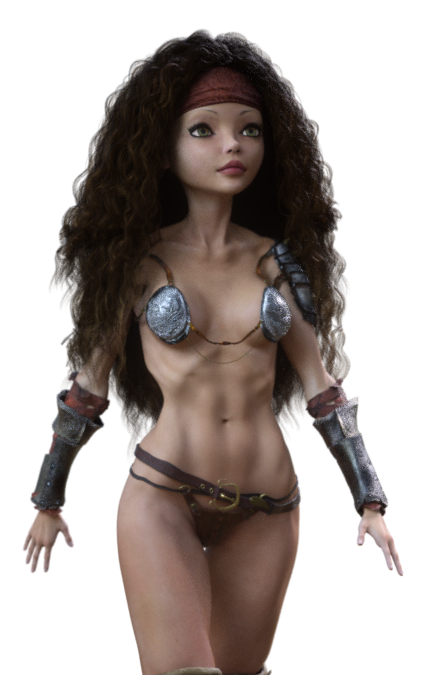 I'm not sure if she was the first, but Victoria 4 Elite - Reby Sky (anyone remember "Who is Reby Sky?" for months before seeing what she looked like in an image?) definitely used 3D scans to get her shape onto V4 via morphs, and high resolution (of the time) photos were taken of her entire face, head and body to produce the textures.
The DVD for the (no longer available?) Premium Bundle is really quite a cool thing to see! The texture maps collection of Reby Sky is why I use it for Rosie 5.5 (Genesis 1 figure using V4 and Genesis 2 Female shapes)
I think she was one of the only V4 Elites to come with Subsurface Scattering maps. I could be wrong. I know Mec4D's Homo-Erectus generation 4 characters (now Daz Originals) also have SSS maps, but not sure of any others. I'd have to dig.
Read more about how Rosie 5.5 was designed and built, along with our future endeavors with her on my website - Rosie 5.5, a subpage of our Bridging Technology page.
Retopology in Carrara?I'm not positive, but I think that Daz 3D might begin with 3D Scans, like the ones that Magaremoto uses (see some of his renders in Carara Community Art Gallery) except that I think they do their own, and then retopologize the result into the amazingly sexy topology that their incredibly morphable, shapable figures turn out to be.
Whatever era of figure they produce, they've always been using some of the latest 3D articulate figure technology of their time when building them.
Genesis 1 introduced their first SubD cage - with exception being the SubDragon. This Cage tech takes retopology to a whole new level, allowing the SubD levels to use specific data rather than just a SubD-smoothed result. The Cage keeps everything consistent across the family of shapes, but the individual data folder can contain specific data that the SubD levels add to the cage - at least I think that's how that works.
So to me, Genesis = Genius.
I was just getting into Poser around the time when Victoria 2 was quite popular, though I didn't know about her yet. Once I found her and Michael, Vicky 3 was just about to be released - and she was the best thing anywhere - short of a personally made custom figure with the costume built onto the mesh.
I'm fairly certain that these earlier Millennium People were modeled by hand beginning with a cube, like everything else. Dan and Chris were just really good at making humans since they did the 'visible human' musculature and skeletal charts we see in Doctors offices - they know the human body inside and out.
I know... Daz fanboy here. But for good reason.
What can we do to improve the long load times of characters?grimulkan_9cfbd329bc said:
Interesting. My G8F morphs aren't that much bigger (19GB), but it still takes 5+ minutes to load. Maybe I should dig into it more and find out if there are specific offending morphs. The log file never told me where the time was being spent.
DAZStudio was taking between 2 and 3 minutes with my DAZ content to merge the "Base G8 Female" actor into an empty scene (i.e. start DAZStudio then just "merge..." the character). I separated my DAZ content into 38 installation directories based on figure, props vs wardrobe vs pose etc and, by excluding those directories from the "current" CMS settings, managed to establish that pretty much all that time comes from the characters I have bought. Even with the various morph packages included the basic G8F loads in 10-15 seconds; about 12 times faster.
At present I've taken the 38 separate directories and come up with a base set that supports the scenes I have. It turns out that I've bought quite a lot of stuff I don't use... The basic insert is now down to 3-4 seconds. I just need to go through the scenes I have moving characters from my various "Figures" folders to the "Figures in use" folders and catching any of the morph packages I actually use (I know the principle ones and those are already loaded by default.)
It's quite a bit of work; I had to start by de-installing all of my DAZ content and it took me several days to a week to sort through it and install it by what are sort-of DAZ categories... However the benefits of loading a DAZ actor in a few seconds rather than a few minutes seem really worthwhile.
The way DAZ could fix this is by not having those morph dials; maybe someone out there wants 50% Victoria and 50% Edie, but surely it isn't worth slowing every load down by a factor of 10 or more to accomodate mix'n'match of character shapes. Maybe better to put that in a multi-morph loader tool.
Michael 8.1Hi, I think I could need a little help from you.
I have problems with the Michael and Victoria 8. 1 characters. I can load them, I can pose them, but I can't add any expressions on their faces.
Normaly they should work with the new FACS system, but ... nothing. I have bought some expressions from the 8.1 bundles to test them, but none of the expressions work.
When I load Genesis 8 I had all the morphs for any part of the body, but there are no other morphs available when I work with Genesis 8.1.
Where the morphs for the face should be I have only the nice hint.
Maybe I have forget to install something (I have installed both manual, but after the problems, I have also installed Michael 8.1. again via the Install Manager).
Has anyone an Idea, what I can do, to add some expressions to them? Thanks for any help in advance!!!Looking for this modelfred9803 said:
To me she looks like the blur of a thousand 3D models from Victoria 4 2006 to G8F8.1 2021. Bland, totally without character and typiclaly generic, and as about as appealing as a sausage sandwich from the local hardware store.
:-) It's always interesting to see how characters appeal differently to persons. She is totally my style - whatever this now tells you about me. ;-)
Looking for this modelVanilla Victoria, yep, pretty generical.
looks like 65% dialed Kherrington face morph with another skin, your avatar is more interesting, btw.
Looking for this modelTo me she looks like the blur of a thousand 3D models from Victoria 4 2006 to G8F8.1 2021. Bland, totally without character and typiclaly generic, and as about as appealing as a sausage sandwich from the local hardware store.
Do You Have Suggestions for Changes to the Galleries?tsroemi said:
If you want to know if postwork was used, could you not just ask, maybe?
Only beginners would ask if an image is being postworked, Only the ones with a ton of years in this hobby is very simple what render have postwork or not. If somebody can't see the difference and being more than 4 years in this area then they have a problem, a really and serious problem.
and doesn't harm if one image have or not postwork, is the same question when somebody asks "Oh can you share your light setup?", is the same, the technique used, nobody renders with the infamous HDR included in the free content of DS neither your default Victoria texture with green eyes.
for me, Art is any image with or without postwork, period.
Carrara 8.5 how to manually manage Daz Contentbrother grim said:
Here's what I've done so far. I created a place for my content C:\ Runtimes\V4, then I downloaded and unzipped the Victoria 4.2 base there, next I opened Carrara and went to the File/Folder icon on the browser tab but the option to add a runtime is greyed out. Obviously I'm doing something wrong.
Not "wrong", you just didn't get there yet ;)
For this to work, you simply have to have a scene open - even if it's empty. Just go to File > New and start any ol' scene, and your options will appear for you!
Carrara 8.5 how to manually manage Daz ContentHere's what I've done so far. I created a place for my content C:\ Runtimes\V4, then I downloaded and unzipped the Victoria 4.2 base there, next I opened Carrara and went to the File/Folder icon on the browser tab but the option to add a runtime is greyed out. Obviously I'm doing something wrong.
Nevermind I forgot to select the content tab first. She's loaded and everything is working. I'm sure more questions will follow later when I and more items.
!! Store Issues - Known Problems - Please Read !!Ati said:
I bought the Puppy Love Bundle this morning; I have the confirmation email. The bundle is now showing up in the store as unowned, and I don't have the bundle in my product library.
Happens quite often lately. I have same issues with https://www.daz3d.com/jordan-bundle-for-genesis-8-females. I also had issues with https://www.daz3d.com/victoria-8-1-university-bundle ;
For the second one, I have opened a ticket and it did take quite some time to fix. For the fisrt one I haven't bothered (yet). Seems like there is something not working as it should in the background.
Genesis 8.1 PBRSkin settingslindans said:
Just playing with the PBRSkin settings for Genesis 8.1 I have selected the skin etc.in the surface tab and typed enable but not sure which ones to turn off and on at the moment my skin just whites out. oops just realised that was the translucency tab, but any other hints would be greatfully recieved LOL!
white skin?, just turn off the Make Up button, that is the cause with white skin figures.
Hint: using PBR skin on simple G8.0 textures is doable but you must know that some channels have missing textures: Detail Map, Ambient Occlusion Map, Depth Map, yes, they can faked using SSS maps and Normal maps but the results will be very different when compared to Victoria 8.1 HD skin, requires a lot of patience and some knowledge and the result is not 100% accurate.
on the other hand there is some online services that creates this maps, bad for me I forgot the links, but still Photoshop is your friend.
Michael 8.1Thank you Daz for providing textures and compatibility with Michael 8.1 and Victoria 8.1 with both male and female anatomy. I hope official Genesis 8.1 figures will continue to have support for different kinds of characters like this.
Convert/upgrade genesis 8 characters to 8.1?Leana said:
Choronzon said:
And... it didn't work for me. I dont have the lastest update as that sounds like an immense head ache for now... just was gonna wait til the bugs were worked out.
Anyway I saved the Victoria 8 figure as a shape and then loaded 8.1 and applied the shape and... nothing. I will keep poking to see what I missed.
You need 4.15 if you want G8.1 to be able to use G8 morphs automatically. In earlier versions of DS G8.1 won't load G8 morphs when you load the figure, so applying a preset wouldn't work.
I noticed the face morphs were not working... Torn between returning 8.1 and upgrading. Last time I upgraded it took me two or three months to get back to being able to work. I still dont use their downloader because of that episode.
Daz 3D is part of

Connect
DAZ Productions, Inc.
7533 S Center View Ct #4664
West Jordan, UT 84084Licensing Agreement | Terms of Service | Privacy Policy | EULA
© 2026 Daz Productions Inc. All Rights Reserved.