-
Daz 3D Introduces dForce Physics Engine
Well hopefully they will update how their characters work and they'll come with multiple weight maps that adjust in values & volume distributions, eg change the percentage of lean body mass vs fat in the body for the different areas, with 'morph dials' but that's pretty major work. That's something that is sort of like PBR materials for realistic rendering. They'll be known values that can be collected and integrated into the 3D models for everybody in advance of purchasing the character models. Maybe in Genesis 9. I did a DexaScan in November that showed such fat, lean muscle mass information and it was pretty neat. It would be nice if DAZ models had morph dials where you could dial that sort of information in and it would adjust the appropriate shape morphs and weigh maps and surfaces maps.
Well you can already (with the weight influence maps) paint in how squishy an area is. For instance on the full body map I did I made the breasts and lower glutes full red, while the rest of the body was full blue or very light purple. Farther adjustments can be made with the dynamic strength and other settings under the Surfaces tab. With a larger character you could paint full red to the belly area and any other more squishy parts and adjust the dynamic strength under Surfaces. :) I know it's not perfect, but for now it's not too shabby at all! heheh
I haven't tried doing anything with weight maps other than the Influence Weights, but the New dForce Weight Node adds weight maps for things like friction stiffness, etc. Don't have the beast on, but I think I have an image showing all the maps. I'll attach it here as soon as I find it. Anyway, learning how to use these other maps will really open up dForce.
Okay, it was in my private gallery, so I'll embed it instead:

Yeah, one of these days I'm going to need to experiment with all the different maps and see what all they do. I totally agree - it will really open dForce up a lot more once we get more of a handle on it! :D Daz has done a really cool job with the creation of this new tool. It's quite powerful and I have a feeling we are barely scratching the surface with all that it will eventually be proven to be able to do! :D
If they stopped development right now, that would still be true, (imo, of course.) But Daz is continuing to develop dForce. Daz Studio Build number 4.10.0.119 in the Change Log shows: "Update to dForce 1.0.0.25" the change log is currently up to 4.10.0.121.
Can you imagine what dForce will do when dForce hits version 3 or 4. Holy wow. I can hardly wait.
Oh my! I didn't know that! That's great news and quite exciting!
 Daz 3D Introduces dForce Physics Engine
Well hopefully they will update how their characters work and they'll come with multiple weight maps that adjust in values & volume distributions, eg change the percentage of lean body mass vs fat in the body for the different areas, with 'morph dials' but that's pretty major work. That's something that is sort of like PBR materials for realistic rendering. They'll be known values that can be collected and integrated into the 3D models for everybody in advance of purchasing the character models. Maybe in Genesis 9. I did a DexaScan in November that showed such fat, lean muscle mass information and it was pretty neat. It would be nice if DAZ models had morph dials where you could dial that sort of information in and it would adjust the appropriate shape morphs and weigh maps and surfaces maps.
Well you can already (with the weight influence maps) paint in how squishy an area is. For instance on the full body map I did I made the breasts and lower glutes full red, while the rest of the body was full blue or very light purple. Farther adjustments can be made with the dynamic strength and other settings under the Surfaces tab. With a larger character you could paint full red to the belly area and any other more squishy parts and adjust the dynamic strength under Surfaces. :) I know it's not perfect, but for now it's not too shabby at all! heheh
I haven't tried doing anything with weight maps other than the Influence Weights, but the New dForce Weight Node adds weight maps for things like friction stiffness, etc. Don't have the beast on, but I think I have an image showing all the maps. I'll attach it here as soon as I find it. Anyway, learning how to use these other maps will really open up dForce.
Okay, it was in my private gallery, so I'll embed it instead:
Yeah, one of these days I'm going to need to experiment with all the different maps and see what all they do. I totally agree - it will really open dForce up a lot more once we get more of a handle on it! :D Daz has done a really cool job with the creation of this new tool. It's quite powerful and I have a feeling we are barely scratching the surface with all that it will eventually be proven to be able to do! :D
If they stopped development right now, that would still be true, (imo, of course.) But Daz is continuing to develop dForce. Daz Studio Build number 4.10.0.119 in the Change Log shows: "Update to dForce 1.0.0.25" the change log is currently up to 4.10.0.121.
Can you imagine what dForce will do when dForce hits version 3 or 4. Holy wow. I can hardly wait.
Daz 3D Introduces dForce Physics EngineWell hopefully they will update how their characters work and they'll come with multiple weight maps that adjust in values & volume distributions, eg change the percentage of lean body mass vs fat in the body for the different areas, with 'morph dials' but that's pretty major work. That's something that is sort of like PBR materials for realistic rendering. They'll be known values that can be collected and integrated into the 3D models for everybody in advance of purchasing the character models. Maybe in Genesis 9. I did a DexaScan in November that showed such fat, lean muscle mass information and it was pretty neat. It would be nice if DAZ models had morph dials where you could dial that sort of information in and it would adjust the appropriate shape morphs and weigh maps and surfaces maps.
Well you can already (with the weight influence maps) paint in how squishy an area is. For instance on the full body map I did I made the breasts and lower glutes full red, while the rest of the body was full blue or very light purple. Farther adjustments can be made with the dynamic strength and other settings under the Surfaces tab. With a larger character you could paint full red to the belly area and any other more squishy parts and adjust the dynamic strength under Surfaces. :) I know it's not perfect, but for now it's not too shabby at all! heheh
I haven't tried doing anything with weight maps other than the Influence Weights, but the New dForce Weight Node adds weight maps for things like friction stiffness, etc. Don't have the beast on, but I think I have an image showing all the maps. I'll attach it here as soon as I find it. Anyway, learning how to use these other maps will really open up dForce.
Okay, it was in my private gallery, so I'll embed it instead:
Yeah, one of these days I'm going to need to experiment with all the different maps and see what all they do. I totally agree - it will really open dForce up a lot more once we get more of a handle on it! :D Daz has done a really cool job with the creation of this new tool. It's quite powerful and I have a feeling we are barely scratching the surface with all that it will eventually be proven to be able to do! :D
Daz 3D Introduces dForce Physics EngineWell hopefully they will update how their characters work and they'll come with multiple weight maps that adjust in values & volume distributions, eg change the percentage of lean body mass vs fat in the body for the different areas, with 'morph dials' but that's pretty major work. That's something that is sort of like PBR materials for realistic rendering. They'll be known values that can be collected and integrated into the 3D models for everybody in advance of purchasing the character models. Maybe in Genesis 9. I did a DexaScan in November that showed such fat, lean muscle mass information and it was pretty neat. It would be nice if DAZ models had morph dials where you could dial that sort of information in and it would adjust the appropriate shape morphs and weigh maps and surfaces maps.
Well you can already (with the weight influence maps) paint in how squishy an area is. For instance on the full body map I did I made the breasts and lower glutes full red, while the rest of the body was full blue or very light purple. Farther adjustments can be made with the dynamic strength and other settings under the Surfaces tab. With a larger character you could paint full red to the belly area and any other more squishy parts and adjust the dynamic strength under Surfaces. :) I know it's not perfect, but for now it's not too shabby at all! heheh
I haven't tried doing anything with weight maps other than the Influence Weights, but the New dForce Weight Node adds weight maps for things like friction stiffness, etc. Don't have the beast on, but I think I have an image showing all the maps. I'll attach it here as soon as I find it. Anyway, learning how to use these other maps will really open up dForce.
Okay, it was in my private gallery, so I'll embed it instead:
Daz 3D Introduces dForce Physics EngineWell hopefully they will update how their characters work and they'll come with multiple weight maps that adjust in values & volume distributions, eg change the percentage of lean body mass vs fat in the body for the different areas, with 'morph dials' but that's pretty major work. That's something that is sort of like PBR materials for realistic rendering. They'll be known values that can be collected and integrated into the 3D models for everybody in advance of purchasing the character models. Maybe in Genesis 9. I did a DexaScan in November that showed such fat, lean muscle mass information and it was pretty neat. It would be nice if DAZ models had morph dials where you could dial that sort of information in and it would adjust the appropriate shape morphs and weigh maps and surfaces maps.
Well you can already (with the weight influence maps) paint in how squishy an area is. For instance on the full body map I did I made the breasts and lower glutes full red, while the rest of the body was full blue or very light purple. Farther adjustments can be made with the dynamic strength and other settings under the Surfaces tab. With a larger character you could paint full red to the belly area and any other more squishy parts and adjust the dynamic strength under Surfaces. :) I know it's not perfect, but for now it's not too shabby at all! heheh
Daz 3D Introduces dForce Physics EngineWell hopefully they will update how their characters work and they'll come with multiple weight maps that adjust in values & volume distributions, eg change the percentage of lean body mass vs fat in the body for the different areas, with 'morph dials' but that's pretty major work. That's something that is sort of like PBR materials for realistic rendering. They'll be known values that can be collected and integrated into the 3D models for everybody in advance of purchasing the character models. Maybe in Genesis 9. I did a DexaScan in November that showed such fat, lean muscle mass information and it was pretty neat. It would be nice if DAZ models had morph dials where you could dial that sort of information in and it would adjust the appropriate shape morphs and weigh maps and surfaces maps.
Matching collar to catthe trouble with converting the milcat to weightmapping and using the transfer utility is it will take on any morphs and distort,
it is not a conforming clothing
propping it still the best option but smart propping will help
parent it to the cat's neck and save as support asset with parenting checked and follower assessory neck
3D Art Freebie Challenge-November 2017-Winners Announced-Remembering the Fallen -Entries Thread OnlyDAZ 3D Art Freebie Challenge November 2017
"Remembering the Fallen""Those of Us Left"
Free stuff
Genesis 8 model,
SubDragonLE - came with 4.10
Dragon poses - Anton's dragon poses - http://www.fantasy3d.com/pfiles/dl.cgi?dir=characters&char=Other Characters:Dragon
Spear - https://www.daz3d.com/the-malaik-lance
Sword - http://www.sharecg.com/v/69647/browse/11/Poser/Sword-pack-ver-2
Fir Trees - http://www.morphography.uk.vu/dlheidi.htmlOutfit
Bardot Skirt (used with chain texture, though you can't really see it in this render) - from Dforce starter essentials
Little Black Dress - https://www.most-digital-creations.com/little_black_dress_g8.htm
Boots and Top - Ghastly's - http://www.sharecg.com/v/71947/view/21/DAZ-Studio/Ghastlys-Skimptastic-Battle-Outfit-Genesis-1?interstitial_displayed=Yes
Cape - Dark Storm Arm Armor - from Genesis 3 Female Starter essentials
Leopard prints - https://danielak.deviantart.com/art/Reptile-Skins-and-Animal-Fur-146421123
Most fabrics - Iray leather shader, colored, modified for fursPaid stuff
Terradome 3, using snow texture.
HSTW Body Morph Kit,
HSTW Head Morph Kit.
Victoria 5 Elite Ponytail.3D Art Freebie Challenge-November 2017-Remembering the Fallen -Main Thread OnlyHey... re-posting as the first time it's not showing from my end.
DAZ 3D Art Freebie Challenge November 2017
"Remembering the Fallen""Those of Us Left"
Free stuff
Genesis 8 model,
SubDragonLE - came with 4.10
Dragon poses - Anton's dragon poses - http://www.fantasy3d.com/pfiles/dl.cgi?dir=characters&char=Other Characters:Dragon
Spear - https://www.daz3d.com/the-malaik-lance
Sword - http://www.sharecg.com/v/69647/browse/11/Poser/Sword-pack-ver-2
Fir Trees - http://www.morphography.uk.vu/dlheidi.htmlOutfit
Bardot Skirt (used with chain texture, though you can't really see it in this render) - from Dforce starter essentials
Little Black Dress - https://www.most-digital-creations.com/little_black_dress_g8.htm
Boots and Top - Ghastly's - http://www.sharecg.com/v/71947/view/21/DAZ-Studio/Ghastlys-Skimptastic-Battle-Outfit-Genesis-1?interstitial_displayed=Yes
Cape - Dark Storm Arm Armor - from Genesis 3 Female Starter essentials
Leopard prints - https://danielak.deviantart.com/art/Reptile-Skins-and-Animal-Fur-146421123
Most fabrics - Iray leather shader, colored, modified for fursPaid stuff
Terradome 3, using snow texture.
HSTW Body Morph Kit,
HSTW Head Morph Kit.
Victoria 5 Elite Ponytail.I will give you a bit of time to put this into the entries only thread all links check out
Sweet! Done. The post is just waiting approval to show up. Thanks!
Philemo ☼ Alembic importer still possible?is a sort of obj with animated morph series
Fitting clothing onto Lorenzo/Loretta LoRezSave it as Morph Asset. It will not affect the shape of any figure unless you have the default strength set to something other than 0, which you should not.
Type needs to be "Modifier/Clone". Group should be "Hidden/Clone".
Fitting clothing onto Lorenzo/Loretta LoRezOk so it goes like this?
1. Import Genesis1 zeroed shape and Lorenzo default
2. Scale squash deform Lorenzo as close as possible to the Genesis shape
3. Export Lorenzo as an obj.
4. Import Lorenzo as a morph using morph loader
5. Set the morph type to modifier/clone in the parameters pane
How do I get the clone to appear in the autofit clone list? Save the morph as ...what? And will this alter the shape of all Lorenzo figures I already created for various projects?
Fitting clothing onto Lorenzo/Loretta LoRezRight, thanks! I'm off to search for the "how to make a clone" thread. I did convert one of the male figures to weight mapping, then on a pair of pants did the scaling/posing thing added smoothing modifier export as obj. import and used the transfer utility but the mesh got distorted and did not fit well so yeah looks like I need that clone.
Fitting clothing onto Lorenzo/Loretta LoRezLooks like those are cr2s, so you'd have to convert them to weight mapped, save them to the library, and then make clones for whatever figures you wanted to borrow clothing from OR scale the clothes to fit by hand and modeling app then transfer the rig.Anime style adult characterWill it's a freebie but there is this anime female head morph for G8F.
https://www.sharecg.com/v/88934/gallery/21/DAZ-Studio/Anime-Head-for-Genesis-8-Female
They also have made one for G3F. Sorry but no G8M or G3M that they've made.
I made one because she looked lonely. http://fav.me/dbvdjwo
That's quite nice and a bit of masculinity/boyishness that the female anime freebie doesn't have. Thanks for that.
Thanks. :)
Philemo ☼ Alembic importer still possible?I just bought a pile of DAZ PA HD men today and while I can static obj import them into Carrara in full HD morph glory or for that matter abc export them to Octane standalone animated and also export a Carrara scene it would be lovely to abc import them into Carrara as vertex animations too.
So was wondering if you were still considering creating an Alembic plugin after having bought OR4C?
3D Art Freebie Challenge-November 2017-Remembering the Fallen -Main Thread OnlyHey... re-posting as the first time it's not showing from my end.
DAZ 3D Art Freebie Challenge November 2017
"Remembering the Fallen""Those of Us Left"
Free stuff
Genesis 8 model,
SubDragonLE - came with 4.10
Dragon poses - Anton's dragon poses - http://www.fantasy3d.com/pfiles/dl.cgi?dir=characters&char=Other Characters:Dragon
Spear - https://www.daz3d.com/the-malaik-lance
Sword - http://www.sharecg.com/v/69647/browse/11/Poser/Sword-pack-ver-2
Fir Trees - http://www.morphography.uk.vu/dlheidi.htmlOutfit
Bardot Skirt (used with chain texture, though you can't really see it in this render) - from Dforce starter essentials
Little Black Dress - https://www.most-digital-creations.com/little_black_dress_g8.htm
Boots and Top - Ghastly's - http://www.sharecg.com/v/71947/view/21/DAZ-Studio/Ghastlys-Skimptastic-Battle-Outfit-Genesis-1?interstitial_displayed=Yes
Cape - Dark Storm Arm Armor - from Genesis 3 Female Starter essentials
Leopard prints - https://danielak.deviantart.com/art/Reptile-Skins-and-Animal-Fur-146421123
Most fabrics - Iray leather shader, colored, modified for fursPaid stuff
Terradome 3, using snow texture.
HSTW Body Morph Kit,
HSTW Head Morph Kit.
Victoria 5 Elite Ponytail.I will give you a bit of time to put this into the entries only thread all links check out
Daz 3D Introduces dForce Physics EngineBTW, I love the ability to weightmap the dForce influence - such a powerful feature! In case anybody's interested, here's a quick tutorial on using dFroce to address cleavage issues on custom morph fits, etc:
https://www.daz3d.com/forums/discussion/205426/yoda-says-use-dforce-to-fight-static-cling
- Greg
mcjTeleBlender:Daz Studio scenes/animations w/Blender's Cycles EngineI just wanted to add my personal THANK YOU
to Mcasual!!As an animator your scripts have made animation in Daz studio
nearly as powerful as my other pro packagesYour decimate script makes imported mocap clean up a breeze
the way it culls down the frame count to something managable for GraphMate
and the "freeze things " script is awesome for removing unwanted animation
from props that have been moved during to timelineBut I think your greatest hidden gem may be your
Cycler script for auto repeating of movement & morph changes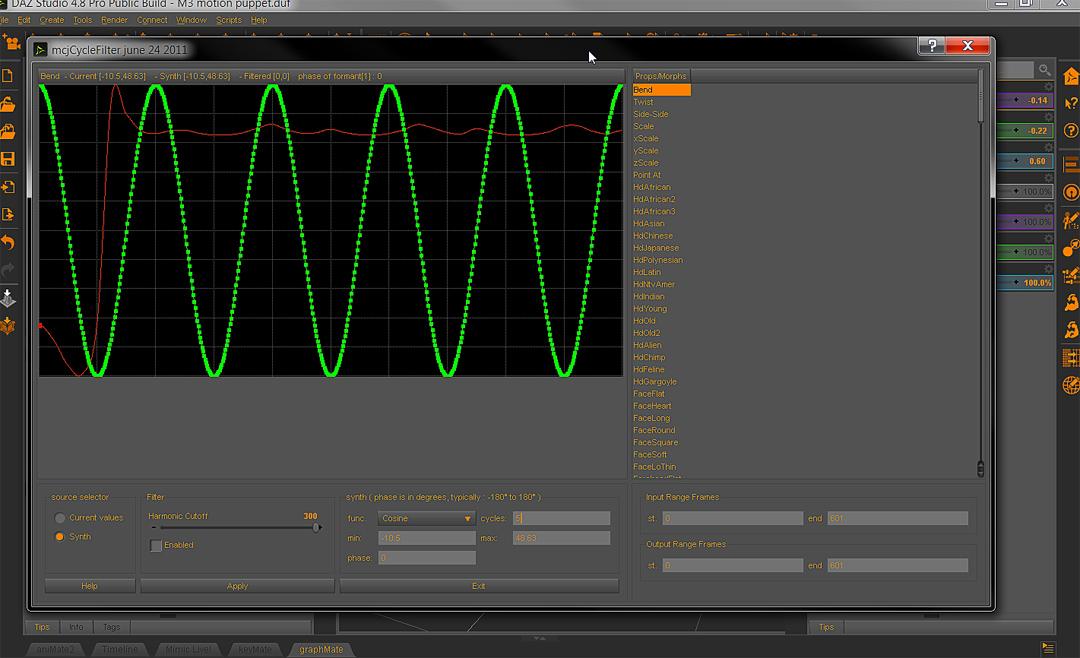
I strongly reccommend animators download & try the cycler script
it is how I got this space ship bridge crewman,in the linked video below, to quake with fear without
any manual keyframing. Welcome to Daz, Mousso!
cool, thanks!
Is the new Delilah character: https://www.daz3d.com/delilah-for-genesis-3-and-8-female a brand new one, or was it previously for sale at rendo? Curious if someone has it already, and what they think of it?
Yes, Delilah was on Rendo but I reworked the Genesis 3 morph and added Genesis 8 too. Remade the textures too (especially the brows and lips) and shaders :)
Daz 3D is part of

Connect
DAZ Productions, Inc.
7533 S Center View Ct #4664
West Jordan, UT 84084Licensing Agreement | Terms of Service | Privacy Policy | EULA
© 2026 Daz Productions Inc. All Rights Reserved.