-
Daz to Maya question
Daz Mike 2 is not an "HD mesh"
How many vertices does Michael 2 have? Compare that to Genesis 3. That's what I meant by "HD". So if I import a vestigial figure with ripped abs, it will look like an HD morph compared to anything I can get from G3. That was my point.However in the context of a discussion about JCM& FBX imports from Daz
studio to Maya,Certainly V4 does not solve anyone's problems as none of the many magnets
and other kludges to fix her joints in DS/poser will transfer via FBX either.It seems you are in the wrong discussion. That is exactly what I was saying in my original post. It is a pity that I can't make her move in Maya like in DAZ without a lot of work. Bottom line, I'd rather be working in DAZ, but it's currently too painful. I was hanging around because I hoped this update might fix enough things to push me into the Daz club, but dynamic clothing isn't nearly enough. I will try to do a few scenes in DS because muscularity morphs are a time and money saver. But otherwise, my rant was just a goodbye cry to Daz Studio.
Daz to Maya questionSo there's no way to animate in Maya and import the animation to Daz Studio?
Yes Maya can Export motion to a BVH file and DS 4.10.x now support proper BVHimport
for G3/G8."Thank you, you just made my point. You have to use a "vestigal"
character to do that because they are already "HD".
Try doing that with a
Genesis figure. You can't. Base sub-d can't produce HD details."I think you might be confusing muscle morphs with "HD morphs"
Daz Mike 2 is not an "HD mesh"
here he is without his muscle morphs dialed in but merely subdivided
to smooth out his horrible faceting that would show in a close up render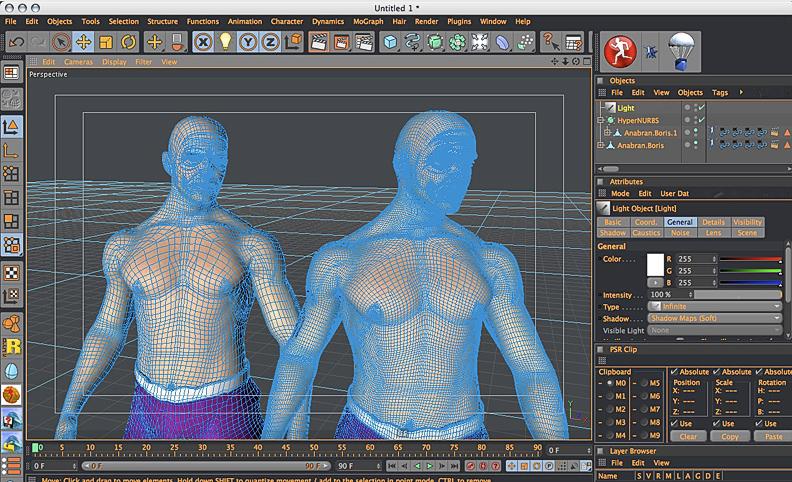
"I have eyes and I've seen V4.2 figures that look better most G3 or G8.
Once more, they are more detailed. There is no need for HD morphs,
they are already HD.When I import them into Maya, I have no need to
subdivide"Not going to debate personal choices of figure generations mate,
I certainly have my preferences.
However in the context of a discussion about JCM& FBX imports from Daz
studio to Maya,Certainly V4 does not solve anyone's problems as none of the many magnets
and other kludges to fix her joints in DS/poser will transfer via FBX either.How to Use dForce: Creating a Blanket, Draping Clothes on Furniture, and Much More [Commercial]Can Simulations be continued? I had an idea, that was harder to do then I thought, basicly i turned a plane into a scarf/towel.
at first I tried using wind, that didn't work, it tried to push it through the neck then it exploded. then i thought, well maybe i lay down and have gravity do it, that doesnt work because you cant continue (that i know of) a simulation.
what I ended up doing was having it slide down another plane. came out nice, but it would be nice to either continue a simulation, or save as a morph and resimulate.

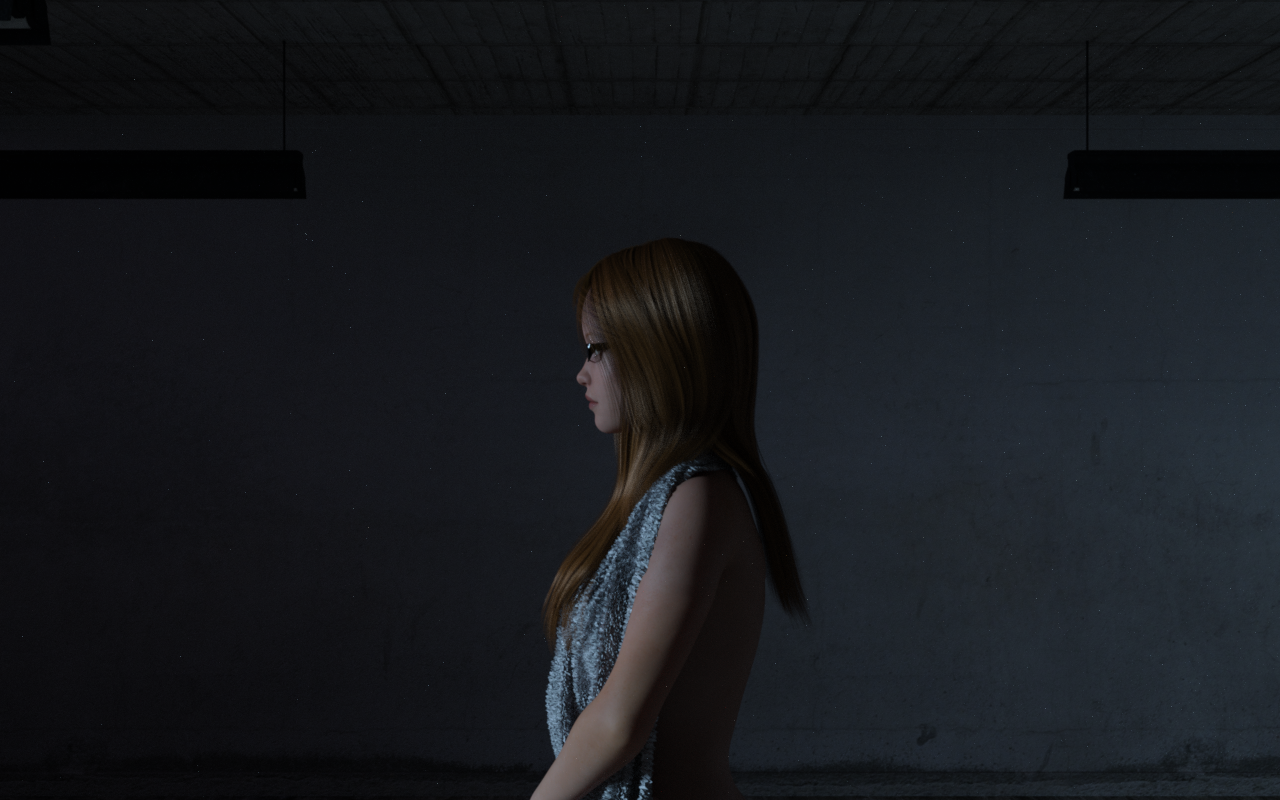
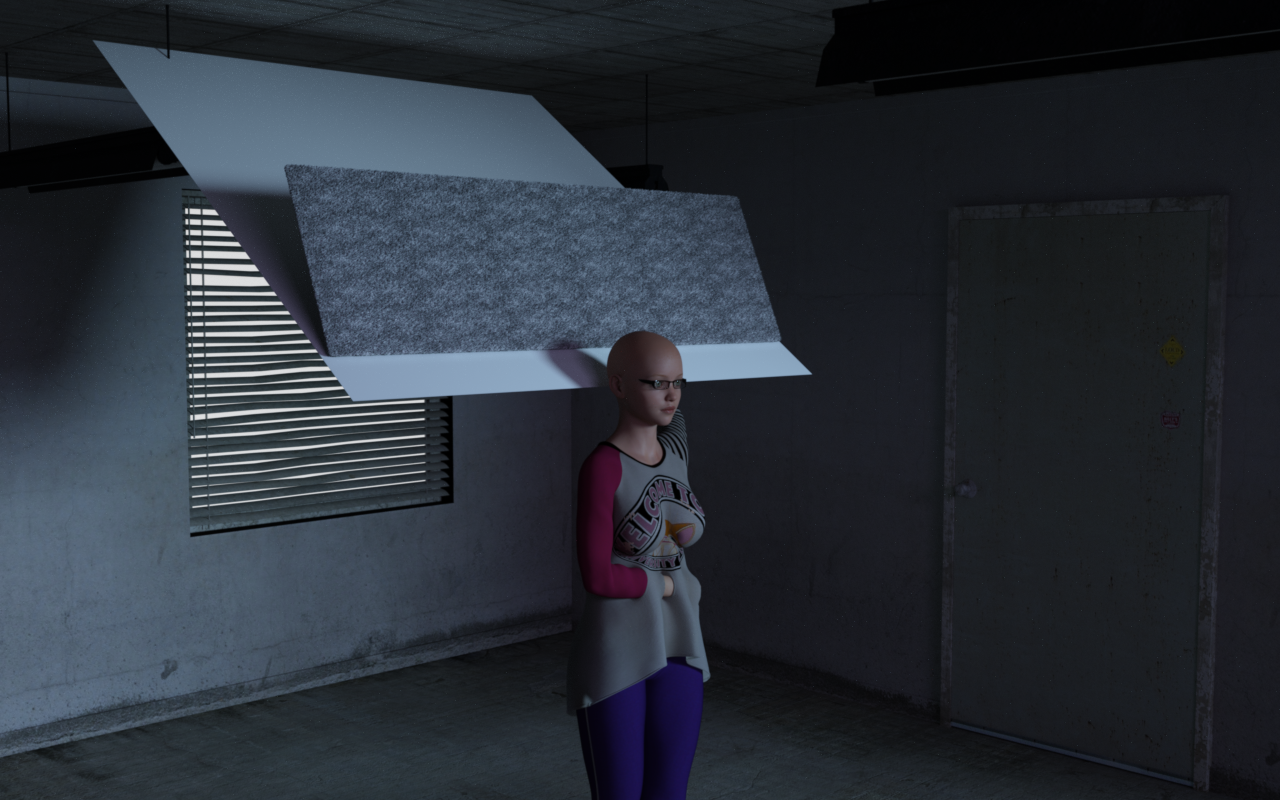
No, starting a simulation clears the existing simulation (if you want to preserve a simulation you can set the surface/object Visible to Simulation to Off, but then it won't interact with any new simulation).
Or use Freeze Simulation, which had slipped my memory. That will allow the object to be used in effect as a static object whichj can interact with the items that are draping live.
Transferred Morphs from V4 Don't WorkVictoria 4 doesn't use weight mapping, it uses the old parametric rigging system (angles and speheres, the position of a vertex relative to which determines its weighting). I would not expect the transfer utility to work at all, I suppose it may be baking the weights from the parametric rigging and projecting those into the clothing. In any even, try right-clicking and select transfer Active Morphs to get the morphs across.
dForce exploding content - possible work around?It kind of seems as if you are having problems because you are trying to run a physics simulation based upon a physically impossible start condition. The good news is that you can probably fix the situation pretty easily. Simply apply a smoothing modifier to the chair, and smooth it against your figure so that there is no collision. Bake in the smoothing morph and (optionally) raise your figure by some trivial amount (0.05 should be fine) so that there is some additional separation. Now simulate from stored pose, and your cloth will end up nicely sandwiched between the figure and the chair.
I tested this out with a cube for a chair and a plane for a piece of cloth, and it worked just fine. (The biggest problem was setting it up so that the "memorized pose" wasn't embedded in the chair. I worked around this by setting up a simple animation which started the figure above the "chair" and lowered it into position.)
(Note that in the attachment, only the plane was simulated. I also smoothed the plane against the cube after running the simulation because the simulation wasn't quite smooth enough and created it's own intersection between the two surface. Still, the end result was something that's pretty physically accurate and doesn't blow up and, as a bonus, actually illustrates the effect of the figure sinking into the couch.)
DaztoMaya Plug-in technical issueIt looks like it follows the rules set out in the "Edit Morph Export Rules" tab of the standard Daz FBX exporter so might be worth looking at that to see if they are set to be exported.
The developers told me that the script does use the settings in Daz’s fbx export menu, and the issues I was having with morphs not transferring was caused by that.
So far I’ve only been able to get the facial morphs to transfer by adding “head” to the export rules. I’m not able to get body morphs to export even if I try adding other parts to the export list list.
Maybe someone knows a trick that I’m missing?
How to Use dForce: Creating a Blanket, Draping Clothes on Furniture, and Much More [Commercial]Can Simulations be continued? I had an idea, that was harder to do then I thought, basicly i turned a plane into a scarf/towel.
at first I tried using wind, that didn't work, it tried to push it through the neck then it exploded. then i thought, well maybe i lay down and have gravity do it, that doesnt work because you cant continue (that i know of) a simulation.
what I ended up doing was having it slide down another plane. came out nice, but it would be nice to either continue a simulation, or save as a morph and resimulate.
No, starting a simulation clears the existing simulation (if you want to preserve a simulation you can set the surface/object Visible to Simulation to Off, but then it won't interact with any new simulation).
Missing morphs?Actually, they should be accessible through either the Shaping or Parameters tabs, with the figure selected in the viewport.
Since you are coming from Poser, you should understand that all the Genesis series figures (Genesis, Genesis 2, Genesis 3 and Genesis 8) do not use the morph injection process that is so familiar to Poser users. Instead, when "installed", morph packages are automatically applied to the figure when one is loaded - they should simply appear in either the Parameters tab or Shaping tab when a figure is loaded and selected. If multiple morph packages are used, it can sometimes be difficult to differentiate between the morphs associated with different packages, since there is not necessarily any categorization like that. If the G8F face and body morphs have been placed properly in your content library, you should see more than twenty breast morphs showing up, or, similarly, more than 20 nose morphs showing up for the figure. You can do a search by body parts (nose, breasts, etc.) in the parameters tab to show the morphs available. (Alternatively, you can expand the selections under Actor in the left panel of the Parameters tab to narrow your selection - i.e. Actor > Head > Face > Nose) If you are not seeing them, there may be a problem with the installation.
DaztoMaya Plug-in technical issueBeen using it with Win 10 for the last few days with no problems, morphs/blendshapes have been exporting automatically for me. It looks like it follows the rules set out in the "Edit Morph Export Rules" tab of the standard Daz FBX exporter so might be worth looking at that to see if they are set to be exported.
Transferred Morphs from V4 Don't WorkOkay. I've made some freebie clothing items for the Genesis series of clothing, etc. But I've had people asking me to convert them to V4 (don't ask me why; far as I'm concerned, Generation 4 figures became obsolete as soon as the Genesis series of figures hit the scene). But in any case, I've been working on it. I've managed to rig the clothing with the Transfer Utility, even managed to transfer all of the morphs. But whenever I use the morphs on Victoria 4, the clothing doesn't morph with it. Any ideas what I'm doing wrong?
How to Use dForce: Creating a Blanket, Draping Clothes on Furniture, and Much More [Commercial]Can Simulations be continued? I had an idea, that was harder to do then I thought, basicly i turned a plane into a scarf/towel.
at first I tried using wind, that didn't work, it tried to push it through the neck then it exploded. then i thought, well maybe i lay down and have gravity do it, that doesnt work because you cant continue (that i know of) a simulation.
what I ended up doing was having it slide down another plane. came out nice, but it would be nice to either continue a simulation, or save as a morph and resimulate.
Limited functionality for the price on just about everythingAt the time I posted this, I was not familiar with Studio's mesh-editing tools. They were never as intuitive for me as Poser's Direct Manipulation and other tools. With those, I activated and used them without reading the manual or watching a YouTube video, and got the results I was after quickly.
Over a year later and I'm only now getting into the Geometry Editor, and that's only to make new Surfaces for hair to use with dForce.
At the time I posted this, I was trying to pose a figure on the Flight Of The Swan furniture prop. It's a beautiful piece. The top of the seat cushion is 2 polygons. Have you tried to morph that with the Deformer? You know where it flexes? At the center.
I "fixed" it by exporting it as an Object and using Poser's intuitive tools to reverse the normals of the top, then took Poser's high-res square primitive, using the built-in tools to cut it to size, and parented that to the cushion, then imported that to DS to render in Iray. But, as I said, I was not (and still am not very) familiar with Daz' built-in editing tools.
Now we've got dForce and it shows promise for clothing. I was hoping for a full-on Marvelous Designer bridge, which had been rumored, but so much for rumors. At leas MD has a Daz Studio scaling preset, which is better than nothing. They're also getting a lot of suggestions on how to make it more functional for Daz' imported figures as avatars.
I don't expect a free program to have the animation capabilities of Maya or Max or C4D or iClone or even Poser. It'd be nice, but I can kinda understand it (and I say "kinda" since the real money is in the content).
However, in the year since I posted this, I'm seeing game engines gain ground, with concepts like PBR-based character generation. Of course the professional-quality promo images are a lot like those idealistic hamburgers you see on billboards. While I've not dabbled into game engines (loaded a sample scene for UDK I think - or one of them) and saw no built-in option to bring in an external figure asset and rig it for use. I'm not a programmer. I could do a few simple things in DOS back in 1982, but that was when Windows v1 was a topic of discussion and floppy disks were floppy and the only CDs were Certificates of Deposit, and a hard drive was a cross-country trip with the family in bad weather. Bill Gates and Steve Jobs were only millionaires, not multi-millionaires.
While I'm not actively tracking the development of any sort of add-ons for game engines like the Unreal DevKit or Unity which would turn them into competition for Poser or Daz Studio, I can't imagine it will be too much longer. All it takes is someone who isn't focused on making a video game, but rather using it as the engine of a 3D figure posing and animation system. With an open slot for the Nvidia GameWorks and a photorealistic GPU-based renderer, you'd have dynamic hair, cloth, and fluid, and real-time rendering. Yes, it's be back to the "tricks" with light and shadow and bump and displacement maps, but look at the results they're getting now. It's passable for everything except replacing world leaders with 3D puppets.
Official Release of Carrara 8.5 **Update - 8.5.1.19**DAZ studio has a bridge to Bryce and Hexagon. Hexagon is Uber cheap. If you want a super easy way to make morphs for anything or anyone you need Hex 2.5. You just go back and forth, it’s like having a modeler in DAZ Studio. No power morph loader or whatever. You can even modify the texture in Hex. It is just too bas there’s no Carrara bridge.
SY Clothing Breast Helper Genesis 8 FemaleIf you find the SY universal Breast helper in the store you will see a video tutorial which will explain how to use it. I think the G8 version works the same.
Yep, this has a video and it works exactly the same:
https://www.daz3d.com/sy-universal-breast-helpers-genesis-genesis-2-and-genesis-3-female-s
EDIT: the short version is, conform clothes to the figure, then dial the morph from the Actor/Chest section of G8F. They have their own heading in that section.
Thank you so much! :D
Importing from Marvelous DesignI made an outfit for Gen8 female in Marvelous Design. I made it a blue cotton fabric. I exported as an OBJ. I did not do textures because I don't know how yet. I opened DAZ, imported the OBJ and opened Gen8 female. It fits fine. But, it won't move with the model even though I parented it. So, the question is: how do I get this outfit to work with the model. Also, when you import something, where does it go and how do I put it where I want it?
You will need to use the transfer utility to add a simple skeleton rig to the item. Go to Edit->Object->Transfer Utility and select the Genesis 8 Female as Source and the outfit as the target.
how can i get render like these.Okay... here are some threads that might help you:
- https://www.daz3d.com/forums/discussion/110771/natural-iray-lighning-for-rooms#latest
- https://www.daz3d.com/forums/discussion/111251/will-s-tips#latest
- https://www.daz3d.com/forums/discussion/comment/1746086/#Comment_1746086
- https://www.daz3d.com/forums/discussion/113601/how-to-use-depth-of-field#latest
As for characters, a word of advice: Teenage characters come without genital textures. So if you are planning treenage "interaction" (I'll assume that from the hints you have given so far), you will not find the skin sets here at DAZ store that have genital material, unless you use an adult skin. Also, if you need the genitals, you will need to buy a Pro pack for the Generation that you want to render. Only the Adult Pro packs come with Gens, but you can use Michael 6 Pro assets on Brodie 6, minus of course the skin.
As Colin French pointed out, you'll need the morph packs to make the boobs increase beyong what is in the defaul shaping tab, but a quick solution would be to remove the limits at the existing boob morph in the shaping tab slider. There are also nice shaping packages like this PA's https://www.daz3d.com/zev0
Be careful, when you have Genesis 2 (Brodie 6), Genesis 8 controls will not work on him.
Well yeah genesis 2 modle are bit diffrent.
and i m serching for mat of bordie 6 gen mat.
but i can't able to find.
if u can help me with that that will be nice,
Brodie is a teenager, teenagers do not have genital textures.
Daz to Maya questionOf course Daz didn't invent JCM's, thats not the point. As far as I know, DAZ is the only software with automatic application of JCM (funny you neglected to comment on that point). A JCM is just a corrective morph for bad deformations in the joints. In Maya, I have to sculpt my own corrective morphs for each character and each pose. This is a lot of work I'd rather not be doing. DAZ studio has implemented technology that is coupled with their figures to do that automatically. You haven't noticed this? In Maya, if I want flexing muscles, I have to use a muscle simulator (a time consuming process). In DS, I just need to buy some flexor morphs and the effect will probably be good enough. That will never be a Maya feature because it is coupled to a set of supported figures and assets. Maya users generally have no use for such tech as DSON, they develop their own assets.
And each and every one of those JCM morphs is hand sculpted in either zBrush or Maya prior to being imported into DAZ Studio. They do not simply magically spring into existence in the software. Ask any DAZ content creator and they will tell you that making those is the most time consuming part of creating any item for Studio.
Daz to Maya questionOf course Daz didn't invent JCM's, thats not the point. As far as I know, DAZ is the only software with automatic application of JCM (funny you neglected to comment on that point). A JCM is just a corrective morph for bad deformations in the joints. In Maya, I have to sculpt my own corrective morphs for each character and each pose. This is a lot of work I'd rather not be doing. DAZ studio has implemented technology that is coupled with their figures to do that automatically. You haven't noticed this? In Maya, if I want flexing muscles, I have to use a muscle simulator (a time consuming process). In DS, I just need to buy some flexor morphs and the effect will probably be good enough. That will never be a Maya feature because it is coupled to a set of supported figures and assets. Maya users generally have no use for such tech as DSON, they develop their own assets.
So how is V4 "better textured"???
Additionally all of the advanced hand/limb controls
(grasp ,spread etc) are missing from V4 when you load a V4 into studio
thus all of her fingers would have to be animated individually if you needed V4 to grasp an object in studio
so she does not "move fine" enough for my usage in Daz studio
And genesiscan of course be subdivided at will for more resolution and DS native HD morphsIt doesn't matter how, I have eyes and I've seen V4.2 figures that look better most G3 or G8. Once more, they are more detailed. There is no need for HD morphs, they are already HD. When I import them into Maya, I have no need to subdivide. Subdividing a base G3 figure is not going to bring back the HD details lost in the fbx transport. They are gone forever. As far as hand controls, OMG, that solution is just a script away. As long as there are finger joints, the problems can be solved.
Pictured Here is the vestigal Mike 2 rig in C4D at his original resolution on the left...
Thank you, you just made my point. You have to use a "vestigal" character to do that because they are already "HD". Try doing that with a Genesis figure. You can't. Base sub-d can't produce HD details. But that is the least of my concerns. Base resolution is good enough for me. I'm not ok with sculpting all those correctives.
Interactive License?Yes they do in my opinion, see my tests below (Ivan HD and Gen8 custom morph with vascularity), exported as obj to Cinema 4D. However I prefer using fbx (which dosn't export HD morphs) for animation.
What kind of settings are you using for the obj export? I tried and its just the default model for me.
Carrara Charactersi dont think the direction would be humans that need poses and clothes... starting to think my model for the group conversation to use as a universal reference is misleading, lol... i just wanted to use something that everyone could use and relate to. the info learned is whats important, would translate to ANY kind of figure im hoping... but this whole .fbx thing is turning out to be a most welcomed distraction...
Right, but the idea behind the idea doesn't really seem to be defined - so it's easy for us to accidentally jump off track by not understanding what this "Standard" is that you're talking about.
The best guess I've had so far, but kind of got lost again through several other comments, is that we need a Standard for finalizing the weight painting process. I did link to a conversation about it, but the thing is, this is a very tedious process - simple concept.
We paint the strength of influence on and off of parts of the mesh on a per-bone (of the rig's skeleton - after being merged with the mesh) basis in an attempt to correct for all allowed joint rotation - so setting constraints plays a big factor in this too.
Figures are (arguably) the most difficult at first. But here inlies the big reason for Fenric's ERC for Carrara plugin, we don't have a native JCM (Joint Controlled Morph) system in Carrara. So we'd need to require ERC for Carrara in order to offer its use to others - yet another added expense (that I was happy to pay back when it firast came out).
I say that because weight painting alone has never seemed to resolve issues for bending elbows, for example. It's common to require a morph to kick in during specific joint rotations.
Alternatively, ERC and Non-ERC versions could be created, where Non-ERC users would have to either set the morphs that simulate a JCM manually, or use a specially configured NLA clip set up ahead of time - which is also very doable in Carrara. The clips would be very tiny on the hard drive and the delivery.
So we'd have an "Arm Bend 90 R" clip that would bend the right arm to 90 degrees and apply any needed correction morphs.
The user would then have the option of either adding the clip to the timeline or simply "Add Data from Clip"
So in that regard, we could even skip the ERC version and just make note to users that ERC could greatly enhance their workflow. The caveat being that it would require a lot of extra work on behalf of the end user.
Yeah... it would be nice if someone on such a team would be nice enough to set up any necessary ERC modifiers to make the figure work smoothly out-of-the-box for those whom own ERC (Enhanced Remote Control) for Carrara.
Daz 3D is part of

Connect
DAZ Productions, Inc.
7533 S Center View Ct #4664
West Jordan, UT 84084Licensing Agreement | Terms of Service | Privacy Policy | EULA
© 2026 Daz Productions Inc. All Rights Reserved.