-
How to bend a girder...
I want to make a bending girder.
I got it in my head it would be simple enough to get a pre-existing girder model that I like, make it "conforming clothing" to a versaile tenatacle that I use but the Transfer Utility won't recognize he tentcle for some reason. Why, do you estimate, is the reason?
3D Art Freebie Challenge-February 2018-"Love Is....." -Main Thread OnlyHere's my entry.
This is planned to be a panel in my comic.
The group had arrived at Kageto's family home in Iga, Japan. Tommie and Kageto are both in emotional turmoil, from what had happened over the past few months since Kageto's disappearance, and there is much healing needed for both of them. Kageto had sequestered himself in his room, so with some gentle prodding from Ashley, Tommie has gone to his room in the hopes of finding the healing they both need in each others' arms.
Tenderness
Freebies:
Die_trying's V4 morphs for Genesis (Tommie, Kageto, Yosei)*
Pin-up Girl Pack (Tommie)*
Ghastly's General Purpose Anime Team Morphs ( Kageto, Yosei, Kitsune)*Ghastly's Big Eye Anime Team Morphs (Yosei, Kitsune)*
Ultimate Shader Pack (Chrome shaders—with reflection maps removed—for Tommie's wristwatch, earrings, and necklace)*
Ella V4 (Tommie's eyes)*
Sandra for V4* (Tommie's skin)*
Samantha Hair for Genesis (Kageto)*
Windwalkler Accessories (Headband) (Kageto)*Satin shaders (Kageto’s headband, kimono, hakama, obi, sheets, pillow,)*
Super Shine Shader pack (Kageto's, cyberarms and Daisho saya)*Glass Shaders (Sapphires in earrings)*
HFS EVAN Expansion set (Kageto's cyberarms)*
Katana Set for M3 (Kageto's Daisho)*
Two items from Hisayan Image Labs (clothes converted to fit Genesis):
4th down: Kozure_Okami for M3—[converted to fit manually in Hexagon] (Kageto's Hakama)
5th down: Yagyu for M4—[fit via Transfer Utility] (Kageto's kimono, obi)M3 Baseball Cap (Tommie)*
Cross My Heart tenth down (Tommie)
Stud Earrings (Tommie)*
Secrets II (Tommie and Kageto's poses)*
Morphing Mattress (third down) (Futon)
Latenight Fantastic Bedspreads (Bedspread)*
Japanese Bedroom Props (Pillow)*
Modular Japanese Room (Dresser)*
Closet (third down), Washitsu lamp(12th down), Kotatsu (33rd down) (ceiling lamp, wardrobe, table)
Paid For Items
Ryuu International (Kageto)
Willow for Genesis 2 Female (Tommie)Marja Hair for Genesis (Tommie)
JeanZ Skirt for Genesis (Tommie)
Snapping Asian Interior Construction Kit (room)
No-count Items
Genesis Evolution Head Morphs and Body Morphs (Both characters)
Ramwolf's Freebie Morphs for Genesis (All characters)*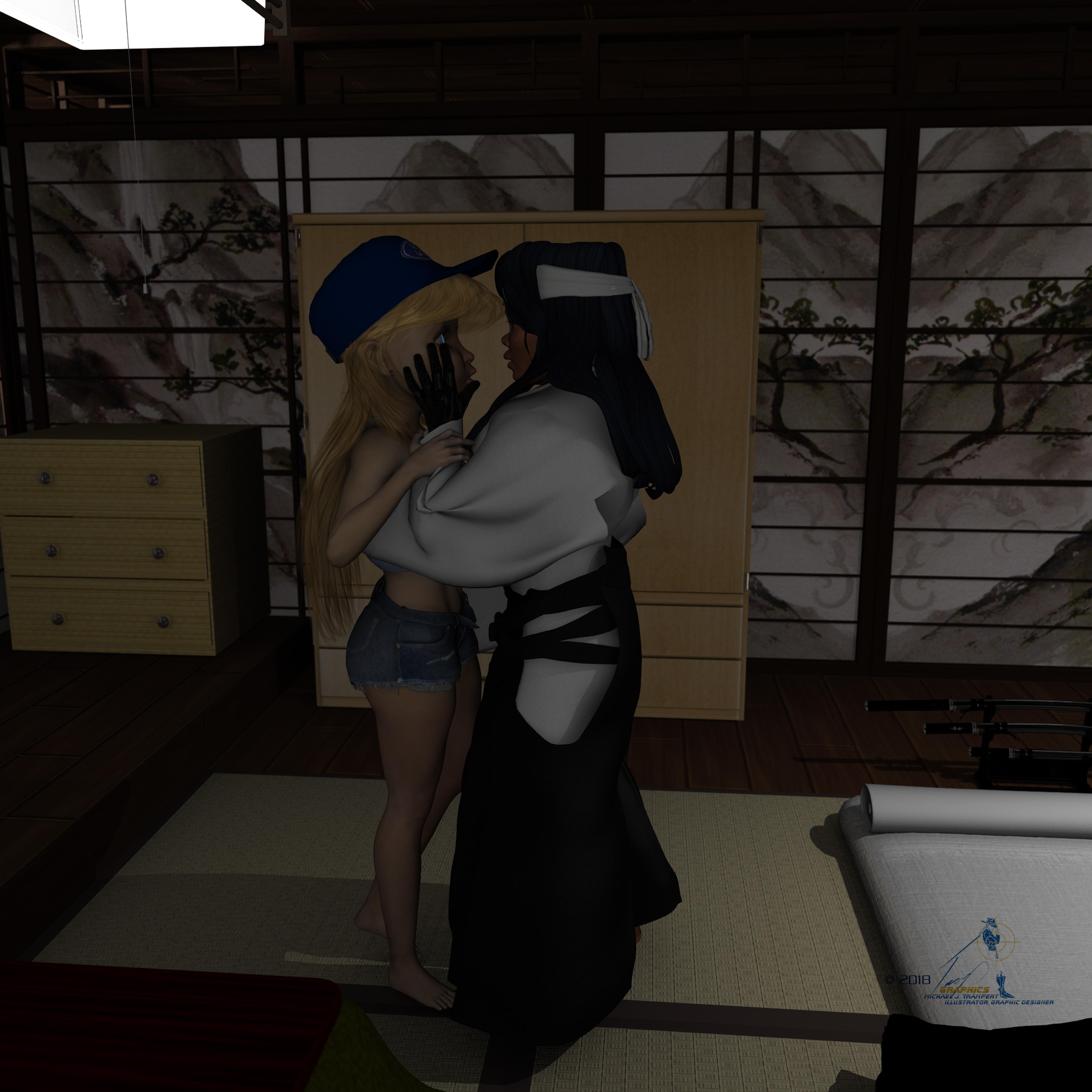 Morphs from G3 to G8
well done, singular!
the new version of the script just purred through that problematic morph set. the folder and file structure carried through perfectly, no duplicates or out-of-place anything. everything that was in the root folder transferred beautifully. the values are correct, and the morphs all work.
!
j
Morphs from G3 to G8Thanks for your promptness. I tried it with the new script (log included) and, while the problems with the nails were the same and Toon Generations 2 only loaded the four previously mentioned properties, otherwise the results were much improved: Toon Generations 2 scale and posture switch worked as intended and poke-away (a hybrid of morph and projection morph) not only transferred but worked (so, a new functionality for the script, and a much needed one--seriously, projection morphs are a must when not using dynamic clothing).
Sahel HDYeah, I want you guys to understand the issue a little better. To create above average characters and include all the features like HD morph, her own smile, fibremesh eyebrows and all the other options, I need to find ways to make it all feasible. This all adds to production time, and I prefer to still offer stuff at a reasonable price. Because with too high prices you never know how many people will feel it's too much and not buy at the initial release. Look at other stuff sold in the store. Clothes with one texture for 20 bucks, 2 texture expansion for 14.95 each. All of that combined, I would argue, had a fraction of the production time of Sahel. But it's 50 bucks. Pretty much any character, regardless of quality, realism and features, sells for around 19.95. Despite all that I'm selling Sahel for 29.95 with her own smile, which could be seen as 19.95 + 10 for the smile, or 24.95 + 5 for the smile or whatever. This is a pretty sweet deal right?
So to make that work I can only see 2 possible solutions at the moment:
- save time whereever I can on less important stuff, and to me head/body separation was such a thing. Does not influence the quality of the character per se, it's just a lack of convenience or perhaps usefullness for creating your own dial-spun creations. Of course this task is rather ridiculously small in grand scheme of things, but that's only because the amount of work that went into Sahel is pretty insane. And also then reuse some stuff for a few characters, iterate rather than start from scratch every time.
- I can increase the price to a level or near that of Daz main figures. 44.95 usually for the figure alone. Another 40 later for the HD morph. Unlikely Daz would even accept such pricing, ultimately they have the last word on that and are basing it on their sales data which will inevitably show 19.95 as the sweet spot for PA characters.
So to me option 1 seems way better for everyone. I just wanted you to see a bit where I'm coming from and that this wasn't a lazy cop out on my behalf but a very concsious decision, just a tiny little bit to make it work. Let me know your opinion on all of this, perhaps areas where you think you could forgive me taking some shortcuts.
Having said that, Sahel is doing really well so thank you all for the support! I can say without a shadow of a doubt, the most important thing by far to make this work is that you actually buy

Thanks for explaining in more detail. To be honest your post about the "next character will have separate head and body but not for HD" made me feel like you could care less what the consumers wanted/needed and I almost returned the product, mostly because the lack of separate head and body really hinders my use of the product, BUT I really love the skin and there are parts of the body morph that really stand out, like her hands. The smile is great, but for me, it is mainly a novelty and not something I would use much at all. If it came down to 19.95 + 10 for the smile, I would happily do without the smile if it was an option
Is Sahel an expensive character with everything included? If so, would you find her less expensive if she was 19.95 with the smile available separately, as with clothes and texture expansions?
For most, I would say yes based on forum posts I see. For me, the price was up there but I was able to justify the expense since I do a fair bit of commercial 3D work and also have a good job, so it's easier for me.
I never buy texture expansions as that comes across as nickle and diming a customer (they should be included with the product IMO) and I can always make my own .
Sahel HDHer price is already "up there" as far as the high end of what I'm willing to pay for a non-Daz Original "official" figure. You don't often see characters that are $30 (base price) in the store. And while I think Sahel is probably more than worth the price, I would expect a separate head and body morph for that price.
I still plan on getting her, I would probably think twice in the future about a character in the $30 range that doesn't also have a separate head and body morph. But you have to do what you have to do. Customers will decide if they're willing to make that sacrifice of having a less customizable character in exchange for the high-quality skin and morph. So... a lot of choices and decisions both by the creator and buyer.
Personally, even though it's a pain and takes a little bit of extra time, I'll always try and add a head and body morph separate in my characters. Unless the morph is so extreme that it makes it nearly impossible to create separate morphs, of course. :) I know that many (maybe most) people who buy characters like to customize them and not being able to dial the head and body in at different strengths can really hinder the character's ability to be customized to the customer's liking. Let's face it everyone has different thoughts on what is beautiful - and the ability to tweak a character's face and/or body to be more in line with what the customer considers to be more "ideal" is important to a lot of people who purchase characters here.
Thanks diva. Luckily I've already budged on the head/body separation, apparently it's more important to people than I thought. I was just trying to explain where I came from at the time.
Sahel HDHer price is already "up there" as far as the high end of what I'm willing to pay for a non-Daz Original "official" figure. You don't often see characters that are $30 (base price) in the store. And while I think Sahel is probably more than worth the price, I would expect a separate head and body morph for that price.
I still plan on getting her, I would probably think twice in the future about a character in the $30 range that doesn't also have a separate head and body morph. But you have to do what you have to do. Customers will decide if they're willing to make that sacrifice of having a less customizable character in exchange for the high-quality skin and morph. So... a lot of choices and decisions both by the creator and buyer.
Personally, even though it's a pain and takes a little bit of extra time, I'll always try and add a head and body morph separate in my characters. Unless the morph is so extreme that it makes it nearly impossible to create separate morphs, of course. :) I know that many (maybe most) people who buy characters like to customize them and not being able to dial the head and body in at different strengths can really hinder the character's ability to be customized to the customer's liking. Let's face it everyone has different thoughts on what is beautiful - and the ability to tweak a character's face and/or body to be more in line with what the customer considers to be more "ideal" is important to a lot of people who purchase characters here.
Applying a full body morph to only half of the bodyYou could use the same dFormer weight-map method that separates head and body morphs in Morph Loader Pro. I used this tutorial to create such for G2 and G3. That discussion is here. There’s a video tutorial on doing it manually.
You’ll likely get the best results by using the dFormer method. It allows you to smoothly attenuate the morph rather than just removing vertices.
How can I give the "draping" effect to a clothing item?Well you should be bit more Specific in what look your after and where exactly the cloth should drape. There are two ways: Create a custom Morph or use a modifier, or (if the cloth is ok for that) use the new d-force to drape the cloth the way you want it after posing your figure. But it all depents on the Clothing, the figure and the needed effect. There is not one answer for all, the right solution could be one or the other depending on your needs.
Missing Thumbnail Images in Smart ContentIt all seems to be various Expression morphs in these products that I own:
Z Everyday Activities
i3 100 Must Have Expressions for Genesis 8 Female(s)
Bosom Buddy Poses for Teen Josie 8
Z Horror and Fear - Morph Dial and One-Click Expressions for Victoria 8
Some of the thumbnails do appear (smaller versions though) in the Parameters Pane (See attached file)
I can use most of the expressions with the Parameters Pane...it's just that the thumbnails are missing in the Smart Content Pane for many Expressions.
Sahel HDYeah, I want you guys to understand the issue a little better. To create above average characters and include all the features like HD morph, her own smile, fibremesh eyebrows and all the other options, I need to find ways to make it all feasible. This all adds to production time, and I prefer to still offer stuff at a reasonable price. Because with too high prices you never know how many people will feel it's too much and not buy at the initial release. Look at other stuff sold in the store. Clothes with one texture for 20 bucks, 2 texture expansion for 14.95 each. All of that combined, I would argue, had a fraction of the production time of Sahel. But it's 50 bucks. Pretty much any character, regardless of quality, realism and features, sells for around 19.95. Despite all that I'm selling Sahel for 29.95 with her own smile, which could be seen as 19.95 + 10 for the smile, or 24.95 + 5 for the smile or whatever. This is a pretty sweet deal right?
So to make that work I can only see 2 possible solutions at the moment:
- save time whereever I can on less important stuff, and to me head/body separation was such a thing. Does not influence the quality of the character per se, it's just a lack of convenience or perhaps usefullness for creating your own dial-spun creations. Of course this task is rather ridiculously small in grand scheme of things, but that's only because the amount of work that went into Sahel is pretty insane. And also then reuse some stuff for a few characters, iterate rather than start from scratch every time.
- I can increase the price to a level or near that of Daz main figures. 44.95 usually for the figure alone. Another 40 later for the HD morph. Unlikely Daz would even accept such pricing, ultimately they have the last word on that and are basing it on their sales data which will inevitably show 19.95 as the sweet spot for PA characters.
So to me option 1 seems way better for everyone. I just wanted you to see a bit where I'm coming from and that this wasn't a lazy cop out on my behalf but a very concsious decision, just a tiny little bit to make it work. Let me know your opinion on all of this, perhaps areas where you think you could forgive me taking some shortcuts.
Having said that, Sahel is doing really well so thank you all for the support! I can say without a shadow of a doubt, the most important thing by far to make this work is that you actually buy
To be perfectly honest, I LOVE Sahel's skin, and would have purchased it just for that (and will purchase eventually when on a steeper sale) but I like to do my own morphs or enhance most characters morphs to my own liking and like to do my own smiles and expressions, so for people like me, it is important to have separate head and body morphs so I can create my own characters with the original character mostly as a base. There is a thread here that talks about how most people like to spin dials to create their own unique characters. I'm sure there are many who do use characters "out of the box" but you could be losing sales from those who don't. Obviously Sahel is extremely popular and I'm sure you made a ton of sales, but there are those like me holding off for a better sale price because of those lacking features. I have a ton of merchant resource morphs to change things, but I usually like to start with a generic body and create my own morphs or at least be able to dial out the body and head separately. It seems like it may be too much work for this one, but glad you will do it on the next ones. If you sold just the skin at a lower price, I'd probably easily buy that though! If you created a discount character, using Sahel's skin, materials and settings with no HD morphs, no smile, but separate head and body morphs, I'd definitely get that too!
Buy Something That Doesn't Work in Carrara? Post your Questions and Workarounds here. (please)thank you for responding and your pm
not many care as DAZ studio the only software that support is required for, hence this thread.
I can get it in via FBX but of course have to manually pose every key and it's corresponding hammer etc but that is not unexpected, ERC functionality is DAZ studio specific
it is certainly not the only thing I cannot get into Carrara but we post here so others can know before purchasing
I shall still use it in studio anyway

I still need to see if I can figure out Casual's midi script too or maybe pair events with the D3D midi piano poses to drive the animation, I do not have any scripting knowledge but can read a pz2 and duf file in notepad and swap out morph etc names, do so for mimic dmc files often and this should be no different it is just an animated pose generated by a midi file instead of a wav file the mechanics are the same.
except there will be 88 morphs/poses to do hopefully only once, future generated poses a straightforward find and replace in notepad++ should work.
casual's script may be the best choice
https://www.daz3d.com/forums/discussion/70673/animating-a-keyboard-using-a-midi-text-file#latest
Sahel HDYeah, I want you guys to understand the issue a little better. To create above average characters and include all the features like HD morph, her own smile, fibremesh eyebrows and all the other options, I need to find ways to make it all feasible. This all adds to production time, and I prefer to still offer stuff at a reasonable price. Because with too high prices you never know how many people will feel it's too much and not buy at the initial release. Look at other stuff sold in the store. Clothes with one texture for 20 bucks, 2 texture expansion for 14.95 each. All of that combined, I would argue, had a fraction of the production time of Sahel. But it's 50 bucks. Pretty much any character, regardless of quality, realism and features, sells for around 19.95. Despite all that I'm selling Sahel for 29.95 with her own smile, which could be seen as 19.95 + 10 for the smile, or 24.95 + 5 for the smile or whatever. This is a pretty sweet deal right?
So to make that work I can only see 2 possible solutions at the moment:
- save time whereever I can on less important stuff, and to me head/body separation was such a thing. Does not influence the quality of the character per se, it's just a lack of convenience or perhaps usefullness for creating your own dial-spun creations. Of course this task is rather ridiculously small in grand scheme of things, but that's only because the amount of work that went into Sahel is pretty insane. And also then reuse some stuff for a few characters, iterate rather than start from scratch every time.
- I can increase the price to a level or near that of Daz main figures. 44.95 usually for the figure alone. Another 40 later for the HD morph. Unlikely Daz would even accept such pricing, ultimately they have the last word on that and are basing it on their sales data which will inevitably show 19.95 as the sweet spot for PA characters.
So to me option 1 seems way better for everyone. I just wanted you to see a bit where I'm coming from and that this wasn't a lazy cop out on my behalf but a very concsious decision, just a tiny little bit to make it work. Let me know your opinion on all of this, perhaps areas where you think you could forgive me taking some shortcuts.
Having said that, Sahel is doing really well so thank you all for the support! I can say without a shadow of a doubt, the most important thing by far to make this work is that you actually buy
Applying a full body morph to only half of the bodyHi There!
Is there a way to create a morph like Voluptuous, Heavy, or Emaciated that would apply to only half of the body, upper or lower?
HD does what?An HD moprh is able to move the additional vertices created by the SubD process, so it allows a finer detailing than a regular morph. That's especially useful in close-ups, or with strongly directional lights - for more general images a normal map is probably sufficient.
No, Victoria 8 and the other name 8 shapes are not just presets, theya re new custom sculpts. Sincwe the base figure is still Genesis 8 female other morphs can be freely mixed and matched (allowing for the fact that some may product ugly results if they work at cross-purposes).
Morphs from G3 to G8Well, I didn't give a lot of details because I figured they were already adressed issues in the previous versions of the script and thus more data would be irrelevant (except the part about the projection morphs, but you've already adressed that, and the suggestion/petition for an indicator, but you already stated your reasons). But sure, let me be a bit more exhaustive, I hope it'll be of help:
- By "extreme morphs" and "don't get along", I am referring to the product's ( https://www.daz3d.com/hfs-fantasy-shapes-for-genesis-3-female-s ) morphs for hooves (that have some of the toenails' vertices spearing through the foot) or the claw morphs (which bend to the side instead of being straigth) among others.
- I favorited Toon Generations 2 age control dial, and the only dials that were transferred were said dial, the full body morph and two on/off options ("include posture", that did nothing I could see, and "include scale" that did something but not what it should do, seeing as I had a gigantic baby slightly taller than G8F).
I have included a few screenshots of the troublesome nail morphs and a log file from the verbose script running with the same favorited morphs.
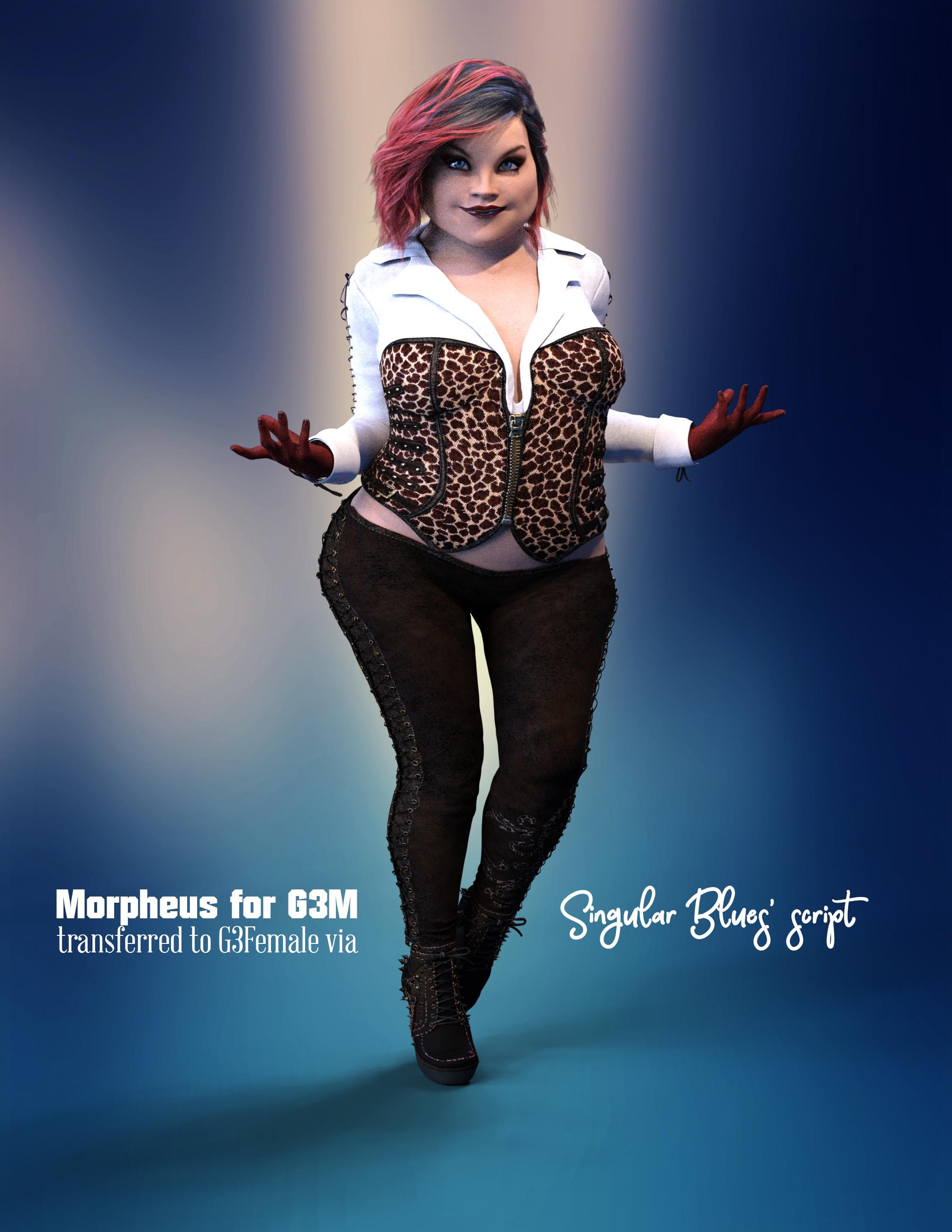
Morphs from G3 to G8Ok, I've also tested Morpheus for Genesis 3 Male with the latest script. The same thing that happened to @jardine applied.
1ST TEST:
I attempted to transferred Morpheus various morphs to G3F. What I found was that two sets of morphs transferred over. One, which copied the folder structure from the original G3M path to a G3F one. Then another set of morphs were just dumped outside of the subfolders.
1ST TEST A): I moved the morphs outside of the subfolders to my desktop and tested the foldered morphs. The morphs showed up (dials) but they didn't do anything to the G3F figure (it almost seem like they were attempting to transform an invcible object).
1ST TEST B): I deleted those morphs and dumped them inside the folder (no other structure) and tried that. Again, those showed up but didn't work.
1ST TEST C): I re-structured the morphs manually (following the original folders). Again, those showed up but didn't work.
2ND TEST:
I went to the original G3M path (made a backup copy and saved it in my computer) and pulled all the morphs out of the subfolder (I deleted the subfolders). Keep in mind, that the folder structure is extensive (folder inside folder inside folder) compared to other products. For example, one of the paths would look like this:
W:\DAZ RESOURCES\My DAZ 3D Library\data\DAZ 3D\Genesis 3\Male\Morphs\Guruvar\Body\Morph 01\JCMIn general, it went from this:
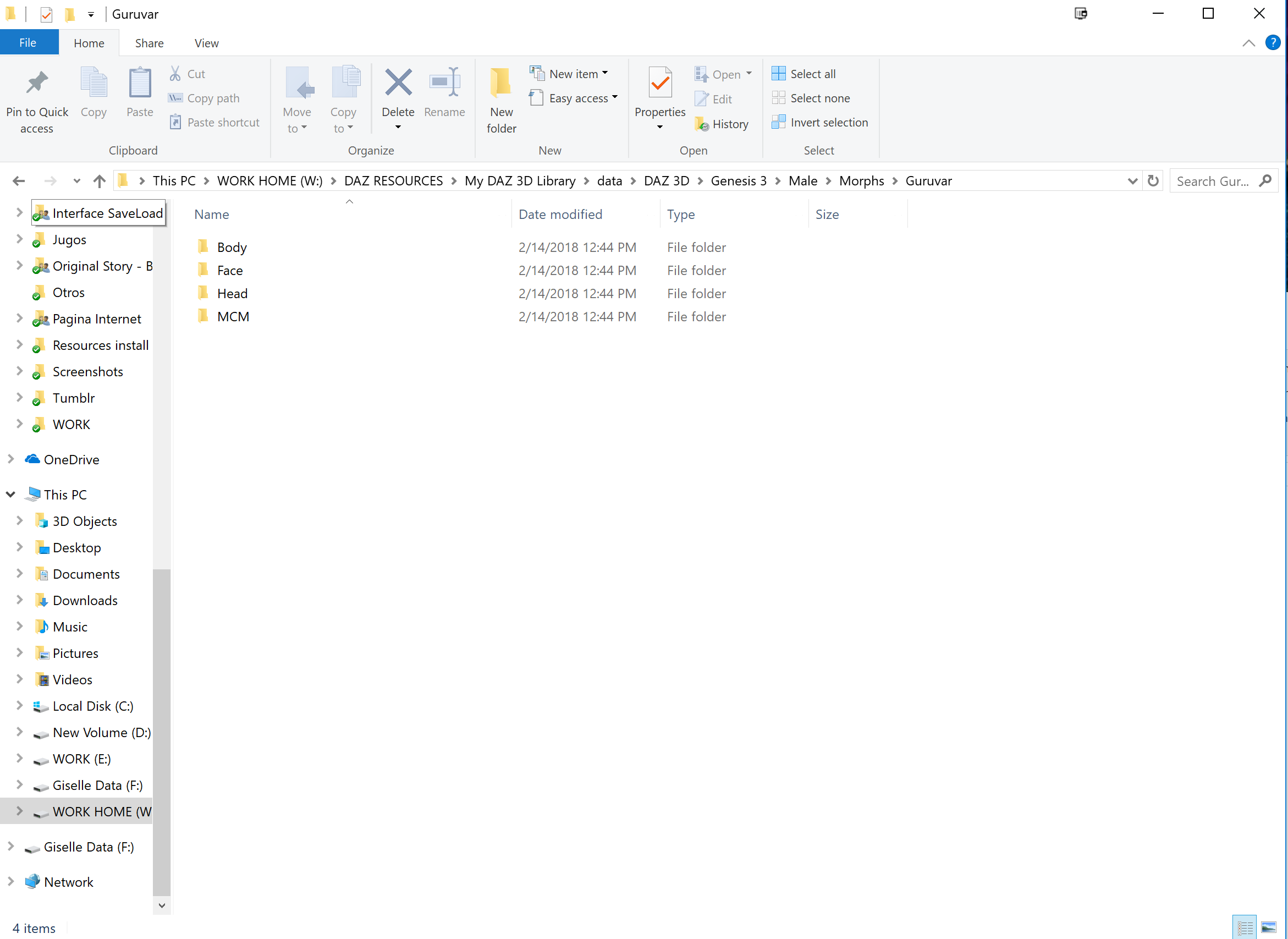
To this:
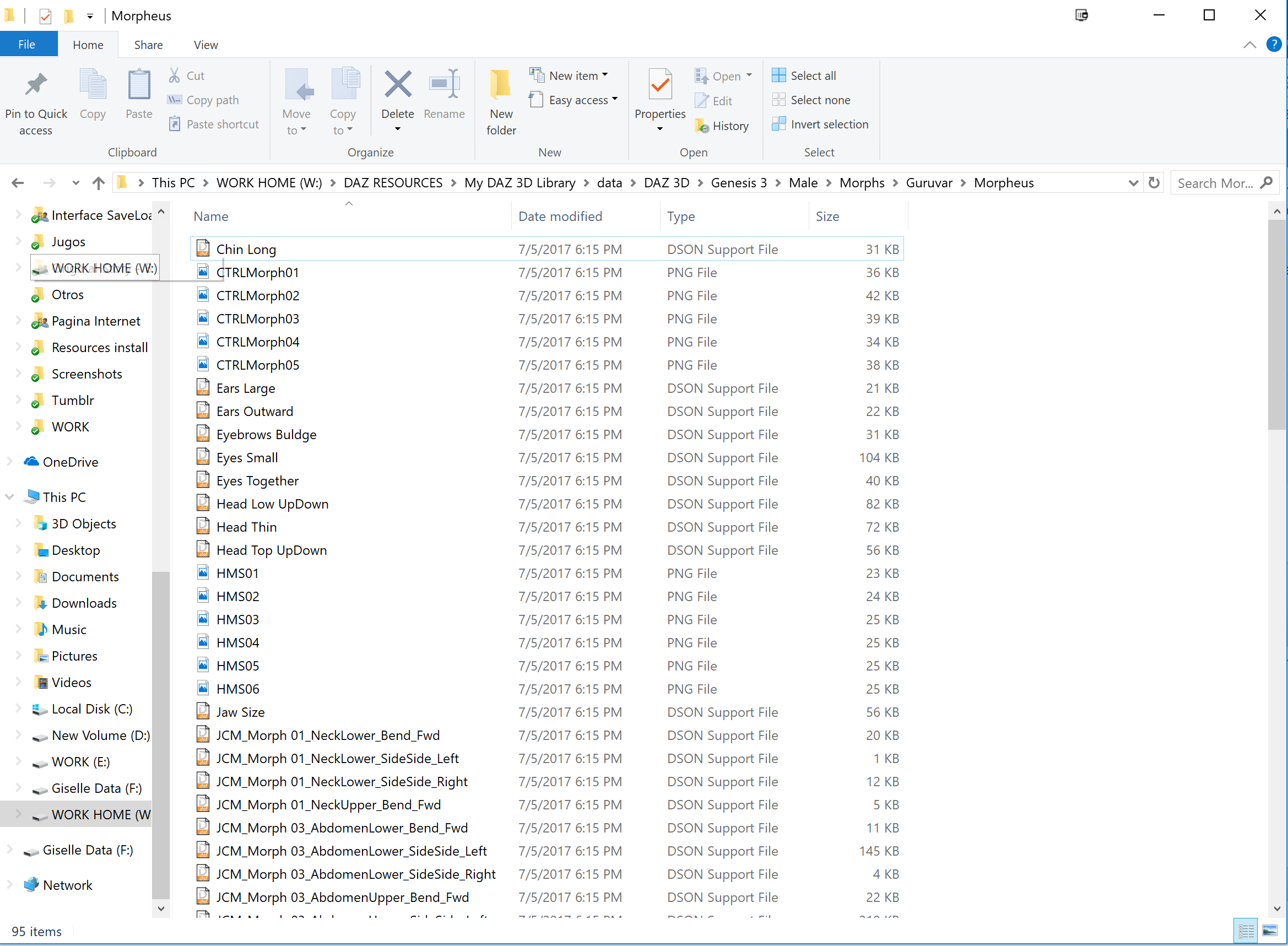
THEN I used the script to transfer them to G3F. This time they worked perfectly! Quick render to show results:
 Buy Something That Doesn't Work in Carrara? Post your Questions and Workarounds here. (please)
the Protozoon piano does not even load in Carrara
I expected the keys not to affect the hammers etc unless saved as poses which I was going to do each note but nah does not even load just gets an error
Warning: file \data\Protozoon\HD Grand Piano and Poses\Grand Piano\Grand Piano.dsf could not be loaded
Error: node /data/Protozoon/HD%20Grand%20Piano%20and%20Poses/Grand%20Piano/Grand%20Piano.dsf#Hammer%2001%20A0 not foundHi!
I don't have any experience of Carrara, but I'll try to figure out a workaround. Does Carrara support Daz rigging?
Protozoon
Carrara supports DS rigging except for G3 and G8 figures.
the Daz Studio current default rigging "general" doesn't work in carrara.
we've been using Edit, Rigging, Convert general to blended. then saving it as a charactre preset.
works on most figures.
occasionally an ERC control won't work in carrara.
or a formulae in a morph file will cause a figure not to load.
Thanks !! for thinking of carrara customers !! !!
Morphs from G3 to G8Alright, I've been experimenting a bit, here are my results:
- Projection morphs won't work. Either they won't do anything at all (as in this product by Sickleyield: https://www.daz3d.com/sy-decrackifier-genesis-genesis-2-genesis-3) or they will transfer but visibly morph the mesh instead of projecting (as in this product: https://www.daz3d.com/poke-away3-for-genesis-3-female).
- Extreme morphs and nails or toenails won't get along (at least not those of this product, https://www.daz3d.com/hfs-fantasy-shapes-for-genesis-3-female-s specially the hooves morphs).
- Toon Generations 2 didn't transfer properly just by selecting the main morph (I think that your previous message said that was fixed, if you were stating otherwise, plese, disregard this).
I thought there was also something wrong when some tear morphs didn't transfer, but then I realized they were HD morphs. Pity not to have them available. Other than that, the speed of the script is very impressive, but a dialog stating it has finished and prompting the user to click "OK" would lessen the confusion and wariness of neanderthals staring at the glowy rock with clear mistrust newcomers like me.
This was not written for projection morphs at all. Neither was the one before. I suspect the older one might have been able to do them, but only because it was fully capable of destroying the base figure. This one isn't.
"Exteme" and "Don't get along" are almost entirely useless. I know something is not working for you, but I have no idea what. To repeat, data, data, data, I cannot make bricks without clay. To see what data looks like, see the various info dumps above.
Toon Generations 2 should work, to the extent that I'm aware of issues with it. The package contains both prototype and prototypeverbose for the express purpose of providing the clay I referenced above. If something should work and does not I need to know exactly what didn't work and probably to see a prototypeverbose run in the log to determine what went wrong.
UI is for the closed beta or for paying customers. The only reason this script gives any indication of what it's doing is that I'd have to invent whole new code to stop it from doing that. The purpose of the alpha test is to eliminate bugs, not provide end user utility. It not that these things aren't important. It's that the Alpha is effectively the Release's competition. And the more feature complete the alpha is the more competitive it is. Right down to litte things like indicating it's finished.How to make the eyelid thickness thinner?Not quite sure what you mean, but if you mean the thickness as indicated by the little green lines in the image, then I haven't found anything in the available morphs to make that look thinner....
(The only change in this image to the default G8F was adjusting the eyeball position in the 'Z' axis by 0.008, as I think the eyes are just a little to deep in the eye-sockets for close-ups...)
Hey thanks. Yes that's what I meant. They are too thick for most people but I see you say there is no morph available to make them thinner. Thanks again.
Daz 3D is part of

Connect
DAZ Productions, Inc.
7533 S Center View Ct #4664
West Jordan, UT 84084Licensing Agreement | Terms of Service | Privacy Policy | EULA
© 2026 Daz Productions Inc. All Rights Reserved.