-
Clothing conversion?
Hi everyone, I'm a former Poser user, and I have about 15,000 clothing items (well, so it seems) for V4 and M4. I tried to manually convert V4 clothes to G8F but found it challenging and tedious.
Thinking about purchasing https://www.daz3d.com/rssy-clothing-converter-from-victoria-4-to-genesis-8-female - has anyone had really great success with this product and if so, can you link some renders where you used it? How easy is it to use?
TIA!
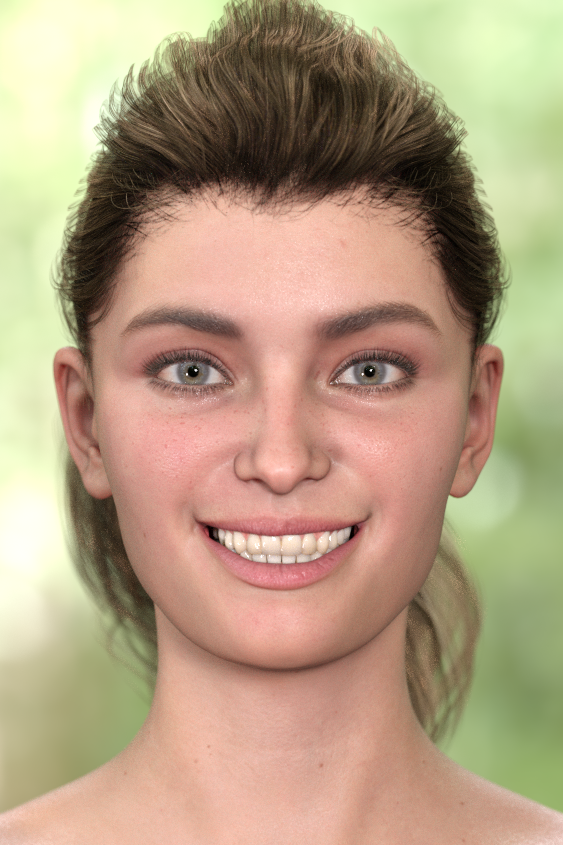
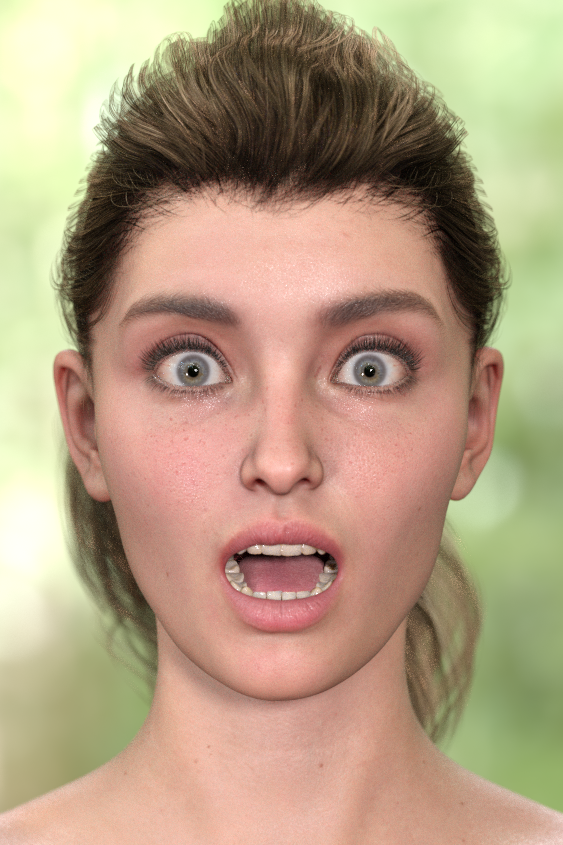
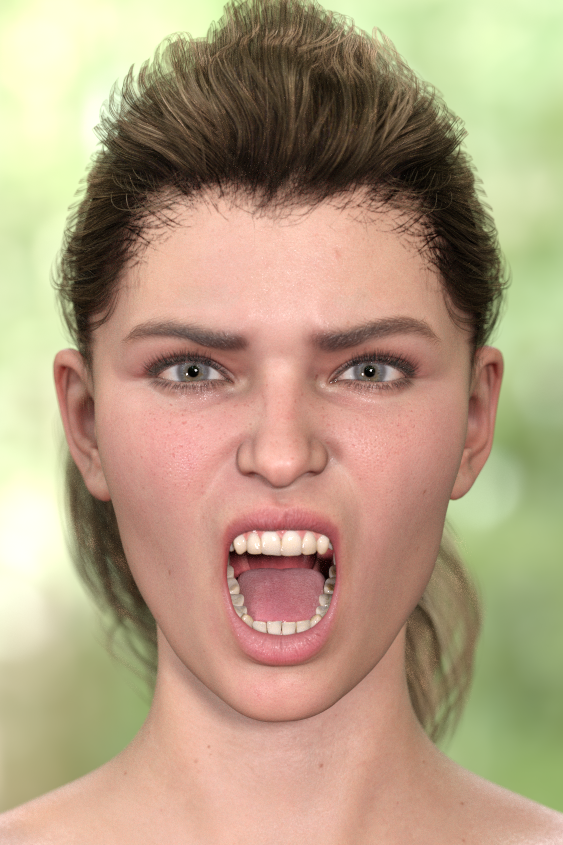
"Anatomy of Facial Expression": A Genesis 8.1 Companion Guide?A few weeks ago, I asked for recommendations about a FACS reference guide, to achieve scientifically-accurate facial expressions for the new Genesis 8.1 face rig. Amidst the dozens of replies basically saying, "Just eyeball it, it'll be fine," one helpful soul ( @Ceridwen ) recommended "Anatomy of Facial Expression." I just now got around to checking the book out and I decided to post my preliminary findings. While the book itself is a very good resource, I very quickly ran into problems when I tried to apply the Action Units to the G8.1 face rig, because I have no idea what half the controls should be. Like AU17, "Chin Raiser". Nothing on the Daz rig is named that, so what the heck do I move? Nevertheless, the book is 200+ pages and has a great deal of information about musculature, so I'm sure if I read the rest more closely I can figure it out, but it's still annoying.
Anyway, onto my first renders with my lucky volunteer, Victoria 8.1.
SMILE
SURPRISE
RAGE
In conclusion...
If you want a technical reference guide to human expressions--or you just plain don't want to "eyeball it" when making faces--the book is a pretty good buy for $45. Especially since the official FACS reference guide costs $400 and you need to study for 100 hours and take a certification test before they send you the good stuff.
I have my issues with Genesis/Victoria 8.1 itself--the oddly-named control handles, the lack of realistic skin creasing, her eyes not blinking properly due to the new tear node--but I'm overall satisfied with the book. It seems to have a wealth of insight on how faces are put together, so even if you don't use it for FACS you can probably learn some useful stuff when you're making expressions.
Draenei from WoW (again)Sorry to bring ths up again, but I have found threads on how to get close, and they all say to use HFS Ultimate Shapes Bundle, which gets you most of the way there. However, I am trying to close the gap and noticed a few things. First, the toenails are normal size toenails which make this look really weird. Second, the head tendrils are still missing, and third, no tail. I need all three. For anyone interested I am using Tara 2 HD horns with a white'ish bone shader I altered the color to give it a blow tint; and the Wind Warrior Outfit works perfectly for this (mostly).
https://www.daz3d.com/hfs-ultimate-shapes-bundle
https://www.daz3d.com/tara-2-hd-for-victoria-7-victoria-8
https://www.daz3d.com/wind-warrior-outfit-with-dforce-for-genesis-8-females
https://cdn.vox-cdn.com/thumbor/sBIgV4jM3BTGmufRYiCWbU1pyqw=/16x0:943x618/1200x800/filters:focal(16x0:943x618)/cdn.vox-cdn.com/uploads/chorus_image/image/31387271/61bvt0kd5nxm1396920999452.0.jpg
Last one for reference
Edit: fixed the hooves by creating a shader surface with Geometry editor, still no tail or head tendrils. :(
Eyelashes for Victoria 4/4.2I'm looking for something a bit like Lashes Utilities: https://www.daz3d.com/lashes-utilities-for-genesis-2-3-and-8 , except for Victoria 4/4.2
I want to replace V4's basic lashes. I've just used Wrap3 to wrap an OC to Victoria 4.2 (the result is brilliant compared to some of the wraps that I've done with the Genesis figures). But her lashes are out of place, and I'm not sure that I can move them back into place, and shape them to fit around her eyes.
If another product similar to Lashes Utilites exists for V4/4.2, then it'll make my work load a little lighter ^^'
Problem with Ginny 8.1 and G8.1 in general SOLVEDOh...
I've deleted everything G8.1 related and reinstalled only Victoria 8.1 and Ginny, same thing. The G8.0 version does not have the problem.
Scott
List of new characters with PBR Shader skin...JeffG said:
VYK Markie for Victoria 8.1 ??? Not sure. Anyone know?
https://www.daz3d.com/vyk-markie-for-victoria-81
"60 Texture, Ambient Occlusion,..."
Gaia HD
https://www.daz3d.com/gaia-hd-with-hd-expression-for-genesis-81-femaleBoth are PBR
Blender and/or DAZ Studio?juvesatriani said:
tapanojum said:
juvesatriani said:
marble said:
Over the past week I have been immersed in Blender tutorials (... again! ... this is something I do at least once a year, every year). At the end of these marathon sessions, I usually end up convinced that 3D scene creation without the convenient library of pre-made objects, poses, textures and accessories that are part-and-parcel of the DAZ-o-sphere is practically beyond my capabilities.
Blender seems to have all one could wish for as a swiss army knife for creating scenes as I do in DAZ Studio but the learning curve is so very daunting. It is not that any particular part of the toolset is unreasonably difficult but the sheer scope is overwhelming. For example, in order to understand how a human figure gets her skin texture, I need to understand UV maps and how to create them and materials and how to set them up which means learning how to manipulate those little spaghetti-connected boxes called nodes (hours and hours of tutorials just to get started on those). Then there are things such as morphs which, in Blender terms, translate to Shape Keys. But it is not just a matter of a dial to make a glute tight when bent as that usually requires something called a JCM which is something that the DAZ products come with ready-made. They also come rigged while Blender has not one but several methods of rigging a figure and each has its own learning curve.
My introduction to the world of 3D was via a PC game called The Sims. I played it and soon became interested in how I might modify some of the elements in the game. I found that there was a whole community dedicated to doing just that and that they used esoteric software such as 3D Studio Max and Blender. But I found that I could download ready-made props and clothing, etc., to use in the game - all created by geeks with skills I could never hope to emulate. Pretty soon, the fad of The Sims wore off but I had also discovered there were other avenues for making scenes with virtual human characters, namely the quite expensive Poser and the free DAZ Studio. I tried both but soon abandoned the paid one in favour of the free DAZ software. It just seemed to suit me better. Little did I know that I would still be dressing up my virtual humans and placing them in scenes 15 years later.
Unfortunately, my creative impulses push me towards doing things that I can't easily do in DAZ Studio. I find the animation timeline doesn't work as I want it to or there is little scope for making my own morphs or that rendering more than a few frames is likely to use up a large slice of the time I have left on this earth. Blender looks like a solution to many of these shortcomings but it seems that learning the necessary skills will take up even more of that ever-decreasing time span and I am not even sure I have the capability to develop those skills.
So one solution that seems to hold a lot of promise for people like me is the bridge approach (specifically the official version or the Diffeomorphic alternative). So I looked at the DAZ version and quickly decided that as it does not support some essentials such as geografts, it is a non-starter. Diffeomorphic, on the other hand, is more versatile but has quite a learning curve in itself. I've exported quite a few test scenes but once they are in place in the Blender viewport I have discovered that what I really need now is some in-depth knowledge of Blender in order to make the cloth or hair work or to light, pose or animate the figures. The texture probably needs tweaking, especially if I want to use Eevee. So I am almost back to where I started with Blender - there is no escaping going through that learning curve.
Or I could just find another hobby.
I feel you .. Thats why I`m suggesting DAZ releasing most Flagship in Native Blender Format . With Proper RIG for animation and corrective morph instead focus in Bridges
Your problem similiar with mine , which having too much love with DAZ products so we never see another options . Actually There are tons of cool model out there . I would not abandon DAZ but if I want to play with Blender I`ll seek other options
If you have time or money to spend , try download or buy ready to use for animation figure for native blender . Try google Rocket girl rig for blender . its free and having nice rig setup . Try play with it .. making simple animation or maybe doing extreme material make over !! and you`ll know why releasing DAZ figure in Blender native format is the obvious answer for us
Rigs are not transferable between software and it would be absolutely insane for Daz to create separate rigs for each character in every software they have a bridge to. They've already taken a step in the right direction by going PBR with 8.1, meaning textures will translate properly outside of Daz. Diffeo converts chars to Rigify just fine and I imagine that eventually the Daz to Blender bridge will as well.
You missed my point , i dont talk about transfer rigs between apps . But releasing Victoria - AIKO or Michael model with proper rig for animation in Blender . it shouldnt "dead" close with what we`ve already had in DAZ Studio , but for better use for animation
I`ve already test all DAZ bridges including diffeo but since its based on DAZ rigs ( or i should say based on what DAZ studio used for ) it still not really suitable for animation .
Can you create animation with coverted rig ? Yes of course but the truth is Converting to other rig system doesnt mean fix the problem if the structure not right in first place for animation use
If you dont believe, go to blend swap or blender market and find premade character for Blender and you`ll see what kind rig setup for animation.
I do believe DAZ have skill and knowledge to do that and before DAZ studio exist , they support Poser ecosystem which have slighty different method of Joints and Rigs , so why not for Native Blender right now ?
About PBR , in theory they should output similiar result. But in reality its not really . Because every light system in each render engine is different . So they react different . That conclusion based on my fiddling with PBR material in major Render Engine including Corona - Arnold and Lumion in daily work
To be honest, it really sounds like you don't know what you're doing, which is totally ok.
Please don't giggle - convert V3 accessories to Genesis ??You can convert clothes to Genesis 1 with this: https://www.daz3d.com/v3-and-m3-shapes-for-genesis
And to Genesis 3 with this: https://www.daz3d.com/wear-them-all-autofit-clones-expansion-for-genesis-3-male-s-and-genesis-3-female-s
To convert them to another Genesis figure you would need to convert them to G1 or G3F then save the converted clothing as a new figure asset, then use another converter to convert the new G1 or G3F clothing to the other Genesis figure.
Morphs can be converted up to Genesis 3 with GenX2 and its add-ons:
- Main program: https://www.daz3d.com/genesis-generation-x2
- Add-on to convert from V3/M3: https://www.daz3d.com/genx-addon-gen3-for-v3-and-m3 (requires the V3/M3 shapes for Genesis listed above)
- Add-on to convert to G2: https://www.daz3d.com/genx2-addon-for-genesis-2
- Add-on to convert to G3: https://www.daz3d.com/genx2-addon-for-genesis-3 (requires the G2 one)
To convert morphs to G8 you would need to use GenX2 to convert them to G2 or G3 then use one of the G2 to G8 or G3 to G8 converter.
For skins, there's this to get V3 skins on G3F: https://www.daz3d.com/legacy-uvs-for-genesis-3-special-edition-victoria-3For other Genesis figures the only option would be to convert the maps to V4 with something like Texture Converter 2 if you have it, then use the various options to use V4 skins on Genesis figures.
Using them with Iray will probably require a bit of work on the materials too.
List of new characters with PBR Shader skin...VYK Markie for Victoria 8.1 ??? Not sure. Anyone know?
https://www.daz3d.com/vyk-markie-for-victoria-81
"60 Texture, Ambient Occlusion,..."
Gaia HD
https://www.daz3d.com/gaia-hd-with-hd-expression-for-genesis-81-femaleGenesis 3-8-8.1 what makes them special?Just in case you're wondering, the progression of DAZ figures is as following:
- [ancient figures that no one is talking about anymore]
- Generation 3 (Victoria 3, Michael 3, Aiko 3, etc)
- Generation 4 (Victoria 4, Michael 4, The Kids 4)
- Genesis (core characters from this generation have the number 5 in their name: Victoria 5, Michael 5, etc)
- Genesis 2 (core characters from this generation have the number 6 in their name)
- Genesis 3 (core characters from this generation have the number 7 in their name)
- Genesis 8
- Genesis 8.1DAZ figures made quite a leap in quality from Genesis 2 to Genesis 3.
The posing is better, facial expressions are better, the eyes look better, the poly count is lower. Also, starting with Genesis 3, all figures come with IRAY skin materials.
Since Genesis 3 the improvements have been more subtle. Genesis 3, Genesis 8, and Genesis 8.1 are similar enough that they're hard to tell apart. There's a lot of cross-figure compatibility between the three generations.
Some differences between those latest 3 generations, ordered from most improved since G3 to least improved, in my subjective opinion:
- Facial Expressions improved (in my opinion significantly) from G3 to G8 and again from G8 to G8.1.
Facial expressions are not compatible across those three generations. However there's a trick to make G8 facial expressions work on G8.1:
https://www.daz3d.com/forums/discussion/477386/how-to-get-genesis-8-expressions-working-on-genesis-8-1#latest- Eyes improved from G3 to G8 and again from G8 to G8.1.
Eye geometry has changed from G3 to G8 (but not the UV); eye UV has changed from G8 to G8.1 (but not the geometry).
In practice this means: G8 eyes can be used on G8.1; other than that, eye materials are generally not compatible across generations.
However you can make G3 eyes work on G8 and G8.1 with some manual fiddling: https://www.daz3d.com/forums/discussion/comment/5816691/#Comment_5816691- Lashes and Tears: In my opinion the improvements in lashes and tear only matter if you render close-ups of the face.
G3 has lashes/tear as a part of the figure.
G8 has lashes/tear as one separate geograft.
G8.1 has two separate geografts, one for the lashes and one for tear.
G8 lashes can be used on G8.1. Other than that, lashes/tear are not compatible across those three generations; however you can work around that by using the scene identification trick.- Skin Shader: All three generations are focused on IRAY. G3 skins don't use Dual Lobe Specular, Chromatic SSS, Diffuse Overlay, and possibly some other features I'm forgetting. G8 adds those features; G8.1 uses a completely new shader called PBR skin shader.
To be honest I don't think the improvements in skin materials are all that great since G3 and I find that the best G3 skins can easily stand next to the most recent G8.1 skins.
Skin materials are compatible between all 3 generations as long as they use the same UV. Speaking of which...- Skin UVs: G3 and G8 largely use the same UVs and as such are interchangeable.
There's some exceptions; the most notable ones are all G3 core characters. So that's Victoria 7, Michael 7... basically all characters that have a "7" in their name.
To use those G3 core chatacter skins on G8 and G8.1, you'll need these two products:
https://www.daz3d.com/genesis-3-character-uvs-for-genesis-8-female
https://www.daz3d.com/genesis-3-character-uvs-for-genesis-8-maleG8.1 has a new UV with a better transition from face to neck to torso. G8.1 can use the UVs of G8 and G3, but not the other way around.
- Poses: G3 loads in T pose, G8 and G8.1 loads in A pose. I find that one is not really better or worse than the other, so I don't know why they changed that.
Poses for G8 and G8.1 are interchangeable. You can easily apply G3 poses to G8 and G8.1 by using free pose converters, such as these:
https://www.deviantart.com/agentunawares/art/G3F-to-G8F-World-s-Greatest-Pose-Converter-709591348
https://www.deviantart.com/agentunawares/art/G3M-to-G8M-World-s-Greatest-Pose-Converter-709731867Blender and/or DAZ Studio?tapanojum said:
juvesatriani said:
marble said:
Over the past week I have been immersed in Blender tutorials (... again! ... this is something I do at least once a year, every year). At the end of these marathon sessions, I usually end up convinced that 3D scene creation without the convenient library of pre-made objects, poses, textures and accessories that are part-and-parcel of the DAZ-o-sphere is practically beyond my capabilities.
Blender seems to have all one could wish for as a swiss army knife for creating scenes as I do in DAZ Studio but the learning curve is so very daunting. It is not that any particular part of the toolset is unreasonably difficult but the sheer scope is overwhelming. For example, in order to understand how a human figure gets her skin texture, I need to understand UV maps and how to create them and materials and how to set them up which means learning how to manipulate those little spaghetti-connected boxes called nodes (hours and hours of tutorials just to get started on those). Then there are things such as morphs which, in Blender terms, translate to Shape Keys. But it is not just a matter of a dial to make a glute tight when bent as that usually requires something called a JCM which is something that the DAZ products come with ready-made. They also come rigged while Blender has not one but several methods of rigging a figure and each has its own learning curve.
My introduction to the world of 3D was via a PC game called The Sims. I played it and soon became interested in how I might modify some of the elements in the game. I found that there was a whole community dedicated to doing just that and that they used esoteric software such as 3D Studio Max and Blender. But I found that I could download ready-made props and clothing, etc., to use in the game - all created by geeks with skills I could never hope to emulate. Pretty soon, the fad of The Sims wore off but I had also discovered there were other avenues for making scenes with virtual human characters, namely the quite expensive Poser and the free DAZ Studio. I tried both but soon abandoned the paid one in favour of the free DAZ software. It just seemed to suit me better. Little did I know that I would still be dressing up my virtual humans and placing them in scenes 15 years later.
Unfortunately, my creative impulses push me towards doing things that I can't easily do in DAZ Studio. I find the animation timeline doesn't work as I want it to or there is little scope for making my own morphs or that rendering more than a few frames is likely to use up a large slice of the time I have left on this earth. Blender looks like a solution to many of these shortcomings but it seems that learning the necessary skills will take up even more of that ever-decreasing time span and I am not even sure I have the capability to develop those skills.
So one solution that seems to hold a lot of promise for people like me is the bridge approach (specifically the official version or the Diffeomorphic alternative). So I looked at the DAZ version and quickly decided that as it does not support some essentials such as geografts, it is a non-starter. Diffeomorphic, on the other hand, is more versatile but has quite a learning curve in itself. I've exported quite a few test scenes but once they are in place in the Blender viewport I have discovered that what I really need now is some in-depth knowledge of Blender in order to make the cloth or hair work or to light, pose or animate the figures. The texture probably needs tweaking, especially if I want to use Eevee. So I am almost back to where I started with Blender - there is no escaping going through that learning curve.
Or I could just find another hobby.
I feel you .. Thats why I`m suggesting DAZ releasing most Flagship in Native Blender Format . With Proper RIG for animation and corrective morph instead focus in Bridges
Your problem similiar with mine , which having too much love with DAZ products so we never see another options . Actually There are tons of cool model out there . I would not abandon DAZ but if I want to play with Blender I`ll seek other options
If you have time or money to spend , try download or buy ready to use for animation figure for native blender . Try google Rocket girl rig for blender . its free and having nice rig setup . Try play with it .. making simple animation or maybe doing extreme material make over !! and you`ll know why releasing DAZ figure in Blender native format is the obvious answer for us
Rigs are not transferable between software and it would be absolutely insane for Daz to create separate rigs for each character in every software they have a bridge to. They've already taken a step in the right direction by going PBR with 8.1, meaning textures will translate properly outside of Daz. Diffeo converts chars to Rigify just fine and I imagine that eventually the Daz to Blender bridge will as well.
You missed my point , i dont talk about transfer rigs between apps . But releasing Victoria - AIKO or Michael model with proper rig for animation in Blender . it shouldnt "dead" close with what we`ve already had in DAZ Studio , but for better use for animation
I`ve already test all DAZ bridges including diffeo but since its based on DAZ rigs ( or i should say based on what DAZ studio used for ) it still not really suitable for animation .
Can you create animation with coverted rig ? Yes of course but the truth is Converting to other rig system doesnt mean fix the problem if the structure not right in first place for animation use
If you dont believe, go to blend swap or blender market and find premade character for Blender and you`ll see what kind rig setup for animation.
I do believe DAZ have skill and knowledge to do that and before DAZ studio exist , they support Poser ecosystem which have slighty different method of Joints and Rigs , so why not for Native Blender right now ?
About PBR , in theory they should output similiar result. But in reality its not really . Because every light system in each render engine is different . So they react different . That conclusion based on my fiddling with PBR material in major Render Engine including Corona - Arnold and Lumion in daily work
Introducing the Daz to Blender Bridge & native Blender File FormatsI wonder if someday several flasghip figures like Victoria - Michael - Aiko - Sakura - Girl - Toon Gen will be available in Blend Native format.
With Low Poly Version - proper rig for animation - corrective joint/bend morph and material which optimized for EEVEE or Cycles .
I`ve been trying all DAZ to Blender Bridge ( including Diffeo) since last year , but the truth is really hit and miss especially if we talk about proper or easy to use Rig setup for animation . Because their focus is duplicating what DAZ already excellent for . Personally I believe if DAZ can easily build proper 3D character than transferring what users already enjoy with DAZ Studio .
When I`ve bought ready to use Blender character , I love it !! Its easy to make animation with it . Why ? Because its already set to work with Blender
If you remember Poser Fusion , all important aspect about animation stuff controlled mostly by poser , but hosted and exported in Big boys 3d software for final render stages , which absolutely right reason to do it since they have better light system and advance script to make better
I know DAZ right now not yet have fully animation pipeline, but again I believe releasing several DAZ flagship figures in Native Blender format easier than make stable and useful Bridges . Beside Blender is actively update and several times they change their code which potentially can make all bridges unusable
Bluejaunte appreciationbluejaunte said:
nicstt said:
There aren't many true 8.1 figures - to be true they have to have all the features, which includes the 8.1 UVs.
Hi all! Just a disclaimer, and I'm honestly kinda shocked that they did this unless this was an error, but Daz removed all my clarifications about what maps are used and the usual stuff I list... I'm looking at the description now and there's nothing there. What's missing:
- Skin based on new PBRSkin shader
- Textures are still for the old Genesis 8 UV map (saw no benefit but more VRAM usage with new ones)
- Eyes use the new UV map
- Head morph with separate assymmetry
- Custom sculpted HD smile
- Asymmetric HD morph
- Fibremesh eyebrows
- Fibremesh eyelashes (courtesy of Lash Master)
- Realistic skin pores and a meticulously tuned skin shader presets
- Better foot bends
- Sculpted feet and a neutralizing morph in case shoes won't fit
- Custom sculpted teeth
- 5 eye colors
- A no-makeup and 5 makeups separated into lips and eyes
- Lipgloss ON/OFF presets
- Flushed cheeks LIE preset
- 2 Lashline LIE presets
- 3 metallic makeup presets
- Presets for white and natural teeth color
- 5 sole displacement presets
- Genital morph matching the texture for quick results without having to use geografts
I will inquire why this is missing. In short I only use the new UVs for the eyes. Saw no benefit in the new head UV but more VRAM usage, as already mentioned earlier in this thread (I think). Also what I forgot to mention here is there is no ambient occlusion maps either. I removed those from Victoria 8.1 and saw no difference, again wasting VRAM for yet another set of textures that don't do much seemed wasteful. If you guys had a different experience though, do let me know. Maybe I just didn't test enough.
Honestly I think this list got lost by mistake, because I always list the stuff and it was never a problem. I see it as beneficial from a marketing point of view.
The genital morph I should've mentioned is G8 compatible, so will work on all my previous figures too

Thanks for this.
I haven't yet clicked purchase but is in my cart; I'd looked at the read me, but it wasn't obvious.
Daz Studio Victoria 4 (Aiko 4) no head morphs in list FBX export list.Well that's unfortunate. Kinda wish I knew that before buying these models. It does seem like a bug, as far as I can tell it looks like the issue is that it's only showing the morphs on the root figure. As though the code that walked tree is broken (or Victoria 4 specifically is breaking it.)
Does anyone know if Aiko 8 can be easily LOD dropped to look like Aiko 4. I chose 4 for stylistic reasons, but 8 can be reduced to look like 4 that might get me by or even be better.
Bluejaunte appreciationnicstt said:
There aren't many true 8.1 figures - to be true they have to have all the features, which includes the 8.1 UVs.
Hi all! Just a disclaimer, and I'm honestly kinda shocked that they did this unless this was an error, but Daz removed all my clarifications about what maps are used and the usual stuff I list... I'm looking at the description now and there's nothing there. What's missing:
- Skin based on new PBRSkin shader
- Textures are still for the old Genesis 8 UV map (saw no benefit but more VRAM usage with new ones)
- Eyes use the new UV map
- Head morph with separate assymmetry
- Custom sculpted HD smile
- Asymmetric HD morph
- Fibremesh eyebrows
- Fibremesh eyelashes (courtesy of Lash Master)
- Realistic skin pores and a meticulously tuned skin shader presets
- Better foot bends
- Sculpted feet and a neutralizing morph in case shoes won't fit
- Custom sculpted teeth
- 5 eye colors
- A no-makeup and 5 makeups separated into lips and eyes
- Lipgloss ON/OFF presets
- Flushed cheeks LIE preset
- 2 Lashline LIE presets
- 3 metallic makeup presets
- Presets for white and natural teeth color
- 5 sole displacement presets
- Genital morph matching the texture for quick results without having to use geografts
I will inquire why this is missing. In short I only use the new UVs for the eyes. Saw no benefit in the new head UV but more VRAM usage, as already mentioned earlier in this thread (I think). Also what I forgot to mention here is there is no ambient occlusion maps either. I removed those from Victoria 8.1 and saw no difference, again wasting VRAM for yet another set of textures that don't do much seemed wasteful. If you guys had a different experience though, do let me know. Maybe I just didn't test enough.
Honestly I think this list got lost by mistake, because I always list the stuff and it was never a problem. I see it as beneficial from a marketing point of view.
The genital morph I should've mentioned is G8 compatible, so will work on all my previous figures too
Bluejaunte appreciationcajhin said:
Yay, that's the one item I was waiting for. Into the cart before I even looked at the promos, glad she's a grown-up. Now hurry, weekend.
Btw that was one expensive figure... day 1 (I don't usually do that), with today's stacking rebate and BJ store (and others) on sale. Ended up at $140, when I wanted to take a break after MM...
Instead, Gaia didn't impress me so much at first sight. I am sure of the quality that BJ brings, but I feel her to be too much "similar" to some previous BJ's characters I already own. I don't feel that "new" or "wow" factor that I need to buy at D1. Maybe I'll change my mind seeing her in some custom works. After all, my appreciation of BJ started when I saw Amira as a model in OOT promos....
For now, Victoria will remain my only 8.1 figure....
Daz Studio Victoria 4 (Aiko 4) no head morphs in list FBX export list.I can't seem to export the head morphs at all in FBX.
I'm specifically looking for Visemes and eye close/open
I've attached pictures showing that the Visemes are there in the Parameters list but don't appear in the export list. The morphs should appear in that list when exporting no matter how you have the rules set right?
Collada export does show all the morphs but seems to break when I try to export it with head morphs. (Blender throws an warning and imports nothing)
"Sax FWL (Warning): Source with id "blMilWom_v4b_68498-morph-targets" in morph controller with id "blMilWom_v4b_68498-morph" used in input with semantic SEMANTIC_MORPH_TARGET could not be found!"
I created the Aiko 4 model by double clicking on the Aiko 4 Base and going through the PowerLoader import dialog (selecting the V4.2 Base and Aiko 4 Morphs.)
I'm not sure what I'm missing here?
I've also tried setting the Morph Export Rules to target the visemes just in case and nothing.
NEW 2021 Sales thread: Report Issues Here "There's Always Another Sale™"ps201 said:
Wonderland said:
Cris Palomino said:
certaintree38 said:
...
https://www.daz3d.com/vyk-markie-for-victoria-81 has a naughty promo. I think the crotch of her underwear might need to be adjusted.
Will report.
It’s just her shin. It’s a weird render. The sleeve is cutting through the knee a bit and somehow makes the shin with the dirty hole look like her crotch lol.
OH, it's that image you're on about. That's just the ripped jeans material. I thought you were talking about the green knickers image.
I know it's probably the top of her thigh, but it does look like she may be feeling a draft down there
Yes, I noticed that afterwards, These don’t look like Vyktioria’s renders that are usually super creative and artistic. Looks like she may have hired out.
NEW 2021 Sales thread: Report Issues Here "There's Always Another Sale™"Wonderland said:
Cris Palomino said:
certaintree38 said:
...
https://www.daz3d.com/vyk-markie-for-victoria-81 has a naughty promo. I think the crotch of her underwear might need to be adjusted.
Will report.
It’s just her shin. It’s a weird render. The sleeve is cutting through the knee a bit and somehow makes the shin with the dirty hole look like her crotch lol.
OH, it's that image you're on about. That's just the ripped jeans material. I thought you were talking about the green knickers image.
I know it's probably the top of her thigh, but it does look like she may be feeling a draft down there
NEW 2021 Sales thread: Report Issues Here "There's Always Another Sale™"Cris Palomino said:
certaintree38 said:
...
https://www.daz3d.com/vyk-markie-for-victoria-81 has a naughty promo. I think the crotch of her underwear might need to be adjusted.
Will report.
It’s just her shin. It’s a weird render. The sleeve is cutting through the knee a bit and somehow makes the shin with the dirty hole look like her crotch lol.
Never mind, THAT promo. I had to zoom in on my iPad lol.
Daz 3D is part of

Connect
DAZ Productions, Inc.
7533 S Center View Ct #4664
West Jordan, UT 84084Licensing Agreement | Terms of Service | Privacy Policy | EULA
© 2026 Daz Productions Inc. All Rights Reserved.