-
Looking for a Shoulder Strap Belt to Add Gadgets or Weapons too for G8F
If you own Dystopian Outfit, it's very easy to Auto-fit it to G8F but some fixing work may be needed.
I roughly made one Sash ?, Left and Right versions ~ See if they're what you want. I've not made any morph on them, just rigged and shaded ~~
My custom morph gets destroyed when posing (G8/8.1M)I haven't found anything relevant to know what to do in here, So my custom morph is a mix of different elements I found, also I retouched it in Blender, I'm not a pro in Blender but I could do what I needed.so, the model is smaller than the regular Dev G8/8.1 and it works flawlessly, it loads all fine, since I followed some tutorials to get it working. However, after I texturized and retouched mats in PS I wanted to finally pose it, either by moving limbs and whatnot or using poses from elsewhere, and here is where the trouble begins, because it gets all disfigured... :(
Please, help...Which Genesis 8 or 9 Figure that Looks Like Winona Ryder?Hello All,
Pretty much just as the subject says. I am looking for a Genesis 8 or 9 figure that resembles the actress Winona Ryder. I really don't want to use a face transfer.
Thank you,
Geo
Looking for a Shoulder Strap Belt to Add Gadgets or Weapons too for G8FI made it.
It is modelled to fit G8F, but I have saved it as a prop, as I assumed if it was conforming it would deform based on the character. It is saved with 4 bones, so you can adjust it with the bones.
If you want it conforming you can load it and run transfer utility.
In the file it is as a rigged prop and as a wearable preset for G8F.
It is fairly low poly, so there is defult a subD. The textures is simple, but you can apply own shaders.
Let me know if issues.
Help with Diffeomorphic - Exporting animation from Blende to Dazstrezoiualexandru said:
crosswind said:
You need to go to MHX panel, Transfer IK to FK in there before Saving Pose Preset.
Awesome!!!!
It worked, thank you!!!!No problem !
Help with Diffeomorphic - Exporting animation from Blende to Dazcrosswind said:
You need to go to MHX panel, Transfer IK to FK in there before Saving Pose Preset.
Awesome!!!!
It worked, thank you!!!!Figures with detailed musclesHarlow 9 has quickly become my favorite torso morph for Genesis 9. The serratus are well defined, the tendinous intersections are crisp, and the linea semilunar aren't too deep (which is a problem I have with most ab morphs). Since I got him I've been using 30% Harlow as a base anytime I want to add some abs.
I wen't looking for more figures with details like his, particularly a female equivalent, but there weren't many. The best I could find were Ethan and Mia.
Can you think of any other Genesis 9 figures that are as detailed as Harlow?
►►► aniMate 2 - Real aniMating Power for Daz Studio!If you want to preview the motions using aniMate, there's something that we can do to help that along.
If you preview aniBlocks on the bone Minion in its default state, it will be writing data to Genesis 9 so heavily that the preview isn't much help to us.
Option 1 - Turn off auto transfer
Bone Minion is just a rigging skeleton-looking thng, but it can still serve as our previewer. Simply select Bone Minion and in the "Bone Minion" section of the Parameters plane, remove the check for Auto-Transfer. Now we can preview without writing data, Just turn it on again after the aniBlock is loaded and we want to transfer the motion(s) to the target figure. This way we can easily assemble several aniBlocks together if we need... etc.,
Option 2 - Bring in some Help
Another methos is to go ahead and have a Genesis 8 (in this example) in the scene for the purposes of previewing. This way we can build and tweak our animation onto Genesis 8 with the full preview and, when done repeat the process onto Bone Minion.
In either case, the reason I do all of mine in the timeline is so that I get all frames recorded once in a single playthrough. Otherwise we could, in fact, just let the animation run in aniMate 2 until we feel that we've recorded enough key frames.
Now, since Bone Minion only writes data for the current frame that it's on, we can also filter our animations if we prefer to. I never do, but it's quite popular to only record every third or fifth key frame if our intention is to edit the motion later. Bone Minion and Daz Studio make this simple. With Bone Minion active and selected, click through only the frames you wish to record. Likewise we could type the frame number into the "Current" field of the timeline. Like 5, 10, 15, 20, 25... for example.If any of the points between recorded keys isn't enoughfor the animation to look good, simply click in between some frames with Bone Minion active and selected.
Tip - if you want to play back what has already beed recorded without recording anything new, simply make sure that Bone Minion is not selected and it won't write data.
►►► aniMate 2 - Real aniMating Power for Daz Studio!Hey all. Have another question if Dartan or anyone else can answer. I have Bone Minion and I want to transfer G8 animated pose presets to G9. Do I just do this the same way as if using Aniblocks but just stay in the timeline?
Help with Diffeomorphic - Exporting animation from Blende to DazYou need to go to MHX panel, Transfer IK to FK in there before Saving Pose Preset.
Limited Time Freebies Discussion ThreadSilverGirl said:
admission: I kinda want to see somebody do cave ogre with some of the classical dance poses, but I don't have the utility to cross M/F poses to do it myself.
poses are compatible across genders, so knock yourself out!
miladyderyni_173d399f47 said:
These are great! I like the Ogre! @Hylas, are there problems using it with G3?
Yes, the eyes were already wonky before the transfer. The morph isn't configured correctly.
Limited Time Freebies Discussion Thread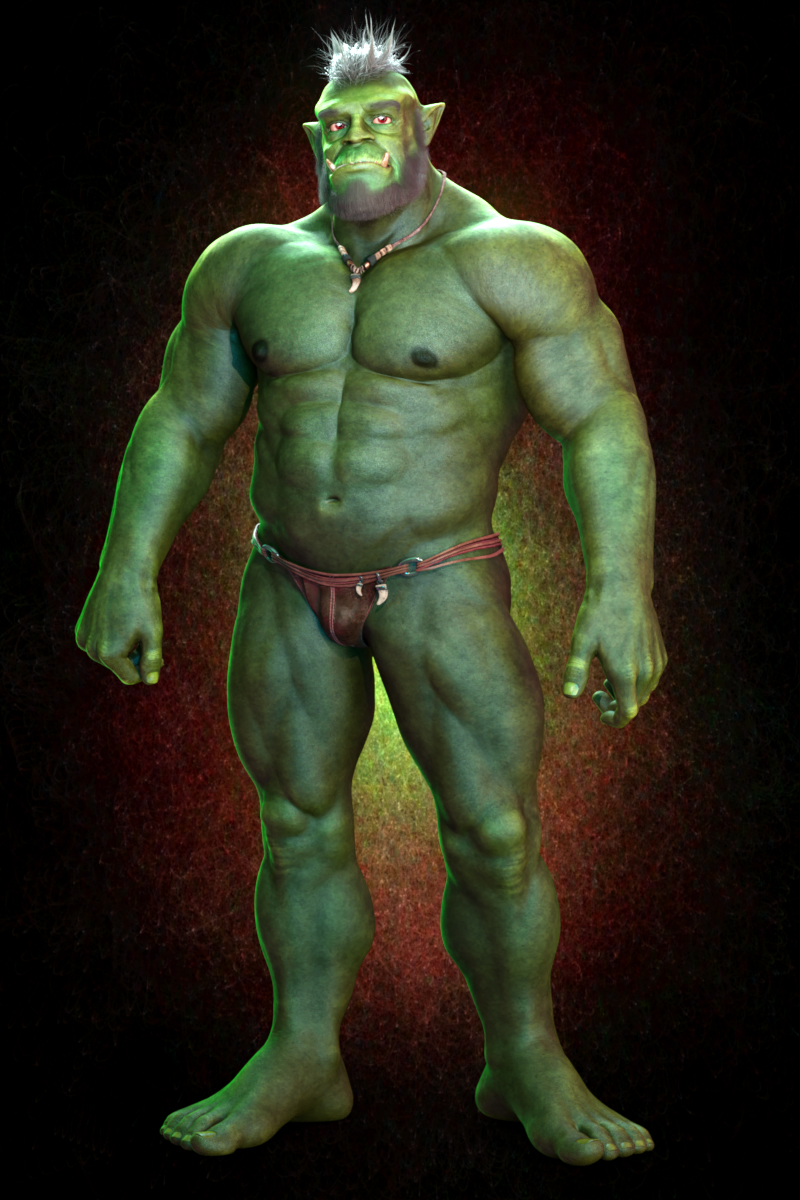
50% Cave Ogre, 40% Toon Hero (Head), 50% The Brute 8 (Body), 100% Dain 8 (Head), a few additional dials, plus Anagenessis 2 for the skin.
Unfortunately the Cave Ogre's eyes are messed up and they pose all wonky. It's not the result of a bungled transfer either, it's a problem on G3 as well. It means you have to pose each eye separately, and the JMC's around the eyes don't work quite right. Which is not the end of the world but it's still a bit of a bummer. I guess we could report it but afaik DAZ no longer fixes issues with items from the G3 era
 glass half-full, gift horse mouth, etc.Mirroring a joint corrective morph
TheCediz said:
For anyone having the same problem if it is a negative bend:
you drop the controller morph/pose in Propperty hierarchy > your JCM/MCM > controller > 1st stage. Then under the morph in 1st stage > Attribute > Scalar ; set the number to negative.
Slight necro just to say thanks, was tearing my hair out when trying to make corrective morphs for some clothing I made in marvelous. All the tutorials for JCM's just show how to do it on the positive axis and then move on lol.
Does anyone know how to export environments and props when using daz to cinema?peterpeter said:
Create a generic genesis figure, and attach the props and environment you want to transfer to the character. Export the character ;)
Things you wish you've known sooner! OMG IT WORKS!
Face Transfer - Saving the whole figureyes, work flow = 1. save your G8/8.1/9 figure as subset 2. use face transfer's provide tool to save your reference photo in face transfer folder 3. it's next to your "generate face" tap
How to handle morph rules for silent FBX export when morph names conflictWhat I'm wondering is how one sets the name for the CSV/Rule set for the "include morphs" part of silent FBX export when you want a specific morph and that morph's name is a prefix for several other morphs?
I have here a snippet that sets the export settings for the morphs by pulling a list of morph names from an array I've prepared:
oSettings.setBoolValue("IncludeMorphs", true);

var rules = morphNames.map(function(morphName) {
     return morphName + "\nExport";
}).join("\n");

oSettings.setStringValue("rules", rules);
That's not really the issue - just posting code here to be helpful. The issue is, for example, if I specifically want to export something like PBMNipples, how do I set a rule to only export that one morph and not also "PBMNipplesSize" and "PBMNipplesDepth", etc...
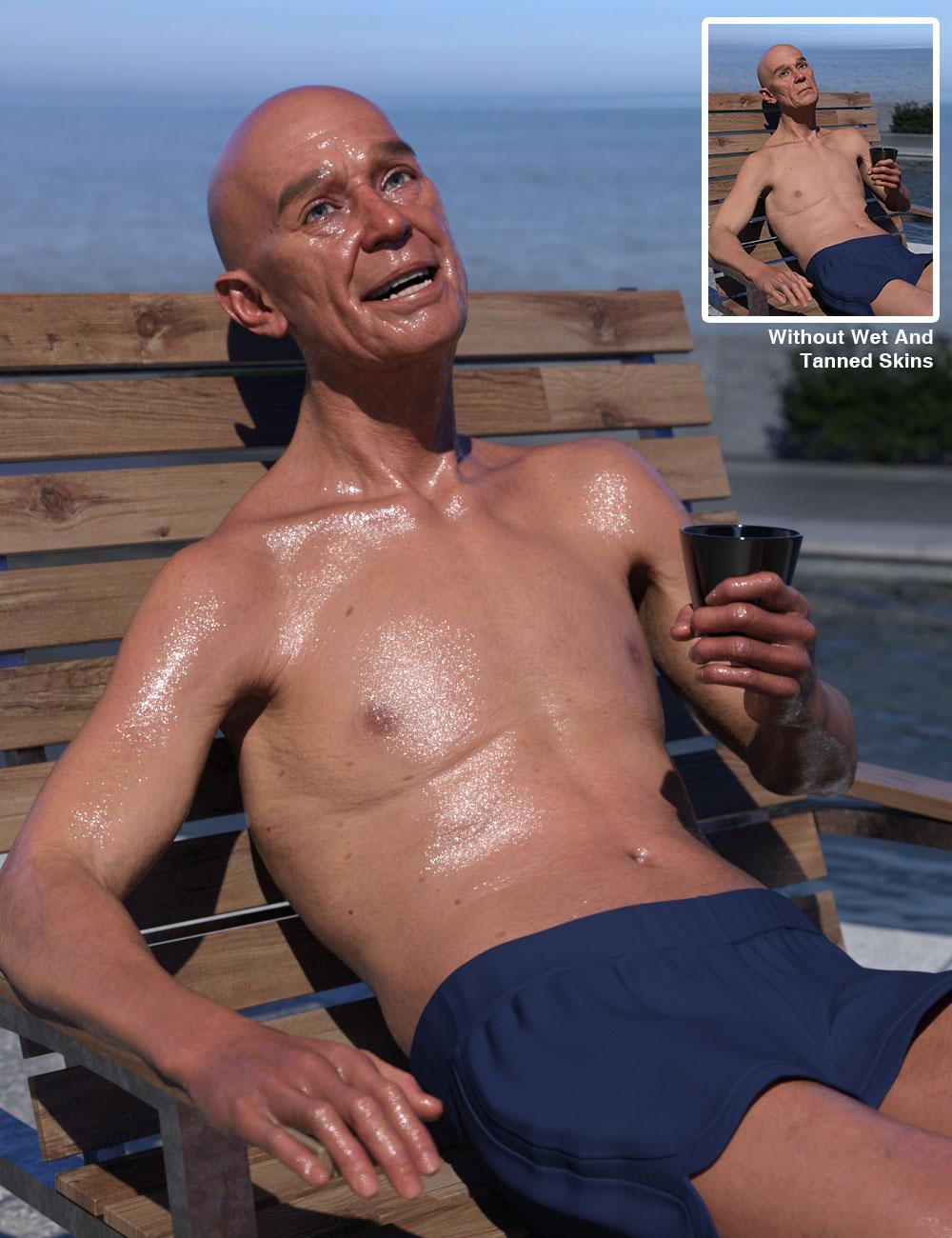
Released : "Wet And Tanned Skins For Genesis 9" (Commercial)Find it here : Wet And Tanned Skins For Genesis 9 | Daz 3D
Wet And Tanned Skins For Genesis 9 is finally coming! Based on the same, but improved, principle of the wet and tanned version for Genesis 8, with more bonuses and features. Control the tan, tan lines, and wet look of your figures like never before. Here is as a summary of what you will find:
- The ability to browse easily wide ranges of skin tones, from super pale to super tanned,
- The ability to adjust the wet looks from dry to super wet, with or without drops or drips,
- Based on a custom made shader relying on the PBRSkin shader,
- All the tans (+skin tones) and wet look effects can be made three ways, depending on what you prefer :
- via partial or full presets, or
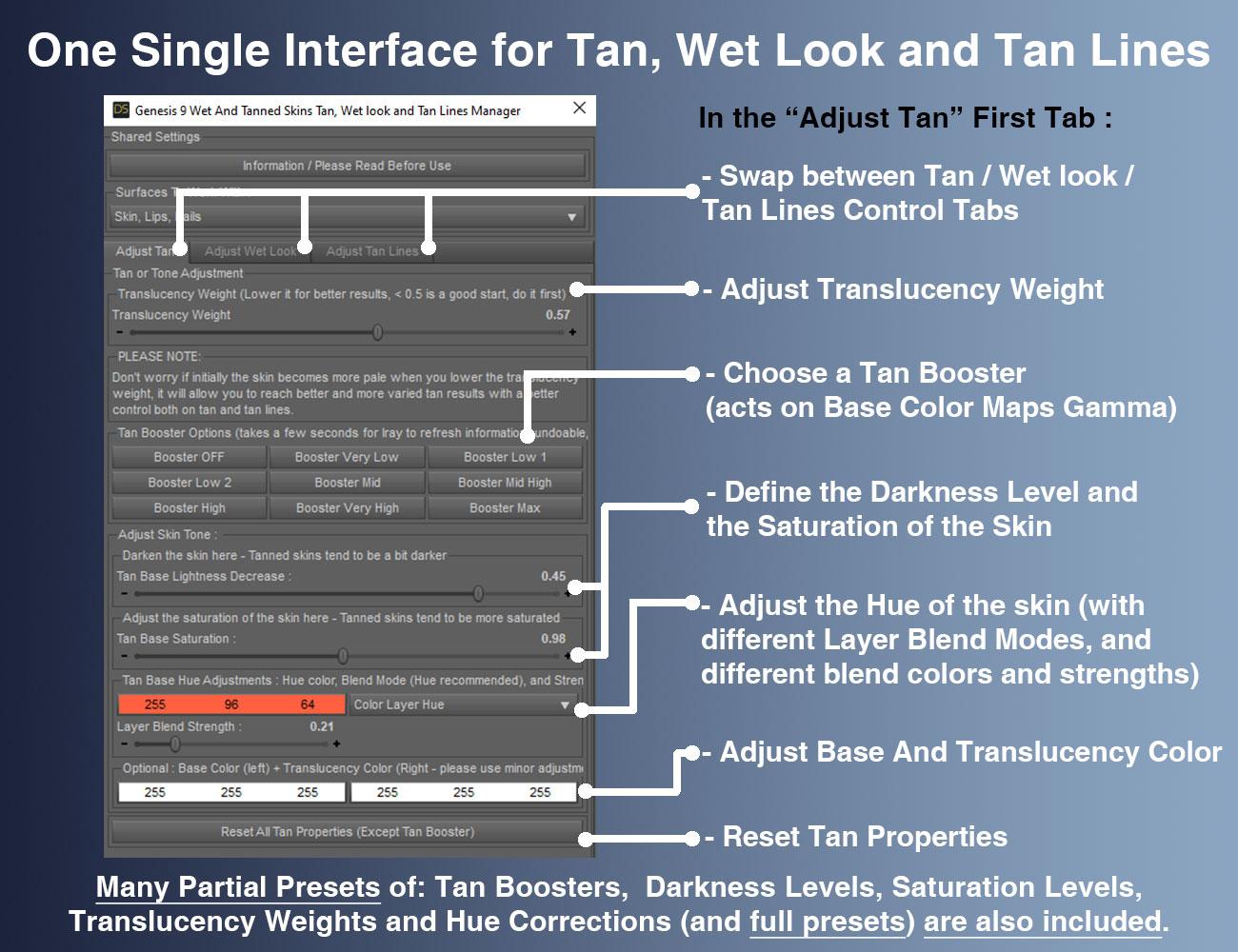
- via a simple global control interface,
- or via the surfaces editor (enter “tan” for tan or tan lines, and “wet” for the wet layers)
- with even more possibilities for the wet looks (partial presets with 2 wet layers and/or 2 other additional methods and/or Geometry Shells)
- All this so that you can really create your look using the method you prefer.
- Volume tan boosters were also included as bonuses
- Two wet layers and several wet maps are included for each layer, you can control amount and various other aspect of wet look to adjust it to your lights if necessary (maps and maps strengths, roughness, exponent, grazing and normal factors)
- Additional “Fast Wet” methods were included as bonuses (based on metallic flakes or on the dual lobe and normal properties).
- All the wet layers are now also available as Geometry shells if you prefer. Fast wet, Geometry Shells and Tan boosters can be used on even non converted figures.
- Tans and skin tones sub-tools include lightness, saturation and hue controls associated with tan boosters (Base and Volume) and translucency weights tools. They also include a huge amount of full presets to cover a wide range of initial figures, lighting, and desired tan.
- Many tan lines patterns are provided, both male based and female based even if you can apply female patterns to male and inversely, and once they are applied, you can adjust the tan lines saturation, lightness and hue.
- Tan lines can be applied directly or combined as overlays to build more complex tan lines patterns.
- Even if most the users will probably not try this, I mention here that the shader mixer shader is made “like in photoshop” were layers can be used above each other with different mix (saturation, hue, blend, lightness, color burn, etc..) allowing to create their own unique skin tones and effects via the Surfaces Editor.
- Genitalia support (shader transfer and correct maps application) is included by scripts (one male, one female) which will handle everything except the tan lines (but you have the tan lines presets for the Genitalia available for almost all tan lines patterns for the gender the tan lines were made.).
- Two documentations, one 2 pages for people in a hurry, and one “big” for the most curious.
Compatible with your Genesis 9 figures.
Feel free to use this post or PM for feedback, remarks or questions.
REMARKS :
- on the release day, I'm not 100% satisfied with the metadata where "main scripts" folder should have been first (instead you/I presently have the bonuses folders at the top of the folders/options, and they should be at the end). I may ask Daz for a metadata change later on. It does not impact how the product works, I'd just like them to be more straighforward for the users.
- There are tons of options, so don't get lost : main script first for conversion, then either global interface. If you prefer working with presets go for or partial or full tan (+ tan lines) presets, then wet partial presets (and/or geometry shells). Just read the names of the folders in the metadata - I personally prefer to work in the Content Library folder where the subfolders are exactly sorted the optimal way for the most comfortable development.
I won’t show all the images here because I there are too many, so only a few of them here. You can click on the images to enlarge. You can also click the image bottom of this post that I did not enlarge in this text.


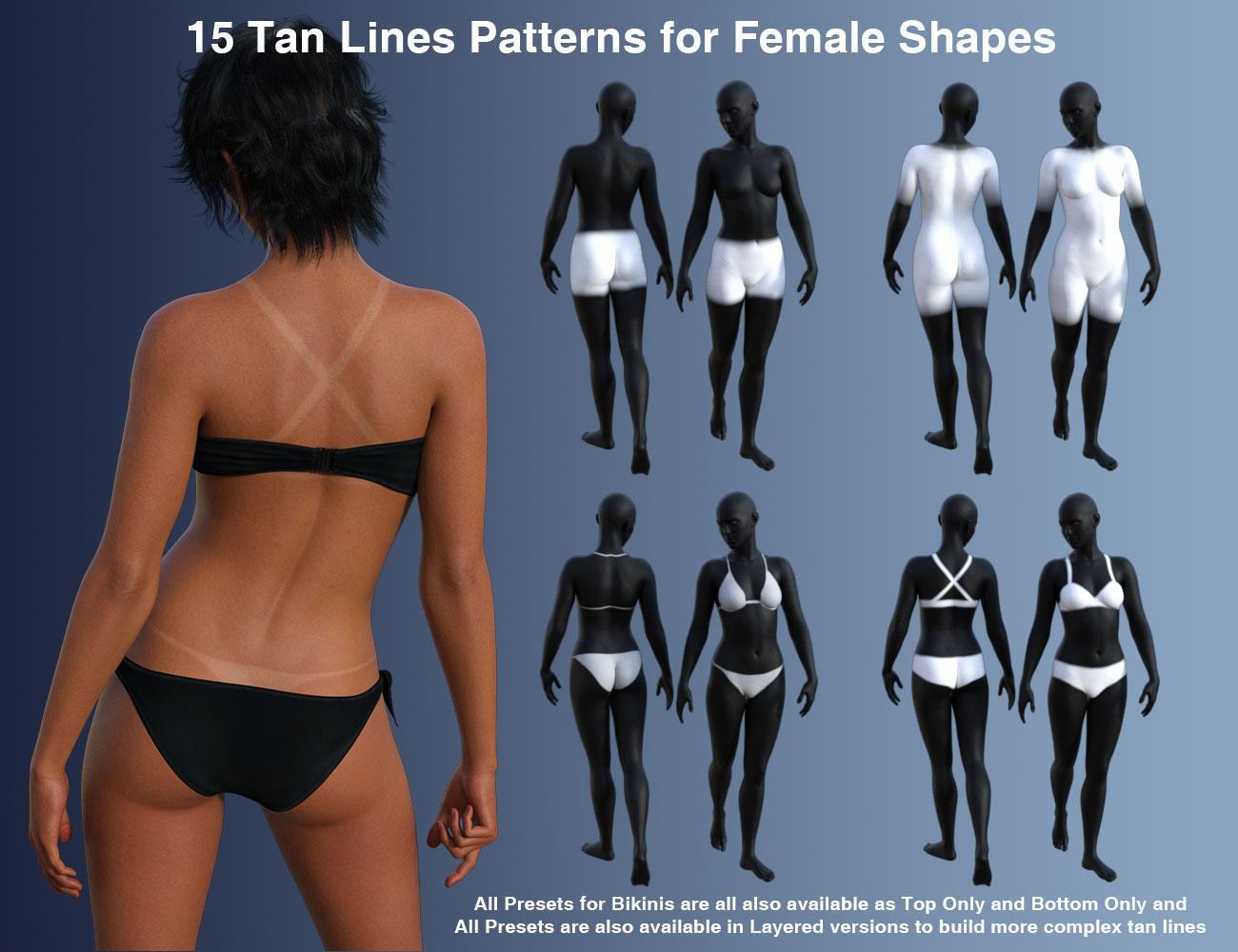
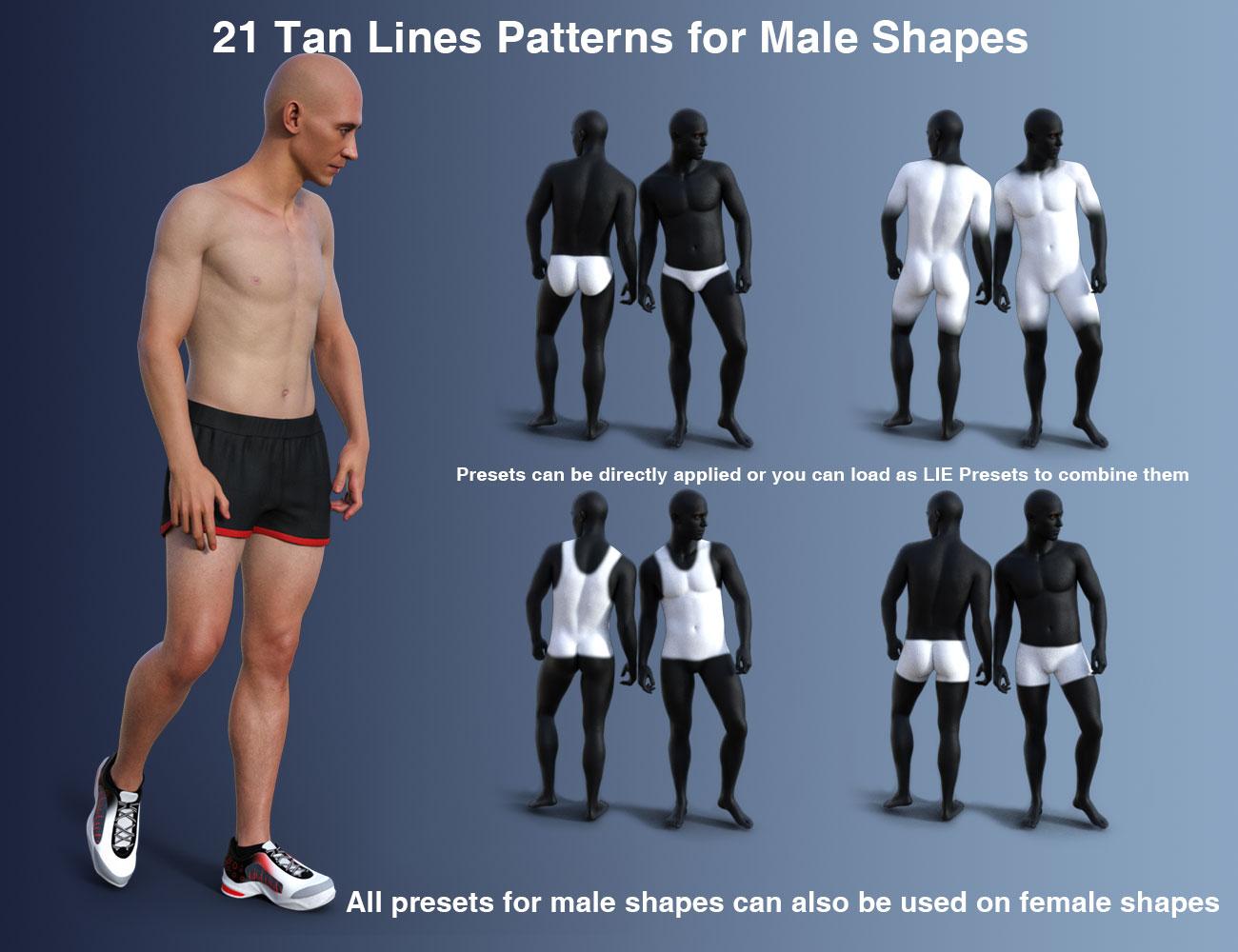
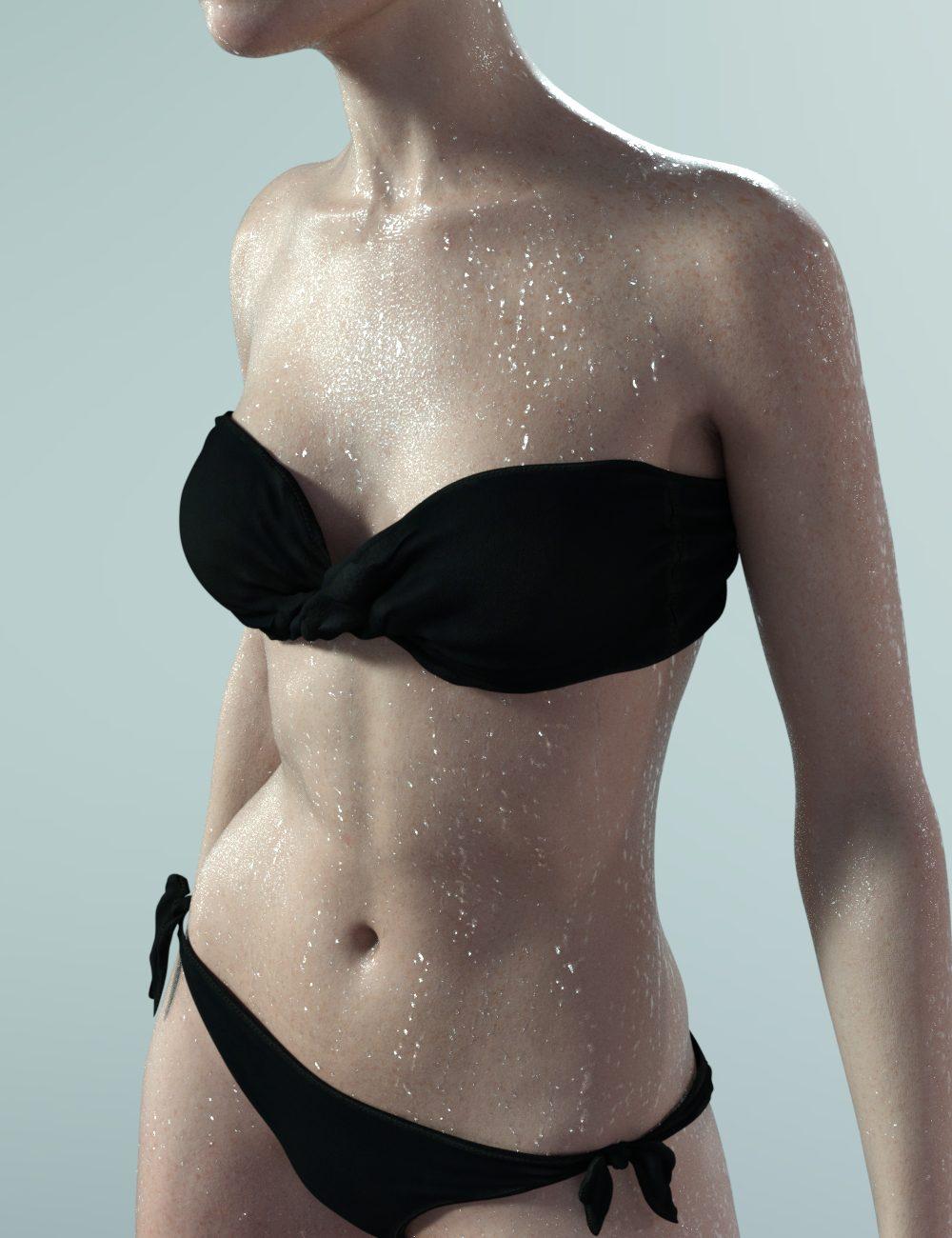

edit : additional mention : recommended to install with DIM (or manually).
Importing a Poser CR2 with geometry switching and morphs - all okay except morphsConcentrating on the PP2014 CR2s now since the Poser 11 ones are clearly a non starter
If I change the geometry of a book in the left (default geom hardback) stack to one of the alternate geometries then the morph is applied correctly (green arrow in the screenshot below).
If a change the geometry of a book in the right (alt geom paperback) stack to the default geometry then the morph isn't applied.Note: the gaps between books shouldn't be there - the morph that's applied to the book below fills it. Or at least it should.

The morh targets for the default geometry are saved in the CR2 itself, whereas the morph targets for the alternate geometries are in external OBJ files. That would probably explain this bit of the puzzle. If that's the case then I should be able to fix that bit by manually loading each morph target of the default geometry in Studio. Tedious in the extreme, but possible. Probably need to give it a try with a single morph target to check.
Is Strand-based hair taking a step backward in realism, lately? August 2024mrpenguin76 said:
The reason why I said direct Auto-Fit doesn't work and manual fixing will be needed was because we ever experimented a lot with this sort of "new hairs".... I have to say the way with which you Auto-Fitted the hair breaks a couple of things: original "Fit to" structure, ghost morphs on the hair's root node, and dForce modifier ~~ So if one does need a conversion... the better way should be always the old school way : Auto-Fit (or Re-rig with Transfer Utility) + Fix Base. With this hair, key steps :
1) Load hair into the Scene, just auto-fit Face Dummy and Summer Style Wavy Long Bob Hair root node to G8. (Re-rigging with Clone will also do. )
2) Load hair on G9, dial G8F Clone on G9. Export Cap and Strand nodes to OBJ files. Import OBJ files onto Cap and Strand nodes on G8 with MLP as "Fix Base" morphs. Then dial the morphs.
3) Save a Wearable Preset or a converted version Figure Asset. Done ~With this way, everything on G9 version's hair will be kept on the converted one on G8, and works well.
That is a MUCH better method, thanks for Tip, added a warning in my first post. I do tend to break stuff when I play around ;) It's how i learn to fix it.
Ah... oaky, got it !
Importing a Poser CR2 with geometry switching and morphs - all okay except morphsI'm in the final stages of making a stackable adjustable bookstack figure for Poser (tested and working in Poser 6, PP2014 and Poser 11). The Poser figure uses geometry switching, ERC, and morphs.
I'd like to do a version for DAZ Studio too, so I imported the latest figure into Studio (I have 4.20 installed - I don't use it very often), had a little play with it, saved it as a scene subset, closed and reopened Studio, and loaded the new scene subset. I did this a few times. In summary these are the results:
☑ Geometry switching works as intended
☑ ERC works as intended
☒ Morphs don't do anything regardless of which alternate geometry I select **More details on what happens with the morphs
When I import the CR2 the morphed geometries are correctly displayed as per the CR2 settings
With the freshly imported CR2 the morph dials work as intended and the displayed alternate geometry morphs correctly - but only for the alternate geometries. None of the morphs for the default geometry work.
I can switch the geometry of any of the books and that works. If I switch to an alternate geometry the morphs for that geometry all work. But if I switch to the default geometry none of the morphs work.When I save a scene subset from an imported CR2 and reload that scene subset the morphed geometries are correctly displayed.
But none of the morph dials for any geometries do anything to the displayed geometriesThe screenshot below gives a concrete example of this - on the left is an imported CR2, on the right is that saved as a Scene Subset and then reloaded
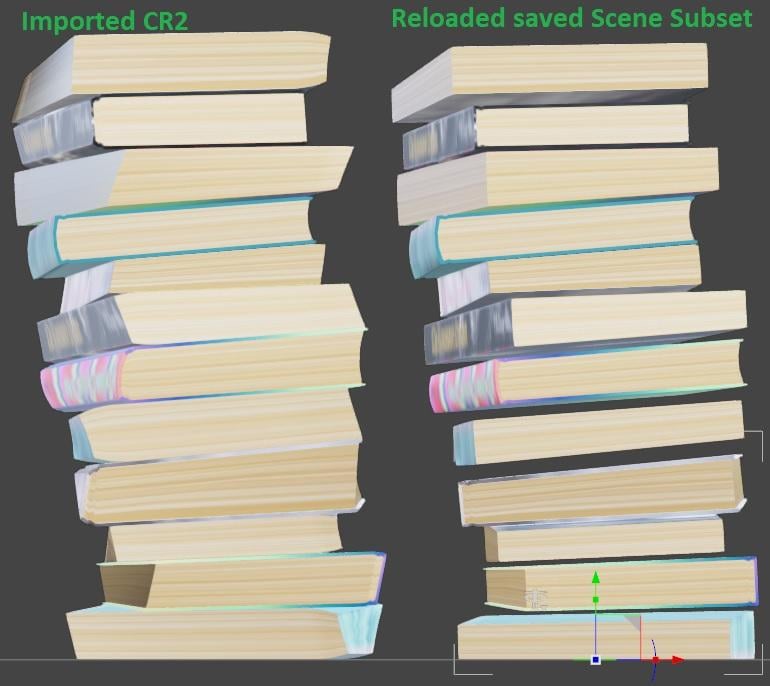
So can anybody explain what's happening here, and more to the point, how I can fix it.
Daz 3D is part of

Connect
DAZ Productions, Inc.
7533 S Center View Ct #4664
West Jordan, UT 84084Licensing Agreement | Terms of Service | Privacy Policy | EULA
© 2026 Daz Productions Inc. All Rights Reserved.