-
Easy FilaToon [Commercial]
Hair is tricky for sure. Your idea of just getting rid of the trans maps worked well with the hair styles in your render. Some hair just does better than others with Filament and FilaToon.dsum55 said:Daz Studio BETA - version 4.24.0.4!The new filament toon rendering system is great. Love what Daz has done here with this. It's breathed new life into my entire library no matter the age of the asset.
In fact the older the asset the better it seems to work.
I'm now spending hours playing with toons and making scenes.
Here's my problem though.
If I work with the filament preview running for long periods of time or I, for example, decide to delete everything in my scene and add new different assets Studio consumes all available GPU ram and then becomes unusable.
You'll notice this when you make a change and things start to disappear from the scene then suddenly Studio stops responding or stutters when moving or changing things.
So far the only way I've found to solve this is to restart it. Saving the scene or sub-set before restarting isn't always successful. Sometimes the scene/subset loads back in with the same corruption. Things like characters loading but are invisible things like that.
We need a better way to manage VRAM/RAM usage or a way to manually clear/purge either or both.
Easy FilaToon [Commercial]3Diva said:
barbult said:
@3Diva I'm confused about the Cameras section of Easy FilaToon. Each one loads a Distant Light with it, but Filament can only use one Distant Light. I think the first one loaded is the one used, but I'm not sure about that. The LOAD THIS FIRST already loads a distant light, so I don't understand how the additional 4 cameras with lights are intended to be used. Are we supposed to go to the light loaded by LOAD THIS FIRST and turn that off and then load one of the cameras? If we load a second camera, we are supposed to delete the previous one and its light??? What is the difference between these camera and light pairs?
I did go over that in the tutorial. The tutorial states that the first distant light in the scene tab is the one that is "seen" by the render engine. You can do whatever you want with the cameras and lights. If you don't like the one that comes with the "load this first" you can load a different one from the camera list. You can hide the other distant light and camera or delete it. The cameras and lights are slightly different - they're just different options. People can do what they want with the options or ignore them. It's up to the user what they want to do.
Thanks, and sorry to bother you about what you already explained. I need to watch the tutorial again, I guess. I watched the videos when the product was first released, but I just now got to use it. Time is not the friend of memory!
 Easy FilaToon [Commercial]
barbult said:
@3Diva I'm confused about the Cameras section of Easy FilaToon. Each one loads a Distant Light with it, but Filament can only use one Distant Light. I think the first one loaded is the one used, but I'm not sure about that. The LOAD THIS FIRST already loads a distant light, so I don't understand how the additional 4 cameras with lights are intended to be used. Are we supposed to go to the light loaded by LOAD THIS FIRST and turn that off and then load one of the cameras? If we load a second camera, we are supposed to delete the previous one and its light??? What is the difference between these camera and light pairs?
I did go over that in the tutorial. The tutorial states that the first distant light in the scene tab is the one that is "seen" by the render engine. You can do whatever you want with the cameras and lights. If you don't like the one that comes with the "load this first" you can load a different one from the camera list. You can hide the other distant light and camera or delete it. The cameras and lights are slightly different - they're just different options. People can do what they want with the options or ignore them. It's up to the user what they want to do.
Easy FilaToon [Commercial]@3Diva I'm confused about the Cameras section of Easy FilaToon. Each one loads a Distant Light with it, but Filament can only use one Distant Light. I think the first one loaded is the one used, but I'm not sure about that. The LOAD THIS FIRST already loads a distant light, so I don't understand how the additional 4 cameras with lights are intended to be used. Are we supposed to go to the light loaded by LOAD THIS FIRST and turn that off and then load one of the cameras? If we load a second camera, we are supposed to delete the previous one and its light??? What is the difference between these camera and light pairs?
Daz Studio BETA - version 4.24.0.4!Imago said:
It worked fine in previuos DAZ Studio versions?
I don't know, I've only just started using Filament since DS 4.23.x. I think I might have dabbled a bit with Filament before, but I never paid attention to what worked or didn't. I didn't take it seriously until now. But now all my focus is on using Filament and animation.
Daz Studio BETA - version 4.24.0.4!FrankTheTank said:
Not sure where I should report this, but is Daz aware of this emissive problem in Filament? The problem where you need to refresh all the objects with emissive surfaces for them to show up corrrectly?
For example, if you have a scene set up with emissive surfaces, they will show up correctly the first time you setup the scene, but as soon as you save the scene, close the scene, and reopen it, the emissive surfaces will no longer show up correctly. However if you simply click on each surface again and make any kind of change to it, that surface will show up correctly. You have to do this for all emissive surfaces anytime you reopen a scene in filament.
It seems to force a "refresh" or something. I've figured out how to fix it in bulk by using the V3D Iray lIght Manager Pro script, but it still needs to be fixed. The quickest way is to simply toggle on/off on the two-sided emissive property. But any change to the surface illumination settings will fix the problem so it has nothing to do with two sided emissives.
It could have something to do with bloom, the lights in the first image you can see that they are on, but very weak and no bloom, as soon as they are "refreshed" the lights are much stronger and bloom is active.
It worked fine in previuos DAZ Studio versions?
Daz Studio BETA - version 4.24.0.4!Not sure where I should report this, but is Daz aware of this emissive problem in Filament? The problem where you need to refresh all the objects with emissive surfaces for them to show up corrrectly?
For example, if you have a scene set up with emissive surfaces, they will show up correctly the first time you setup the scene, but as soon as you save the scene, close the scene, and reopen it, the emissive surfaces will no longer show up correctly. However if you simply click on each surface again and make any kind of change to it, that surface will show up correctly. You have to do this for all emissive surfaces anytime you reopen a scene in filament.
It seems to force a "refresh" or something. I've figured out how to fix it in bulk by using the V3D Iray lIght Manager Pro script, but it still needs to be fixed. The quickest way is to simply toggle on/off on the two-sided emissive property. But any change to the surface illumination settings will fix the problem so it has nothing to do with two sided emissives.
It could have something to do with bloom, the lights in the first image you can see that they are on, but very weak and no bloom, as soon as they are "refreshed" the lights are much stronger and bloom is active.
Why does the viewport go black when I turn on a light?Hello.
For a few weeks now, when you add a light, of any type, the viewport goes completely black.
This happens in texture shades mode. Obviously, it doesn't happen in wire, Iray, or filament modes.
In the render editor, I have dome and scene mode selected.Do you know what I have set up wrong?
Thanks for reading.
Genesis 9 Anime model loads all black – new user needing help!Richard Haseltine said:
Unfortuantely, if you are using a Mac, as GhostofMacbeth says, then at the moment you don't - due to a restriction of the Mac version of Filament it will not work in DS 4.x.x.x Mac, you will have to wait for the next majore version of Daz Studio (for which there is no ETA).
Thank you so much
Genesis 9 Anime model loads all black – new user needing help!Unfortuantely, if you are using a Mac, as GhostofMacbeth says, then at the moment you don't - due to a restriction of the Mac version of Filament it will not work in DS 4.x.x.x Mac, you will have to wait for the next majore version of Daz Studio (for which there is no ETA).
Genesis 9 Anime model loads all black – new user needing help!Richard Haseltine said:
Which version of Daz Studio is that? You need the Filament drawstyle, and the new Filatoon shader (from the current version of the Default Resources package).
Thank you for yourrepose how do i get filament and the new filla toon thanks
FilaToon / Cell shaded rendering with FilamentImago said:
I have a quick question: Someone managed to have fully working transmaps in Filament but I can't find any new clues about it. It all started with a new product which had billboard grass with transmaps.
Anyone knows?
Transmaps with the FilaToon shader has been fixed for a while. Do you have the lastest version of Daz Studio installed? Make sure you're using the Filatoon Shader. Make sure the transmap is in place.
If you have Easy FilaToon the "Hair Prep" Shader Preset and the "Environment Base" Shader Preset both preserve the transparency maps/ cutout opacity maps. I believe V3D's Filatoon product also can preserve trans maps (at least that's what I read, I don't own the product). You can, however, manually reapply the transmaps after using the Filatoon shaders that come with Daz Studio, if you prefer to do it by hand.
The key is to adjust the PBR Masked Threshold. Most trans-mapped hairs and foliage seem to look best at a very low PBR Masked Threshold value (at least in my experiments). Every trans map is slightly different, though, so you'll want to adjust that setting accordingly.

Before and after:

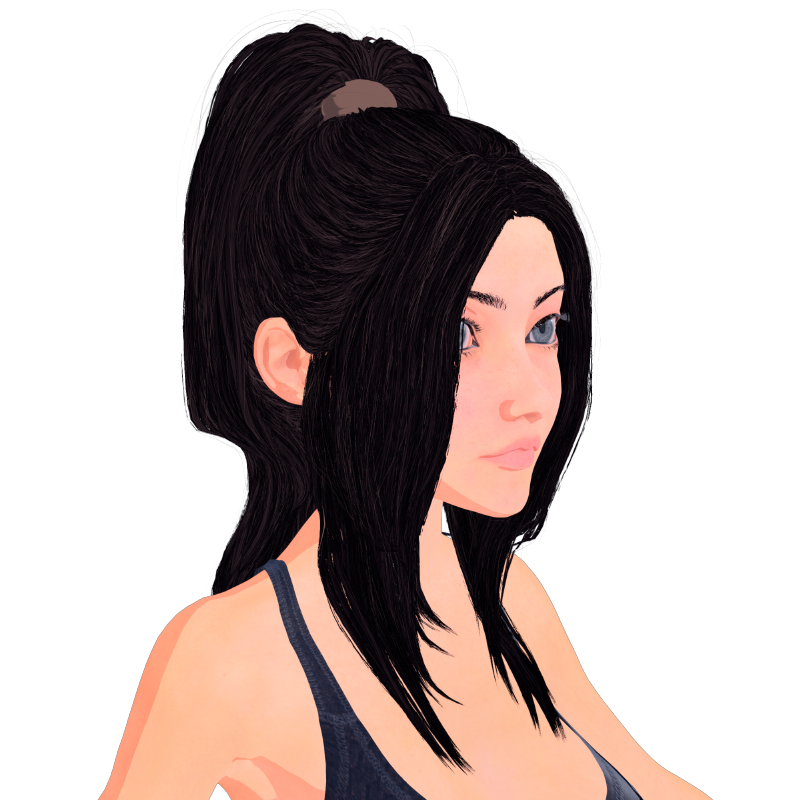
Iray (etc.) hair that works well in FilamentI've been experimenting with Filament and using the wonderful FilaToon Converter tool by V3Digitimes to convert objects and scenes to filament and I've noticed that, for these purposes, not all objects are created equal. Some hair objects especially turn into an absolute mess when converted, usually because they have a "skullcap" and are very very strandy, resulting in the hair becoming a black Afro and/or having a black scalp. There's no discernible pattern to which ones will work, though - there are ancient and recent hair models that convert nicely and ones that convert terribly.
Top ones to avoid seem to include Andrew Flip Hair for Gen2 male (just becomes a black Afro if you size up the outline for a wider angle shot) and Ashley hair for Gen3 female (somehow unable to host an outline) and the Hair Set for Gen8 males, which universally becomes just blackness because of the closely packed strands. Lani hair for Gen3 female also seems to be mad after conversion, although its textures convert nicely if you turn off outlines.
In the middle ground, DeRoca hair for Victoria 4 etc. is a Poser asset, which probably explains why its outlines take on the texture you assign the hair and become opaque so correcting the outline material just turns the whole thing black. However, if you're careful to have your texturing done before you apply the outline, it looks gorgeous. Similarly, Carla hair for Gen8 female accepts outlines and doesn't go weird if re-textured, but has only basic edge-of-the-model outlines rather than any sort of detailing, so you'd need to apply detailing by means of custom textures. Charm Hair and Dream Hair for Gen2 female (very similar models) are the same, but also have very very pale highlights round the edges that may or may not work with your aesthetic. Armani Hair from Gen8 Starter Essentials accepts textures fine, but outlines are hit or miss depending on your angle of view - some angles make it look like Sonic the Hedgehog while others have basically no outline - and the Toulouse hair is similar. (The earlier versions are similarly dodgy on outlines but otherwise seem fine) The dForce Starter Essentials dForce Mohawk Hair accepts outlines, but they appear as grey (and make it really hard to see in viewport as they obscure the strands and are the same colour as the background) and render exclusively as the base colour selected in their Surfaces parameter - with random grey areas where the outlines just obscure the hair. Filippa Hair for Gen2 female inherits strange outlines and has the Charm/Dream weird highlights, but accepts new textures fine and looks alright as long as the outlines are small.
On the other hand, the Hall of Fame for hair that accepts outlines wonderfully, translates textures in a pleasing format and accepts new textures without incident post conversion:
- Bonnie Hair for Gen8 female
- Eirgrid Hair for Gen9
- Elegance Hair for Gen2 female (surprisingly similar to Charm and Dream, but the outlines work fine and the highlights aren't too high)
There are bound to be many more, I'm curious to know other people's experiences with this and which products you'd recommend for use in Filament renders.
How do I assign a surface/face to a node so I can hide just that surface in the scene pane? (solved)I've been using FIlament a lot lately, and one of the issues is that things like eyeglasses don't always look right due to the opacity issues that seem to be inherent to filament. Depending on lighting angle they might look like sunglasses one second and clear the next depending on movement of the character in the lights. Even though they are clear lenses and even if the opacity is set to 0, the lenses will still cast a shadow on the face of the character.
I can obviously delete the geometry for the lenses with geometry editor, which is what I have been doing. But I was wondering if there is a better way. If I can assign just the lense faces to a separate node, then I could just click the hide icon in the scene pane. But I can't find any tutorial how to do this. I'm guessing it needs to be done in Hexagon as I can't find any way to do it with geometry editor. (When I tried with geometry editor, what it actually did was assign all the surfaces of the eyeglasses to just one node, even though I had only selected the lenses)
Also, I know I can assign faces to "selection sets" in geometry editor, but those are shown again as soon as the scene is reopened so its not really a solution. I want to be able to hide the surfaces in the scene, so that when I save a scene file with lenses hidden, they stay hidden. And when I want to show them again, to behave like "sunglasses" then I can simply unhide them, by clicking on the head node.
Genesis 9 Anime model loads all black – new user needing help!Which version of Daz Studio is that? You need the Filament drawstyle, and the new Filatoon shader (from the current version of the Default Resources package).
The "Animators Assemble!" thread for Daz animation WIPs, clips, and tipsFilament is the best thing to happen to Daz in 10 years.
Easy FilaToon [Commercial]miladyderyni_173d399f47 said:
3Diva said:
miladyderyni_173d399f47 said:
I just got this last night & can't wait to try it out!
Thank you for supporting my work, it's much appreciated! I look forward to seeing what you do it with it, if you decide to share some renders with us! :)
First try, converting a fantasy character I did a couple years ago. This is the G3M Centaurs plus https://www.daz3d.com/krampus-demon-for-genesis-3-male. His weapon is some random polearm from my runtime. Environment is from https://www.daz3d.com/warrior-couple-and-landscape--genesis-8. I think it turned out fairly well. Since I was using some pre-Iray models, I ran https://www.daz3d.com/rssy-3delight-to-iray-converter* before using Easy Filatoon. I used the Hair shaders on the centaur, clothing , & hair; Environment for the Landscape & weapon. It was quite fun. I will probably do some more work on this one but wanted to show off a "first draft."
By the way, I don't think it took more than 1 minute for Easy Filatoon's magic to work on my vintage G3 centaur.
*Highly recommend this product if you want to use older items.\
Thank you for sharing your work with us! And I agree, the speed of Filament rendering is really good! One of my favorite parts of working with Filament and Filatoon is that you can try different settings and see in real time exactly how it's going to look when rendered, which is very cool!
FilaToon / Cell shaded rendering with FilamentImago said:
I have a quick question: Someone managed to have fully working transmaps in Filament but I can't find any new clues about it. It all started with a new product which had billboard grass with transmaps.
Anyone knows?
Once you apply the transmap, play with the PBR Masked Threshold setting.
FilaToon / Cell shaded rendering with FilamentI have a quick question: Someone managed to have fully working transmaps in Filament but I can't find any new clues about it. It all started with a new product which had billboard grass with transmaps.
Anyone knows?
Daz 3D is part of

Connect
DAZ Productions, Inc.
7533 S Center View Ct #4664
West Jordan, UT 84084Licensing Agreement | Terms of Service | Privacy Policy | EULA
© 2026 Daz Productions Inc. All Rights Reserved.