-
all my genesis models loads with a bad morphs (body and face)
Hello,
I will try my best to explain my problem :
Due to a heavy hard drive crash, I had to reinstall my DS, (last version, via DIM), on a brand new hard drive, copied my libraries in the right folder, and it launches perfectly, (just a bit slower than before but, this not the problem), I have to say that everything worked fine on the previous install, but now,everytime I load a genesis model, (at least a genesis 8 model, even the base genesis 8.0 victoria, I haven't tried genesis 3 yet) it comes with a general morph (body and face) and the model is just litterally awfull, no matter witch genesis 8 model I load even a new project from scratch, it has the same morph...
is there a way to remove this damn morph, or at least reset the base figure to recover the right genesis 8 model at loading ? (please don't tell me to reinstall, I have a slow internet connection and it took me days to finish this install...please...please...please)
any ideas or help will be appreciated, thanks in advance for your help.
I'll post a picture of the bad morph tonight if you want.
Best animation software to work with Daz
There IS a way to use Gen 7 characters, but it isn't terribly easy... https://tinyurl.com/3pa6zr4yber_pc7_9b5e08e686 said:tsarist said:
I use Carrara. It can handle Daz characters and props natively (Vicky & Mike 1-6). It can also handle Poser people (Poser 3-7). Props, buildings, cars, etc work fine in Carrara. This includes many new buildings & props.It has a powerful animation system built in and you can also use aniblocks.It has a batch render function that allows you to set up a series of renders at one time. Set it & forget it.I have been using it for years and will keep using it. It's available here in the Daz marketplace.Thanks I'll also do some tests in Carrara, but you mean you can only use natively the older versions of victoria and michael but not 7 and 8? that's a shame
Best animation software to work with Daztsarist said:
I use Carrara. It can handle Daz characters and props natively (Vicky & Mike 1-6). It can also handle Poser people (Poser 3-7). Props, buildings, cars, etc work fine in Carrara. This includes many new buildings & props.It has a powerful animation system built in and you can also use aniblocks.It has a batch render function that allows you to set up a series of renders at one time. Set it & forget it.I have been using it for years and will keep using it. It's available here in the Daz marketplace.Thanks I'll also do some tests in Carrara, but you mean you can only use natively the older versions of victoria and michael but not 7 and 8? that's a shame
Render problem with FWSA ElizabethI'm having trouble making renders with this particular Genesis 8 female character: https://www.daz3d.com/fwsa-elizabeth-hd-for-victoria-8
Here's a sample render of her.
As you can see, she looks mostly fine - except for some pixelated bits on her face, hands, toes, and a few fireflies on her eye. I can normally fix such problems, by increasing the Nominal Luminance. However, when I try doing that with this particular character, she ends up looking like this. (This is with the Nominal Luminance set to 2.)
And I know the problem isn't on my end, because no other character ever does that, when I render them - no matter what I set the Nominal Luminance to.
List of new characters with PBR Shader skin...fastbike1 said:
Did you not read anything about the Genesis 8.1 models? The PBR shaders for Genesis 8.1 are based on different UVs and shaders than the Iray Uber based shaders of Genesis 8. I don't believe there is any implication vis s vis the previous Iray shaders other than these have a different UV and base shader. PRetty clearly just to differentiate for the previous generation.
margrave said:
All Iray skin shaders are PBR materials.
Physically-based rendering just means (in its simplest form) that a material has some combination of roughness/metallic/specular/normal/bump maps to determine how much light its surface should reflect.
Daz has released an updated skin shader, but it isn't any more "PBR" than the Iray skins released five years ago.
Please disabuse yourself of Daz's marketing hype.
Iray is a physically-based render engine, and all MDL shaders are, by definition, PBR shaders. They should have come up with a proper name to distinguish it. It's as if they had called Victoria 8.1 "Victoria 3D".
The My Bucket's Got a Hole In It Complaint threadI've had a break from Daz. But now I've gone back to work on my main character, I swear she's starting to look like Victoria Beckham/Posh Spice. Which for me, isn't a problem. She's still my favourite Spice Girl. I just don't want to end up being sued by her because of the likeness. ^^'
An asthma nurse put me on steroid tablets. My head feels so messed up. I hope I'm not going to have a night like last night. Happy one minute, then bawling my eyes out the next... And that's on four tablets in one day. She must be kind of insane if she thinks I'm going to take eight. My Mum seems to think the nurse is trying to make up for the fact that I have severe asthma, and I've had no help since the pandemic began.
Urgh! Here comes another headache...
 Brooke 8.1... Yes, finally ! ! !
Regardless of the random assortment of stuff in her bundles,I think she is a fantastic mode. I was a bit suprised when Victoria 8. I came out,and she was only 5' 8. Next Cleopatra came out and she was 5’ 4",and White Priestess is only 5' 7"! Now with the 5' 6" Brooke, it looks like we may finally be done with the endless stream of 6' supermodels!
On a side note, I am in love with Brooke's "imperfect" body shape。
Keep up the good work Daz. As long as we keep getting more diverse body shapes for the core Genesis 8.1 models, they will all be day one purchases for me.
The Newest Evolution Is Here: The Daz Season Pass!Cybersox said:
CHWT said:
plot twist: the 2nd figure blows every previous figure out of the water. Not being sarcastic. That really might happen if DAZ really takes customers comment seriously this time.
If they had something like that, which seems highly unlikely, given that the very nature of the Season Pass concept is based on the idea of selling a larger amount of unknown sell quantity over a proven amount of proven quality.
That said, I note that DAZ did just jack up the extra SP discount on the second Brooke bundle from 35% to 50% off... which only has six items versus the first one's seven.
They basically turned this Brooke set into two starter bundles for more than the old starter bundles cost, and with no discounts on the bundles for buying the add-ons.
The two August 8.1 bundles were both old starter size for $74.95. (Ended up paying around $40 for both.)
The Victoria 8.1 University Bundle was $149.95 with the figure and 11 items. (under $50)
The Victoria 8.1 Loving Life Bundle was 139.95 with the figure and 8 items. (under $40)
Both of which I got discounts on the bundles by buying add-ons.
The Swimsuit Fashion Bundle by The Diigitals and LavieByCk for $135.95 actually had two figures – and good discounts for already having some of the 13 pieces. (under $40)
The Michael 8.1 cost more and didn’t offer what I was interested in, so I can’t say what savings they may have offered.I’m not quite sure what their game plan is with Brooke and the next four, but as played so far I’ll have to pass on them for now.
Brooke 8.1... Yes, finally ! ! !outrider42 said:
This sure seems like a very strange way to start off the big Daz season pass. LOL.
I like the concept of variety of body shapes, but not so much the execution. The biggest problem is the skin looks so very bad on her in many of her shots. The pic of Brook with BJ Naomi skin should be embarrassing to every single person in the building (or working remotely) for Daz. Just imagine if Brook looked something like that, she would sell so much better. People would be celebrating their season passes. You guys need to figure this out. Victoria 8.1 had OK skin and appeared to signal a tiny step forward in that regard. But after that we have had cartoonish skins and sand paper. I mean, I can look at my own skin, the skin of a man, and see that my skin is FAR more smooth than poor Brook's. Why is Brook's skin so bumpy? I know this sounds harsh, but for crying out loud this is really getting bad. Stop it. Instead of trying to pump out content for the sake of content you seriously need to focus on the quality of the content. This is getting out of hand.
Daz core characters should be setting the standard for what Daz Genesis can be. If you guys want me to buy core characters, you need to make good core characters. It really should not be that hard. I don't know if it is time restraints pushing people to get these out the door or what, but the end result is not good. Core characters are becoming a joke.
Quality products will sell. I believe quality products will sell better than marketing a season pass for less than stellar products. Is such an idea crazy talk?
Is what I am saying wrong? Am I wrong in this assessment? While some people seem to like Brook, there are a lot of comments regarding some element of questionable quality in this bundle, even from people that like her.
And that doesn't even touch the completely wack backstory on this character and how her bundle makes no logical sense whatsoever, or the pricing of everything.
I was quite impressed with Brook but now that you have pointed this out I have gone back and looked at all of the promo pics and, yes, that skin is a moon map after an asteroid shower. Nevertheless, I commonly switch between skins on characters so I'm sure people will be repeating the Naomi switch (and other very nice skins available). I rarely buy new products, even with the New discount, because I'm happy to wait for later sales and bigger discounts but Brook will join my select band of characters at some point.
Brooke 8.1... Yes, finally ! ! !This sure seems like a very strange way to start off the big Daz season pass. LOL.
I like the concept of variety of body shapes, but not so much the execution. The biggest problem is the skin looks so very bad on her in many of her shots. The pic of Brook with BJ Naomi skin should be embarrassing to every single person in the building (or working remotely) for Daz. Just imagine if Brook looked something like that, she would sell so much better. People would be celebrating their season passes. You guys need to figure this out. Victoria 8.1 had OK skin and appeared to signal a tiny step forward in that regard. But after that we have had cartoonish skins and sand paper. I mean, I can look at my own skin, the skin of a man, and see that my skin is FAR more smooth than poor Brook's. Why is Brook's skin so bumpy? I know this sounds harsh, but for crying out loud this is really getting bad. Stop it. Instead of trying to pump out content for the sake of content you seriously need to focus on the quality of the content. This is getting out of hand.
Daz core characters should be setting the standard for what Daz Genesis can be. If you guys want me to buy core characters, you need to make good core characters. It really should not be that hard. I don't know if it is time restraints pushing people to get these out the door or what, but the end result is not good. Core characters are becoming a joke.
Quality products will sell. I believe quality products will sell better than marketing a season pass for less than stellar products. Is such an idea crazy talk?
Is what I am saying wrong? Am I wrong in this assessment? While some people seem to like Brook, there are a lot of comments regarding some element of questionable quality in this bundle, even from people that like her.
And that doesn't even touch the completely wack backstory on this character and how her bundle makes no logical sense whatsoever, or the pricing of everything.
Legs and torso not matching ( Cato G8M )Sorry for the late reply, this forum might help if you still haven't solved this https://www.daz3d.com/forums/discussion/230141/victoria-7-texture-seams-showing-between-the-legs-and-torso
List of new characters with PBR Shader skin...JeffG
Do you mind updating the OP with all the characters in the thread that are confirmed to be PBR 8.1s?
Yes, I know it additional work, but it makes for a better thread.Genesis 8.1 Females using the PBRSkin (Updated, New Skin, PooBer) shader:
Genesis 8.1 Males using the PBRSkin (Updated, New Skin, PooBer) shader:
PS
Confirm on VYK Markie ?Skin tone behaving weirdly.Something very wierd is happening to my renders, specifically one character of my render.
I'm trying to develop a "prom photo". (See second attachment). To do this, I created each character individually, until I got their look correct.
Then, I brought them together for a group photo. As you can see there's something weird about the girl in the red dress. When I created her character, everything rendered fine. (See first photo).
But when I added her to the group for the group render the weirdness happened. She's a Victoria 8 character. All are Gen 8 characters.
I thought there was something corrupt about the character, so I re-created her. Still the same ultimate result.
I don't even know what's happening.
Any help would be appreciated.....
Thanks.
Brooke 8.1... Yes, finally ! ! !certaintree38 said:
blaz said:
It seems I'm the only one that likes the textures.
Here's Brooke reporting undercover
Her skin looks great there! I wonder if anyone can get it to look that good in low light?
I actually really like her body, and I loved the promos of her in a slinky dress and belly dancing outfit. Those outfits are sexy and flatter her. But the dress in the bundle doesn't flatter her so much. At least her BF, Zak, is pretty good-looking. The NY tenements seem kinda redundant. We already have tenements like that in the store, by the same PA. But W/E.
The marketing does seem all over the place. On the Season Pass page, where they give the details of the contest, it says she is in the business industry. On her product page, she is described as being a News Anchor. And the marketing for her bundle calls her "Famous for being famous." When someone is in the News industry, you might call it communications, but I've never heard it referred to as the "business industry." Those are two separate things. Business people run businesses. People in communications write or talk for the masses. Additionally, when someone is "Famous for being famous," you are saying that they have no actual talents or merits. It's a term used on reality television stars like The Real Housewives, or the Kardashians, or The Girls Next Door. I can see how they might have confused "Being famous" for "Being Famous for Being Famous," but if the woman is famous for being a News Anchor, or a savvy business woman, then she's not "famous for being famous."
If I were going to enter the contest, I might wonder which story I was supposed to tell, with so many narratives going on at once. Probably safest to stick to the business thing.
I wishlisted Zak and the hair. I will probably wait longer to get Brooke, since I only want her for her body and mixing.
I find a lot of DAZ originals (that look Caucasian to me), to be too dark. Most of them I can brighten up with shader settings. Victoria 8.1 is great at that. You can make her really pale and still natural. Brooke though, is giving me some trouble.
I still haven't decided about the bundle. I like most of it, but I'm kind of ticked that the HD (that i paid for) does not account for discount for the add-ons. And that i would have to buy 2 add-ons to get the extra 50% of the Famous Highlights.
If I do decide to enter the contest, I have an idea for which it wont really matter if she is a reporter or a fashion consultant.
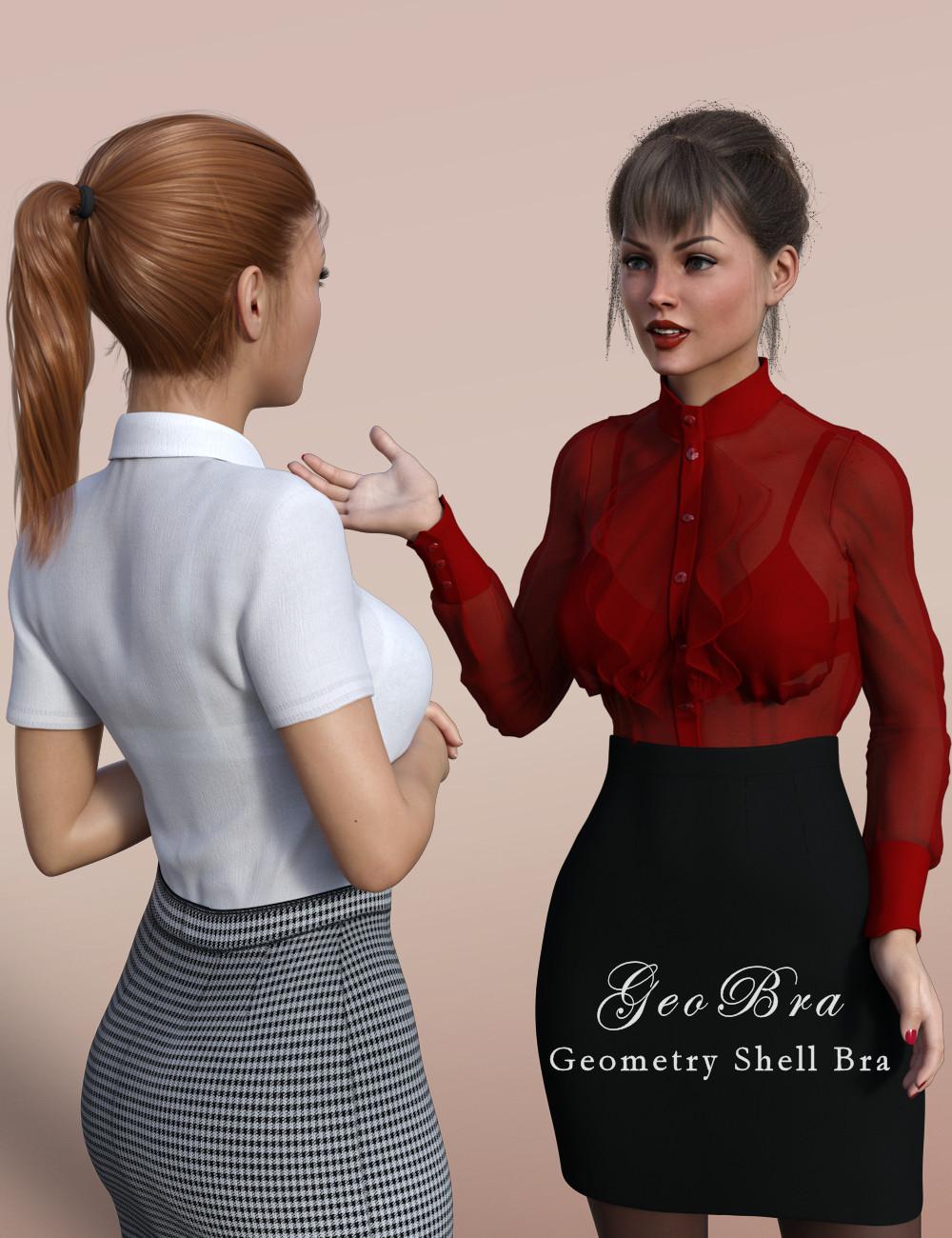
GeoBra - Geometry Shell Bra for G3/G8/G8.1Introducing the GeoBra for G3F, G8F & G8.1F, a bra so comfortable it's like a second skin! No wires, buckles, hooks or clips, in fact no geometry of its own at all.
This product uses Daz Studio's Geometry Shell feature to create a bra that can be safely worn under other clothes without requiring many resources or causing poke-through. It is intended to be used under sheer or semi-sheer tops to preserve your model's modesty.
The bra is available in two styles (lacy and plain) in both 1K and 4K resolutions, and in three colors - but you can set it to whatever color you like by changing the diffuse. Both Iray and 3Delight versions are included.
If you're looking for a bra to be worn on its own, as outerwear, this product is not for you. There are a ton of suitable products in the shop, and freebies by (amongst others) Wilmap and Beat578 that autofit nicely to more recent generations. But if your model is wearing a garment over her bra, you can get problems with poke-through if the bra has geometry of its own. This product is for that situation - it essentially paints a bra shape onto the model's skin, so it can be seen through a thin top, but doesn't actually poke through.
Here's an example of it in use:
And now in creepy Man-O-Vision:
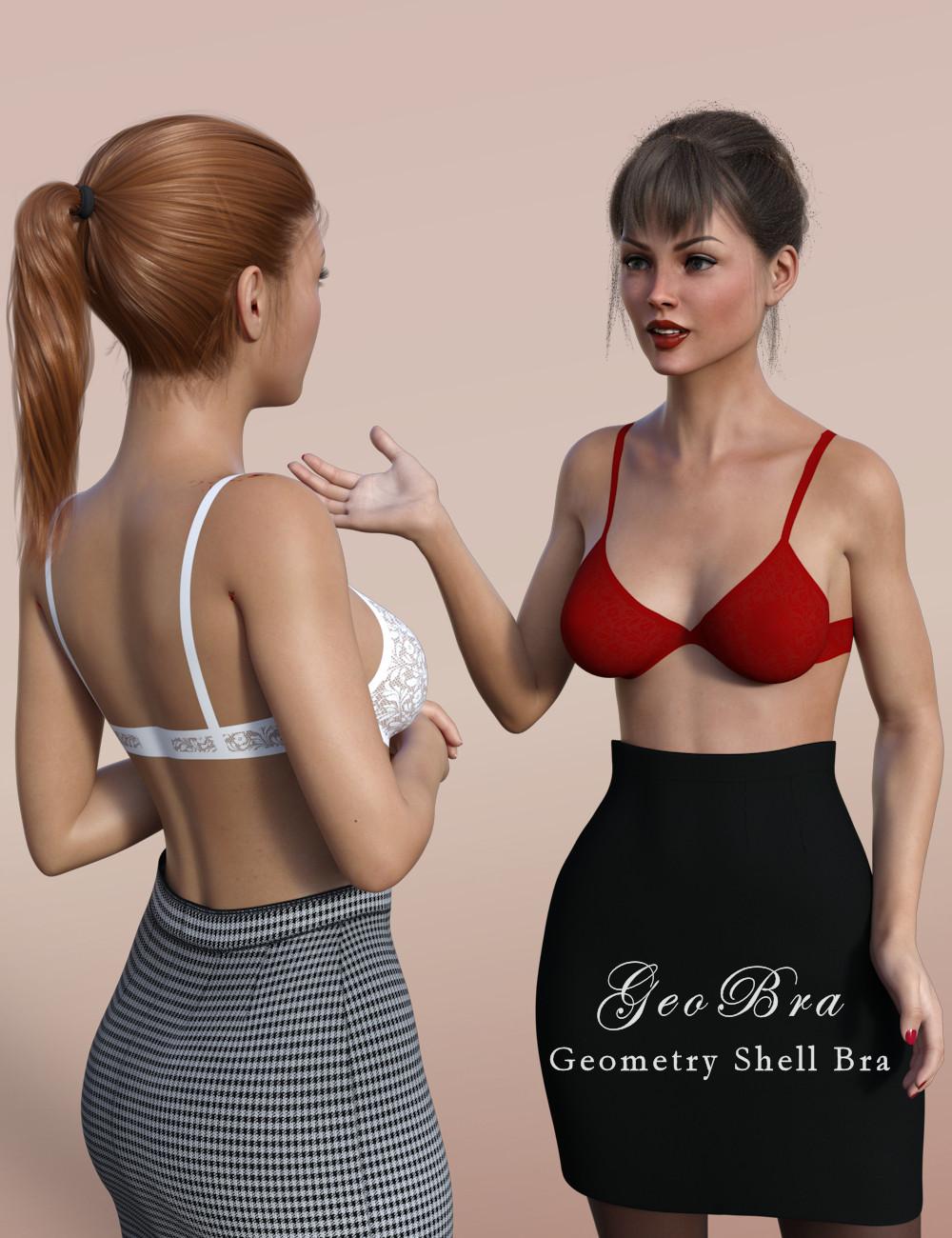
Here's one of the icon files to give you a better view of the front. I hope the strapping looks plausible, such garments really aren't my area of expertise!
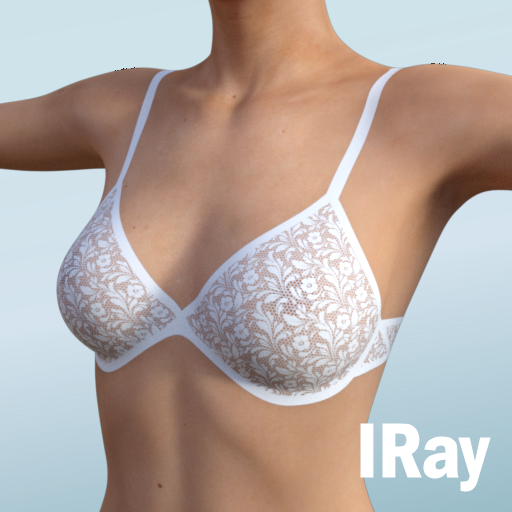
You can download it here: https://sharecg.com/v/97449/browse/21/DAZ-Studio/GeoBra
Promo Credits
White Top
Red Top
The Newest Evolution Is Here: The Daz Season Pass!certaintree38 said:
BTR said:
Fair enough! No doubt I am not doing Brooke 8.1 the justice she deserves with my screenshots.
I like her skin in some of your other renders, but it really seems like PBR skin can be hard to light.
The default skin has SSS direction set at -0,7. That's why the low SSS effect. And like Victoria and Michael 8.1 she likes a lot of light. I don't like this very much as it is sometimes hard to put them in an environment. Either you get an unnaturally dark character or an overly bright environment.
As for the lips, I don't mind them so much, as I have a friend that has really similar lips.
hear ye hear ye dforce outfits for diffeoHey Padone, you asked me to leave some thoughts. I'm a bit confused as to what Diffeo is accomplishing with this. For example, I understand that Diffeo's default skin shader is doing a great job of mimicking how a character will look like in Daz. Is Diffeo trying to mimic Dforce behavior in Blender or is it just trying to find a good starting point for all dforce clothes to not completely break in Blender?
I loaded in Victoria 8 with a Dforce Retro Romper. This is what it looks like unsimulated.
[Image Removed]
First thing I noticed is that the cloth has a collision modifier which confused me.
[Image Removed]
I baked the default settings to 30 frames and got this result, which is okay but creates some material overlap in the cleavage area.
[Image Removed]
Removing the collision modifier and enabling self-collision on the garment itself (leaving the default Diffeo settings as is) seems to give better results.
[Image Removed]
Here's the quick way of how I would have tackled this type of garment myself. Note I'm no expert in cloth sims but get by well enough to where it's useable for my projects.
This garment's topology is actually not ideal for simulating and it's default position is already wrinkly and somewhat overlapping mesh.
[Image Removed]
[Image Removed]
The bottom half of the garment seems to be autofitted well enough in Daz so added it to the pin group and excluded from the sim. I then only simulated a few frames just to get the straps to sit on the shoulders. I then applied this as a Shapekey and reassigned the pin group to only contain the area I want to do the rest of the simulation on. (Highlight the simulated area and do ctrl+i to invert the selection).
[Image Removed]
This is the 30 frame sim using Simply Cloth's Silk preset.
[Image Removed]
If this was a personal project where I would spend more time on it, I would edit the topology and add some additional vertex groups as well such as trim. These would be utilized in this section to further control the overall shape and simulation.
[Image Removed]
I may just not be understanding the goal here but adding this dforce feature to Diffeo seems like it's a lot of extra work with very little benefit. Other than setting the collision distances to 0.001 by default, all the other settings are very scene specific. For example, cloth having a collision modifier on by default may cause a lot of frustration for users not understanding these settings well. I normally try to simulate layers of clothing one at a time rather than having multiple cloth/collisions running at once. Even the Quality Steps value is so very specific not just to the garment and simulation settings, but also to the pose and rate of change. If I have a pose that's significantly different than the prior or resting pose, I need to either raise quality steps to match my minimum fps (24,30,60) or keyframe the pose over a long range of frames to make it stable. Whereas more subtle changes even a low value of 5 can be more than enough.
Overall these default settings seem fine as a starting point but I imagine it will be a source of frustration for Thomas since there's so much room for error and there may be a lot of posts of users having issues with cloth sims. Perhaps rather than it being implemented as part of Diffeo, the Diffeo manual can simply have a section on best practices when using cloth sim and how to address common issues? I can provide the presets that come with Simply Cloth as these tend to work better in my experience.
[Image Removed]
Edit: Looks like I'm unable to paste images into the body of text so I've saved and attached the finish product instead.
Content Question Timebrother grim said:
Got it fixed. One more question is there a way to edit the ranger vest on victoria in that pose. If i select the model for the ranger top in the instance manager then click the icon to edit in assembly room the vest jumps off the character. If i select the ranger top and everything included with that model, hip, abdomen, etc. i can only edit it in the modeling room. The problem is I end up deforming the mesh a little more than I need and jumping back and forth between the two rooms which makes a bigger mess. So I make the edit jump back if it doesn't work I undo the edit and start again. If I had to fix several instances of poke through this way the vest would probably look a little off (odd bends and folds) I would think.
If you need to work on the mesh while in a posed position, it truly is a lot easier to work in the Model room instead of using the Edit option in the Assemble room.
In the model room, use the zoom tools in the tiny preview window to get the problem area as visible as possible.
Now go to the Animation tab in the model room (middle tab on the right panel) to see the item as it is on the conformed figure. We cannot actually make adjustments here, but we can select the exact polygons we need, then switch back to the model mode.
Once back in modeling mode, and the polygons selected from above, set the softness to your liking and make your tweaks while looking at the results in the preview.
We can make the preview window bigger, but then it changes the whole interface. We can move it back, but I just got used to leaving it little and just being patient with my adjustments.
I say all of this because there's no way in hell that I can stick only to morph parameters that have been included with products, and I'm always tweaking.
Another useful tidbit to follow this post
Now that I'm finally making moves from V4/M4/K4 to G8MF ... is there a way to convert that far?WillowRaven said:
Oso3D said:
I would REALLY not bother converting hair or skin; the tech has come a LONG way and results are unlikely to look that great.
I have thousands of dollars in characters with skins ideal for my needs. If I can salvage even half of them, I would feel less sick about making the switch.
Looking around, I've found Legacy UVs for Genesis 8: Victoria 4 & Legacy UVs for Genesis 8: Michael 4.
From what I can tell, if I can't find full character conversion tools, these will at least save my favorite generation 4 skins. :)
I love these!! they work well and I still use 3Delight , and while tech has come a long way Generation 4 skins were under appreciated ,and not all were set up properly for DAZ Studio. It all depends on what makes you happy
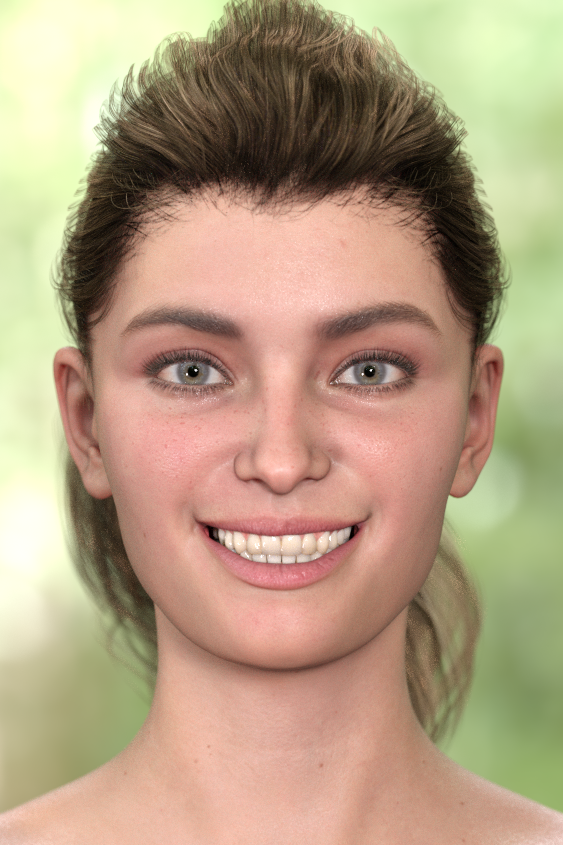
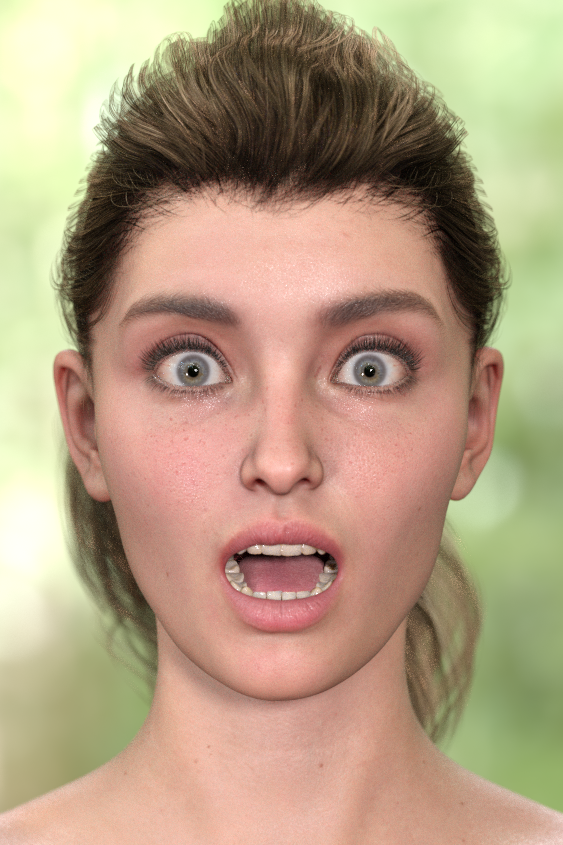
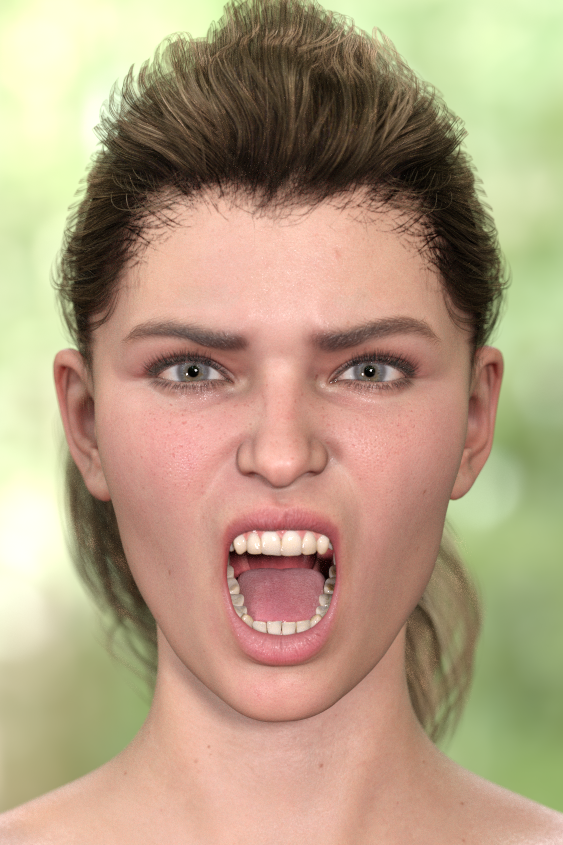
Show Us Your Iray Renders. Part VIIIExperiments in applying the Facial Action Coding System to Genesis 8.1's new face rig.
Crossposted from "'Anatomy of Facial Expression': A Genesis 8.1 Companion Guide?"
Victoria 8.1 with Vertigo Ponytail.
Daz 3D is part of

Connect
DAZ Productions, Inc.
7533 S Center View Ct #4664
West Jordan, UT 84084Licensing Agreement | Terms of Service | Privacy Policy | EULA
© 2026 Daz Productions Inc. All Rights Reserved.