-
At Sea Vignette Install Issue
Not the Seaside Walkway, the Sea Vignette. I can't
get the DS version to install in DIM or Daz Central.
DazCentral won't install Daz studioTrying to install Daz on windows10. Installing Central is slow but finally works. After that if I try to install Studio from Central it hangs several times before finally getting stuck at 83%. The log file has this error over and over again:
2020-09-12 23:43:08.916 Installing: 13176-2 : DAZ Studio 4.12 (Win 64-bit)
2020-09-12 23:44:10.033 WARNING: Killed Process
2020-09-12 23:44:10.033 WARNING: QProcess: Destroyed while process ("cmd") is still running.
2020-09-12 23:44:10.033 Install Failed: DAZ Studio 4.12 (Win 64-bit)I'm using standard Defender, no extra virus or malware progs, installing to default paths (on my C drive). After the first time it got stuck I deleted everything Daz (including the user/appdata directory) and started over clean. Same result. I've installed Daz studio a year (or 2) ago without any issues when it still used just the install manager. Now it wont work even though my system is exactly the same.
Suggestions before I just delete it all and give up?
Daz Content Moving Safe?The big thing to understand about DS is that, it doesn't matter, for the most part, where content is installed, as long as it's mapped correctly in Content Directory Manager. see image 2.
Main(boot) drive, secondary internal drive, usb drive, networked(nas or server, within the limits of the EULA), doesn't matter.
I think at my worst i had things spread across 4-5 independent drives, mostly due to space constraints and i only use RAID in certain situations. Today i'm using a central network(local) drive for all content.
For the most part, excluding Plugins and some content, all you'll need to do is move the My library, My daz connect library, My daz 3d library, in the User\documents\daz 3d folder of your current drive to a folder on the secondary.
Depending on your particular setup, you may need to check the Administrator, your user, and the Public accounts.
Then map the new location in CDM(content directory manager). Right click on the Content library tab and select Content directory manager. (see image 1)
You can then either create a whole new set of mapped directories, including and excluding directories as you need them or don't need them, or just stick with the default selection.(see image 2)
Just be sure to delete the original files off your c:\ drive after you've gotten this done.
You'll also want to change the install paths in DIM, Connect, or daz central to the new path, if you use those things.
For the most part, this shouldn't mess up any CSM organization you already have, but it might, just be aware of it.
About the worst thing you might run into is an arbitrary path reference in a particular piece of content.
That is, something that references a specific drive, usually c:\, and path. It's rare these days, but does still exist from time to time.
You can either install the assets back to the path, or use Notepad++, to remove the drive reference, if you don't mind a bit of coding.
NOte:you cannot edit connect only files as they are encrypted.
As an aside, due to your duplicate content installation, you might want to take this opportunity to do a clean content install.
Setup A, or multiple, working directories on the secondary drive, and install all content there. be sure to update content as some older assets may be a mess and not work with newer add-ons due to changes in the structure of assets.
I'll be lurking if you have any other questions.
Twosret 8using Daz Central Twosret 8 does not appear everything else in the bundle did
No manual download for Fluidos CompanionThere is no manual download being offered. From the product page: Install Types:
 DIM
DIMOkay, I thought the DIM button would be available at least.
Will enquire. It DOES show DIM. You don't see it in DIM?
No manual download for Fluidos CompanionThere is no manual download being offered. From the product page: Install Types:
DIMOkay, I thought the DIM button would be available at least.
Europan Style ApartmentI would have expected a Europan style apartment to have much more radiation shielding and central heating at the very least.
Living in northern europe, the heating systems have gone under the floor. No radiators visible anymore.
Not familiar with the term "radiation shielding"... The effects of Chernobyl were not THAT severe

Yep, that's the place. If you zoom in far enough near the north pole, you can see my cache of retired cars - Trying hard to warm up the surroundings as firewood is hard to come by.
No manual download for Fluidos CompanionThere is no manual download being offered. From the product page: Install Types:
DIMEuropan Style ApartmentI would have expected a Europan style apartment to have much more radiation shielding and central heating at the very least.
Living in northern europe, the heating systems have gone under the floor. No radiators visible anymore.
Not familiar with the term "radiation shielding"... The effects of Chernobyl were not THAT severe
Europan Style ApartmentI would have expected a Europan style apartment to have much more radiation shielding and central heating at the very least.
Living in northern europe, the heating systems have gone under the floor. No radiators visible anymore.
Not familiar with the term "radiation shielding"... The effects of Chernobyl were not THAT severe
MacOS Catalina & Daz StudioDaz Central install doesn't work on Mac Os Catalina 10.15.6
Failed Installs in DIM and CentralApologies in advance if I am beating a dead Sleipnir, but I searched the forums and did not find a solution.
I had this issue before the previous patch but it cleared up after the patch was installed to DIM, however it has reared its ugly head again after the latest patch. When I attempt to install any new content, it downloads just fine, however it seems to fail on decompression, or that is what the log file tells me:
2020-09-10 20:43:01.315 Installing: 62395-1 : Cyborg Motorbike
2020-09-10 20:43:01.783 Could not extract file: G:/Documents/My DAZ 3D Library/Runtime/Support/DAZ_3D_62395_Cyborg_Motorbike.jpg
2020-09-10 20:43:02.178 Install Failed: Cyborg Motorbike
2020-09-10 20:43:02.180 Install Queue Finished: 0 min 0.8 secI extract it just fine in both 7-zip and the default Windows tool. The same issue happened in Central, but I uninstalled it to reduce some headaches. DIM is also installed on the non C:drive, but that has not been an issue over the last few years.
Anyone else have this issue and have a solution?
Thanks in advance
D
"There's Always Another Sale™" (Report sales issue here.)gift cards processing really slowly today?
usually there's a little lag. but it's been 45 minutes since i got the purchase confirmation from paypal.
j
I don't know about today, but last night I bought one around 7pm central time (an hour later than Daz time, aka Mountain time) & I had the email within minutes, with a working code. I paid with my bank card, not Paypal.
The completely gratuitous complaint threadmelange?
Melange, often referred to as simply "the spice", is the name of the fictional drug central to the Dune series of science fiction novels by Frank Herbert and derivative works. Wikipedia
First appearance: Dune; 1965
Function: Ingested to lengthen lifespan, improve health, and heighten awareness
September 2020 - Daz 3D New User Challenge - Depth of Field and CanvasesAfter the Fall
Beginner Challenge
Software: Daz Studio 4.12
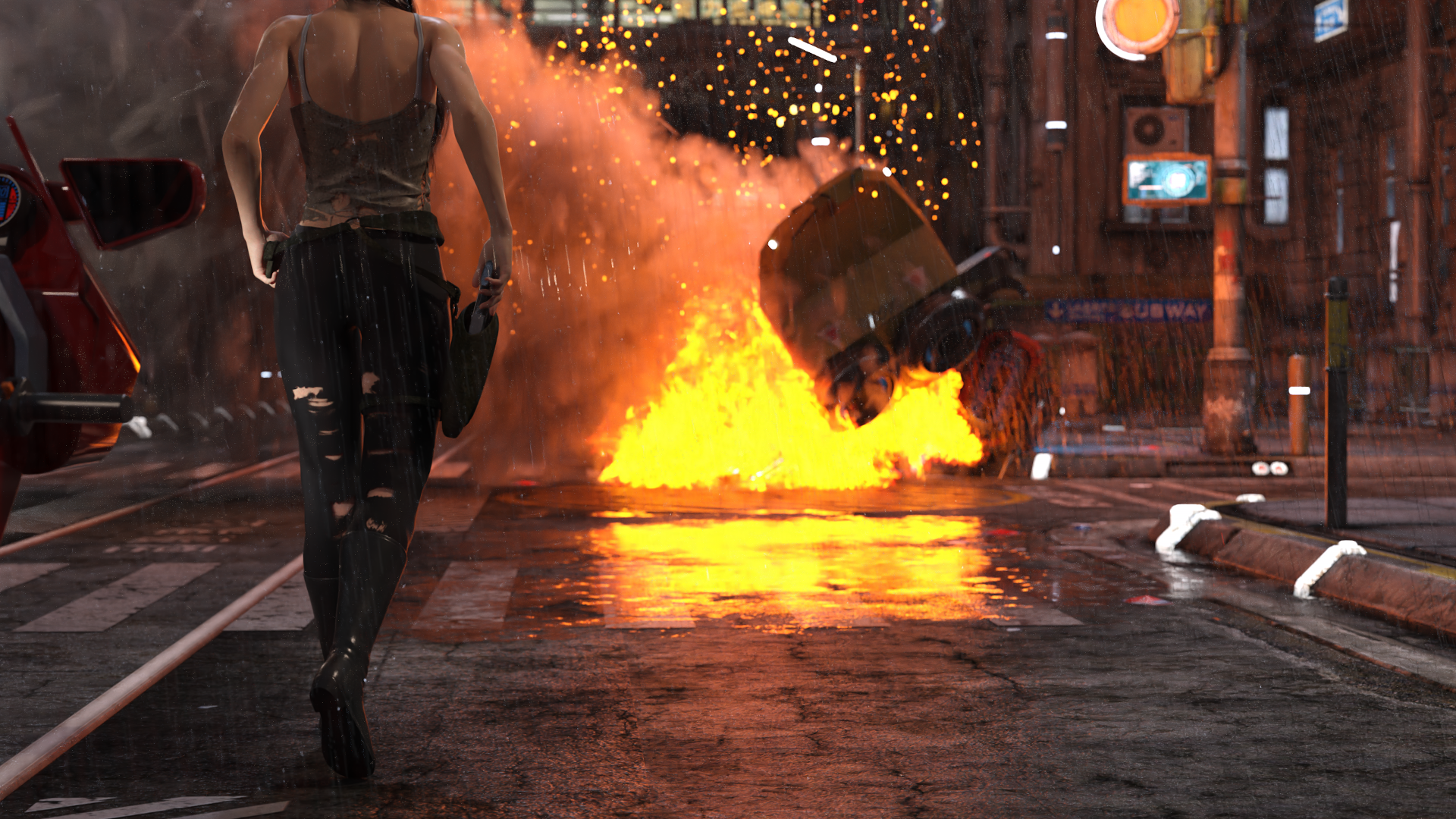
This has had a post render denoise applied to it. The rain and emissive lights (there are about 50 emissive surfaces in the visible portion of the shot) combine to extend this render time considerably (after 12 hours it was still hovering around 20% convergence). I still have quite a bit of learning to do with regards to scene optimizing (in addtion to needing to upgrade my GPU). I am starting to understand why post-work effects are so popular as they would shave a lot of render time.
This is a companion render to one in my gallery. I have been playing with Depth of Field for a few weeks now, and this challenge was a great chance to try and work with a more complex scene. The DoF is fairly tightly centered around the central figure, with both the bike in the foreground (and parts of the rain) and the wreck in the background out of focus.
Comments and suggestions are welcome. Until this challenge I had not even heard of the canvass features of Iray so I plan to composite a scene for that challenge as well.
Tirick
[Released] ManFriday's Mesh Grabber [Commercial]I just purchased this and it shows downloaded in Daz Central, but not under the tools menu. What should I do?
Click Window - Workspace - Update and Merge Menus
Lost OrderOkay...so I purchased Animate2 some time ago and from the info I can gather...I never downloaded it. Or something. I don't know. I can't find it in DIM or Daz Central and the Manual Install option doesn't let me click on it. How can I find my purchase so I can get it installed/reinstalled?
[Released] ManFriday's Mesh Grabber [Commercial]I just purchased this and it shows downloaded in Daz Central, but not under the tools menu. What should I do?
Morphs ExplodingDaz Central? I can't imagine why it would make a diffrence, but you can still use Install Manager.
Europan Style ApartmentI would have expected a Europan style apartment to have much more radiation shielding and central heating at the very least.
Daz 3D is part of

Connect
DAZ Productions, Inc.
7533 S Center View Ct #4664
West Jordan, UT 84084Licensing Agreement | Terms of Service | Privacy Policy | EULA
© 2026 Daz Productions Inc. All Rights Reserved.