-
How to setOverrideControllers for a JCM morph
Richard Haseltine said:
You can't find the controllers or there is an issue with adjusting them? Do you have a concrete example?
I got it. I couldn't find specific JCMs when I was looking for a `DzProperty` by name. Eventually I realized for JCMs specifically, the name attribute is `Value` and it is the label attibute that has the morph's name when dealing with the DzProperty. For DzModifier, the JCMs name attribute is the name of the morph, so this was a little confusing to me before I figured it out.
which female character is she ?alienarea said:
Marnie is G8F and Sushmita is G3F.
I'm not sure what your point is there. I know of at least three tools that exist to convert G3F morphs to G8F (but honestly, G3 and G8 are so similar it can be done with just the transfer utility if it's used properly) and they use nearly exactly the same UVs, so skins don't even need converting.
I have many characters whose shapes are mixed between morphs originally from different generations. On one occasion, I think I mixed five different Vickies, all the way between G2 and G9.
DS 4.22 - A good thing...My library has grown so large over the two decades I've been using Poser, and more recently, DS, that scenes with migh morph count figures could take 10 minutes to load. With 4.22 that load time has been decreased DRAMATICALLY!
I don't know what you guys did, but I like it!
[Released] RSSY Character And Material Conversion Bundle Genesis 8 to Genesis 9 [Commercial]Thunderwall said:
I am trying to use the converter to convert my Genesis 8 character to Genesis 9, but it turns out a complete mess. Whether I try the Genesis 8 or 8.1 version, it still looks the same.
From the manual:
The Converted Character’s Body is wrinkled. Because of the way that morphs must be converted, a morph that on Genesis 8 appears to only touch a small part of the head can affect the whole body on Genesis 9. You need to show Currently Used parameters to show all morphs on the converted character. Then, one by one, dial in the morphs to find the offending morph(s). Once you find them, delete the morphs from your HD (click the Gear icon, Parameter Settings, and look at File Path for the asset to figure out where the morph is and what it is called). You should also resave the character with the offending morph(s) dialed out (set to 0).
Render your buys! Use buys from the current month and the previous month of sales"The Mouse"
Yeah, I really didn't need the cleaning stuff bundle, but I bought it anyway.

https://www.daz3d.com/dforce-fe-elegant-wave-long-hair-for-genesis-9
* https://www.daz3d.com/urhd-orla-hd-for-genesis-9
https://www.daz3d.com/dforce-apron-suit-hd-clothes-for-victoria-9
https://www.daz3d.com/high-waisted-shorts-suit-hd-clothes-for-victoria-9
https://www.daz3d.com/fun-poses-for-mouse-and-victoria-9
https://www.daz3d.com/mouse-by-am(* Obviously, she's not Orla. Like all of my Face Transfer characters at the moment, this is a stock G9 figure, to which the FT2 shape and other shaping was applied, then in this case, the URHD Orla materials, and then I replaced the base color with the textures from my character. Lazy, but quick.)
How to setOverrideControllers for a JCM morphOk so for anyone else, I answered my own questions.
First, JCM's (by name, if looking at the morph properties) have a Modifier and a Property. The modifier name is the JCM name. The property LABEL is the JCM name. The property NAME is just `Value`.Secondly, maybe I'm just not understanding what the little "Chain" or "Link" icon means regarding overriding controllers. I assumed "Chain" means "Overriding" and "Unlinked Chain" means Not Overriding. But I would be wrong.
setOverrideControllers(true) = unlinked chain
setOverrideController(false) = linked chain (default state)
How to setOverrideControllers for a JCM morphSo I adjusted the script to search for properties by label instead of by name, and that allowed me to find the JCMs I was missing. However, I can't seem to get the `setOverrideControllers` to do anything. It doesn't give an error in the IDE, so it seems to accept the method as valid. But when I actually run the script, I can see that it's not working because the little "link" icon on the morph isn't changing.
How to setOverrideControllers for a JCM morphWeirdly, my script finds a single JCM morph in the Genesis 8 model, `pJCMNeckTwist_Reverse` but I have no idea why that one is different. All of the other JCM's can be found via `obj.getModifier` but I'm not understanding why I can find the JCM under modifiers when everything suggests it should be a property.
Create or transfer "Open Fly" morph for G8 Male Mega Wardrobe Jeanscrosswind said:
...
I tried, but I can't get the morph to show up on the modified version if I change the name at all. I tried to edit the morph file itself and make sure the file path was correct with the new name, but it still wouldn't work. If there's no workaround, I can just settle for uninstalling and reinstalling it as needed.
It should always work. The detailed steps as below:
1) Load Jeans with Open Fly morph on G8M. Select Jeans and save Figure / Prop Assets to the separate folder named with your Vendor name, e.g. People\Genesis 8 Male\Clothing\!Crosswind\Mega Wardrobe\
2) Set your Vendor Name, product / item names, etc. in options dialogue. (screenshot 1). Then load the save asset to G8M to check.
3) Delate Open Fly morph file (dsf) in the data folder of the original product. Uninstall / re-install the product in DIM or direactly extract files from its IM package to the target Daz Library.
That worked perfectly! I'm sorry I've sounded so clueless! You're my literal daz hero!
How to setOverrideControllers for a JCM morphSo, I have some code to find things like CTRL morphs if I want to change their values. I think this is actually from the sample scripts IIRC:
        var oPropertyGroupTree = oElement.getPropertyGroups();

        if (bUseLabel) {
            oProperty = oPropertyGroupTree.findPropertyByLabel(sProperty);
        } else {
            oProperty = oPropertyGroupTree.findProperty(sProperty);
        }
This works great for CTRL morphs and allows me to do things like
prop.setValue(1.0);or
prop.setOverrideControllers(false);But what I want to do is `setOverrideControllers` for JCM morphs. However my script is not finding those morphs. Why not?
Favorite Elf for G8F ?Thanks, it's a combination of pretty much all the elf ear morphs (the ones that would look right anyway) that have been put out for G8, also most of the morph sets that have come out as well that have extra ear morphs in them... damn I just realized that the middle one is G9 sorry about that I am still not used to having much done with G9 yet so I forgot that she was G9.
Elf ears can be a pain to get right if you have a certain look you are going for, and for me it is mainly kinda like human ears, except pointed and a little taller so it can be a pain.
Create or transfer "Open Fly" morph for G8 Male Mega Wardrobe Jeans...
I tried, but I can't get the morph to show up on the modified version if I change the name at all. I tried to edit the morph file itself and make sure the file path was correct with the new name, but it still wouldn't work. If there's no workaround, I can just settle for uninstalling and reinstalling it as needed.
It should always work. The detailed steps as below:
1) Load Jeans with Open Fly morph on G8M. Select Jeans and save Figure / Prop Assets to the separate folder named with your Vendor name, e.g. People\Genesis 8 Male\Clothing\!Crosswind\Mega Wardrobe\
2) Set your Vendor Name, product / item names, etc. in options dialogue. (screenshot 1). Then load the save asset to G8M to check.
3) Delate Open Fly morph file (dsf) in the data folder of the original product. Uninstall / re-install the product in DIM or direactly extract files from its IM package to the target Daz Library.
Create or transfer "Open Fly" morph for G8 Male Mega Wardrobe Jeanscrosswind said:
Anxious3102 said:
crosswind said:
Anxious3102 said:
crosswind said:
Ah, great ! You're welcome ~ I just updated the tutorial 'cause I found I didn't parent the jeans to G8M before I proceeded... haha ~ But that didn't impact the morph. Only after loading Jeans to the figure, Jeans is not parented to G8M.
Now the tutorial is correct, if you followed the updated one, everything should be fine. Have fun !
Like I really REALLY do appreciate it! Your instructions were super easy to follow, and I just appreciate the generosity of you being willing to help me figure it out and then teach me :D
No problem !

What would I need to do differently in this process if I wanted to keep a pure install of the jeans without the morph, and have a modified version that has it?
Ah ~ You just need to simply save the modified version as Figure/Prop Assets with the Vendor Name of your own, then you'll have both Original and Modified version of this product.
I tried, but I can't get the morph to show up on the modified version if I change the name at all. I tried to edit the morph file itself and make sure the file path was correct with the new name, but it still wouldn't work. If there's no workaround, I can just settle for uninstalling and reinstalling it as needed.
Measure metrics measures perimeters badlyIs that the only property you are adjusting? Which morph is it using? Figure Metrics (the script you are using, which is built to use the Measure Metrics plug-in) works by adjusting the targetted morphs for each selected measure to try to get a match for the desireed value, but if the morph is not suitable (unlikely here since it is having an effect) or if the shape is being affected by another morph pursuing a different target value it is possible for the process to yield unhelpful results.
Product Missing Files, need Helpmarklgoldenberg said:
I recently bought 3 of the InStyle Products:
1-InStyle-Bad Reputation
2-InStyle-Jennifer Style
3-InStyle-X-Fashion
I can’t get these products to work, and I think I tried everything.
It doesn’t show up in Wardrobe or Materials or Texture. I did find it in the Product tap.
Each is shown below. I’ve tried to just click on it and a error message comes up. Then I thought like some other product, if it’s a Material, I have to first put another shirt on the figure then apply the material of my choice and that didn’t work and same error message shows up, where some file is missing. What am I missing or are these products faulty? See below the error message, when I tried to apply
You need to really carefully read the store page for many of these transfer products - they say what the texture set is for, i.e. which actual clothing product you need to own before you can apply Instyle textures.
As an example, here's what Bad Reputation says:
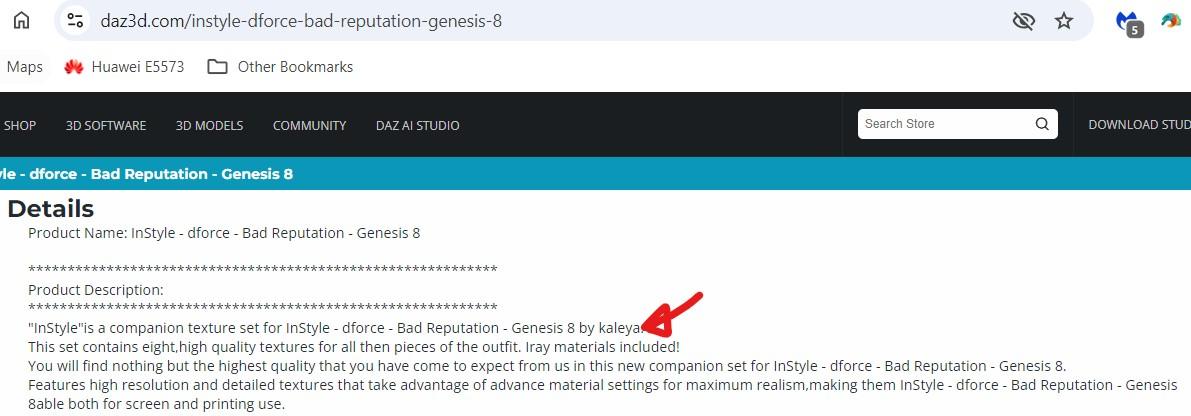
The required product is sold at Renderosity.
Create or transfer "Open Fly" morph for G8 Male Mega Wardrobe JeansAnxious3102 said:
crosswind said:
Anxious3102 said:
crosswind said:
Ah, great ! You're welcome ~ I just updated the tutorial 'cause I found I didn't parent the jeans to G8M before I proceeded... haha ~ But that didn't impact the morph. Only after loading Jeans to the figure, Jeans is not parented to G8M.
Now the tutorial is correct, if you followed the updated one, everything should be fine. Have fun !
Like I really REALLY do appreciate it! Your instructions were super easy to follow, and I just appreciate the generosity of you being willing to help me figure it out and then teach me :D
No problem !
What would I need to do differently in this process if I wanted to keep a pure install of the jeans without the morph, and have a modified version that has it?
Ah ~ You just need to simply save the modified version as Figure/Prop Assets with the Vendor Name of your own, then you'll have both Original and Modified version of this product.
Requesting help to identify the figure.Sorry for the very late reply,
First of all, thanks for your answer.
That's what i was fearing, a mixed morph char.I can probably create something approaching.
Why transfer utility change the shape of my hijab cloth on Genesis 9 ?Why transfer utility change the shape of my hijab cloth on Genesis 9 ?
Before transfer utility
https://prnt.sc/zGjoo61-a2hq
After transfer utilityCreate or transfer "Open Fly" morph for G8 Male Mega Wardrobe Jeanscrosswind said:
Anxious3102 said:
crosswind said:
Ah, great ! You're welcome ~ I just updated the tutorial 'cause I found I didn't parent the jeans to G8M before I proceeded... haha ~ But that didn't impact the morph. Only after loading Jeans to the figure, Jeans is not parented to G8M.
Now the tutorial is correct, if you followed the updated one, everything should be fine. Have fun !
Like I really REALLY do appreciate it! Your instructions were super easy to follow, and I just appreciate the generosity of you being willing to help me figure it out and then teach me :D
No problem !
What would I need to do differently in this process if I wanted to keep a pure install of the jeans without the morph, and have a modified version that has it?
Diffeomorphic issues with eyelashes shapekeysHey guys,
I've been doing this in the past without problems on a bunch of G8 and now since i need a few new G8 i am having issues and maybe i am in a loop because i can't seem to fix it.
Getting G8 from daz 4.22.0.16 to blender 4.2.1 with diffeo 4.2.0 and even tried development version final destination being unreal 5.4.2 for a G8 with shapekeys.
After a simple diffeo import i import units and for the sake of this post what i am interested in is the eye closed morph.After conversion to shapekey and transferred to eyelashes the shapekey is broken and i don't understand what i am doing wrong.
First image is fresh import, second is with diffeo driving morph and third is with shapekey where is broken.
If anyone has any ideea i appreciate it. Thanks.
Daz 3D is part of

Connect
DAZ Productions, Inc.
7533 S Center View Ct #4664
West Jordan, UT 84084Licensing Agreement | Terms of Service | Privacy Policy | EULA
© 2026 Daz Productions Inc. All Rights Reserved.