-
Will There Never Be a Way to Transfer HD Morphs?As far as why, my understanding is editing of HD morphs is currently restricted to tools that are only available to DAZ PAs, which is why people are unable to transfer (or split) them on their own.
Quite possibly. Checking some more, I saw a PA say something to that effect and another thing about using morph loader...
I don't see HD morph transfer ever happening to be honest. I'd like to see it too, but I'm also realistic ;) It's tech that Daz seems to want to keep very close to the vest.
Laurie
I uncomfortably follow your realism. Seems to be that way.
Still looking out for a "one day" generosity, far far away... Lol.
Will There Never Be a Way to Transfer HD Morphs?I don't see HD morph transfer ever happening to be honest. I'd like to see it too, but I'm also realistic ;) It's tech that Daz seems to want to keep very close to the vest.
Laurie
Will There Never Be a Way to Transfer HD Morphs?As far as why, my understanding is editing of HD morphs is currently restricted to tools that are only available to DAZ PAs, which is why people are unable to transfer (or split) them on their own.dog 8 dog 8 woof woof we finally have a dog 8We need a Growing Up morph kit for the dog from @Zevo and an all over morph kit from some PA... I'm not really into any of the breeds so far, but would like to make my own mutts and puppies...
But the Heckhound is totes adorb!
If we don't get a brand new G8F pro pack by midnight I'm getting the dog.
Right now my cart says: Dog 8, French Bulldog, Heckhound, Collar and leash, fightin' poses.
Still debating half of it.
dog 8 dog 8 woof woof we finally have a dog 8We need a Growing Up morph kit for the dog from @Zevo and an all over morph kit from some PA... I'm not really into any of the breeds so far, but would like to make my own mutts and puppies...
Will There Never Be a Way to Transfer HD Morphs?Just for clarification. The question has arisen many times in morph transfer discussions so, it appears transferring of HD morphs is desirable. Morphs are just better in HD. Alas, there appears no hope. I've scoured forums and the persisting answer (Up till June 2017) is that it's impossible. Why is this so? Must it necessarily be this way?
Converting files from Poser to DSHow come Poser morphs don't work in some of the Poser models in DAZ Studio?
Do they have .pmd files? Those are external binary morph targets from Poser, DS has trouble with them in many cases (about the only ones that work at all are those associated directly with a CR2 figure file).
OK, I will have to look and try again sometimes. It is not all of them though.
Converting files from Poser to DSHow come Poser morphs don't work in some of the Poser models in DAZ Studio?
Do they have .pmd files? Those are external binary morph targets from Poser, DS has trouble with them in many cases (about the only ones that work at all are those associated directly with a CR2 figure file).
Converting files from Poser to DSNo, you can use them but those file type listed will need adjustment to make them look right. They will look flat brought over from Poser. A different value gets transferred over than what you see in Poser. When I was doing content for both Poser and DS when I'd transfer the Poser files to DS you had to adjust the diffuse, trans, bump, and displacement for it to look the way it did in Poser. If there were any custom shaders applied in Poser you will then have to recreate them in DS.
Wow, ok. That sounds like a monumental task given the number of Poser only products I have accumulated over 10+years.
 I might try it on an 'as needed' basis. If I desperately want someting in particular, I'll just do that one and then save it as a .duf.
Thanks guys for your help. Wish there was an easy way.... but then that would be easy!
dog 8 dog 8 woof woof we finally have a dog 8So it seems like each dog breed has its own UV set, meaning you can't use fur from one on another??? If so, is there a work around?
Also, can you mix breeds? Are the heads and bodies separate like with humans? Can you use dials to mix things like ears or snout to create new mutt breeds? Thanks.
why DAZ why? did you not learn with Genesis 2

and yes map transfer but still why?
and export base obj, in morphloader loader click attenuate by head under surface or weights, you can createa temporary surface or use a dformer to do this on export
Genesis 8 female what's going on?I had the identical problem. After many many searches and attempts at fixing via suggestions, I’ve solved it. At least in my case. The culprit was a morph set called “Big Girl Morphs” or “BGM”. I realized the morphs were not working correctly and uninstalled them. I tried reinstalling them but the problem returned. So they won’t be installed again. Hope this helps!
Converting files from Poser to DSNo, you can use them but those file type listed will need adjustment to make them look right. They will look flat brought over from Poser. A different value gets transferred over than what you see in Poser. When I was doing content for both Poser and DS when I'd transfer the Poser files to DS you had to adjust the diffuse, trans, bump, and displacement for it to look the way it did in Poser. If there were any custom shaders applied in Poser you will then have to recreate them in DS.
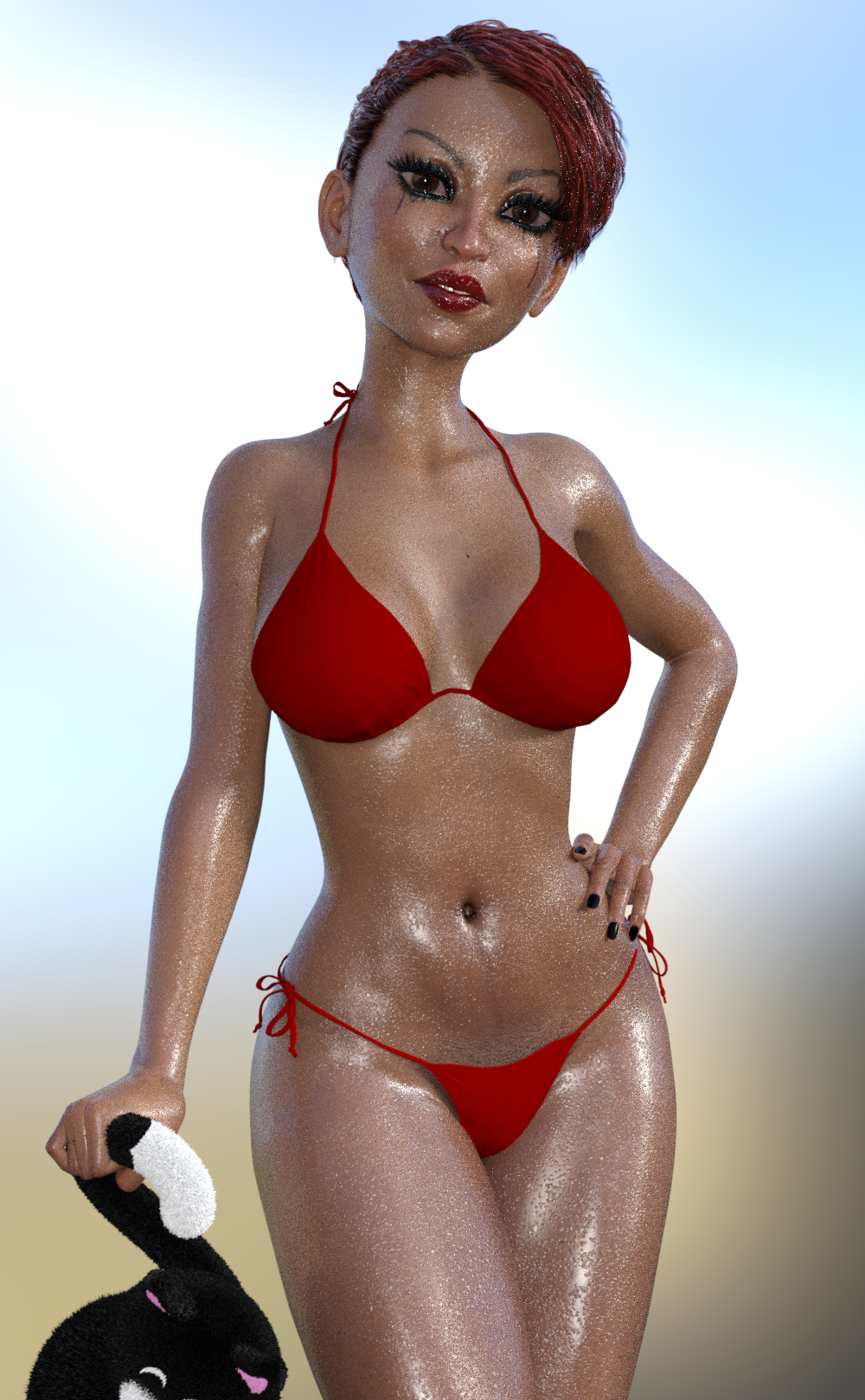
MimicMolly's Renders & WIPsAnother character I got, that I didn't render sooner is Girl 8 because I was out of the country. And I will say she has the best body of any of the Girl characters that have been released (original, V4/Genesis legacy morph, Girl 6, and Girl 7.) As for her face, I don't like it very much and I had suspected that she was going to have a pointy face since that is a trend in this generation. (Girl 7 has the best face, Girl 6 has the best skin/make-ups.) She's still cute though and had she been released before Aiko, I would've skipped Aiko. Same hair, bikini as the previous post. Her pose is from Burlesque Dance Poses for G8F and The Girl 8 found in the Girl 8 Pro Bundle.

The reason I've been a fan of The Girl is because to me, she was the perfect base to making cute non-white characters. With the exception of Girl 7, The Girl looks Latina to me. Speaking of which, I decided to mix her in with another clearly Latina character, Benita. (Benita without V8 at 100% and Girl 8 at 75%). Another pose from the set in the previous render and I made her hold the cat plushie from Deredere Anime Poses for G3F because I couldn't find a chair. XD
 Using Transfer Utility replaces object's position
@ kaotkbliss Nice idea to create a geograft for an extra pair of arms, but this is way more complicated than to just create a conforming figure.
In general its best to have both items in default baseshape and position before using the Transfer Utility. Otherwise both meshes have to be at least close to each other, so the "projection" algorithm of the Transfer Utility
can project / transfer the weightmaps / morphs from the source mesh to the nearby target mesh.What you can try to do is to use the cut off G8 arms figure in the current position (if you still have them saved in the scene) as the Source Item and select Item Shape: Current also check the General Options: Reverse Source Shape From Target. That could possible keep the item in place, but I'm not shure I haven't used these settings alot.
I guess the Hexagon geograft mesh comes in as a static object (I guess you have used the Hexagon bridge) with the arms in the same position like the down/forward translated cut off arms figure in the DS scene. I would now export an OBJ of the Hexagon geograft mesh to maybe use it later.
I think you have to use the Transfer Utility twice, once to grab the rigging/weightmap and morphs of the original arms and then a second time with Merge Hierarchies checked under Weightmap to transfer the rigging/weightmap and morphs of the torso area without loosing the rigging/weightmap that is already transfered.
Another issue could be that DazStudio gets confused because all the bones in the arms of the geograft are named like the original G8 figure and with a conforming figure that usualy means they follow the position and movement of the bones of the figure it is fitted to. To prevent this to happen you may have to rename all the bones of the geograft arms one by one, maybe just add something like "_1" at the end. The action for this can be found in the Joint Editor tool and is called Rename Node because you have to change the real Node Name not the user facing label.
All of this is just my pure guesswork you may have to try this and that but I'm shure its possible, I hope this helps good luck with your geograft.
Here I've found a tutorial video from SickleYield that may cover some of these issues Geograft/Clothes With Extra Bones In Daz Studio
Genesis 8, is it Enough?Genesis 2 clothes fit on Genesis 8 fairly well (with the exception of some high heels, although there are workarounds for that in many cases), but I have every utility available; so, I'm not sure how much is working behind the scenes without my conscious participation. Fit Control is also invaluable for making autofitted garments drape more realistically, although you can take the plunge into dForce as an addition or alternative to that.
My first response to you was only about shapes/morphs, and I neglected to mention the Legacy skin texture products necessary for moving pre-G3 skin to G8. But others caught the slack. Since the Legacy skin products use a geoshell, there are difficulties using Wet Body and Shaved products when you use pre-G3 skins on G8.
In April, I discovered a flaw in my morph-dialed G3F leading lady that would have been more trouble to fix (so I thought) than to just design a new woman using G8F. I also ended up changing the G3F skin, which I loved, to a G8F skin. As a result of the things I have discovered since then, I would suggest that---if you are going to use Genesis 8---you focus on the Zev0 and Sickleyield utility products for that generation along with Daz Original head and body, RareStone, 200 Plus, Emma&Jordi, and Thorne/HandspanStudios morph kits and forgo generation conversion utilities. Most of this G8F morph stuff is on huge sale right now until possibly the 24th. If you are serious about G8F and can afford to do it, you should get all this stuff NOW imo.
Carrara Challenge #40 NOIR WIP - A warm welcome to our PA sponsor, Fenricwonderful Fenric is a sponsor!!
And on that note, here is a little bit about Fenric.
Fenric is a Carrara PA located in Irving, Texas, USA. His main profession is "software architect."
He discovered Carrara after a lengthy personal journey:
"I started in 3d art in college back in 1993 with POV-Ray. Even then I
loved to tinker with the software and modified the main ray-geometry
logic to use fixed-point (integer) calculations so that it ran somewhat
reasonably on the rather inadequate Intel 80486 processor.After a long hiatus for school and life, I returned to the art world. I
dabbled with the free DAZ studio for about a year before deciding that I
really wanted something more capable. My first thought was to research
what was available, and I settled on Carrara (then version 7). I fell
in love.Learning that Carrara had an SDK, I put my programming training
to use and began making plugins, creating the BVH exporter. From there I
moved on, writing small additions to improve Carrara’s overall
usability."Fenric is famed for his Carrara plugins!
Here is a partial listing:
Shader Power Tools - Shader Doctor, Skin Doctor, Advanced Shader Tweaker, Multi-Shader Editor
Posing Pack 3 - Tree Duplicator, Unlock Figure, Restore Figure, Change Rotation, Set Figure Visibility
Motion Designer File Format for Carrara - This plugin provides both import and export support for the Lightwave Motion Designer/Point Oven (MDD) file format.
Pose and Shading Tools 2 - Pose Transfer Command, Stack Tweener, Clear Timeline Command, TowardAway Shader, Color Balance Shader, Color Separation Shader, Color Merge Shader
Carrara Enhanced Remote Control - The Enhanced Remote Control suite is a set of behavior modifiers and scene commands that work together to add much needed functionality and control to your animation workflow.
Pose Helper for Carrara - Left / Right Pose Symmetry based on scene element names, Morph Zeroing, Pose Zeroing, Rotation Setting, Scale Zeroing, Scale Setting, General Scene Option Setting, Full undo/redo support. Works on content, native figures and groups of primitives, and works across multiple figures and groups
BVH/PZ2 Exporter (Poser Pose exporter) for Carrara - This plugin adds the ability to export Poser Pose (PZ2), Animated Poser Pose (PZ2), and Poser-compatible BioVision animation data (BVH) from a single, easy to use function.
Many thanks to Fenric for providing the profile information, and for sponsoring this Challenge by offering an item from his Daz store.
A drawing from the 12 entry participants in this thread will be held at the close of voting to determine who wins the Carrara PA prize.
dog 8 dog 8 woof woof we finally have a dog 8What I am wanting for the Dog 8 is the option/ability for a feather tail - I'm hoping that is a correct term for it. I am talking of the tail that has has the fur loger hanging down off the tail.
There's a "Tail Full" morph, but that just produces a big chunky lump. As Oso says, anything requiring fluffiness just won't look right without LaMH or an outright fibermesh addon.
dog 8 dog 8 woof woof we finally have a dog 8To answer one of the earlier questions - no, you can't just autofit G8 clothes to it. It's not a morph of G8 like the hedgehog is.
Render crashes to CPUAlso your log says there was illegal menory access while launching the CUDA renderer. Not sure what thats a symptom of, but I dont see an obvious connection to PCI issues. And an x4 should give 1GB per sec transfer, and x16 is like 4GB, so if your total VRAM usage is only like 20GB with the 3 cards I dont see how theres a transfer rate issue.Morphs ......You have some options to prevent that rigging problem to happen. This is a common problem in case the bone positions don't match the shape of the figure you can use Adjust Rigging to Shape to fix that.
Your character shape includes the Vicoria 4 shape and that seems to be the issue.
But first of all have a closer look at the character shape morph Gen X2 had created for you. Usualy with V4 characters there is a separated head and body morph. Gen X2 has the option to recreate all separated morphs that the V4 character is made of in the target figure. If you only got an overall shape morph from the Gen X2 you can also work with a so called Headsplit dFormer like descriped in the links in the Refereces below.
Otherwise you can also export the OBJ zero the morph shapes you want to keep and use the Reverse Deformation Yes option of Morph Loader Pro. Now the new morph created with this dosn't include the morph shapes that are still dialed in on the figure before using the Morph Loader Pro.
References:
- Customizing Morphs Using Morph Loader Pro includes a PDF tutorial
- How to make separate head and body morphs from custom FBM
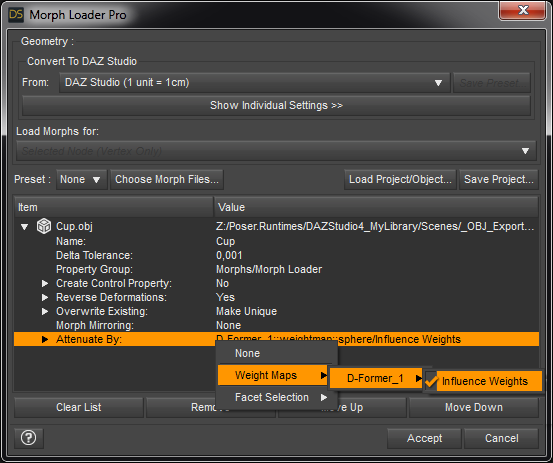
TUTORIAL - Creating a Genesis series Full Body Morph for DAZ Studio Pro 4.10 by RKane_1
Using a Mask when Importing Morphs - Xenic101
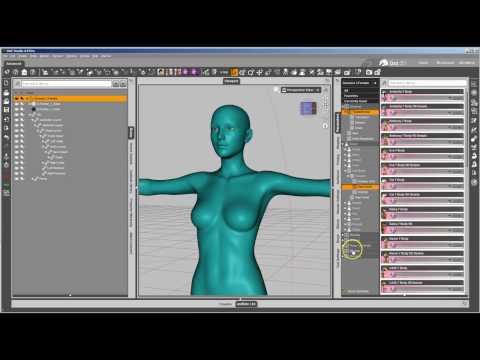
New Morph Tools Intro - Josh Darling

Daz 3D is part of

Connect
DAZ Productions, Inc.
7533 S Center View Ct #4664
West Jordan, UT 84084Licensing Agreement | Terms of Service | Privacy Policy | EULA
© 2026 Daz Productions Inc. All Rights Reserved.