-
Commisioning religious portrait
A middle-eastern ethnic morph and texture set would be good, too...he was not a western European man!
Dana
Clothing acts as if Morphs are at 0 when reloading a SceneIs the morph used saved as a Morph Asset? This seems to happen if the morph is simply saved with the scene.
Can morphs be transfered between Horse 2 and Centaur 7?As I understand it, the Centaur 7 geografts are based on the Daz Horse 2 model. So, I was wondering if it would be possible to transfer additional morphs for the horse to the centaur, via Morph Loader or any other means. For example, could someone that has the Horse 2, Lovable Llamas, and at least one of the Centaurs transfer the llama morph to the centaur geograft so that they can make a llamataur? If so, how would they go about doing that?
Confused on game usage...You don't have to buy the Pro bundle, if you are only going to use Michael 8, and not any of the hair, clothes, other skins or poses in the bundle. Just buy Michael 8 and his interactive license. Remember, if you use any morph products, hair, clothes, skins, etc. you need to buy the interactice license for those, too.
Sundress for G8Fno nose, you are correct. It doesn't follow poses. If you want it to, you can open the transfer tool, select G8F as source, Dress as destination and select knee length dress. If you do this you will lose the bones for posing the skirt individually but you will gain the bones that will automagically pose it with the thigh movements. It will not look very good that way (in my experience) but it would work that way. For full skirts I've found that to be somewhat unsatisfactory for my purposes but your mileage may vary.
You see I do still renders so for me posing the helper bones (left front, right front, etc) makes a better looking and more natural render. But if you want it to follow the thighs you can do as I suggest above.
It's My Party and I'll Complain If I Want To Complaint ThreadStill working on transferring to Ed's computer. Win 7 to Win 7, used Easy Transfer. Need another handy 6 of Shiner.
How is Ed? Tell him he is missed.
Sorry, I have no contact with him. It's a 4-hr bus ride to the place, 30 minute visit, than 4 hrs back home. No can do.
How to apply Tranfer Utility on altered shapes?Projection templates aren't going to help here. Just try lining the plane up with the zeroed figure's back, export/import so it is baked in that position, then do the Transfer Utility.
That's the point... I'm able to easily conform everything on a zeroed figure... But this time I need to to do on the morphed and posed figure.

Anyway I'll try what you said, thanks Richard!
Clothing acts as if Morphs are at 0 when reloading a SceneFigures - G3F - Morph Loader Pro - Create Morph - Result = Pic A
Saving as Scene
Reloading Scene = Pic B
Why?
How to apply Tranfer Utility on altered shapes?Projection templates aren't going to help here. Just try lining the plane up with the zeroed figure's back, export/import so it is baked in that position, then do the Transfer Utility.
Fixing Collisions - GamePrintTo be honest, I have never needed to do this, so I can only point you to answers given by other forum-goers. This looks like a nice step-by-step guide: https://www.daz3d.com/forums/discussion/122046/is-it-possible-to-save-the-results-of-smoothing-as-a-morph
And this, while not what you were looking for, seems like a very nice trick to have in the bag, so I'd rather mention it: https://www.daz3d.com/forums/discussion/65857/useful-tip-for-the-day
Genesis 3 gets deformed when posingOK, since zeroing the shape fixes it that means a morph is being applied on load - if you load a base figure (not a character), select the figure, and in the Parameters pane's Editor tab click Currently Used, what is listed?
How to apply Tranfer Utility on altered shapes?I managed to obtain some result from your last post!
I reimported the cloth as OBJ (It looks exactly like in the second picture of my last post) and used Transfer utility on it. The cloth got skyrocketed somewhere next to the ceiling.
Then I added the morph using the same OBJ and selecting the "Reverse deformation". Now moving the slider the cloth returns to its original position and shape but still doesn't follow the girl's back.So I redid the Transfer Utility on the cloth. It kept its shape and started following correctly the upper part of the back (Chest area) but the shoulders and the other part of her back seems to have little influence on it and the hips have none.
I'm getting close, anyway!

P.S.
I did another try with another scene, this time it follows only the Hip node ignoring all the rest of the body. When doing the Tranfer Utility I notced the Projection Template is disabled in the first and second use.
How to achieve a better clothing fitI can't help you with the Gameprint export.
I saied the shape of the applied modifiers had to be exported as OBJ and imported as a Morph. But sorry I forget one important step, you have to turn off the Smoothing Modifier with the property Enable Smoothing in the Parameter pane before you load your OBJ that stores the collision shape with MorphLoaderPro otherwise it dosn't create a new morph.
I'd like to add there is also a Push Modifier with an offset dial in the Parameters pane that inflates the geometry in the direction of the face normals. If applied to the figure you could also create a Push Modifier Weight Node from the create menu. With this selected you can paint the Weight Map where the 'push' should be applied onto the figure with the Node Weight Map Brush tool for the slight extra bulging along with the smoothing collision.
- Here is a link to a good PDF tutorial on how to setup the dFormer with WeightMap: Customizing Morphs using Morph Loader Pro
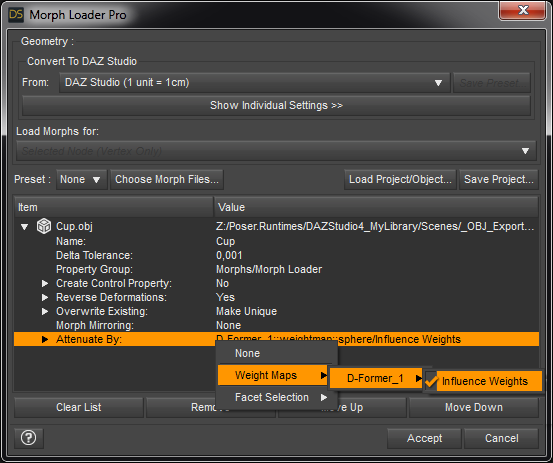
- And here I have a screenshot of the Attenuate option of MorphLoaderPro:
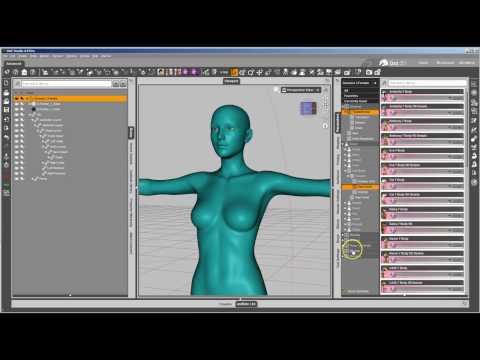
- And a YouTube video: Using a Mask when Importing Morphs - Xenic101
 Changing piviot point for a pose.
Why talking about a complicated script? I mean if you like to go ahead there may be some advantages, but I think this can easily been done without writing a script.
The simplest thing you can do is to parent the figure to a Null or a Group positioned at the desired location and use this as the new pivot point.
Another way would be to create a Property for that descriped below.
After you've changed the origin of the root node with Joint Editor you can create a new Property in the Parameters pane (right-click menu at the pane Edit-Mode then select it to be a Type: Modifier/Pose).
Once created right-click that Property and use ERC-Freeze to save the new loacation of the Origin to the slider. Also check the Reset Rigging in the ERC-Freeze dialogue.
You propably don't want your actual pose to be part of the new Property so before using ERC-Freeze to shorten the list in the dialogue first use Memorize Figure Pose from the Parameters pane options menu (the lined button at top).
Next if you dial up this property and save your pose as Pose Preset it will include the correction of the Origin because its defined as Type: Pose. Well you could even change the data type to Bool to make it 'jump' into position with an On/Off button instead of sliding up as you dial. Finaly don't forget to save the Morph Asset of your new property to the DazStudio library. Make shure the default value of the property is zeroed have a look at the Parameter Settings (the gear icon) before saving the morph asset.
I've done this in the past, set the origin to the hip location but then the Move to Foor action shortcut Ctrl+D set the figure half way into the ground. But as I discovered recently the Move to Foor script got updated and there should be no such issue anymore.
However keep in mind that the figure root node origin is also used as the scaling center. If you scale your figure up-down it will no longer stay with the feet on the ground but hitting Ctrl+D Move to Floor should fix this.
PS use smooth shaded instead of texture shaded for your screenshots next time the DAZ TOS is very restricted about nudity see Acceptable Ways of Handling Nudity.
Fixing Collisions - GamePrintI think there is an option to convert smoothing to a morph. Maybe you could try doing that and applying said morph before exporting?
It's My Party and I'll Complain If I Want To Complaint ThreadStill working on transferring to Ed's computer. Win 7 to Win 7, used Easy Transfer. Need another handy 6 of Shiner.
How is Ed? Tell him he is missed.
...indeed, some of us are both curious and concerned.
OT-Nvidia Card Options questions for a new PC-help please-ThanksI am looking to get a new PC as my old one, while having 354 Cuda cores basically is a CPU Only rig.
I have a favorite vendor and they only have a few options and I was wondering what the "sweet spot" would be. I have 2 hdmi monitors and want the new system to run with THE SAME 2(current) as well.
The Options I can play with is 16G Ram or 32G Ram and the following cards:
NVIDIA® GeForce® GTX 1070 8G
NVIDIA® GeForce® GTX 1080 8G
NVIDIA® GeForce® GTX 1080Ti 11G
Duals
Dual NVIDIA® GeForce® GTX 1070 8G SLI
Dual NVIDIA® GeForce® GTX 1080 8G SLI
Dual NVIDIA® GeForce® GTX 1080Ti 11G SLI
Interactive renders in iray are the most important focus as I tend to spend a lot of time on morphs, hair and outfitting a single character. If I need a complex/large scene I tend to load all the characters in last and then just let the scene render overnight. I don't really ahe a cause to try and add in each character, morph and dress them inside a really full scene.
So questions I know to ask... is that 32Gig helping much over the 16Gig?
Is a DUAL 1070 give similar performance to a Single 1080Ti since the TOTAL number of Cores is similar?
Compared to what I have now, is a single 1070, with about 3 times the Cuda cores and at least 2x the memory going to be 3x faster in interactive mode?
Thanks in advance, Jazzy B-)
It's My Party and I'll Complain If I Want To Complaint ThreadStill working on transferring to Ed's computer. Win 7 to Win 7, used Easy Transfer. Need another handy 6 of Shiner.
How is Ed? Tell him he is missed.
Some basic questions re MorphsHey there! I have some basic questions regarding Morphs.
1) I already have "G8 Male Body Morph" and "G8 Male Body Morph". If I now buy a male G8 character, for example "Orc Brute for Genesis 8", can I morph that characters face and body? Or does it only work on the basic G8 figure?
You can, as far as the software goes, freely mix morphs. Not every combination will look good, especially if dealing with morphs that radically reshape the mesh, but there's nothing to stop you trying
2) What is the difference between, say, G8 Male Head Morphs and 200 Plus Head and Face Morphs for G8 Male? I imagine the more expensive product offers more dials?
More dials, and also different dials.
3) If I were to install both "G8 Male Head Morphs" and "200 Plus Head and Face Morphs for Genesis 8 Male", I would probably just get a jumble of mostly redundant dials? (Not that I'm planning to do this, I'm just curious.)
I don't think there's much overlap since most people making add-on packs will assume buyers will have the core Daz morphs. The morphs are grouped in the property panes, they aren't all jumbled together (unless you click the All group).
4) If I were to deinstall "G8 Male Head Morphs", what happens to all the faces I had created with that product? Do they remain?
5) If I were to make a "Shaping Preset" file I created with "G8 Male Head Morphs" available for download, does the file work for everybody, or only people who also have "G8 Male Head Morphs" installed?
No, when you save a preset or scene it stores pointers to the morphs used and their values, so it won't work correctly if the morphs are missing.
It's My Party and I'll Complain If I Want To Complaint ThreadStill working on transferring to Ed's computer. Win 7 to Win 7, used Easy Transfer. Need another handy 6 of Shiner.
Daz 3D is part of

Connect
DAZ Productions, Inc.
7533 S Center View Ct #4664
West Jordan, UT 84084Licensing Agreement | Terms of Service | Privacy Policy | EULA
© 2026 Daz Productions Inc. All Rights Reserved.