-
Novica & Forum Members Tips & Product Reviews Pt 11
The Grape Xscape Chess Bar (Technical Aspects)
Here's a few behind the scenes tips. This is using the DA Palm Island, Fancy A Game of Chess sets combined, with the Scrappy the Robot, Grapevines, Multi Letters (X) props and Sakura as the character. This was the Not So Fast! Contest combination I rendered.
TIP: When creating a stone/natural floor in the sand, use dFormers to bring sand onto the stone. You are not going to have a nice straight line where the stone meets the sand. You could also do a layer of raised stone as a border- but you STILL have to have irregularities where the sand meets the stone. The wind doesn't always create straight line sand. You can see the dformers in front, by the sign, and behind Scrappy The Robot.TIP: When you create a morph from the dFormer, DO NOT CHOOSE THE OPTION TO DELETE IT. After you name the morph, you can move the dFormer to another location and create another morph.
TIP: Create your own signs by creating a primitive plane and using the Beach Cafe Outdoor Furniture sign.
TIP: Tie in what's on the sign by using the same image on an employee's shirt, menu, poster, etc. (In Surfaces.)TIP: Mask and lighten areas. Use the Magic Wand Tool then add/correct areas with the brush. Old Hagred was too dark so she was masked, then ONLY she was lightened. Next I did her chair, which otherwise would have been totally dark crimson. You can now see the top of the chair, it's a lighter color. Scrappy the Robot was masked and sharpened, love the crisp detail of his face. The chess box was also lightened, it was really dark. You can now see hints of chess pieces in the box.
TIP: Use a Ghost Light for under-umbrella scenes. Those gals were a LOT darker than the surrounding area. There's just one Ghost Light at 100 luminance. Not a lot, but made a nice difference.
TIP: Use the planters from Ancient Temple Courtyard and Y translate to flatten them. They make great tropical/natural serving bowls as they're terra cotta. Look on the counter by Sakura.
TIP: My favorite tip: Embed items in umbrella poles to make tables/ drink holders. I embedded the horse chess piece trophy as the base was square and stuck out, and that's what IceDragonArt's drink is sitting on. (Now if we could just get Old Hagred's pet spider off the horse...)
And of course, the usual tips. Make sure your characters' heads are clearly shown- note Old Hagred's face has a background of white sand, there's no grapevines directly behind her head, etc. The frog in the drink is between Scrappy's legs.
I did a lot of straw thatch postwork- it had weird horizontal lines running through it, like material zones that weren't right. The thatch roof on your left took about an hour.
Enjoy! :)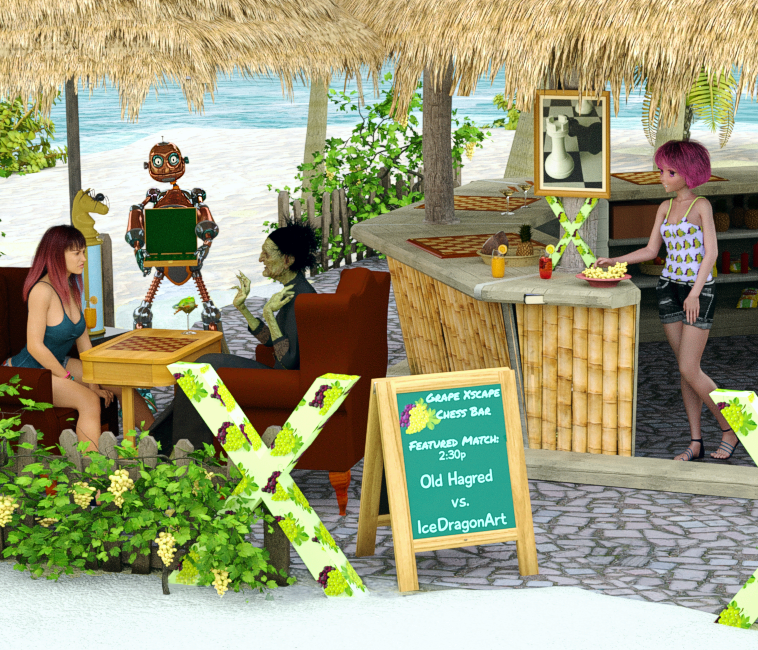 What do we WANT from the next male G8 base?
I would just like a classically handsome man 30-ish. (In real life too!) Like a young Robert Redford or Nathan Fillion or even a young Edward 8. Also an M4 for G8. M4 was the last Daz Original male I actually found attractive. I can morph handsome guys myself off the base G8 with all the morphs I have, but it would be nice to have a handsome masuline base to start with. Sorry, I just don't find any of the DO G8 males attractive at all except Edward (as Bond) who is in an older age range... There are tons of beautiful female characters in the market but I rarely see male characters that I find attractive. Those hot girls need hot guys! I'd be curious to see if Mousso could create males in the style of his/her(?) stunning women!
here ya go using facegen I added michael 4 face onto michael 8 hd
What a great idea! I hadn't thought of that, using Face Gen on older characters to create new ones! Brilliant! I don't have Michael 8 but will try it on G8 Male
 Finding texture maps for Freak character
Odd - although there are no texture maps in the base figure product, The Freak is definitely UV-mapped (there were UV maps for him from the store page once upon a time, though the links no longer work)
I don't know ZBrush at all, so I've no idea why the surface mapping wouldn't transfer automatically.
Where the morphs and expressions made in Zbrush are saved?The ZBrush Data folder is just used for sending to/from ZBrush via GoZ.
Initially your morphs are saved as aprt of the scene file (or soem preset types) - they will then be available only when the figure is loaded via that file. If you want a morph generally available you use File>Save As>Support Assets>Morph Asset, that palces the files in the data folder for the figure or prop with folder names determined by the entries you make for author and product in the options dialogue - for example /Data/Daz 3d/Genesis 8/Female/Morphs/Author/Product/morphname.dsf for a Genesis 8 Female morph
nested objects do they use up CPU resources [Solved]Hi,
If an object is inside another object does that slow down the render? I have some freebie rocks that I'm using. I'm not yet able to morph them, so doubled them up with just the bit I needed showing. My render is taking forever but, this is the first time I've rendered a complete scene. After 24 hours I've only got 96 itterations. I'd normally have finished a perfect render of a Genesis 8 figure hours ago.
Thanks
Pose and animation conversion for multiple generations of DAZ figuresI hope this thread is still active, because I have an issue now that I did not get before. While attempting to transfer from Victoria 6 to Victoria 7 I get the following message .
general\dzscript.cpp(658): Unhandled errorwhile executing script. QscriptEngine::popContext()doesn't match with push Context()
then, the script stops after converting about 200 frames and then V7 is suddenly placed to the side of V6 and has all muscularity morphs applied. I have used this script before many times to convert from V6 to V7 with animations exceeding 6000 plus frames and it worked fine. The only difference I can think of that I have now is that I istalled muscularity morphs for G8 recently. Any help would be appreciated.
I'm using the most up-to-date version of DAZ and I'm not getting any error messages.
any feedback, issues found with the G8 preset free betas?As for G8 beta, the only thing that makes me sad is absent JCMs. I'm not really interested in any brand characters for G8 beta, except for my own morphs. BTW, I noticed that any figure scale baked in a body morph evoke all that nail distortions.
Books for those empty virtual bookshelves - and stacks tooI managed to package and upload the thing before the apathy set in...
A Few Books By The Cheapskate... on ShareCG
It's a Poser prop*, and here's a DS4.9 render of it what I just done:
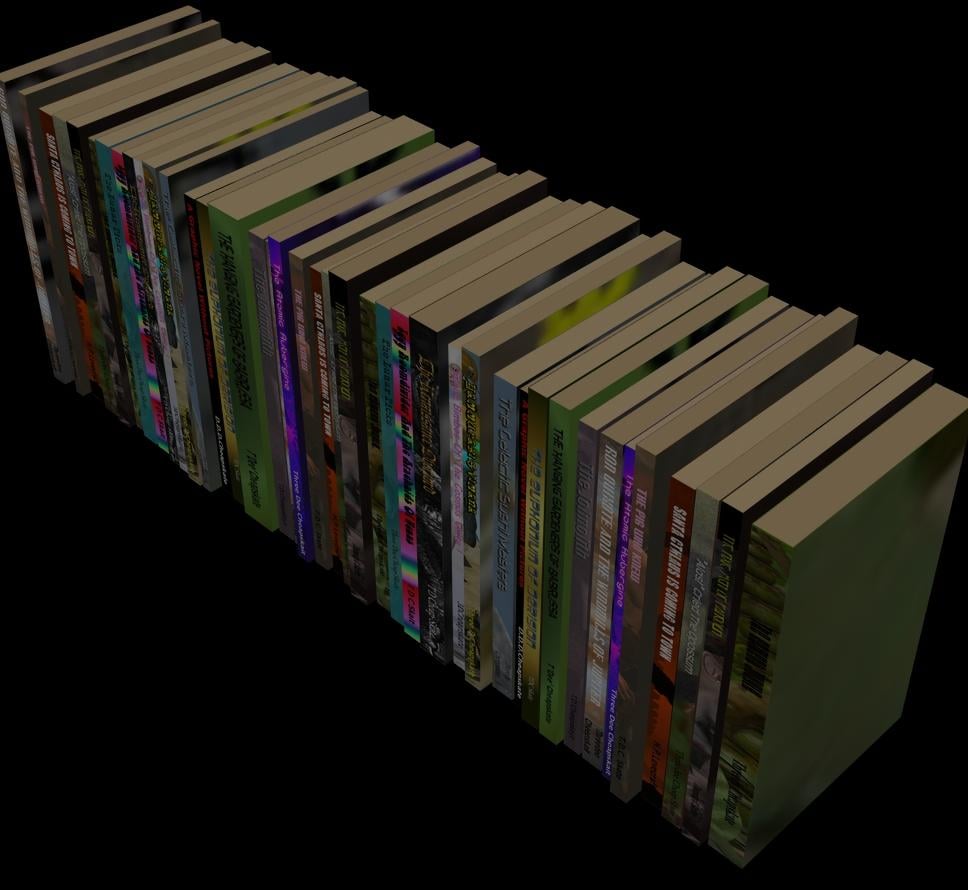
Here's the blurble I put on the ShareCG page:
"A first test of a simple prop for populating all those empty virtual bookshelves.
It's in Poser 6 Poser Prop format.There's a PMD version, plus a normal version so DAZ Studio users can use it too.
There's a single 2048x2048 JPG texture containing 41 classic titles in paperback - you really should read them !
The prop loads with the bottom left corner of the leftmost book at the origin.
All 41 books are standardish-sized thin paperbacks (17.5cm x 10cm x 1cm)
There's a morph to separate the books, and another to make them A4 magazine-ish size (29.7cm x 21cm x 1cm).
And because having all books the same size is so boring there are two morphs for making them more random-ish.
All morphs play happily together, and negative values work to some extent although some books turn inside out, and that's not a pretty sight!
More details in the "Books To Populate All Those Empty Virtual Bookshelves"thread on the DAZ Freebie forum
Hopefully I packaged everything up that's needed. It'seems a long time since I last did one of these.."
*Newer DAZ Studio users may not be familiar with using Poser props. Provided you've got your library paths set up and you're displaying them correctly,then it's as easy as using a DS-native prop (if anybody needs help with that just let me know)
Edit: If you're disappointed that there are, in fact, only 17 different titles amongst the 41 books then you've only got your own apathy to blame! I did request more titles over on the "Pointless Prizeless Challenge 12: Render The Story Title" thread...
GenX2 - Need HelpThe item you need selected is the figure in the Scene box that you are transferring the morphs from, then you dial in the morphs that you want to transfer over.
If you are transferring a premade character over, check in your people folder in your parameters tab that the corresponding character morphs have dialled out.
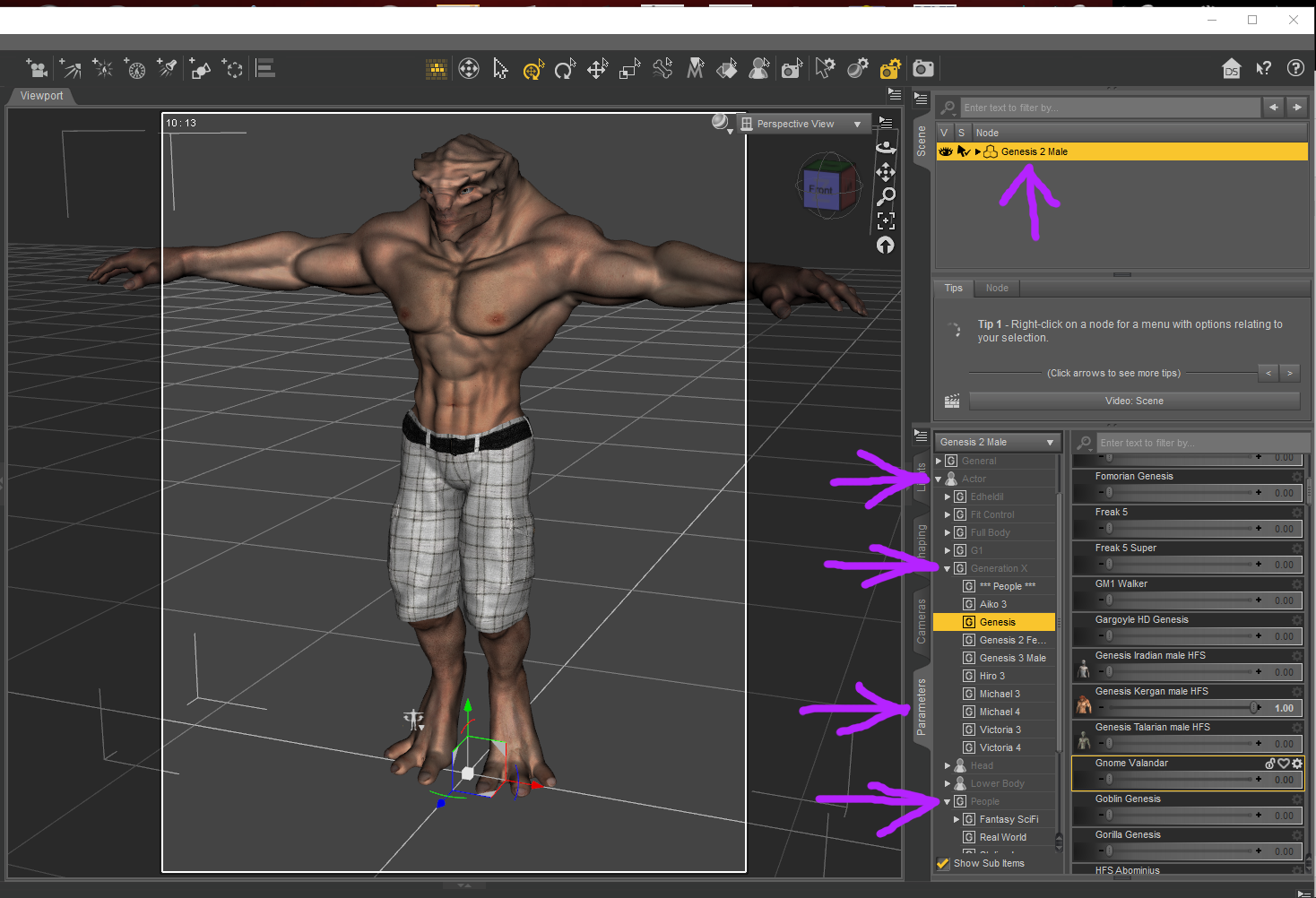
In the Parameters tab you will have Actor up the top, Generation X under that (for full body morphs), and People under that. If you save a GenX morph as a head morph then you will need to look in the Head morphs for the Generation X morphs.
I had a look at the Dusty for Scott 6 character in the shop, it has Scott 6 as a required product, I don't know if Dusty on It's own will transfer over without Scott 6 being dialed in, which means you might have to import the morphs for Scott 6 as well. You could try doing both seperate to see what happens or both together. A couple of morphs that reference other figures refused to work for me when I tried to transfer them so keep that in mind.
Could not find a Disable All morph, so without knowing what it's for I would leave it out.
Refer attached screen shot to what boxes you should be ticking, as well as Scott 6 if you are bringing that in.
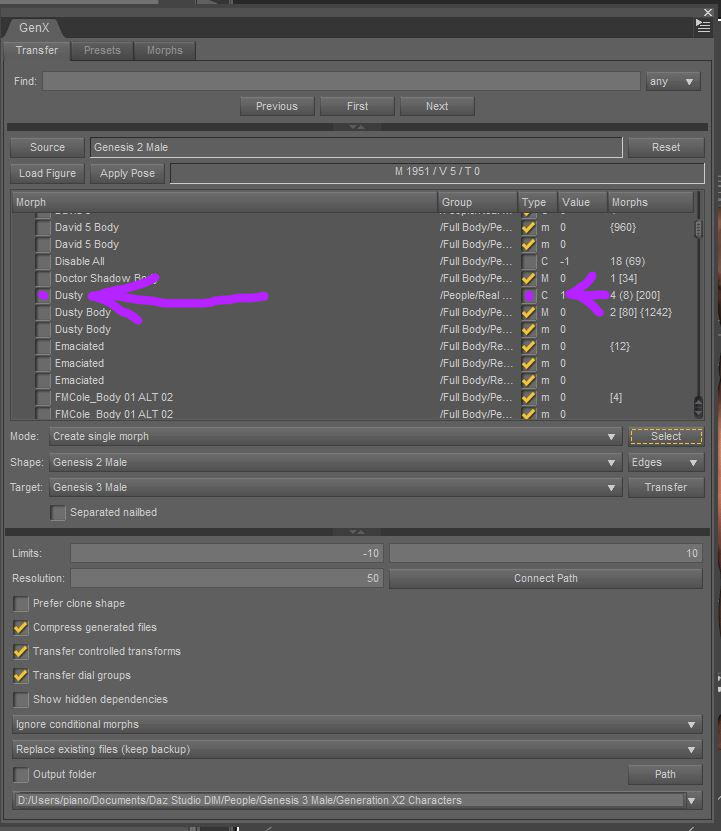
The only boxes you need to worry about are the ones with a non-zero number value next to them.
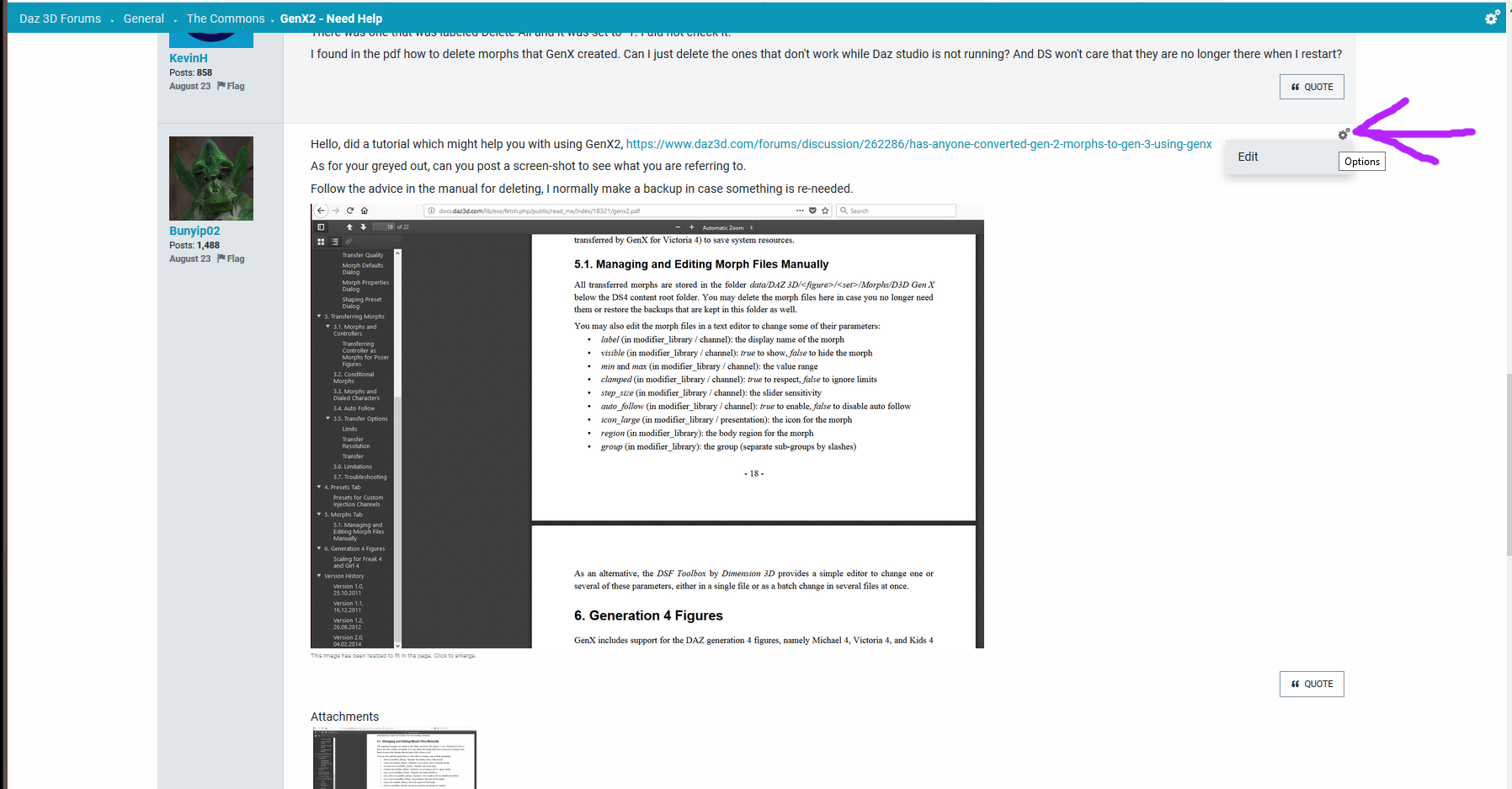
To edit a post click on the cog-wheel at the top right hand side of your post, click on options, then edit. If you click on an uploaded image you do not want you should be able to delete it. The forums have been playing up a bit lately and not showing the image after you load it, but then showing them after you hit the Post Comment tab.
https://www.daz3d.com/forums/discussion/59549/tutorial-how-to-place-images-in-your-post-tips
 What do we WANT from the next male G8 base?
Frankly, with all the resources available, I don't really care now who the next base male is. What I have discovered is that the clothing for males is well below the quality for women. So the most important thing for the next bundled guy is that the clothing be well made and fit better than a painted on shell.
+1
For people like me, all I need is good skin textures, a few morph packs and clothing that's equivalent in quality, and quantity of morphs, to female.
Books for those empty virtual bookshelves - and stacks tooI should have mentioned what my aim is (or perhaps in 'asset-speak' - I should have 'stated my mission goal'...
 ).
)."I just want a quick and easy way to populate all my empty virtual bookshelves with a visually interesting library"
Doing individual morphs for each book (as mentioned in edits to theOP) would be heading off in totally the wrong direction. I'm not interested in fine-tuning the size of any book.I just want a random-looking collection of different sized books. So a couple of morphs for predefined randomish booksizes should fit the bill there. I also like the idea of being able to add a small gap between books. Adjusting the thickness of books and adding gaps between them allows the bookrow's length (or width depending on your preferred terminology) to be adjusted in an interesting manner.
Here's where I'm up to so far:
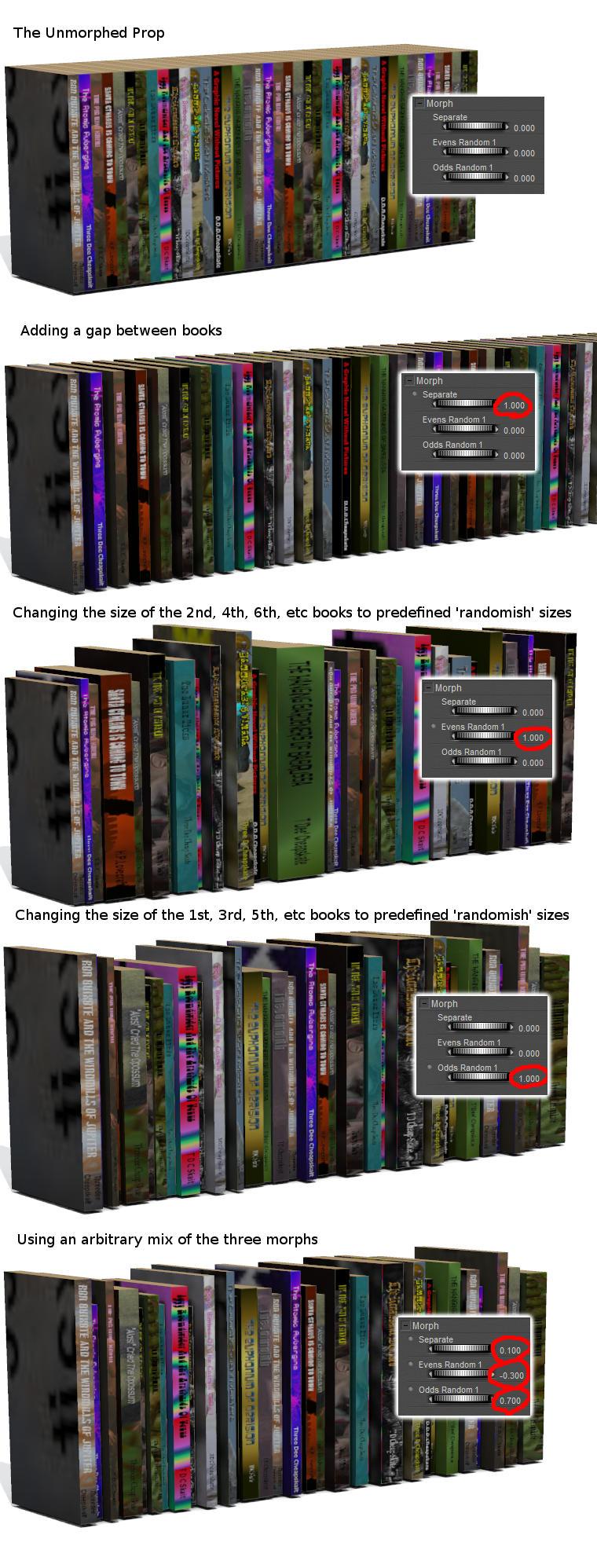
I think that looks quite visually interesting and flexible- not bad for a 328 vertex / 246 face row of books with a single 2048x2048 JPG texture.
(note: the morph dials in the screenshot are Poser ones because I'm initially doing this as a Poser prop)
I had been worried about the titles on the spines being stretched too much when I made a book thicker. But I was forgetting that these books are mainly to provide background clutter and visual interest. Being able to read the titles isn't important.
I'm now looking at putting six rows of books in the prop, with morphs to cope with different shelf separations, and with poses to fit the prop to the shelves in various things I own ("err sorry, what was that? Oh... 'assets'. Okay,if you must.)
And I'm beginning to get bored with this already*. Maybe I should release what I've got so far ?
Edit: maybe another morph, 'A4 Size', could be useful ? Everybody knows A4 size** - its, errr... [quick Google]... 21cm × 29.7cm (note to self: 1 PNU = 103.2" or 262.128021cm). The base mesh at the moment is roughly standardish paperback size - 17½cm × 10½cm × 1cm (it's a thin paperback), but I'm wondering whether some arbitrary base size and a 'Standardish Paperback Size' morph would be better. You see the sort of quagmire of insignificant irrelevances (irrelevancies?) I get entrenched in ? And entrenching in a quagmire is really no joke !
*I think maybe I'm a manic-apathetic...
**except people who don't
Finding texture maps for Freak characterIt sounds like you are using an earlier gen version of the freak, pz2 are poser files, this most likely would be in the poser content folders. Also it is likely that the version could be a morph which is using the base maps for genesis version that your version of Freak belongs to. Body suit is a naming convention for earlier gen base maps and I have seen it used with M4.Thanks, CGHipster. Yes, I did get the Freak model a while ago. The UV maps don't seem to be in the old Poser/Efrontier runtime either. Even with newer models like Ceratosaurus, the "Browse to File Location" takes me to C:\Users\Public\Documents\My DAZ 3D Library\Runtime\Libraries\Materials\DAZ Dinosaurs\Ceratosaurus where there are no UVs. With a separate Windows search, I find the UVs in C:\Users\Public\Documents\My DAZ 3D Library\Runtime\Textures\Animals\CeratosaurusDR . Even with the DAZ model SYSerpConstrictor that I purchased this year, I can't seem to find the UV from within the Surfaces tab. I have to find it with a completely different Windows search. The Freak UV's location remains a mystery.
What do we WANT from the next male G8 base?Sorry if I'm repeating what someone else has saidd but I was so anxious to join this conversation I jumped all the way to the end WHY ARE THERE SO FEW HISPANIC MALE CHARACTERS I use the Awan character too much, and I have some morph packages that have some options but I just remember do many more choices with g2m, g2 and m4. Also, this maY be that I focus on more "real life" renders but some more typical looking guys, somewhere be between the huge muscle guys and the cartoons.Finding texture maps for Freak characterIt sounds like you are using an earlier gen version of the freak, pz2 are poser files, this most likely would be in the poser content folders. Also it is likely that the version could be a morph which is using the base maps for genesis version that your version of Freak belongs to. Body suit is a naming convention for earlier gen base maps and I have seen it used with M4.GenX2 - Need HelpThanks for referring me to your tutorial. I was doing most of what you describe. I didn't have the people folder selected. Do I need to do that? Also, I kind of thought that since I said get values from figure in scene that it was selected the morphs that were needed to create the figure. But I guess that it is just setting the values.
I also just checked and I don't see a people folder but I do see an actor folder.
So if I load a character into my scene, and want to transfer that character from G2M to G3M, I get a screen that looks like this after I say get values from figure in scene ...
(Well, I wanted the picture to show here, but it shows as an attachment. Plus I didn't realize that you had to save the the response before the attachment showed, so I attached it 4 times and now I don't see a way to delete the duplicates.)
In any case, the only morph that appears to be set is Dusty 1, except for the one that says Disable all -1, so if I check the line that says Dusty and transfer the morph, then I should end up with a character morph for G3M that will convert him into Dusty, right? (I thought I did that but the slider didn't change anything. But maybe I didn't something wrong, so I will try it again.)
Also, why are some of the types checked in yellow, but some are not. They all seem to have a value of zero, so I'm not sure what the check mark means.
I couldn't find an example of one that I thought looked grayed out.
Toon Dwayne 8Brandon mixed with several Marcius characters plus dial spun to make him less blocky.


Wow, that morph looks great! First one I've seen that I liked... Unfortunately I don't own any Marcius characters. Yet.
Pathfinder GoblinsI need a morph for a Pathfinder style goblin. While I've got enough morph backs to get the basic stature and spindly limbs, the signature piece - the head - is giving me trouble. They're incredibly large and roughly football shaped, typically the same width as the shoulders, and often the same width as the hips. A very toothy mouth makes up much of the space.
Can anyone point me to something roughly like that? I've come close with mixing various morphs, but I'd like better options.
SG Copy Pose Animated Script issueI posted this in the original scripts thread but it has not been active for a while so I thought that this might be a problem that is common to scripts so I posted here as well. I have an issue now that I did not get before when using the SG Copy Pose Animated Script. While attempting to transfer from Victoria 6 to Victoria 7 or from V4 to G3, or V5 to V7. I get the following message .
general\dzscript.cpp(658): Unhandled errorwhile executing script. QscriptEngine::popContext()doesn't match with push Context()
then, the script stops after converting about 200 frames and then V7 (G3 when used with v4 to G3) is suddenly placed to the side of V6 and has all the upper body muscularity morphs applied. I have used this script before many times to convert from V6 to V7 with animations exceeding 6000 plus frames and it worked fine. The only difference I can think of that I have now is that I istalled muscularity morphs for G8 recently. Any help would be appreciated.
Kwan
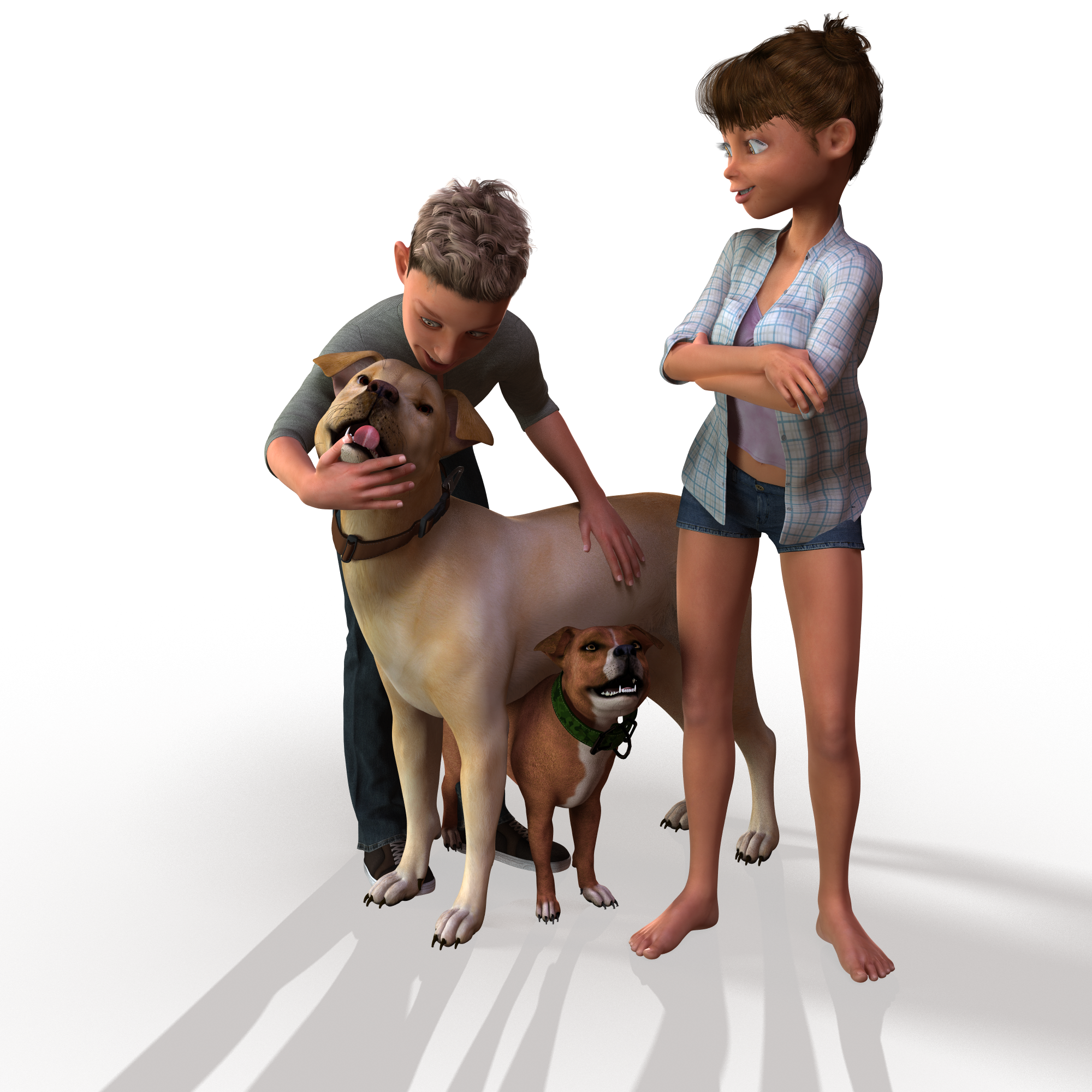
Things I'm Playing with ........Sometimes I worry about createing variations with morphs or scaling cause what if it prevents somebody else from making a morph ? any who here is my scaled and morphed American Bulldog from Bully
 Pose and animation conversion for multiple generations of DAZ figures
I hope this thread is still active, because I have an issue now that I did not get before. While attempting to transfer from Victoria 6 to Victoria 7 I get the following message .
general\dzscript.cpp(658): Unhandled errorwhile executing script. QscriptEngine::popContext()doesn't match with push Context()
then, the script stops after converting about 200 frames and then V7 is suddenly placed to the side of V6 and has all muscularity morphs applied. I have used this script before many times to convert from V6 to V7 with animations exceeding 6000 plus frames and it worked fine. The only difference I can think of that I have now is that I istalled muscularity morphs for G8 recently. Any help would be appreciated.
Daz 3D is part of

Connect
DAZ Productions, Inc.
7533 S Center View Ct #4664
West Jordan, UT 84084Licensing Agreement | Terms of Service | Privacy Policy | EULA
© 2026 Daz Productions Inc. All Rights Reserved.