-
Ten Years After - The Making of Dartanbeck.com
Dartanbeck said:
She's Coming!!!
The latest version of Rosie will be able to jump back and forth between Daz Studio and Carrara!
No crazy exporting or manipulations... just load from the library and go!!!
She's nearing completion, but not quite there yet.
This image is a celebration of my latest epiphany - using dForce and Linday's Classic Long Curl Hair to build up a conforming hair with a plethora of Joint-Controlled-Morphs created directly from Simulation data - and it works!
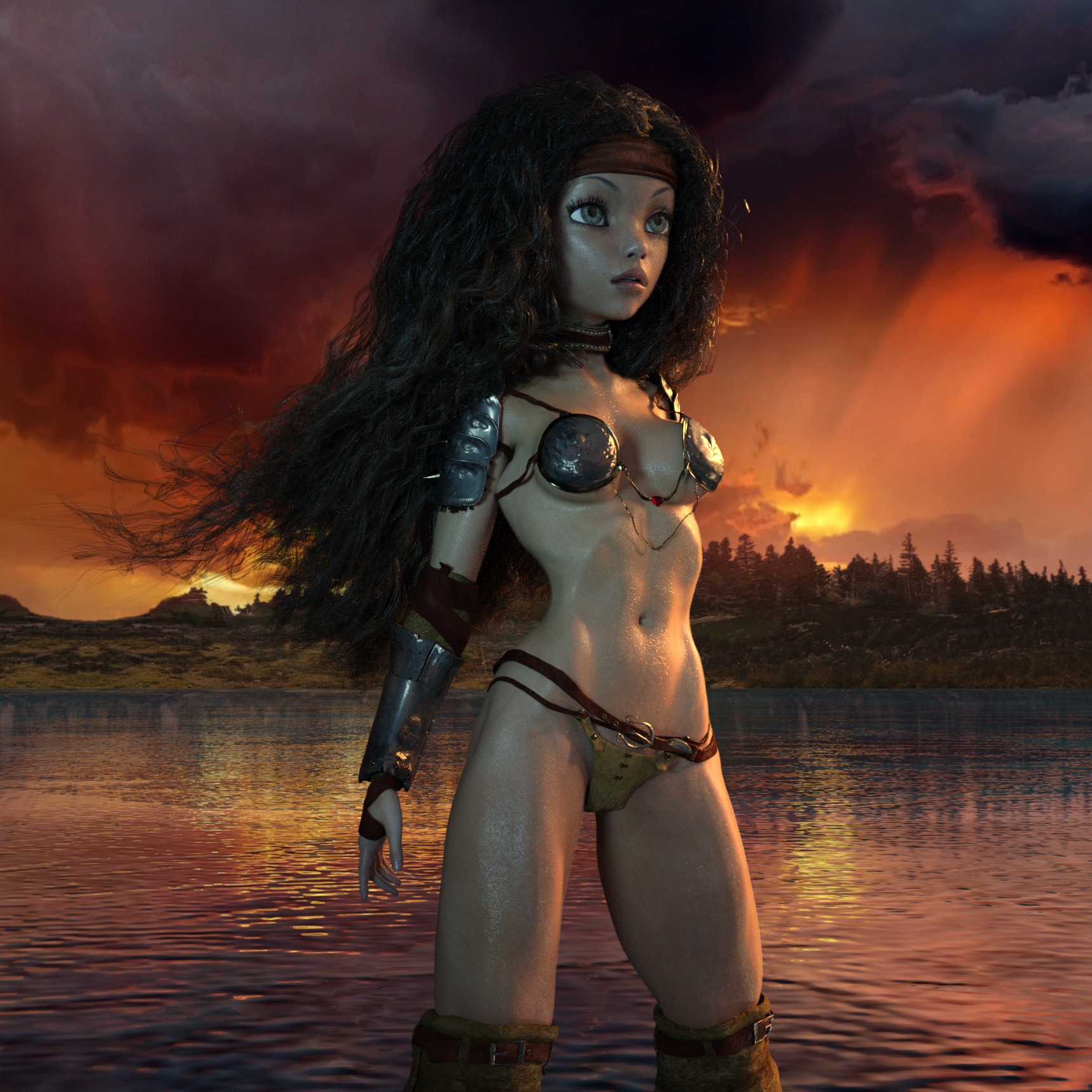
I still have a way to go, but I wanted to give a small sample of where I'm at.
In this image she's also wearing her own custom GeoShell, and I made up the transparent shader with V4 HiRes Wet Maps (Specular and Bump).
I ported Arki's EYEdeas 4 for Genesis 3 Females over to Rosie and am also using PhilW's Eye Surface for Genesis - and he made his "Bright Eyes" for both Daz Studio and Carrara - so, win Win!!!
I really like the modern shaders for the latest few generations of Genesis, so I've used those as a base to work from and have come up with a really nice skin shader for Rosie using V4 Elite: Reby Sky.
Her shape comes from many sources - Sol for G8F and G3F, Star 2, Aiko 6, Gia 6, Victoria 6, Victoria 4, Stephanie 4, Arki's EYEdeas 4 and many shaping morphs from across generations 5 through 7.
After all of this time learning about many of the 'not-so-obvious' tools of Daz Studio, I've really come to love this software, and Carrara has been a Huge asset through this whole process, which is my Favorite Reason to even use a computer - Period! Carrara Pro ROCKS!!!
That's a terrific render, Dart. Hope you complete the character soon.
Your workflow sounds complex, but if it works for you, great. All that matters is the result (which looks outstanding).
Glad there are no bloodshot eyes. I really didn't care for those. :)
Looking for a character, help please.wiktor.fryszka said:
The one used in theese promo images.
https://www.daz3d.com/z-la-femme-fatale-poses-for-genesis-3-female
I looked through Fred Winklers and Sabbys cnaracters and didn't find her, any of you have an idea who makes characters looking like this?
She looks like a Raiya character to me, possibly - Sasha for Victoria 7 | Daz 3D
Ten Years After - The Making of Dartanbeck.comShe's Coming!!!
The latest version of Rosie will be able to jump back and forth between Daz Studio and Carrara!
No crazy exporting or manipulations... just load from the library and go!!!
She's nearing completion, but not quite there yet.
This image is a celebration of my latest epiphany - using dForce and Linday's Classic Long Curl Hair to build up a conforming hair with a plethora of Joint-Controlled-Morphs created directly from Simulation data - and it works!
I still have a way to go, but I wanted to give a small sample of where I'm at.
In this image she's also wearing her own custom GeoShell, and I made up the transparent shader with V4 HiRes Wet Maps (Specular and Bump).
I ported Arki's EYEdeas 4 for Genesis 3 Females over to Rosie and am also using PhilW's Eye Surface for Genesis - and he made his "Bright Eyes" for both Daz Studio and Carrara - so, win Win!!!
I really like the modern shaders for the latest few generations of Genesis, so I've used those as a base to work from and have come up with a really nice skin shader for Rosie using V4 Elite: Reby Sky.
Her shape comes from many sources - Sol for G8F and G3F, Star 2, Aiko 6, Gia 6, Victoria 6, Victoria 4, Stephanie 4, Arki's EYEdeas 4 and many shaping morphs from across generations 5 through 7.
After all of this time learning about many of the 'not-so-obvious' tools of Daz Studio, I've really come to love this software, and Carrara has been a Huge asset through this whole process, which is my Favorite Reason to even use a computer - Period! Carrara Pro ROCKS!!!
Although installed, V4 Morphs++ do not function in DS 4.15 [Solved]I have installed Victoria 4.2 and several of her character morphs in DS 4.15, along with the corresponding Morphs++ package. The morphs appear in the Content Library and there can be selected, but it seems that they are not applied to the character. After selecting V4 in the Scene palette, I find a search of Parameters, Shaping, and Posing comes up empty. I mean the morphs I applied, for example BreastsSize or Hip Size, simply cannot be found. Has anyone please any idea what I have done wrong? Thanks to one and all.
Where is Genesis 8.1 female basic modelI have Victoria 8.1 but can not find the Genesis 8.1 female basic model anywhere. Does anyone know where it is?
Genesis 8.1 Female - Where are the Body MorphsWill the https://www.daz3d.com/genesis-8-female-body-morphs work with HD models like > https://www.daz3d.com/victoria-8-1-add-on ?
Genesis 8.1 Female basic modelI can not find the Genesis 8.1 Female model? I have Victoria 8.1 but can not find the Genesis 8.1 Female model.
KHImage studio does it again, now for GENESIS 8!This thread is older, but here is another one with this product and I can't seem to get it to work. Now I can get some slight changes for the shoulder, but for example the picture in the store shows that bending the neck should produce some very visible details:
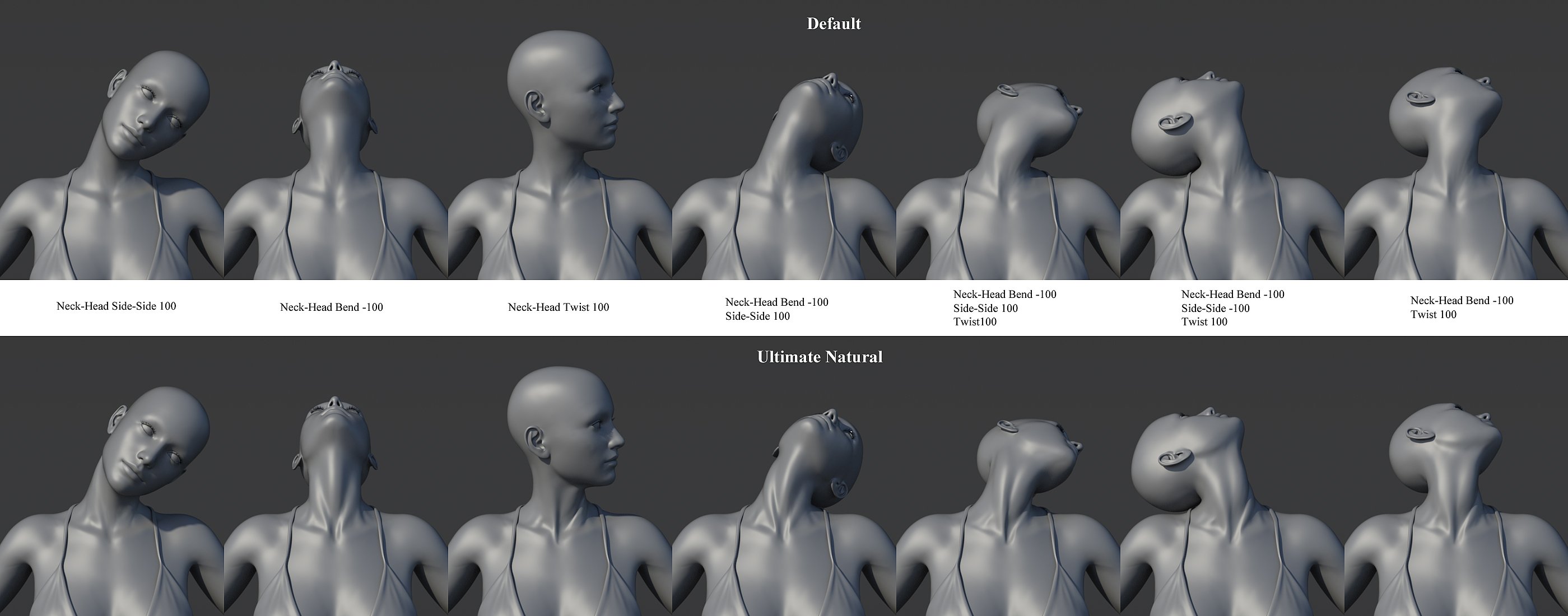
but it just doesn't, all I get is this:

EDIT: I own both the Victoria 8 version and the Gen8 version, probably bought both in a PC+ sale or something like that. Neither of them seems to work correctly. Just pointing that out since in the screenshots the Victoria8 version sliders are shown, but I tried both.
EDIT2: Ok, now I seeing the comments pointing out that I am supposed to use the Pose Controls. Though it does work when I just pose the bones for some of the morphs it seems. Maybe its somehow possible to just change the controller so it does not require me using the Pose Controls? That does indeed make the product inconvenient to use for me.
How do I convert female poses to male?DaWaterRat said:
I know it's old tech at this point, but you may want to look at the original base Genesis figure, which could morph into male and female characters. Since it could morph into either easily, the clothing fit either gender equally well without needing autofit.
The Genesis starter essentials should be available as part of your Daz Studio content downloads, so you can at least check out the base shapes without investing anything. There are also a fair number of freebies still around for Genesis 1 as well (may be noted as for Victoria 5, which is the Victoria shape for the original Genesis figure.)
This is a good suggestion; if you still want to use the poses with another preferred generation character, you can just transfer them to Genesis 1, dial in the opposite gender just to tweak the poses, and re-transfer them to the desidered generation. Results may not be perfect, but would at least be a starting point.
Are there still morph dials?Hi - I am just getting back into 3D stuff (I used DAZ a ton 15 years ago) and a lot has changed.
I am looking to use Victoria 8.1 but can't for the life of me find a facial morph pack. I don't want character presets...I'm looking for dials (example: eye height, top lip roundness, jaw angle, etc.). Is this still a thing?!
Thank you.
New! Novica & Forum Members Tips & Product Reviews Pt 14Novica said:
And why does the title say 8.1 and it ISN'T in the 8.1 section, it's in the 8.0 ????? Tired of shoddy work by QA. No one else has noticed this, or have they? I am not searching the forums, too busy.
Just out of curiosity, are you using Smart Content or the Content Library. I don't know from Smart Content, but what I've seen so far is that ***all*** of the 8.1 characters are installing to the 8.0 Characters directory structure. Not one or two: ALL of them, even Michael and Victoria. I don't think that the 8.1 directories even contain a Characters subdirectory by default. I wound up creating one of my own because not having it there was making me a little mental, and I manually move every 8.1 character and their materials directory into that spot.
The 8.1 directories mostly have expressions presets, some poses, a very few 8.1-specific materials, and clothing, I think.
My Skin Tweaks for the Iray Uber ShaderHylas said:
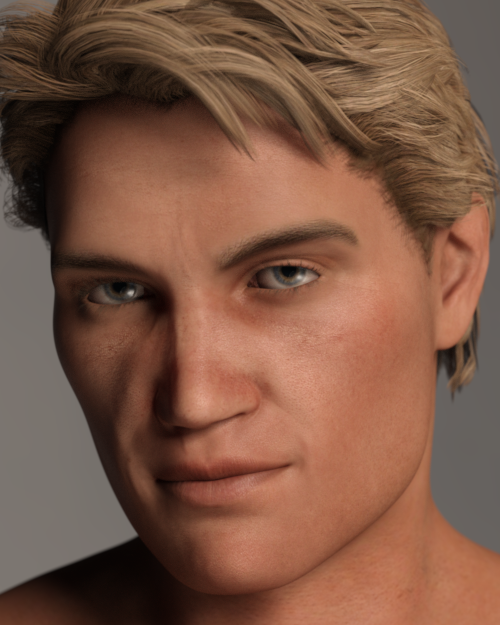
My first misadventure with MelissaGT's tutorial.
I'm tackling Drako's skin. I'm not afraid to tweak skin settings and experiment but so far I never quite manage to get Drako right.
I find his complexion always a little too dark and would like to lighten it without lowering translucency even further (it's 0.5 by default.)
Besides, it's by no means a bad skin but I think it could be even better.
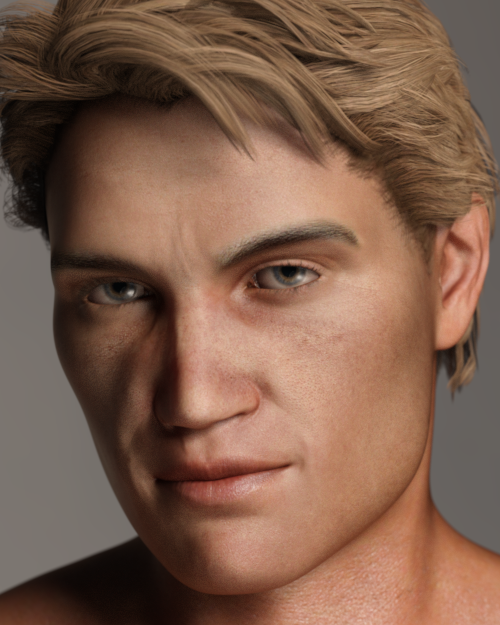
This is Anagenessis 2, which sometimes does wonders, especially for G3 skins.
Drako came out a little corpsy so I added a little peach to the diffuse channel. It's not too bad but still could be better.
So, following MelissanteGT's instructions...
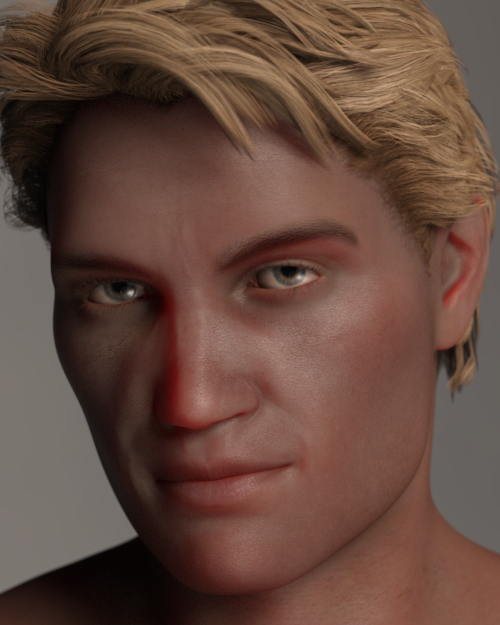
yikes yikes yikes yikes yikes yikes yikes yikes yikes yikes yikes yikes yikes yikes
LOL!
(I mean no disrespect! Of course I understand that every skin is different and there's no one-size-fits-all solutions.)
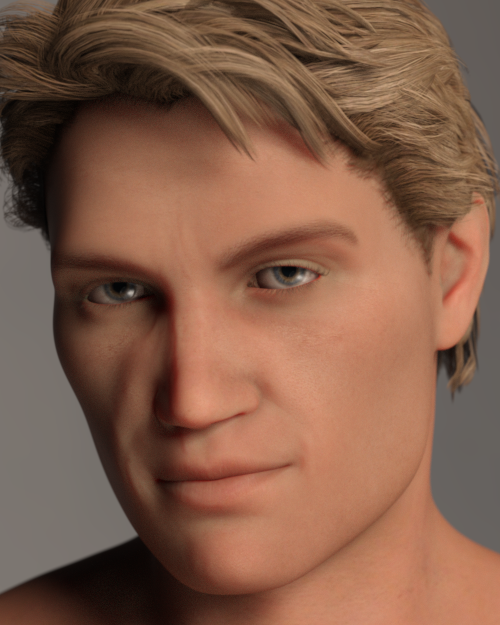
In any case, experimenting a little more I found that the new SSS maps were too dark, so I made them 30% lighter in Photoshop.
Here I'm using the skin presets of Bernat by Sithlordsims but with Drako's maps, including the newly generated SSS maps.
I like the skin tone... but it's still not really it, is it?
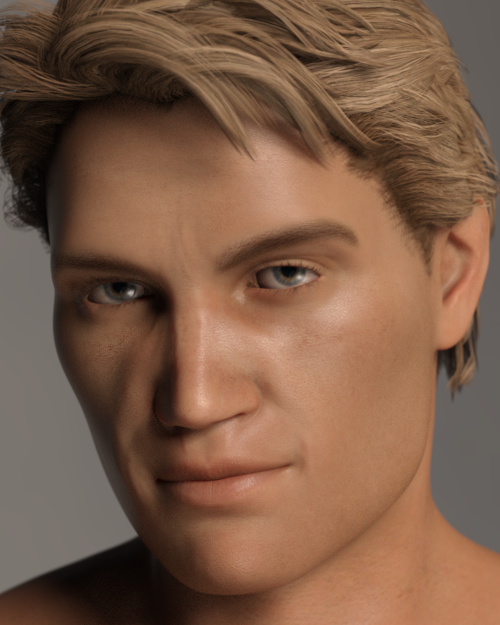
Lastly (for now) the skin presets of Vernon by Mousso. Might be the best one so far, not entirely sure.
I find him too yellow now, and that's after I already dialled out some yellow.
(Looking back, the original setting maybe wasn't so bad after all... LOL)
If he turned out red like that with my steps, you absolutely did something wrong along the way. Did you create a SSS map for him? G3 characters use different SSS and you have to convert the mono SSS to chromatic. It looks like you might have forgotten to change the SSS to chromatic and then set the transluceny very high on a (still) monochromatic skin. I don't have the character, so I can't show you what he looks like if I do it.
If he was only a couple bucks I'd buy him to show you, but I'm not spending $10 on a character I'll never use. I do have Michael 7, who is of similar toning...I can do that one and post here the results.
Here are the steps for G3 when I converted Victoria 7 -
- Open up a figure of your choice (I’m using Victoria 7 for my example) in Daz Studio.
- Open up the Surfaces tab.
- Starting with the Face, open up the translucency map in Photoshop (or photo editing program of your choice that supports layers). In the case of Vicky 7, this map is here on my system – DAZ 3D\My 3D Library\Runtime\Textures\DAZ\Characters\Genesis3\Victoria7\V7FaceMapSSS_1001.jpg. There are other SSS maps for Vicky 7 that are dependent upon any makeup you choose, but for our purposes, we’re only concerned with the base skin that loads with the character. You can always convert the makeup skins if you’d like later (I usually just use third-party makeup anyways).
- Once you have the Face SSS map open in Photoshop (it should be greyscale with blue squigglies), take a look at the vein detail. It’s great! I really wish Daz kept these details on their newer figures but c’est la vie. Now open up the base color map, in this case V7FaceMapD_1001.jpg. We’re going to need both to create a proper Chromatic SSS map.
- Next take the SSS map and copy/paste it onto a new layer over the base color map. You should now have two layers…one with the SSS map, and one with the base color map. The SSS map should be on top, currently blocking the color map from showing.
- Change the opacity of the SSS map to 25%.
- Now create a new solid color adjustment layer and pick a nice fleshy pink tone (205,165,165).
- Change the opacity of the solid color adjustment layer to 20%. The pink layer will bring back some nice color to the map we’re building.
- Go ahead and save this working file as a .psd if you want to come back to it later and play around (I would highly advise playing around…that’s how I learned!). Flatten the image or stamp visible if that’s you’re thing and save this new SSS map as a .jpg (the highest quality setting). You can save it in Vicky 7’s folder, or anywhere you’d like to save it if you want to set aside a special folder for your custom maps. I’ve saved mine as V7FaceMpaD_1001 – CUSTOM SSS.jpg.
- Back in Daz, change the Translucency Color map to the one you just created. You do this by clicking on the map in the Surfaces tap and then going to Browse when the menu pops up.
- Change the Translucency Color to white (you can absolutely play with this if you’re going for fantasy skin colors)
- Change the Translucency Weight to .85 (you might need to play with this depending on the character).
- Change the Base Color Effect to Scatter & Transmit Intensity (Vicky 7 is already set up that way, but if the character you’re working on doesn’t have it, go ahead and change it).
- Change the SSS Reflectance Tint to 0.56, 0.98, 1.00. (you might need to play with this depending on the character, I usually start with 0.79, 1.00, 1.00 and adjust from there).
- Scroll down on the Surfaces pane.
- Change the SSS Mode to Chromatic.
- Change the Transmitted Measurement Distance to .15 (you might need to play with this depending on the character).
- Change the Transmitted Color to 0.95, 0.20, 0.10 (you can definitely play with this depending on the character and skin tone you’re going for…unlike with Monochromatic SSS, this is where you can go to fine tune the ultimate lightness/darkness and tone…to an extent).
- Change the Scattering Measurement Distance to .015 (you can play with this setting too).
- Change the SSS Color to 0.95, 0.45, 0.55 (you can play with this setting too…in fact, you will have to depending on the character and look you’re going for).
- Change the SSS Direction to -.15 (I typically don’t mess with this and leave it set to 0, but using small negative values, such as -.1 to -.25, can be helpful if there is too much scattering effect…this can vary greatly on lighting).
- Repeat these steps for the Lips and Ears (I often do them at the same time as the Face since they use the same maps).
- Repeat these steps for the rest of the skin surfaces…Arms, Body, Legs, Fingernails, Toenails, EyeSocket, etc. All of these maps are located in the same folder where we found the Face map (in example, the body would be V7TorsoMapD_1002.jpg for Victoria 7).
How to move the path of the morph so that it's permanently changed?Also, Jonstark, which figure are you using?
The last time I used a figure that had per body part morph designations was Victoria 4/Michael 4 where I had to select that body part to use morphs for that body part.
That might be a whole other can o-worms for morph selection designation to the 'root' of the figure.
I am curious because, I was thinking of adding V4/M4 support to my DS/Blender morphing bridge script, but I haven't explored the per body part only morphing. les FBM's (Poser style morph creation for gen4 figures), and the needed work-flow switching for working with per body parts as opposed to working on full figures and setting body part designations as with the Genesis line.
Swapping textures between charactersYou can usually use G3F/M textures on G8F/M if the G3 figure uses the Base Female/Male UV, because those are the same for G3 & G8. However all of the Daz Original G3 Characters, Michael, Victoria, Leo, Gianni, Olympia, etc use Figure specific UVs and thus would need to be changed with Map Transfer to use the G3 Base Female/Male UV. Or if you don't want to to do it manually, you would need: https://www.daz3d.com/genesis-3-character-uvs-for-genesis-8-male and https://www.daz3d.com/genesis-3-character-uvs-for-genesis-8-female.
To use male or female textures on the opposite gender of the same generation you will need: https://www.daz3d.com/genesis-3-uv-swap-male-and-female-base for G3, https://www.daz3d.com/genesis-8-uv-swap-male-and-female-base for G8, and https://www.daz3d.com/uv-swap-for-genesis-81 for G8.1.
Genesis 9 Coming?kyoto kid said:
Noah LGP said:
It's like Victoria 4.2 the next is Genesis 8.2, the Genesis series end.
Nexus series will begin.
..nailed it.
Not so sure about nailing it, but I sure as hell wouldn't be surprised to see 8.2.
Pablo 8.1I'm actually from Mexico (born and raised) and I don't understand all this talk about Pablo not looking like a Mexican. I was just talking with Esid (my brother and, as such, also Mexican) and we both agreed he look like someone we would see walking down the street. As with the rest of the world, we are varied here as well in terms of skin color, body type and face shape. For context, I have a friend (also 100% Mexican) who is white and looks very much like someone from France or Germany. When I was stuying in Canada, I was often asked if I was Korean by Asian students. Later on, when I studied in Italy, I was asked if I was from Egypt. So this just goes to show that outside of building a stereotype, I don't get what people would be expecting a "Mexican" to look like.
I know that sometimes I see Korean dramas/films and some of the actors/actresses feel like they could be Mexican to me. This situation also reminds me of when my mom came to visit me in Canada (Victoria BC) and a chinese-canadian guy didn't believe she was mexican because she was white, lol. Just my two cents in regards to that part of the discussion.
PS: I agree in that I'm not crazy about the expression marks near the corner of his lips, but I like Pablo's shape quite a lot!
Celebrity Look-a-Likes for 3D figures part 3Lossow said:
Do we have any ideas on the latest Celebrity Series from Adam Thwaites?
Definitely looks like someone familiar - can't quite place it. AI seems to indicate Monica Bellucci. Which I can definitely see. But I I feel like it's actually supposed to be of someone younger/more famous right now.
Haruchai said:
Probably a bit too old now but Karmir by StudioArtVatarian is a pack for Victoria 4 based on Jean Grey and includes the character, hair and suit.
Karmir Pack for V4 3D Figure Assets StudioArtVartanian (renderosity.com)

jimdrago used to have a V4 take on her as well, but it is sadly no longer available.
Celebrity Look-a-Likes for 3D figures part 3Probably a bit too old now but Karmir by StudioArtVartanian is a pack for Victoria 4 based on Jean Grey and includes the character, hair and suit.
Karmir Pack for V4 3D Figure Assets StudioArtVartanian (renderosity.com)
 Celebrity Look-a-Likes for 3D figures part 3
iDiru said:
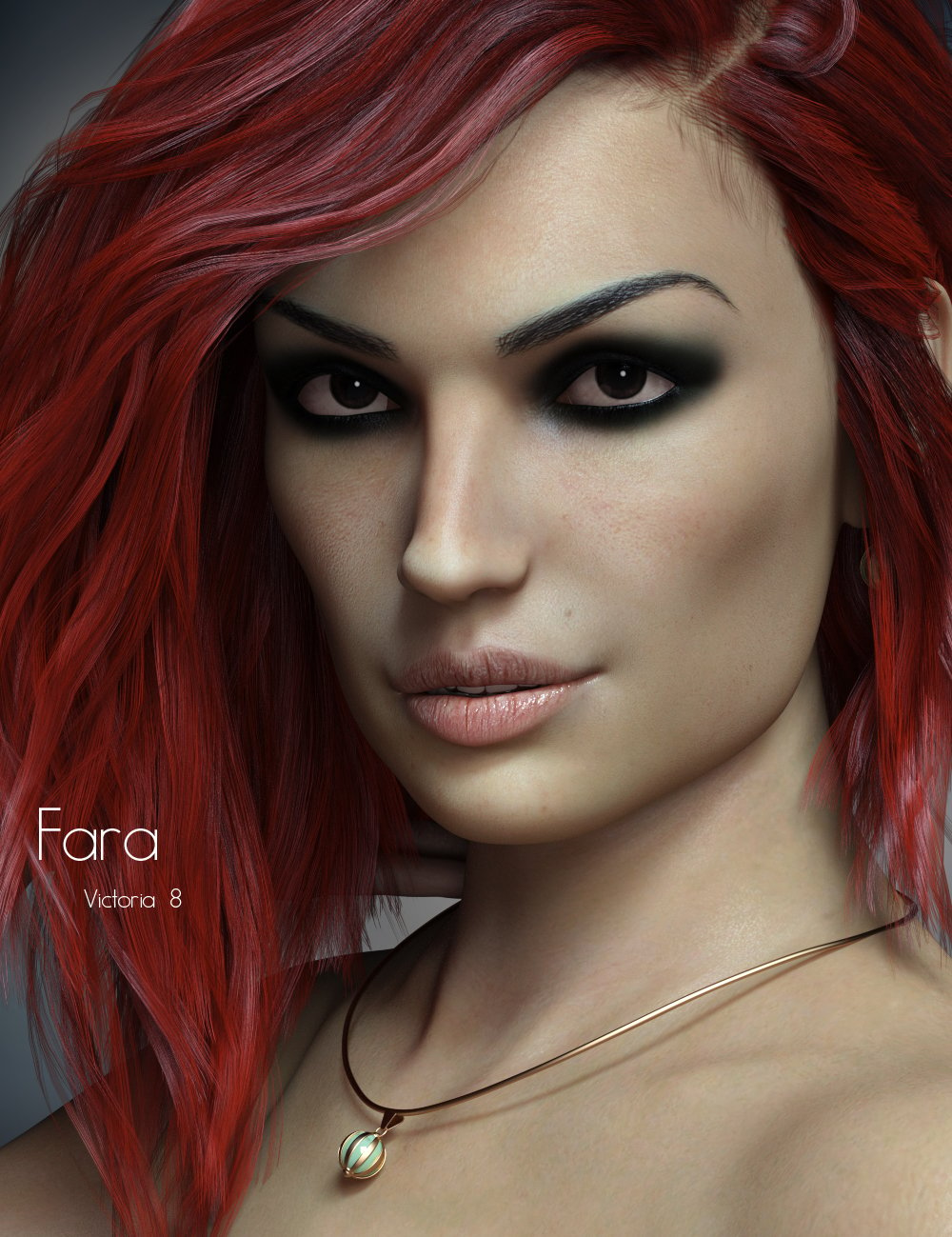
Anyone know of any Famke Janssen (original Jean Grey) morphs?
P3Design's FARA for Victoria 8, was inspired by Famke. ;)
 Diffeomorphic DAZ Importer version 1.6.0 released
Padone said:
@surody Please state your specs (daz, blender and plugin versions) and the exact steps to reproduce the issue. Also if needed upload a test scene as simple as possible (duf file).
I use the newest Daz Beta, the newest Blender 2.93 + Blender 3.0 versions and the newest 1.6.1 dev version of daz_import. I get the error with both Blender versions. I kept testing a bit more and Victoria 8.1 and Jada 8.1 seem to work but Joanna 8.1 doesn't work.
Here's the error:
Python: Traceback (most recent call last):
File "C:\Users\AppData\Roaming\Blender Foundation\Blender\2.93\scripts\addons\Diffeomorphic-import_daz-f611d2545732\error.py", line 208, in execute
self.run(context)
File "C:\Users\AppData\Roaming\Blender Foundation\Blender\2.93\scripts\addons\Diffeomorphic-import_daz-f611d2545732\main.py", line 468, in run
self.easyImport(context, filepath)
File "C:\Users\AppData\Roaming\Blender Foundation\Blender\2.93\scripts\addons\Diffeomorphic-import_daz-f611d2545732\main.py", line 477, in easyImport
bpy.ops.daz.import_daz(
File "H:\Blender 2.93 (E-Cycles)\2.93\scripts\modules\bpy\ops.py", line 132, in __call__
ret = _op_call(self.idname_py(), None, kw)
RuntimeError: Error: Python: Traceback (most recent call last):
File "C:\Users\AppData\Roaming\Blender Foundation\Blender\2.93\scripts\addons\Diffeomorphic-import_daz-f611d2545732\error.py", line 208, in execute
self.run(context)
File "C:\Users\AppData\Roaming\Blender Foundation\Blender\2.93\scripts\addons\Diffeomorphic-import_daz-f611d2545732\main.py", line 122, in run
self.loadDazFile(filepath, context)
File "C:\Users\AppData\Roaming\Blender Foundation\Blender\2.93\scripts\addons\Diffeomorphic-import_daz-f611d2545732\main.py", line 206, in loadDazFile
asset.build(context)
File "C:\Users\AppData\Roaming\Blender Foundation\Blender\2.93\scripts\addons\Diffeomorphic-import_daz-f611d2545732\cycles.py", line 81, in build
self.tree.build()
File "C:\Users\AppData\Roaming\Blender Foundation\Blender\2.93\scripts\addons\Diffeomorphic-import_daz-f611d2545732\cycles.py", line 347, in build
self.buildLayer("")
File "C:\Users\AppData\Roaming\Blender Foundation\Blender\2.93\scripts\addons\Diffeomorphic-import_daz-f611d2545732\cycles.py", line 381, in buildLayer
self.buildDetail(uvname)
File "C:\Users\AppData\Roaming\Blender Foundation\Blender\2.93\scripts\addons\Diffeomorphic-import_daz-f611d2545732\cycles.py", line 586, in buildDetail
self.buildNormalMap(weight, tex, uvname)
File "C:\Users\AppData\Roaming\Blender Foundation\Blender\2.93\scripts\addons\Diffeomorphic-import_daz-f611d2545732\cycles.py", line 491, in buildNormalMap
self.links.new(tex.outputs[0], self.normal.inputs["Color"])
AttributeError: 'NoneType' object has no attribute 'outputs'location: <unknown location>:-1
Daz 3D is part of

Connect
DAZ Productions, Inc.
7533 S Center View Ct #4664
West Jordan, UT 84084Licensing Agreement | Terms of Service | Privacy Policy | EULA
© 2026 Daz Productions Inc. All Rights Reserved.