-
CARRARA CHALLENGE #63: There be Dragons..... Voting thread
Entry: 13
Artist: UnifiedBrain
Title: "Is it just me, or did it suddenly get a LOT warmer in here?"
WIP link: https://www.daz3d.com/forums/discussion/comment/7594006/#Comment_7594006
Comments: V3 and the Daz Dragon (pre-milliennium) are the characters.
The outfit is a modifed version of Angeluz for V4. The flame and smoke were Jepe billboards, which I had never used before. Background was courtesy of MatCreator.
No postwork, but prework on the V3 body texture in PSE.
 CARRARA CHALLENGE #63: There be Dragons..... WIP
Diomede said:
Thanks for the nice comment.
On workflow, I created the tombstone using the terrain modeler. Created the letters in an image editor, then insterted as a heightmap in terrain modeler. Added a smooth filter. Converted to vertex model for some minor editing.
Thanks for the workflow !!!
I'm always amazed at the number of ways you can do things in Carrara !
[Released] Environment Set Splitter * Commercial *Totte said:
WendyLuvsCatz said:
Totte said:
smaker1 said:
In my cart also :-)
What about fbx files like those from Kitbash3D,... ? Generate one prop for each building
Thanks
I looked into that, but as the KitBash3D files has no Mesh Groups set up, there is no way to figure out what meshes belong to which main scene object, like is this pipe a part of building 1,2 3 or 4 for example. You see that of you open them in for example Hexgon or Blender, just a long list of mesh objects without any grouping, and no metadata file either that describes which object belong where.
they load grouped in buildings in Carrara

Hmm, interesting, probably depends on what the format is. Did you use obj or fbx?
cannot recall but Carrara can import obj as separate meshes as well as FBX rigged so in place
I am not sure why D|S messes up the latter so much
a decent FBX import is something many people would love especially for rigged stuff
.CAR filesNo, they only work in Carrara.
.CAR filesIs possible importing Carrara files, directly in DAZ? Without purchasing Carrara?
[Released] Environment Set Splitter * Commercial *WendyLuvsCatz said:
Totte said:
smaker1 said:
In my cart also :-)
What about fbx files like those from Kitbash3D,... ? Generate one prop for each building
Thanks
I looked into that, but as the KitBash3D files has no Mesh Groups set up, there is no way to figure out what meshes belong to which main scene object, like is this pipe a part of building 1,2 3 or 4 for example. You see that of you open them in for example Hexgon or Blender, just a long list of mesh objects without any grouping, and no metadata file either that describes which object belong where.
they load grouped in buildings in Carrara
Hmm, interesting, probably depends on what the format is. Did you use obj or fbx?
[Released] Environment Set Splitter * Commercial *Totte said:
smaker1 said:
In my cart also :-)
What about fbx files like those from Kitbash3D,... ? Generate one prop for each building
Thanks
I looked into that, but as the KitBash3D files has no Mesh Groups set up, there is no way to figure out what meshes belong to which main scene object, like is this pipe a part of building 1,2 3 or 4 for example. You see that of you open them in for example Hexgon or Blender, just a long list of mesh objects without any grouping, and no metadata file either that describes which object belong where.
they load grouped in buildings in Carrara
Learning tips and tricks from prior Carrara Challenge WIP threadsCarrara Challenge 63 - There Be Dragons - WIP
https://www.daz3d.com/forums/discussion/578331/carrara-challenge-63-there-be-dragons-wip/p1
Carrara Challenge 63 - There Be Dragons - Entry Thread
September 2022 - Daz 3D New User Challenge - Depth of Field and CanvasesBeginner Challenge - September 2022
"Focus/Depth of Field"
This month's focus will be on Depth of Field/Focus.Depth of Field is basically controlling what part of the image is in sharp focus. A couple of explanations, from the world of photography (so not everything is applicable, but the definitions and basics do apply when rendering).
http://www.cambridgeincolour.com/tutorials/depth-of-field.htm
http://digital-photography-school.com/understanding-depth-field-beginners/
Inspiration
Tips and Examples, Studio:
http://flipmode3d.com/depth-of-field-daz-studio/
http://www.versluis.com/2015/04/how-to-render-with-depth-of-field-in-daz-studio/
http://www.sharecg.com/v/52258/browse/3/PDF-Tutorial/DAZ-Studio-Tutorial-Depth-of-Field
http://www.daz3d.com/forums/discussion/19195/daz-depth-of-field-settings-a-general-starting-point
https://www.youtube.com/watch?v=EuAIDTH0YoA (Depth Of Field In Daz Studio 4 10)
https://www.youtube.com/watch?v=V0jMBdrMo40 (Daz Studio Depth of Field)
Tips and Examples, Poser:http://www.keindesign.de/stefan/poser/dof_p5.html
http://www.trekkiegrrrl.dk/DOFtut1.htm
Tips and Examples, Bryce:http://www.daz3d.com/forums/discussion/3855/
Tips and Examples, Carrara:https://www.youtube.com/watch?v=gliniNqq8_k
Other Helpful Links
When following tutorials, be cognizant of the different applications (Bryce, Daz Studio, Poser, Carrara Blender, etc.) and different render engines (3Delight, Iray, Reality, etc). Techniques for one may not apply directly to another. If you have some favorite portrait lighting and composition tips, please share them in this WIP thread.
Composition Golden Ratio helpers:
Bryce
DAZ Studio (Also, DS has a built in Rule of Thirds guide; just select Show Thirds Guide in the Viewport context menu)Don't forget to look at previous themed contests where information and hints are available. Here is the depth of field challenge from last September.
CARRARA CHALLENGE #63: There be Dragons..... WIPed3D said:
Bunyip02 said:
ed3D said:
Bunyip02 said:
ed3D said:
Bunyip02 said:
ed3D said:
UnifiedBrain said:
Yes, those DIM prompts are confusing to me as well.
Probably better to install the product manually. It has two main folders - Presets and Scenes - which can be merged into the Carrara program folders with the same names..
When that is done, you still need to go to your Carrara browser window and add the PhilW folder to your scenes menu.
~.~ And Thanx very much _ manuall install > instatlled right in _ just need to see this " the individual buildings bit " and how its' done +
+ and the First Renders -
Glad you got it sorted !!! Nightime Dragon flame attack by chance ?
~ Thanx , and would suppose the 3 Entrys will "mostly" be all _ did start an scene => do'nt know how to set the lights to be On or Off
( if they even can ) on singl buildings
3 Entries is excellent !!!
.well , thanx - ususally 1 or 2 -
Was trying to twist your arm and make it 4 !!!

well , Thanx - - but actualy "Could" be 4 if can finish "the Smokers" - but idk -
I'll keep my fingers crossed !!!
Carrara Sale Email Message Alert thread
Shoot, missed them. This weekend there is a 80% off code, includes 2 Carrara AniMate bundles.Bunyip02 said:Freebies includes 6 Starter Bundles for those that don't have them !!!
Carrara Sale Email Message Alert threadAnd then >
- 10 Carrara items -
CLEARANCE CATCH-UP :
$2.99 Clearance Items
$1.99 each for Daz+ MembersThanx ~
CARRARA CHALLENGE #63: There be Dragons..... WIPBunyip02 said:
ed3D said:
Bunyip02 said:
ed3D said:
Bunyip02 said:
ed3D said:
UnifiedBrain said:
Yes, those DIM prompts are confusing to me as well.
Probably better to install the product manually. It has two main folders - Presets and Scenes - which can be merged into the Carrara program folders with the same names..
When that is done, you still need to go to your Carrara browser window and add the PhilW folder to your scenes menu.
~.~ And Thanx very much _ manuall install > instatlled right in _ just need to see this " the individual buildings bit " and how its' done +
+ and the First Renders -
Glad you got it sorted !!! Nightime Dragon flame attack by chance ?
~ Thanx , and would suppose the 3 Entrys will "mostly" be all _ did start an scene => do'nt know how to set the lights to be On or Off
( if they even can ) on singl buildings
3 Entries is excellent !!!
.well , thanx - ususally 1 or 2 -
Was trying to twist your arm and make it 4 !!!
well , Thanx - - but actualy "Could" be 4 if can finish "the Smokers" - but idk -
CARRARA CHALLENGE #63: There be Dragons..... WIPed3D said:
Bunyip02 said:
ed3D said:
Bunyip02 said:
ed3D said:
UnifiedBrain said:
Yes, those DIM prompts are confusing to me as well.
Probably better to install the product manually. It has two main folders - Presets and Scenes - which can be merged into the Carrara program folders with the same names..
When that is done, you still need to go to your Carrara browser window and add the PhilW folder to your scenes menu.
~.~ And Thanx very much _ manuall install > instatlled right in _ just need to see this " the individual buildings bit " and how its' done +
+ and the First Renders -
Glad you got it sorted !!! Nightime Dragon flame attack by chance ?
~ Thanx , and would suppose the 3 Entrys will "mostly" be all _ did start an scene => do'nt know how to set the lights to be On or Off
( if they even can ) on singl buildings
3 Entries is excellent !!!
.well , thanx - ususally 1 or 2 -
Was trying to twist your arm and make it 4 !!!
CARRARA CHALLENGE #63: There be Dragons..... WIPBunyip02 said:
ed3D said:
Bunyip02 said:
ed3D said:
UnifiedBrain said:
Yes, those DIM prompts are confusing to me as well.
Probably better to install the product manually. It has two main folders - Presets and Scenes - which can be merged into the Carrara program folders with the same names..
When that is done, you still need to go to your Carrara browser window and add the PhilW folder to your scenes menu.
~.~ And Thanx very much _ manuall install > instatlled right in _ just need to see this " the individual buildings bit " and how its' done +
+ and the First Renders -
Glad you got it sorted !!! Nightime Dragon flame attack by chance ?
~ Thanx , and would suppose the 3 Entrys will "mostly" be all _ did start an scene => do'nt know how to set the lights to be On or Off
( if they even can ) on singl buildings
3 Entries is excellent !!!
.well , thanx - ususally 1 or 2 -
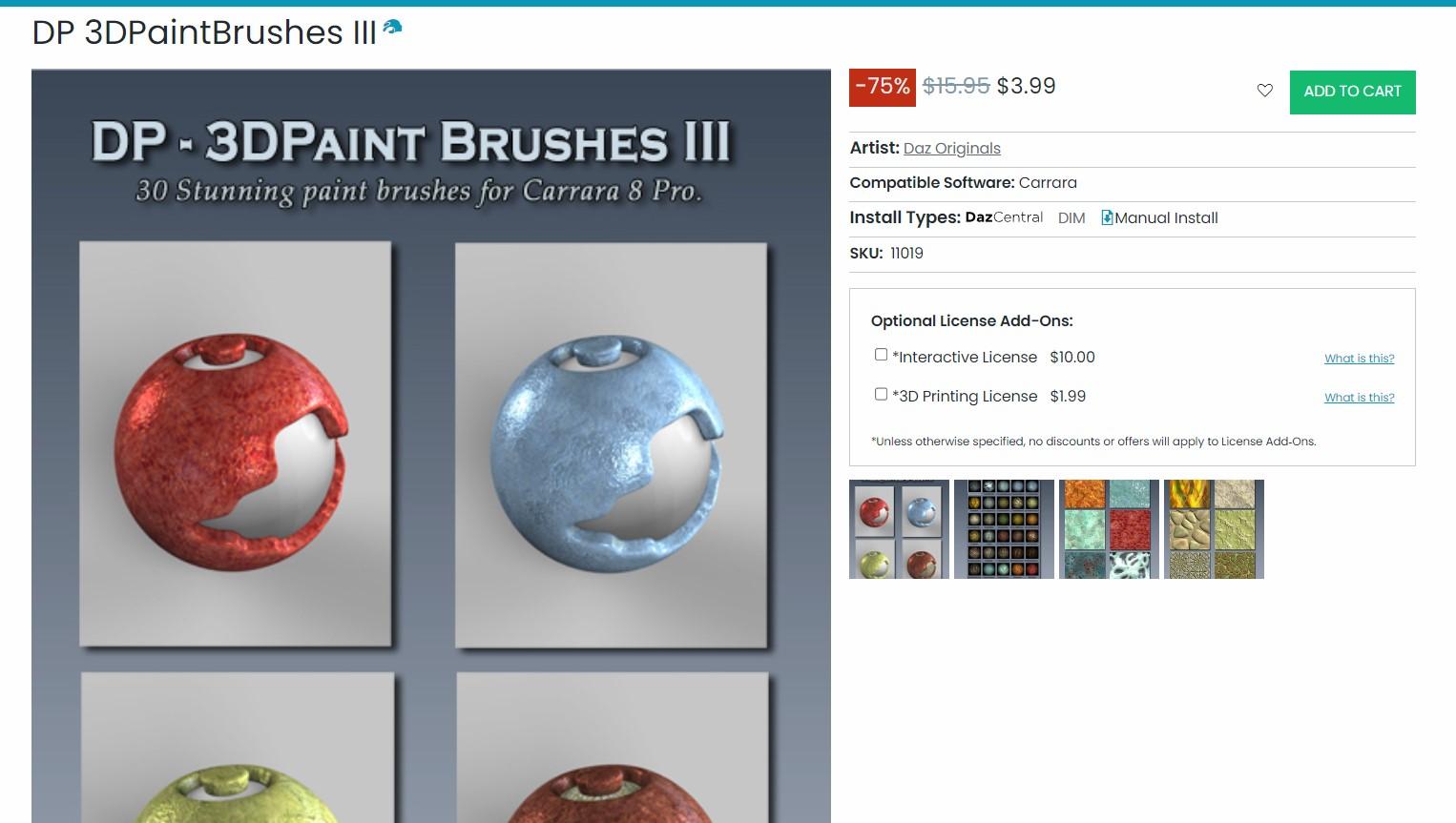
Carrara Sale Email Message Alert threadI bought the Carrara brushes as was something I actually didn't have yet (obviously)
Animating a growing plant - Ideas?DUDU said:
Hi Ted!
I remember using 'VUE 5" to make these animation of plant: see at the minute 6:40
Good point, DUDU. I still consider VUE one of the best 3D animation programs, but recently got more into DS/Iray to use some high quality products. Carrara, VUE, DS, Poser ... >B-O
CARRARA CHALLENGE #63: There be Dragons..... WIPed3D said:
Bunyip02 said:
ed3D said:
UnifiedBrain said:
Yes, those DIM prompts are confusing to me as well.
Probably better to install the product manually. It has two main folders - Presets and Scenes - which can be merged into the Carrara program folders with the same names..
When that is done, you still need to go to your Carrara browser window and add the PhilW folder to your scenes menu.
~.~ And Thanx very much _ manuall install > instatlled right in _ just need to see this " the individual buildings bit " and how its' done +
+ and the First Renders -
Glad you got it sorted !!! Nightime Dragon flame attack by chance ?
~ Thanx , and would suppose the 3 Entrys will "mostly" be all _ did start an scene => do'nt know how to set the lights to be On or Off
( if they even can ) on singl buildings
3 Entries is excellent !!!
Carrara Sale Email Message Alert threadThere is a Carrara specific brush product in the Clearance sale.
 CARRARA CHALLENGE #63: There be Dragons..... WIP
Bunyip02 said:
ed3D said:
UnifiedBrain said:
Yes, those DIM prompts are confusing to me as well.
Probably better to install the product manually. It has two main folders - Presets and Scenes - which can be merged into the Carrara program folders with the same names..
When that is done, you still need to go to your Carrara browser window and add the PhilW folder to your scenes menu.
~.~ And Thanx very much _ manuall install > instatlled right in _ just need to see this " the individual buildings bit " and how its' done +
+ and the First Renders -
Glad you got it sorted !!! Nightime Dragon flame attack by chance ?
~ Thanx , and would suppose the 3 Entrys will "mostly" be all _ did start an scene => do'nt know how to set the lights to be On or Off
( if they even can ) on singl buildings
Daz 3D is part of

Connect
DAZ Productions, Inc.
7533 S Center View Ct #4664
West Jordan, UT 84084Licensing Agreement | Terms of Service | Privacy Policy | EULA
© 2026 Daz Productions Inc. All Rights Reserved.