-
Toonify character shapes morph?
Can Cartoonized for gensis 8 be used on other gensis 8 characters or just the base genisis?
There are other cartoon morph characters and they can all be mixed with realistic characters for the same generation of Genesis.
Custom Morph HelpLooking for some advice on creating a custom morph:
I want to make some small adjustment morphs (just for personal use) to fix up a character created from a bunch of different morphs. Normally what I'd do is export it dialed in, make the adjustments, then bring it back as a single new morph, adjust the skeleton, and be done. However I'm using Sakura 8 for this one, and the separate eyes + brows are not on board with this.
I've tried dialling in the morphs without Sakura's head, making the changes, then adding her head later, adding her head before making the changes, completely unmorphing the head before adjusting the body, and basically every other configuration I could think of. From what I can tell, her eyes are bound to the skeleton in some way I couldn't really adjust - but could see changing when I adapted the rigging to the new shape. Pretty much any changes to the rigging (even autofitting after minor changes) seems to instantly send the eyes into revolt, and my custom shape has a lot of changes to it, leaving the eyes somewhere inside the head.
Ideally I'm guessing the solution would be to make the morph using solely G8F, but I can't do that because it's an adjustment to a load of other morphs, and without seeing them, I can't model the fixes. I tried dialling Sakura's head out and even as a -100%, but as soon as I do the adjust rigging to shape, her eyes go walkabout. I can only imagine the problem will get worse when I want to add custom fixes to the head itself.
Any suggestions?
Genesis 7 for Genesis 8The advantage :
- You can mix Mei Lin 7 morph with all the Genesis 8 exclusive morphs
- All the maps use the Base female UV map, it 's useful when LIE presets are applied
- If you don't own the original Mei Lin 7, this Genesis 8 version is less expensive.
I purchased Aiko 7 for Aiko 8, I don't plan to purchase the original figure because I want to use only Genesis 8 figures.
The interest is the same than these previous products
- Stephanie 3 and FREAK Shapes for Genesis
- A3 and H3 Shapes for Genesis
- V3 and M3 Shapes for Genesis
- V4 and M4 Shapes for Genesis
- Generation 4 Legacy Shapes for Genesis 2 Male(s)
- Generation 5 Legacy Shapes for Genesis 2 Male(s)
Can DAZ 3d be used by kids under the age of 18?Always fun to read these topics.

Can Daz Studio be used by kids under 18? I think the answer to that is yes, but it depends on the parents. If you don't find it safe, make sure they can't use it. My own view on this is that there is nothing dangerous here, compared to all the other dirt they can (and you better believe they will) look at in the big bad world out there. Parents are usually oblivious to what's going on in schools and among friends of their kids. Even more so these days with all the stuff so easily available. Something like Daz Studio that primarily has an artsy background should be the least of your worries if you ask me. I'd be glad your daughter has a creative side and isn't out there doing bad stuff. Not yet anyway.
Valid point though, why are there genitals painted on female characters? I have done this with my own characters, simply because I thought that was expected as it seemed to be common place. But is that even serving a purpose? It being just painted on doesn't provide enough realism to actually use it in renders. I could include additional morphs to make that a bit better, then again as far as I know I can not by default load that morph anyway. And of course there are better options with the additional geografts out there. So, why did I paint on genitals at all? And as mentioned above, why does this not trigger a problem with credit card companies, or whatever the underlying problem is, but an actually shaped penis does? It's a bit of a mystery to me too.
Genesis 7 for Genesis 8They give the shape of the Genesis 7 character for Genesis 8 -- you can do it yourself, yes, but it is a massive pain, at least to start with. They also do the map transfer to shift the textures from the million-and-one G7 UV sets to Base Male and Base Female; otherwise you'd either need to do that yourself (doable, to be sure, but also a minor pain) or to buy Redz' product that provides the UV map for Genesis 8.
what does shape re-projector - solvedhttps://www.daz3d.com/simtenero-shape-reprojector
its a script that can help you simulate some collisions by creating a morph that deforms an object/figure based on the shape of another object/figure that is in contact with it, and also create interesting shapes by combining two overlapping objects into a morph.
ohh thanks lol bought that and forgot
what does shape re-projector - solvedhttps://www.daz3d.com/simtenero-shape-reprojector
its a script that can help you simulate some collisions by creating a morph that deforms an object/figure based on the shape of another object/figure that is in contact with it, and also create interesting shapes by combining two overlapping objects into a morph.
How to Use dForce: Creating a Blanket, Draping Clothes on Furniture, and Much More [Commercial]63. Momentum Transfer
Some have asked if dForce can be used to cause a ball to bounce. ...
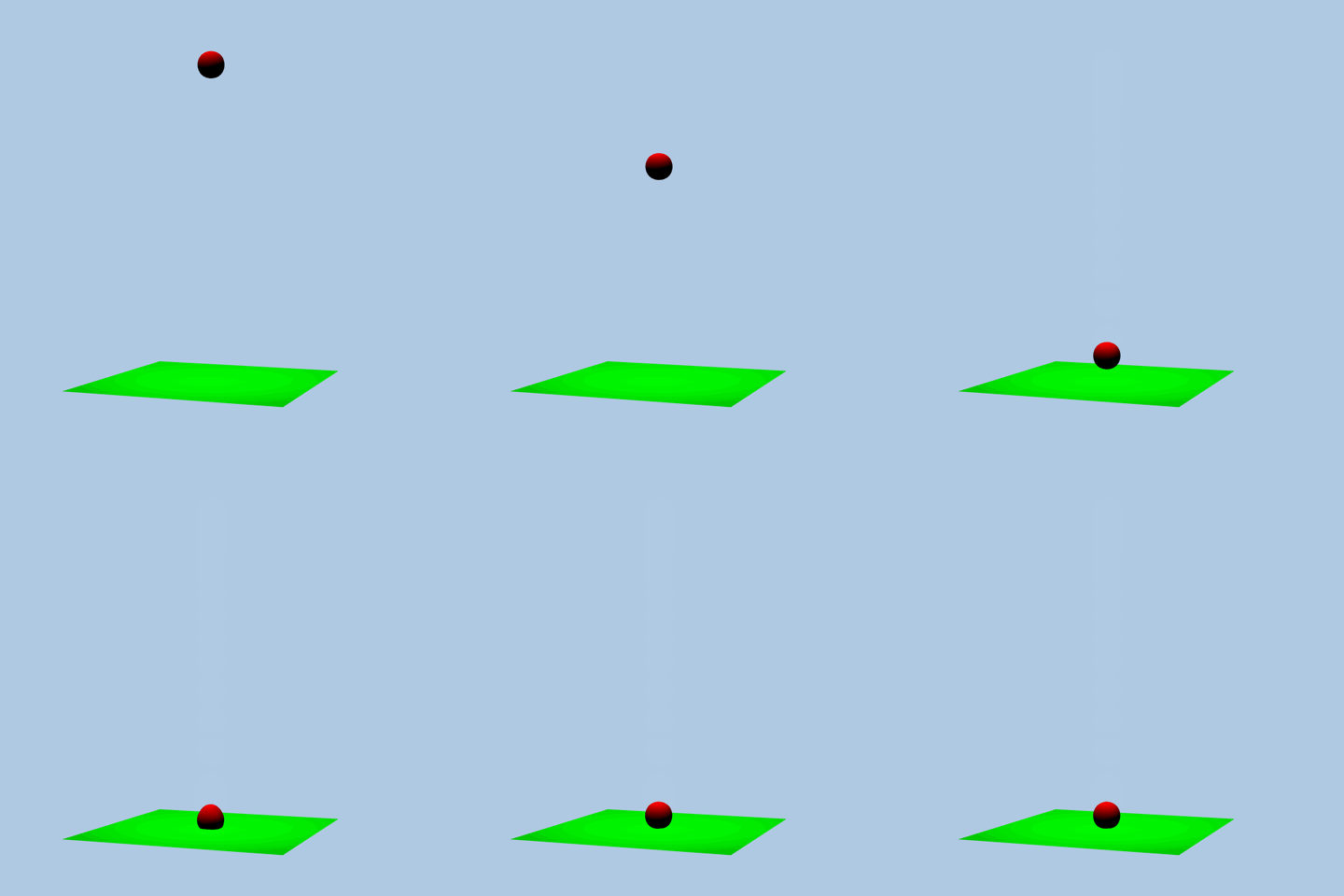
Firstly, a big Thank You for your superb tutorials!
(Secondly, thanks for the info on how you make your animated .GIFs actually animate in your forum posts)
I added a dForce 'Dynamic Surface Add-On' internal PolyLines structure to a ball to enable the ball to bounce like rubber instead of just flop like cloth:
See attached scene file Bouncing_Ball_01.duf
NB: Requires DAZ Studio v4.11.0.236 or laterThe ball surface was made by sub-dividing a cube - this produces a sphere made of evenly-sized quads, which should behave better with dForce than the standard DAZ Studio Sphere primitive:
New Primitive: Cube
Origin = Object Center
Primary Axis = Z+
Size = 15 cm
Divisions = 1
Set Y-Pos = -7.5 cm
Edit > Object> Geometry > Convert to SubD
Parameters > General > Mesh Resolution > View SubD Level = 3
Temporarily Hide all other Scene Nodes, then
Export > Sphere.obj @ 100%
Delete Cube
Import Sphere.obj @ 100%, rename 'Ball':
In Joint Editor > Tool Settings:
Set Center Point Y=0
Edit > Object > Geometry > Add dForce Modifier: Dynamic SurfaceThe internal structure of polylines was made in Cinema4D, saved as an .obj file, and Imported into DAZ Studio with the "Read Polylines" option checked.
It consists of vertices coinciding with the vertices of the ball's Sphere.obj, each with a Line linking it to its symmetrically-opposite vertex.
It was Imported @ 100%:
In Joint Editor > Tool Settings:
Set Center Point Y=0
Edit > Object > Geometry > Add dForce Modifier: Dynamic Surface AddOn
Parent it to the BallMove the Ball to Y=150
Add a ground-plane as a collision surface
Run the Simulation.
It still needs a lot of experimenting with Surface settings, etc. to make it useful.Distributing my own morphs - G8 ??Ideally you put the full path - starting with the data folder - containing only your own fiels in the zip, that way Windows users can just merge it. You can set up a new content directory, then in the options dialogue when saving the morph asset set that as the base directory at the top. if you also put textures in the Runtime/textures folder (before applying them) and save your presets to that content directory then you should end up with all the needed files, and no third-party files, in one place ready to zip up.
Using Merchant Resource Morphs to Create A Character to Sell200 Plus is not listed as a merchant resource. I woudl undestand "Mixed with" to mean that you can bake them into a single morph (by exporting to OBJ, for example) rather than being able to include them as separate files.
Using Merchant Resource Morphs to Create A Character to SellI've purchased character morphs that were advertised as a 'merchant resource'. But as I read about what to do or not do when it comes to using morphs, I get confused. I get that I shouldn't just repackage what I bought and call it my own. But can I use some the morphs in what I purchased to create a new character head/body morph and sell it?
For example, if I purchased these items:
https://www.daz3d.com/face-shape-merchant-resource-for-genesis-3-female
https://www.daz3d.com/200-plus-head-and-face-morphs-for-genesis-8-female-s
https://www.daz3d.com/rarestone-s-face-morphs-collection-for-genesis-8-female
https://www.daz3d.com/ej-demon-races-creator-and-morphs-for-genesis-8-females-and-males ;
Can I use a nose morph from one, a chin morph from another, lips morph from a third, and a tweaked morph from Blender to create a new character called Mindy as a product to sell?
I see verbiage such as: MERCHANT RESOURCE: These morphs are for a final user as well as to be used as a merchant resource, provided your character is for sale, not for free. You can use these morphs mixed with your existing body morphs or reference them and list them as a requirement. You can't repack these morphs in any way, totally or partially, or claim them as your own.
What does this verbiage mean? If I can't 'repack' them, does this mean I can't sell them? Or does repack simply mean don't sell the morphs under your own name? Does this mean I need to reference that I used this or that product in the Read Me file? Or does this mean I must tell buyers that hey, you must purchase these morphs from this and that merchant in order to use my product? If this is the case, what value do I get out of buying 'merchant resources for morphs'? Ok - sure I can use them to create characters for my own pictures. But if I'm trying to create characters to sell, am I able to use the morphs without 'referencing' them as 'requirement' for other buyers? I don't see this being done with other characters I've purchased. So either they are creating unique morphs in Blender (or some other modeling tool) or they are able to use the morphs they've purchased from others.
Can someone explain how purchased morphs are used in order to create and sell a character? I appreciate any advice on this! Thanks!
Distributing my own morphs - G8 ??How do I prepare and distribute my own custom moprhs (genesis 8)
I have just started to use genesis 8 Female and am currently building up various morphs for her using Blender. I have exported the default base figure from Daz as a wavefront obj, Imported into Blender and created my morphs.
After importing my newly created morphs back into G8 in Daz, all my morph dials etc work fine and as they should, so all is good so far.
Now, I'm thinking maybe other people may want to use some of my morphs, so I have saved as Support Asset - Morph Asset(s) called EXAMPLEmorphs. Do i now just zip up the 'EXAMPLEmorphs' Folder (from... \data\DAZ 3D\Genesis 8\Female\Morphs\EXAMPLEmorphs) and give it out??
Is this the correct/legal way to do it?. . . Do I need to do anything else??
Thanks
Genesis 7 for Genesis 8I don't get the point of any of these addons either, just seems like a money grab more than anything.
What puzzles me is the packages seem to come with the makeup and textures from the 7 version which means DAZ has to be in on this to allow this. So they supply the textures and gravity studios supplies the morph?
Well yes, It is a DO, so where is the problem?
Artist: Daz Originals Gravity Studios
Genesis 7 for Genesis 8I don't get the point of any of these addons either, just seems like a money grab more than anything.
What puzzles me is the packages seem to come with the makeup and textures from the 7 version which means DAZ has to be in on this to allow this. So they supply the textures and gravity studios supplies the morph?
duf to obj or fbxAn OBJ export should be an exact copy of what is in the viewport, though materials will not transfer (OBJ offrs only very basic settings).
Genesis 9 delayed until at least 2020. Will you be buying it?I think Daz made a good move with G3, as it used more common technologies, like quaternion weighting, which is also supported in professional programs and facial bones.
G8 was a small change to G3 and I avoided it for a long time, until some utilities were released that allow a transition of assets from G3 to G8. The best thing about G8 are some unique new characters, like Mabel, Edda, Floyd and Ollie. If you want to tell stories with your images, you don't need supermodel, but a variety of realistic characters.
In order to be interested in G9, I'd like to see
- new unique features that makes creating images easier and the transition to other programs, like Blender, Cinema 4D, Maya, 3dsMax, Modo.
- tools to allow the transfer of G3/G8 assets to G9 - e.g. skin bitmaps(same UV or Texture Transform), morphs, poses, clothes/hairGenesis 8 Eyeballs - ProblemAlso if your character has a cornea bulge- or other correction morph, try dialing it in, as the eye topology of the Genesis models is far from physically accurate.
are yoo a thread killer?i downloaded the squirrel from cp and it did not come with any nuts... now will you close the thread ?
maybe it can borrow AM's nuts
https://www.daz3d.com/rodents-by-am-squirrel-props-and-posesHuh? I went to lol at it to wishlist it but one slight problem. I did not know I already got him.
edit does that include the squirrel morph and textures?
Building my library - what are some good, versatile assets to buy when first starting?I would recommend:
- G8 Head Morph and Body Morph
- A few haircuts. Good hair is rarely available as a freebie. For my female characters I personally like Bronwyn and Miranda, but this is obviously very subjective.
- Heeled shoes are a problem as well, as they can't be used across generations and there aren't many G8 freebies out there yet. I find The Power Pump quite versatile.
Definitely explore the things that come for free with the base program. Other than that, if you want to save money, look into freebies first. There is soooo much out there.
You can create make-up and eye colours yourself if you have a bit of skill with Photoshop. Different skin tones can be made by fiddling around with the material settings. Poses and expressions are also just a matter of time and patience.
Other things I wish I had known from the start:
- Put products from the DAZ shop you're considering on the wishlist, and check back regularly. There's always some sale or other going on, and sooner or later your desired product will be on sale.
- Within 30 days of purchase, you can return any product without giving a reason.
- You can use M4 and V4 products on your G8 figure. You first need to auto-fit the product on a Genesis figure, then from Genesis to Genesis 8.
Good luck, have fun!
Didimo heads to Daz figuresanother thing to bear in mind is with DAZ figures you are limited by the topology
only Premier Artists have access to HD morphs
so no third party mesh with more polygons is going to look as good projected onto a DAZ mesh, this is the issue with facegen for example.
also the geograft option which might work using my conforming suggestion to transfer expression morphs over in the transfer utility would also need the mesh UV mapped to load the DAZ textures or transfer Didimo ones over to the DAZ mesh etc.
All of this is quite a lot of work
not impossible though
I have actually done in myself using the iClone Character creator figures to an extent in that I have made a pair of matching clone shapes and can transfer morphs between them and use Ultimate unwrap 3D repaint to transfer textures.
But it was a lot of work involving moving individual vertices much smoothing modifier collisions and exporting reimporting, posing one rigged figure to line up with another as well as shrinkwrapping in Blender, still not perfect.
Daz 3D is part of

Connect
DAZ Productions, Inc.
7533 S Center View Ct #4664
West Jordan, UT 84084Licensing Agreement | Terms of Service | Privacy Policy | EULA
© 2026 Daz Productions Inc. All Rights Reserved.