-
G8M morphs to G8F
So when I try to use the transfer utility I
set the source to G8M
shape current / 2 haed morphs I want set to on / and favorited
set target to G8F
shape G8M clone /
options transfer on morphs / favorites
but only one of the morphs transfers... one won't transfer even if I try it solo - is there something awry with my setup?
Thanks
Shape Rigger Plus(Commercial)Here is a list of possible options that are planned. How viable each one is depends on user feedback and viability. The save morph in current location is definately planned, the others are still being reviewed.
I would like those extensions too.
Shape Rigger Plus(Commercial)If the morph is rigged with this, even if it has rigging, it will automatically remove duplicate ID issues if resaved. The script makes sure it eliminates those as well. So basically if a morph has duplicate id issues, just re-rig it via the script, save it and the issue is gone.
 WOW! This is awesome. In my cart! Shape Rigger Plus(Commercial)
If the morph is rigged with this, even if it has rigging, it will automatically remove duplicate ID issues if resaved. The script makes sure it eliminates those as well. So basically if a morph has duplicate id issues, just re-rig it via the script, save it and the issue is gone.
Shape Rigger Plus(Commercial)Nice! Just testing it. In the Save Morph tab could you please also remember the last product name, not just the vendor name? That would help so much.
We can add that feature. Another feature that will be in the update is a save morph in current path, basically saving it in its existing location instead of having to assign a product name. Right now we could only mimic the save options that studio offers.Ah yes, that sounds useful too. Maybe just fill in the product name if the morph already has one? Or use last one and make some checkbox to use existing one. Hmm... I'm sure you'll work it out :)
Excellent product. I had scripts on UI buttons, one to adjust all and one to do just inner squints. But for partial morphs I still had to do manual and deselect stuff. One other bother in my work is if I change a an existing morph and want to adjust the bones again, I need to first open the .duf file and delete the whole formulas section or else I'll get duplicate formulas all over the place. Is this solved here too?
Shape Rigger Plus(Commercial)Here is a list of possible options that are planned. How viable each one is depends on user feedback and viability. The save morph in current location is definately planned, the others are still being reviewed.
Shape Rigger Plus(Commercial)Nice! Just testing it. In the Save Morph tab could you please also remember the last product name, not just the vendor name? That would help so much.
We can add that feature. Another feature that is planned for the update is a save morph in current path, basically saving it in its existing location instead of having to assign a product name etc. Right now we could only mimic the save options that studio offers.
Shape Rigger Plus(Commercial)@TenTen71 - If u save to a new path for the morph it will create a new version of the morph. Studio will only reference that one even though the old one still exists. If you save to same path of original morph it will overwrite the existing morph.
Shape Rigger Plus(Commercial)Does this alter the original morph file you apply it to or does it create a new morph file? (excuse my inexperience in this area) I'm trying to understand if you can apply the script without affecting the original morphs in case you still wanted/needed the originals.
Shape Rigger Plus(Commercial)Nice! Just testing it. In the Save Morph tab could you please also remember the last product name, not just the vendor name? That would help so much.
Nix 8Thanks, @Hera! I used Transfer Utility to get this morph on G8M.
Nix 8Xenoboy mixed with Zellarian

Much better, this actually works! He's got normal feet too. Those daemon feet doesn't do it for me, because you cannot fit any kind of shoes or boots on them without it looking like crap!
Now, what script do I need to blend G8M & G8V? (I have a hard time using the search functions in this place, normal wild cards do not seem to work)There is a slider for a G8M morph under the hidden properties for G8F. Of course, you won't be able to dial in other G8M morphs unless you transfer them to G8F. The G8F mats could be used on G8M with the UV swap product, but I think you're stuck with using G8F as the base because of the HD morph.
@Vyusur - Not sure what tools you are using or what your workflow is, but I do beleve I see some fractal algorithms in use there - lookin good! I sure do love me some fractal algorithms . . .
- Greg
Shape Rigger Plus(Commercial)No, Morph Loader or Morph Loader Pro will create the morphs but it doesn't adjust skeleton to shape for you nor does it ERC Freeze it. That's up to you to do after the morph is applied.
So whats the difference between the normal auto adjust and this ?
AIUTO...CHI CONOSCE L’ITALIANO? PARTE UNDICIMa quale mercato caldo!
e’ solo che i miei esperimenti preferisco farli con le donnine che non simulare altro.
per ora mi accontento di capire come funzionano i concetti.
il fatto che non si possa aggiungere la collisione fisica a un corpo e’ un po’ una menata eh.
immaginavo che con un morph tipo flatten ci sarei arrivato ma e’ un vero peccato che la fisica possa essere applicata a tutto tranne che alle mesh del pupazzo base.
ps
per diventare un erotomane c’è ancora tempo dai....
Image removed
D force for hair?You need to understand that DForce was designed primarily to drape fabrics, not hair. Having said that, some have had some success in draping hair, but the results are by no means guaranteed for hair that has not been specifically designed to be used with DForce. There are some hairs available in the store that have been DForce-enabled. Most of the latter are longer hairs, not short ones such as the Ryo Hair you mentioned, as longer hairs are more likely to drape in reality. Adding a DForce modifier is an essential step in attempting to use DForce on any hair not designed for it, but it is by no means a sure thing. It is always going to be a hit-or-miss affair. I'm not sure what you are trying to do with the Ryo Hair, but if you are trying to flatten it, that would be better accomplished by creating a morph in a modelling application, IMO.
Perhaps this will be useful to you:
https://www.daz3d.com/forums/discussion/213321/can-t-add-dforce-modifier
Products Converted from Studio to PoserFrivolous Forties
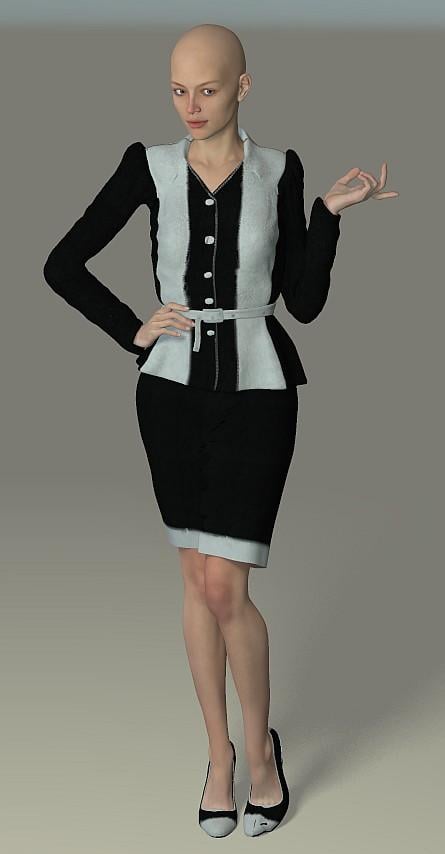
Largely a Good Conversion
This one worked out fairly well - it doesn't support many morphs, so I added some as outlined in the posts above, among them the Stephanie 6 and Thin morphs shown here. I did have to use the morph brush on a patch at her arm but I was more concerned with the oddity of the left shoe - not sure what is happening there but I can paint over it, so I won't worry. Otherwise, all seems okay and so I think I can put this to good use.
 Products Converted from Studio to Poser
Time for School Asia
Good Conversion
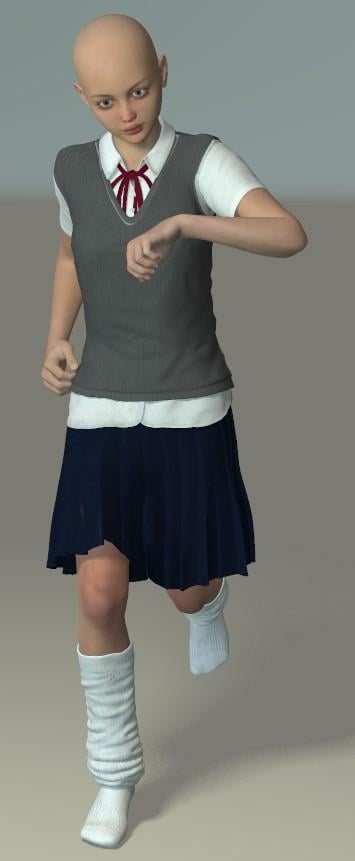
Just a quick follow up from the last post - I had picke up a bunch of clothes from Dogz in one of the sales. I must admit that I'm not sure what I'm going to use this for but I dare say that I'll think of something. Perhaps I can find a Katana somewhere.
Anywho, I've had a go at converting for Poser and it worked out fairly well. There was a little hiccough with the panties and socks, which both lost their morphs - I can't envision a senario where I would need the panties to be visible and the socks are a simple enough item that I can just add morphs with Poser's copy morph option. This is a quick test image with a stock pose and the Belle 6 shape, which is one of a fair number supported (so, as above, I didn't bother with the Fit Control morphs). I copied the Belle morph to the socks, which went fine and otherwise, all was well with the mesh. I did need to use the morph brush on the shirt over the right thigh but that sort of thing is par for the course and no trouble.
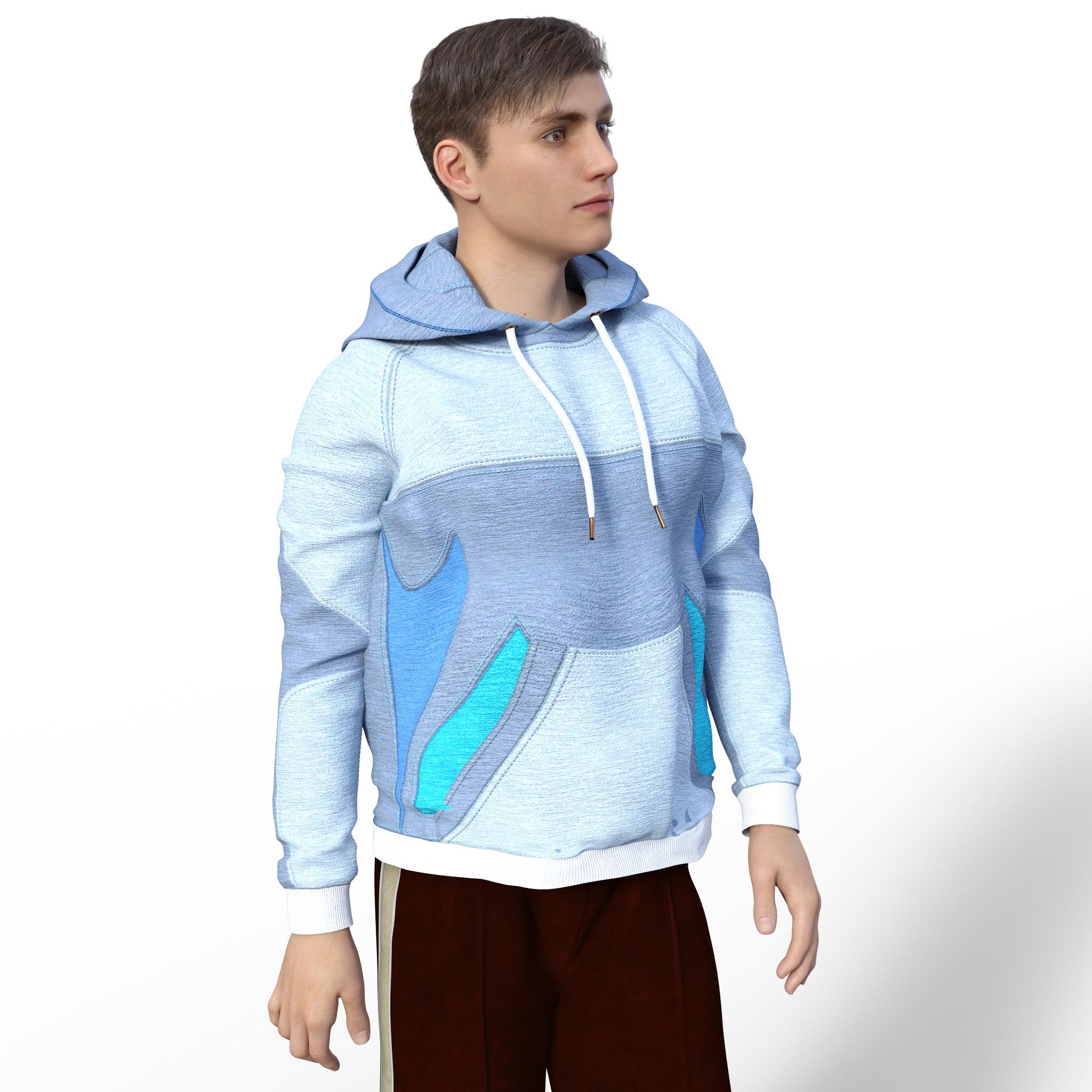
 Is there a hoodie available for Gen 8 male?
I also have two for G3F. One from i13 available here, but that autofitted badily, and is really intended for female breast revealing shots, so doesn't look good on a male. Another G3F one is in the sports suit by Sparkman over at Rendo. This also suffered somewhat with a pulled out chest, like you mentioned with the hoodie you tried, though there is a morph that lengthens the hoodie which improves that. Screenshot below, so you can decide yourself.
 Products Converted from Studio to Poser
Time For School - Girl's School Uniform
Good Conversion
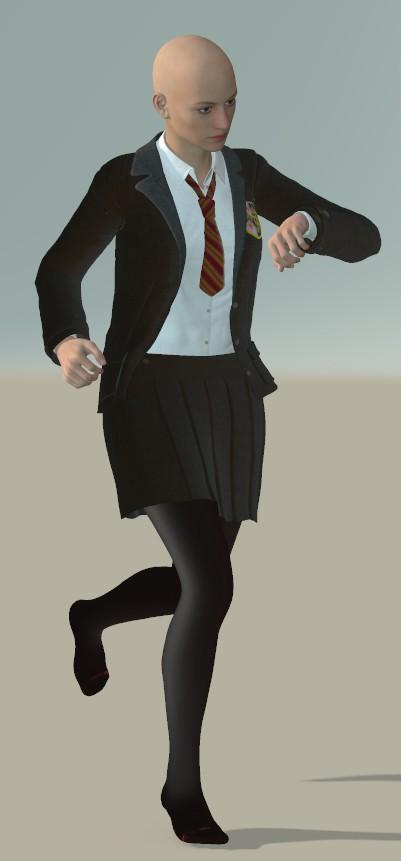
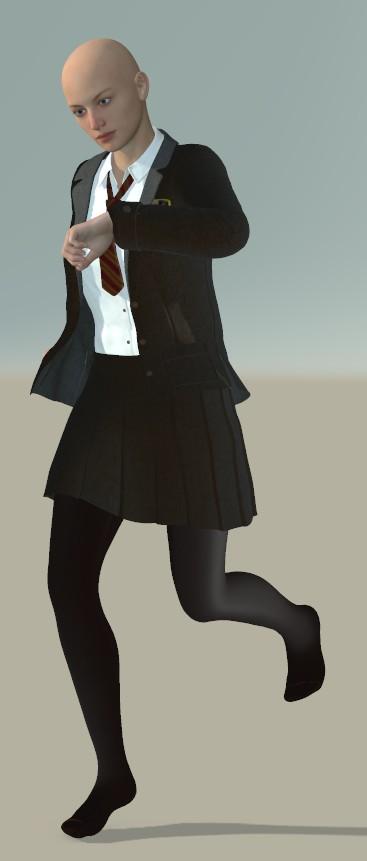
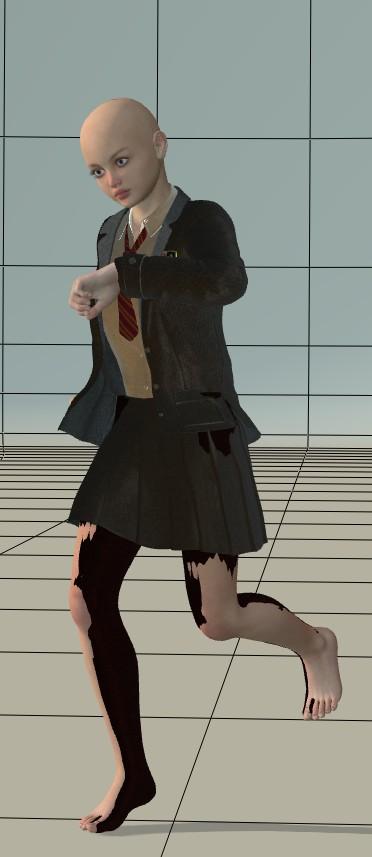
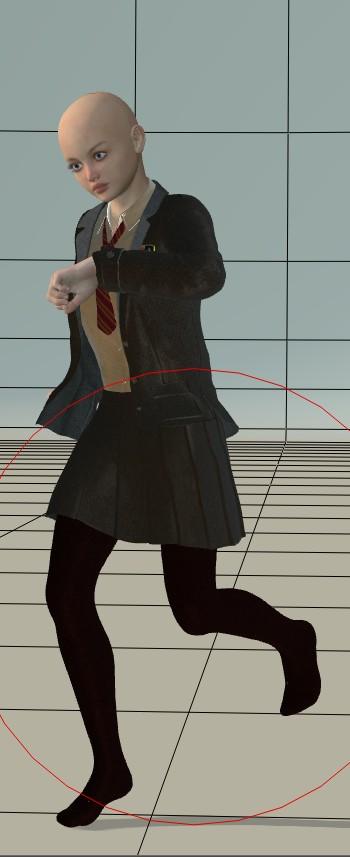
I've always tended to end up buying a small selection of children's things but never really find a use for them - now a friend would like something featuring a couple of children in school uniform. For the most part, most uniforms tend be innapropriate for children but fortunately, Dogz has some British school uniforms that are just the thing. I was a little worried that this wouldn't work - and I've yet to try the boys uniform - as I've had trouble converting his uniform dress (one of the few modern nurse uniforms out there that looks like it's for nursing). Still, it looks rather good. I didn't bother transferring the Fit morphs this time as the product supports a good range of morphs already and it's for children, I don't really have to worry about fixing shrink-wrapped breasts.
There was a little bit of a to-do over the shirt as it wasn't showing up. Ditch the transparency right away and make sure you have the normals forward on the materials - that seems to fix it. The tights and part of the tie don't load their materials at all but it's a moment's work to find the textures. The movement morphs in the skirt work well and there was no mesh tearing when I posed the figure. The clothing follows the morphs I applied quite well with only a tiny bit of poke through here and there - nothing the clothes own adjustment morphs couldn't fix though. The exception was with the tights - below I've posed what happened when I applied the Belle 6 morph. As the tights are skin-tight, I just used Poser's own morph transfer to apply the Belle morph, which did the trick.
I'll also note that when you load these using DSON from the Companion Files with conforming, weird things may happen to their apparent location and your camera - ignore it all and save them back to run through the File Optimizer.
There are two other versions of the skirt, basic and advanced rigging, which I've not tried yet. I'll try the school jumper, and boys uniform another day.
 How to reduce Genesis file sizes in Carrara?
I would guess that D3D's 'Gatherer' product in the DAZ store would let you 'refine' your custom character in DAZ Studio down to the minimum, save it (only) as a scene-subset, 'gather' it, and have that new 'gather'ed archive available as a character-dedicated runtime/library that @Mystarra's technique would work well with. I believe 'Gatherer' collects only the things that are actually used in a scene, and creates a zipfile that contains a standalone runtime/library for that scene. The big benefits being a) you could use a mega-runtime to build your character, and b) you don't have to manually figure out what's required (only) to properly extract/create your independent standalone minimal custom character runtime/library.
The other 'trick' would be to fire up your complete (unadorned) character, export it as an obj, and re-import it as a single morph (or head/body/both), then merge that morph with only the standard and relevant genesis morphs (expressions/visemes/etc.) that you would use on the character in that same runtime/library for the project. (clear as mud?)
I struggle with this issue as well and really like the ideas you folks are sharing. Thanks!
ETA: my first suggestion above sounds like the same effect that @ProPose is getting. I'd also be curious what other morphs people consider base enough to put in their 'template' (e.g. pupils, etc. like @Mystarra mentions)
good stuff.
--ms
Daz 3D is part of

Connect
DAZ Productions, Inc.
7533 S Center View Ct #4664
West Jordan, UT 84084Licensing Agreement | Terms of Service | Privacy Policy | EULA
© 2026 Daz Productions Inc. All Rights Reserved.