-
Is IK being worked on?
Maya and iClone use full time IK, DS use an ancient part time
IK system that require baking to keyframes,Reallusion leased their Maya human IK system from Autodesk.
It is a proper Ik system With realtime foot and hand contact solving during vertical and lateral root motion
with uneven terrain recognition.
Those so called "pins" in Daz studio do NOT perform contact Solving during motion
hence they simply "snap off" when you move the "pinned" foot/hand beyond the most minimal range of motion.
Pining and using the "point at" option of a hand or foot to a stationary object, sometimes works and sometimes not.
YMMV.
I find them much more stable if you select to body part to be moved and us the
manual XYZ rotation /translation tools .Using the Daz studio Pose control sliders instantly snaps the pins(Hmmm??)

Poser"IK" has slightly better performance however it is an all or nothing proposition.
One can pin feet in poser for a realistic squating motion however if you
unpin the feet ,later in time ,to have the figure perform a root locomotion motion like walking
Poser forcibly tries to retroactivelly re-pin the feet, buggering the entire animation.At least Daz studio only ruins the bit where the pins failed allowing you to salvage everything before and after
that.BTW if you want some really cool fun with animation in DS get the free Cycler plugin from Mcasual.
https://sites.google.com/site/mcasualsdazscripts/
Automatic repetition of any morph parameter for "jiggly bellies"
hair/clothing movement morphs trembling etc etc.Daz studio with GraphMate/KeyMate/ Animate2 /mimic live/Mcasual's scripts
can be used to create some pretty complex animations,despite the lack of a true IK solver.
IMHO A better value than poser in this consumer space.G8M dimplesBoth of these products offer cheek dimple morphs:
https://www.daz3d.com/ej-face-morphs-and-details-for-genesis-8-male
Welcome to Hatsune Miku Anime Manga Cafe ☕That was one singular advantage the original Aiko (the one based upon the first Stephanie Peitite (which, in turn was based upon Michael 1/2)) over Aiko 3. Because the teeth of those figures was really a singular, horseshoe shaped band of geometry sculpted with "peaks and valleys" to suggest individul teeth, those surface details could be smoothed via a morph dial to depict a smooth, featureless strip of white as is often done in comic art (be it manga or "western"). Because the Mil 3 (and all subsequent releases) had individually modeled teeth, this feature was mever recreated. Oh, in theory, it could have been done; it just would have taken far, far more effort. Each tooth would have need to be reshaped into a retangular solid with the polygons of one tooth practically "clipping" with those of the next. There jusat was not enough demand to entice any vendor (though I tried to rally the troops).
Now, Cliff Bowman once sold a set of "parenting" props that covered the individual teeth of V4. But that worked because the upper and lower gums and teeth in V4 were separate body parts. the "toon" teeth props would follow the positioning of the inner moouth parts. That technique would not have worked upon the Mil' 3 (meaning, primarily, Aiko 3) because the inner mouth geometry is all part of the "head" body part. Oh, one could load and position them, but however wide the mouth was opened, the props would have to be manually repositioned. Annoying enough for stills, nigh impossible if animating.
Sincerely,
Bill
FBX Export from CarraraYes, Carrara does export fbx, and it does carry the information you mention.
I use Carrara with Unity, and personally I prefer to transfer via Collada DAE, because it transfers in the correct orientation, whereas FBX I have to work around orientation issues. I don't know if you will encounter this with Hitfilm or not, but if Hitfilm supports either, you may want to try both and see which is easier to work with the results of. Both do technically work.
Regards,
Dave
Report sales errors here. Missed it? No worries. "There's Always Another Sale™"Sigh. Right now, I am so glad I decided to not do G8. There are So Many new human base models, as opposed to previous generations when there were a handful of bases and a load of morph/texture character sets. Yes, it's great that they now have more models that aren't quite runway models in looks, but couldn't most of those be done as characters? Oh yeah, a new model, starter and pro bundles sells for more.
And as someone way above posted, it would be great if there were some deals for people who just want the base or starter. Those are way more enticing to me than the current strategies. Daz used to offer deals like that, as recent as the early G8 days--there are several G2 & 3 models/starters I bought on those promos because they were the best deals I'd seen for them. IIRC, the deals were something like "Buy Whoever 7 & get W6 free. Buy W7 starter & get W6 starter free." Simple deals that got me to buy.
G8M dimplesIs there a way to give Gen 8 males dimples? I have a possible commission, and they want the guy to have dimples, but I can't for the life of me figure out how to do it, or if I need to buy a specific morph
zbrush size export problemsshe has done as Richard has suggested, she imported the g8 base -1.9mb then exported again, one was at 100% -1.8mb, the other was at 10000% 1.9mb-neither one will morph successfully
The Official aweSurface Test TrackAh, oke thanks Wowie. I also found another problem. When i render to a rib file for use with external 3delight, the exporter breaks after the first transfer to rib.
Then i have to restart Daz studio if i want to transfer to a rib file again. The internal 3delight works fine though.
Yes. That's the limitations of the RIB export when you use the render script. Hence all the more reason to get DAZ implementing raytracer and radiosity caching options.
One note about RIB export and standalone renderer. Subsurface scattering behaves differently on the standalone. I haven't figured the cause yet. Diffuse/reflection/refraction works fine.
Edit: OK. I found the cause and made the necessary fixes. Subsurface will now render the same with the built-in renderer and the standalone. It also is just slightly faster (5%). Render times with the standalone seems to be around 15% faster.
That is great to hear, i did notice for me at least that renders with standalone 3delight are generally faster.
Should i download the awe shader again from your link to get the subsurface fix ? And did you also find a fix for the rib export ?
You know you have too much 3D content when...When you set up a new PC and have to figure out the best way to transfer a terabyte of content from the old computer.
Genesis 8 Cross-Figure Resource KitThe cross-figure morph has one advantage that everyone has overlooked. My impression of the feature was not just to have a male wear female-fit clothes and visa versa but to be able to morph your particular male figure, using all the male/femal morphs, into a sibling, parent or child etc. You can't do that as far as I know any other way. I grant you the differences in the attached image are subtle but the one on the lelft is mor femine, she has a smaller jaw, fuller top lip and no brow ridge.
Many morph packages -There are quite a few morph packages for each generation. I usually buy the DO packages right off, but then there are a lot by PAs.
I tend to stay away from anything spun from the original DAZ morphs ... characters, and so forth...
But there are others using zbrush, that are custom. ... but how many morph packages do you need really? Are they different enough to warrant purchase?
I also noticed that the newer base characters don;t seem to morph as well as V4/M4 ... the mesh seems to pull apart quicker. any comments on that?RawArt Annual Birthday Sale 2019!!I don't think I wished you a Happy Daz Vendor Birthday, so Happy Birthday! You stuff is phenomenal! I missed getting the best deal yesterday, (I made a payment through the Bank of America App which didn't let me select an amount. Usually I transfer the funds so I can add more to my minumum payment. This cued an $1875 payment from my account of $1400. So I am waiting for the refund since it didn't flag anything to them that there might have been an issue) I will see what part of the sale is left when I can and see what I can get. Even ifit is just the two new items those are great...but I have a lot in my cart that I am having to put back because of price changes.Shape Splitter - Divide, Combine and Save (The new version is already available. 1.2.1)[Commercial]Hi thanks for getting back. I'll try again now that I have the instructions. I did look for the instructions. Theyr'e usually on the Read Me page but that was pretty sparse and there's no hint on that page that there's instructions in any file. I am not able to search for a morph. On the video at this point
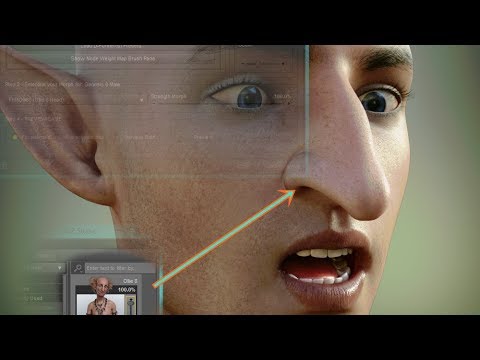
it shows you typing in the search field. Mine is blocked. I'm unable to type anything in there. I gave up with it at this point and used the weight map to create the morphs in the long winded, manual way, the way you'd use the headsplit.
Thanks
Christian 8He is Edward 2019.


Yup. That's sad. But I can always use another Daz Core quality skin with HD morph, and I have face morphs from Daz Originals, RareStone, Zev0, E&J, and others that make it possible to just about sculpt any face I want (although this hyper-morphing can sometimes backfire when using expressions).
Christian 8Once again Male = No open morph, if dForce Coveralls and Tools for Genesis 8 Male(s) were a female outfit, it would include a "look at my boobs" open morph.
I won't pay for a product which brings less option than the female content.
About Christian 8, I will purchase it only for the tattoo textures, no PA character is "attractive". I skip the Pro Bundle.
Male vs female

 Morph Converter from Genesis 3 to Genesis 8 and vice versa.
.
zbrush size export problemsCris she did no change to the figure, I do understand that no verts can be deleted or added or sub d added in order for the morph to work
zbrush size export problemsNo Cris, she just imported the base g8 obj zeroed figure and then exported out of zbrush (as obj) and the size just changes from the original 1.9mb to around 3mb so it would not morph
No1 answers - so please ignore this.Reading the description of GHD SomeBody - Morphs for Genesis 8 Female(s):
07 Zero Presets (sets to zero only the corresponding dial groups)
.........................................................................................
- Nipples Remove (set only the Nipples remove dial)
So the question - does this removes the nipples from the breasts at all (so they don't poke through the clothing)?
Also what exactly Nipples Zero (reset only the Nipple dials) means? Set all the nipple related dials from this morph package only to zero percents if any dials are changed? In this case does it sets to zero the Nipples remove dial too so the nipples should appear again?
AIUTO...CHI CONOSCE L’ITALIANO? PARTE UNDICIDa oggi mi unisco anche io. Non riesco più ad accedere al mio vecchio profilo, quindi ecco che ne ho fatto uno nuovo.
Ad ogni modo, manco arrivato e subito che vi chiedo aiuto. Premetto che sono un esperto modellatore, ma giro attorno a Daz solo da qualche anno ed in casi molto rari, come nel caso delle figure Genesis completamente gratuite, che possono essere modificate per creare da zero cose completamente nuove. Alle volte ho una energia che pare inesauribile, alle volte sono di un pigro che io stesso stento a spiegarmi, ed è il caso che mi ha portato qui: avevo intenzione di partire da una figura base di dinosauro dell'autore Dinoraul, con l'intenzione di crearne una versione migliore (per uso personale), quindi apro il file in Daz e lo mando a Zbrush. La procedura che si fa di solito, insomma. Comunque sia, fatto quel che dovevo, rimando la figura a Daz e mi appare questo messaggio: https://imgur.com/a/loQhFNO. Il risultato è che ora mi trovo la figura originale più quella modificata. Ok, poco male, penso, ora uso Transfer Utility così ho la nuova figura pronta all'uso, con le pose di base riutilizzabili ecc ecc. Ed invece niente. Al momento di scegliere la figura da cui attingere quel che mi serve (source) posso selezionare solo quella nuova, che sarebbe il target, e non quella originale.
Ovviamente il perché di tutto ciò non lo so, sono tutto meno che esperto in Daz, ma mi pare strano che non sia possibile fare una cosa del genere. Se può servire, la figura si seleziona dalla libreria di Poser, ed il formato è .CR2.
Qualche suggerimento?
Daz 3D is part of

Connect
DAZ Productions, Inc.
7533 S Center View Ct #4664
West Jordan, UT 84084Licensing Agreement | Terms of Service | Privacy Policy | EULA
© 2026 Daz Productions Inc. All Rights Reserved.