-
Transferring Morphs from one charecter to anotherI recently made a Genisis 8 female that I want to keep my head shape but start over with the body. Is there a way to copy the head changes on my charecter and apply it to a base female to start over shaping the body? I didn't create a head morph when i made her because I'm a newb and didn't know how.Rigidity groups and keeping hard surfaces hard... not working!
Ok, never mind, I was being stupid.
When simply importing an obj and using transfer utility to rig it to a figure, the merge hierarchies does not work since, technically, the obj has no bones yet, no hierarchy. The obj has to be set up first using the figure setup pane, then TU works fine merging the hierarchies.
As for my other question, since I got TU working like I wanted, I am going with the extra bones option, not rigid follow nodes.
Please carry on continuing to ignore me. ;P
List of available head morphsJust a quick question.
I don't want to delve too deep into scripting - just want to know enough to do what I want to do.
Random characters. I don't have too many base models and so, for a project I'm doing where I need "lots" of people, I want to get bang for my buck. As such, I've created a little script to randomize various sliders. Works fine and dandy by explicitly stating which morphs to change. I'm not 100% happy however in how the faces are coming out. So I've come up with a better idea which seems to work and look better when I've done it by hand ..
And that's by blending a number of the head morphs of my current characters to form a brand new character. So I want to do this via script to randomly pick 4 heads and then apply a 15% to 50% modifier to each so they blend into one.
What I want therefore and can't see much in the way of documentation to help me out - is to collect a list of the head morphs under Genesis 8 Female (ie, Victoria 8 Head, Charlotte 8 Head, Stephanie 8 Head), for instance, that I currently have within Daz and stick them in an array and then do my stuff. I just can't work out HOW to automatically pull in the Head Morph list (filtering what I want is fine it's just the basic "put the head morphs you've got into an array" bit that I can't seem to find an answer for).
It's probably easy - but programming wise, I've never messed around with the likes of java or other scripting languages and whatnot so not too up to speed on how it all works and fits together. Generally code in other stuff ...Cheers in advance for any help
Rigging dress for G8F in non-default poseYou can do this, by using the Bake Rotations command (Edit>Figure>Rigging as I recall), then rotate the arms on the dress down to the default position and Bake Rotations on that. It does make adding the JCMs a little trickier though (and you do need to make sur those are zeroed before doing the transfer).
Can i find somwhere step-by-step tutorial how to do that?
I'm probably doing something wrong and having result like that:
 How do I reset the eyes and mouth of a morph I'm making?
Inside Daz Studio, you can try this:
Tools -> Geometry Editor
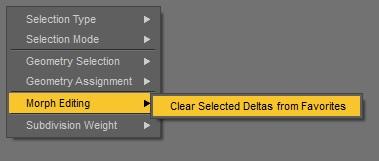
(right-click) Morph Editing -> Clear Selected Deltas From FavoritesI think this information is a bit incomplete.
The command is called Clear Selected Deltas from Favourits and can be found in the Geometry Editor Tool if its switched to Vertex Edit mode (instead of default Face Edit mode).
The right-click menu looks different in Vertex Edit mode. I once had trouble to find this command see here: Clear Selected Deltas from Favourites - can't find this function anymore in the new DS version

As you already mentioned you would have to move the parts back into place, maybe you could use a DFormer with Weight Map influence for that.
Here is a short instruction for how to use Clear Selected Deltas From Favorites:
1. have the dog figure selected and then go to the Parameters pane find your morph(s) and add them to "Favourits" by clicking the heart icon on the slider
2. switch to the Geometry Editor Tool - open the Tool Settings pane
3. add the Surfaces like eyes, gum and teeth to the 'geometry selection' with the plus icons behind the Surface Group list in the Tool Settings pane
4. right-click the viewport and choose Geometry Selection > Convert Selection > Convert to Vertex Selection
(the Geometry Editor in the Tool Settings pane now changes to Vertex Edit mode and shows the selected vertex dots)
5. right-click the viewport again and choose Clear Selected Deltas from Favourits (if you don't save those Morph Assets but the scene file now the morphs only exist in the scene file)
Here is a Tutorial video that descripes this method pretty well.
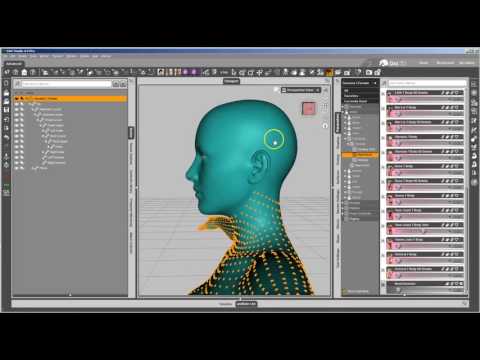
Cleaning Up Morphing Mistakes by Xenic101
 fit old gen stuff or just buy new
...going the Gen4 - Gen2 route, saving as a wearables asset then autofitting to G3 seems to work OK depending on the style. The only wearable that doesn't transfer well is footwear because of the "crucifixion" pose of the feet for Gen4 characters (why they didn't keep te feet flat like Gen3 did .is still somewhat a mystery).
Footwear doesn't seem to be that much of a problem to me, at least. It's not like one can't find loads of shoe packs for G3/8 anyway. That, and none of V4's shoes did anything for me anyway. Aiko/Victoria 3 had some great footwear. V4? Not so much. If push comes to shove, there's freebie boots and shoes running around.
Now if I can just get the pose guys to remember than not everyone wears bloody heels, I might be able to stop having to rebuild them. Not every woman wants to live her life on her toes, after all.
fit old gen stuff or just buy new...going the Gen4 - Gen2 route, saving as a wearables asset then autofitting to G3 seems to work OK depending on the style. The only wearable that doesn't transfer well is footwear because of the "crucifixion" pose of the feet for Gen4 characters (why they didn't keep te feet flat like Gen3 did .is still somewhat a mystery).
fit old gen stuff or just buy newIt's a case by case basis for me these days, but there are so many situations where there either isn't a current gen equivalent product... like renderwelten's WW2 German military outfits or, Poserworld's now discontinued Baseball uniform... or, if there is but there's only one or two and you want to do a scene with... say, six differently dressed pirates or a group of doctors who aren't all wearing the exact same scrubs or lab coats, then you really have no choice except to start mixing generations. Skinwise... when G3F was first introduced I had to do a lot of conversions of older skins simply because there wasn't much variety, but I'm doing very little conversion of "glamour" type characters now as there are tons and tons of G3f/G8F native characters that one can pick up dirt cheap. On the other hand, while Mortem Vetus and Brahan were still in the DAZ store, I bought out every character in their M4 catalog and a huge selction of exotic V4s just to harvest them for their skins. Of course, the big trick there is remembering what you have since DAZ purges almost all of the information on those products and vendors as soon as they're ouf the store, so products that had a number of interesting skin and morph variants are frequently represented in my product library by a single thumbnail or, worse, a 404 card.
HeadShop 11 and OneClick2 Fix Files UploadedThere are still issues with Headshop after this update that should have been caught.
I mentioned an issue with teeth warping multiple times, and this remains. If you use Genesis 3, the teeth will lose their shape as the morph is applied. It is a very similar situation to the neck bump issue, so hopefully an easy fix.
For Genesis 8, I found a different issue. The eyelashes are not responding at all to the face morph, so they disconnect from the face depending on where the eyes move. This makes the Genesis 8 shape largely useless. No matter what you dial the morph to, I even tried negative numbers, the eyelashes do not move. The teeth also move a little bit, but not like they do with Genesis 3. Again, like the neck bump, this hopefully can be fixed, but this really should have been caught before release.
So there is still work to do.
Damn Lady Littlefox! That is just too much CuteDo the promo pics of thistle combined with various toon characters have the posey morph dialed out or not?
Damn Lady Littlefox! That is just too much CuteI made a No Ear morph for Thistle - though I'm not sure if it will work properly or not, as I only have the beta version of Thistle's base character "Posey and Petunia" and I don't know if the ear morphs where changed after the beta testing was done. It SHOULD work properly unless there was a change to the ears morph. Here's the link: https://www.dropbox.com/s/bucha31cluk7163/No Ears G8F Morph - Divamakeup.zip?dl=0
Unzip, open the file, and drop the "data" and "Presets" folder into your My Library.
You should then be able to find No Ear morphs for Thistle as well as one I did for just the base G8F (in case you wanted your other G8F characters to have no ears - for aliens and such).
After you drop the folders into your My Library the No Ear morphs should then be in the Shaping Tab >> Head >> Ears
You'll need to make sure to dial out the "Petunia Ears" morph to zero and the "Thistle Ears" to -100% and then dial in the "No Ear Thistle" morph to 100%:
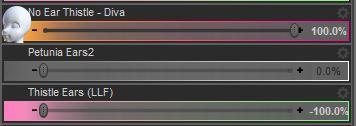
That SHOULD get rid of the ears - but again I only have the beta version of "Posey and Petunia", so if there where any changes to the ear morphs after the beta testing the morph may not give a perfectly smooth 100% gone ear. There's also an included Shaping Preset (found under: Presets >> Shaping >> Thistle No Ears) that moves the dials of the Petunia Ears, Thistle Ears, and No Ear Thistle morphs automatically. But again, it will only work if the ear morphs from the beta testing are the same as the released version.
Hopefully it works for you guys though. :)
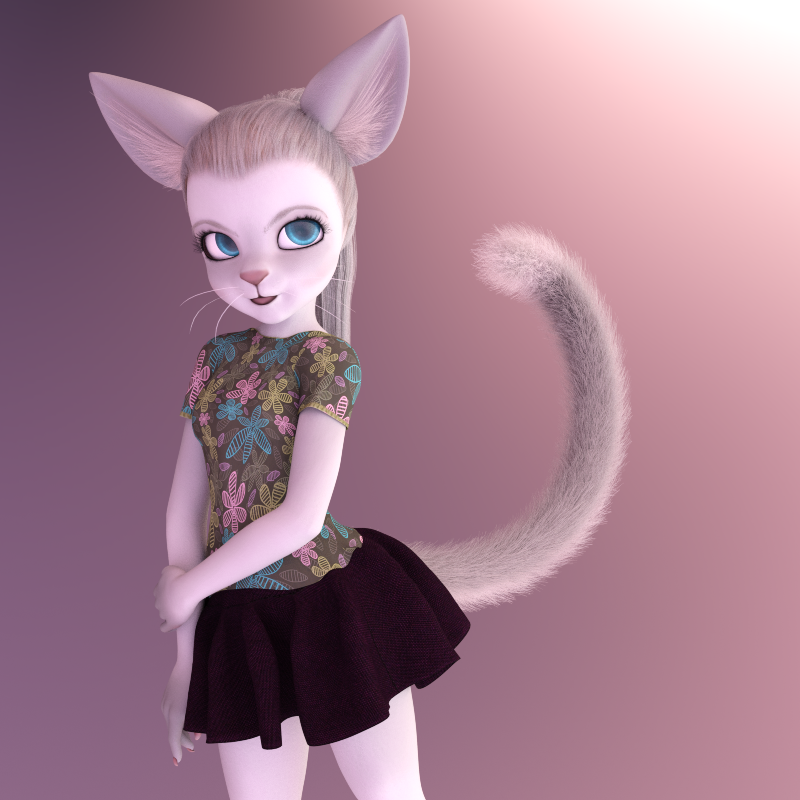
Here's a render with the No Ear Thistle morph:
Here's Xenogirl with and without the G8F No Ears morph I included in the zip.
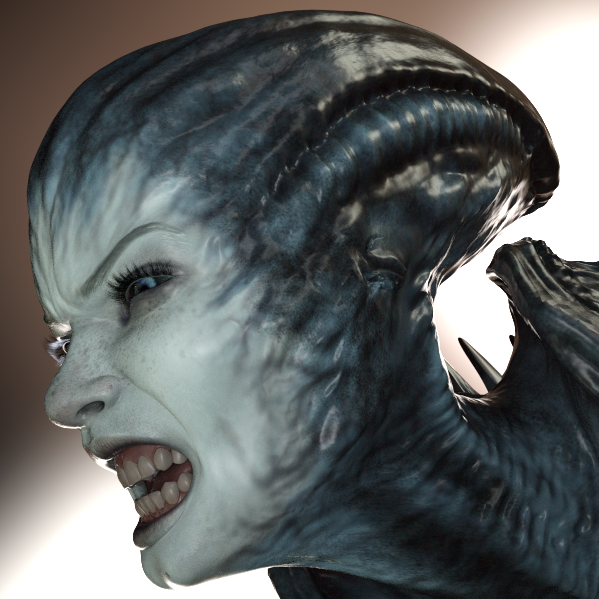
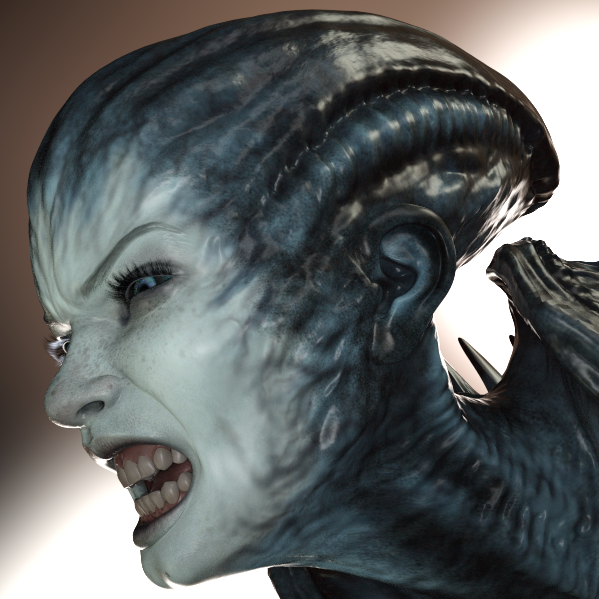
These were just a couple of quick morphs I did in zbrush but maybe some of you guys will find them useful. :)
Christian 8I know. That's why I always end up buying the base characters, especially the ones that have features that are unique. I really like his hooded eyes, too, and the tattoo on his back is gorgeous. And I usually apply Altern 8, which I love, although these are just default.
Whenever I look at buying a character these days I ask myself 'apart from the morph what else do they bring to the table?' I tell myself I'm buying materials most of the time. I was surprised when I did some comparison tests on some of my characters, I put them all in the same pose and same materials. They all looked either like twins or or brothers. So I did more tests and used different materials on the same character in exactly the same lighting and pose. They looked very different in some cases. As you say shape is only a part of the character. It's a pitty there isn't more and better hair products for the guys as that makes a huge difference to the character.
I'm going to have to try this. I'm sure I've got at least half-a-dozen muscular, dark haired guys with blue eyes. If I had a big "comparables" image showing all the characters I've bought that are almost the same, it would help a lot to resist temptation. Oh, yeah... that would work... right....
 I just checked GypsyAngel's store and realized I've got 6 of her guys bookmarked and own another 7. I should probably just start there. Oh, except for the Lilith 6 lookalikes. And, yes, to stay on topic, middle-aged white guys with character.Damn Lady Littlefox! That is just too much Cute
When I use the Thistle cat ears, I get two sets of ears. I tried shutting off the Thistle ears (using the eyeball), but nothing happens for me. What am I missing?
Dial out the ear morphs in the "Shaping Tab". It doesn't get rid of the ears 100% but it dials them down to normal size. You can then add hair that covers the smaller ears.
I might have to do a "no ear" morph for her, just for funzies. Shouldn't take long in ZBrush. I'll see if I can find some time this evening.
Content Ownership?I think the governments will elaborate some laws about this,
That actually has happened already, they even started to enforce the customers rights with quite hefty fines. We are living in a world of trade and commerce and reselling is a natural part of it, actually part of the very same business model. With even Microsoft, Apple, Oracle, and other key players having to commit, it really wouldn't be a wise (and economically sane) move trying to fight the inevitable and rather create proper way for it in own intent. With mandatory account creation on installing DAZ Studio, customer product library etc all neccesary means actually are already full in place. It would be so easy to allow transfer of single product licenses from one account to another that it is striking it's not possible already. And by keeping it on the own market place, absolute control about proper use would be warranted. Just mark the product you want to shift and it is removed from the online library and flagged blocked in local.
Re the OP: As long there is no other way provided simply change of email address and credentials and pass the whole account on seems the easiest way .
How do I reset the eyes and mouth of a morph I'm making?Inside Daz Studio, you can try this:
Tools -> Geometry Editor
(right-click) Morph Editing -> Clear Selected Deltas From Favorites
Outside DS, try this:
https://sharecg.com/v/92305/browse/10/Software-and-Tools/Full-Body-Morph-FixerMorph Loader Pro Moving OBJs Instead of MorphingThat usually means that the preset in Morph Loader Pro, setting scale etc., doesn't match the one used exporting the OBJ
Morph Loader Pro Moving OBJs Instead of MorphingI've used MLP before and found it really handy and easy to use, but this last time instead of applying the morph to the object I had, the morph shifted the whole obj either up or down. No matter what type of morph I tried, it only went up and down. I'm not sure what I'm suddenly doing wrong but I was hoping someone could provide a little insight into the problem?
Thank you!
Content Ownership?Right so, but at least within the EU a software license should actually sellable/transferrable by law and the seller is liable the license is no longer used by the selling holder. The problem with software in general is, that it is impossible/hard to prove unless you tie it to a hardware dongle like iLok or similar, so this is what is the state of the art with professional audio worksatiopns and effect plug ins. Another solution could be that the seller needs to login once and the content to be sold is flagged for non available until a further purchase. It's tricky, but holds true for the downloadable packages, too. But in any case it's a legal requirement in the EU and if someone insists to transfer a license DAZ would be obligated to allow for that.
You are free to mount a legal challenge and take it to court and you might even win. But until you do DAZ will abide by their own rules.
Content Ownership?Right so, but at least within the EU a software license should actually sellable/transferrable by law and the seller is liable the license is no longer used by the selling holder. The problem with software in general is, that it is impossible/hard to prove unless you tie it to a hardware dongle like iLok or similar, so this is what is the state of the art with professional audio worksatiopns and effect plug ins. Another solution could be that the seller needs to login once and the content to be sold is flagged for non available until a further purchase. It's tricky, but holds true for the downloadable packages, too. But in any case it's a legal requirement in the EU and if someone insists to transfer a license DAZ would be obligated to allow for that.
Shape Splitter - Divide, Combine and Save (The new version is already available. 1.2.1)[Commercial]I'm not sure, I do not have the figure Aureska. But I see that the alien elements are part of the shape.
The HD detail that is lost with X-Morphs are usually wrinkles on the skin.
What you could change with X-Morphs is to change the legs, torso and arms with other morph, for example with Zelara.There are usually two ways to use X-Morphs,
Create the new morph of Aureska's head (No HD detail)
OR
Create morphs for torso, legs and arms of morph Aureska, and apply them with value of -1 to Aureska figure. Preserves the HD detail, wrinkles. In this way the morph are neutralized.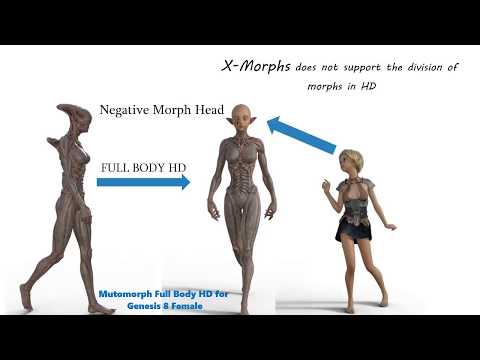
And the other way, it would be done at the level of vertices.
Daz 3D is part of

Connect
DAZ Productions, Inc.
7533 S Center View Ct #4664
West Jordan, UT 84084Licensing Agreement | Terms of Service | Privacy Policy | EULA
© 2026 Daz Productions Inc. All Rights Reserved.