-
FLUIDOS plugin for Carrara -- version 1.4 update
I have been playing with some simple props that I might distribute as freebies. One is a bottle with cap similar to the project in Mike Moir's vertex modeling tutorial, except I am adding a straw. I was modeling liquid contents for the bottle with a morph to change the level, then I remembered Fluidos!
Are there limitations on distributing a fluidos setup? Carrara version? Studio version?
No, there is no limitations. Moreover, is encouraged!
 angeloi oversleeves
I think they'd need to be fitted with the transfer utility then
FLUIDOS plugin for Carrara -- version 1.4 updateI have been playing with some simple props that I might distribute as freebies. One is a bottle with cap similar to the project in Mike Moir's vertex modeling tutorial, except I am adding a straw. I was modeling liquid contents for the bottle with a morph to change the level, then I remembered Fluidos!
Are there limitations on distributing a fluidos setup? Carrara version? Studio version?
Newbie questionThe base program gives you the latest 4 generations of base figures (Genesis, Genesis 2, Genesis 3, Genesis 8) and some very limited possibilities to shape their bodies.
To get more out of it, you want to buy morph sets, which will give you the ability to shape their faces and bodies further.For example, if you go with Genesis 8, you'd want to start with:
https://www.daz3d.com/genesis-8-male-head-morphs
https://www.daz3d.com/genesis-8-female-head-morphs
https://www.daz3d.com/genesis-8-male-body-morphs
https://www.daz3d.com/genesis-8-female-body-morphsThere's plenty more products which give you more possibilities (like this one or this one), but those 4 are the basics.
You don't need any additional products for posing and facial expressions.
However, if you're impatient and/or have difficulties with certain poses/expressions, you can also purchase pre-made poses and expressions (which you then can further adjust.)You can return any product you purchase within 30 days without giving a reason. The money will be returned in store credits.
There's a lot of sales going on here. So if it's not very urgent, it's worth waiting a little and getting everything at a 50%-80% discount.
Ancient Anubis for G8M [commercial]Ancient Anubis
https://www.daz3d.com/ancient-anubis-for-genesis-8-male
Whether Ancient Gods or Ancient Aliens, the mysteries of Egypt return again with Anubis, the jackal headed god of the underworld.
The set comes complete with custom crafted High Definition Morphs, and Highly detailed Textures for the utmost realism.
Product Includes:
-
- One Anubis Character Preset
- One Anubis Full Body HD Morph
- One Anubis Shaping Preset
- One Anubis Full Body Material Preset including anatomical elements
- Two Face Material Presets
- Two Torso Material Presets
- Four eye Material Presets
- Includes both Iray and 3Delight Material Presets


 Newbie question
Pick a Genesis vesion and get the Head and Body morph sets -that should give you a fairly solid starting point, at least.
Request to all PAs: Morph pathwaysBut that's not useful if you are wanting to chnage a particular aspect of the shape. I don't object to having a group for each morph set under the appropriate section, but I don't like having them all grouped in a single folder. A better approach would be to give them all a consistent prefix so that you could just select Actor, with the sub-group option enable, and type the prefix in the filter box if you wanted to see only the morphs for a certain set.
(Released) - East Asian Men for Genesis 8 Male (Commercial)great product but i wish you would match the name with the images you've posted. sometimes its hard to figure out who is who just by looking at the content library.
If you mouse-over the thumbnails in the opening post of this thread, the name is there in the filename. Jun, Haro, etc, just let your cursor hover for a second over the image and it'll show you.
To help though, first image in the plaid shirt is Teen Fujio, Haro in the glasses and red shirt, Junsu in the black, Adult Fujio in the business suit, and Jun in the leather jacket, Sumo is the sumo morphs from a different morph set maybe?
Information on ERC Freeze featureHello all,
You can find my tutorial on DAZ Studio ERC feature on the Renderosity site at:https://www.renderosity.com/mod/freestuff/tutorial-daz-studio-erc-feadture/81207
Here is a description of the content:
This tutorial is about ERC (Extended Remote Control) feature of DAZ Studio (Version 4.10). After a short history about ERC and some preliminary considerations, concepts relate to the ERC relationship between Controller and Sub-component are described using the DeltaAdd and Keyed operators. By the same token, the DAZ tools and graphical interface associated with ERC feature are introduced. In the last part of the tutorial, the ERC Freeze and Bake options are explained as well as the use of Timeline method to build ERC keyed relationship. Details about the Attenuate option are given with application in the design of a Multiple Joint Controlled Morph (MJCM).
Daz scene files are included to support the tutorial.
Work with DAZ Studio (Version 4.10)Allstereo
Request to all PAs: Morph pathwaysThe last two morph sets I bought do not have the morph dials in one specific folder in Shaping Tab. The dials are distributed amongst all the body part sub-folders. This might sound sensible on the surface but it is a complete nightmare when you have hundreds of morph dials, often with similar sounding names. To find a morph dial from a particular set, you have to know exactly what it is called or exactly in which sub-folder it is located. To find other morph dials in the same set, again you need to know the precise name or location.
For example HY Detailed Morphs for Genesis 8 Female by Her-Yun contains some very nice face and body detail morphs, but when I came to try them out, I couldn't find them. I have to keep going back to the product page in the DAZ shop to find the name of the dial and then do a search for that dial in the Shaping tab.
The same is true for Genesis 8 Female Mixed Morph Kit by Handspan Studios and Thorne; the dials are all over the place. However, at least Handspan Studios Thorne have prefixed every dial name with HSTW, so a simple search can pull them all up.
So, my request to all PAs making morph sets: If you are not going to place all your morph dials in a single folder (and I can see why you would not), please prefix the dial names with a unique vendor descriptor as Handspan Studios Thorne have done.
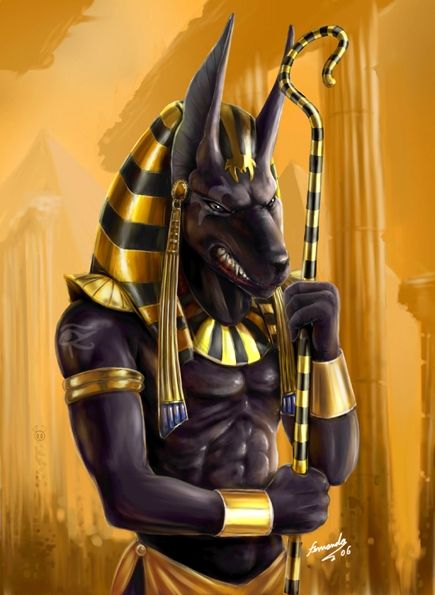
Morph for Ancient AnubisHi,
Once again RawArt did a beautiful unique character, just it could be better if the jaw was a little longer. The current jaw reminds me Werwulf a little.


 SereneNight's Sci-Fi Fun Thread 2
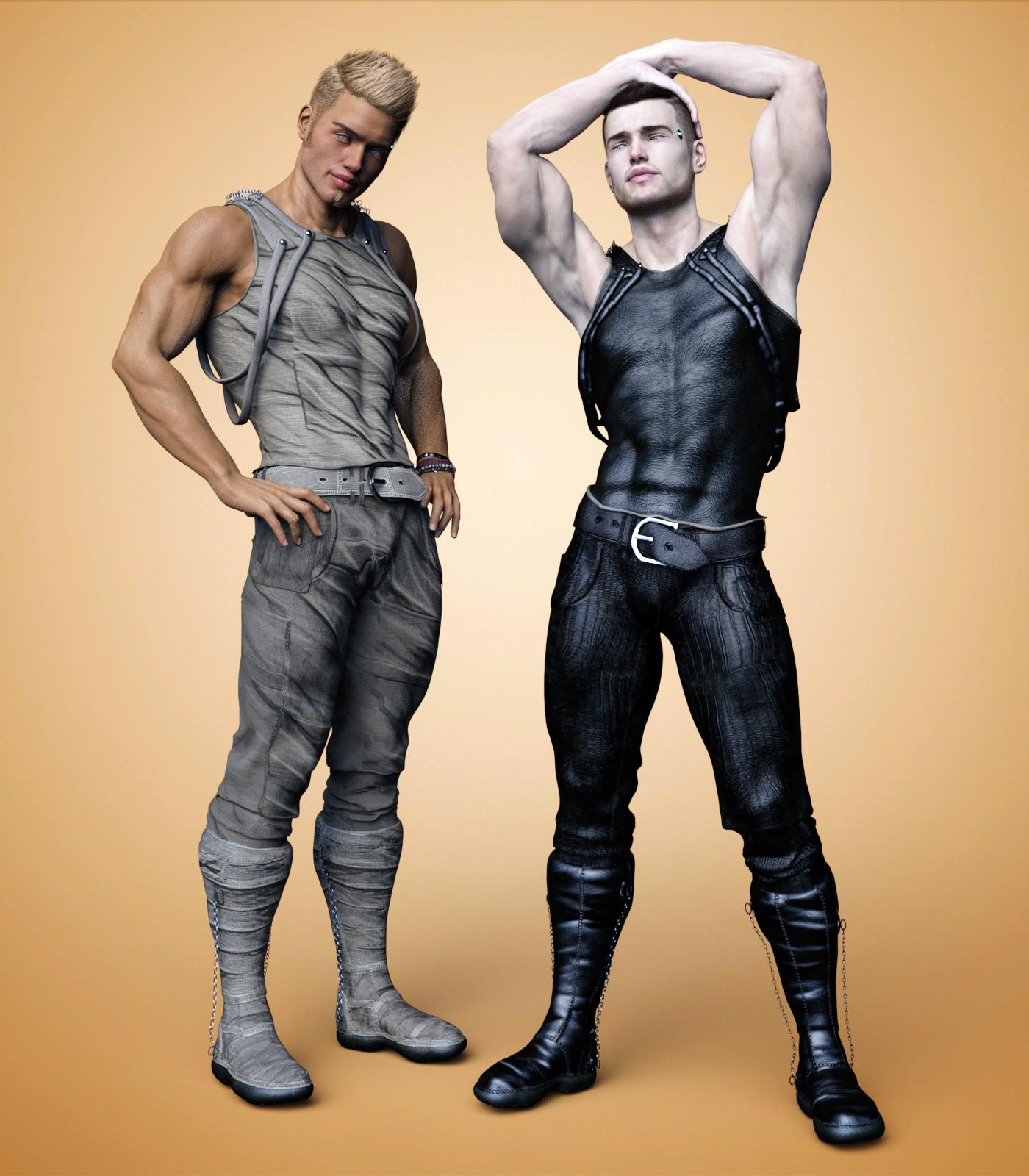
Okay, here is the Number 01 outfit for G8M with the texture adddon. Each piece of clothing has a number of surface mat zones so it is quite easy to retexure this yourself. The boots are interesting as they have chains hanging down the sides and the tops have ropes or braiding over the shoulders. I really like the number of extra morphs included with the set. I really liked the 'puppy dog under the shirt morph.'
I didn't care for the default red leather texture but, some of the expansion textures are attractive. Here are beige/tan and black.
 Legacy UVs for Genesis 3 [Commercial]
Shanarah, unfortunately geografts do not work properly with HD morphs. This seems to be a current limitation with the technology. Unless a particular HD morph is specifically created to work with the geograft it will not carry over onto the geograft in the way a standard morph will. So in your attachment the geograft part only shows the standard Lee morph.
Legacy UVs for Genesis 3 [Commercial]I'm having some trouble with morphs not transfering to the geografts and wondering if anyone knows of a fix? I tried loading a new scene with a new G3M, then loading my preset shape and pose, and then preparing the figure and I still got the same result. Here's a render showing the figure with the geograft and without for comparison. The morph I'm trying to get to show up on the geograft is Lee 7 HD in case that's any help.
Zero out morphs?How do you go about zeroing out all morphs on a character?
I now about the pose reset but I have a problem with some poses where when applied suddenly wierd things happen to the face like lips a foot long?
There must be a way to zero out a morph without having to manually search all possible shaping morphs and try them one at a time to get back to a zero position.
Perhaps a script I can install to use anytime I run into this issue?
Thanks
How do I import a FBX model into DAZ and transfer his morphs into Genesis 3 and 8 models?You can import any model in .OBJ format. I do this with game models from the games i own. I extract them in .FBX format, then import them into 3DSMax and pose them and then export as .OBJ and back into DS. The Import .FBX plugin in DS does not work, unless it's the same model you just exported as .FBX. it is possible, but a lot of work to import other models into DS and then transfer the rigging from a genesis character into the new model with the transfer utlity, but in my experience there are always some issues and unless you know how to adjust the rigging, it will never be of a good quality.
You can't transfer any of the morphs from a outside figure into a genesis figure. A morph is based off the base genesis model only and the vertices have to match
But I've seen game models rendered and wearing genesis clothes how did they do this? from what I've seen it's not possible to remove genesis head and attach a new one.
that can be done using iClone 7 Pipeline with 3Dxchange
(I have iC6 pipeline only but once more with the extra work I described it is doable)
again though to get them back into DAZ studio you'd need Poser
they may have exported posed obj too without examples etc I cannot begin to guess
there is a multitude of ways to do stuff and many softwares ones can use to do it but nothing just out of the box will get you what you want
[Released] Goldfish and Props [Commercial]@Sylvan, I figured the mesh would have to change to support the fan tails. I don't know much of anything about modeling, but I wasn't thinking of a morph for the existing goldfish, more of a new mesh using the existing fish mesh as a starting point. It would be nice if the two could share textures, but looking closer at the fantails, I don't think that will work. So not an add-on, but a totally new product.
From what i've seen so far, you do really good work and I want to throw more money in your direction. I hope that's all right with you…
 How do I import a FBX model into DAZ and transfer his morphs into Genesis 3 and 8 models?
You can import any model in .OBJ format. I do this with game models from the games i own. I extract them in .FBX format, then import them into 3DSMax and pose them and then export as .OBJ and back into DS. The Import .FBX plugin in DS does not work, unless it's the same model you just exported as .FBX. it is possible, but a lot of work to import other models into DS and then transfer the rigging from a genesis character into the new model with the transfer utlity, but in my experience there are always some issues and unless you know how to adjust the rigging, it will never be of a good quality.
You can't transfer any of the morphs from a outside figure into a genesis figure. A morph is based off the base genesis model only and the vertices have to match
But I've seen game models rendered and wearing genesis clothes how did they do this? from what I've seen it's not possible to remove genesis head and attach a new one.
February 2019 - DAZ3D New User Challenge - Lighting@Shinji Ikari 9th @dtrscbrutal
Thank you much, I really appreciate the comments. And yeah the character is a morph. Also yes the armor was going into the floor and clipping into the bodysuit.
So version 2 & 3 here included your suggestions, I almost got the hair to hang sideways but it was still slightly off, I changed the hair because even with her head upright, the original hairstyle was intersecting her chest. I adjusted her pose in version 2 so the armor issue isn't showing. Also brought in the right wall and it definitely gives a tighter feel, but it seems like some depth/distance is lost which I kind of wanted to have to give a long travelled feel to it-I'm curious to hear opinion on that...if it's better with the wider or narrower wall. Version 3-Not fully rendered (with red hair) is like ver,2 but slightly different angle and i chose to try hiding the armor because it was causing problems. I can't decide which one is better, any input is appreciated.I kind of like the shorter hair, it feels like it would be more practical for what she's doing in this.
Camera angle in both are good, and could let you maybe add someone trying to fallow her, even trying to take a shot at her if you have a way to do tracers if you went that way.
The downside of the camera angle is that you can see that the lights on the floor and roof are meeting the edge of the surface in the middle of a lighting panel. checking the offsets on those surfaces should let you adjust that as long as the walls are seperate from them.
February 2019 - DAZ3D New User Challenge - Lighting@Shinji Ikari 9th @dtrscbrutal
Thank you much, I really appreciate the comments. And yeah the character is a morph. Also yes the armor was going into the floor and clipping into the bodysuit.
So version 2 & 3 here included your suggestions, I almost got the hair to hang sideways but it was still slightly off, I changed the hair because even with her head upright, the original hairstyle was intersecting her chest. I adjusted her pose in version 2 so the armor issue isn't showing. Also brought in the right wall and it definitely gives a tighter feel, but it seems like some depth/distance is lost which I kind of wanted to have to give a long travelled feel to it-I'm curious to hear opinion on that...if it's better with the wider or narrower wall. Version 3-Not fully rendered (with red hair) is like ver,2 but slightly different angle and i chose to try hiding the armor because it was causing problems. I can't decide which one is better, any input is appreciated.Daz 3D is part of

Connect
DAZ Productions, Inc.
7533 S Center View Ct #4664
West Jordan, UT 84084Licensing Agreement | Terms of Service | Privacy Policy | EULA
© 2026 Daz Productions Inc. All Rights Reserved.