-
Changes to Infinite Skills Carrara Training
Thank you both UB and Bunny
Maybe it's just me.
In Phil's top left pane under the General tab one can see a heading for Morphs (and in this case since he has Morph++ installed, that as well) as well as Subdivision heading and more.
I have none of that.
Even after adding an INJ icon over the Victoria 4.2 instance in the lower left pane no heading with its controls appear in the top left hand pane.
Of course Phils version of Carrara is different since DAZ have added Paramaters and Controllers tabs, which I hve also looked through.
If this is something I overlooked to do in the setup of Carrara I apologize for any inconvenience this may have caused.
Cheers
Anthony
Problem with transfer utilityIf it is a figure with parametric rigging you can't use the transfer utility to rig clothes for it, as it's for weightmapped figures. You would need to use the figure setup tools to do this, as you would do for a V4 item.
Bridget 8I’m not thrilled with the morph but I like her skin without makeup, love the freckles. I like most of the bundle and Emrys’s girls so I’m getting this one. The $50 free stuff isn’t as good as past deals because the prices are so high and not as good as past multiple bundle sales. Seems promotionally no better than a non-March Madness release. Waiting to see if there’s a purple banner...
FINALLY!!!! Al Bundy gets his recognitionWhat? An Al Bundy thread in the DAZ forums and not a single mention of Big ‘Uns? Could have sworn I have seen one morph/character in the store worthy of the name… maybe even two…
- Greg
..ahh you get those on many of the adult female character models here.
My genesis 8(customized) can not close eyesYou need a custom morph for the eyes to complete the closing - send the emsh to ZBrush with your morph applied at 100% and one of the eyes closed at 100% (and everything else zeroed), adjust the shape to have the eeys fully closed, send back to DS and in the options dialogue select Reverse Deformations (this subtracts your shape and the eyeclosing. Then you need to link the adjustment to both the Eye closed shape and to your shape - assuming you are in Edit mode in the parametrs pane, and have the three morphs (eyes closed left or right, your shape, and your correction) set to 100% right-click on your sahpe, select ERC Freeze, and in the dialogue select the Eye Closed shape for the Attenuate by option, and make sure that only the corrective morph is listed as a Sub component. That shoudl fix your issue.
Thank you so much, finally I solved this problem.
Tired of Sassy, need AwkwardPoses can usually be applied to both genders, even if advertised for one.
True, but not all G8F poses transfer to G8M well unless you want effeminate males.
Changes to Infinite Skills Carrara TrainingIf you own Morphs++ (these are the main V4 morph injections), it absolutely does appear in both Content and Smart Content, if you are set up correctly.
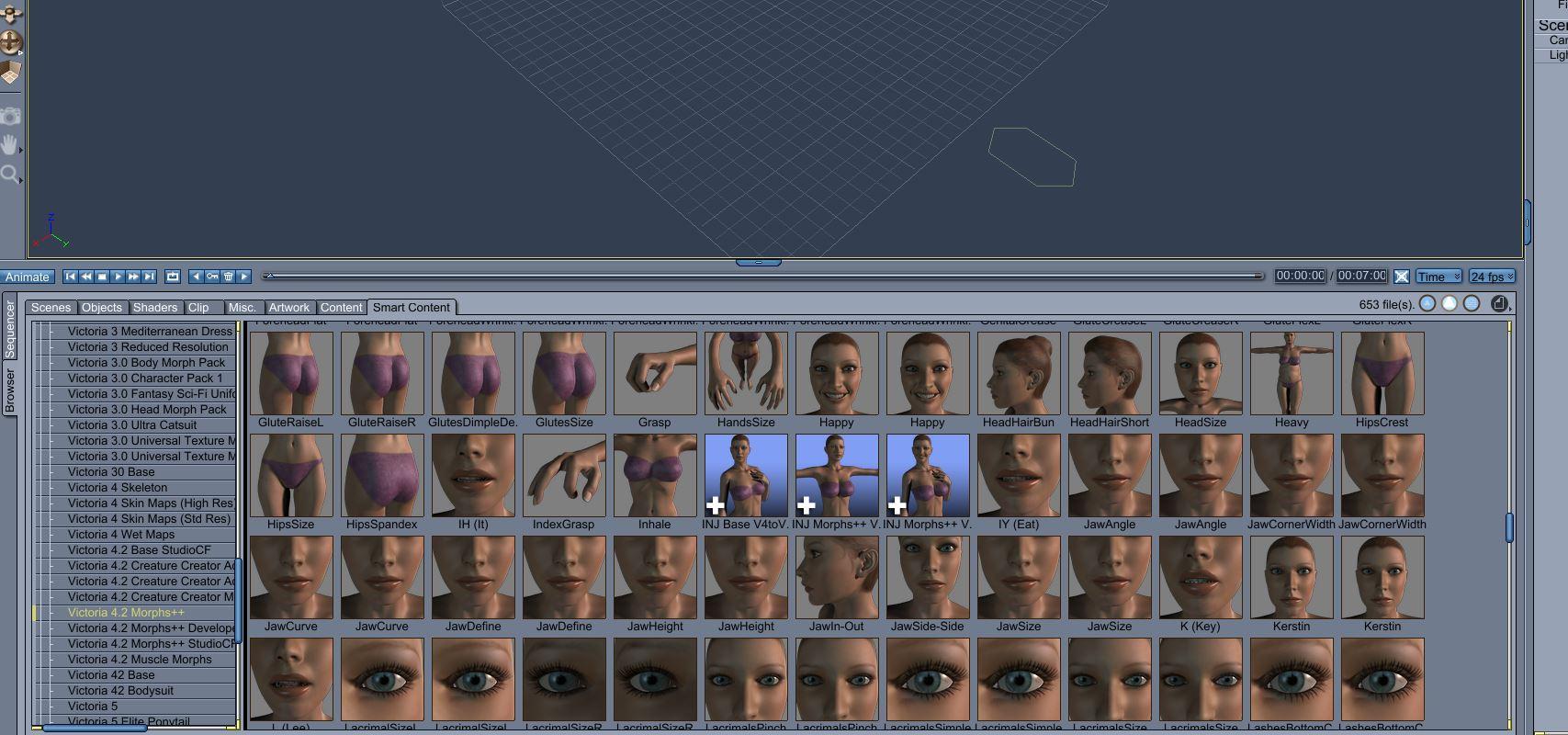
V4 also comes with basic morphs. Those can be found in the parameters tab on the top right. To see them, you first have to click on Victoria 4.2 in the instances tab (lower right). There are only two basic (male) morphs there. But if you go further down and click "head," there you will find a bunch of morphs.
Basically, if you want more than head morphs, you will need Morphs++.
Changes to Infinite Skills Carrara TrainingThank you UB for the link.
I was referring to the morph injections that do not appear anywhere within the Content or Smart Content tabs.
Cheers
Laura 3 deltastrying the Mother Pook paradigm character I get this message
this is from GenX on Genesis 1 but also on Laura applying the character
Could not locate script: /Runtime/libraries/!DAZ/Laura/Body/Deltas/InjDeltas.PBMHeavy.pz2
Could not locate script: /Runtime/libraries/!DAZ/Laura/Body/ChanVis/Unhide.PBMHeavy.pz2
I tried applying all the V3 morph injections but that doesn't resolve it
the character applies to Laura in DS, in Carrara the body goes all wrinkly on the torso
not sure yet what genX will do to genesis if it works as still trying
edit, update
utterly nothing, I just have all the V3 morphs under Laura
Poser 11 throws the error too
LUXE - Fibermesh Lashes and Brows: do they fit/autofit G8M (well, or very meh)I have trouble when I autofit things like the NYC police hat and other such headwear & all on toon style morphs like the 'Cartoonized' G8M & G8F models.
same with hair, besides losing all bones there's distortion... so after trying to autofit, i mostly parent them to the head.
and to have them appear at the right place (when figure is 0ed) i first load the item and autofit it, then i reload it without the figure being selected, and i center-align the new figure with the 1st loaded, parent it to the head, and then delete the 1st loaded. usually hits the mark ~Me too.
As far as the fibremesh eyebrows if the browridge deviates too much from the default G8M/G8F then there is a gap between the brows and the browridge. The Super Natural Brows does have a placement morph that can go negative or positive to fit the brows mostly flush on the brow ridge though. It's not a 100% good solution because browridges aren't all the same shape between people and autofit it's doing enough. I guess one could use the DS dformers function to 'push the brows' to fit the browridge.
what you explained here is exactly the reason why i'd like a product that fits itself perfectly to males (including the various eye shapes like Asian) - this finetuning is something i hate, just hitting wildly on the sliders to & fro, not knowing exactly what i'm doing until per chance i hit the mark >_< - i suffer enough every time i fumble thru dials to modify/create a figure's face, like nose ridge, nose bridge, up down thin flat etc... it's a torture every single time XD. i have a terrible sense of comparison, seeing changes burns a good few gray cells until i notice the differences ~
Well having adjusted the brows to lay flat on the browridge it is difficult as you have to rotate around the brows & look at them in so many directions to make sure there isn't a gap. It's mistake prone.
FINALLY!!!! Al Bundy gets his recognitionWhat? An Al Bundy thread in the DAZ forums and not a single mention of Big ‘Uns? Could have sworn I have seen one morph/character in the store worthy of the name… maybe even two…
- Greg
That's a 3D-Age product and defintiely not on DAZ site <evil grin>
LUXE - Fibermesh Lashes and Brows: do they fit/autofit G8M (well, or very meh)I have trouble when I autofit things like the NYC police hat and other such headwear & all on toon style morphs like the 'Cartoonized' G8M & G8F models.
same with hair, besides losing all bones there's distortion... so after trying to autofit, i mostly parent them to the head.
and to have them appear at the right place (when figure is 0ed) i first load the item and autofit it, then i reload it without the figure being selected, and i center-align the new figure with the 1st loaded, parent it to the head, and then delete the 1st loaded. usually hits the mark ~Me too.
As far as the fibremesh eyebrows if the browridge deviates too much from the default G8M/G8F then there is a gap between the brows and the browridge. The Super Natural Brows does have a placement morph that can go negative or positive to fit the brows mostly flush on the brow ridge though. It's not a 100% good solution because browridges aren't all the same shape between people and autofit it's doing enough. I guess one could use the DS dformers function to 'push the brows' to fit the browridge.
what you explained here is exactly the reason why i'd like a product that fits itself perfectly to males (including the various eye shapes like Asian) - this finetuning is something i hate, just hitting wildly on the sliders to & fro, not knowing exactly what i'm doing until per chance i hit the mark >_< - i suffer enough every time i fumble thru dials to modify/create a figure's face, like nose ridge, nose bridge, up down thin flat etc... it's a torture every single time XD. i have a terrible sense of comparison, seeing changes burns a good few gray cells until i notice the differences ~
LUXE - Fibermesh Lashes and Brows: do they fit/autofit G8M (well, or very meh)I have trouble when I autofit things like the NYC police hat and other such headwear & all on toon style morphs like the 'Cartoonized' G8M & G8F models.
same with hair, besides losing all bones there's distortion... so after trying to autofit, i mostly parent them to the head.
and to have them appear at the right place (when figure is 0ed) i first load the item and autofit it, then i reload it without the figure being selected, and i center-align the new figure with the 1st loaded, parent it to the head, and then delete the 1st loaded. usually hits the mark ~Me too.
As far as the fibremesh eyebrows if the browridge deviates too much from the default G8M/G8F then there is a gap between the brows and the browridge. The Super Natural Brows does have a placement morph that can go negative or positive to fit the brows mostly flush on the brow ridge though. It's not a 100% good solution because browridges aren't all the same shape between people and autofit it's doing enough. I guess one could use the DS dformers function to 'push the brows' to fit the browridge.
My genesis 8(customized) can not close eyesYou need a custom morph for the eyes to complete the closing - send the emsh to ZBrush with your morph applied at 100% and one of the eyes closed at 100% (and everything else zeroed), adjust the shape to have the eeys fully closed, send back to DS and in the options dialogue select Reverse Deformations (this subtracts your shape and the eyeclosing. Then you need to link the adjustment to both the Eye closed shape and to your shape - assuming you are in Edit mode in the parametrs pane, and have the three morphs (eyes closed left or right, your shape, and your correction) set to 100% right-click on your sahpe, select ERC Freeze, and in the dialogue select the Eye Closed shape for the Attenuate by option, and make sure that only the corrective morph is listed as a Sub component. That shoudl fix your issue.
Bringing older generations up to modern standards - might be fun ;)Haven't figured out how to split the head and body with GenX yet...will have to try that ;)
Laurie
You have to use "Selected Morphs (with properties)" and not "single morph". When you do that, you then load Genesis from Source. After that, you should then search for the word "David". Then you can check the main David 5 morph in the left column checkbox, then you can continue the search for the word David and check all five of his head shapes and bring them over as separate sliders. (I think there are five; may be just four. I'm not at that computer at the moment.)
The main morph dial still dials in his head and body -- and the main dial has them combined as one shape, so it's not possible to dial in his body without his head. [His head slider doesn't move when you do that; the main morph isn't a CTRL dial, but a complete shape all by itself.] But once you've got that shape set, you can dial in his default head to an extra percentage, or add in the other shapes as desired. (They are meant to be additive, it looks like, from my tinkering. And I suppose they'd have to be, since the main dial is an intact complete shape.)
Oh, and I had to use the Chin Cleft HD slider for his chin, as well. Neither GenX from Genesis nor GenX from the G2M Legacies shape brought over that feature.
My genesis 8(customized) can not close eyesHi, there
My genesis 8 character(customized in Zbrush) can't close eyes.

The face of the character was modified in the zbrush(goz). then, closed eyes(expressions morph) didn't work properly.
There are no hidden properties that affect it. only the morph from zbrush affects.
How do I fix 'Eyes Closed'?
Bringing older generations up to modern standards - might be fun ;)after bringing aiko3 over into ,duf how maks a template so she can autofit clothes from v4?

If you have copied over the Aiko 3 shape you can use that to create an A3 clone, to load clothing from A3, but not V4. For V4 you need to copy over the V4 shape via GenX and then create a clone from that. Alternatively there are a lot of products available to give you a V4 clone in G3F or G8F, and Genesis 1 has a V4 clone built in.
but, how to save as a clone?
ty

Firstly bring up the "Parameter Settings" of the morph and change the Type from Modifier/Shape to Modifier/Clone.
Then File->Save As->Support Asset/Morph Asset (not clone asset)
In the popup box locate the morph you changed to be a clone, select it, and then this will be saved for the relevant Genesis base figure
Using old morphs on newer modelsI need a bit of help guys. I’m trying to figure out a way to either transfer the morph from this genesis model into a Genesis 3 model. From what I am seeing I would need to buy these adjustments.
GenX2 AddOn for Genesis 3
And then hopefully it will all roll over correctly. Is there a better way to do this or a different suggested application that can do this?
Customized Character TutorialsMy two cents
I've created a lot of characters over the past twenty years (over 500). When I create a character face I start with the shape of the face. A list of face shapes; hexagon, oval, rectangle, round, square, and triangle. First I'll tackle the female face; I'll tackle the male face later.
Vicky 4's face is an example of an oval face, I'm guessing that's because it find of the standard. First, I'll take on the square face shape. With a square shaped face, the distance from the chin to the forehead should be the same as the distance from cheek to cheek. One things that makes a square face is a weak jaw line makes the face look shorter. On the other hand what makes rectangular face is a strong jaw line which makes the face look longer. What true for a square face dimension wise is true for a round face. The difference is a round is more rounded than the angular shape of a square shaped face. With a hexagon shape, the sides are straight up and down while the jaw line is stronger and the chin is wider to give the a hexagon shape. The triangle face the face taper from cheek to chin with a narrow chin giving the face a sharp triangular shape.
I used Vicky 4 and Morph++ morphs, because I figured most everyone would have them, but that also limited what I could do. The morphs I used have been around since Vicky 2. I only have the ones for Vicky 4, but I'm assuming that they included in all Vickys up to and including Vicky 8Figure Metrics ignoring or messing with input@fstromberg have you seen the Daz Wiki documentation on Figure Metrics? If not, it might help some.
Figure Metrics does have bugs, though. I reported one related to arms length in 2015. I never got any message from customer support saying it was fixed, so I suppose the bug is still there. (Richard confirmed the bug in a forum discussion at the time.) I basically gave up on Figure Metrics. I could never achieve results that I considered acceptable.
You need to own enough morphs that target specific body areas and you need to manually configure Figure Metrics to specify exactly which morph it should use for each body area. The selected morphs often seem to conflict with one another, and don't converge to the desired shape for me. A lot of the success or failure probably comes down to what morphs you have available and which ones you choose to use.
Daz 3D is part of

Connect
DAZ Productions, Inc.
7533 S Center View Ct #4664
West Jordan, UT 84084Licensing Agreement | Terms of Service | Privacy Policy | EULA
© 2026 Daz Productions Inc. All Rights Reserved.