-
DTU Bridge - materials not working, animations not working
psychoclast said:
I'm using the latest DTU bridge and have found that it still fails to export materials properly - transparency is lost as are normal maps, bump maps and emission maps.
Actually, the latest Daz to Unity bridge is still the same version from Oct/Nov 2020. I can't speak officially for Daz, but hopefully a new version will be out soon.
Additionally, animations do not export at all - regardless of whether you select export as animation or not, it gets exported as a skeletal mesh. What can I do to fix this? I'm using Victoria 8.1. Some texture images have been modified, but most have not. All are losing bump, normal, transparency and roughness, and again, no animation. Hair looks a mess too. I can fix most of the material issues in Unity, but the animation I'm lost on.
Animations are not yet supported with the current version of the Daz to Unity bridge. Victoria 8.1 uses the more recent "PBRSkin" shaders instead of the "Iray Uber" shaders that's used in older products. "PBRSkin" shaders are also not yet supported in the official Daz to Unity bridge. This is why all extra material data like bump, normal, transparency and roughness are missing. Many hair assts require extra tweaks to BumpMap Strength, NormalMap Strength and Alpha Threshold. Animations and PBRSkin support have been in the unofficial bridge since v0.3-alpha. Improved hair support was added to v1.3 alpha 3.
And unfortunately, I can't use FBX export for animations either - while it will export the animation, I lose all facial expression data unless I select "Bake to studio keyframes." However, if I do that, then the pivot points on all the bones get screwed up and the figure distorts wildly. See image below. I've tried using both a humanoid and generic rig.
Only studio keyframes (aka Timeline) animations are exported in FBX files. Aniblocks and other "aniMate"-based animations must be baked to studio keyframes before they can be exported. Distorted figures usually results when animations which were made for a specific model and rigging are applied to a same or different model with entirely different rigging. The best way to minimize this is to always use the same exact settings and export procedures that you use for your base model and all of your animations. From what you've written so far, it sounds like you've been experimenting with several different Daz Studio settings, FBX Exporter settings and Unity settings for your exported models and animations, and then trying to use all of these different export results together. Your best path forward may be to start with a completely fresh project and do new exports with the same settings for all assets/models/animations.
Have you tried to use unofficial DTU bridge?
I have - and found it broke my unity project.
There are a couple things that might cause a "broken" project. The first is you tried to use a mismatched combination of Officila/Unofficial Daz Studio plugin with Unity plugin. Both versions can be installed into Daz Studio at the same time, but you have to use a matched version of the Daz Studio and Unity plugins when doing an export operation, aka only use the Official Daz Studio plugin with the Official Unity plugin or the unofficial Daz Studio plugin with the unofficial Unity plugin. A second cause is if you are using Unity version 2020 or higher and did not select the option to Update Scripts when you first installed the uDTU files into your Unity Project. If this happened, then you can try selecting your "Assets/Daz3D" folder in Unity, right-clicking and selecting "reimport".
I know all this is easier said than done. If you still run into distorted animations, then you are probably unintentionally changing something between model export and animation export without realizing it. Post back here if you need more detailed instructions. Good luck.
V4 ++ shapes how does one make them work?vicsdaz said:
I have installed [V4 ++ shapes] these now but when i click the icons (with v4 sleceted) nothing chnages on v4-i maiknly got thinking there were sliders for hand graasp for example or smile or open mouth-when she is selected inparamters there are no new sliders, am i missing something ?
Edited for Please put your question in the post body and the title - Daz 3D Forums
Did you install the PowerLoader files for Victoria 4 and the morphs? If not you should ideally do so (it gives options on loading the figure) or you can go to /Runtime/Libraries/!DAZ/ in the content directory you installed to and double-click the DzCreateExPFiles-v4 batch file for your operating system (.bat for Windows).
GF8.1 Eyelash controlsCan someone point me in the right direction? I'm struggling to find eyelash controls with GF8.1 characters, including Victoria & the base character.
If I load the base 8.1 eyelashes only, I see full shaping options in parameters, but not if I parent to a character! Also, I'm unable to apply a material to those lashes so I only have weird curved panes.
If I load a full 8.1 character the full range of shaping options for the lashes are no longer available in parameters.
FYI - I'm looking simply to alter the curl, angle & length. At present I can do absolutely nothing.
Clearly I'm missing something here & it's driving me nuts. I need an idiots guide to this.... can someone please help this idiot?
[Legacy Poser-to-DS Help] V4 Rigging Breaks When Opened in DSIN SHORT:
I'm presently troubleshooting recurring issues around the rigging of legacy Victoria 4 based figures (originally customized in Poser Pro) when they're opened in Daz Studio.
BACKGROUND:
- Over time (meaning the last 3 years or more) I've encountered broken rigging in V4 figures opened in DS. V4 figures originally customized in Poser Pro and used there with no problems often import to DS with distorted rigging issues that render them unusable.
- Example: Figures will import in zeroed pose, but with rEye, lEye, upperjaw and lowerjaw severely offset from their intended positions.
- Example: Facial morphs will not work properly. They are distorted from their intended appearance and sometimes cause bones in the head to translate, dragging jaw pieces and/or the eyes with them.- I started learning DS in 2018, but I've used Poser Pro since Poser 8 through Poser 12. These issues have persisted the whole time, but they're not always consistent. Sometimes a V4 character from Poser will import with rigging more or less intact and working properly.
WHAT I NEED:
- What parameters to look for to determine what's causing these distortions.
- Whether or not the distorted figures can be "fixed" in DS.
- How to configure my characters to import to DS without broken rigging.TECH DETAILS:
Windows 10 Home v. 21H1
DAZ Studio 4.16.0.3 Pro (64-bit)
Poser Pro 12.0.757
- DS & Poser content Runtimes installed to external driveExample screenshots attached. Any helpful insights appreciated!
BV
DTU Bridge - materials not working, animations not workingI'm using the latest DTU bridge and have found that it still fails to export materials properly - transparency is lost as are normal maps, bump maps and emission maps.
Additionally, animations do not export at all - regardless of whether you select export as animation or not, it gets exported as a skeletal mesh. What can I do to fix this? I'm using Victoria 8.1. Some texture images have been modified, but most have not. All are losing bump, normal, transparency and roughness, and again, no animation. Hair looks a mess too. I can fix most of the material issues in Unity, but the animation I'm lost on.
And unfortunately, I can't use FBX export for animations either - while it will export the animation, I lose all facial expression data unless I select "Bake to studio keyframes." However, if I do that, then the pivot points on all the bones get screwed up and the figure distorts wildly. See image below. I've tried using both a humanoid and generic rig.
Step-by-Step: Using the new PBR Skin on Genesis 8Daedalus-7 said:
There is a much simpler way to convert the Iray skin shader to PBR:
1) Apply your Iray skin shader to your character as usual.
2) Go to a character with PBR skin (such as Vicktoria 8.1 or Michael 8.1)
3) Hold CTRL +ALT and double click on that character's skin.
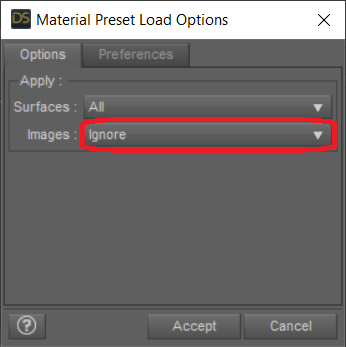
4) A pop-up window appears, choose "Images > Ignore". This basically means that you are loading the shader without the texture maps!
5) Since characters with PBR are typically 8.1 characters, applying their skin shader will change the UVs to 8.1. If your chosen textures are 8.0, you need to switch it back to 8.0
This is done in the Surfaces Pane, search for UV and choose "Base Female" or "Base Male".
All done!
NOTE: Your character might now have a different look due to the different properties of the PBR skin shader you are using.
HERE are my PBR skin settings:
Top Coat Roughness: 0.55 body ; 0.45 head ; 0.40 face ; 0.3 lips [The face tends to be more oily, the lips even more, the head is changed for a smoother transition]. If you want a more "shiny" look, you can reduce these by 0.1 each [body to 0.45, face 0.35, head 0.4, lips 0.2]
I don't usually respond here very often because I am just a beginner at DAZ, but this little tip helped me find something that I think is not supposed to work but does. I wanted an asnwer to using PBRSkin shader on Anatomical Elements, everything says it can't be done, but using this method forces PBRSkin Shader on genitalia. Since I was using a G8 texture I did have to apply the Base Female UV after copying the Victoria 8.1 shader. Not only were all the standard skin textures converted to the new shader but the Anatomical Elements were converted at the same time.
You can't simply double-click on PBRSkin Shader with Genitalia selected in the scene, it simply ignores the script and remains Iray Uber. I am still not sure if this is the correct way to accomplish this and I haven't tried it with other genitalia. Maybe it will but I don't want to mess around too much with this. At least now I have a starting point to play around with converting my G8 models to G8.1 models with new skin shaders. Thanks for figuring this out.
making morph for v4 few questionsThe default bikini/underwear is on the textues, not in the emsh, so it has no impact on morph creation. Victoria 4 pre-dates SubD, that's why the figure has a higher resolution than any Genesis. There are no additional items on a default Victoria 4 either.
head morphs smaller than body-what can be done about itthe goal is for the head to havew the same perportions as original head so it will look natural-if we are changing the whole body then it would not matter (as long as the new head will be in proper perportions to the new body it goes with) but when we are changing just the head on any figure victoria or g8 then all levels (chin, top of head, eys, nose and mouth) should be at the same level as the originals if the figure is to look as natural as possible
AIUTO...CHI CONOSCE L’ITALIANO? PARTE TREDICIAnfy said:
@Imago: denghiu! Certo che sì!
* * *
Errore dello store (si può dire?), ha messo in vendita a 5 (cinque) USD alcuni pro bundles (invece dei core) dei personaggi gen. 7, 6 e mi sembra anche 5.
In buona fede avevo messo Victoria 7 pro bundle nel carrello senza procedere ancora all'acquisto e ora (giustamente) non risulta più scontata. Se l'avessi presa mi avrebbero, penso, segnalato a posteriori the mistake: meglio così allora.
Non è una novità, è sempre tutto rotto da queste parti. Non so se ricordi quel pasticcio di tempo fa, dove gli utenti si sono visti togliere prodotti dalla libreria perche i ragazzuoli della DAZ avevano sbagliato a mettere i prodotti freebie. Così, invece di prendersi la responsabilità del errore e rimborsare ai PA quello che avrebbero guadagnato dalle "vendite", hanno preferito cancellare centinaia di ordini degli utenti. Che bei metodi.

Quindi, alla fine, hai fatto bene a non completare l'ordine. Io aspetto sempre alcune ore prima di fare acquisti in presenza di promozioni, spesso ho visto pacchetti Pro come freebie nelle pagine promo e pochi minuti dopo sparire, chiaro segno del elevatissimo grado alcolico nel flusso sanguigno degli incaricati alla cura del front-store DAZ.AIUTO...CHI CONOSCE L’ITALIANO? PARTE TREDICI@Imago: denghiu! Certo che sì!
* * *
Errore dello store (si può dire?), ha messo in vendita a 5 (cinque) USD alcuni pro bundles (invece dei core) dei personaggi gen. 7, 6 e mi sembra anche 5.
In buona fede avevo messo Victoria 7 pro bundle nel carrello senza procedere ancora all'acquisto e ora (giustamente) non risulta più scontata. Se l'avessi presa mi avrebbero, penso, segnalato a posteriori the mistake: meglio così allora.
Daz to Unity Update 4.0I'm noticing that when I tell Daz to Unity to export as an animation, it exports it as a skeletal mesh. In fact, there doesn't seem to be any way to make D2U export animations- at least not how the tutorial says. Is there another way to do it? Exporting as an FBX wont work- if I export without baking to studio keyframes I lose all my facial expressions, and when I do bake to studio keyframes, I get wild distortions in the bones which causes disasters like below:
Also, while there's been somewhat of an improvement with the hair in the last rev, I assume it's still an ongoing process? What sort of hairs work at the moment (that's Greer hair, and as you can see, it doesn't). Or is Genesis 8.1 not supported yet? (the character here is Victoria 8.1)
Thanks,
Help me find this hairmding said:
The first one could be Belinda Hair: Link
Edit: look at last promo picture, compare "triangle" (hair) on forehead: Link
Thank you! That definitely looks like the correct one.
Help me find this hairThe first one could be Belinda Hair: Link
Edit: look at last promo picture, compare "triangle" (hair) on forehead: Link
Katharina Hair for V4The path to this hair is going to be in "Poser format>Figures>Daz Victoria 4>Hair>OOT Katharina hair"
The "Character" folder is renamed to "Figures" in software.
This is, if you've installed the poser version, in addition to the genesis versions.
There's three zips, one for g2f, one of g3f, and one for v4.
There's also the "poser companion files" which is an additional install package for using the g2/3 hair in poser.
Katharina Hair for V4Courtesy link: https://www.daz3d.com/katharina-hair
According to the readme:
-
You can find new icons for loading this product in the following Poser Libraries:
-
Figures: “DAZ Victoria 4:Hair:OOT Katharina Hair”
-
Materials: “DAZ Victoria 4:Hair:OOT Katharina Hair”
-
Pose: “DAZ Victoria 4:Hair:OOT Katharina Hair”
-
fit genesis clothes onto m/v 4vicsdaz said:
THE SKINs DO NOT LOOK GOOD, i follow all tutorials but my renders coninue to not be satifying , at least m v4 look skins pretty good espically v4-i just use hdri adding lites does nothing good, my lits or lite sets
But you can use Michael 4 and Victoria 4 materials on Genesis (and Genesis 2 with the add-on UV set, as I recall).
Anyone else going back to G3?MelissaGT said:
marble said:
MelissaGT said:
PerttiA said:
Basically G8 doesn't use any more resources than G3 does, if a figure uses more resources than an other figure, then the first one is using larger textures, bigger SubD or more texture maps for the surfaces - All things that can be dealt with.
Also more control morphs...G8 (and moreso 8.1) has a lot of those.
That being said, I do stick with G8.1 (and any G8 figure can be loaded up on G8.1) simply for the eye movement.
I have never used 8.1 for anything. I don't haave a clue as to what works with 8.1 and what doesn't and, other than a few expressions (which are rarely important to me) I don't see the benefit. It seems to me that 8.1 requires a whole new investment in materials and I don't have the bufget for that. I've only just started using G8M because most of my males so far have been G3M.
A problem I've found with using G3M clothing on G8M is that, even though I followed SickleYield's excellent tutorial, the converted clothes only seem to fit the base G8M. Try them on a morphed character such as one made with Zev0's Growing Up and the converted clothes don't fit - especially on the arms. I think it is a similar story converting the other way (G8 clothes to G3).
Any clothing that fits G8 will fit G8.1 without having to auto-fit (the rare exception being masks that use the different facial rigging). G8 materials can absolutely be used on G8.1...I do that all the time. The biggest benefit for me is the more realistic eye movement. More than just the eyeballs move when looking left/right and up/down and G8.1 is far better at that than G8.
You can run into the clothing fitment issue with even using G3M to G3M (or G8M to G8M, etc)...if custom fitment morphs were not created for that character in that specific article of clothing. For example, I can buy an outfit made for G8.1...but if I try to put it on Jada 8.1, it will technically fit, but it will most likely get all sorts of distorted. Clothing fits horribly on Jada. That's why I tend to stick pretty dang close to the base G8/8.1 or base G3 figure by default...because the further you go from it, the worse clothing will (in general) fit. So the same situation applies in your case...you are converting clothing from base G3 to base G8...and that clothing doesn't have any fitment morphs built into it for any of the G8 characters. Your best bet if you want it to fit perfectly is to either create custom morphs yourself (which requires external knowledge and programs), or use the base figure body shape (which is what I tend to do). Just try an experiment. Load a base G8 or base G3...then load clothing that is made to fit...then slide in a PA-made character or even one of the more obscure DO characters (so like other than Michael or Victoria, etc)...just watch how the clothing distorts when the character morph loads. Some people aren't bothered by it (judging by the level of distortion I see in a lot of product promos)...it drives me bananas.
Absolutely agree with all of that other than sticking close to the base figure. If there's one thing that keeps me coming back to this hobby almost daily it is the ability to make my own characters from the dials. I never use the base figure nor a purchased character (out of the box, as it were). I just wish the clothes would look natural but you are correct - they don't. So I spend a lot of time making morphs myself. I should learn and use Marvelous Designer because I spent good money on it but it is too tempting to take the easy option and buy dForce clothes from the store.
Anyone else going back to G3?marble said:
MelissaGT said:
PerttiA said:
Basically G8 doesn't use any more resources than G3 does, if a figure uses more resources than an other figure, then the first one is using larger textures, bigger SubD or more texture maps for the surfaces - All things that can be dealt with.
Also more control morphs...G8 (and moreso 8.1) has a lot of those.
That being said, I do stick with G8.1 (and any G8 figure can be loaded up on G8.1) simply for the eye movement.
I have never used 8.1 for anything. I don't haave a clue as to what works with 8.1 and what doesn't and, other than a few expressions (which are rarely important to me) I don't see the benefit. It seems to me that 8.1 requires a whole new investment in materials and I don't have the bufget for that. I've only just started using G8M because most of my males so far have been G3M.
A problem I've found with using G3M clothing on G8M is that, even though I followed SickleYield's excellent tutorial, the converted clothes only seem to fit the base G8M. Try them on a morphed character such as one made with Zev0's Growing Up and the converted clothes don't fit - especially on the arms. I think it is a similar story converting the other way (G8 clothes to G3).
Any clothing that fits G8 will fit G8.1 without having to auto-fit (the rare exception being masks that use the different facial rigging). G8 materials can absolutely be used on G8.1...I do that all the time. The biggest benefit for me is the more realistic eye movement. More than just the eyeballs move when looking left/right and up/down and G8.1 is far better at that than G8.
You can run into the clothing fitment issue with even using G3M to G3M (or G8M to G8M, etc)...if custom fitment morphs were not created for that character in that specific article of clothing. For example, I can buy an outfit made for G8.1...but if I try to put it on Jada 8.1, it will technically fit, but it will most likely get all sorts of distorted. Clothing fits horribly on Jada. That's why I tend to stick pretty dang close to the base G8/8.1 or base G3 figure by default...because the further you go from it, the worse clothing will (in general) fit. So the same situation applies in your case...you are converting clothing from base G3 to base G8...and that clothing doesn't have any fitment morphs built into it for any of the G8 characters. Your best bet if you want it to fit perfectly is to either create custom morphs yourself (which requires external knowledge and programs), or use the base figure body shape (which is what I tend to do). Just try an experiment. Load a base G8 or base G3...then load clothing that is made to fit...then slide in a PA-made character or even one of the more obscure DO characters (so like other than Michael or Victoria, etc)...just watch how the clothing distorts when the character morph loads. Some people aren't bothered by it (judging by the level of distortion I see in a lot of product promos)...it drives me bananas.
Hair in Rosalind Promo, and RW Triangle Bikini Promo?I'm afraid that is not the correct hair. I'm 99% certain that hair is Ciri's from the Witcher 3 game. Is from Kayless and it's free. Is not called Ciri but Gwennili hair.
Available also at Rendo or Kayless Deviantart. Note is a G3F hair
https://www.renderosity.com/freestuff/items/77151/gwennili-hair-for-genesis-3-female
Gwennili is available here at DAZ:
https://www.daz3d.com/gwennili-hd-for-victoria-7
Cheers.
Seeking 3D modeling help of Medici Lions for next Kingsman MovieWhile plans are not set in stone, currently I am building a 3D model of Stowe House (Buckinghamshire, UK. See https://www.stowe.co.uk/house).
I am building the mass model in Carrara and texturing it in RedShift in Cinema4D, so it can be blown up in Matthew Vaugn's next Kingsman movie, with Dwayne Johnson flying through the air in front of it, or some such.
While I have the experience and knowledge to model the architectural model and terrain, I am not skilled enough at 3d sculpting to make the Medici lions on the South Front portico, which have a bit of history. These are the original lions from when Stowe House was originally built in ca. 1730. When Queen Victoria visited the Duke of Buckingham, the expense drove him bankrupt, and the lions were sold. In the early 20th century Stowe was bought to turn into a school. Since I graduated in the 1970s, the National Trust has been helping restore Stowe, as a consequence of which anonymous donors sponsored the purchase and return of the lions to the South Front for half a million dollars (see https://wmf.org.uk/Projects/technical-case-study-the-stowe-lions/ for the full story).
I am very slow. It's going to take me 8 months to do the architectural model, but no problems, the film's not scheduled to shoot until September. Probably the studio will want to improve on any explosions I make, but currently that''s way off in the future. The reason I am doing it is because Stowe gave me an all-paid scholarship, so I am putting at least the first segment of work in the public domain, which also mitigates the required commercial licensing fees. So I can think some residual may be result from your work depending how things go, but I can't promise any payment. I think people call this doing work 'on spec,' lol, although there's no specs at all, it's entirely my own idea and so far no one has objected so Im getting into it seriously now.
If you're interested in working with me on modeling the Medici lions, or any other way in fact, I'm delighted to hear from you. here are some pictures of Stowe from the air, the South Front where the lions are, and one of the lions. The quality of the sculpture is superb--note the lion ribs. There's lots of pictures and so on to help. I won't deluge you in them. I share on Facebook about it, https://facebook.com/ernestmeyer3 , although other things I am doing are muddled up with it so you might have to hunt down my profile page to find more about it.
thanks for all the great support through the years. It seems I know more about modeling than the people giving tutorials on it in Cinema4D, lol.
Daz 3D is part of

Connect
DAZ Productions, Inc.
7533 S Center View Ct #4664
West Jordan, UT 84084Licensing Agreement | Terms of Service | Privacy Policy | EULA
© 2026 Daz Productions Inc. All Rights Reserved.