-
RiverSoft Art Second Anniversary Contest SUBMISSION THREAD
Knittingmommy said:
Products Used:
Riversoft Art:
RSSY Clothing Converter from Victoria 4 to Genesis 8 Female
Expression Mixer
Eye Clock Pose Control for Genesis 3 and 8 Male(s) and Female(s)V4 Outfit:
How Products Were Used:
The Clothing Converter was used to convert the dress and the sleeves. Sleeves and shoes are always a problem with converting from V4 to newer generations. There is always crinkling, especially with the more severe poses. The Clothing Converter did a great job converting the sleeves and dress, better than autofit. I chose one of the most severe, problematic poses I knew of to try out with the outfit after converting and it did wonderfully. I only had a slight crumpling of the edge of the skirt on one side which I think I could have fixed fix, but I didn't bother because that part didn't end up being in my final shot. This product worked great and will be a valued tool in my arsenal.
Expression Mixer was used to create the character's smile. It did a pretty good job with an open mouth smile which are hard to get right.
Eye Clock Pose was used to pose the eyes which never look right when I do them on my own.
How does RSSY Clothing Converter from Victoria 4 to Genesis 8 Female do with converting dynamic clothing from V4 to G8F?
WIP comming soon, The Tube. (commercial)Yeah also a former Londener and now expat myself - hence the product choice.
The model is more base dont the Victoria/Bakerloo line version, No worries regarding the colours - im not one to skimp on mats (see attached) Legally I should be ok with the colours,just not the LU roundel which is heavily copyrighted, but easy enough for users to add one to the exterior texture file if desired.
Station is in the works also, not such a useful product without one. I know we have Jacks park side in PC, but felt we could use an updated one (iray etc) and bespoke to fit this vehicle..
Long Straight Bangs?Chiva Hair is something I've used for awhile. It's exactly what you are looking for...Downside is that it only works with Victoria 4...I've tried to adapt it to Genesis with only limited luck on Genesis 3...it can be done, though.
Returning after a long break - what are the new "essentials"?Thank you Matt_Castle for detailed description about figure generations... I was quite sure that Victoria held a some special position back in the days, thanks for confirming and further clarifying things.
An Issue with Victoria 8 not taking any materialsAfter some reading and fealing a little dumb, I realized there are 3 different ways to down load stuff for Daz minus the manual download and install yourself. I have a bad feeling that part of the stuff for that model was one way and parts were another way which would explain why the base of Victoria would not take certain Maps/Materials if they were divide into different locations. I was unaware until now this was something I had to worry about but I am in the process of fixing it and I hope this solves my problem once I am up and running again.
Thanks
An Issue with Victoria 8 not taking any materialsActually everything else is taking textures fine that is why I am asking for some help, nothing I can come up with will apply anthing to that model ( Victoria 8). From the Victoria content, I am reinstalling everything becuase I have to assume at this point it is a issue there but I don't actually think it is.
An Issue with Victoria 8 not taking any materialsHello, as the title says I can't get the Victoria 8 model to take any materials at all, I have everything i need installed I double checked to be sure I have made other renders already so that is not the issue. I tried changing the models, Maps or materials or change even skin color and nothing. The only thing I could do was change eye color, I am working inside the options for Victoria only right now and not say using the Corina skin map which works fine on the Victoria model, and gets even stranger because the view port shows her with eye brows and the aux port shows nothing.
I am still pretty new to this so a problem here and there i can sort out but this is a little above me and need a little help trying to figure out what is going on.
Thanks.
Wet And Tanned Skins For Genesis 8 Bundle (Commercial)hi!
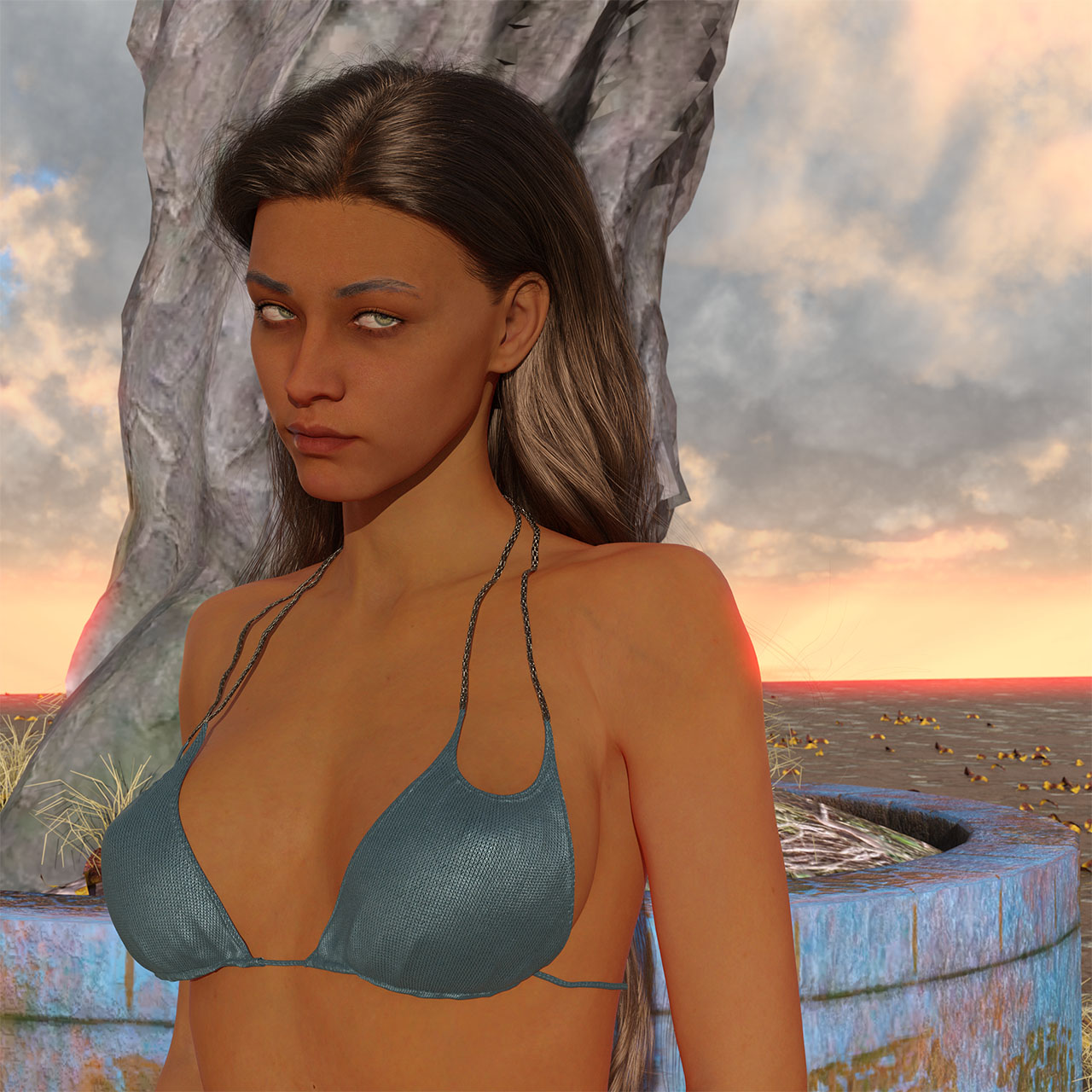
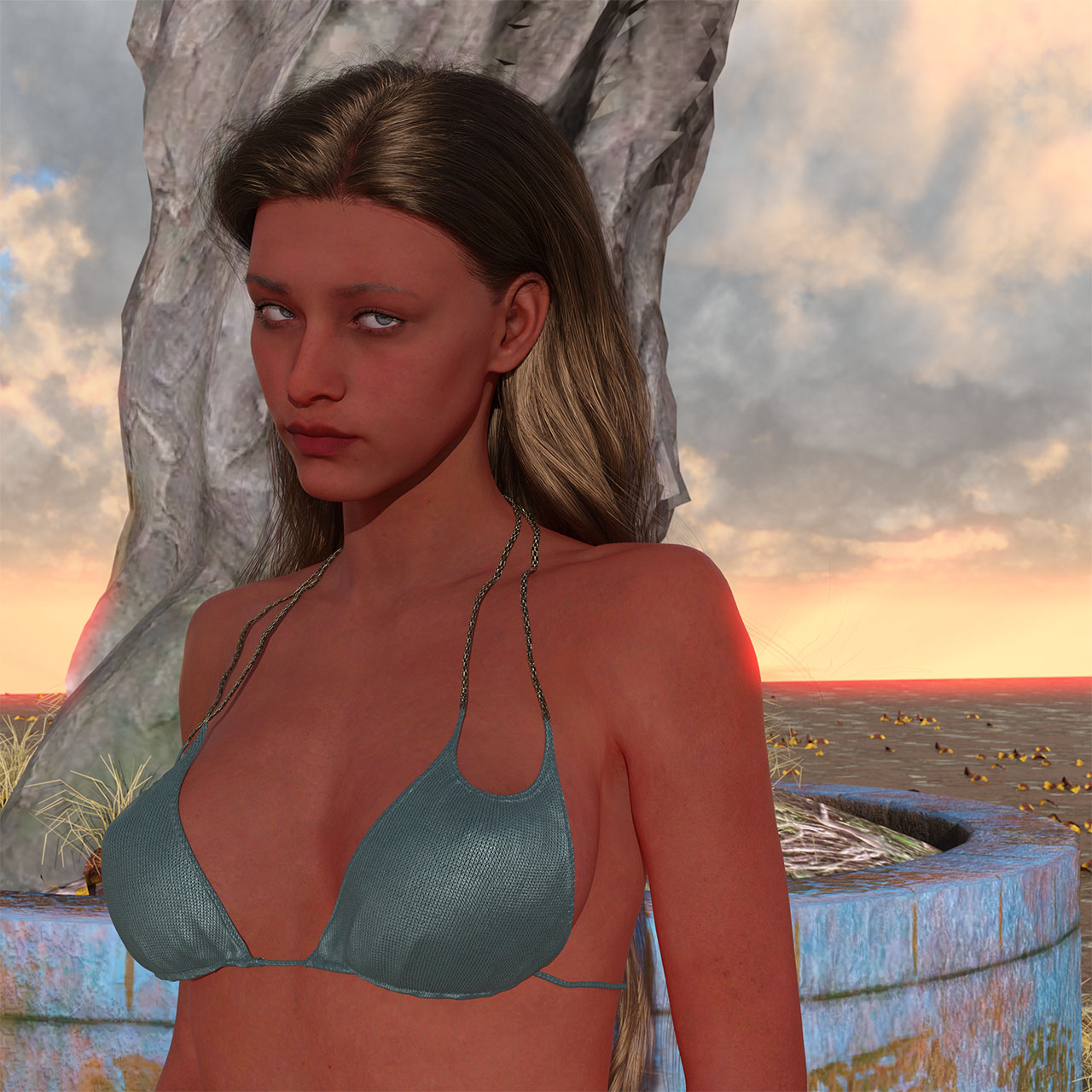
i ran several renders based on the third shading option with the new beta, and the most current nvidia studio driver. at medium translucency + medium tan boost, and again at the highest settings for both.
i haven't used the shading system much, so i don't really have a good frame of reference for the results. but my takeaway was the results seem to depend on the base skin.
below are the results i got for the highest translucency/highest tan booster settings. victoria 8's skin mats gave me the tan render. bj nadya's mats gave me the red one.
hope this helps--
j
 Sexy G8F Monsters
Probably already on your radar, but if not: https://www.daz3d.com/tara-2-hd-for-victoria-7-victoria-8. The wings are quite good, as also the horns & hip spikes.
Now, it may be a matter of taste.. No. It IS a matter of taste, but I find the results of this: https://www.daz3d.com/surgical-beauty- quite terrifying.
Regards,
Richard
Daz Studio Pro BETA - version 4.20.0.17! (*UPDATED*)Heckbarth said:
Hi all,
is anyone experiencing the weird texture behavior I have in the beta? See the pictures of a vanilla Victoria 8.1 in a render and in NVidia preview.
It seems the different "texture areas" (if that's the correct term) get arbitrarily colored.
Tested w/ latest 4 and 5 studio drivers, same result. So with gen 8 models. Caches deleted.
Does not appear in 4.16.03 (GA).
Any idea what to do here?
Best wishes,
H.
Please see Acceptable Ways of Handling Nudity for guides on image posting
It certainly looks as if the wrong maps are being used - a lot of them are maps from a different UDIM tile, though it does also look as if a (wrong) normal map is being used for the base colour in at least one of the images. I have seen others reporting similar issues, though it doesn't seem to be universal and has happened occasionally in the past
Daz Studio Pro BETA - version 4.20.0.17! (*UPDATED*)Hi all,
is anyone experiencing the weird texture behavior I have in the beta? See the pictures of a vanilla Victoria 8.1 in a render and in NVidia preview.
It seems the different "texture areas" (if that's the correct term) get arbitrarily colored.
Tested w/ latest 4 and 5 studio drivers, same result. So with gen 8 models. Caches deleted.
Does not appear in 4.16.03 (GA).
Any idea what to do here?
Best wishes,
H.
Show Us Your Iray Renders. Part VIIIThe Blurst of Times said:
magog_a4eb71ab said:
Maybe its just the poses you've used, but your character reminds me of the character used in this product: IM Being Myself Poses for Genesis 8 Female They might have actually used some of Sangriart's Evenstar's character in the aforementioned promo character. Face/head shaping is still a challenging & time consuming task for me.

Yeah, maybe some Evenstar in there.
Everyone has their own peculiar tastes for head/face shape. I usually start with 4-5 figures in some combinations... between 15-35% of each figure, sometimes as much as 50% but not more. I often don't like 100% dials. It's usually a lesser amount of many faces that I like.
That usually gets the best feeling from each of the faces that I like at the time.
Then I amplify the features that I like (Eye Size, Nose Size, Lips - Heart, etc.).
Sometimes, it creates a feeling of sameness, however. Especially when I use the same shaping dials.
Yes, too many and too high % of character morphs applied to the same model and it just gets way beyond my abilities to keep everything in proper proportions, and some character morphs just don't go well together above a certain % due to some of their parameters being similar(i.e. Kanade 8 & Aiko 8, Stephanie 8 & Victoria 8). I also try to keep the total % of character morphs used on a given model = or < 100%, but even then sometimes the face still ends up becoming too compressed/small. I don't know if its possible, but I'm hoping at some point they implement a feature in Daz Studio that measures facial features & proportions.
I also have the same issue with character body morphs. I end up using fewer character morphs on the body in comparison to the head. More often than not, if I use more than 3-5 character body morphs(depending on the dialed %), the body ends up becoming too thin, small, and/or tall in comparison to the head.
Returning after a long break - what are the new "essentials"?therry_e35e822bb8 said:
Victoria is no more special (with all the "pro" morphs etc) as she used to be?To copy an explanation of mine from elsewhere:
Okay, figure generations:
Over time, Daz has produced nine generations of base figure:
- Generation 1 had base figures called (eventually) Victoria 1 and Michael 1. (Originally Victoria was "The Millennium Woman", but that kept getting shortened to Millie, which Daz didn't really like).
- Generation 2 was Victoria 2 and Michael 2
- Generation 3 was Victoria 3 and Michael 3
- Generation 4 was Victoria 4 and Michael 4. (With 4.1 and 4.2 updates for Vicky that changed minor things).All of these generations had a number of derivative figures that used the base Victoria and Michael meshes and morphed/retextured them to become new characters.
- Generation 5 was called Genesis. This generation was an androgynous one that tried to unify the male and female figures. There were still Victoria 5 and Michael 5 figures, but these were now based on the Genesis base.
- Generation 6 was Genesis 2, but the figures were split back into male and female (too many problems with fitting clothes). Again, there were Victoria 6 and Michael 6, but again these were morphs based on the Genesis 2 Female and Male bases.
- Generation 7 was Genesis 3, again Male and Female. Victoria 7 and Michael 7 remained the flagship figure morphs.
- Generation 8 was Genesis 8, which was when Daz decided to address the confusion between the different Genesis number and Generation number. The base mesh this time is actually very similar to Genesis 3 in shape, with the main alteration being a change from a T-pose to an A-pose.
- And the eighth-and-a-bit generation is Genesis 8.1. This is actually a refinement of Genesis 8, retaining the same vertex count, skeleton, and pose, allowing it to be almost fully backcompatible with Genesis 8 content.On which point, I should note: Mostly, content is only natively compatible with its own base generation. Things such as clothes and hair (being standalone meshes) can make use of tools to refit them to other generations, but figure morphs naturally require their base figure to build upon (just being a set of morph vectors and textures).
~~~~~
As far as some, but not all of my personal favourites that get regular use:
- The base Daz Original "Genesis 8 Female Body Morphs", "Genesis 8 Female Head Morphs" and the equivalent Male versions.The similar expressions are a *maybe*, as they don't natively work on G8.1 (although they can be made to).These aren't *essential*, but they're extremely useful and also widely used. While the Genesis bases all have auto-follow capability meaning that clothing can try to adapt to any morph applied, clothing still benefits from the author fitting it to a morph, and these are the most widely supported morphs for that. (Particularly useful when it comes to breasts, which are an area auto-follow struggles with).
- "Scene Optimizer"
Most assets these days are intended for Iray rendering, and Iray has the issue that it will only run on a GPU (NVidia only) if the scene fits entirely into the card's VRAM, and instead runs (very slowly) on the CPU. Scene Optimiser helps you downsize textures that are out of focus or distant in order to save memory and thus run (apparently) larger scenes.
- Resource Saver Shader Collection
Does a somewhat similar job to the above, but it does it by providing a heap of generic low-memory shader presets that you can apply to things that aren't particularly in focus.
- SPEX for Genesis
*Bit* of an odd-one-out in most people's essentials lists, but an absolutely fantasic pair of extremely morphable spectacles that can be easily used on any figure generation. The shaders are still for 3Delight, but can be extremely easily updated for Iray.
On which note:
- RSSY 3DL to Iray Converter
Helps a lot with converting 3DL materials to work with the new Iray renderer.
- Fit Control
Adds loads of extra adjustment morphs to clothing.
- Mesh Grabber
Okay, not actually one of my favourites (I tend to export to Blender for the same job), but a lot of people swear by it.
- Ultimate Pose Mixer
Gives a lot of quick presets for rapidly locking off parts of a pose so that they can be preserved while you load another pose preset.
M4 morphs for the-witch-and-the-warlock applied but no sliders found to vary themvic3d said:
Ok thanks Leana, so for genesis items there should always be sliders but for M4 sometimes there are not correct?
I will try your method later to change the value of each of the morph it doesnt sound too horribly hard-
thank you!
Originally the V4 and M4 didn't have 'fullbody morphs', but you had to dial everything separately for each bodypart (bone). Only when the first Genesis figure was released, all the morphs could be dialed in from the base figure.
They were released in 2006 (Victoria 4) and 2008 (Michael 4) and the technology has made big improvements since then, they are old and it shows.
Could you help me find this model?The shape is Victoria 8.1, and the skin textures were from that merchant resource product.
Could you help me find this model?I thought that was just Victoria 8.1 with the skin merchant resource. https://www.daz3d.com/victoria-8-1Returning after a long break - what are the new "essentials"?Hello all. I played a lot with Daz Studio and Carrara almost ten years ago. Back then (if I recall correctly) it was "almost necessary" to get Victoria 4.x Pro Bundle, and then various other characters / animals / what ever one wanted.
Now I am considering returning, but I am a little confused. Some basic Genesis 8.1 stuff seem to be included with current Daz Studio, but what after that? Victoria is no more special (with all the "pro" morphs etc) as she used to be? Or? Are there some bundles that I should look at? Anything I should not miss?
Another guestion: Daz Central seems to remember my previous purchases (at least A LOT of them). Although very old, I am probably able to use most of them with current Daz Studio, right? (Like Victoria 4.2 stuff and many other characters of the era.)
Sadly Carrara was abandonded already back in the days, so that will probably be replaced with Blender then...
Thank you in advance!
Where to get David 3 and Victoria 3https://www.daz3d.com/victoria-3-0-base
https://www.daz3d.com/david-baseThose are 20 years old, so do not expect them to work like the current ones.
Where to get David 3 and Victoria 3Can't a character on the site for sale like M4 and V4.
can I use daz 3d content in video or photos without my interactive licensePerttiA said:
cridgit said:
Richard Haseltine said:
In general, if you mean 2D images and animations/videos, yes - the only exceptions I am aware of is the old Anne Marie Goddard Digital Clone for Victoria 3 (which has some additional rstr5ictions rather than absolutely prohibiting its use) and products from Flipped Normals (most of which are strictly non-commercial).
I hope this isn't the start of a new thing where every PA has a different license. Imagine having to read a different license every time before purchasing a product? I'd simply go shop elsewhere.
And what is the point of buying content I can't use commercially? I'd need to keep all that stuff in a seperate content library in case I accidentally use one of their non-commercial items 11 months from now.
The simple solution for me personally is to just not purchase these items.
The Victoria 3 figure Richard mentioned is ancient, but with Flipped Normals it makes one wonder... If one buys their Blender tutorial, one can never again do anything with Blender that would in any form be related to commercial projects... They do not make the same clarification that DAZ does between the assets and images created with the assets.
I'm pretty sure that is not correct - however, you wouldn't be able to sue the tutorial steps to build a model and exploit it commercially. Flipped Normals also has some assets in the store, which was what I was mainly thinking of.
Flipped Normals is a reseller rather than a PA as I understand it - their discounts are capped and they are usually listed separately from regular PAs on promo pages (and usually excluded from the big discounts) so they shouldn't be taken as a harbinger of things to come with respect to PAs.
Daz 3D is part of

Connect
DAZ Productions, Inc.
7533 S Center View Ct #4664
West Jordan, UT 84084Licensing Agreement | Terms of Service | Privacy Policy | EULA
© 2026 Daz Productions Inc. All Rights Reserved.