-
Heels, begone?
Ok, so I know I'm in a sharp and tiny minority when I look at outfits, think "Wow, this one looks really great!" and then see high heels, groan an exaggerated, melodramatic groan, and close the tab because I now deem the outfit unusable. I get it. Not even all women consider heels to be ridiculous, unwearable atrocities. ('Course, not all women have ridden rodeo, been a soldier and an MP, fought in full and partial medieval armour, driven a truck, worked construction, fought martial arts, raced BMX, fought light weapons, done their own stunts, or "manned" a siege engine, either. ;) )
So, yeah... I would LOVE it if every outfit that has high heels also had a morph for flats or functional heels (like combat boots, hiking boots, or cowb'y boots) but I know there's probably not much market for it, and I don't wanna make everyone else wear my shoes any more than I want to wear theirs, so the question becomes this:
I imagine I can take those outfits into Hex or Blender, re-shape the heels into flats, and import that as a morph (and I expect tutorials on that will teach me how to re-inject the zeroed out heel poses to do it) but, once that's done, do you think there's a viable market for that as a thing? "Sensible Shoes for X", "Sensible Shoes for Y" - it'd have to be super-cheap to be saleable, but it wouldn't sell many copies, either, right? So how long would it take, and how many would have to sell to make all the making, texturing, injecting, and all the song and dance to get them accepted as products worthwhile...?
Whenever I have an idea like this, I tend to assume the reason it's not a thing is because people with a lot more experience have already considered it and decided the math doesn't work out, right? Are these assumptions correct:
A - It would have to be done on an outfit by outfit basis.B - It would take two hours, per outfit, bare minimum.
C - packaging it for sale in the marketplace would require at least another 3-4 hours (promo render, product render, actual file packaging, etc.)
D - Most people aren't going to buy it at all, and those who do won't pay more than a buck or three unless it just happens to be that one outfit they really wanted to use (luck of the draw)
E - They're going to buy it on sale anyway, so you're making what... $.25, $.50 per, max? So...
F - let's say the equation is V * H / P = X where V is Value of your time (Let's say $25 for ease of math), H is hours invested (6?), P is profit, your cut per sale (let's say $.25, again for ease of math) = X
Solve for X gets us a threshold of 600 have to sell for each one to earn out? Is that about right? So are there anything like six hundred people who'd buy it - even as a step toward making that outfit male-friendly?Someone mentioned this in passing, but alot of times the heel is its own material zone, separate from the sole. When that is the case, the easiest thing to do is to make it invisble in the surfaces tab.
long, straight hairI think the alice hair looks better because it goes behind the ear, unlike drop wet hair (attached).
My fav is https://www.daz3d.com/classic-long-hair-with-dforce-for-genesis-8-females. So natural, and it would be fun to try to make a morph for it without a part.
Please help on Sandals fit to feetI think in this case your only real option is a custom SWOLE morph made in a modeller.
Heels, begone?I constantly run into outfits that I think look awesome, and then.. Oh, flat moonboots again. So yes, I'd agree that it would be awesome if boots and shoes came with some kind of morph to both add and remove high heels. Ideally even morphs for a variety of heels (high, low, stiletto, wedge, wide sole, narrow sole, ribbed sole, flat sole). Sadly, that'd be a LOT of work for the designers to create, though one might sometime create some sort of "blueprint" for this, to use as a base for future shoe designs.
What's worse: I can generally easily fit flat shoes of previous generations on newer G3/G8 figures. Heeled shoes on the other hand, even with the Clothing Converter scripts currently available, remain problematic. So whenever I look at an outfit now, I immediately look whether it has heels, and also whether those heels are of a generic design I don't have yet, so I might combine them with other outfits lacking heels.
AIUTO...CHI CONOSCE L’ITALIANO? PARTE UNDICIA noi danno la beta della beta, inoltre i PA hanno il modo di creare i morph HD, non è giusto
 Heels, begone?
Ok, so I know I'm in a sharp and tiny minority when I look at outfits, think "Wow, this one looks really great!" and then see high heels, groan an exaggerated, melodramatic groan, and close the tab because I now deem the outfit unusable. I get it. Not even all women consider heels to be ridiculous, unwearable atrocities. ('Course, not all women have ridden rodeo, been a soldier and an MP, fought in full and partial medieval armour, driven a truck, worked construction, fought martial arts, raced BMX, fought light weapons, done their own stunts, or "manned" a siege engine, either. ;) )
So, yeah... I would LOVE it if every outfit that has high heels also had a morph for flats or functional heels (like combat boots, hiking boots, or cowb'y boots) but I know there's probably not much market for it, and I don't wanna make everyone else wear my shoes any more than I want to wear theirs, so the question becomes this:
I imagine I can take those outfits into Hex or Blender, re-shape the heels into flats, and import that as a morph (and I expect tutorials on that will teach me how to re-inject the zeroed out heel poses to do it) but, once that's done, do you think there's a viable market for that as a thing? "Sensible Shoes for X", "Sensible Shoes for Y" - it'd have to be super-cheap to be saleable, but it wouldn't sell many copies, either, right? So how long would it take, and how many would have to sell to make all the making, texturing, injecting, and all the song and dance to get them accepted as products worthwhile...?
Whenever I have an idea like this, I tend to assume the reason it's not a thing is because people with a lot more experience have already considered it and decided the math doesn't work out, right? Are these assumptions correct:
A - It would have to be done on an outfit by outfit basis.B - It would take two hours, per outfit, bare minimum.
C - packaging it for sale in the marketplace would require at least another 3-4 hours (promo render, product render, actual file packaging, etc.)
D - Most people aren't going to buy it at all, and those who do won't pay more than a buck or three unless it just happens to be that one outfit they really wanted to use (luck of the draw)
E - They're going to buy it on sale anyway, so you're making what... $.25, $.50 per, max? So...
F - let's say the equation is V * H / P = X where V is Value of your time (Let's say $25 for ease of math), H is hours invested (6?), P is profit, your cut per sale (let's say $.25, again for ease of math) = X
Solve for X gets us a threshold of 600 have to sell for each one to earn out? Is that about right? So are there anything like six hundred people who'd buy it - even as a step toward making that outfit male-friendly?Probably talk to a vendor about the legality of selling this sort of add-on to a preexisting product since you can't simply repackage their product. It isn't that high heels are more popular... modelers say that they are easier to model though....
Heels, begone?Ok, so I know I'm in a sharp and tiny minority when I look at outfits, think "Wow, this one looks really great!" and then see high heels, groan an exaggerated, melodramatic groan, and close the tab because I now deem the outfit unusable. I get it. Not even all women consider heels to be ridiculous, unwearable atrocities. ('Course, not all women have ridden rodeo, been a soldier and an MP, fought in full and partial medieval armour, driven a truck, worked construction, fought martial arts, raced BMX, fought light weapons, done their own stunts, or "manned" a siege engine, either. ;) )
So, yeah... I would LOVE it if every outfit that has high heels also had a morph for flats or functional heels (like combat boots, hiking boots, or cowb'y boots) but I know there's probably not much market for it, and I don't wanna make everyone else wear my shoes any more than I want to wear theirs, so the question becomes this:
I imagine I can take those outfits into Hex or Blender, re-shape the heels into flats, and import that as a morph (and I expect tutorials on that will teach me how to re-inject the zeroed out heel poses to do it) but, once that's done, do you think there's a viable market for that as a thing? "Sensible Shoes for X", "Sensible Shoes for Y" - it'd have to be super-cheap to be saleable, but it wouldn't sell many copies, either, right? So how long would it take, and how many would have to sell to make all the making, texturing, injecting, and all the song and dance to get them accepted as products worthwhile...?
Whenever I have an idea like this, I tend to assume the reason it's not a thing is because people with a lot more experience have already considered it and decided the math doesn't work out, right? Are these assumptions correct:
A - It would have to be done on an outfit by outfit basis.B - It would take two hours, per outfit, bare minimum.
C - packaging it for sale in the marketplace would require at least another 3-4 hours (promo render, product render, actual file packaging, etc.)
D - Most people aren't going to buy it at all, and those who do won't pay more than a buck or three unless it just happens to be that one outfit they really wanted to use (luck of the draw)
E - They're going to buy it on sale anyway, so you're making what... $.25, $.50 per, max? So...
F - let's say the equation is V * H / P = X where V is Value of your time (Let's say $25 for ease of math), H is hours invested (6?), P is profit, your cut per sale (let's say $.25, again for ease of math) = X
Solve for X gets us a threshold of 600 have to sell for each one to earn out? Is that about right? So are there anything like six hundred people who'd buy it - even as a step toward making that outfit male-friendly?Can someone help me find this outfit...Understood about hiding over deleating. I found the options after selecting the clothing item and selecting the geometry editor. I found the hide option, but when I actually went to select the area I wanted to 'hide', the tool creates a very pixelated edge. For example, I used the tank top as my test item and I wanted to create a cutout right in the center. In selecting the polygons in that area, it is a very rough and blocky edge. Is there a way to fix that up? You also mentioned that this could be made into a materials zone. How would I do that?
the line edges will depend on the modeling and how clean it was because it uses the polygons to define the area. To create a new material zone I have attached an image that shows where to go and what to do.
That is what I was getting at, see in your attachment how the line edges are not pixelated and they are defined? How would I do that?
So it is THAT difficult? I have seen something in terms of tutorials in the Daz store:
https://www.daz3d.com/submerged-inside-hexagon-and-daz-studio--part-3-modeling-the-dress
I do have Hexigon with Daz and I normally run Ubuntu Studio on my machine and Blender came with that.
Thanks
Geo
Any modeling app can make clothing, but the rigging will have to be done inside Daz Studio. You can get basic rigging done with the transfer tool, but for quality rigging you will have to adjust things by hand which is a bit more detailed
I see. But for the clothing creation would it be better off with Hexagon or Blender? I have tried to use Blender in the past and it is a difficult program to learn, is Hexagon easier?
Thanks,
Geo
There is nothing you can do about the edges, it all has to do with the actual mesh. If it is an outfit that was autofitted then the mesh might be distorted and cause these types or issues, but either way you can't change it.
As for clothing creation, all modeling apps have a learning curve, some more than others. You just need to try them out and see which works the best for you. None of them are "easy". I spent 5 months learning 3DSMax and have been using it for years and I still only know about half of what the program can do, but the UI makes sense to me and it gets the job done for me...
Can someone help me find this outfit...Understood about hiding over deleating. I found the options after selecting the clothing item and selecting the geometry editor. I found the hide option, but when I actually went to select the area I wanted to 'hide', the tool creates a very pixelated edge. For example, I used the tank top as my test item and I wanted to create a cutout right in the center. In selecting the polygons in that area, it is a very rough and blocky edge. Is there a way to fix that up? You also mentioned that this could be made into a materials zone. How would I do that?
the line edges will depend on the modeling and how clean it was because it uses the polygons to define the area. To create a new material zone I have attached an image that shows where to go and what to do.
That is what I was getting at, see in your attachment how the line edges are not pixelated and they are defined? How would I do that?
So it is THAT difficult? I have seen something in terms of tutorials in the Daz store:
https://www.daz3d.com/submerged-inside-hexagon-and-daz-studio--part-3-modeling-the-dress
I do have Hexigon with Daz and I normally run Ubuntu Studio on my machine and Blender came with that.
Thanks
Geo
Any modeling app can make clothing, but the rigging will have to be done inside Daz Studio. You can get basic rigging done with the transfer tool, but for quality rigging you will have to adjust things by hand which is a bit more detailed
I see. But for the clothing creation would it be better off with Hexagon or Blender? I have tried to use Blender in the past and it is a difficult program to learn, is Hexagon easier?
Thanks,
Geo
[Released] RSSY Clothing Converter from Victoria 4 to Genesis 8 Female [Commercial]Force converting did work, thank you, though the fit was very loose. Here's the log.
Could you please show the render, to see this loose fit.
I have noticed, that if the cloth has many different morphs, one can improve fit a lot by applying such morphs.
Do not forget, that this converter is an automatic solution,
so it will not miraculously fix all fit problems.
@Dracorn, as @Artini says, the first thing you do is tighten up the conversion using the Tighten All morph. We made the conformers slightly big to make sure they covered everything but we expect you to use the morphs to get the perfect fit.
Here's what it looks like before using any of the morphs:
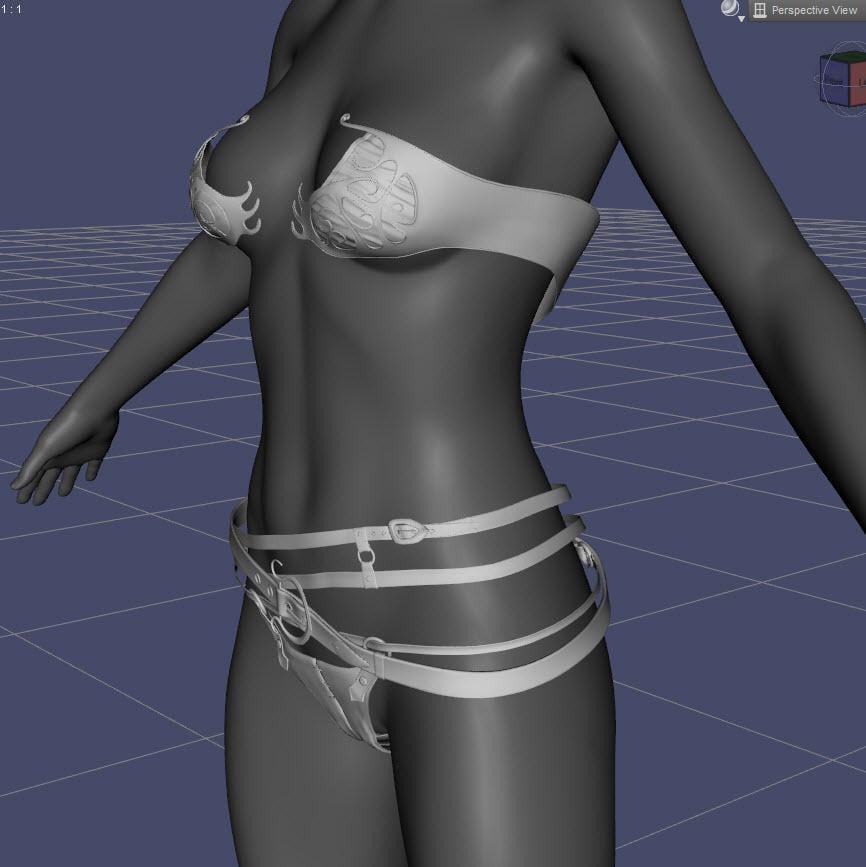
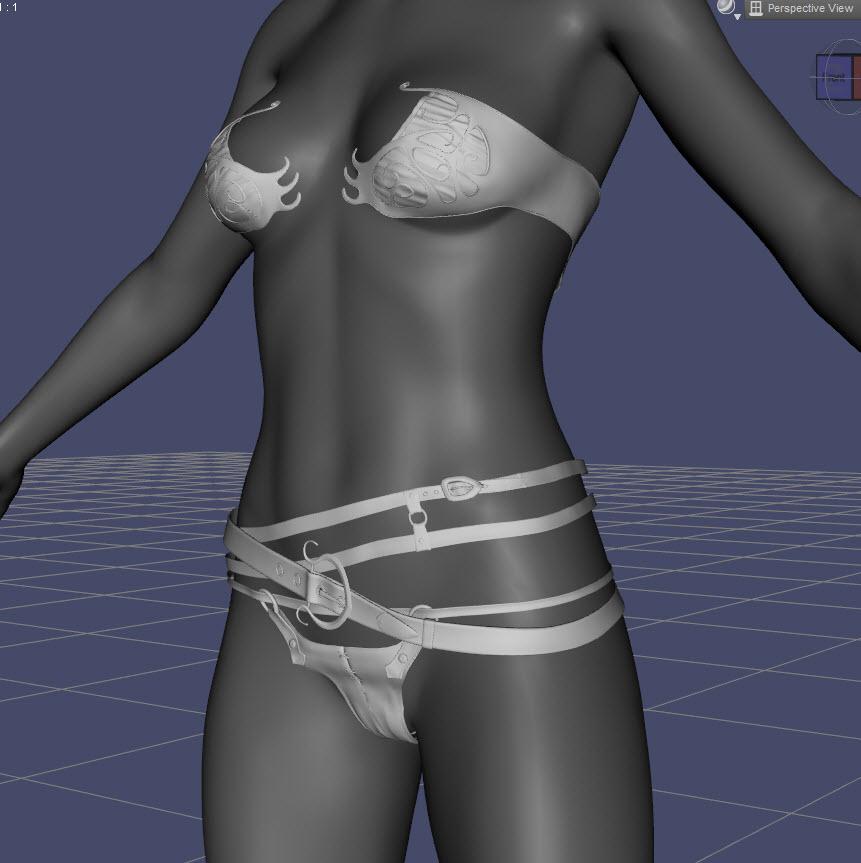
After playing around with the morphs plus the adjustments that come with Elf Age, I did achieve better-looking hip straps than before. There is some warping in the front of the panty, though, along with some space between the lower belly and the straps.
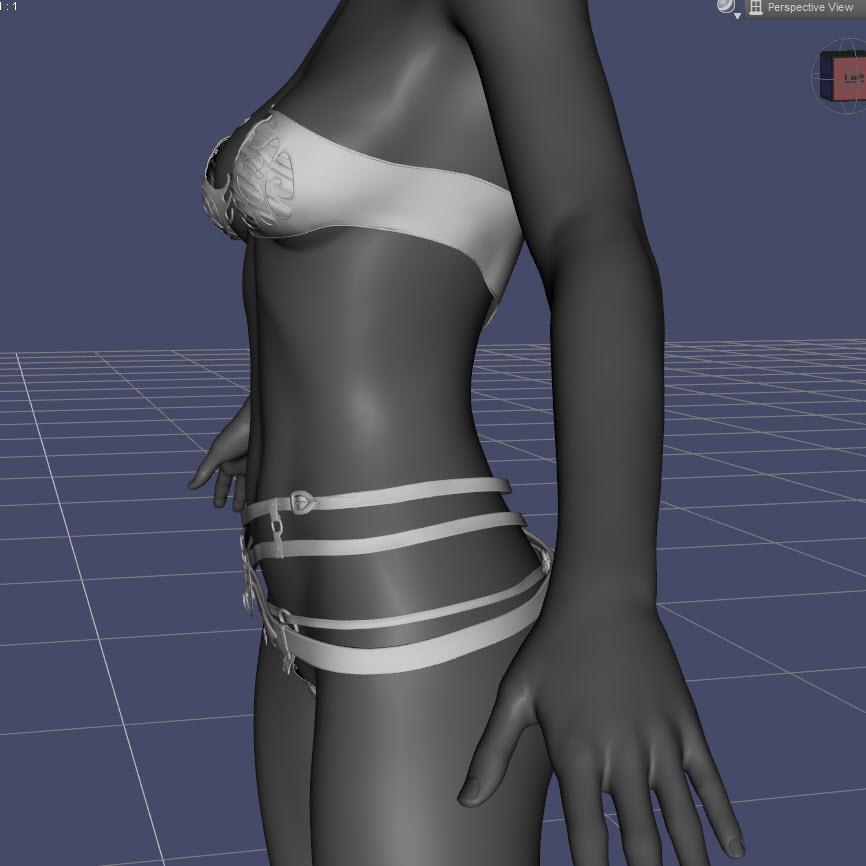
The side view shows the space between the cup and the breast.
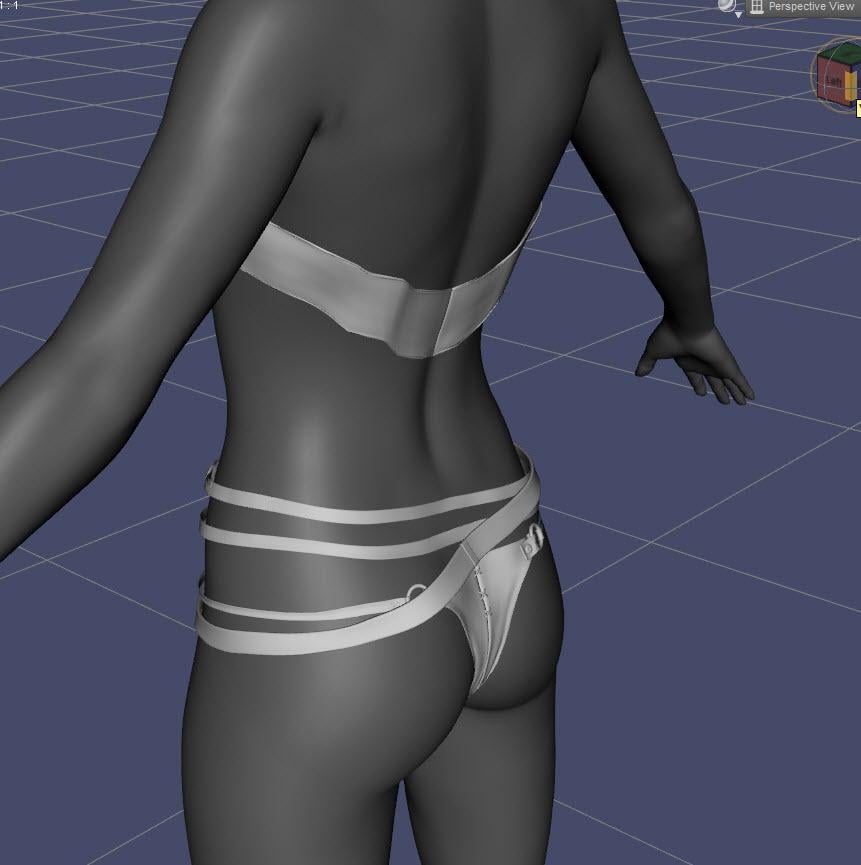
The back of the panty looks good - no wrinkle in the back. There is some warping in the back of the bra strap.
I'll play around with it some more - I have Fit Control along with SY's Clothing Fit Helper. Between all these morphs, I should be able to make a good fit. Thanks for pointing out the Tighten All - for the life of me, I didn't see that morph.
Glad I could help. The outfit looks really good.
[Released] RSSY Clothing Converter from Victoria 4 to Genesis 8 Female [Commercial]Force converting did work, thank you, though the fit was very loose. Here's the log.
Could you please show the render, to see this loose fit.
I have noticed, that if the cloth has many different morphs, one can improve fit a lot by applying such morphs.
Do not forget, that this converter is an automatic solution,
so it will not miraculously fix all fit problems.
@Dracorn, as @Artini says, the first thing you do is tighten up the conversion using the Tighten All morph. We made the conformers slightly big to make sure they covered everything but we expect you to use the morphs to get the perfect fit.
Here's what it looks like before using any of the morphs:
After playing around with the morphs plus the adjustments that come with Elf Age, I did achieve better-looking hip straps than before. There is some warping in the front of the panty, though, along with some space between the lower belly and the straps.
The side view shows the space between the cup and the breast.
The back of the panty looks good - no wrinkle in the back. There is some warping in the back of the bra strap.
I'll play around with it some more - I have Fit Control along with SY's Clothing Fit Helper. Between all these morphs, I should be able to make a good fit. Thanks for pointing out the Tighten All - for the life of me, I didn't see that morph.
Can someone help me find this outfit...For the second part, make sure the clothing is selected and then select the geometry editor in the tools menu. Then right click the clothing items selected and it will give you a bunch of options. best to load a test item to see what each optins does and to get the hang of using it. Keep in mind it is better to hide a part with opacity rather than deleting it as this will alter the rigging if deleted
Understood about hiding over deleating. I found the options after selecting the clothing item and selecting the geometry editor. I found the hide option, but when I actually went to select the area I wanted to 'hide', the tool creates a very pixelated edge. For example, I used the tank top as my test item and I wanted to create a cutout right in the center. In selecting the polygons in that area, it is a very rough and blocky edge. Is there a way to fix that up? You also mentioned that this could be made into a materials zone. How would I do that?
the line edges will depend on the modeling and how clean it was because it uses the polygons to define the area. To create a new material zone I have attached an image that shows where to go and what to do.
As for the last part, creating clothing, especially conforming clothing is not an easy job. You cannot create them in DS, you will need a modeling program such as hexagon, Blender, maya, etc.There are quite a few tutorials on it in the store.
So it is THAT difficult? I have seen something in terms of tutorials in the Daz store:
https://www.daz3d.com/submerged-inside-hexagon-and-daz-studio--part-3-modeling-the-dress
I do have Hexigon with Daz and I normally run Ubuntu Studio on my machine and Blender came with that.
Thanks
Geo
Any modeling app can make clothing, but the rigging will have to be done inside Daz Studio. You can get basic rigging done with the transfer tool, but for quality rigging you will have to adjust things by hand which is a bit more detailed
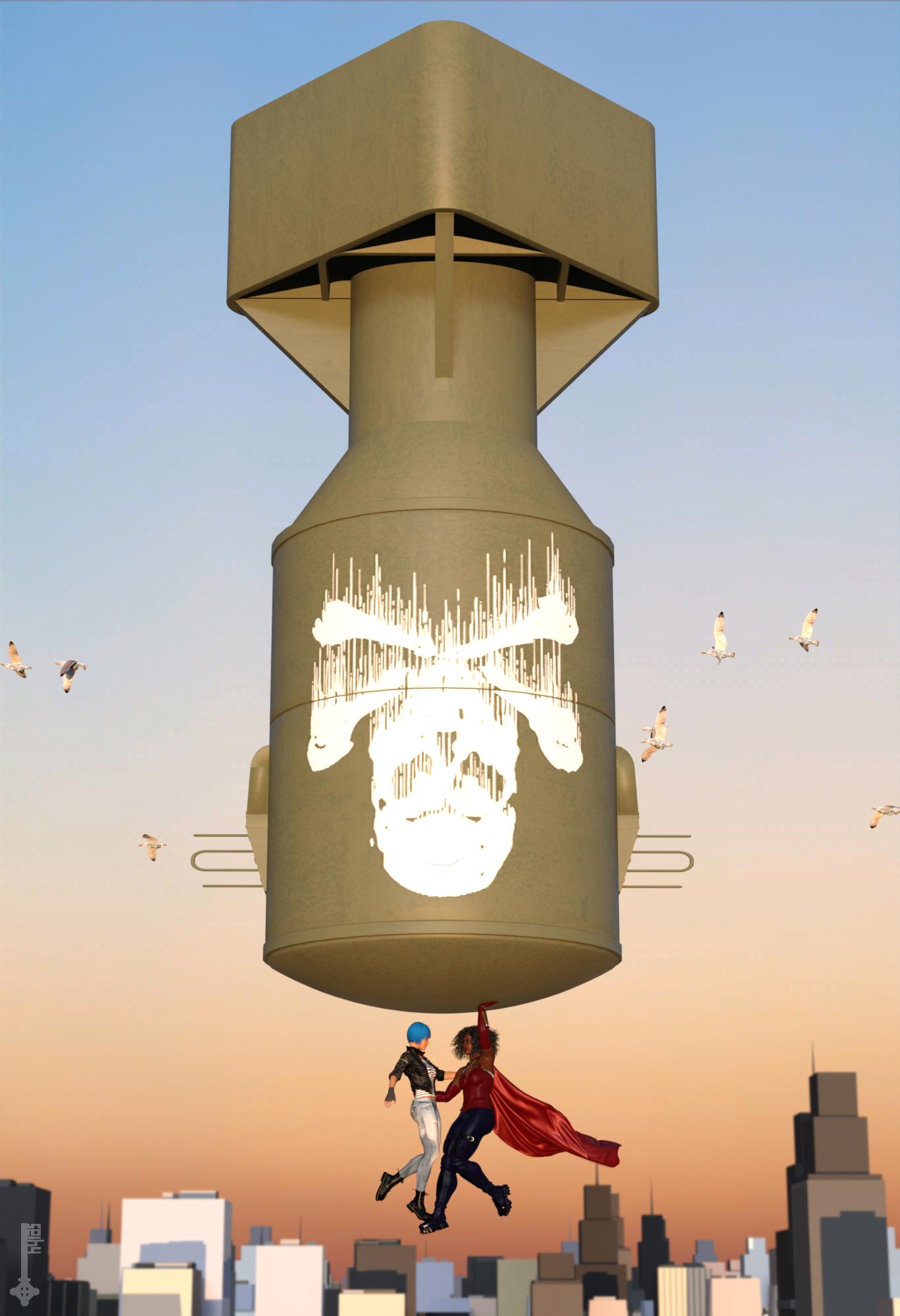
3D Art Freebie Challenge-February 2019-"Strange Love" -Main Thread OnlyTitle: Sorry Dr. Strangelove, the Apocalypse is cancelled...
... or: how I learned to stop worrying and love my Superhero girlfriend.DAZ Studio & Photoshop.
Not sure how I ended up with basically the exact same composition like my entry last month... I seem to be going through a phase.
Had to figure out dForce Wind Nodes to make the cape billow like that. Yay for learning new things!
Freebies:
1) Bomb by roachmiester: http://www.sharecg.com/v/80764/browse/5/3D-Model/Little-Boy
2) Face morph by RenderGuyNY: http://www.sharecg.com/v/90309/gallery/21/DAZ-Studio/Genesis-8-Female-Faces
3) Body morph by squarepeg3d: https://www.renderosity.com/mod/freestuff/fantasy-amazon-bundle-for-g8f---100-free/79046
4) Circlet by squarepeg3d: https://www.renderosity.com/mod/freestuff/fantasy-amazon-bundle-for-g8f---100-free/79046
5) Cape by Hilmarion: https://www.renderosity.com/mod/freestuff/dforce-oval-cape/80321
6) Pants by Wilmap: https://www.wilmapsdigitalcreations.co.uk/view_product.php?id=437
7) Lipstick (granted, not really visible) by April's Vanity: http://shop.aprilsvanity.com/flo-makeup-for-genesis-8-females.html
8) Leather Jacket by squarepeg3d: https://www.renderosity.com/mod/freestuff/the-major-for-g8f---100-free/79495
9) Fingerless Gloves by Wilmap: https://www.wilmapsdigitalcreations.co.uk/view_product.php?id=89
10) Jeans by scheusal242: https://www.renderosity.com/mod/freestuff/hipjeans-for-genesis-8-female/77555
11) Combat boots by Headkase & Varsel: http://www.sharecg.com/v/56443/browse/11/Poser/Bossy-Boots-2.0-for-GENESIS
12) Cityscape by alicansaygin: https://free3d.com/3d-model/city-environment-46245.html
Bi-weekly DAZ freebies:
13) Bustier: XDress
14) Sci-Fi Gloves & Boots: ArtemisX
15) Hair: Pure Hair: Bubblegum
16) TShirt: Foxy Stripe Shirt
Purchased:
- Sacrosanct Poses and Expressions
- 200+ Head and Face Morphs for Genesis 8 Female
- Fit Control for Genesis 8 Female
No Counts:
- Genesis 8 Female Head Morphs
- Genesis 8 Female Body Morphs
All Links Check Out Plz Move To Entries Thread
Morphs from G3 to G8Without being rude that project is almost 2 years old.
I mean the time is running fast.
Question:
What will happen when Genesis 9 will be released ? Will the development include it too ??? I mean the development may never end if a new generation is released every 2 years.
Until DAZ makes it easier to transfer morphs from one generation to another, this probably would be a continuous project (at least once it comes out. I’m just wondering if it can be open source so it can become easier to work on)
Bringing older generations up to modern standards - might be fun ;)I thought I'd document my progress in bringing some of my older, favorite figures up to modern standards (namely Iray skin that looks truly good). I'll share what I did to make my older figures look like they do in the images I post so that you can fix your skins too (it really IS pretty easy). I'm sure success will vary from figure to figure and I don't know yet what I'll run into as I've only so far done David 5.
A quick synopsis of what I did:
I made SSS maps out of David's color maps, and using a shader from a G8 character I really like (in David's case, Edward 8's skin shader), I placed the new SSS maps I made on David's surfaces where they are on Edward's shader and removed or moved maps that don't belong. I applied the shaders for the different surfaces one by one by saving a "shader" preset (not material!) for each surface of Edward 8 to a temp folder, then while holding down Control, applied the corresponding surface to David's surfaces, telling DS to ignore the maps so that I could keep David's original maps. I then used Edward as a reference and went down the stack, putting maps where David didn't have a matching one (like the SSS maps I made), and deleting them from places where they didn't belong and placing them where they did (mostly the specular maps). The results looked quite good IMVHO. Other things I did to make David look like he had more detail (this was pre-HD morphs) was to add detail to under the eyes with the eye crease morph, some dimples, and adding some definition to the brows (all part of Genesis' basic morphs). I also added some of Zevo's Vascularity, which also helped a great deal. For his eyes, I used Chevybabe's eye shaders (but still kept David's eye textures), which are the best I've seen so far, even though they take a long time to resolve noise when rendering. You can just use the shader from the G8 skin that you pick. I also have a G3 clone for Genesis that allows me to use G3M clothing and hair, which I did in the first image - I even used Redz Super Natural Brows on him.
How I made the SSS maps:
I use Photoshop, but I'm sure there is a corresponding way to do it in your image editor of choice.
I loaded all the color maps from David. I loaded the SSS face map of Edward so I could judge how light to make my SSS maps for David. Starting with the face (David's), I went into Hue/Saturation and gave it a saturation of -25 and lightness of +25. Whatever values you use, write them down or memorize them, because they need to be done exactly the same way for every other map. I saved them out, adding "SSS" to the name of the map and then placed them in the Translucency Color after applying Edward's shader. The specular that is in the Glossy Color will need to be moved to Dual Lobe Specular Reflectivity and the specular map that is in the Top Coat Color will need to be moved to Top Coat Weight.
I hope all that made sense! Phew! :) I'll post my progress with other figures as I do them and any problems I run into. Hopefully there won't be any :P.
 Morphs from G3 to G8
sadly, I’m wanting to transfer pretty much every morph from G1 to G3 into G8 so i can have a super genesis figure that i can create a ton of stuff from. i did with GenX2 and had no major problems.
and this includes the really complete creature morphs.
Morphs from G3 to G8Victoria 6, Michael 6, Darius 6, Gianni 6, Lee 6, Darius 7 and Gianni 7 as Genesis 8 figures would be a good beginning.
Since I have transferred the maps with Legacy UVs and Map Transfer, only these morphs are missing.
Morphs from G3 to G8Problem is, there is no definition that constitutes what is a "regular morph", and what is not. I doubt DAZ would be happy selling a product that could not be specific about what does, and does not work. Morphs can have any name, and the script would have no foreknowledge regarding whether or not the selected morph is extreme.
I guess you could say, "results on extreme morphs will vary", in the same way that not all clothes can be re-fit correctly with autofit, but I don't know if that will be acceptable.
How far modification/morph can be made to Genesis characters via GoZ in ZbrushIf GoZ is working for you thats fine. If something goes wrong with some brush that alters the geometry you will get notified by the time you reimport with GoZ to Daz Studio that you only can add a new object to the scene instead of a morph to your figure.
i didnt select to replace the morph but create new one.
This is new to me so they've added a dialog to replace some kind of morph I wonder what morph gets replaced. Well you can combine those 4-5 different morphs with exporting an OBJ and loading it with Morph Loader Pro. If you want to get serious with morph creation there is no way around using Morph Loader Pro.
I know a great thread from where I've learned most things about creating morphs with ZBrush and how to use Morph Loader Pro.
TUTORIAL - Creating a Genesis series Full Body Morph for DAZ Studio Pro 4.10 by RKane_1
3D Art Freebie Challenge-February 2019-"Strange Love" -Main Thread OnlyTitle: Sorry Dr. Strangelove, the Apocalypse is cancelled...
... or: how I learned to stop worrying and love my Superhero girlfriend.DAZ Studio & Photoshop.
Not sure how I ended up with basically the exact same composition like my entry last month... I seem to be going through a phase.
Had to figure out dForce Wind Nodes to make the cape billow like that. Yay for learning new things!
Freebies:
1) Bomb by roachmiester: http://www.sharecg.com/v/80764/browse/5/3D-Model/Little-Boy
2) Face morph by RenderGuyNY: http://www.sharecg.com/v/90309/gallery/21/DAZ-Studio/Genesis-8-Female-Faces
3) Body morph by squarepeg3d: https://www.renderosity.com/mod/freestuff/fantasy-amazon-bundle-for-g8f---100-free/79046
4) Circlet by squarepeg3d: https://www.renderosity.com/mod/freestuff/fantasy-amazon-bundle-for-g8f---100-free/79046
5) Cape by Hilmarion: https://www.renderosity.com/mod/freestuff/dforce-oval-cape/80321
6) Pants by Wilmap: https://www.wilmapsdigitalcreations.co.uk/view_product.php?id=437
7) Lipstick (granted, not really visible) by April's Vanity: http://shop.aprilsvanity.com/flo-makeup-for-genesis-8-females.html
8) Leather Jacket by squarepeg3d: https://www.renderosity.com/mod/freestuff/the-major-for-g8f---100-free/79495
9) Fingerless Gloves by Wilmap: https://www.wilmapsdigitalcreations.co.uk/view_product.php?id=89
10) Jeans by scheusal242: https://www.renderosity.com/mod/freestuff/hipjeans-for-genesis-8-female/77555
11) Combat boots by Headkase & Varsel: http://www.sharecg.com/v/56443/browse/11/Poser/Bossy-Boots-2.0-for-GENESIS
12) Cityscape by alicansaygin: https://free3d.com/3d-model/city-environment-46245.html
Bi-weekly DAZ freebies:
13) Bustier: XDress
14) Sci-Fi Gloves & Boots: ArtemisX
15) Hair: Pure Hair: Bubblegum
16) TShirt: Foxy Stripe Shirt
Purchased:
- Sacrosanct Poses and Expressions
- 200+ Head and Face Morphs for Genesis 8 Female
- Fit Control for Genesis 8 Female
No Counts:
- Genesis 8 Female Head Morphs
- Genesis 8 Female Body Morphs
Daz 3D is part of

Connect
DAZ Productions, Inc.
7533 S Center View Ct #4664
West Jordan, UT 84084Licensing Agreement | Terms of Service | Privacy Policy | EULA
© 2026 Daz Productions Inc. All Rights Reserved.