-
Gensis 8 Body Morph Bundle
Hi team, Mr What-is-This-DAZ-Sorcery here.
OK, just bought Genesis 8 Female Body Morph Resource Kit, downloaded and installed. Problem, I can't find it. I can see it in Finder (I'm on MAC) where DIM told me it was installed, but nowhere to be seen in DS. Path is as follows. Ready, Ahem!
Users/Shared/My DAZ 3D Library/Data/DAZ 3D/ Genisis 8/Female/Morphs/HSTW/BMK1 and then all the file names.
Now, I kind of suspected it won't show up as a stand alone folder, I can't even see a "Data" folder in DS. But I have searched the various tabs associated with Genesis 8 and morphing and posing and wotnot but cannot find any reference to the Morphing software I bought. I have refreshed and restarted DS to no avail.
I know I may appear to be somewhat of a nugget here, but that's because I am. Any help appreciated. Many thanks
Malc
Body Chains 2 for G3+8F - how good is autofit on males?could someone who just bought Body Chains 2 for Genesis 3 and 8 Female(s) - and maybe, while we're at it, the 3 similar products from Sshodan? - please try them on G3M and G8M and upload snapshots?
i really like those chain products, but i never use females. and while most outfits containing normal clothes usually fit ok with autofit + possibly some clone thingy addon, or when hair really doesn't autofit i can parent it and the results are usually ok, i can obviously not parent a chain outfit. and while some distorsions in a clothing item might still be acceptable, it would look awful with only chains... especially since very thin mesh elements like straps or chains often distort when used with other figures... also, most clone thingy addons still haven't been issued for crossgender figures.
for emergency case i have the free transgender morph to use GF as a guy, but since i have no other morphs (yet) for G3F/G8F, my "male" looks quite meh, and also i have no anatomical elements (yet) to stick on a female (and then comes the material creating, again, like for male figures sold without genmats...)
of course, if anyone created something just like that for males, they'd have a buyer... *winking & nudging like mad*
V4 clone to G8F clothing questionsOnce an item is AutoFitted it is like any other item fitted to the figure.
So if I continue the Sunarian example, it is a CR2 file, If I load it, fit it to G8f and then Save it as a DUF file, it "should" load from that point forward to G8F. allowing me to remove the CR2 file from my directories, and only use the new DUF file... Correct? and will always auto fit to G8F?
Yes.
A morph is the reshaping of a mesh by moving its vertices and is object specific. No you cannot redistribute.
Jestmart, this actually kind of confuses me, since there is a tutorial sold on the marketplace on just HOW to do exactly what you are saying cannot be done, and how to make money selling the end results on DAZ Store.
I.E. Character X for V8... Let's see, load V8, move some character MORPHS around, change her shape a bit here and there, save the end result off as a character file and Walla, sell it on DAZ for $15 dollars a pop, don't include textures, have those load the V8 defaults with the disclaimer: "MUST Have V8 to ____".
Or better yet, load G8F, move things around on her, change some actor settings slant her eyes, blah, blah blah... save it off and sell it as a completely NEW character for G8F.
Wait, isn't that morphing her and redistributing? (with or without a profit margin?) Okay, so now take that model into blender and really change the geometry around, bring it back in, add it to your character as a HD Morph for Character X and market it... Have we not just added a morph to a different morph that was in fact the G8F?
Let's be honest with what is happening there, V8 or any other character that says it is G8F compatible is, in fact simply a Morph (or set of morphs) applied to the G8F character. To take that even farther, the F and M aspects are simply morphs to the Genesis 8 character, (which is a rather strange looking thing, neither male nor female in gender definitions. Can be achieved by changing all her actor dials to 50% for male and female. (But I digress.)
Oh here's a concept, Change G8F to be 50% G8M and save off the actor and call it PAT, you know, after the movie character. Use a skin shader and Tada, a completely NEW character that should be able to be sold in the DAZ store. I mean there is a DAZ sanctioned tutorial for sale in the store that tells you exactly how to do just that.
Hmmm... if I take G8f, turn her V4.2 Morph up all the way, then do some changes actor changes to her Am I creating a NEW character for V4.2 or for G8F, Hmmm... maybe it's a new character for V4.2 for G8F...
This is becoming a ghoofy rant, but you see what I'm saying here... base line is if Genesis 8 is required for ANY of the characters purchased here, then they are in fact nothing more than morphs to said character, so how can it be said that morphing the character cannot be redistributed? (BTW, I never said I wanted to SELL them, heck I'd even be willing to give them back to the original artist so that they could redistribute them, I'm more concerned with some of this older content getting UPDATED to the newer models and/or capabilities of DAZ Studio.
Attached Image is the G8F dev load on the right, to her right is G8F as G8M, behind him is G8F as G3M, behind him is G8F as G2M, and behind him is G8F as Genesis. the gang is all there, just turn the dials, or push the buttons.
Characters can either use custom morphs, made by directly editing the shape (using a modelling or sculpting application) or they can be settings for the Daz or other morph sets (where the morphs are applied and the preset justs toers the amount of the morph applied, it doesn't store the shape itself). Unless they are merchant resources used in accordance with the license terms it isn't permissible to duistribute a morph baked from another morph or morphs.
Sorry another hardware question concerning studioRunning 3 sticks will default you down to single channel (64bit mode) effectively cutting your memory transfer speed in half. Just make sure that the two remaining sticks are placed in the correct slots for dual channel mode.
Does it really matter with Studio if the memory transfer speed is cut in half? I assumed the bottleneck in the process of loading a scene into RAM is the hard drive, not the RAM.
That's an interesting question - how much memory speed affects the loading of a scene. I do know that I tried putting my content on an SSD earlier in the year and it made no noticable difference to the running of az Studio, so I put everything back onto the HDD. That would suggest that the bottleneck is memory or CPU speed, but I imagine it would be difficult to keep control of all variables to test this.
Hi :D
I've experienced a HUGE difference when I put my Daz Products on my NVME SSD, compared to my 3.5" HDD ^^
Does your SSD have RAM and a good controller?Transfer Utility functions?This is to be expected with the way the Transfer Utility works.
To fix this you would need to correct the Weight Maps manual with the Node Weight Map Brush tool.
Select the pelvis node of the figure in the Scene pane and paint with the brush to add weight to the pelvis. By doing this you substract the weight from the thighs so the bikini bottom dosn't follow the legs movement anymore. Also using the smoothing brush can help fixing things - use it with care somethimes it can make things worse.
I made a few youtube videos showing how to use the Node Weight Map Brush tool. In the posted video tutorial below I'm working with Genesis 2 that got a different weight map system called TriAx where you can directly manipulate the Bulge Maps.
If you are working with the newer generations Genesis 3 and 8 the weight map system had changed to general weight map. There the Bulge Maps got replaced by [JCM] Joint Controlled Morphs. The JCMs that the genesis figures are using will get autgenerated onto the clothing once you pose them with the clothing fitted to. The Weight Maps and the JCM work together to get the bending right. You just need to tweak the JCMs sometimes because the autgenerated ones not always show the best result.
I would say all genesis figure generations and clothing show some distortions in that area if you pose the thighs bejond 45° angle rotation in any direction. You can get third party JCM products for your genesis figures that try to address this not just for better bending thighs.
For example I'm takling about something like this: Bend Control Bundle for Genesis 8 Female(s) and Male(s) - Daz 3D
Here are my youtube videos I hope they can help you some. Ignore the customized interface the tools work the same in any layout you choose.
- DazStudio G2F BasicWear 01 WeightMaps TriAx - Youtube
- DazStudio G2F BasicWear 02 BeautyBend - Youtube
If you like to customize your interface like I did have a look at my thread here: How to Customize Daz Studio - to speed up Workflow!?
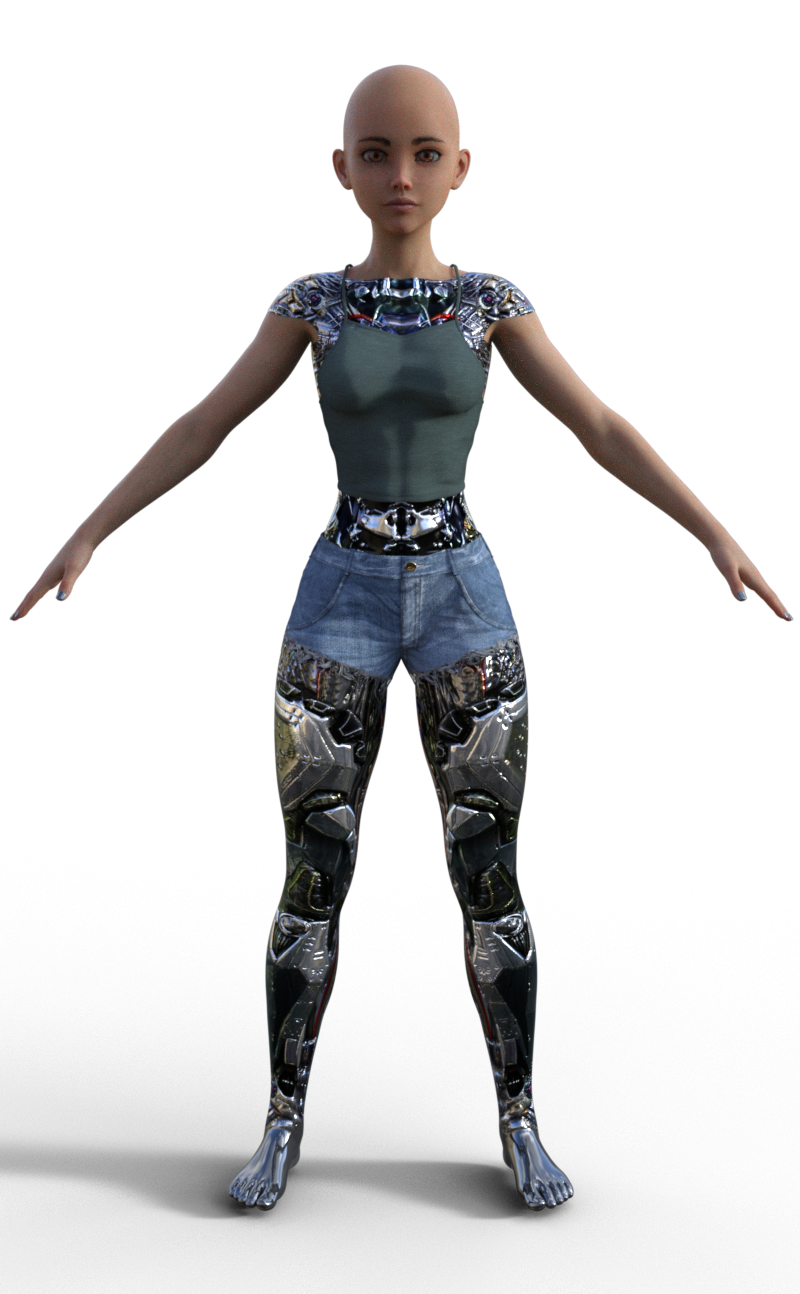
Syph and BodysuitThere is a 'Sylph Mech Skin' that fits OVER the G8 character, so any clothing needs to be adjusted to fit. The Mech Skin itself seems to be a geograft, with similar material zones to G8.
Here's a quick render with the arm surface opacity set to zero, so you can see the 'human' skin underneath.
EDIT: When I tried to transfer the textures from the Mech Skin to G8F's arms, her arms mostly disappeared. Even so, I think having the Mech as a geograft offers more opportunity to modify your character than just texturing the G8 skin would.
 Sorry another hardware question concerning studio
Running 3 sticks will default you down to single channel (64bit mode) effectively cutting your memory transfer speed in half. Just make sure that the two remaining sticks are placed in the correct slots for dual channel mode.
Does it really matter with Studio if the memory transfer speed is cut in half? I assumed the bottleneck in the process of loading a scene into RAM is the hard drive, not the RAM.
That's an interesting question - how much memory speed affects the loading of a scene. I do know that I tried putting my content on an SSD earlier in the year and it made no noticable difference to the running of Daz Studio, so I put everything back onto the HDD. That would suggest that the bottleneck is memory or CPU speed, but I imagine it would be difficult to keep control of all variables to test this.
Import custom 3D model and use Genesis morphShure it is possible - I would do the following. In Blender reduce the polygons of Genesis as you like. Blender got this Decimate Modifier set it to Un-Subdivide with an even number works best. Then export the OBJ from Blender. Import the OBJ into Daz Studio. Finaly run the Transfer Utility with the right settings. There are a few settings leave most of them at default but the most important is Replace Source with Target to get what you want.
You need to run the Transfer Utility process again for new purchased morphs first marking them as favourits. This time in the Transfer Utility you only need to select Morphs: Favourits and Subcomponents to get the new morphs to your low-poly version.
So G3M got deformed...Do you have ANY other character or morph installed to your G3M?
I would start by checking the hidden items.
V4 clone to G8F clothing questionsA morph is the reshaping of a mesh by moving its vertices and is object specific. No you cannot redistribute.
Jestmart, this actually kind of confuses me, since there is a tutorial sold on the marketplace on just HOW to do exactly what you are saying cannot be done, and how to make money selling the end results on DAZ Store.
I.E. Character X for V8... Let's see, load V8, move some character MORPHS around, change her shape a bit here and there, save the end result off as a character file and Walla, sell it on DAZ for $15 dollars a pop, don't include textures, have those load the V8 defaults with the disclaimer: "MUST Have V8 to ____".
Or better yet, load G8F, move things around on her, change some actor settings slant her eyes, blah, blah blah... save it off and sell it as a completely NEW character for G8F.
Wait, isn't that morphing her and redistributing? (with or without a profit margin?) Okay, so now take that model into blender and really change the geometry around, bring it back in, add it to your character as a HD Morph for Character X and market it... Have we not just added a morph to a different morph that was in fact the G8F?
Let's be honest with what is happening there, V8 or any other character that says it is G8F compatible is, in fact simply a Morph (or set of morphs) applied to the G8F character. To take that even farther, the F and M aspects are simply morphs to the Genesis 8 character, (which is a rather strange looking thing, neither male nor female in gender definitions. Can be achieved by changing all her actor dials to 50% for male and female. (But I digress.)
Oh here's a concept, Change G8F to be 50% G8M and save off the actor and call it PAT, you know, after the movie character. Use a skin shader and Tada, a completely NEW character that should be able to be sold in the DAZ store. I mean there is a DAZ sanctioned tutorial for sale in the store that tells you exactly how to do just that.
Hmmm... if I take G8f, turn her V4.2 Morph up all the way, then do some changes actor changes to her Am I creating a NEW character for V4.2 or for G8F, Hmmm... maybe it's a new character for V4.2 for G8F...
This is becoming a ghoofy rant, but you see what I'm saying here... base line is if Genesis 8 is required for ANY of the characters purchased here, then they are in fact nothing more than morphs to said character, so how can it be said that morphing the character cannot be redistributed? (BTW, I never said I wanted to SELL them, heck I'd even be willing to give them back to the original artist so that they could redistribute them, I'm more concerned with some of this older content getting UPDATED to the newer models and/or capabilities of DAZ Studio.
Attached Image is the G8F dev load on the right, to her right is G8F as G8M, behind him is G8F as G3M, behind him is G8F as G2M, and behind him is G8F as Genesis. the gang is all there, just turn the dials, or push the buttons.
Transfer Utility functions?So I made some bikini bottoms for G8 , Parented them to her and used the Transfer utility to fit them and saved as a prop. Everything went as planned , BUT,
When i apply the clothing item and pose G8 with any leg spread the cloth follows the inner thighs , Not as intended.
How does one fix this? I have noticed that some clothes react this way and some do not. There has to be a trick , or a step I am missing?
How does on get panties or such Not to follow the legs with and spread?
simple blender to Carrara animation exportA follow-up to my own post - just in case anyone else ever wanted to do the same thing.
There doesn't seem to be a way to import a Blender camera track to Cararra. I have tried several file formats and ideas. Cameras and lights just don't seem to transfer through file formats. Animation data is also tricky to transfers between software. I thought linking an object to a camera in Blender might work since the object will transfer. That idea also fell flat. The object will come across, but no matter what I do, the animation data is either not good or not there at all.
I'll keep looking for workarounds, but for now it looks like I am tied to blender for anything that involves a camera motion track.
Sorry another hardware question concerning studioRunning 3 sticks will default you down to single channel (64bit mode) effectively cutting your memory transfer speed in half. Just make sure that the two remaining sticks are placed in the correct slots for dual channel mode.
Does it really matter with Studio if the memory transfer speed is cut in half? I assumed the bottleneck in the process of loading a scene into RAM is the hard drive, not the RAM.
Sorry another hardware question concerning studioI'm assuming that the computer in question is the one in your signature?
If your 32GB is 4x8GB, you might want to remove a second stick bringing your machine down to 16GB for now.
Doing this will allow your computer to continue running dual channel mode for the RAM (128bit mode)
Running 3 sticks will default you down to single channel (64bit mode) effectively cutting your memory transfer speed in half. Just make sure that the two remaining sticks are placed in the correct slots for dual channel mode.I Forgot What My Complaint Was - Complaint ThreadWheee..., breaking my pattern. No Tuesday uptown lunch tomorrow
 . Instead, I'm ordering out and picking up liver & onions tonight. Mmmmmm, yum! No, need to make a micro-adventure uptown tomorrow for normal Tuesday chores because there are no prescriptions ready, I don't have enough trash to take to the transfer station, I have all the groceries I need for the rest of the week, and not yet enough laundry to warrant a trip. So, instead it's liver & onions for the next four days from the place that seems to think restaurant meals should be big enough to cover large pizza sized plates. Yay! I think.
  My cholesterol needs pumping up. I haven't had liver & onions for at least 4 months.Corrupted G3M and G3F .duf files Need to access new .dufs
have you tried reinstalling the Genesis 3 Starter Essentials? If that fails it is likely that you saved a morph asset with a non-zero default value, which cand be fixed either by editing the .dsf file for the morph or by editing on the figure (you can get at the default value by clicking the gear icon on the slider and selecting Parameter Settings0 and resaving it as an asset.
Morphs from G3 to G8Hi everyone, so I really don't want to read through all of the many many posts for a way to answer my question, so I'm hoping one of you will give me a brief summation of, or point me in the right way to transfer morphs from g2 to g8? Or even g3 if that's easier to transfer to (I seem to be hearing there are problems with g8 because of the base pose he's in?). If you can link me to an explanation on how to do this, or just give me the run down, I'd very much appreciate it. I've tried sickleyield's tutorial and there are various road blocks I keep running in to mostly because it seems like she has different utilities in her Daz than I do? Such as supports assets. When I get to this step "File--Support Assets--Morph Asset." I cannot find that in my version of Daz 4.10. Any help will be mucho appreciated.
Right then.
To get things out of the way, the work on script went exactly as expected. There was no reason I could think of that it wouldn't work, and yet there was a reason that mess me up. Except I solved it. It's going to be a minor and tedious pain impleneting this fix, but so far, so good. I'm sorry to everyone whose been waiting. In my defense, I did have to nearly reinvent the whole method of morph transfer. (If anyone really wants to know, the problem was that when dealing with separted head morphs, and trying to bake in the source figure shape, the head tended to rise because Genesis is shorter than Genesis 2 is shorter than Genesis 3. There is a slight difference with Genesis 8, but it makes no difference. While you could hide this with the full character dialed in, that defeats the purpose of separate head and body morphs.) Still not promising any time frame. Only refering to my original promise, if I can't sell it, it'll be free. That still stands, but It's looking like it'll soon meet my standards for sale.
Now, to the quoted question: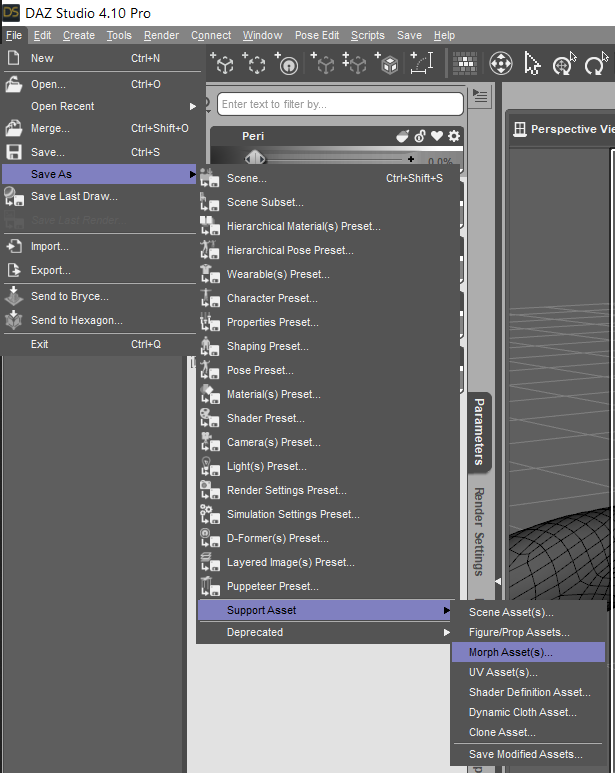
There you go.Saved Genesis 8 with my morph, she loads with it every time.I forgot to zero out my morph before saving it as an morph asset and now Genesis 8 loads with the body morph every time. I remember reversing it once before by using word pad and zero ing out some part in the dsf file for her but I can't remember where to do it. Where do I zero out my morph in word pad.
V4 clone to G8F clothing questionsA morph is the reshaping of a mesh by moving its vertices and is object specific. No you cannot redistribute.
Apex Hunter for G8M [commercial]Apex Hunter for G8M
https://www.daz3d.com/apex-hunter-for-genesis-8-male
The top of the food chain just got much higher, as the Apex Hunter has just arrived. This predator has only one goal, and that is to prove that it is the best, and all others are just trophies for its wall.
The set comes complete with custom crafted High Definition Morphs, and Highly detailed Textures for the utmost realism.
Product Includes
-
- One Apex Character Preset
- One Mandible Geograft Figure
- One Apex Full Body HD Morph
- One Apex Full Body Material Preset including anatomical elements
- Three Face Material Presets
- Five Eye Material Presets
- Includes both Iray and 3Delight Material Presets


Daz 3D is part of

Connect
DAZ Productions, Inc.
7533 S Center View Ct #4664
West Jordan, UT 84084Licensing Agreement | Terms of Service | Privacy Policy | EULA
© 2026 Daz Productions Inc. All Rights Reserved.