-
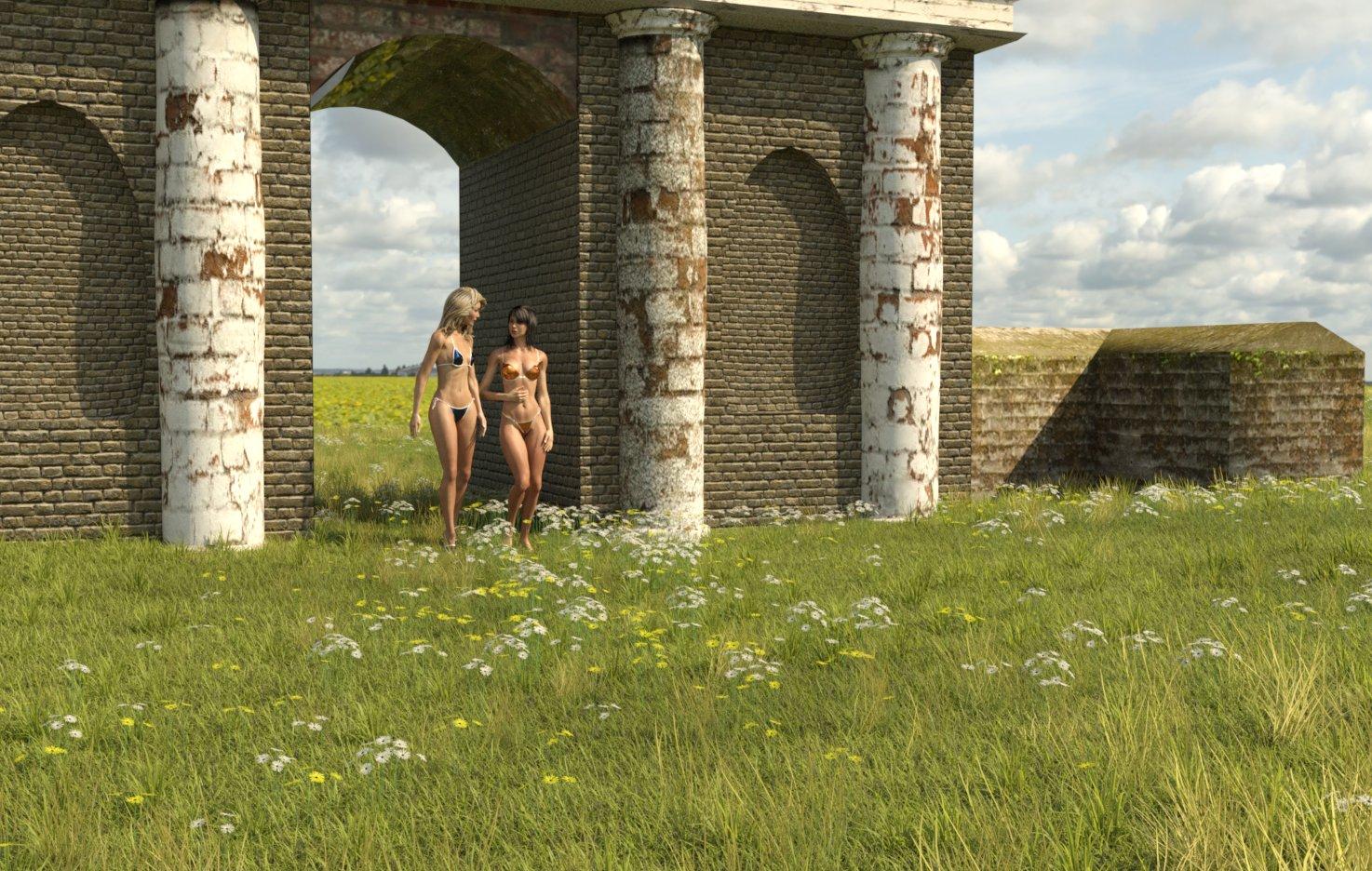
Old Stone Arched Building
I hope you don't mind if I make some comments. They are intended to help future projects be even better, not to criticise or make this one seem terrible, because it's great. I do like it, and know that my current equivalent project is a bit stalled through a lack of gumption.
Right, the brick size is a bit huge. In reality bricks including mortar tend to be 9" x 4.5" x 3" (225 x 110 x 75mm). The main bricks are HUGE in comparison, looking at 8"/200mm high. The 'Stones' in the pillars don't look like bricks, so can be believable the size they are. It may be worth scaling the texture so it can be closer to reality. The thing I tried was to tile the texture. Oh dear. That didn't work. It may be worth trying to use a seamless texture for bricks so that it can be tiled by the user.
Next comment. In your original texture, the mortar aligns around a corner. This is great. If the user, however, uses a different shader, then due to an offset in the texture mapping, the shader bricks don't match up around the corner.
OK, that's enough comments, now to show it in use. I used UltraScenery instead of the ground, and used some Victoria 3 based characters to remind myself how good they can be in iRay. Then used the 'Sunflowers' HDRI from PolyHaven as the background.
Regards,
Richard.
Workflow Question - New Pose Shape KeysDaz to Blender workflow for me is currently just like it is set up in Diffeo - Import Character from Daz, Corrections, Materials, Import Morphs, Finishing, and Rigging.
I was wondering if anyone has tried keeping a base G8 in Blender with all shape keys and morphs applied, then morphing that G8 base with each new imported character using a 'join as shapes' shape key. For example, let's say I set up a G8 base with all my favorite morphs, shape keys, custom shape keys, and corrective pose shape keys (new with Blender 3.1, see link below). I don't want to have to do that with every character, right? So can I import a custom character, let's say Victoria 8, and morph my finished G8 base to the Victoria 8 shape? Diffeo allows us to morph the armature and retarget the outfit. The lashes, brows, and hair would need re-parented. We could merge geografts last so we have a G8 base that we can constantly import new shape keys as they come out on the Daz store if we want, and also create our own.
Has anyone tried this or see any reason why it might not work?
https://studio.blender.org/training/blender-studio-rigging-tools/pose-shape-keys/
https://diffeomorphic.blogspot.com/2021/09/morphing-armatures.html
https://diffeomorphic.blogspot.com/2021/07/changing-outfits.html
Can someone identify the character model for G3FI think your on the right track with it being a Raiya character, because they and OutofTouch make products together
For generation 7 have a look at this https://www.daz3d.com/topmodel-hd-morphs-for-victoria-7
Can someone identify the character model for G3FMaybe Charlene
Website Testing and Updates - NavigationUHF said:
Clicks to find things has increased.. so thats bad. Try navigating a bundle. Go ahead, just do it. I dare you.
https://www.daz3d.com/victoria-8-1-university-bundle
You can't open a bundle and right click open each item you might be interested in a new window. Nope.
Click, scroll down.. open in new window, scroll up... select new one, scroll down.. right click open in new window.... Wow.
Don't miss the little white line hiding there under the huge pictures. You will most certainly miss something. Yeah.. The Victoria 8.1 University bundle clearly only containts 2 items. Just 2, Victoria 8.1, and FG Bluson Library. I guess it might be worth it at 90% off. (I can hear the forum comments now.. "Oh I missed that." )
This design is a step backwards. More clicks. Easy to miss things.. painfully up and down 'cause big pretty pictures'...
I'm not sure the big pictures really help. They sorta do (I have bad eyes) but I think people will still be clicking through the enlarged pictures, and thats not any different.
I think you missed some things! The bundle has a lot more than 2 items in it. Probably, you already own most of them, and that's why they didn't show up for you.
Dana
Website Testing and Updates - NavigationClicks to find things has increased.. so thats bad. Try navigating a bundle. Go ahead, just do it. I dare you.
https://www.daz3d.com/victoria-8-1-university-bundle
You can't open a bundle and right click open each item you might be interested in a new window. Nope.
Click, scroll down.. open in new window, scroll up... select new one, scroll down.. right click open in new window.... Wow.
Don't miss the little white line hiding there under the huge pictures. You will most certainly miss something. Yeah.. The Victoria 8.1 University bundle clearly only containts 2 items. Just 2, Victoria 8.1, and FG Bluson Library. I guess it might be worth it at 90% off. (I can hear the forum comments now.. "Oh I missed that." )
This design is a step backwards. More clicks. Easy to miss things.. painfully up and down 'cause big pretty pictures'...
I'm not sure the big pictures really help. They sorta do (I have bad eyes) but I think people will still be clicking through the enlarged pictures, and thats not any different.
Ethin's Art and ... stuff.Ethin said:
DollyGirl said:
When you say nodes you are talking about the beginning and ending points on a bone, correct?
Bones, joints, whatever (DS likes to be fancy and calls them nodes). I posed Aiko then adjusted the X scale of the strap's forearm and shoulder 'cause the bend for the hand didn't line up with the hand.
Nodes are things that appear in the scene. Bones are one type of node, belonging to a figure node.
DollyGirl said:
Also how did you get such lovely bends on your girls was that through character sets created for A3? I am just wondering because you have really done a great job on an old figure. I would like to do the same for Victoria 2.
If your talking about the pose, I have two tricks I use (that is if I remember to use them).
First, I like to adjust some bone simultaneously in pairs, thigh-buttocks, abdomen-chest, neck-head, this can give better results.
The second one is DS specific. I add Smoothing Modifier to Aiko, it's mainly ment to fix poke-throughs with clothes, but if its not set to collided with something it just smooths the mesh it's applied to.If your talking about the the character morphs then the Smoothing Modifier affects them somewhat but other than that I don't know what to say, unless it's just 17 years of using Aiko.
Ethin's Art and ... stuff.DollyGirl said:
When you say nodes you are talking about the beginning and ending points on a bone, correct?
Bones, joints, whatever (DS likes to be fancy and calls them nodes). I posed Aiko then adjusted the X scale of the strap's forearm and shoulder 'cause the bend for the hand didn't line up with the hand.
DollyGirl said:
Also how did you get such lovely bends on your girls was that through character sets created for A3? I am just wondering because you have really done a great job on an old figure. I would like to do the same for Victoria 2.
If your talking about the pose, I have two tricks I use (that is if I remember to use them).
First, I like to adjust some bone simultaneously in pairs, thigh-buttocks, abdomen-chest, neck-head, this can give better results.
The second one is DS specific. I add Smoothing Modifier to Aiko, it's mainly ment to fix poke-throughs with clothes, but if its not set to collided with something it just smooths the mesh it's applied to.If your talking about the the character morphs then the Smoothing Modifier affects them somewhat but other than that I don't know what to say, unless it's just 17 years of using Aiko.
OH NO! What's Happened to Victoria 8 ?Fauvist said:
nemesis10 said:
I would suggest removing the Genesis 8 essentials and Victoria 8, and reinstall them. Most likely, it is the Genesis 8 female that had a non zero value installed (probably an expression... that doesn't look like a morph to me).
It didn't work. I uninstalled Genesis 8 Female Essentials; Victoria 8; Genesis 8 Female Body Morphs; Genesis 8 Female Head Morphs; Genesis 8 Female Expressions -----and then reinstalled them. It had no effect on the ugly morph/expression that is plaguing my Genesis 8 Female Characters.
If it's a non-zero default then you need to fix or remove the morph with the non-zero default, uninstalling/reinstalling other content will have no effect.
Ethin's Art and ... stuff.When you say nodes you are talking about the beginning and ending points on a bone, correct? Also how did you get such lovely bends on your girls was that through character sets created for A3? I am just wondering because you have really done a great job on an old figure. I would like to do the same for Victoria 2.
OH NO! What's Happened to Victoria 8 ?nemesis10 said:
I would suggest removing the Genesis 8 essentials and Victoria 8, and reinstall them. Most likely, it is the Genesis 8 female that had a non zero value installed (probably an expression... that doesn't look like a morph to me).
It didn't work. I uninstalled Genesis 8 Female Essentials; Victoria 8; Genesis 8 Female Body Morphs; Genesis 8 Female Head Morphs; Genesis 8 Female Expressions -----and then reinstalled them. It had no effect on the ugly morph/expression that is plaguing my Genesis 8 Female Characters.
Will this make it to 2022 Sales Thread:Report Issues Here "There's Always Another Sale™"V5 starter bundle works as intended for me but I get the same issue with the Genesis Michael Victoria Combo Bundle: I own all components but price is $2.22 in cart for some reason.
Will this make it to 2022 Sales Thread:Report Issues Here "There's Always Another Sale™"I have found 4 Bundles that I own everything and they are still charging. The Victoria 5 Starter and Pro Bundles and the Michael 5 Starter and Pro Bundles. Screen shots attached. Thanks
OH NO! What's Happened to Victoria 8 ?I would suggest removing the Genesis 8 essentials and Victoria 8, and reinstall them. Most likely, it is the Genesis 8 female that had a non zero value installed (probably an expression... that doesn't look like a morph to me).
OH NO! What's Happened to Victoria 8 ?mding said:
Fauvist said:
watchdog79 said:
Switch from textures view to Iray.
She looks like the witch from the Wizard of Oz.
Why, it is a useful expression!
to get rid of it select the character in the scene port, then in the parameters port click on "currently used" and everything which has to do with expression you can reset by leftclick + alt on the percentage number...
There is NOTHING currently used except Victoria 8 - no expression, no anything.
OH NO! What's Happened to Victoria 8 ?I loaded nothing into the scene except the figure Genesis 8 Female, and the figure Victoria 8. They look hideous. I tried loading other Genesis 8 Female characters and they're ALL UGLY. What happened to them? I opened a new scene and loaded them again, and they're still grotesque. I tried loading other Genesis 8 Females and they're ALL sickening looking. What do I have to do to fix this? I'm HORRIFIED! I tried Teen Josie 8. Same thing. It doesn't matter if I load the ACTOR of the character, or load Genesis 8 Female and then apply the character - they're all freakin' awful.
Anyone know why Victoria 8.1 has no normal or bump map for the lips? -solvedVictoria 8.1 *DOES* have normal maps, both according to her file list in the readme (down at the bottom of the list), and accordng to what I'm seeing in her runtime/textures/Daz/Characters/Genesis8/Victoria8_1 directory (I have Victoria 8.1). They apply by default when you put the Character into a scene, so I'm not sure why you're not seeing them.
Victoria 8.1 HD has HD normal maps. Basically, much more enthusiastic and visible normals.
She does NOT have bump maps, because she's set up to work only with Iray, and Iray doesn't do as well with bump maps. She has no 3Delight settings, which would make better use of the bump maps.
Anyone know why Victoria 8.1 has no normal or bump map for the lips? -solved(edit) because it was not the hd version. hd version has normal map on the lips.
Anyone know why Victoria 8.1 has no normal or bump map for the lips?
Sshodan's chitonsIf you check out this thread:
There is a discussion about how to convert V4/M4 dynamic clothing into conforming outfits for G8F/G8M that can be simulated with dForce.
Bekka HD for Genesis 8.1 Female Not RenderingHi Abraham. What version of Daz Studio are you using? Genesis 8.1 was introduced along with an updated PBR shader for the skin that requires Daz Studio 4.15 or higher. You can read about it on this page here. My guess would be that Bekka uses the new shaders and you might need to update to a newer version of Daz Studio to use it. I first tried using Victoria 8.1 in an older version and she rendered white just like your attached image. After updating, that problem went away.
Daz 3D is part of

Connect
DAZ Productions, Inc.
7533 S Center View Ct #4664
West Jordan, UT 84084Licensing Agreement | Terms of Service | Privacy Policy | EULA
© 2026 Daz Productions Inc. All Rights Reserved.