-
March 2024 - DAZ 3D New User Challenge - Posing and Puppeteer/PowerPose
Beginner Challenge - March 2023 Posing Basics
Posing Basics:
This challenge is a general render challenge with the focus being on how you pose the characters in your image. We're providing you with lots of great links on Posing from a variety of sources. To get started, find a photograph or drawing using this link or for dance poses this link to use as a reference. (Be sure the image you use is labeled for commercial reuse - though we will only be using it as reference, alternatively use your own personal photographs for reference.) Additional searches approved for use include Running and Fighting. (These links go to DuckDuckGo, which may give different results for different searchers, and should give everyone plenty to choose from.)Then try to pose your character as closely as possible to match the reference image. For this challenge, please post your reference image or a link to it, and your render. This will give forum viewers an idea of the pose you are trying to achieve and will lead to more helpful suggestions. Have fun!
How to Use Your Software:
Software is often updated, and online tutorials and information often demonstrate older versions of the software. The software version you are using may differ in User Interface and tools available. Please share links to reference material that you have found helpful in the Challenge thread.
in Daz Studio:
Introduction to Posing Tools in Daz Studio with Jay Versluis
Daz Documentation Center [Wiki]
Daz 101: Posing
Pinning, Posing and the Active Pose Tool
Applying Partial Poses
Daz 3D Posing, Pinning Poses, & Morphs
Some good tips in this forum thread.in Poser:
Poser Tutorial: Quick Posingin Carrara:
Huge list of helpful forum links (scroll to Animation and Posing section) If you have a problem, your answer might be here!
Carrara 3D Tutorial - Posing a Figure
Posing in Carrarain Bryce:
While it is not possible to pose things in Bryce, you are welcome to do your posing in another program such as Daz Studio or Poser, then export and render in Bryce.
For information on how to use the Bryce bridge to import a DS scene into BryceAlways worth a look: Previous Posing challenges:
Posing 2023
Posing 2022
Posing 2021
Posing 2020
Posing 2019
Posing 2018
Posing 2017I will be checking in, as will the rest of the Community Volunteers, to try and help with anything you all may need.
March 2024 - DAZ 3D New User Challenge - Posing and Puppeteer/PowerPoseBeginner Challenge - March 2023 Posing Basics
Posing Basics:
This challenge is a general render challenge with the focus being on how you pose the characters in your image. We're providing you with lots of great links on Posing from a variety of sources. To get started, find a photograph or drawing using this link or for dance poses this link to use as a reference. (Be sure the image you use is labeled for commercial reuse - though we will only be using it as reference, alternatively use your own personal photographs for reference.) Additional searches approved for use include Running and Fighting. (These links go to DuckDuckGo, which may give different results for different searchers, and should give everyone plenty to choose from.)Then try to pose your character as closely as possible to match the reference image. For this challenge, please post your reference image or a link to it, and your render. This will give forum viewers an idea of the pose you are trying to achieve and will lead to more helpful suggestions. Have fun!
How to Use Your Software:
Software is often updated, and online tutorials and information often demonstrate older versions of the software. The software version you are using may differ in User Interface and tools available. Please share links to reference material that you have found helpful in the Challenge thread.
in Daz Studio:
Introduction to Posing Tools in Daz Studio with Jay Versluis
Daz Documentation Center [Wiki]
Daz 101: Posing
Pinning, Posing and the Active Pose Tool
Applying Partial Poses
Daz 3D Posing, Pinning Poses, & Morphs
Some good tips in this forum thread.in Poser:
Poser Tutorial: Quick Posingin Carrara:
Huge list of helpful forum links (scroll to Animation and Posing section) If you have a problem, your answer might be here!
Carrara 3D Tutorial - Posing a Figure
Posing in Carrarain Bryce:
While it is not possible to pose things in Bryce, you are welcome to do your posing in another program such as Daz Studio or Poser, then export and render in Bryce.
For information on how to use the Bryce bridge to import a DS scene into BryceAlways worth a look: last years Posing challenge:
Posing 2023 (https://www.daz3d.com/forums/discussion/622551/march-2023-daz-3d-new-user-challenge-posing-and-posing-ii/p1)
Posing 2022 (https://www.daz3d.com/forums/discussion/554081/march-2022-daz-3d-new-user-challenge-posing-and-posing-ii/p1)
Posing 2021 (https://www.daz3d.com/forums/discussion/476666/march-2021-daz-3d-new-user-challenge-posing-and-posing-ii/p1)
Posing 2020 (https://www.daz3d.com/forums/discussion/388851/march-2020-daz-3d-new-user-challenge-posing-and-posing-ii/p1)
Posing 2019 (https://www.daz3d.com/forums/discussion/312316/march-2019-daz-3d-new-user-challenge-posing/p1)
Posing 2018 (https://www.daz3d.com/forums/discussion/235981/march-2018-daz-3d-new-user-challenge-posing/p1)
Posing 2017 (https://www.daz3d.com/forums/discussion/150246/march-2017-daz-3d-new-user-challenge-posing/p1)I will be checking in, as will the rest of the Community Volunteers, to try and help with anything you all may need.
Diffeomorphic import_daz python errorI’m unable to import anything from daz using the diffeomorphic plugin because I keep getting these python errors. I don’t know what any of these mean and there’s nothing online about it. Someone said to make sure all of the models are in base resolution before exporting and I did that but it didn't make a difference. I tried using a combination of blender and diffeomorphic versions but I get the same errors. I’m not sure what I’m doing wrong.
Python: Traceback (most recent call last): File "C:\Users\sxen\AppData\Roaming\Blender Foundation\Blender\4.0\scripts\addons\import_daz\error.py", line 223, in execute self.run(context) File "C:\Users\sxen\AppData\Roaming\Blender Foundation\Blender\4.0\scripts\addons\import_daz\main.py", line 287, in run self.loadDazFile(filepath, context) File "C:\Users\sxen\AppData\Roaming\Blender Foundation\Blender\4.0\scripts\addons\import_daz\main.py", line 153, in loadDazFile asset.build(context) File "C:\Users\sxen\AppData\Roaming\Blender Foundation\Blender\4.0\scripts\addons\import_daz\cycles.py", line 89, in build self.tree.build() File "C:\Users\sxen\AppData\Roaming\Blender Foundation\Blender\4.0\scripts\addons\import_daz\cycles.py", line 330, in build self.buildLayers() File "C:\Users\sxen\AppData\Roaming\Blender Foundation\Blender\4.0\scripts\addons\import_daz\cycles.py", line 343, in buildLayers self.buildLayer("") File "C:\Users\sxen\AppData\Roaming\Blender Foundation\Blender\4.0\scripts\addons\import_daz\pbr.py", line 155, in buildLayer self.buildTopCoat(uvname) File "C:\Users\sxen\AppData\Roaming\Blender Foundation\Blender\4.0\scripts\addons\import_daz\cycles.py", line 1239, in buildTopCoat self.mixWithActive(fac, factex, texslot, top, keep=True, effect=effect) File "C:\Users\sxen\AppData\Roaming\Blender Foundation\Blender\4.0\scripts\addons\import_daz\cycles.py", line 1975, in mixWithActive self.linkScalar(factex, node, fac, "Fac", texslot=texslot) File "C:\Users\sxen\AppData\Roaming\Blender Foundation\Blender\4.0\scripts\addons\import_daz\cycles.py", line 1994, in linkScalar self.links.new(tex.outputs[texslot], node.inputs[slot]) KeyError: 'bpy_prop_collection[key]: key "Alpha" not found'MISSING FILES- MISSING FILES- MISSING FILEShttps://ibb.co/fF2Kfhv
https://ibb.co/chq8hXB
Hello, as you can see in the photos above, im facing this infamous issue that is relevant to this day.
i formated my C drive, and reinstalled daz3d. The library i used to use was in D drive, not in the same drive as the daz software.
so when i launched the newly installed daz3d. i went to content manager and pointed it to my library(https://ibb.co/tzmM73p) my library showed up, however when i import a characters i get the fffnnnkg famous errors(https://ibb.co/fF2Kfhv)(https://ibb.co/chq8hXB)
how can i solve this??????????????????????????Looking for some nightclub/DJ equipment stuffrichardandtracy said:
luan.yang said:
richardandtracy said:
External obj models can be made to work in Iray. When I make my freebie models, they always start as obj files. I've recently made a model of a huge span bridge. This is how it imported as an obj:
<>
And when finished texturing it etc, I made an image from beside one of the piers, it looked as below:
<>
So with shaders, textures and a bit of playing about with settings (ie fun) you can make most obj files work in DS.
Regards,
Richard
Interesting! How complex is it to make an OBJ model behave like this bridge you imported into Daz? Is it very difficult or does it depend on the complexity of the 3D OBJ model itself?
Making a model like that one took a while. I modelled it in my CAD software (SolidWorks 2014), then because it has no compatible file formats with DS I exported the model as an STL. I have written an STL to OBJ file translator. I then opened it in another modeller I wrote, applied surface groups and texture mapping then saved as an obj and imported to DS where I applied the textures. This is a complex way. Hexagon & Blender (both free) can create the tex mapped OBJ model straight away - I just can't get on with either modeller. I have bought Carrara to model in, but haven't had it to play with for long yet. Once the OBJ file is in DS, it's a matter of applying an Iray shader like the DAZ Uber shader to all surfaces and then applying appropriate textures and surface properties in the right boxes. It can be a slog at times, but other times can be fun. I particularly enjoyed making the fountain pens below (being a fountain pen nut too):
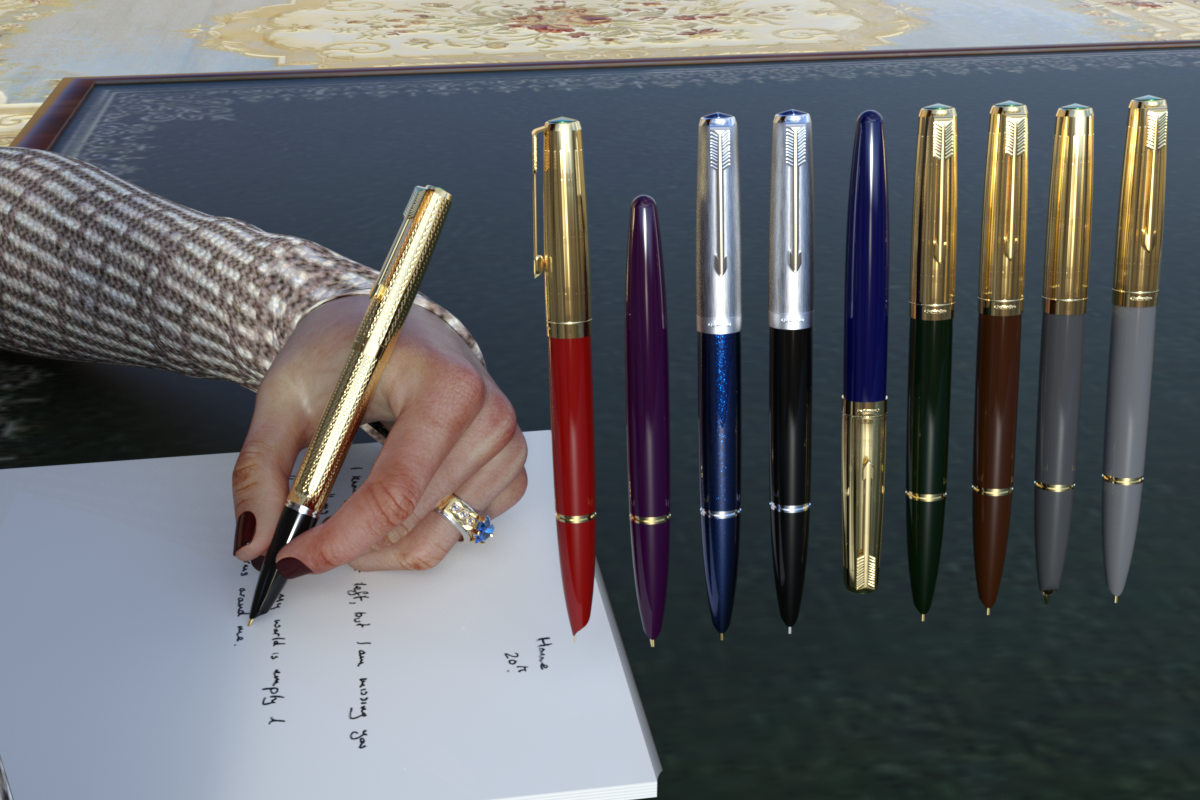
Regards
Richard
It's definitely something that goes beyond my knowledge of rendering and 3D modeling hahaha... Well, in this case I already have a 3D model in FBX format from Sketchfab that I found of two CDJ-3000s with a DJM-900 Nexus 2 mixer included. When I import this 3D model along with the textures into Daz, what steps would I need to take to make this FBX work perfectly in terms of rendering (Iray), shadows and quality? https://sketchfab.com/3d-models/pioneer-cdj-3000-7a33aaa799044e0db082f3b2b038c328
Looking for some nightclub/DJ equipment stufffelis said:
luan.yang said:
Thanks for the recommendations! Now I need to look for a tutorial that teaches how to import external 3D assets (FBX and OBJ, for example) into Daz, as well as how to apply Iray to them because I've never done anything like this before and I have no idea where to start hahaha. In fact, these 3D models of CDJs that I mentioned previously would work into Daz, right?The model list obj as format. DS can read objs.
It also lists fbx, and DS has an FBX importer, but FBX might have comptability issues, so unless good reason for FBX, I would stick to obj.
Inside DS you would have to redo the texturing, i.e. adding textures to the different slots in the surface settings, as well as adjust other settings.
If the buttons shall work they need to be rigged; FBX include rigging information, while obj not (required that the creater rigged it). So best guess is that you have to rig it (if you need the buttons to move)
Wow, thanks for the explanation! I'll take a look for a tutorial on YouTube on how to import OBJ models and textures correctly into Daz. Do these external 3D models work well with Iray? Anything I need to know first?
[SOLVED] How to import GoldenRules.obj (Golden Rules Composition Helpers for Bryce)Hello,
I installed Bryce's product but nothing works. I don't see anything in Content Library. The Readme file is not clear enough for me. I created a Golden Rules directory under Camera Presets, then placed the file there. Then launched it as Import but it does not recognize the .obp extension. How to make this product working ?
Thank you.Looking for some nightclub/DJ equipment stuffluan.yang said:
Thanks for the recommendations! Now I need to look for a tutorial that teaches how to import external 3D assets (FBX and OBJ, for example) into Daz, as well as how to apply Iray to them because I've never done anything like this before and I have no idea where to start hahaha. In fact, these 3D models of CDJs that I mentioned previously would work into Daz, right?The model list obj as format. DS can read objs.
It also lists fbx, and DS has an FBX importer, but FBX might have comptability issues, so unless good reason for FBX, I would stick to obj.
Inside DS you would have to redo the texturing, i.e. adding textures to the different slots in the surface settings, as well as adjust other settings.
If the buttons shall work they need to be rigged; FBX include rigging information, while obj not (required that the creater rigged it). So best guess is that you have to rig it (if you need the buttons to move)
Looking for some nightclub/DJ equipment stuff
Thanks for the recommendations! Now I need to look for a tutorial that teaches how to import external 3D assets (FBX and OBJ, for example) into Daz, as well as how to apply Iray to them because I've never done anything like this before and I have no idea where to start hahaha. In fact, these 3D models of CDJs that I mentioned previously would work into Daz, right?richardandtracy said:Freebie turntable: https://www.renderosity.com/freestuff/items/63183/turntable
Headphone freebie search: https://www.renderosity.com/search/freestuff?keyword=headphones
Free mixing desks: https://www.renderosity.com/freestuff/items/63201/stereo-mixer Old: https://www.renderosity.com/freestuff/items/56818/and-action-10-movie-set-props
With conversion to Iray may well look modern enough, worth at least what you pay..
Regards,
Richard
Convert Weight Maps to GroupsNot for the poses, but for the morphs. If I import an FBX, for example, it is not divided into groups, but is laid with the Weight Maps. However, it is more difficult to create a morph this way. So, if you could convert WMs into Groups, you could create morphs.How could I have DAZ Hair Strands converting to Blender?To be fair, diffeomorphic's wiki and guides are fairly awkward and deficient.
As is their website. I briefly mentioned this before in the diffeo thread: not even having an intro on the landing page of the website explaining what the plugin is and what it does seems like a massive fail missed opportunity. Plus, if you read through any documentation, it often reads more like a github thread than a wiki/guide, often referring to a nesting doll of several previous posts to get the full story instead of just having current info summarised succinctly.
Also specifically in the hair section of the wiki, they say to export SBH at Render Line Tesselation = 2, then much later say they can import PS guides from the duf file, and then later suggest to export in dbz at Render Line Tesselation = 0. There is way too much extraneous conflicting info - it should just be a table or list of what the options are for SBH: PS Guides, export as polyline, export as mesh, etc with pro/con, and methodology. The guide also refers to images without stating which specific image they refer to, whether the image is above or below text, or referencing a figure number.
Great plugin though - they should keep up the good work in that respect!
Trouble with custom morphsFor a while i've been having an issue with Genesis 8 morph creation.
I can export, modify in zbrush or blender and import it back, that works fine.
The problem is when exporting the base model of G8 it adds distortion to the model, i'm not sure why, so everytime I create a new custom morph there are these anomalies that continue to accumulate with each morph added.
Now I understand the process of excluding morphs for specific areas of a model. You can modify a head and say you accidentally moved part of the body you can simply remove that.
The issue though is everytime I make a custom moph for the head it comes already distorted slightly so any additional morphs will magnify the problem over time.
Here is a Gif showing the issue and my Export and Import settings.
In the Gif I have exported G8 as an OBJ and then immediately reimported it back as a morph, it creates problems as you can see.
Daz Version 4.22How could I have DAZ Hair Strands converting to Blender?Padone said:
With diffeomorphic you can convert polylines to strands or particles, as well as import or convert transmapped hair.
https://bitbucket.org/Diffeomorphic/import_daz/wiki/Setup/Hair
Nothing worked here, guides weren't helpful for me. Could you please elaborate more? If it helps im using the Manami Hair for 8.1
[Released] ManFriday's Seamster (clothes rigging for Daz Studio) [Commercial]chriscox said:
3D-GHDesign said:
ManFriday said:
3D-GHDesign said:
I see only export import, but I hate to fill my folders with meshes (always forget to delete later :D ) and I use ZBrush ... but with Zbrush I use the bridge ... it is useful for that too? I mean remember the sent morph's name or whatever ...
Yes, you can use ZBrush too. I don't have ZBrush myself but several people have tested it before release and used GoZ, the ZBrush bridge. I just attached the PDF user manual to the first post in this thread, and it explains the process on page 18. Seamster has a button to copy the morph's name to the clipboard quickly for that purpose as well. Hope this helps!
Thanks, good to hear .. but I don't see the pdf
Same here, not seeing a PDF in the post
and not sure where the Comprehensive PDF manual that is listed as being included was downloaded toLike Mada said, please see the attachments to the first post of this thread.
Generally, Seamster is a plugin for Daz Studio, not a script, so the PDF does not get installed into the content libraries, but to the Daz Studio program directory (C:\program files...). Daz Studio doesn't make it easy to find these, but there are three ways to view the PDF after installation:
1) Once you have added the "Seamster" pane to the Daz Studio UI, there is a little question mark button at the top right of the pane. That is the easiest way to open the PDF. (This is true for all my plugins. Admittedly it's a bit of a chicken-and-egg problem that the manual explains how to add the Seamster pane to Daz Studio, and only then is there a button that makes opening the manual easy.)
2) You can press F1 in Daz Studio, and in the window that pops up, select "Seamster" -> "Documentation" under "Plugins" on the left. That will open the PDF as well. This is true for all plugins.
3) You can navigate to C:\Program Files\DAZ 3D\DAZStudio4\docs\Plugins\Seamster and open the PDF yourself.
Hope this helps!
How could I have DAZ Hair Strands converting to Blender?With diffeomorphic you can convert polylines to strands or particles, as well as import or convert transmapped hair.
https://bitbucket.org/Diffeomorphic/import_daz/wiki/Setup/Hair
[Released] ManFriday's Seamster (clothes rigging for Daz Studio) [Commercial]chriscox said:
3D-GHDesign said:
ManFriday said:
3D-GHDesign said:
I see only export import, but I hate to fill my folders with meshes (always forget to delete later :D ) and I use ZBrush ... but with Zbrush I use the bridge ... it is useful for that too? I mean remember the sent morph's name or whatever ...
Yes, you can use ZBrush too. I don't have ZBrush myself but several people have tested it before release and used GoZ, the ZBrush bridge. I just attached the PDF user manual to the first post in this thread, and it explains the process on page 18. Seamster has a button to copy the morph's name to the clipboard quickly for that purpose as well. Hope this helps!
Thanks, good to hear .. but I don't see the pdf
Same here, not seeing a PDF in the post
and not sure where the Comprehensive PDF manual that is listed as being included was downloaded toTo find where your files are installed open DIM, find your product under installed files and then click on the 3 dots to the right of the name... "show installed files" will show you where to find it
[Released] ManFriday's Seamster (clothes rigging for Daz Studio) [Commercial]3D-GHDesign said:
ManFriday said:
3D-GHDesign said:
I see only export import, but I hate to fill my folders with meshes (always forget to delete later :D ) and I use ZBrush ... but with Zbrush I use the bridge ... it is useful for that too? I mean remember the sent morph's name or whatever ...
Yes, you can use ZBrush too. I don't have ZBrush myself but several people have tested it before release and used GoZ, the ZBrush bridge. I just attached the PDF user manual to the first post in this thread, and it explains the process on page 18. Seamster has a button to copy the morph's name to the clipboard quickly for that purpose as well. Hope this helps!
Thanks, good to hear .. but I don't see the pdf
Same here, not seeing a PDF in the post
and not sure where the Comprehensive PDF manual that is listed as being included was downloaded toDiffeomorphic - DAZ import overwrites/corrupts World settingsSo I'm using the Physical Starlight And Atmosphere addon: https://blendermarket.com/products/physical-starlight-and-atmosphere
This handles the world settings in Blender to make realistic skies.
If I use the lastest Diffeomorphic (1.7.4.2029), Easy DAZ import, it seems like any scene overwrites my world material settings. It comes in with a texture called DTHDR-RuinsB-500, for whatever reason. Now, this by itself is not horrible, but when I switch it back to the original "World," the sky is transparent and/or doesn't show up. I had some wonky behavior where I had an office building I imported, and the sky showed up only through the glass from the inside of the building, both in viewport and in final render. If I moved outside the building, it's just an endless transparency.
I tried this with a completely blank DAZ scene and used Easy Import DAZ to bring that in, and same thing, just overwrote my environment settings (that you cannot delete in DAZ studio), and when I try to use the atmosphere plugin, the world material is generated like always--identical in the shader editor, but the sky is still transparent in both viewport & render. This is problematic with the plugin, but in this case, it still seems to supercede somehow even if I don't use the plugin.
[Released] ManFriday's Seamster (clothes rigging for Daz Studio) [Commercial]ManFriday said:
3D-GHDesign said:
I see only export import, but I hate to fill my folders with meshes (always forget to delete later :D ) and I use ZBrush ... but with Zbrush I use the bridge ... it is useful for that too? I mean remember the sent morph's name or whatever ...
Yes, you can use ZBrush too. I don't have ZBrush myself but several people have tested it before release and used GoZ, the ZBrush bridge. I just attached the PDF user manual to the first post in this thread, and it explains the process on page 18. Seamster has a button to copy the morph's name to the clipboard quickly for that purpose as well. Hope this helps!
Thanks, good to hear .. but I don't see the pdf
[Released] ManFriday's Seamster (clothes rigging for Daz Studio) [Commercial]3D-GHDesign said:
I see only export import, but I hate to fill my folders with meshes (always forget to delete later :D ) and I use ZBrush ... but with Zbrush I use the bridge ... it is useful for that too? I mean remember the sent morph's name or whatever ...
Yes, you can use ZBrush too. I don't have ZBrush myself but several people have tested it before release and used GoZ, the ZBrush bridge. I just attached the PDF user manual to the first post in this thread, and it explains the process on page 18. Seamster has a button to copy the morph's name to the clipboard quickly for that purpose as well. Hope this helps!
Daz 3D is part of

Connect
DAZ Productions, Inc.
7533 S Center View Ct #4664
West Jordan, UT 84084Licensing Agreement | Terms of Service | Privacy Policy | EULA
© 2026 Daz Productions Inc. All Rights Reserved.