-
Freebie Challenge February 2022-"Mysteries of the Heart" - Main Thread
Sky77 said:
katywhite said:
Title: Don’t Leave Me By The Subway
Free Stuff
- Asian Dress Set 01 for G8F (https://www.renderosity.com/freestuff/items/83346/asian-dress-set-01-for-g8f)
- G8M Walther 2.0 (https://sharecg.com/v/97276/related/21/DAZ-Studio/G8M-Walther-2.0)
- Dforce Walther 2.0 shirt & shorts for G8M (https://sharecg.com/v/97280/gallery/21/DAZ-Studio/Dforce-Walther-2.0-shirt-shorts-for-G8M)
- BOUCHE DE METRO Update (https://www.renderosity.com/freestuff/items/80403/bouche-de-metro-update)
- Basic Pumps for Genesis 2 Female(s) (https://www.renderosity.com/freestuff/items/74884/basic-pumps-for-genesis-2-females)
- Floral Dress (https://www.renderosity.com/freestuff/items/84293/floral-dress)
- HH Olympia Starter Kit (https://www.renderosity.com/freestuff/items/85584/hh-olympia-starter-kit)
- Side Swept ROse Hair (G3F,G8F) UPDATE (https://www.renderosity.com/freestuff/items/79641/side-swept-rose-hair-g3fg8f-update)
- dforce Chronicles G3F G8F (https://www.renderosity.com/rr/mod/bcs/dforce-chronicles-g3f-g8f/124484)
- Evening Dress for Genesis 2, 3 and 8 Females (https://www.renderosity.com/freestuff/items/87696/evening-dress-for-genesis-2-3-and-8-females)
- Trish Hair for Genesis 3 Female (https://www.renderosity.com/freestuff/items/77150/trish-hair-for-genesis-3-female)
- G3 Fairy(Elven)Dress (https://www.renderosity.com/freestuff/items/76773/g3-fairyelvendress)
- FF7 Remake Tifa for G8F (https://www.deviantart.com/shinteo/art/FF7-Remake-Tifa-for-G8F-846437057)
Neutral
- Genesis 2 Female
Paid
- Daisy 8 (https://www.daz3d.com/daisy-8)
- Masozi for Celani 8 for Genesis 3 and 8 Female (https://www.daz3d.com/masozi-for-celani-8-for-genesis-3-and-8-female)
- FWSA Saffron HD for Victoria 7 (https://www.daz3d.com/fwsa-saffron-hd-for-victoria-7)

You are all set! Please move to the Entry Thread.

Poor thing, so desperate not to be left behind... oh the horrible mystery of stairs...

Nice use of perspective and pose to set the scene!
Your link #9 looks like it is for purchase (???) though it is not available currently. Please move to your paid items list for this entry. You have enough freebies otherwise.
Oops that might have been one of those limited time only freebies I got in the past. Sorry about that! I've moved it to the paid part on my submission in the entries thread.
And thank you! It took me a bit but I finally got it to the pose and perspective I was happy with :)
Freebie Challenge February 2022-"Mysteries of the Heart" -Entries Thread OnlyTitle: Don’t Leave Me By The Subway
Free Stuff
- Asian Dress Set 01 for G8F (https://www.renderosity.com/freestuff/items/83346/asian-dress-set-01-for-g8f)
- G8M Walther 2.0 (https://sharecg.com/v/97276/related/21/DAZ-Studio/G8M-Walther-2.0)
- Dforce Walther 2.0 shirt & shorts for G8M (https://sharecg.com/v/97280/gallery/21/DAZ-Studio/Dforce-Walther-2.0-shirt-shorts-for-G8M)
- BOUCHE DE METRO Update (https://www.renderosity.com/freestuff/items/80403/bouche-de-metro-update)
- Basic Pumps for Genesis 2 Female(s) (https://www.renderosity.com/freestuff/items/74884/basic-pumps-for-genesis-2-females)
- Floral Dress (https://www.renderosity.com/freestuff/items/84293/floral-dress)
- HH Olympia Starter Kit (https://www.renderosity.com/freestuff/items/85584/hh-olympia-starter-kit)
- Side Swept ROse Hair (G3F,G8F) UPDATE (https://www.renderosity.com/freestuff/items/79641/side-swept-rose-hair-g3fg8f-update)
- Evening Dress for Genesis 2, 3 and 8 Females (https://www.renderosity.com/freestuff/items/87696/evening-dress-for-genesis-2-3-and-8-females)
- Trish Hair for Genesis 3 Female (https://www.renderosity.com/freestuff/items/77150/trish-hair-for-genesis-3-female)
- G3 Fairy(Elven)Dress (https://www.renderosity.com/freestuff/items/76773/g3-fairyelvendress)
- FF7 Remake Tifa for G8F (https://www.deviantart.com/shinteo/art/FF7-Remake-Tifa-for-G8F-846437057)
Neutral
- Genesis 2 Female
Paid
- Daisy 8 (https://www.daz3d.com/daisy-8)
- Masozi for Celani 8 for Genesis 3 and 8 Female (https://www.daz3d.com/masozi-for-celani-8-for-genesis-3-and-8-female)
- FWSA Saffron HD for Victoria 7 (https://www.daz3d.com/fwsa-saffron-hd-for-victoria-7)
- dforce Chronicles G3F G8F (https://www.renderosity.com/rr/mod/bcs/dforce-chronicles-g3f-g8f/124484)
Detail video diffrence figure for beginner.Check the figure number, bearing in mind that Genesis = Victoria etc. 5, Genesis 2 = Victoria etc. 6, and Genesis 3 = Victoria etc. 7. Textures will be an add-on (if for something) or may be generic (various fabric shaders can be applied to anything, though the result will depend on how the model is set to apply textures). "For" usually indicates that what you are looking at is soem kind of add-on, and there should be a required products note too. If you do end up with something you can't use then, within 30 days, you can request a refund via a sales support ticket https://www.daz3d.com/help
Detail video diffrence figure for beginner.There is pretty much info on how to install check for content etc.
But for someone who lands on the Daz platform now, there is chaos in regards to figures and many contents on the shop that need to be wised checked for compatibility.
Is there a tutorial that explains figures and compatibility like victoria is an old product do I still need to buy for compatibility for shop content.
Why can't adapt to the new Gemini figure, what is the difference with dForce why some are Gemini and others are dForce.
I buy this https://www.daz3d.com/v4-arabesque but then I need to buy Victoria 4 I also buy this
https://www.daz3d.com/dforce-figure-skater-outfit-textures but need dForce Figure Skater Outfit for Genesis 8 FemalePretty complex and very puzzling.
Thanks for helpFreebie Challenge February 2022-"Mysteries of the Heart" - Main Threadkatywhite said:
Title: Don’t Leave Me By The Subway
Free Stuff
- Asian Dress Set 01 for G8F (https://www.renderosity.com/freestuff/items/83346/asian-dress-set-01-for-g8f)
- G8M Walther 2.0 (https://sharecg.com/v/97276/related/21/DAZ-Studio/G8M-Walther-2.0)
- Dforce Walther 2.0 shirt & shorts for G8M (https://sharecg.com/v/97280/gallery/21/DAZ-Studio/Dforce-Walther-2.0-shirt-shorts-for-G8M)
- BOUCHE DE METRO Update (https://www.renderosity.com/freestuff/items/80403/bouche-de-metro-update)
- Basic Pumps for Genesis 2 Female(s) (https://www.renderosity.com/freestuff/items/74884/basic-pumps-for-genesis-2-females)
- Floral Dress (https://www.renderosity.com/freestuff/items/84293/floral-dress)
- HH Olympia Starter Kit (https://www.renderosity.com/freestuff/items/85584/hh-olympia-starter-kit)
- Side Swept ROse Hair (G3F,G8F) UPDATE (https://www.renderosity.com/freestuff/items/79641/side-swept-rose-hair-g3fg8f-update)
- dforce Chronicles G3F G8F (https://www.renderosity.com/rr/mod/bcs/dforce-chronicles-g3f-g8f/124484)
- Evening Dress for Genesis 2, 3 and 8 Females (https://www.renderosity.com/freestuff/items/87696/evening-dress-for-genesis-2-3-and-8-females)
- Trish Hair for Genesis 3 Female (https://www.renderosity.com/freestuff/items/77150/trish-hair-for-genesis-3-female)
- G3 Fairy(Elven)Dress (https://www.renderosity.com/freestuff/items/76773/g3-fairyelvendress)
- FF7 Remake Tifa for G8F (https://www.deviantart.com/shinteo/art/FF7-Remake-Tifa-for-G8F-846437057)
Neutral
- Genesis 2 Female
Paid
- Daisy 8 (https://www.daz3d.com/daisy-8)
- Masozi for Celani 8 for Genesis 3 and 8 Female (https://www.daz3d.com/masozi-for-celani-8-for-genesis-3-and-8-female)
- FWSA Saffron HD for Victoria 7 (https://www.daz3d.com/fwsa-saffron-hd-for-victoria-7)
You are all set! Please move to the Entry Thread.
Poor thing, so desperate not to be left behind... oh the horrible mystery of stairs...
Nice use of perspective and pose to set the scene!
Your link #9 looks like it is for purchase (???) though it is not available currently. Please move to your paid items list for this entry. You have enough freebies otherwise.
Poses not posingI've purchased a couple different pose and wearable prop sets with bath towels.
https://www.daz3d.com/sy-dforce-towels-for-genesis-8
https://www.daz3d.com/bath-towel-and-poses-for-victoria-8
Both sets only load the wearable parented to the figure, but the G8F figure doesn't pose at all. Other poses are working fine.
Any ideas as to why that would happen?
My Skin Tweaks for the Iray Uber Shaderyukimuki12 said:
MelissaGT said:
cridgit said:
MelissaGT said:
Thanks! Rosawyn is a custom character and her skin is what I call a "franken-skin". It's a custom-blended (in Photoshop) amalgamation of Babina 8, Victoria 7 (love her fine details), and LY Bramble. I built the sss maps from scratch and then tweaked the shaders using my workflow process.
I'd buy!
I do have some merchant resources and I have contemplated making a couple characters for sale...however I prefer the Uber Shader, and it seems most folks frown on characters being released without the newer (not necessarily better) PBR Skin Shader these days.
would you share your settings with us? :) that problem let save everythin as i know
At the beginning of this thread is a link to an article I put together that covers my workflow for the Uber Shader...though those settings will not work for spectral rendering.
Expressions not workingDoes anyone know why expressions are not working on a character? I'm using Victoria 8.1 and I have bought some 8.1 expression packs but trying to apply them to the model it doesnt change anything. Is there something I am missing?
My Skin Tweaks for the Iray Uber ShaderMelissaGT said:
cridgit said:
MelissaGT said:
Thanks! Rosawyn is a custom character and her skin is what I call a "franken-skin". It's a custom-blended (in Photoshop) amalgamation of Babina 8, Victoria 7 (love her fine details), and LY Bramble. I built the sss maps from scratch and then tweaked the shaders using my workflow process.
I'd buy!
I do have some merchant resources and I have contemplated making a couple characters for sale...however I prefer the Uber Shader, and it seems most folks frown on characters being released without the newer (not necessarily better) PBR Skin Shader these days.
would you share your settings with us? :) that problem let save everythin as i know
My Skin Tweaks for the Iray Uber Shadercridgit said:
MelissaGT said:
Thanks! Rosawyn is a custom character and her skin is what I call a "franken-skin". It's a custom-blended (in Photoshop) amalgamation of Babina 8, Victoria 7 (love her fine details), and LY Bramble. I built the sss maps from scratch and then tweaked the shaders using my workflow process.
I'd buy!
I do have some merchant resources and I have contemplated making a couple characters for sale...however I prefer the Uber Shader, and it seems most folks frown on characters being released without the newer (not necessarily better) PBR Skin Shader these days.
Website Testing and Updates - NavigationHi!
I am a longtime DAZ user, I've spent several 1000s of dollars over the years. But I will pause as a protest. I am sorry.
Here are the reasons briefly:
- The new UI might look good, but it's really bad user experience compared to the previous version.
- I used to be able to see everything relevant in one look and I could make a decesion quickly. It was EFFORTLESS.
- But now, everything is tiring and difficult. All the relevant information that I need requires a lot of effort to obtain.
- Before doing such a big change, you should have asked feedback from the users on a seperate test site.
DETAILED PAIN POINTS:
1) Unusable for Bundles. Example https://www.daz3d.com/victoria-8-1-university-bundle
- OLD WEBSITE:
- 1) you could check each individual part of the bundle in a matter of a second
- 2) I could see if I own that part of the bundle
- 3) I could visit a product inside the bundle quickly
- NEW WEBSITE:
- scroll up-and-down like a mad man
- I have no clue if I own that part of the bundle or not
2) Required Products
- OLD WEBSITE:
- 1) I could see in an instant as this info was higher up at a prime location
- 2) I could see if I own the required product or not
- NEW WEBSITE:
- I need to scroll down to see if there is a required product, it's not at a prime location
- page doesn't tell me if I own the required product or not
- Note: Information about "Required Products" is a key info when making a purchase decesion. It should be treated as such.
3) Already Owned Button
- OLD WEBSITE:
- the button was different depending if I already own or not
- the visual clue helps my mind to understand the info intuitively, without any reading effort
- NEW WEBSITE:
- the button is the same color
- and I need to make an effort to read it
4) Black background
- OLD WEBSITE:
- easy on the eye
- matches the rest of the store
- NEW WEBSITE:
- very hard on the eye
- it doesn't match the rest of the store, which is confusing for someone new.
- But the black background is the least of my problem. The usability is a bigger issue
CAN YOU PLEASE...:
- Please consider fixing these issues
- But even better, much better, reverse the product page
- Can we please get a response from the team? Thanks!
My Skin Tweaks for the Iray Uber Shadercridgit said:
Melissa, thank you for sharing those tests. Is that texture from a commercially available character? It looks like a really good one.
Thanks! Rosawyn is a custom character and her skin is what I call a "franken-skin". It's a custom-blended (in Photoshop) amalgamation of Babina 8, Victoria 7 (love her fine details), and LY Bramble. I built the sss maps from scratch and then tweaked the shaders using my workflow process.
Freebie Challenge February 2022-"Mysteries of the Heart" - Main ThreadTitle: Don’t Leave Me By The Subway
Free Stuff
- Asian Dress Set 01 for G8F (https://www.renderosity.com/freestuff/items/83346/asian-dress-set-01-for-g8f)
- G8M Walther 2.0 (https://sharecg.com/v/97276/related/21/DAZ-Studio/G8M-Walther-2.0)
- Dforce Walther 2.0 shirt & shorts for G8M (https://sharecg.com/v/97280/gallery/21/DAZ-Studio/Dforce-Walther-2.0-shirt-shorts-for-G8M)
- BOUCHE DE METRO Update (https://www.renderosity.com/freestuff/items/80403/bouche-de-metro-update)
- Basic Pumps for Genesis 2 Female(s) (https://www.renderosity.com/freestuff/items/74884/basic-pumps-for-genesis-2-females)
- Floral Dress (https://www.renderosity.com/freestuff/items/84293/floral-dress)
- HH Olympia Starter Kit (https://www.renderosity.com/freestuff/items/85584/hh-olympia-starter-kit)
- Side Swept ROse Hair (G3F,G8F) UPDATE (https://www.renderosity.com/freestuff/items/79641/side-swept-rose-hair-g3fg8f-update)
- dforce Chronicles G3F G8F (https://www.renderosity.com/rr/mod/bcs/dforce-chronicles-g3f-g8f/124484)
- Evening Dress for Genesis 2, 3 and 8 Females (https://www.renderosity.com/freestuff/items/87696/evening-dress-for-genesis-2-3-and-8-females)
- Trish Hair for Genesis 3 Female (https://www.renderosity.com/freestuff/items/77150/trish-hair-for-genesis-3-female)
- G3 Fairy(Elven)Dress (https://www.renderosity.com/freestuff/items/76773/g3-fairyelvendress)
- FF7 Remake Tifa for G8F (https://www.deviantart.com/shinteo/art/FF7-Remake-Tifa-for-G8F-846437057)
Neutral
- Genesis 2 Female
Paid
- Daisy 8 (https://www.daz3d.com/daisy-8)
- Masozi for Celani 8 for Genesis 3 and 8 Female (https://www.daz3d.com/masozi-for-celani-8-for-genesis-3-and-8-female)
- FWSA Saffron HD for Victoria 7 (https://www.daz3d.com/fwsa-saffron-hd-for-victoria-7)
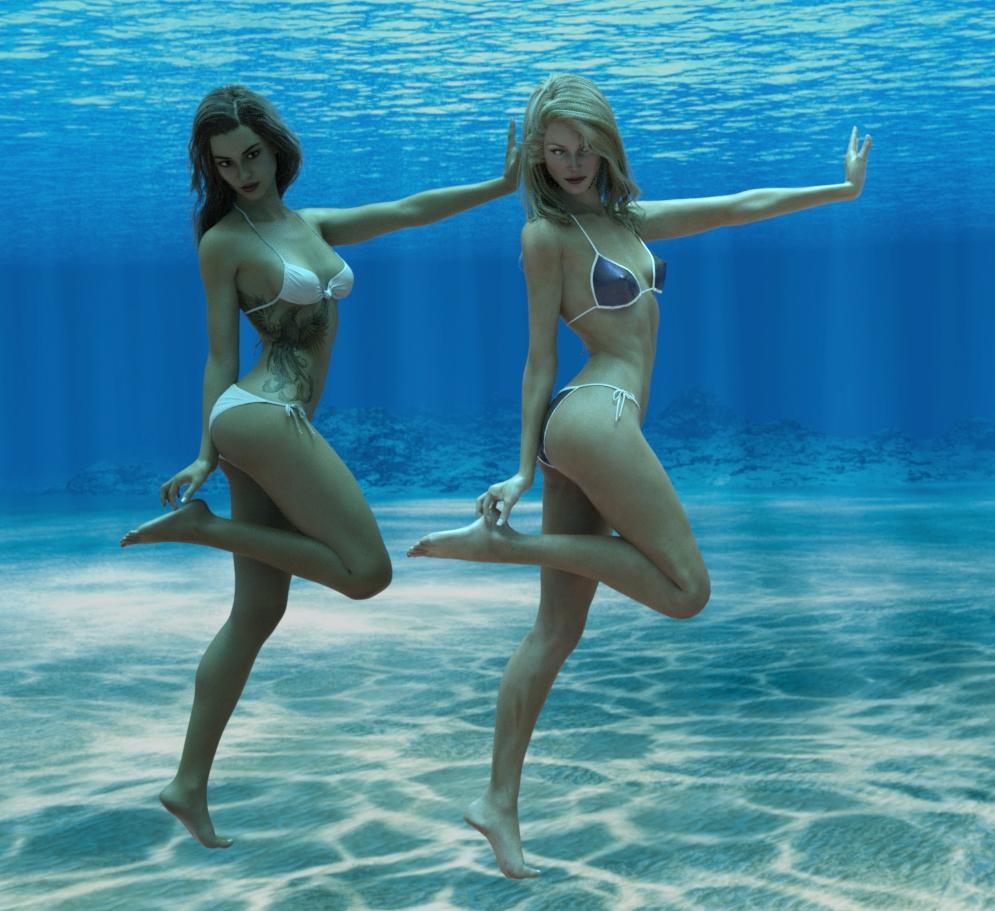
Underwater HDRI FreebieI do really like this HDRI. I have used it to illustrate all my female pose transfer scripts. To demonstrate that a pose is accurately transferred, you need to see as much of the character as possible. So, a bikini is useful. To avoid being accused of gratuitous use of a bikini, the character must be getting wet, and the only way of having it so the whole character is visible while getting wet is to have the character underwater. This is where the HDRI comes in. Here's an example with the G8F pose transfer to Jim Burton's elderly Victoria 3 based Glamorous Vickie:
Regards,
Richard
Old Stone Arched BuildingI hope you don't mind if I make some comments. They are intended to help future projects be even better, not to criticise or make this one seem terrible, because it's great. I do like it, and know that my current equivalent project is a bit stalled through a lack of gumption.
Right, the brick size is a bit huge. In reality bricks including mortar tend to be 9" x 4.5" x 3" (225 x 110 x 75mm). The main bricks are HUGE in comparison, looking at 8"/200mm high. The 'Stones' in the pillars don't look like bricks, so can be believable the size they are. It may be worth scaling the texture so it can be closer to reality. The thing I tried was to tile the texture. Oh dear. That didn't work. It may be worth trying to use a seamless texture for bricks so that it can be tiled by the user.
Next comment. In your original texture, the mortar aligns around a corner. This is great. If the user, however, uses a different shader, then due to an offset in the texture mapping, the shader bricks don't match up around the corner.
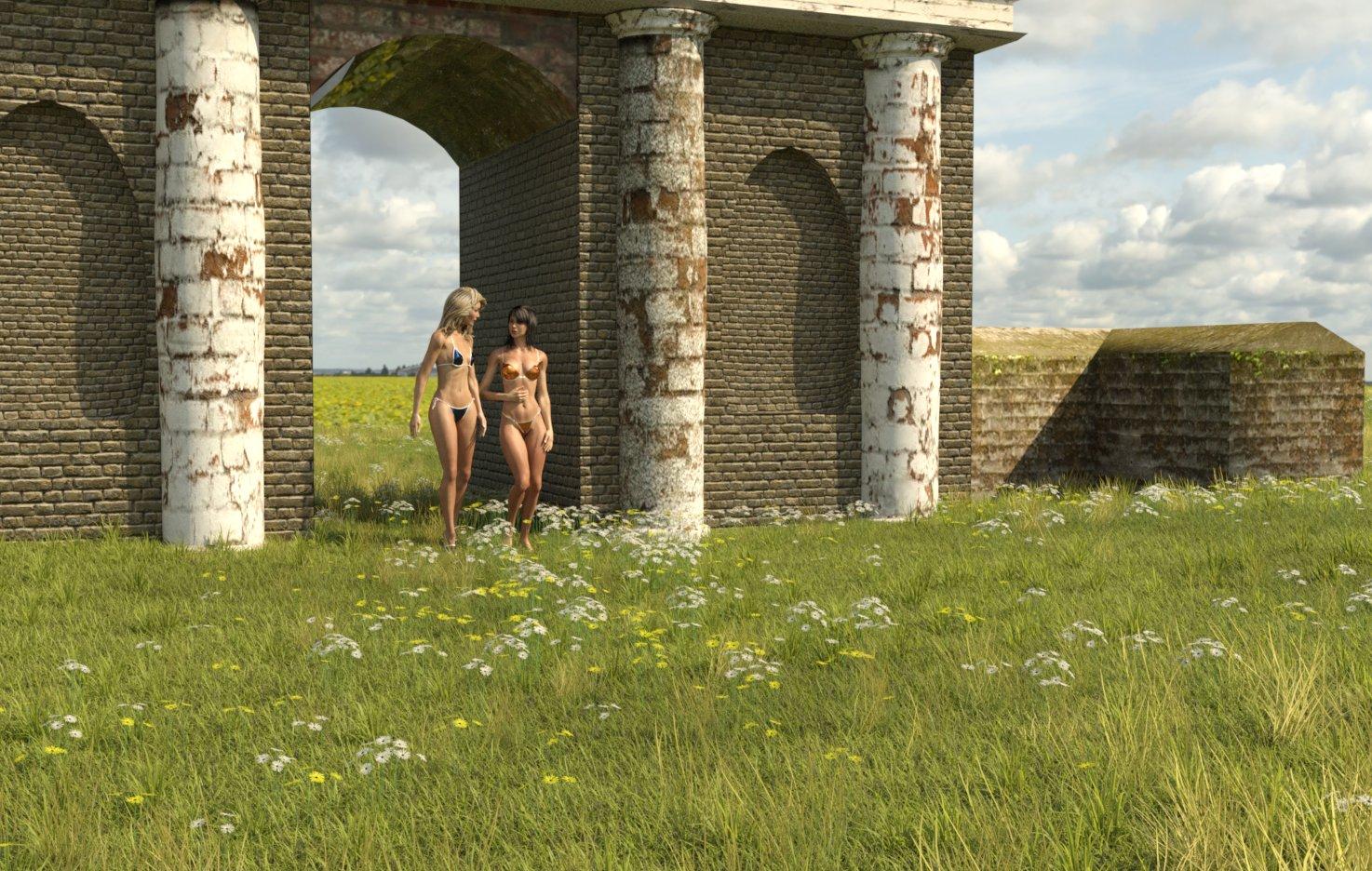
OK, that's enough comments, now to show it in use. I used UltraScenery instead of the ground, and used some Victoria 3 based characters to remind myself how good they can be in iRay. Then used the 'Sunflowers' HDRI from PolyHaven as the background.
Regards,
Richard.
Workflow Question - New Pose Shape KeysDaz to Blender workflow for me is currently just like it is set up in Diffeo - Import Character from Daz, Corrections, Materials, Import Morphs, Finishing, and Rigging.
I was wondering if anyone has tried keeping a base G8 in Blender with all shape keys and morphs applied, then morphing that G8 base with each new imported character using a 'join as shapes' shape key. For example, let's say I set up a G8 base with all my favorite morphs, shape keys, custom shape keys, and corrective pose shape keys (new with Blender 3.1, see link below). I don't want to have to do that with every character, right? So can I import a custom character, let's say Victoria 8, and morph my finished G8 base to the Victoria 8 shape? Diffeo allows us to morph the armature and retarget the outfit. The lashes, brows, and hair would need re-parented. We could merge geografts last so we have a G8 base that we can constantly import new shape keys as they come out on the Daz store if we want, and also create our own.
Has anyone tried this or see any reason why it might not work?
https://studio.blender.org/training/blender-studio-rigging-tools/pose-shape-keys/
https://diffeomorphic.blogspot.com/2021/09/morphing-armatures.html
https://diffeomorphic.blogspot.com/2021/07/changing-outfits.html
Can someone identify the character model for G3FI think your on the right track with it being a Raiya character, because they and OutofTouch make products together
For generation 7 have a look at this https://www.daz3d.com/topmodel-hd-morphs-for-victoria-7
Can someone identify the character model for G3FMaybe Charlene
Website Testing and Updates - NavigationUHF said:
Clicks to find things has increased.. so thats bad. Try navigating a bundle. Go ahead, just do it. I dare you.
https://www.daz3d.com/victoria-8-1-university-bundle
You can't open a bundle and right click open each item you might be interested in a new window. Nope.
Click, scroll down.. open in new window, scroll up... select new one, scroll down.. right click open in new window.... Wow.
Don't miss the little white line hiding there under the huge pictures. You will most certainly miss something. Yeah.. The Victoria 8.1 University bundle clearly only containts 2 items. Just 2, Victoria 8.1, and FG Bluson Library. I guess it might be worth it at 90% off. (I can hear the forum comments now.. "Oh I missed that." )
This design is a step backwards. More clicks. Easy to miss things.. painfully up and down 'cause big pretty pictures'...
I'm not sure the big pictures really help. They sorta do (I have bad eyes) but I think people will still be clicking through the enlarged pictures, and thats not any different.
I think you missed some things! The bundle has a lot more than 2 items in it. Probably, you already own most of them, and that's why they didn't show up for you.
Dana
Website Testing and Updates - NavigationClicks to find things has increased.. so thats bad. Try navigating a bundle. Go ahead, just do it. I dare you.
https://www.daz3d.com/victoria-8-1-university-bundle
You can't open a bundle and right click open each item you might be interested in a new window. Nope.
Click, scroll down.. open in new window, scroll up... select new one, scroll down.. right click open in new window.... Wow.
Don't miss the little white line hiding there under the huge pictures. You will most certainly miss something. Yeah.. The Victoria 8.1 University bundle clearly only containts 2 items. Just 2, Victoria 8.1, and FG Bluson Library. I guess it might be worth it at 90% off. (I can hear the forum comments now.. "Oh I missed that." )
This design is a step backwards. More clicks. Easy to miss things.. painfully up and down 'cause big pretty pictures'...
I'm not sure the big pictures really help. They sorta do (I have bad eyes) but I think people will still be clicking through the enlarged pictures, and thats not any different.
Daz 3D is part of

Connect
DAZ Productions, Inc.
7533 S Center View Ct #4664
West Jordan, UT 84084Licensing Agreement | Terms of Service | Privacy Policy | EULA
© 2026 Daz Productions Inc. All Rights Reserved.