-
FaceShifter for Genesis 8 Female
so I have a character I made, and wanna export to faceshift, when I click on morphs to select the morphs to export, I can't find these :'(...
I've responded to your message, but figured I would post it here for others too:
You can download a CSV file of all the morphs here: http://www.inthefleshart.com/freebies/FaceShifter_Export_Rules.zip. Unzip the .CSV file.
When exporting to .FBX, you need to edit the morph export rules to specify which morphs you would like to export.
At the bottom of the window that opens when you click "Edit Export Morph Rules..." there is a button that says "Import CSV Rules". Click it, and navigate to the .CSV file you extracted from the downloaded .ZIP linked above. NOTE: THIS WILL WIPE ANY OTHER MORPHS ALREADY LISTED. CLICK "EXPORT CSV RULES" FIRST TO SAVE A COPY OF YOUR CURRENT MORPHS TO EASILY RESTORE LATER.
That will import all the morph rules to export FaceShifter morphs. Depending on other morph packages that you own, additional morphs may be exported as well if they are similarly named.
Please note this will override any other morphs you already have set for export. After importing the .CSV file you can still add any other morphs you'd like to export too.
Aniblocks are strange beastsAre you referring to a specific 38 frame aniblock ? Maybe there are problems with it?
Any FBX export, bone based, and morph based should work ok in C4D . You should only expect the "normal" FBX problems (such as base mesh resolution, subd geometry issues, lack of JCM's)
You need to either edit your morph export rules, or some of the the pose morph tag entries in C4D
It's usually better to edit the morph export rules, because then the FBX will be more compatible in all programs
What DS does is it duplicates some of the twist bones as morphs, but you already have bone based rotations in the skeleton. So you get a doubling or tripling effect. Some other types of morphs can be affected as well
Set rules to specify twist bone entries to "ignore" in the FBX export rules . You can use wildcards, but it's case sensitive ; so double check the list to see that the animated twist parametrs are set to "ignore"
lThigh
rThigh
lShldr
rShldr
lForearm
rForearm
Welcome to Hatsune Miku Anime Manga Cafe ☕Death Note series Light Yagami
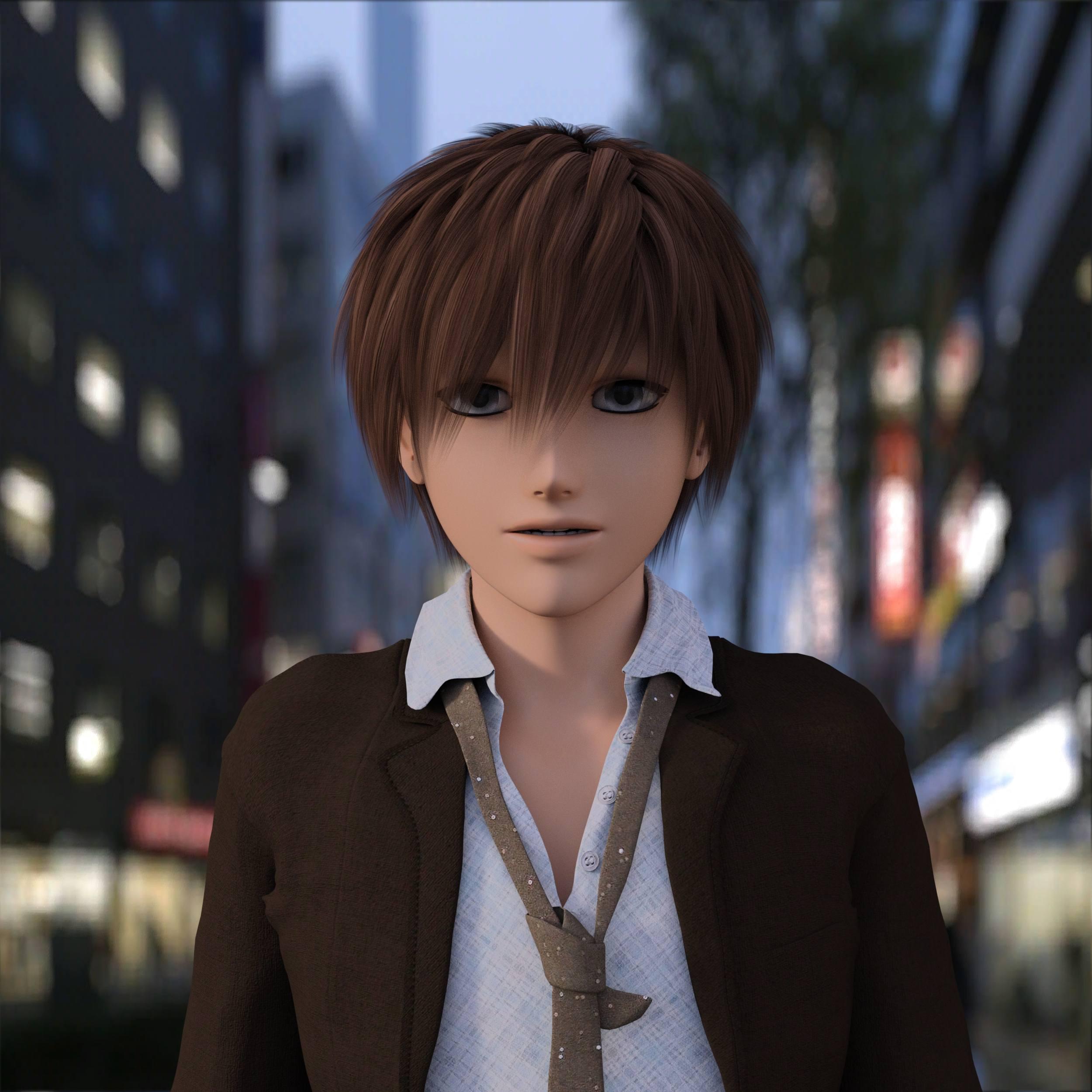
Hiro 5?
Yes customized the facea little with some morph dials :)
Ah, I'm finding that Hiro 5 is the best male Anime figure available. 3D-Outlaw has a good free, male, morph fir Sakura 8 but I don't have the other prodicts needed.
I found Lee 6 is not bad for the dark anime guy characters . Specially is you like the Attila or Servant of evil series, lee 6 can be dialed in pretty good to match most of those characters
Interesting idea. I wonder what Lee 6 would look like with some Ryder morphs mixed in. I have both, so I could try it.
Yes ryder good he has a sharp chin. But I think Yasuo works better for most of the Dark Anime men https://www.daz3d.com/yasuo-for-lee-6
I have him as well.
Welcome to Hatsune Miku Anime Manga Cafe ☕Death Note series Light Yagami
Hiro 5?
Yes customized the facea little with some morph dials :)
Ah, I'm finding that Hiro 5 is the best male Anime figure available. 3D-Outlaw has a good free, male, morph fir Sakura 8 but I don't have the other prodicts needed.
I found Lee 6 is not bad for the dark anime guy characters . Specially is you like the Attila or Servant of evil series, lee 6 can be dialed in pretty good to match most of those characters
Interesting idea. I wonder what Lee 6 would look like with some Ryder morphs mixed in. I have both, so I could try it.
Yes ryder good he has a sharp chin. But I think Yasuo works better for most of the Dark Anime men https://www.daz3d.com/yasuo-for-lee-6
Welcome to Hatsune Miku Anime Manga Cafe ☕Death Note series Light Yagami
Hiro 5?
Yes customized the facea little with some morph dials :)
Ah, I'm finding that Hiro 5 is the best male Anime figure available. 3D-Outlaw has a good free, male, morph fir Sakura 8 but I don't have the other prodicts needed.
I found Lee 6 is not bad for the dark anime guy characters . Specially is you like the Attila or Servant of evil series, lee 6 can be dialed in pretty good to match most of those characters
Interesting idea. I wonder what Lee 6 would look like with some Ryder morphs mixed in. I have both, so I could try it.
This is also a Hiro 5 character that I like (Takeo for Hiro 5):
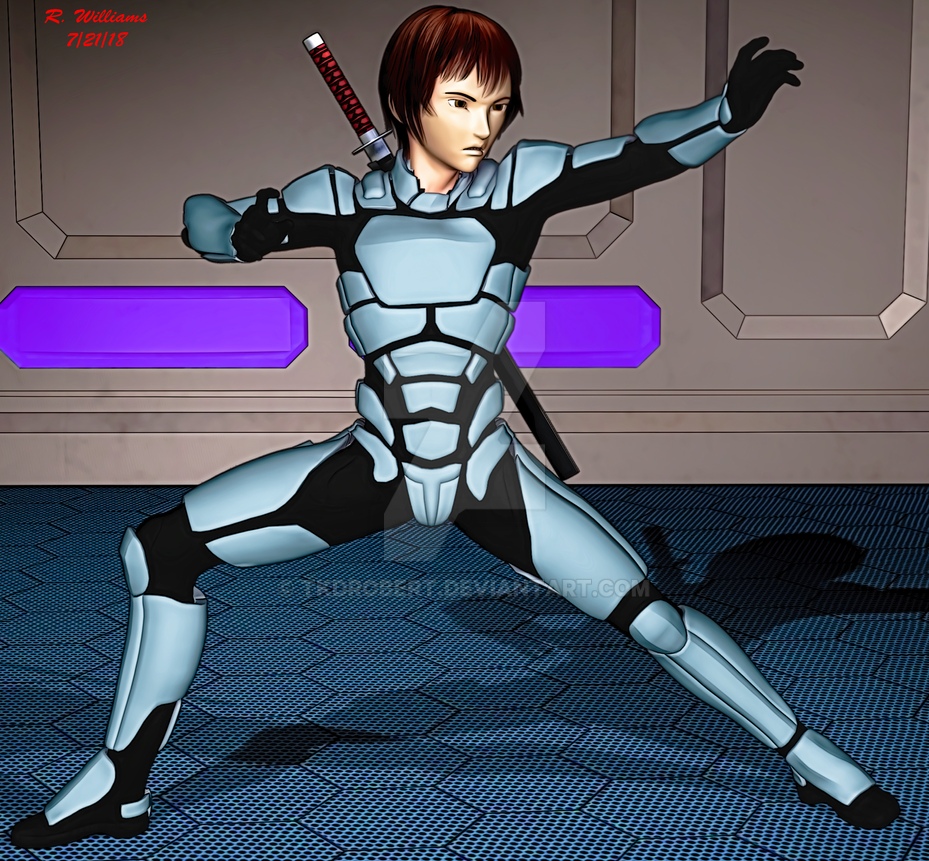 Welcome to Hatsune Miku Anime Manga Cafe ☕
Death Note series Light Yagami
Hiro 5?
Yes customized the facea little with some morph dials :)
Ah, I'm finding that Hiro 5 is the best male Anime figure available. 3D-Outlaw has a good free, male, morph fir Sakura 8 but I don't have the other prodicts needed.
I found Lee 6 is not bad for the dark anime guy characters . Specially is you like the Attila or Servant of evil series, lee 6 can be dialed in pretty good to match most of those characters
Welcome to Hatsune Miku Anime Manga Cafe ☕Death Note series Light Yagami
Hiro 5?
Yes customized the facea little with some morph dials :)
Ah, I'm finding that Hiro 5 is the best male Anime figure available. 3D-Outlaw has a good free, male, morph for Sakura 8 but I don't have the other prodicts needed.
Welcome to Hatsune Miku Anime Manga Cafe ☕Death Note series Light Yagami
Hiro 5?
Yes customized the facea little with some morph dials :)
Welcome to Hatsune Miku Anime Manga Cafe ☕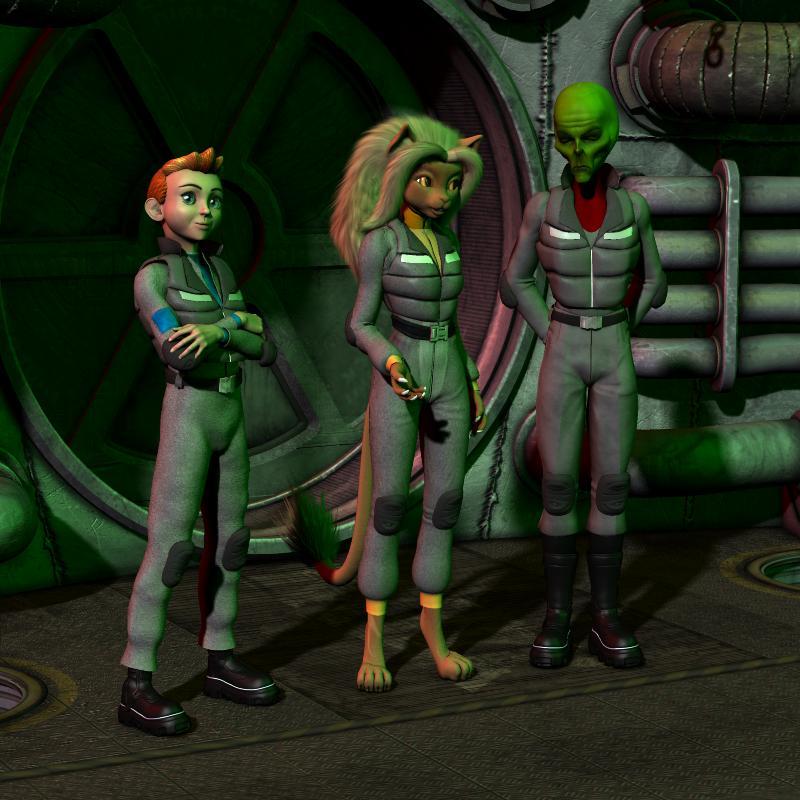
Believe or not, both the Howdy Doody looking cadet and the dour faced. green skinned alien captain are both Hiro 3! Their distinct appearances were achieved with Capsces Digital Ink's "Hitoro" morph set. The package allowed me to closely capture the look of their original illustrative designs as seen in this old web-comic I used to illustrate.
http://www.mzzkiti.com/log009.htm
Lt. Mzzkiti, the titular character, was envisioned using Lady LittleFox's "Melody" (derived from Aiko 3's geometry) and Beth Capsces' "Furries For..." morphs. (Uh, if "anthro'" characters) are not particularly welcomed, I won't post anything more with Melody.)
Sincerely,
Bill
Ive seen furries in anime shows so is all cool.
Welcome to Hatsune Miku Anime Manga Cafe ☕Believe or not, both the Howdy Doody looking cadet and the dour faced. green skinned alien captain are both Hiro 3! Their distinct appearances were achieved with Capsces Digital Ink's "Hitoro" morph set. The package allowed me to closely capture the look of their original illustrative designs as seen in this old web-comic I used to illustrate.
http://www.mzzkiti.com/log009.htm
Lt. Mzzkiti, the titular character, was envisioned using Lady LittleFox's "Melody" (derived from Aiko 3's geometry) and Beth Capsces' "Furries For..." morphs. (Uh, if "anthro'" characters) are not particularly welcomed, I won't post anything more with Melody.)
Sincerely,
Bill
Practical Female Modernish/Future Military/Sci-Fi Armor For G8FHerschel Hoffmeyer's excellent Tactical Assault set has different tops for male and female -- male gets a sturdy ballistic vest, female gets a cleavage-emphasizing corset. I know that this isn't what HH wanted, but was forced on him by the limitations of the technology.
However, I've found that if you apply the Breasts Gone morph to female figures, you can use the male armor on female figures with minimal distortion. (Female vets who've had to wear body armor tell me that 'Breasts Gone' is pretty much what happens when you try to squeeze a female body into armor designed primarily for males, so this isn't even unrealistic).
Interstellar Patrol for Genesis 3 Females isn't bad (example image), as is Soldier 2.0 for Genesis 3 Females (example image). I've also had decent results with Zollacce (oddly, it's a single-piece outfit, but you can use Cutout Opacity to hide the helmet if you want to reveal the face or use a different helmet) and Exo Suit for Genesis 3 Females (where by 'decent results' I mean that the female figure doesn't look like they just got off work at the Pussycat Lounge).
Unsupported figure / fit to / auto fitJust a quick update on today's tinkering, in case it is useful to anyone. FWIW, this is all on a scene object that has not yet been saved as a library object ie it's not yet content.
- I was able to get the model to "fit to" without the unsupported model dialogue for G2M G3M and G8M (but only one at a time) by setting that model as the preferred base in edit/scene identification / preferred base. For some reason the fit to for G1 by this method did not work and still triggered the unsupported model dialogue.
- Setting the compatability base in the same edit/scene identifier/compatability base did not appear to have any effect (ie the unsupported asset dialogue still triggered on "fit to").
- The edit/set default compatabilty base (a different edit menu item) did not appear to have any effect - indeed it appeared not to save as it always opened blank and whatever was entered did not appear in the edit/scene identification information plus the "fit to" behavior did not change.
Bottom line is that with a relatively small edit, I can get the model to fit to G2M, G3M and G8M without any unsupoprted asset dialogue. The raw G3M and G8M fits are pretty good without any geografting as yet. The G2M fit is poor because the bone / skin locations are more than trivially different - and just translating the model is not the solution. Im yet to work out the solution
It would still be useful to know how to circumvent the unsupported asset dialogue. In my experimenting, listing a compatability base on a saved asset that appeard in the content library did not appear to achieve that circumvention.
And at least now, it is stable enough to move onto setting up the geografts and doing the other UV mapping I want to do, whilst also progressing the morph sets I want to build
COMP DOWN USING OLDER COMPIf you're referring to your content/assets, the simplest solution would be to pull the drive from the dead computer, place it in a USB adapter, full housing or drop in, then plug it into your laptop.
Use there or transfer to the laptop.
COMP DOWN USING OLDER COMPRight my comp gone and untill get money fix amd using older laptop can render poser 11.
i dont want redownload studio 10 as to buggy and slow, i need a way transfer my daz 10 external to hard drive to use on old laptop as only using gen 1 and 2 for now.
dont want search downlaod again all me stuff.
i only load iray then export as obj to render in poser and vue as studio takes up all your memory and locks your processor at 100%
and lot studio users looking for older studios to use as they had enough of crashes lockups and other problems studio causing
How do I configure backpack straps to stay in place?Did you model the backpack and "chest rig" yourself?
If so, the easiest way would be to finalize the pose and then modigy the model in your modeling program to fit clothed figure correctly.
I used Hexagon to modify the backpack from this World War II uniform. You can see my Daz Studio viewport saves before and after here. You can see how distorted the backpack is when "fit to" the posed figure. I lost my first attempt when Hexagon died, but I also changed my starting point.
I learned you don't need to undo the distortion of autofit if you only parent the backpack to the figure. That also lets you move it to where the least amount of things need to be morphed. I used the shirt as my guide in Hexagon, and made the straps fit as realistically tight as I could. And I was able to select and move the each of the rigid parts as one, keeping their original shape. Once I was happy with the changes, I saved the backpack as a Wavefront OBJ. You can do the same from the program you modeled the item in originally. When you like the results, save the file as you did the original object. Bring this into Daz Studio and parent it to your figure.
You could use the modified object to create a morph for the original, but that's several extra steps and won't give you any better results in the final render.
Even if you didn't model the backpack yourself, you can modify it in a modeling program like Hexagon, though it may take you a lot longer if you have to learn the program first.
Things missingGreetings all. Here's the situation, I was running out of space on the main drive of my PC so initially I created a "My Library 2" folder on another drive in my PC. After purchasing more products I couldn't install them due to lack of space on the main. I changed the installation folder to the 2nd drive but everything wasn't coming up. So I figured just un- and reinstall to get it back, no luck plus now all my morph sliders are gone. I'm purchasing a new drive tomorrow and reloading Win10 on it but what do I need to do to get Daz 3D back to normal after I install the new drive. Thanx in advance.Medieval, Fantasy Clothes for Teens and youngerI know that some of the clothes work well for young Lords and Ladies, but we could use more selection for the young nobles and young peasants alike, after all we have the King's son! And maybe some different, more youthful dresses for the girls in the royal court.Interesting topic. I'd love to see some fantasy childrens clothing too. And since it's our artwork it can be whatever we want right? I agree about possibly raising the neckline for creating a younger version. Maybe a looser cut on the waistlines? Slightly shorter hem to allow for running, or even split skirt for both male and female if you are going for fantasy instead of authentic. I definitly need more rag clothing and had wondered if I could create them out of some of jepes scarves.
But I have a question to add to this. Can the adult clothing items even be used on the children in daz? I've not tried it but that is in my future plans. I know there are some gen4 clothing items that will work pretty well for me, including the fantasy character ones. I've already tested them and found out they will transfer over to an adult g8 male, so I'm going to assume they will also work on a kid.
Love your samples. I would definitly add those to my daz library if they were available except I'd prefer a less modern gown bodice top.[Tutorial] Converting Custom Genesis 2 UVs to Genesis 3I own 2 products from rendo by CaymanStudios
Legacy UVs for Genesis 3: G2F
Legacy UVs for Genesis 3: V4So the UVs for Gen3: G2 would be the one I'd use?
The Map Transfer utility allows you to convert UVs within a Generation only. So if you have an obscure Genesis 2 UV like Gia 6 you can only transfer it to another Genesis 2 UV. Genesis itself (Genesis 1) does natively support V4 UVs. So if you want to use a Genesis texture use Legacy UVs for Genesis 3: V4, and if you want to use a Genesis 2 Female texture use Legacy UVs for Genesis 3: G2F.
ok, great, thanks!
Help identifying Female Characters (by Zeddicuss)Hey guys :)
I'm trying to find two female characters (guess G8) used by Zeddicuss in many promos, can you help me?
https://www.daz3d.com/z-aerobics-step--dumbbells-props-and-poses-for-genesis-3-and-8 (the brunette)
https://www.daz3d.com/z-runway-model-morph-dial-and-one-click-expressions-for-genesis-3-8


Also a tip about the material would be appreciated, the one used in Z Runway Model is wonderful :)
Skinny ribs for Genesis 8About Male, I use 20% of Wither and X-Morphs (create body morph)

Daz 3D is part of

Connect
DAZ Productions, Inc.
7533 S Center View Ct #4664
West Jordan, UT 84084Licensing Agreement | Terms of Service | Privacy Policy | EULA
© 2026 Daz Productions Inc. All Rights Reserved.