-
Realistic Neko Ears (Male/Female)
RAMworks has a morph for ears on top of a character's head. Simply transfer it to the Genesis version you want and then use Thistle's morph's to sculpt the shape.
Supergirl Tv Show clothesAssuming the model does line up correctly on import you could try applying a dForce modifier to it, then select all of your figure's bones in frame 0 and apply a keyframe in the Timeline, then drag the playhead to frame 30 and apply the pose you want, then do a playrange simualtion in the Simulation Settings pane. Alternatively you could use the Transfer Utility to rig it (Genesis 3 Female and OBJ loaded, Edit>Figure>Transfer Utility, set the Source to Genesis 3 Female and the target to the outfit - however, that would make the cape follow the back and the skirt move with the thighs unless you edited the weight maps).
four arms humanoids a good challenge for monstes artistsyes I meant a standalone like every other recent standalone will have many people complaining it is not a genesis 8 morph and geograft
and even if they do it for one the next complaint will be why not the other
this happens already
Cannot find V4/Deltas/Base/InjDeltas.PHME ??My guess would be that you need to run the batch file provided with V4 to “initialize” morph channels.
The batch file to run will be in :runtime:libraries:!DAZ and is called something like « DzCreateExPFiles ».
Sanjay 8Random thoughts with Sanjay Pro Bundle in the cart:
Base character: very well done. Good skin, good face that evokes several Indian celebs without being any one of them in particular, physique that's a bit different from what we've been seeing on the Genesis 3/8 men (more typical of working class South Asians than celebrity ones) and the more useful for it.
Characters: Sai is awesome, can't place who he reminds me of-maybe a very idealised Ranbir Kapoor or a younger, very very idealized Ajay Devgan? Devansh is a great skin with a bunch of options, plus an appearance that's well-done and interesting. HD component makes it difficult for me to back-convert the morph to G3M, my preferred mode of operation, but may end up not being a priority.
Hairstyles: the dforce one is a brilliant idea; Varun hair is also nice. Reminds me of the mop cut Shahrukh Khan and Shahid Kapoor affected at different times.
Poses: excellent, well-researched and convincing.
Clothes: a couple of them involve PAs I am semi-avoiding, and the other two are not anything I have a burning need for, but they're all reasonably well-done.
Addons: the ones in my cart are the Iron-Fire outfit (thank you for the teeth/horns sizing morphs, think they'll come in handy) and its texture set, plus Raj (well-done Raziel/Silver character), and the texture set for the Alpha Male outfit, on the grounds that of the couple of Pro Bundle outfits I was interested in, it was going to look less good with shader presets.
Sigh. If I pull the trigger I really will have to stay away from here for the next few weeks, and not buy anything else.
how to change coordinates in "parameters panel"Hello everyone it's me again...
Usually I need to change the coordinates in "tool settings panel", and do the transfer in the view area ,it's so useful.

But sometimes , I want to transfer it in "parameters panel" , how can I change the coordinates in "parameters panel"?
 Texture being stretchedThe "pack islands" function is some automated process that tries to puzzle all or at least the currently selected UV islands into the UV space giving you an instant UV layout. The results are not always desirable, for example often I don't want to have the UV islands rotated. In order to match all UV islands into that space pack islands scales everything evenly so the overall proportion and the difference in "texel density" between the UV islands stays the same. There are better automated solutions for this in Blender like the "UV Packmaster" addon for example UV Packmaster at BlenderArtist.com.
The function "Average Island Scale" found in the same UV menu of the Blender UV-Image Editor does change the texel density to have it evenly distributed. To see better whats going on just apply a checker map texture and see if the pattern on the 3D model is aproximately the same size everywhere. If you apply Average Island Scale on the Genesis 3/8 UVs you will see the face UV island will shrink down to a size that it will fit right on the torso map between the backside of the head. But this is not desirable in most cases, the UV layout was made to balance the details to have high resolution textures on the face for closeup renders so I usualy leave it like this.
Here is another Daz Studio tutorial by me dealing with the UDIM UV design on Genesis 3 and 8 by using the Texture Atlas and Map Transfer.
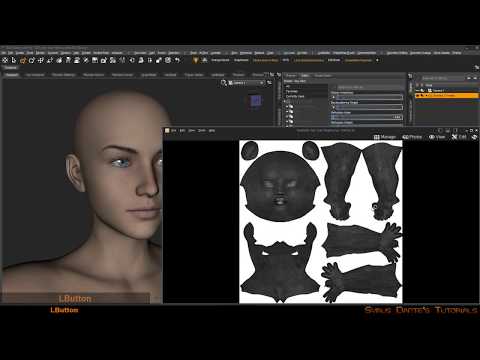
I recommend these Youtube tutorials for Blender UV mapping:
Thank you so much for your help, after going through all this info i was able to get great results(see attachment). You really helped me out, bro!
Any Bikini Morphs Out There?Its a tough one as the clothing item needs an actual morph itself to cut that close in to the body, Somtimes negative values of the generic 'expand' morph will do it, but not always.
As a rule of thumb clothing items are not permitted to touch or intersect any geometry of the figure (out of the box,) Daz sends them back for fixes if they do, as its basically considered as poke through :)
So its really at the discression of the clothing vendor to provide such morphs for their tight fitting items
four arms humanoids a good challenge for monstes artistsGlossed: Honestly, you should consider the 'take two bodies and overlap them'; the results can be pretty cool, and with creativity you can get dforce to work well for it.
ANOTHER thought I've had is presenting a system to manage body overlaps like this. Debating how viable it is.
I mean, here's G2M experiment I did a while back, before dForce, and even bare skinned it looks tolerable.
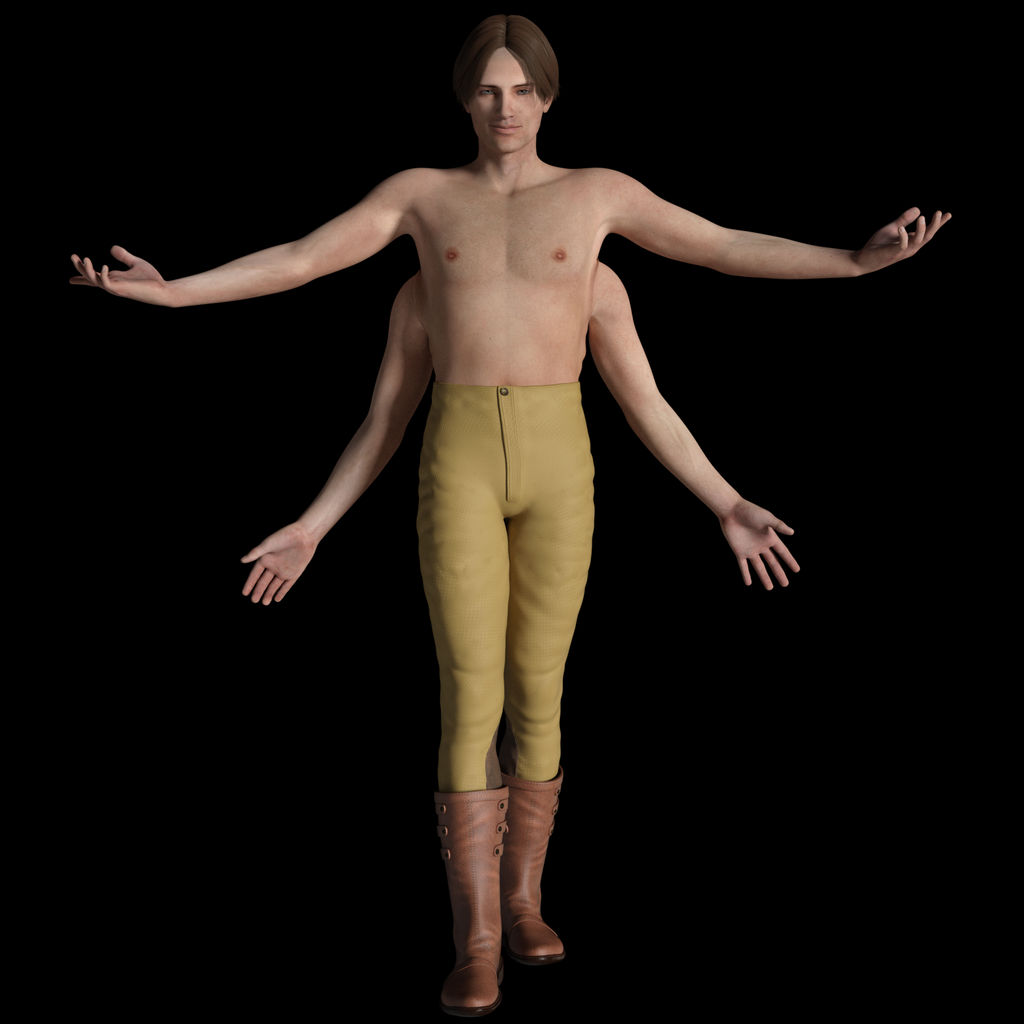
Maybe i'll give that method a try some time...it doesnt seem right but probably because you used a regular human body. The only other 4 armed characters i've ever seen are Goro and Shiva from the Mortal Kombat series and they are way more muscular and menacing. I have the EJ demon morph kits so i'll add a some muscle and tweak the body a little to make them look a bit more non-human. When the figure itself is non-human then maaybe it will be easier to accept the extra arms on there too.
Growing UP -- how you deal with skin textures?Remember that you can also apply G3 Skins textures too. Handy as Ive yet to find too many asian skins for G8 that have really impressed me, too many seem to be caucasian skins recoloured/tinted which tends to look abit off IMO. But to the vendors credit, I know this is hard to do, or else I would be doing it my self.
As for youth morph specifically, I know what you mean, For females I find some skins are not too bad, just the eye brows are usually a problem as they are often way too manacured for a kid and look unatural. and there are still few vendors offering eyebrowless skins, tends to be worse for the males though as adult body hair is an issue and there is less much less choice in store on top of that.
Hell, I pretty much buy character sets just for the Materials, I rarley find myself using the actual shapes, sometimes the head - but never the body really, since the bodies are not usually so different from many of the DazO figures, but will have no supported custom fit morphs in clothing items. - But are different enough to cause unwanted distortion :( - less of a problem with dforce though since you can use it custom fit anything - so long as you include the morph in the simulations animation.
Dforce woes with men’s clothingHave you Generic vs. Base Shape Matching smoothing? Sometimes one seems to work better than the other. I try both to see what is best. Sometimes a higher smoothing value will help, and sometimes it seems worse.
No, I haven't tried it.
If you are using heavily morphed characters, try turning down the morph before the sim and then add it during a timeline. I have found that unlike dynamic, dforce will 'stick" to any part it is touching and this cuases all kinds of issues.
Interesting. Well, it is worth a shot. Thanks for the advice.
I bought a supposedly dForce compatible dress for G8F a few days ago and will almost certainly return it because it doesn't work reliably with the dForce settings it comes with. It either gives a message 'Error perparing objects to simulate' (yes, 'perparing' not 'preparing - not critical, but a sign of lack of attention to detail) or it just crashes Daz Studio. This may be because it doesn't actually fit one of the full body morphs that it is specifically said to support without clipping the body. Got to wonder how that didn't come up in testing. This is basic stuff buyers shouldn't have to try to fix or work around.
I have experienced this too.
 Animating Water Pouring Into Cup Iray
I see that the product page suggests that it includes an adjustment for the level of water in the glass, so technically you could perhaps make incremental adjustsments as you render the 25 frames per second required for "smooth motion" as the glass fills up.
If you were lucky and you were able to adjust the lights and a reflection map "just so" then the surface of the water would likewise suggest movement because its position relative to the lights and the reflection information would be changing slightly.
Unfortunately the surface of real water is a fluid thing (sorry
 ) that is strongly affected by the speed and force of the incoming stream, so you would likely have to do at least a bit of up and down, wavy surface-like deforming on each frame, in addition to controlling the fill morph.
I have only done a bit of "water" renders in DAZ Studio, and only stills. Here is a sample of the water surface that comes with the bathroom in the small room kit. For me still water has been kind of an advanced feature; the more I try to make waves and stuff the more complicated it becomes.
Also attached, an animated cursor on an old green screen monitor. This was a huge project spanning many hours and over 250 frames of animation. Ooops, looks like the forum software still won't support animated GIF's. Try this URL: https://stelexbbs.byethost7.com/forum/images/animated-cursor.gif
hi does anyone know how to use substance painterDecide which Sudivision Level in ZBrush should become the Base Resolution Mesh in Daz Studio. Depending on the mesh Sudivision Level 6 generates way too much vertices to work with in Daz Studio. Turn down the Sudivision Level to the lowest value of 1 and export this as OBJ and use it as the Base Mesh to import into Daz Studio. Sometimes the Sudivision Level 1 is still too much or the geometry topology is not that usable in this case you can use ZRemesher to get better low poly mesh results. Next you can use the Transfer Utility and all that with the Base Mesh in Daz Studio to fit the clothing to the figure.
Then you can generate the normal maps and displacement maps in ZBrush like showen in the tutorials below. Notice that the texture maps that ZBrush generates are fliped verticaly compared to what Daz Studio uses, so you need to flip them verticaly before or after exporting to use them in Daz Studio.
Here I have a couple of youtube videos that basicly talk about the same process of how to use a low poly mesh as the base and project the high poly mesh details onto that with normal and displacement maps.
#AskZBrush - "How can I ZRemesh a model then transfer the details back?"
#AskZBrush: “How can I create a Normal Map for a model inside of ZBrush?”
Zbrush Tutorial - Displacement Mapping
Reprojecting Details in ZBrush - Top Production Tip
Full 3D Character Workflow Explained - Sculpting, Retopo &Textures
ZRemesher and Projection in ZBrush 4R7 (Transfer highpoly to lowpoly)
Full 3D GAME ASSET workflow ( Maya / ZBrush / Substance Painter )
Tranfer a morph from a figure to a clothing item?Usualy the clothing items gets the morphs generated automaticly if the auto-follow was set like it is by default. It could be that you first have to go to File>Save As>Support Asset>Morph Asset and reload the figure and/or unfit/refit the clothing before this will work.
What hair would you choose?Thanks for the suggestions.
Looks like a good choice, for a different alternative style Jolie hair with the addon one might work also:
https://www.daz3d.com/beauty-shop-for-jolie-hair
That's pretty close considering the hight of the bangs. There could be hight adjustments made to the top portion of the hair perhaps. I might add those to my wishlist and watch for a sale.
Maybe this? https://www.daz3d.com/shena-hair-for-genesis-3-female-s
There's a "raise bangs" morph, it looks like.
I think the key would be to use the same Hair Shader on both the "up" version and "down" versions. :)
That looks good too, and would probably look better with a matching shader for both hair figures. I guess parenting and sizing it to G8 would work better than trying to convert it to G8 unless I got the G3 to G8 hair converter as well.
For the moment, Bang Bob Hair is the only one on sale so I'll probably get that for now and wait to see about the others. The look of Linday's dForce hair is a nice bonus also.
Novica & Forum Members Tips & Product Reviews Pt 12I'm still playing with the new (to me) H&C (IH Kang) products I got in the sale a few days ago. I thought that pose with G8F arms raised and sharply bent would be a good challenge for a long sleeved garment. I got H&C Hoodie & Training Wear for Genesis 8 Female(s) that doesn't have dForce. I thought I'd try that. Well, it looked surprisingly good, but I thought the arm bend areas could use some improvement, so I added dForce with a dForce Modifier Weight Node to limit the dForce to the areas I wanted to use it on (the arm bend areas). Because I am using VYK Dorthie for Genesis 8 Female with a custom body morph, the breast area of the hoodie wasn't quite smooth. I fixed that with Fit Control for Genesis 8 Female(s). I added Base Shape Matching smoothing with 1 iteration. I added the lips decal from Make Me Teen for Genesis 8 Female(s). This is the result. I think it looks great. This is another product rating
 from me.
All About the Lips
 Hexagon Sculpting Internal Error! Please Help!
I was wanting to try to make a custom morph for a model in Hexagon (Hivewire Horse, in case it matters). So, I loaded the model in Daz Studio, made sure it was in base resolution and nothing else was in the scene, then used Send to Hexagon. It loaded in there just fine, but when I started to use the sculpting tools located in the UV/Paint tab, almost as soon as I went to work, I receieved an "Internal Error" message. After that, the apply, accept and abort buttons worked just fine, but I couldn't further modify the model with the brushes. Whenever I tried, the same message popped up again. I then tried re-importing the model several times and always ran into the same problem. What could be causing this? Also, even before I start actually moving stuff by clicking, when I pass over any part of the model with a sculpting tool selected, it leaves these little "image echoes" of the special cursor that mode uses all over the place. This is my first time trying these tools, but based on a video tutorial I watched, I don't think that's normal. Could this be another symptom of the same issue?
Dforce woes with men’s clothingIf you are using heavily morphed characters, try turning down the morph before the sim and then add it during a timeline. I have found that unlike dynamic, dforce will 'stick" to any part it is touching and this cuases all kinds of issues.
four arms humanoids a good challenge for monstes artistsEllessar, it's a whole lot more complicated than that approach 'look' from the consumer side of things. All PA's here are driven by sales and creating things that inspire them and feel they can bring something of value to the market. Artists do not think, "what already exists that sells well?... hmm let's make more of that stuff." Absolutely not. Some artists are a lot more dependent on sales than others depending on their living situations and income. Selling artists short because they don't seem to make more original content is missing the point of why they do what they do. Every artist should be respected because they're the ones creating and producing things, even if they don't make things you like.
Another important thing you may be missing is every PA has strengths and weaknesses and limitations on what they know how to do. Some just make clothing, other make more morphs, and so on. Some can even seem limitless. A four-armed morph for a genesis figure could only be done by a hand-ful of artitsts here at Daz and one of very nice quality even less. It is a lot of work and a very complicated process that takes a high level of knowledge of the task at hand. I think it would sell well in the store but it ultimately comes down to what artists can even pull this off, and how long would it take them. I'm pretty sure many artists would love to make something like this and many other things, but choose not to or just cannot based on their current level of knowledge and skill, not because it's something original.
yeah man please i'm not trying to not respect any any as i told i realy understand the other side aswel and know how hard is it(i have studied game design and it also take character modeling), i'm just saying which due to all things you told it can be a little problematic for both sides specially from the atists , i never told which is "easy to do", i'm just talking about when i hear that word how it make frustrated, because i'm also working on my own project and i'm trying to not make more of the same, my current project while it's still a sort of gender/category of game like a sort of fantasy game i'm still trying to make what i want not just looking into the "demand", otherwise i could be doing a total different game from what i'm doing now, i'm just point how i hate see that way to try to explain things, it's not like i don't understand peoples personnal needs and strugles and difficulties and know which somethings can ge hard and need more knowledge to work, it's just hearing only this word as a reason is really bad in my taste but for sure i can understand things.
four arms humanoids a good challenge for monstes artistsEllessar, it's a whole lot more complicated than that approach 'look' from the consumer side of things. All PA's here are driven by sales and creating things that inspire them and feel they can bring something of value to the market. Artists do not think, "what already exists that sells well?... hmm let's make more of that stuff." Absolutely not. Some artists are a lot more dependent on sales than others depending on their living situations and income. Selling artists short because they don't seem to make more original content is missing the point of why they do what they do. Every artist should be respected because they're the ones creating and producing things, even if they don't make things you like.
Another important thing you may be missing is every PA has strengths and weaknesses and limitations on what they know how to do. Some just make clothing, other make more morphs, and so on. Some can even seem limitless. A four-armed morph for a genesis figure could only be done by a hand-ful of artitsts here at Daz and one of very nice quality even less. It is a lot of work and a very complicated process that takes a high level of knowledge of the task at hand. I think it would sell well in the store but it ultimately comes down to what artists can even pull this off, and how long would it take them. I'm pretty sure many artists would love to make something like this and many other things, but choose not to or just cannot based on their current level of knowledge and skill, not because it's something original.
Daz 3D is part of

Connect
DAZ Productions, Inc.
7533 S Center View Ct #4664
West Jordan, UT 84084Licensing Agreement | Terms of Service | Privacy Policy | EULA
© 2026 Daz Productions Inc. All Rights Reserved.