-
MM DAZ-Poser The divide widens
I hear people complain their art sucks! Why does my renders look dull! My Photos don't dazzle, my painting or drawing does not evoke!! Well People, instead of buying hardware and content or using poser or daz!!!!!!! Go to the library and get some books on art composition and photography! It will teach you how lighting and composition work and some general art classes will improve your skills! You will definatly, see a huge improvement in your renders! Most artists want to express a thought or a feeling or tell a story when they show you a piece of work! Before throwing things into a scene try doing this! Oh, I like poser too by the way! I love the way superfly works great on my second hand 10-core 20-thread xeon processor! All 3D software can create great works of art! It is not the content or the software!
>>> it is the artist<<<
~Just my 2 cents
...and a very valuable 2¢.
I used to be heavily involved in traditional art media,excelled in art classes in high school and was an art major (along with music) in college with an emphasis on teaching. When arthritis began to cripple my hand to where I couldn't even draw a clean line anymore or hold a bruch for more than 10 minutes I turned to 3D CG. It is a whole new media which required learning a whole new much more technical language.
When I did a painting I didn't need to be concerned with surface settings like diffuseness, translucency, glossiness, or specularity. I just mixed my colours on the palette and painted what my eyes saw. I didn't need to know about lumens, falloff, aperture, or shutter speed to add an adequate light source, or focal range and DOF settings to accent the subject over the background. In a way it is like learning pretty much everything from the beginning all over again. Yeah composition and basic design of the setting isn't as much an issue as is continually adjusting parameters, lighting, render settings, doing a test render, adjusting again, doing another test render...etc, etc, etc.
If I want something original, I realise I have to lean how to model it, a process that is even more technical than setting up a scene. Years ago I could simply pull out out a sketchpad and work up out the concept. before using it in illustrations For example there is a type of aircraft design in my story that only exists in sketches and my mind. There are no pre made models either here or at the expensive pro stores, that even come close to it. For my SciFi story it is even worse as for the ships I designed, I would have to model each one from scratch for both exterior and interior scenes. Several of the races in the story also pose a special challenge. For example one has two opposable thumbs on each hand, another is slightly feline in nature with a thick mane of fur around the face and down the back with moveable ears and whiskers that work into the expressions. Again not difficult ot draw back when I could, but in 3D will require getting some sort of sculpting and morph generation software which also has it's own learning curve.
So in short, the tools, processes, and all the numbers involved can all have an impact on the quality of a finished work, even for someone who has a lifetime of study and experience in the "analogue" art mediums.
Problem starting a sceneOk this is what i did:
I saved my file. Closed daz studio. Played a game of anthem started Daz with the file i just saved. (so i did not delete or install something)
This is a part from my log:
2019-04-05 22:56:36.209 Saved image: C:\Users\Patrick\AppData\Roaming\DAZ 3D\Studio4\temp\d15.png
2019-04-05 22:56:36.396 Loaded image Amira_diffuse_1004.jpg
2019-04-05 22:56:36.701 WARNING: libpng warning: iCCP: known incorrect sRGB profile
2019-04-05 22:56:36.939 Loaded image Mask Arms.png
2019-04-05 22:56:36.939 WARNING: libpng warning: iCCP: known incorrect sRGB profile
2019-04-05 22:56:37.302 Loaded image Freckles5-2.png
2019-04-05 22:56:43.413 Saved image: C:\Users\Patrick\AppData\Roaming\DAZ 3D\Studio4\temp\d16.png
2019-04-05 22:56:43.418 Could not resolve : "/C:/Users/Patrick/AppData/Roaming/DAZ 3D/Studio4/temp/d6.jpg"
2019-04-05 22:56:43.419 Could not resolve : "/C:/Users/Patrick/AppData/Roaming/DAZ 3D/Studio4/temp/d9.jpg"
2019-04-05 22:56:43.419 Could not resolve : "/C:/Users/Patrick/AppData/Roaming/DAZ 3D/Studio4/temp/d7.jpg"
2019-04-05 22:56:43.419 Could not resolve : "/C:/Users/Patrick/AppData/Roaming/DAZ 3D/Studio4/temp/d10.jpg"
2019-04-05 22:56:43.419 Could not resolve : "/C:/Users/Patrick/AppData/Roaming/DAZ 3D/Studio4/temp/d4.jpg"
2019-04-05 22:56:43.419 Could not resolve : "/C:/Users/Patrick/AppData/Roaming/DAZ 3D/Studio4/temp/d5.jpg"
2019-04-05 22:56:46.635 Loaded Morph Deltas in 0 min 0.0 sec.Most interesting are the "could not resolve" errors. Does anyone have a clue where they come from? My character looks fine i dont see anything or any texture missing. Are these files realy important as they are stored in a temp directory.
secondly:
Is there a way to solve that RGB error?Thanks.
EDIT:
Forget the second issue ;)
Woo Woo! for Mr. Woo!Oh and for the person who was concerned about the side the buttons are on entirely - I checked a stack of hawaiian shirts online and by raiding the housemates wardrobe. About 9 out of 10 were on this side. Don't ask me why! I thought it was odd as well. So I made the shirt to correspond to what I found.
If this seriously bothers you the good news is the fix is pretty simple - as the buttons are rigid follow node, all you really need to do is make a single morph to swap the layering on the plackets and adjust the buttons on Z as needed. Save that as its own werable preset and then you will have both shirts to use.
About half the shirts had 'side vents' - the side seams open for about 4 inches above the hems. Theres already a vented one in the store so I went for unvented.
If you have other quesitons about any of the sets I ahve made for DAZ, remember you can always message me directly to ask.
Lyrra
Slimmest, tallest G8F BaseIt's my understanding that when creating clothing for the genesis figures you should shart with the genesis base, not a specific character. Can anyone clarify this
It's recommended to start from the base figure but it is possible to start from a morphed figure. You should not start from a figure using scaling though.
To rig an item made for a morphed figure, load your morphed figure and your item, launch transfer utility, select the morphed figure and "shape: current" for the source.
Very Useful Daz Products IMHO (Converters, Lights, Utilities, Morphs, VRAM Optimizers, Shaders etc.)Hi everyone! :D
This is the text of one of the following tutorials of my YouTube channel for beginners! I'll post a link to it when I'll actually shoot it, but until then here's what I wanted to say! I hope at least some of you will find this list useful. Please, if any useful product is missing, tell us about it: I've actually found most of these ones thanks to this same forum!
I don't know any of these creators: if a different version of the same product is not present is just because I haven't tried it in the first place!The goal of this guide is to improve your workflow and to save money in the long run!
When you start to purchase products from the Daz Store, it's very likely you'll end up with a ton of useless stuff, with the illusion to save money.
You don't need these products to learn Daz Studio, and, depending on what you want to render, you may not need some of them at all.
But if you're thinking about your first or next purchases, I think it will be useful to you to know that the following products exist: I really wished I've found a list like this one when I made my first purchases! ^^I've put between brackets the lowest price they've had in the 12 months, thanks to Daz Deals browser extension.
CONVERTERS
Genesis 8 products are often pretty expensive, but there are a lot of old clothes and hair around that would look just fine with the right shaders! Since the most supported previous generations are the Genesis and the Genesis 3 ones, here are the relative converters.- Clothing Converters (8.98+9.98+8.98+9.98$) (Genesis to G8F; Genesis to G8M; G3F to G8F; G3M to G8M)
- Hair Converters (11.37+11.37$) (G3F to G8F; G3M to G8M)
- Genesis 3 to Genesis 8 Pose Converter (9.18$)
LIGHTS
- Iray Ghost Light Kit (6.58$)
You could actually create ghost lights by yourself every time, but this kit is very quick and easy to use. - Iray Light Probe Kit (7.58$)
It seems hard to use, but it's not: add the probes to the scene, select the pose "small" or "large" room, choose what kind of light you want, and it's done. I use it in combination with the Iray Ghost Light Kit. - LI Incandescent Set (10.48$)
The best pinup light set I've seen so far. - Leonine Set (1.99$)
- UltraHD Iray HDRI with DOF domes like this one (1.99$ each, let's say 4 of these cost 7.96$)
These creators have made a lot of nice domes with decent lights. Don't waste your money on static backgrounds!
UTILITIES
- Batch Render (9.98$)
The batch render will revolutionize your experience with Daz: set your scenes, then render them altogether when you won't need your PC. - SimTenero Randomizer (10.98$)
Don't waste a ton of money buying figure after figure: with the right morph sets, you could create the perfect shape each time you'll need a new character! I prefer the original version to the 2nd one, because the latter is meant to use just a few morphs, otherwise the time to set it up is exaggerated, and you couldn't use more than 800 morphs with the 2nd version even if you wanted to. - Skin Builder 8 (24.98$)
And with this utility, you'll be able to create your figure texture! Don't waste money on LIE makeup etc.! - Genesis 8 UV Swap (5.23$)
Skin Builder 8 only works with Females. But you may save your new skin textures and load them on your male figures! This tool simply makes this process work better. - Fit Control For Genesis 8 Bundle (17.98$)
To give your clothes a more realistic fit. Be careful: it's not automatic, you'll have to apply each morph by yourself! - Look At Me Pose Control (13.18$)
This will save you a lot of time: it allows you to make a character look at the camera, at another character or at an object. - Shape Rigger Plus (11.98$)
You probably don't need this, but I wanted you to know that there's a way to use your morph on a different figure, where by default you'd have strange deformations. - Pose Architect (13.48$)
Power Pose has made our lives a lot easier in posing our characters. Pose Architect makes it even easier! There are a lot of well-organized sliders to move a part of your character's body, but the special thing is that, when you'll move something with those sliders, its entire body will move, giving you a very natural-looking final pose!
MORPHS
These morphs sets are basically all you need to create a customized figure shape.- 200 Plus Head and Face Morphs Bundle for Genesis 8 (12.78$)
- RareStone's Face Morphs Collection (7.18+8.80$) (G8F and G8M)
- Shape Shift Bundle for Genesis 8 (17.98$)
- Daz Original Morphs (5.03+5.03+5.59+5.59$) (G8F Body and Head, G8M Body and Head)
- Growing Up For Genesis 8 Bundle (11.18$)
This Growing Up bundle and the following Aging Morphs will save you money, because you won't have to buy younger or older figures! I always suggest to directly buy the bundles when they're on sale, because if you buy the female one there's a good chance you'll need the male one too someday, but they cost a lot more if bought separately. - Aging Morphs For Genesis 8 Bundle (15.98$)
VRAM OPTIMIZERS
You won't need these if you have a great GPU.- Scene Optimizer (9.98$)
It basically lets you reduce your texture size, with the option to make and to restore a backup. You could also remove maps. - Iray Memory Assistant (10.98$)
Have you ever wondered if a specific scene will fit in your VRAM? IMA will let you know. - Resource Saver Shaders Collection (7.98$)
I mostly use this to remove maps and for some shaders.
SHADERS
- ColorWerks Hair Shaders (9.98$)
The best set of hair shaders IMHO. Don't waste money buying hair colors: this has hundreds of them. - Basically anything from JGreenless (2.79$ each, let's say you'll take 10 of them for a total of 27.90$)
Don't waste money on clothes textures! Here you'll find cloth, leader, shiny etc. shaders, and you'll be able to customize each piece of clothing. You could also "restore" old outfits.
TATTOOS AND PIERCINGS
You could actually create every tattoo yourself. But if you want to buy some, always pick L.I.E. ones, because you'll basically be able to use them on every figure!
- Teensy L.I.E. Tattoos for Genesis 3 and 8 (3.99$)
- Tattoo for Genesis 3 Female (4.79$)
- Tatt's All Folks! (11.97$)
Be careful: this set works differently! It doesn't have a fixed position, but you'll be able to move those tattoos around. The problem is that they won't stick to the skin, and so you'll need to set up rigid follow nodes to make them stay in position when you change the pose, and when you'll overlap a limb over that body part the tattoo will move to the more superficial part. - Alternative Piercing Pack for Genesis 8 Female (5.69$)
CLOTHES
These are just some examples of clothes bundles, but you can pick any outfit you want!- dForce Casual Closet for G8F (8.39$)
- dForce Multi Dress System for G8F (13.98$)
- dForce Casual Closet Skirt Collection for G8F (6.95$)
EXPRESSIONS
My favorite expressions are the ones from JWolf, but there are a lot of sets available in the shop.- 100 Must Have Expressions Volume 2 for Genesis 8 Female (7.18$)
100 expressions are really a lot, and this set may have every female expression you need. Don't bother with the 1st volume, I think it's older and much less "expressive". - Male Sets (6.28+4.19+4.19$) (My Rules, Strong Man and A Gentleman)
- Female Sets (1.99+1.99+6.28+4.19$) (Elegance, A Famous Woman, Feelings and Brave Girl)
OTHERS
- Unisex Jewelry for Genesis 8 (6.28$)
If you need some jewelry, these two sets are a nice start. There are many equivalent ones on the store. - ES Jewelry Collection (7.98$)
- CC Beard Boss (12.48$)
Don't waste money on beards! This set is customizable to give your figures every beard you'll want. - CC Shave This (12.48$)
This product is not necessary, but it may be useful to give an even more realistic appearance to your male characters. - Alt Style Glasses For Genesis 8 (6.98$)
All the eyeglasses you'd probably need. I find the default clear glass too reflective, so I usually swap it with the default clear glass shader.
In the end, all these products together cost 411.83$ (at their lowest price in the last 5 months).
I'm gonna repeat myself: you probably don't need them all, and they're not necessary to learn Daz Studio. But, if you're going to buy something anyway, these are the product I feel more confident to suggest to you!
I'd set a price notification for each item with the Daz Deals browser expansion, and I'll try to combine those deals with the Platinum Membership (coupons, more discounts), with specific events (like March Madness or Anniversary Sales) and with the Gift Card sales: this way, with a lot of patience, I'm confident you'll be able to get everything for around 300$!
Then just add whatever nice outfits (either from Genesis 8, 3 or 1) you prefer, hair and environments (check out i13 sales) and you probably won't need anything else! :DOh, I almost forgot: if you're new to Daz Studio, and you want to use new stuff without spending a single cent, there's a Wikipedia-like website that categorizes every freebie available on the web: PoserDazFreebies
PS: if you think these products are bad, or if you simply prefer to use other ones or to model stuff by yourself, feel free to share with us your experience: every discussion is a chance to grow, and thanks to these same discussions I've found out about those products in the first place! :D
Recapping, here are all the links:
https://www.daz3d.com/rssy-clothing-converter-from-genesis-to-genesis-8-female
https://www.daz3d.com/rssy-clothing-converter-from-genesis-to-genesis-8-male
https://www.daz3d.com/clothing-converter-from-genesis-3-male-to-genesis-8-male
https://www.daz3d.com/hair-converter-from-genesis-3-female-to-genesis-8-female
https://www.daz3d.com/hair-converter-from-genesis-3-male-to-genesis-8-male
https://www.daz3d.com/genesis-3-to-genesis-8-pose-converter
https://www.daz3d.com/iray-ghost-light-kit
https://www.daz3d.com/li-incandescent--portrait-lighting-for-iray
https://www.daz3d.com/ly-leonine-pro-hdr-lighting
https://www.daz3d.com/ultrahd-iray-hdri-with-dof-seaside-resort
https://www.daz3d.com/batch-render-for-daz-studio-4-and-rib
https://www.daz3d.com/simtenero-randomizer
https://www.daz3d.com/skin-builder-8-for-genesis-8-females
https://www.daz3d.com/genesis-8-uv-swap-male-and-female-base
https://www.daz3d.com/growing-up-bundle-for-genesis-8-female-s-and-male-s
https://www.daz3d.com/aging-morphs-bundle-for-genesis-8-female-s-and-male-s
https://www.daz3d.com/fit-control-bundle-for-genesis-8-females-and-males
https://www.daz3d.com/look-at-me-pose-control
https://www.daz3d.com/200-plus-head-and-face-morphs-bundle-for-genesis-8-female-s-and-male-s
https://www.daz3d.com/shape-shift-bundle-for-genesis-8-female-s-and-male-s
https://www.daz3d.com/genesis-8-female-body-morphs
https://www.daz3d.com/genesis-8-female-head-morphs
https://www.daz3d.com/genesis-8-male-body-morphs
https://www.daz3d.com/genesis-8-male-head-morphs
https://www.daz3d.com/scene-optimizer
https://www.daz3d.com/iray-memory-assistant
https://www.daz3d.com/resource-saver-shaders-collection-for-iray
https://www.daz3d.com/colorwerks-hair-shaders-for-iray
https://www.daz3d.com/jgreenlees
https://www.daz3d.com/teensy-lie-tattoos-for-genesis-3-and-8
https://www.daz3d.com/tattoo-for-genesis-3-female-s
https://www.daz3d.com/tatts-all-folks
https://www.daz3d.com/alternative-piercing-pack-for-genesis-8-female
https://www.daz3d.com/dforce-casual-closet-for-genesis-8-females
https://www.daz3d.com/dforce-multi-dress-system-for-genesis-8-females
https://www.daz3d.com/dforce-casual-closet-skirt-collection-for-genesis-8-females
https://www.daz3d.com/my-rules--expressions-for-genesis-8-male-and-christian-8
https://www.daz3d.com/strong-man--expressions-for-genesis-8-male-and-the-brute-8
https://www.daz3d.com/a-gentleman--expressions-for-genesis-8-males-and-edward-8
https://www.daz3d.com/elegance--expressions-for-genesis-8-female-and-penny-8
https://www.daz3d.com/a-famous-woman-morph-dial-expressions-for-stephanie-8
https://www.daz3d.com/feelings--expressions-for-genesis-8-female-and-bridget-8
https://www.daz3d.com/brave-girl--expressions-for-genesis-8-female-and-mei-lin-8
https://www.daz3d.com/unisex-jewelry-for-genesis-8-males--females
https://www.daz3d.com/es-jewelry-collection
https://www.daz3d.com/cc-beard-boss-for-genesis-8-males
https://www.daz3d.com/alt-style-glasses-for-genesis-8-males-and-females
https://www.daz3d.com/pose-architect-for-genesis-8-females
https://www.daz3d.com/rarestone-s-face-morphs-collection-for-genesis-8-female
https://www.daz3d.com/rarestone-s-face-morphs-collection-for-genesis-8-male
https://www.daz3d.com/cc-shave-this--body-hair-for-genesis-8-males
https://www.daz3d.com/shape-rigger-plus
https://www.daz3d.com/100-must-have-expressions-volume-2-for-genesis-8-females
https://www.daz3d.com/iray-light-probe-kitAiko3 realistic, aiko19 shape for G3F/aiko7!i a big fan of the aiko2/hiro3 realistic morph.
would like for aiko7.
 Need help to find particular product "pull shirt off/over"...
I'm pretty sure i bought a shirt with a morph or a mesh "pull shirt off or over" months ago as seen in attached pic.
Maybe not that "high" but at least till the neck. Maybe even over the head and behind...
Got distracted and never tried it out. Now i need it and can't find in my huge library ;-(
Any ideas/hints what that could have been?
V4 clone to G8F clothing questionsSo a little back story I guess makes sense.
I'm an old poser user who is trying to consolidate my poser content into one great big resource for DAZ, (i'm trying to drop Poser, no particular gripe, I like the program just don't see a reason for 2 applications that do the same thing.) ((I know I know, Poser does things that Studeo doesn't and visa versa, really just not going there, I decided to switch to Studeo for now so that where this is all comming from.))
Anyway, I have Victoria 3 content that there was nothing wrong with, works great, and then Victoria 4 came along, and it took a while but everyone dropped Vicky 3 like a hot potato, there being essentially no more updates or progression with her or the various items made for her. And then (tada sound) Clothes and texture converters... yay!
But these only took things up to Vicktoria 4.
Enter Genisis, and the progression becomes much quicker, but is basically the same story... Older items, huge sellers or not, get dropped as soon as the new characters come out, there is a mad rush to get product out for them, but the OLDER content is just left behind. I am well aware of and understand the marketting aspects behind this, but somewhere someone needs to recognise that I as a user have spend 100s if not thousands of dollars on content over the years, all of which is more or less useless because Everything is off of G8F now. I mean let's face it, even Victoria is no longer anything more than a G8F morph character.
Please understand I am NOT knocking any of the previous characters, nor the current ones. I am simply trying to figure out how to consolidate my DAZ/Poser directories, get all my content into one drive and potentially start making images again...
Rigging/Weight map Issue? Not sure what to do here.Why not converting the V4 figure to genaral weightmap to use the Transfer Utility like suggested? The default Transfer Utility settings should work.
Edit>Figure>Rigging>Convert Figure to Weight Mapping
Instructions for using the texture atlasWith a bit fumbeling around I once figured out how Texture Atlas works.
Unfortunatly there is an issue with the "new" - how it is called? UDIM UV layout if you try to use it on Genesis 3 and 8 figures but this coudn't stop me from using it.
Richard explained a good workaround it in this thread: https://www.daz3d.com/forums/discussion/217276/texture-atlas
I didn't know but as descriped its sounds easy: you export the genesis 3 or 8 figure once as OBJ with the "Collapse UV Tiles" option checked. This eleminates the UDIM UV layout issue once you load this Collapse UV Tiles OBJ as a new UV Set on that you can use the Texture Atlas as usual. Then in the end you just need to remember to only save the UV Set Asset that Texture Atlas has generated.
Lately I've used it on genesis 8, made screenshots and planed a tutorial on how I managed to workaround the issues I had. I've used Blender to fix the mess Texture Atlas did with the UDIM UVs at first.
Since Genesis 2 I've used Texture Atlas for one thing, to turn the character textures into what I called Low-Res UVs. With the Face and Torso, Legs and Arms Surfaces all on one texture map. See the attached screenshot.
Or Skin-Lips-Nails Low-Res UVs for Genesis 3 and 8 because only those surfaces are affected by the rearrangement. Actualy I've invented this method to tweak skin colors all in one go in an image editor like Photoshop.
I called it Low-Res UVs because I wanted to reduce the texture resolution by using a 4k map so every surface like Face and Torso gets 2k resolution. What I haven't tried yet is to use 8k maps on these UVs, in theory you wouldn't loose any detail with the 8k texture resolution.
So finaly I thought using Texture Atlas would be best showen in a video and here it is. This is not realy a tutorial like seen elsewhere because I don't explain everything and I work fast. Maybe its more for advanced users but hey its an advanced issue anyway. In the end I realize I made the mistake and forget to add the EyeSocket surface keep that in mind if you try it yourself. Because of the nature of skin textures this video containes nudity.
DazStudio LowResUVs G3F - Youtube
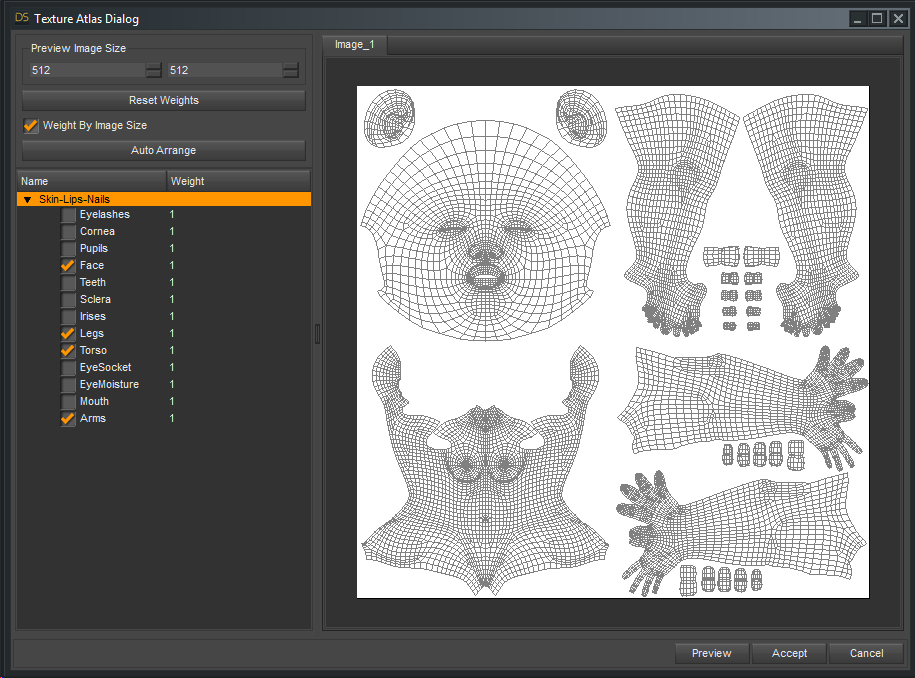
This video shows how I used the Texture Atlas to create all-in-one texture maps and UVs for Genesis 3 Female.
I start with a character texture set Ronya HD for Victoria 7. https://www.daz3d.com/ronya-hd-for-victoria-7
I show the whole process how Texture Atlas will create the new UV Set and convert the textures. Then I save the UV Asset and a Material Preset of the result.
In the second part I show you how to use the Map Transfer to convert other character textures to the new UV set. This time I used the character GND Darla from this other site.
I hope this is useful information to you.
Syrus_Dante
Sexy Stewardess Outfit for Genesis 8 FemaleIf i were trying to put together a 'realistic' flight attendant outfit I would buy Kobamax's dForce G8F Vest for G8F or dForce G8F suit for G8F on Rendo. The first one has a vest and second one has a blazer. Then from there i would look for Freebies for a scarf and put some pilots wings or a nametag. You could buy those things but when i kitbash i dont like buying this product, buying that product and buying that other product. Another alternative is for the smaller items just make it with Blender and GIMP and import it to Daz3ds and use my own texture and one of the free generic Daz shaders. If its a small clothing item that isnt going to be in a close up thats what i would do.
Otherwise if i wanted to try making that Sexy Stewardess Outfit for G8F work i would put a t-shirt on her and mess with the collisions so that it doesnt clip through the outfit. That will cover up her cleavage. Then get rid of the garters and put some black tights or pantyhose on her. And instead of high heels i would just put her in some flats or low heels. Or just dont add in the heel morph for the shoes that come with the outfit and delete the geometry for the heels.
Gooey Gum that stretches when stepped on?Don't know of a rigged version, but this product has options that would work great for a still render if resized https://www.daz3d.com/slime-attack-vol-1
This has some dforce options that might work also https://www.daz3d.com/sy-splats-drips-and-splatters-for-dforce
I second the slime attack. I own that product and it's very good for things like that. Easy to resize and comes with a lot of textures.
Do the slime attack props morph, so that it stretches?
Cat 8 & More Dog 8 BreedsI still really want a chihuahua and a terrier would be nice too. I also like mutts.
I think mutts would be awesome!
Mutts could be easily solved by a general morph pack that includes varied dog traits. Just like G8 human figures have face and body morph packs.
Dog Randomizer lol :)
I'm not on my render computer so I can't try it out, but this might already do that: https://www.daz3d.com/simtenero-randomizer
Woo Woo! for Mr. Woo!Mr. Woo "Out of the Box" but with his Translucency Medium setting. I love this facial hair he comes with! The whiskers look great, imo! :)
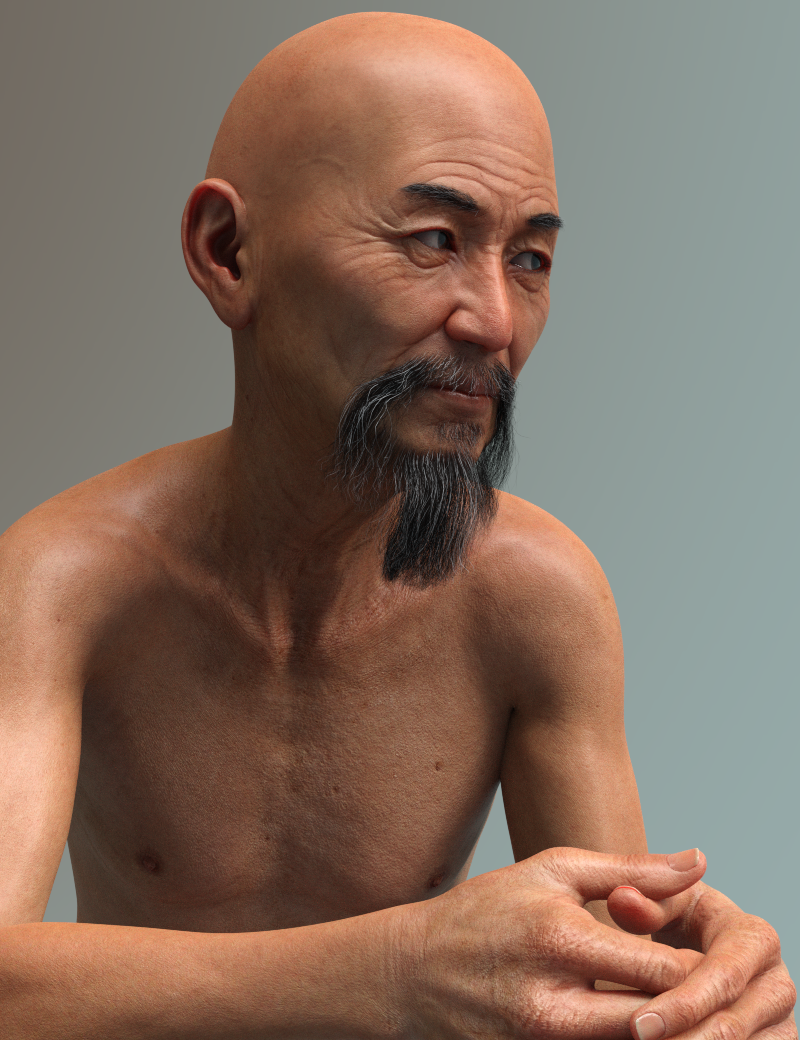
Is this with the HD morph?
Also, can we get an official word about the vacation outfit from Daz? This seriously needs to be fixed. How did this get through?
No, that's just the base Mr. Woo.
I don't have the outfit, so I can't check. However, a lot of the recent dForce clothing have the buttons that aren't part of the mesh and can be moved. If this shirt is the same (and judging by the clay render - see how the buttons aren't clay - it looks like it might be set up that way as well) then it would be easy to move the top button over to the correct side. I can't guarantee that the shirt's buttons are set up that way, but it does look like that might be the case judging by the promos.
1st - Mr Woo ... wow.. he looks very good. If I may, his chest appears to be a bit chalky or something? might be my monitor....
The shirt ... is it possible to open it? That would take care of that button deal ...Cat 8 & More Dog 8 BreedsI still really want a chihuahua and a terrier would be nice too. I also like mutts.
I think mutts would be awesome!
Mutts could be easily solved by a general morph pack that includes varied dog traits. Just like G8 human figures have face and body morph packs.
Dog Randomizer lol :)
Woo Woo! for Mr. Woo!Mr. Woo "Out of the Box" but with his Translucency Medium setting. I love this facial hair he comes with! The whiskers look great, imo! :)
Is this with the HD morph?
Also, can we get an official word about the vacation outfit from Daz? This seriously needs to be fixed. How did this get through?
No, that's just the base Mr. Woo.
I don't have the outfit, so I can't check. However, a lot of the recent dForce clothing have the buttons that aren't part of the mesh and can be moved. If this shirt is the same (and judging by the clay render - see how the buttons aren't clay - it looks like it might be set up that way as well) then it would be easy to move the top button over to the correct side. I can't guarantee that the shirt's buttons are set up that way, but it does look like that might be the case judging by the promos.
Woo Woo! for Mr. Woo!Mr. Woo "Out of the Box" but with his Translucency Medium setting. I love this facial hair he comes with! The whiskers look great, imo! :)
Is this with the HD morph?
Also, can we get an official word about the vacation outfit from Daz? This seriously needs to be fixed. How did this get through?
 OBJ file won't show properly in Zbrush
Zbrush by default shows geometry single sided. There is a button under Display Properties that is labeled Double (Sided) to switch that. I don't know if its actualy changing the geometry or if its just a change in preview, propably its the second because its listed under Display Properties.
But the current issue you see comes from the so called Normals that got somehow inverted. Now you see the inside but not the outside of the geometry - very confusing.
Maybe do a second OBJ export and check the Daz Studio export options - they should look something like this:

The Normals are saved for every vertex and beside of other things it tells the 3D programm which side is outside and which side is inside if it is set to be single sided.
I don't think there is a smooth shaded preview in ZBrush. If you want to have the geometry looking smooth go to the tools pallet and under Geometry press the Divide button once (Ctr+D) with Smt (smooth-subdidisions) option checked. Then sculpt your morph or whatever and before exporting turn down the SDiv slider (Subdivisions / mesh resolution) back to base level in the Geometry pallet.
With Subdivision level one in ZBrush you see the same smoothed mesh resolution as you see the figure in DazStudio with High Res and SubD preview level one settings.
I Forgot What My Complaint Was - Complaint ThreadComplaint: Well, after crowing yesterday about how good the road westward toward the city was, today I hear all this noise outside my window, down on the road and see that they've blocked off one lane again.
 I had to make an unscheduled trip uptown today so I observed what they were doing to the road. Apparently they've burned and cut back thorns and scrub brush and little trees along the hillside outside of town and are grading and repairing the roadside berm and ditches. Then later in the day I had to make an infrequent trip southward from my town and discovered that the south road didn't fare so well during the winter and it's a good thing I wasn't carrying a keg of beer or nitroglycerin.
 Non-complaint: Several months ago my monitor on my primary computer suddenly died. Arghhh...
 But I had a spare that I stole from my secondary computer, and I retired the malfunctioning one to the kitchen closet. I hated to think about discarding it because it was a nice older monitor 1080P, metal frame, lots of tilt adjustment, deeply curved stand designed to let me park my keyboard directly under the monitor when not in use. Yeah it was over 8 years old but still worked great up until it died. So it sat for many months sleeping in the closet. Today I took it to the trash transfer station to get rid of it and discovered that what used to be free disposal is now $15 per monitor or TV, regardless of size. I said "to hell with that, I'll store it till I die". But after I got home I wondered if there was any repair possible on the monitor so I made that southerly trip (mentioned above) to the nearest PC hardware repair people and asked. She did a couple tests on it and said, "well, it is working but your backlighting is dead, so depending on what's broke in the backlighting circuits I might be able to fix it." Yay! I may get my old friend back to life.
 So, in the next few days I'll know if it's worth throwing money at.
  Cat 8 & More Dog 8 Breeds
I still really want a chihuahua and a terrier would be nice too. I also like mutts.
I think mutts would be awesome!
Mutts could be easily solved by a general morph pack that includes varied dog traits. Just like G8 human figures have face and body morph packs.
Daz 3D is part of

Connect
DAZ Productions, Inc.
7533 S Center View Ct #4664
West Jordan, UT 84084Licensing Agreement | Terms of Service | Privacy Policy | EULA
© 2026 Daz Productions Inc. All Rights Reserved.