-
Transfer Utility never works
Of course I tried to use the Transfer Utility (see my first post) and it did not work. I watched a video of Kelvin Jin (
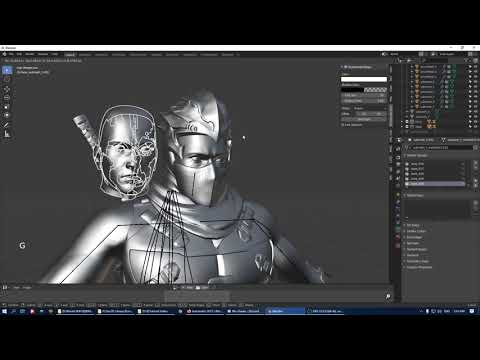 ) as crosswinds suggested and in it he positioned the clothing with bones to the G8 form before exporting it to DAZ - besides meanwhile I got the bones and all as in this video but when I import the obj.file into DAZ I only get boxes ...
I am close to kicking DAZ into the trash can
 Bulk delete, or edit away, "blank" entries in the Content Library Product listings
I don't know why, but I have hundreds of blank "products" in my Content Library Product listings. The relevant products have been unistalled in DIM, but their listing remains in the Product listings, only now there is nothing to find. My strong sense is that looking for this missing stuff is really slowing the Product listing down. I am also getting the following type of message every time I click through to expand a product listing alphabet group:
2023-11-11 22:16:02.054 [WARNING] :: D:\DAZDevel\Hudson\HUDSON_HOME\jobs\NB_Studio_Trunk\workspace\src\sdksource\cloud\dzcloudtasknotifier.cpp(184): Could not adjust thumbnail path from support path: /Runtime/Support/DAZ_3D_11222_Wolf_by_AM_StudioCF.dsx
It is possible to delete these entries (eg Wolf by AM StudioCG) using the Content Library menu items, BUT this is incredibly slow to action and then smashes the tree down to the base level and re-opening eg "W" takes an obscene length of time, eg 60 seconds.Is there a way to eg
- Go to some other interface or to some location and delete away these rogue product references: or
- Do some sort of bulk delete of these entries from within the Content Libaray interface (which appears to allow just one item to be selected at a time).
FWIW, I have condensed the Content DB a number of times, and this does not fix the issue and I have re-imported metadata a number of times and this also does not fix the issue.
Looking forward to any good suggestions.
ARKIT Facial mocap in Blender is here NO IPHONE reqrdPadone said:
This is just to add that diffeomorphic already can import livelink mocap to facs, so you just grab the landmark csv. Thank you Wolf for this nice video that is very complete since it also shows how to edit and mix the mocap within blender, that's not always obvious.
Thanks
@PadoneI have not updated my diffeo in a quite a while (Still on 1.6.2)
So I do not have that FACS panel to import live link data soI updated to 1.7 and now it works with G8.1 or higher
ARKIT Facial mocap in Blender is here NO IPHONE reqrdThis is just to add that diffeomorphic already can import livelink mocap to facs, so you just grab the landmark csv. Thank you Wolf for this nice video that is very complete since it also shows how to edit and mix the mocap within blender, that's not always obvious.
There's Always Another Sale Thread -- Discussions Only Pt 2Vendors don't supply the metadata, that is a purely DAZ responsibility.
There's Always Another Sale Thread -- Discussions Only Pt 2lou_harper said:
jjoyner said:
I bought the motorhome this morning and just installed it with DIM. Strange thing is that it did not show up in Smart Content. When I tracked it down in the mapped folders in the Content Library, I discovered that the product had no metadata to establish file type or categorization nor had a product been created in order for it to show up in Smart Content. Easily fixable but …
Have you reported it? They should do an update.
Lou,
No, I didn't report it. Fixing the metadata issue was not difficult but I thought that it was a bit strange in that I've bought two other Xivon product (presuming that Xivon is part of Absolute Studios) in the past month and did not have this issue with either of them.
Remixing your art with AIArtini said:
Yes, they have vertex colors, when exported as .FBX
Daz Studio cannot read such files directly, so I convert them to .OBJ in Blender.
well then you import them into Zbrush, UV map them with UV master, subdivide and create texture from vertex colours
reduce the subdivision back to the original after creating the map
There's Always Another Sale Thread -- Discussions Only Pt 2jjoyner said:
I bought the motorhome this morning and just installed it with DIM. Strange thing is that it did not show up in Smart Content. When I tracked it down in the mapped folders in the Content Library, I discovered that the product had no metadata to establish file type or categorization nor had a product been created in order for it to show up in Smart Content. Easily fixable but …
Have you reported it? They should do an update.
There's Always Another Sale Thread -- Discussions Only Pt 2I bought the motorhome this morning and just installed it with DIM. Strange thing is that it did not show up in Smart Content. When I tracked it down in the mapped folders in the Content Library, I discovered that the product had no metadata to establish file type or categorization nor had a product been created in order for it to show up in Smart Content. Easily fixable but …
What the hell is Gordig doing now?Sven Dullah said:
Gordig said:
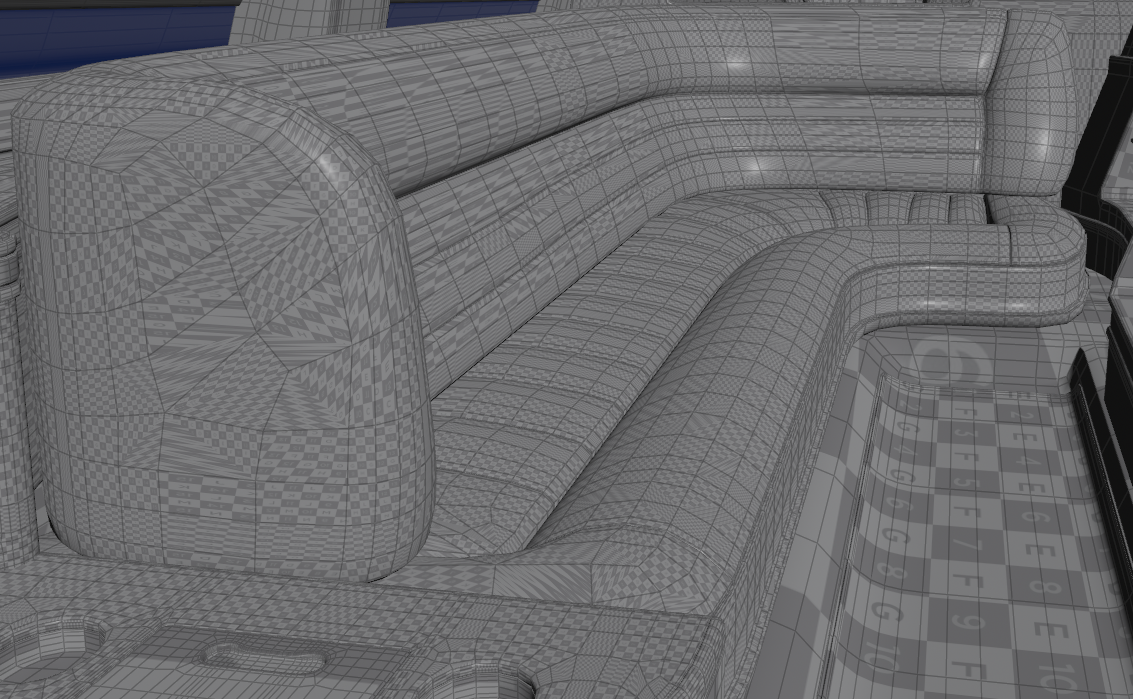
Quick and dirty render of an incidental character, a crime boss who gives the team a mission. After all the time I spent setting up the limo, I'm not sure how usable it's going to be due to UV and scaling issues. I guess if I just hacked together my own upholstery I could make it work, because even after trying to make a usable UV map out of the seating, it still looks pretty gross.
Could you ellaborate on the matter of UV issues, please? Was the limo UV-mapped or did you do it after import? I'm just trying to picture all the rabbit holes I'll fall into, if and when I decide to expand my digital universe...
I'm using Polish's Long Luxury Limo. This is what the UV of the upholstery looks like when I import it into Houdini:
And here it is after using Houdini's AutoUV SOP:
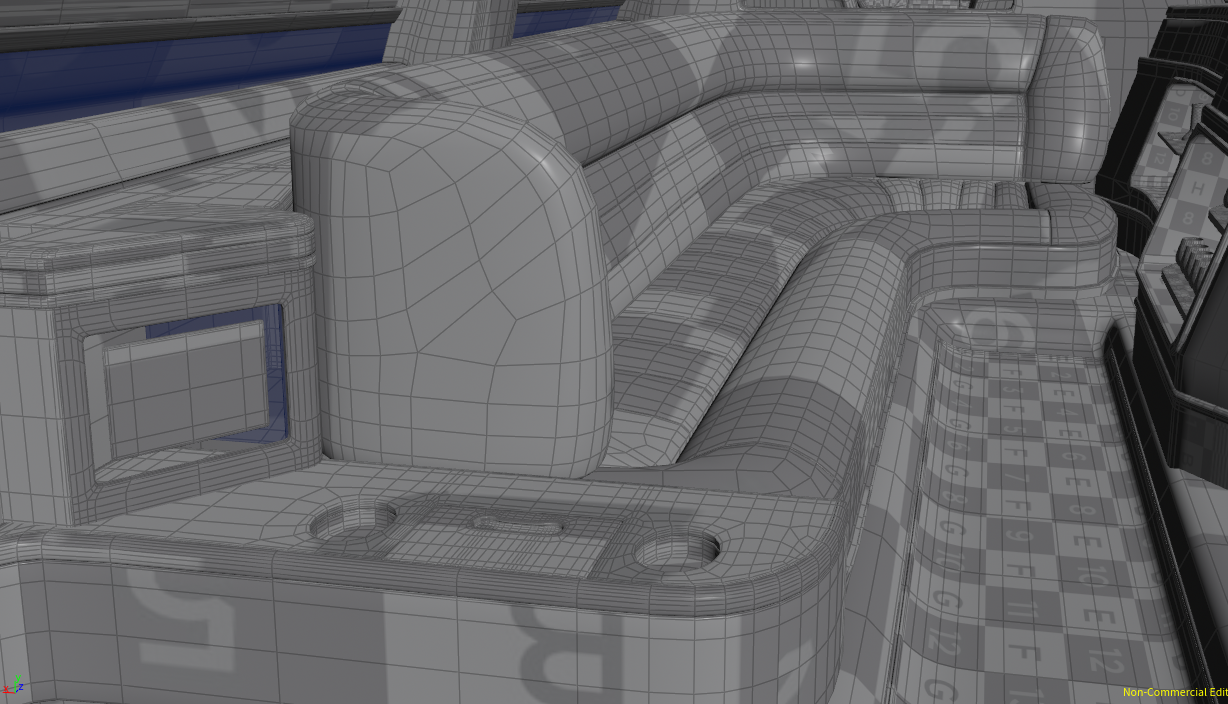
Neither is ideal, but the AutoUV makes it much less chaotic, and better results than the other SOPs I've tried. I could always manually UV it, but I would just about rather die. Somehow the section takes a material alright in DS, where the UV looks like this:

I haven't spent much time with it in DS, so I haven't tried other materials, but I can't see how it would work.
That subway car in Arnold looks fabulous, btw. Also, nice bunch of characters;)
Thanks!
What the hell is Gordig doing now?Gordig said:
Quick and dirty render of an incidental character, a crime boss who gives the team a mission. After all the time I spent setting up the limo, I'm not sure how usable it's going to be due to UV and scaling issues. I guess if I just hacked together my own upholstery I could make it work, because even after trying to make a usable UV map out of the seating, it still looks pretty gross.
Could you ellaborate on the matter of UV issues, please? Was the limo UV-mapped or did you do it after import? I'm just trying to picture all the rabbit holes I'll fall into, if and when I decide to expand my digital universe...
That subway car in Arnold looks fabulous, btw. Also, nice bunch of characters;)
How do I fix this Daz Studio mesh seam problem? [Solved]How do I fix this Daz Studio mesh seam problem? I did not post this in the Blender forum because Blender is working fine.
The problem originated in Daz.
The white image is from Daz Studio auto fit Gen 8 male to Gen 9.
The red Image is from Blender. After the import through Diffeomorphic to Blender for some reason the seams were fine in Blender, there was just the poke through left to contend with.
The white image is from Daz before the morphs were applied from sculpting in Blender. Before I took this (through diffeomorphic) into Blender the seams had distortions and there was poke through in places. When I took it into Blender the seams were smooth for some reason so the only places I needed to sculpt was the poke through on the clothing. After the morphs were applied from Blender there was no longer any poke through in Daz, but the distorted seams were not repaired by the morphs in Daz only the poke through was fixed.
And help on this would be greatly appreciated. Thanks!
Oh and I tried to crank up subD and change Sub D parameters in Daz, it would not fix the seams.
I tried exporting it in base and high resolution, no difference.
Importing geoshells into UE 5.xmilliethegreat said:
If not making my own materials thank you very much mrpdean_7efbae9610! I'm also not making any games in UE. I'm rendering still images in UE.
Saying you want to render in a particular application but refusing to learn even the basics of how it's material system works makes no sense to me.
Is there a pipeline to convert maybe the whole character with the geoshell to a form UE can import?
Off the top of my head, I can think of one pipeline for getting the complete figure with geoshell into UE but it also won't auto-magically set up the nessecary materials for you so I'll leave it at that.
Diffeomorphic 1.6.2 characters in 1.7I've been using Blender 3.5.0 with Diffeo vers 1.6.2 to import my characters (with an MHX rig).
I recently installed Blender 4.0 with Diffeo vers 1.7.1 and tried to open .blend files of my existing characters made with the Blender and Daz plugin version mentioned above.
Trying to pose any of my MHX rigged characters causes Blender 4.0 / Diffeo 1.7.1 to crash. Will all my existing characters previously imported with 1.6.2 not be compatible with 1.7.1?diffeomorphic texture scaled downedPadone said:
The error for multires is a limitation in blender. The multires modifier can't always unsubdivide correctly, so when this happens it means the HD mesh can't be imported as multires. You can import it as base mesh or true HD, meaning HD without multires. Then you may want to update to blender 3.6.5 and diffeomorphic 1.7.2 for more stable versions.
Thank!
Importing geoshells into UE 5.xIf not making my own materials thank you very much mrpdean_7efbae9610! I'm also not making any games in UE. I'm rendering still images in UE. I have a geoshell for veiny breasts for g9 I want to use too. Is there a pipeline to convert maybe the whole character with the geoshell to a form UE can import? Maybe export to blender in fbx and/or convert it to obj and reimport and auto rig and pose it it in Daz and then import it in UE? I forgot who suggested that but someone suggested that to me.
Modify Daz character rig for Unreal skeletonMade a G8 char, exported with DazToUnreal, it looks well for a first import, I have all JCMs, but I'm missing the Genesis8JCMPostProcess blueprint, I see only Genesis81ArKitExample and Genesis8FaceFXexample when I try to open the Post Process Anim Blueprint.
I enabled the Engine Content and Plugin Content.
What do I need to do in order to have the Genesis8JCMPostProcess? Thanks!
Genesis 2 Female Missingiruizapo said:
Hi.
I've updated the software and also couldn't find the Genesis 2 Female base figure in my Smart Content. Did also the Reimport Metadata but nothing.
But checking manually I found it here: Smart Content -> Scene Builder -> Genesis 2 Female Base
That is a folder on disc or a category?
Seems they moved it there, at least in my computer. And is weird because the Male version appears where it has been always, under the Figure section.
question for the Wrap app usersMore or less the last point is right, not so stable in Wrap, especially when the mesh topology / resolution are different, and there're usually some intersection as well. So no worry, just import back to DS and test the result.
Genesis 2 Female MissingHi.
I've updated the software and also couldn't find the Genesis 2 Female base figure in my Smart Content. Did also the Reimport Metadata but nothing.
But checking manually I found it here: Smart Content -> Scene Builder -> Genesis 2 Female Base
Seems they moved it there, at least in my computer. And is weird because the Male version appears where it has been always, under the Figure section.
Daz 3D is part of

Connect
DAZ Productions, Inc.
7533 S Center View Ct #4664
West Jordan, UT 84084Licensing Agreement | Terms of Service | Privacy Policy | EULA
© 2026 Daz Productions Inc. All Rights Reserved.