-
G8F morph Bug [ Resolved ]
Hello,
Thank you for your quick reply.
I flew over the Shaping in the G8F Parameters tab and saw some of the assets, I would look at it more closely tomorrow (10: pm here ;) ). Thank you and I'll let you know.Edit : I finally found the problem. A Morph entitled Alien Head, Alien Torso and Alien Torso and legs. I did not succeed in the lock so I deleted the files and G8F works properly. Thank you.
Cordially.G8F morph Bug [ Resolved ]Please make sure you switch the Viewport to Smooth Sahded mode before taking a screen shot of a nude figure.
This is an issue with an add-on character - it has been saved with a non-zero default value. If you go to the Parameters pane and look at the Currently Used group the morph involved should be listed - just zero it. If it's a store product please report this as a product bug, if it's a freebie you can try contacting the maker to get it fixed or you can remove it or you can save a corrected version of that morph: click the gear icon on the slider and select Parameter Settings, chnage the Default Value to 0 and click Accept, File>Save As>Support Assets>Morph Asset, select just the morph in question, and use the same vlaues for Author adn Product as the original so that it overwrites.
G8F morph Bug [ Resolved ]Hello,
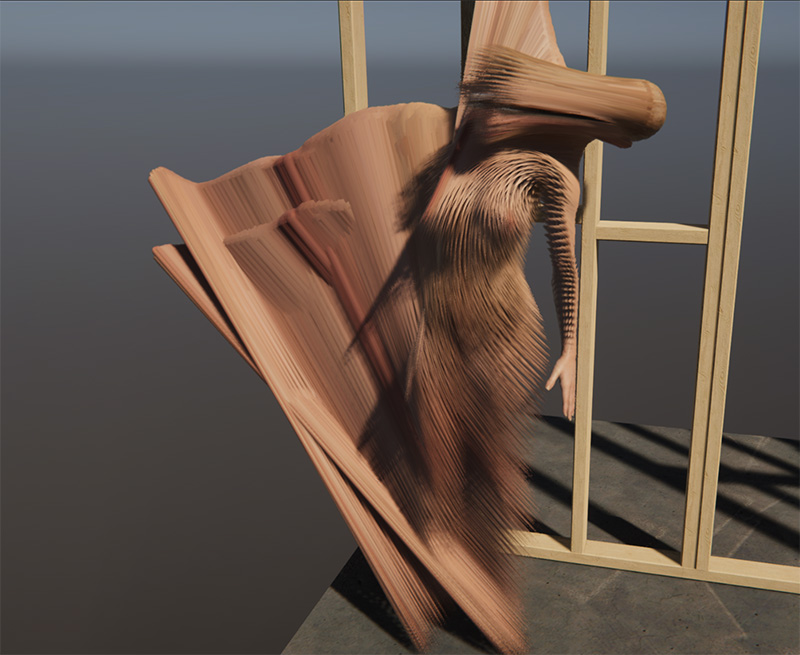
I allow myself to post a message because I have a problem with my Daz 4.10 pro. Indeed, I have a problem especially with Genesis 8 Female only. I start daz, no particular message, I go to the character tab, I select for example G3F or G2F, my character is loaded correctly, no deformation. I'm going to select G8M, no problem either, for cons, I run G8F or another character using it (Victoria 8 for example), it loads, no errors but however, it is completely distorted. I tried uninstalling it and reinstalling it with Install Manager but nothing changed. A few months back, G8F was working properly, I do not see where the problem can come from, usually I use G2F or G3F and I wanted to test Victoria 8 that I just bought, I noticed this problem. What do you recommend that I do ?
I attach a photo and my log file.
Cordially.Making morphs with geograft.Well I did give Hexagon a go. No, it doesn't smooth the graft vertices alongside the figure's (the graft is a distinct object) and yes it does have a problem with "internal error" (also had to turn off local screen updates because it was bugged to hell without it). That's an err-no from me then.
I suppose as I'm dealing with .obj files which are quite simple (tinyobj can load them), I can find the vertices from the original figure and graft given the node/group names and replace them with the exported morph values. That would be *effort*.

Probably need to add to my Daz wishlist seamless round-tripping of geografted meshes for morph loading with figures, to other tools like mudbox, blender, etc.
Making morphs with geograft.In Morph Loader pro I think you want to set the Load Morphs For option to Primary Figure from Graft (Facet Order).
I can get the graft in this way, but not the main figure which is of course exported without the graft geometry and therefore has too few vertices upon import.
Making morphs with geograft.In Morph Loader pro I think you want to set the Load Morphs For option to Primary Figure from Graft (Facet Order).
Victoria Base 4.2 QuestionThat sound alot like you're using Connect. The 4th generation figures must not be installed by Connect, their ExP morph system wont work with Connect's folder structure.
AIUTO...CHI CONOSCE L’ITALIANO? PARTE DODICIPosso far tornare un attimo il discorso su DAZ Studio? C'è questo prodotto che, come dice Joequick, non passo i test dela DAZ
https://www.sharecg.com/v/88450/browse/21/DAZ-Studio/extraOrdinary-Girls-for-G2F
Infatti se vedete le immagini sembrano quelle usate per i promo DAZ, e secondo me come donne so brutte, ma non brutte ma proprio brutte brutte.
Allora che ho fatto, ho preso i morph dalla cartella di Genesis 2 Female, e li ho spostati sotto quella di Genensis 2 Male, e voilà, le donne brutte sono dei perfetti uomini.
Mi era venuto il sospetto che ExGirls stesse per Ex Ragazze, quindi che erano dei trans....ma Ex Girls sta per Extraordinary Girls.
Ahahah, grande! xD
Guarda io sinceramente, avendo iniziato da poco, ho tutto Genesis 8 e vado su questa generazione, a meno che non ci siano prodotti superscontati che posso convertire! E preferisco comprare da Daz così ho il backup in cloud che non si sa mai
Quanto alla Marvel, se ho capito bene loro scherzavano sul fatto che Daz sia per professionisti, poi boh!
Questione Marvel: vero!
Questione DAZ Studio per professionisti: VERISSIMERRIMO!
Che poi la definizone per "professionisti" lascia il tempo che trova. alla fine...
Photoshop è definito per professionisti ma se cerchi sul tubo troverai video di persone che fanno cose impensabili per Photoshop con Paintbrush 3.11 (che ho usato ai miei tempi, è eccezionale!
 )
)
Il professionista è quello che usa gli strumenti al loro massimo non quello che usa uno strumento "professionale" e basta!Certamente :)
Professionista è chi ne fa una professione alla fine.
Anche un cantante pop che produce musica dimenticabilissima è un professionista se guadagna abbastanza da sostenere se stesso e la sua famiglia.Certo è che i programmi hanno dei limiti, e una curva di apprendimento, diversi.
Photoshop ha limiti assurdamente alti, e probabilmente risponde alle esigenze di chiunque. E la curva di apprendimento è estremamente favorevole! Quindi è anche più facile giungere a quel livello che ti consente di definirti professionista.
Anche la quantità di materiale in giro è un fattore importantissimo. Se vuoi dei tutorial per Photoshop, ne hai milioni e milioni fatti in maniera professionale. Prova a usare un software sconosciuto e la cosa diventa più complessa.
Daz stesso ha poche risorse ordinate online alla fine, ed è senza dubbio il programma più usato nell'ambito.Quando ho deciso di fare render era perché avevo appena assemblato il mio primo PC (per fortuna non c'erano ancora le schede AMD nuove, se no avrei rischiato di non poter usare Daz).
Prima di sceglierlo ho fatto un giro fra tutti gli artisti che seguivo, allargandolo un po' quà e là, e avevo notato che il 99% delle persone usava Daz.Poi quando vuoi arrivare a parlare del cinema, come avete detto anche voi i criteri cambiano del tutto. Io risparmio un anno per una 2060 (grazie a quei santissimi patron, altrimenti l'avrei ancora vista col cannocchiale...), quelli hanno capannoni di Quadro magari.
AIUTO...CHI CONOSCE L’ITALIANO? PARTE DODICIPosso far tornare un attimo il discorso su DAZ Studio? C'è questo prodotto che, come dice Joequick, non passo i test dela DAZ
https://www.sharecg.com/v/88450/browse/21/DAZ-Studio/extraOrdinary-Girls-for-G2F
Infatti se vedete le immagini sembrano quelle usate per i promo DAZ, e secondo me come donne so brutte, ma non brutte ma proprio brutte brutte.
Allora che ho fatto, ho preso i morph dalla cartella di Genesis 2 Female, e li ho spostati sotto quella di Genensis 2 Male, e voilà, le donne brutte sono dei perfetti uomini.
Mi era venuto il sospetto che ExGirls stesse per Ex Ragazze, quindi che erano dei trans....ma Ex Girls sta per Extraordinary Girls.
Ahahah, grande! xD
Guarda io sinceramente, avendo iniziato da poco, ho tutto Genesis 8 e vado su questa generazione, a meno che non ci siano prodotti superscontati che posso convertire! E preferisco comprare da Daz così ho il backup in cloud che non si sa mai
Quanto alla Marvel, se ho capito bene loro scherzavano sul fatto che Daz sia per professionisti, poi boh!
Questione Marvel: vero!
Questione DAZ Studio per professionisti: VERISSIMERRIMO!Che poi la definizone per "professionisti" lascia il tempo che trova. alla fine...
Photoshop è definito per professionisti ma se cerchi sul tubo troverai video di persone che fanno cose impensabili per Photoshop con Paintbrush 3.11 (che ho usato ai miei tempi, è eccezionale!
)
Il professionista è quello che usa gli strumenti al loro massimo non quello che usa uno strumento "professionale" e basta!AIUTO...CHI CONOSCE L’ITALIANO? PARTE DODICIPosso far tornare un attimo il discorso su DAZ Studio? C'è questo prodotto che, come dice Joequick, non passo i test dela DAZ
https://www.sharecg.com/v/88450/browse/21/DAZ-Studio/extraOrdinary-Girls-for-G2F
Infatti se vedete le immagini sembrano quelle usate per i promo DAZ, e secondo me come donne so brutte, ma non brutte ma proprio brutte brutte.
Allora che ho fatto, ho preso i morph dalla cartella di Genesis 2 Female, e li ho spostati sotto quella di Genensis 2 Male, e voilà, le donne brutte sono dei perfetti uomini.
Mi era venuto il sospetto che ExGirls stesse per Ex Ragazze, quindi che erano dei trans....ma Ex Girls sta per Extraordinary Girls.
Ahahah, grande! xD
Guarda io sinceramente, avendo iniziato da poco, ho tutto Genesis 8 e vado su questa generazione, a meno che non ci siano prodotti superscontati che posso convertire! E preferisco comprare da Daz così ho il backup in cloud che non si sa mai
Quanto alla Marvel, se ho capito bene loro scherzavano sul fatto che Daz sia per professionisti, poi boh!
AIUTO...CHI CONOSCE L’ITALIANO? PARTE DODICIPosso far tornare un attimo il discorso su DAZ Studio? C'è questo prodotto che, come dice Joequick, non passo i test dela DAZ
https://www.sharecg.com/v/88450/browse/21/DAZ-Studio/extraOrdinary-Girls-for-G2F
Infatti se vedete le immagini sembrano quelle usate per i promo DAZ, e secondo me come donne so brutte, ma non brutte ma proprio brutte brutte.
Allora che ho fatto, ho preso i morph dalla cartella di Genesis 2 Female, e li ho spostati sotto quella di Genensis 2 Male, e voilà, le donne brutte sono dei perfetti uomini.
Mi era venuto il sospetto che ExGirls stesse per Ex Ragazze, quindi che erano dei trans....ma Ex Girls sta per Extraordinary Girls.
Post Your Renders like it's the year 2020!!!Not gotten to it yet but you can select the exact vertices in the animation tab and pull them down in modelling tab so I would create a morph target with them pulled down the other direction from a base resolution obj export in DAZ studio morphloader and save it as a support asset morph.
Someone else might beat me to it.
Real foreheads please. No more Botox.There was someone working on a wrinkled feet/soles addon for Daz3d, not sure if its still a WIP or if its been released or what. I wonder if the methods used to create those wrinkled soles could also be used to make wrinkled foreheads and stuff. Here are some gifs showing what it looks like.
Those ladies have more wrinkles on their feet than on their faces. They definitely need the forehead wrinkles, just sayin'
I found that thread, https://www.daz3d.com/forums/discussion/275696/feet-hd-detail-or-lack-thereof but they were using displacement maps and a custom morph for the feet to be more curved. They also seem to generally agree that they need and HD product for it to happen.
I did find two products that seem to have forehead wrinkles. The problem is that they're both only for G8F. https://www.daz3d.com/acting-skills-1-for-genesis-8-females & https://www.daz3d.com/acting-skills-2-for-genesis-8-females
Carrara's attach skeleton feature?Not sure why you want to give yourself such a headache, but it sounds like you want to create a whole new rig for (according to your example) the Millennium Dragon, right?
Here's the limited info I know on this subject, if you want compatibility with DS, Poser, and Carrara:
Since you want to make a "new" skeleton, you can use Daz Studio's bones and weight maps to make it Triax, if that's your aim. For something like Mil Dragon, I think you might be hard-pressed to do better than what Daz3d did.
If you want to make a new skeleton the Carrara-compatible Poser method, it's quite different than the bones system, in that we name the vertices of the mesh, and where those names are according to the mesh creates the rig, then a whole lot of tweaking is involved to get the bending correct via limits, JCMs, etc., Never quite did this except for making conforming clothing, which Daz Studio helped with immensely through the CCT's transfer utility.
========================
Another way to deal with the Millennium Dragons I and II is to turn off or change the limits. Both can be quite the Beast (see what I did there?) to pose by hand, yet that seems to be the best way (that I've found) to pose them - especially if animation is the end goal. Turning off limits will create nightmares for animations, unless we counter to disaster points as we go.
Daz Dragon 3 seems a lot easier to me, having built-in pose dials to assist.
The wonderful thing I love about Carrara in working with stuff like this for my own use, is the ability to just quickly make morphs on the fly, that I can save to the Carrara version. Sure, I could export the morphed figure as an OBJ and set up the actual morph dials on the dragon using Daz Studio, but I never need to have that cross-compatibility for my projects.
Smoothing shoulders (+ solution for how to export hires fbx)You cannot load higher-resolution mesh as a morph in DS (the Daz tool to do so exists but is available only to PAs for creating store content).
Kung Fu Hair G2M and no smart contentI own kung fu hair https://www.daz3d.com/kung-fu-hair-for-genesis-2-male-s
I don;t fit old generation hair to new generation characters. I try parenting it instead of fitting it too gm3 it will retain all the morph values and no conversion tool is needed.
Probably the best option since I don't want to lose any functionality. Thanks for your input.
Smoothing shoulders (+ solution for how to export hires fbx)I've been experimenting with hexagon to see if that could be a solution.
I can see that hexagon has the ability to create subdivisions and smoothing. I transferred the figure over to it and got the shoulders smoother, but I can't see a way to transfer it back to daz studio, specifically with things like morphs.
EDIT : I feel I should also request that if anyone knows how to export the higher res subdivision levels to unity correctly to unity3d, I'd also rally appreciate that. I know how to export the higher res version as an fbx file and get it into unity, but the skin has errors as soon as I apply the animation.
 Kung Fu Hair G2M and no smart content
I own kung fu hair https://www.daz3d.com/kung-fu-hair-for-genesis-2-male-s
I don;t fit old generation hair to new generation characters. I try parenting it instead of fitting it too gm3 it will retain all the morph values and no conversion tool is needed.
Carrara's attach skeleton feature?poser figures arent vertex, i suspect transfering a carrara vertex to poser obj loses data and relying on poser obj to vertex to rrecreate that lost data doesnt seem to me to be the best workflow.
the earlier poser figures didnt need like v4 bat files to create morph channels.
its been a long dream to not need poser as a carrara plug in.
Use one object to control another?Hi,
I'm wondering if there is a feature or script that will allow me to to pose multiple objects (identically change general parameter settings on each) without having to select each object.
Unnecessary specifics: I love using D-Forms to customize figures and often, rather than converting to a morph I prefer to leave the D-Forms as is so that I have "handles" to further customize for motion/collision/etc. Based on the figure and pose, I find it necessary to use 2 identical D-Forms on adjacent nodes to maintain the D-Form field and shape along the boundary where the 2 nodes meet. This would be unnecessary if I converted to a morph, but then I lose my "handles." Just for the purpose of efficiency, I'd like to be able to link one "handle" to another. I can't simply parent one to another because the paramaters of each need to track to the individual nodes they're D-Forming and each other.
Thanks
Daz 3D is part of

Connect
DAZ Productions, Inc.
7533 S Center View Ct #4664
West Jordan, UT 84084Licensing Agreement | Terms of Service | Privacy Policy | EULA
© 2026 Daz Productions Inc. All Rights Reserved.