-
Missing Textures
Hi, I'm new to daz3d and running into some issues that have gotten me a bit bummed out. I bought some packs to start with, and I'm having some problems. When I try to import Victoria 8, I get a message that files or textures are missing. However, when I go to the runtime folder, the textures and files that do not load are there. The program simply does not see them. Am I doing something wrong? It happens to me with other models, such as a bedroom, the textures in the runtime folder always give me an error.
Victoria 8.1 from Victoria 4.2If can be usefull I released a freebie at Renderosity https://www.renderosity.com/freestuff/items/91460/victoria-4-skin-for-g8fVictoria 8.1 from Victoria 4.2First, Victoria 8.1 is a character for Genesis 8.1 Female rather than a base figure like Victoria 4.
Genesis 8.1 can convert clothing (and other fitted items) from older versions of Genesis and the original Genesis can convert Victoria 4 fitted items, so you have a free route to get those trasnfered (although not perfectly - custom bones, such as skirt handles or taisl on hair, get lost and things that project away from the figure, such as high heels, can come a cropper).
There are routes for morphs and textures but theya re not free and can be fiddly.
Victoria 8.1 from Victoria 4.2Hello. I'm an old school user of Poser as well as Daz 3D. I've been using Victoria 4.2 Starter Bundle for sometime now. I'm interested in upgrading to Victoria 8.1. My concern is the accesories and clothing and morphs I've bought for V4.2. Will things that conform to V4.2 also conform to V8.1? Such as shoes and clothing and morph++? If they won't, then I'll just stay with Victoria 4.2 because it would be a waste of money and time to buy Victoria8.1. Thanks.
Genesis (1) Where are the materials?Genesis 1 can use V4 and M4 textures out of the box. There are many freebie textures available for those characters.
Genesis 1 can't use Genesis 2, 3 or 8 textures out of the box. There are products available to enable that though:
https://www.daz3d.com/genesis-2-male-and-female-base-uvs-for-genesis ==> enables you to use textures for Genesis 2 using G2F and G2M base UVs
https://www.daz3d.com/victoria-6-and-michael-6-uvs-for-genesis ==> enables you to use textures for Genesis 2 using the V6 and M6 UVs
https://www.daz3d.com/genesis-3-uvs-for-genesis ==> enables you to use textures for Genesis 3 using G3F or G3M base UVs. It should also work with textures for Genesis 8 using G8F and G8M base UVs, but it won't work with textures using 8.1 UVs.
How do you get Victoria 8.1 Tear to actually look like the promo Tear image?Richard Haseltine said:
The tear material was, I believe, updated for Daz Studio 4.20.0.2 to take account of the changes in the way ThinFilm behaved - are you using matched materials and application (4.20.0.2 with the updated Starter essentials, or an older DS with unupdated Starter Essentials)?
I updated to 4.20.0.2.
Then I updated to 4.20.0.11.
I'm now using 4.20.0.11.
I updated the Genesis 8 Female Starter Essentials, its package date shows 2/18/2022. I sorted DIM list by latest installed, and it's near the top of my list. I also updated the Genesis 8 Male starter essentials in the same way. So both of these starter essentials are updated.
>4.20.0.2 with the updated Starter essentials
4.20.0.11 with the updated Starter Essentials. I loaded Victoria 8.1 HD, made sure her tear was visible, then rendered, but the tear looks broken. I tried applying the V8.1 tear mat, but still the same result. It doesn't look like a nice wet effect.
If anyone can figure out how to get the tear to look like it's actually a wet watery effect, please let me know. Is it circumstanstial and only works outdoors?
New Computer and Daz Connect problemThat did the trick. Thanks for all the help. The only minor quibble now is the Anatomical elements for Michael/Victoria below version 8 do not show up in Daz Connect (version 8 does though). Other than that it seems all is as it should be.
AIUTO...CHI CONOSCE L’ITALIANO? PARTE TREDICIBuonasera
finalmente dopo tanto tempo lontano da DAZ, avendo un pomeriggio libero, ho approfittato per mettere sul sito R (concorrente di DAZ) il freebie che avevo postato qui un po' di tempo fa.Link: https://www.renderosity.com/freestuff/items/91460/victoria-4-skin-for-g8f
E' la pelle che trasforma la G8F in V4.
Nel pacchetto troverete anche un file video che funge da tutorial a cosa si può fare.
Ci sono però 2 cose a cui stare attenti:- le ciglia della G8F sono oggetti staccati (Eyelashes) mentre quelle della V4 erano un tutt'uno con la figura. La pelle pertanto non contiene ciglia (ma ha unghie, lingua, denti, ecc..). Pertanto se provate ad applicare materiali ciglia della V4 non ottenete nulla
- I morph HD non sono precisi, quelli non HD invece vanno benissimo.
PS file di installazione compatibile con DIM e oggetti già raggruppati come prodotto e con i meta giusti (Victoria 4 Skin for G8F), dunque va solo installato
How do you get Victoria 8.1 Tear to actually look like the promo Tear image?This is the new tear that comes with 8.1
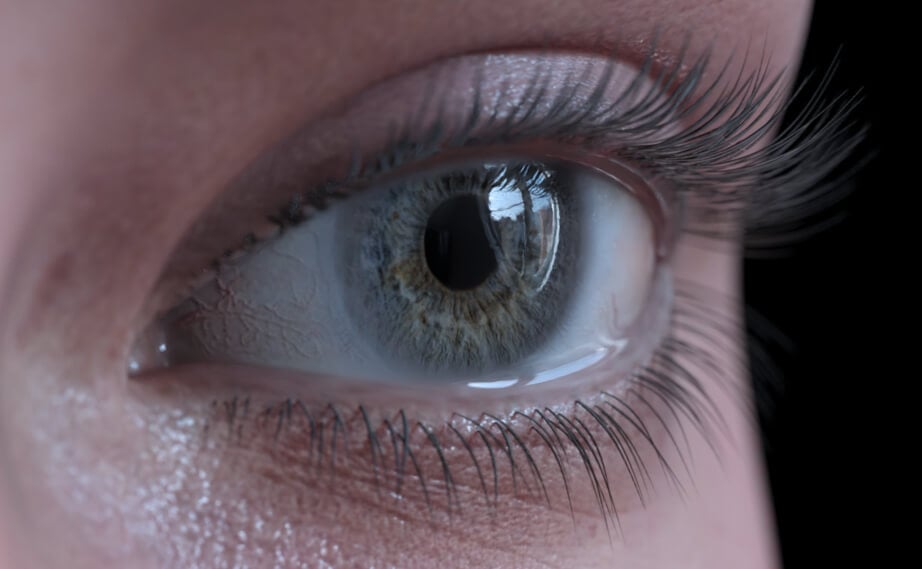
Image link source: https://www.daz3d.com/genesis-8-1
How do you actually get it to look like that? In my renders, the tear just makes that area darker, there's no wetness effect like in the above image.
New Computer and Daz Connect problemThanks for the feedback. Changing the folder might have fixed the issue. I see my icons for content now in the Smart Content tab. Most items seem to be loading ok. The only funny things I see are that 1.) Some items don't have that circle in the upper right (see third item in screen shot) and 2.) Victoria 7 Pro and Michael 7 Pro don't show up in Daz Central. In fact none of the Pro Packs for any character are listing in Daz Central anymore, save for Michael 4 Pro Pack odly enough. Everything else seems to be listed so I'm puzzled as to why those aren't.
METAMIXERPlease look as for now.. as what i have when search meta (have victoria too...)
Also look at what appears when i use it in daz...
Naturally Real Material Options for Victoria 8.1As I said, this was made specifically for Victoria 8.1 and therefor requires her texture to load properly. You can manually try to change other 8.1 characters textures afterwards if you are the adventurous type, but I did not make this for any character other than Victoria 8.1, so you would need to do all of that manually.
Diffeomorphic DAZ Importer version 1.6.0 released@surody I can confirm the bug with Victoria 8.1, can't understand why. Reported to Thomas.
Naturally Real Material Options for Victoria 8.1Yep, that is the expect result. It is made specifically for Victoria 8.1 and requires her unique textures to load correctly. Genesis 8.1 uses a completely different shader configuration (the old Iray Ubershader) and texture set (based on previous Genesis bases). The Generation 8.1 DAZ characters all use the DAZ PBR Skin shader, and contain multiple new types of textures that you will not find in previous generations (or the base Genesis 8.1).
Naturally Real Material Options for Victoria 8.1I don't have Victoria 8.1, just the basic genesis 8.1, and this item fails as not being able to any of the needed parts, giving very long list of file names. I even download and reinstalled the 8.1 starter stuff, no joy.
Diffeomorphic DAZ Importer version 1.6.0 released@surody The figure material shouldn't be an issue because the shell is independent it has its own material. But I'll test it with Victoria 8.1 and let you know.
Diffeomorphic DAZ Importer version 1.6.0 releasedPadone said:
@surody I found a couple minutes and tested this I can confirm the bug. But don't know if Thomas may consider this a limitation rather than a bug. Since the issue is that in the duf file there's not the uv map path, so the plugin scans the current figure folder, and can't find uv maps outside.
If I load the missing uv map by hand then everything works fine here. Test scene included.
https://bitbucket.org/Diffeomorphic/import_daz/issues/934/missing-uv-map
Do you know how daz studio searches for uv maps ? I mean is there a uv map path somewhere because I can't find it in the duf file.
No idea how Daz searches for UV maps.
I've the same UV in the 8.1 folder too. Anyway, I tested it with 8.1 (base figure) and your work around works. But keep in mind that the 8.1 base figure has iray uber materials. I used exactly the same scene but applied Victoria 8.1 skin to the base figure which is PBR.
As soon as I do that, it breaks apart. I've a feel this is also related to the geoshell for the eyes issue I had recently. I added a node comparisons of both tests.Paper Plates Over Eyes - Help? Poser 11 Comic RenderI am using Poser 11 (64 bit). Comic Book Mode for rendering. I set up toon renders on every body part on Victoria 4 and removed textures for a black and white render. After struggling to get the irises of the eye to render as plain white with a black border, I discovered that there were two "paper plates" blocking the view of the character's face. These blocks do not render, but they block the Preview view of the face. I cannot select them, but when I make each eye invisible, the plate corresponding to each eye disappears with the eye.
Any thoughts on how I can make these invisible again?
Edit: Added second screenshot
Naturally Real Material Options for Victoria 8.1If you want to use other textures for this (if you don't have Victoria 8.1), how should they be arranged in the shader?
Anyone know what model this is? Might be the prettiest model i've ever seen.Gordig said:
MelissaGT said:
RL_Media said:
Yeah, sometimes people just wanna load stuff up fast and render. Not everyone is a dial spinning madman like me lol. The main reason I switched from V4 to genesis at all was the ability to mix morphs to create something unique.
That's what I don't get...I wouldn't want my artwork to look like anybody else's, so my characters are all unique.
Two different artists could use the exact same assets and produce completely different art with them.
Yeah, but you could potentially still say "Oh, that's Victoria 8" in both of those renders. I make artwork that is personal to me, or to a client, and I wouldn't want those specific characters to be so common as to show up in someone else's artwork. Like the lady in my avatar. That's Frida. I wouldn't want Frida to show up in anybody else's artwork, because she's my own personal player character from Guild Wars 2. That's why I don't use models out of the box.
Daz 3D is part of

Connect
DAZ Productions, Inc.
7533 S Center View Ct #4664
West Jordan, UT 84084Licensing Agreement | Terms of Service | Privacy Policy | EULA
© 2026 Daz Productions Inc. All Rights Reserved.