-
Still looking for the solution to 'Duplicate Formulas'
Have you checked the log file after loading a Genesis 3 Female, as suggested in many threads on this topic? That should name one of the morphs involved. None of them should suggest redoing every single morph for the affected figure, let alone for all figures (Genesis 3 Female is a figure, Victoria 7, Gia 7 etc. are characters for that figure - duplicate formulas is something that affects all characters and scenes for the figure involved, unless it's for a custom morph not saved as an asset).
Morphs from G3 to G8It still depends on what you are trying to do.
If you just want FWSA Seth, and don't care to have traansfered Elijah 7, bake away. But be sure. If you change your mind, you need to do it again.The intent here was to get the result the user wants, so it's just a question of what your intentions are. If you don't know how to edit Dsf files, then you probably want to always transfer the shape "for" just because it means less headaches. If you know editing, do what you want, because you know how to fix the things you don't like (it doesn't have to be dsf files, directly. Skill in editing properties in Daz edit mode also works).
Basically, if you understand what the script is doing, in broad strokes (essentially, a very advanced form of Redz's method as linked in my sig), do what's best for you. All the script is really for is to automate a process that would be tedious to do manually. If you don't grok, then yes. Bake base shapes (e.g. M7) if you don't indend to get a product like G2F for G3F, or just don't want to bother dialing that in all the time.But keep in mind that baking isn't relevant for non-cross-gender transfers between G8 and G3. They just aren't different enough to make much difference.
It's G1/2 or cross-gender where it becomes important (and G1/2 isn't ready yet. I accidentally nuked 4.10.0.123, and I need to rebuild it). Whatever for G3M will look proetty much the same on G8M if you bake or don't. It's the results that you'll get on G8F you need to worry about.Shape Splitter - Divide, Combine and Save (The new version is already available. 1.2.1)[Commercial]Thanks for the new videos, they're more helpful now with voiceovers, though some of the words are difficult to understand - they're all important without a full manual. As regards to what I'm trying to do, are you saying that I just have to uncheck "pose to zero before spawn" in Clean/Zero and click "spawn morph"? Seems to me that none of the other things done in that video would be relevant. I've done exhaustive testing and only tests with really simple charactors have been successful. The complex charactors I want to split get drastically modified by "spawn morph" and aren't useable enough to split anything. I've tried all the different combinations of boxes in Clean/Zero, like just leaving "pose to zero before spawn" checked, but that takes out a lot of what I want to keep, like face pose - and that doesn't fix all the modification and distortion. Did you omit some important consideration? Also, what does "overide existing morph" do? / thanks
Still looking for the solution to 'Duplicate Formulas'All Genesis 3 females get this error. Nothing else. I've read something like a dozen forum posts about it, with no distinct solution other than the absolutely insane one of manually going through every single morph for every single figure and re-doing (descends into computery gobblty-gook at that point).
How do you fix this message and never see it again?
3D Art Freebie Challenge-June 2019-"Summertime Pin-Ups" -Main Thread Only
Title: Boys Boys Boys
OK, let's try this again. The reworked version has been up for about 24h, so I hope this means it's ok.
DAZ Studio and Photoshop. Version before post-work attached below.
Freebies:
1) HDRI Skydome by Agent Unawares: https://www.deviantart.com/agentunawares/art/Skyset-002-705701571
2) Island by Herminio: https://www.sharecg.com/v/75857/related/5/3D-Model/Dream-Small-Tropical-Island
3) Loincloth by 3DND: http://www.threednd.com/warduke.html
4) Thong by squarepeg3D: https://www.renderosity.com/mod/freestuff/fantasy-amazon-bundle-for-g8f---100-free/79046
5) Morph by bu_es: https://www.renderosity.com/mod/freestuff/saud-for-g3m-g8m/78849
6) Dreads by Aprils Vanity: http://shop.aprilsvanity.com/free-items/ciri-hair.html
7) Strap by SickleYield - https://sharecg.com/v/72661/gallery/21/DAZ-Studio/SY-Impractical-Rogue-G
8) Thong by 3DND: http://www.threednd.com/efreeti.html
9) Torque from Lynettes Dark Nights (bi-weekly DAZ freebie)
10) Cowboy Hat by Versatile Peter: https://www.sharecg.com/v/90616/browse/21/DAZ-Studio/
11) Aviators by Adam Thwaites: https://www.most-digital-creations.com/free_poser_poses_textures_morphs_props_48.htm
12) Speedo by Troglofauna - http://www.sharecg.com/v/89258/browse/21/DAZ-Studio/G8F-Tyris
13) Mohawk by sedartonfokcaj: https://www.deviantart.com/sedartonfokcaj/art/Dante-Hair-for-Genesis-435979176
14) Harness by Karth: http://www.maleposerotica.com/?page_id=42
15) Daisy Dukes by scheusal242: https://www.renderosity.com/mod/freestuff/contributor/scheusal242
16) Flag by mjc26250: http://www.sharecg.com/v/82066/related/21/DAZ-Studio/Flag
17) Plane by printable models: https://free3d.com/3d-model/airplane-v1--79106.html
18) Poses by Thorvan: https://www.renderosity.com/mod/freestuff/30-mirrored-poses-for-genesis-8-male/77781
Wet skin achieved by following the first half of this tutorial: https://thinkdrawart.com/how-to-get-wet-skin-in-iray
(Didn't do the part with the Geo Shell... couldn't make it work for some reason.)Purchased:
1) SWOLE
2) Jepe's Bodyhair Project
3) Fit-Control
4) Ajax Hair
5) Hair Set for G8MNo-Counts:
- G8M Head Morphs
- G8M Body Morphs
- Wild ManeAnd now, for some kinda-sorta "freebies" of my own...
To get the "caveman" skintone, load G8M base mats and adjust following parameters:
Base Color: 0.729919 / 0.535642 / 0.415148
Translucency Color: 0.632043 / 0.442323 / 0.329729
Transmitted Color: 0.789314 / 0.470440 / 0.329729To get the "caveman" green eyes, load G8M base mats and adjust following parameter for only the iris:
Base Color: 0.715465 / 0.560499 / 0.0938759To get the "cowboy" skintone, load G8M base mats and adjust following parameters:
Base Color: 0.915750 / 0.638779 / 0.442323
Translucency Color: 0.867136 / 0.605484 / 0.453456
Transmitted Color: 0.789314 / 0.470440 / 0.329729To get the "Cowboy" blond hair, load the "Wild Mane" hair and adjust following parameter:
Diffuse Color: 232 / 193 / 128To get the "kinkster" skintone, load G8M base mats and adjust following parameters:
Base Color: 0.744530 / 0.744530 / 0.744530
Translucency Color: 0.867136 / 0.529523 / 0.288816
Transmitted Color: 0.680020 / 0.373615 / 0.223310(All other skintones and eyes were adjusted in Photoshop, so I'm afraid I can't share them...)
Also attaching the map I made for the "patriotic speedo"; load on Tyris undies by Troglofauna.
Wacky Modelling ~ In Carrara ~Sounds like a quick job for the spline modeler, using the COMPOUND function and controlling bevels.
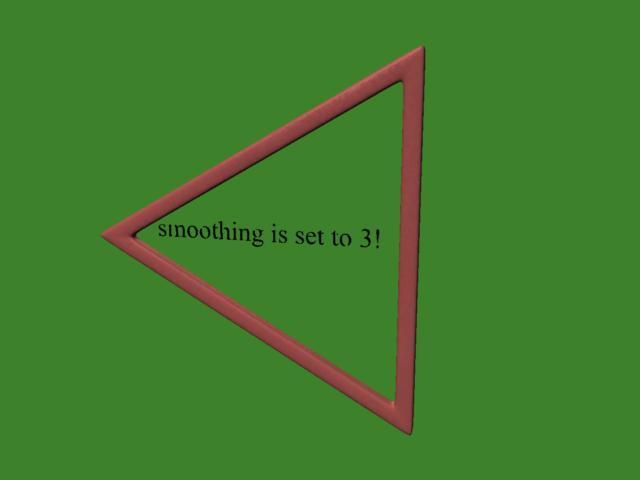
But within the vertex modeler, without yet looking at the pdf, here is how I did it. I decided that my desired result was a triangle that could be used with smoothing, and that means the corners have to be braced with lines.
- In the vertex modeling room I inserted an oval and set the desired number of sides to 3, which yields a filled triangle.
- I then used the tessalate menu to divide the triangle mid edge to center, which yields quads.
- With all selected, I then used shift-extrude to get a middle area polygons and edge polygons, if that makes sense.
- I deleted the middle polygons.
- I selected the corner lines and used extract-around to create lines bracing each corner.
- I selected all of my hollow flat triangle and added thickness.
- I used control-extrude to so that the triangle was four polygons thick (allows each edge to be braced independently).
It would be easy now to morph the triangle to make the faces, legs, or corners more round.
Even with smoothing ramped up to 3, the triangle holds its basic shape well.
 How do I use these FBX clothes from the marketplace?
They are modelled, in this case at least, to fit the Genesis 8 Female figure so you would load the figure, import the clothing, and use Edit>Figure>Transfer Utility with the Source set to Genesis 8 Female and the Target to the clothing model to get a basic rig. That might well then require refinement with the weight editing tools, or even the addition of custom moprhs to help with posing, but it is in principle possilbe with the available tools (and possibly a modelling application for morph creation, though dForms can do a lot) but it isn't a one-click process. Given how snug those are I think the process wold be fairly straightforward, but it's not something I've tried.
ITF Dev Kit G9 Out Now - ITF Freebies ThreadInTheFlesh Merchant Morphs for Genesis 8 Male
This is a free set of morphs which will be updated over time. Primarily consisting of morphs I have created for use during product creation, these are being released as a free merchant resource.
These morphs can be used as a base for your own creations, correcting morph issues with other products or distributed for free or sale. The only restriction is you cannot sell these morphs as part of a morph pack.
__________________________________
InTheFlesh Merchant Morphs Vol. 1 includes:
- Daz Install Manager (DIM) compatible install.
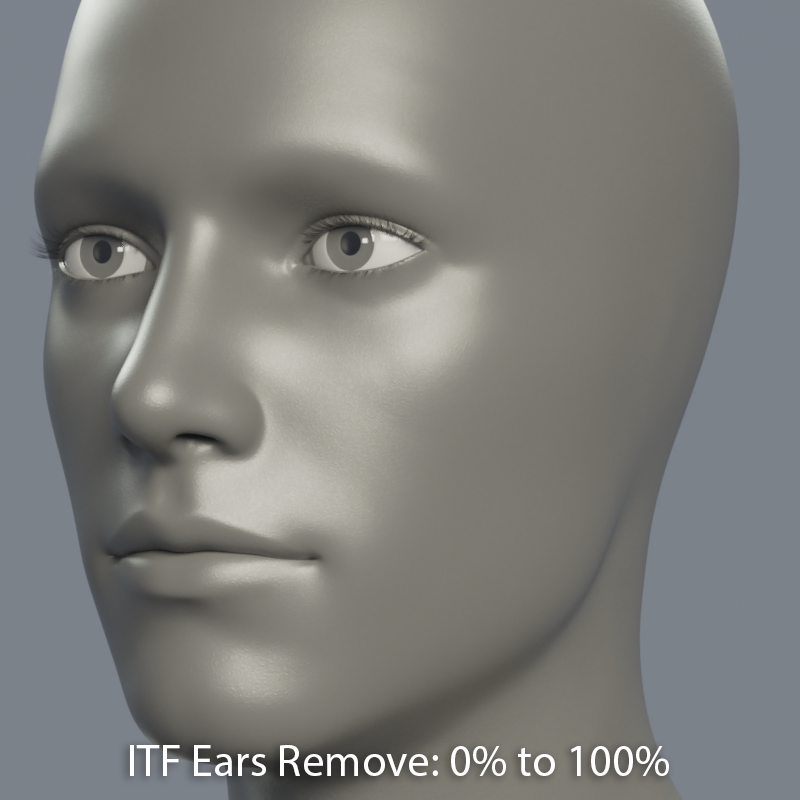
- ITF Ears Remove: Completely removes Ears, resulting in a smooth flattened surface. Intended as a base for further sculpting, this morph only works well with the default Genesis 8 Male base shape.
- ITF Eyes Remove: Completely removes Eyes, resulting in a smooth flattened surface. Intended as a base for further sculpting, this morph only works well with the default Genesis 8 Male base shape.
- ITF Nose Remove: Completely removes Nose, resulting in a smooth flattened surface. Intended as a base for further sculpting, this morph only works well with the default Genesis 8 Male base shape.
- ITF Cornea EyeMoisture Scale: Enlarge or shrink just the Cornea and EyeMoisture. Useful for correcting instances of the Sclera poking through the EyeMoisture.
- ITF Teeth Scale All: Enlarge or shrink just the Teeth. Useful for correcting morphs that cause the Teeth to shrink.
Morphs are located under Actor/Head, or simply search for ITF Merchant Morphs to find morphs from all current and future volumes.
https://gumroad.com/intheflesh?sort=page_layout&tags=free
https://sharecg.com/v/94004/view/21/DAZ-Studio/InTheFlesh-Merchant-Morphs-for-G8M-Vol.-1
What "qualify" as your own character?I'm still unclear about how it works, and what can be used. What about the basic elements that comes with DS?
For intance, let's say that I want to make a sword freebie. Can I use the basic metal shaders that comes with DS or must I make from scratch my own metal shader (or use a merchant ressource)?
I'm not sure, if you mean the specific material presets. Do they still work if you uninstall teh Default Resources package?
Similalrly, if I'm making a character, can I use the basic morphs and basic skins that come with DS when you download it, or are they off limits too?
No, the basic skins and moprhs cannot be distributed and nor can derivatives created from them. You could have a preset that called them (which wouldn't work if the files were not installed).
Let assume that the only peculiarity of my character is that he has a big red nose, so he's big red nosed G8. What can I use exactly to give him a big red nose?
You could use a Layered Image to add the red to the base colour and any other maps that needed it, and use a shaping preset to apply a combination of stock moprhs or create your own morph in a modeller or with dFormers. However, if that's all you are doing I would not hold out any hopes of being able to sell the result.
EJ Easy Face GeneratorThis is a great tool! And fun! Reminds me of my role-playing days when I would make characters for entertainment. Couple of comments and questions.
I find the default settings are fairly subtle and it can be a while before a characters looks different. Lots of them end up looking like the base character's sister. Not a complain, merely an observration (and handy for when you DO want a relative!).
Does the randomizer randomize off of the base character or off of the base plust the current set of morphs? Also, does it use your face morph product under the covers? Just curious.
I've found that dropping the Simplicity settings while keeping the strength settings the same leads to higher variability but not completely wacky faces that often seem to occur with higher Strength. Unfortunately, every time I exit the script, the settings revert to the default. Is there any way to change the defaults persistently?
Keep up the great work!
Yes the icons and the default settings are subtle. The reason is that if you find you moved the settings and get a too extreme face, you can always use the "reset to default" button to restore safe and not extreme settings.
The Generator doesn't remove morphs that you may have applied before running it. For example if you have Victoria 8, and run it, it will add the changes on top of her, withour removing Victoria 8. This is this way on purpose, because one of the uses of this tool is to customize or add a change to an already existing character.
The other way of using is using it over a Genesis 8 without any morphs. Then you can make a new face. Also, after running the Generator, you can also add other morphs you have and apply them on top of what the Generator did.
You're right, the use of Simplicity can do what you say, that is a good way of using it. In this moment it doesn't have the option to save persistently the settings.
EJ Easy Face GeneratorThis is a great tool! And fun! Reminds me of my role-playing days when I would make characters for entertainment. Couple of comments and questions.
I find the default settings are fairly subtle and it can be a while before a characters looks different. Lots of them end up looking like the base character's sister. Not a complain, merely an observration (and handy for when you DO want a relative!).
Does the randomizer randomize off of the base character or off of the base plust the current set of morphs? Also, does it use your face morph product under the covers? Just curious.
I've found that dropping the Simplicity settings while keeping the strength settings the same leads to higher variability but not completely wacky faces that often seem to occur with higher Strength. Unfortunately, every time I exit the script, the settings revert to the default. Is there any way to change the defaults persistently?
Keep up the great work!
AIUTO...CHI CONOSCE L’ITALIANO? PARTE DODICIMa di che state discutendo? (ಠ_ಠ)
E poi tu, Muscleman, ancora rifiuti di ammettere la superiorità della figura unica? ┻━┻ ︵ヽ(`Д´)ノ︵ ┻━┻
E' come diceva Tolkien: Una Figura per domarli, Una Figura per trovarli, Una Figura per ghermirli e a DAZ Studio incatenarli. (づ◔ ͜ʖ◔)づ
Io ho una libreria di vestiti per Genesis1 enorme... Non capisco da dove ti esca che non ci sono abbastanza abiti.Quello che mi dispiace maggiormente, quando riuscirò a trasferire tutti i miei morph, sarà perdere tutte le UV map compatibili con le figure precedenti.
Quant'è grande la tua libreria?
Io in 5,5 mesi di rendering attivo ho 1300 pacchetti su DIM...forse ho speso troppi soldi :O
AIUTO...CHI CONOSCE L’ITALIANO? PARTE DODICIMa di che state discutendo? (ಠ_ಠ)
E poi tu, Muscleman, ancora rifiuti di ammettere la superiorità della figura unica? ┻━┻ ︵ヽ(`Д´)ノ︵ ┻━┻
E' come diceva Tolkien: Una Figura per domarli, Una Figura per trovarli, Una Figura per ghermirli e a DAZ Studio incatenarli. (づ◔ ͜ʖ◔)づ
Io ho una libreria di vestiti per Genesis1 enorme... Non capisco da dove ti esca che non ci sono abbastanza abiti.Quello che mi dispiace maggiormente, quando riuscirò a trasferire tutti i miei morph, sarà perdere tutte le UV map compatibili con le figure precedenti.
Tools for Generating Game-Usable AssetsIf you are only talking specifically about Elder Scrolls and Fallout games then you could just "trace" over the Daz body in Blender/Maya/3DSM. TES/Fallout uses facial morphs for its characters, which is why if you look at FO4 model extracts for Nate and Nora the faces looks nothing like they do in game. Because its only a base male/female head that is being extracted and not the morph data that fine tunes it to make it look like Nate/Nora. So all you can really use out of the Daz models are the bodies. It would probably be much easier to just take a CBBE body and adjust the verts on it (or use bodyslide) until its contour is similar to that of the Daz body. People make characters from scratch using ortho front and side pics. Basically you make a 3d object out of several 2D reference pictures. But with a 3d objects as a reference it is much easier to make another 3d object because in a way all you are doing is making a 3d trace.
You should ask on the Nexusmods forums why nobody uses Daz assets in Oblivion/Skyrim/FO3 and FO4 mods. Its possible that you dont see it a lot NOT because of a lack of tools. It could be something else like CBBE bodies and textures are already really good, or that the really nice looking Daz clothes arent video game friendly since thats not what they were designed for. Like i made a character for some personal renders but she would fit right into a FO3/FO4 post-apocalyptic type game, but she has like 1.4million tris which i think is a bit too high for a game.
Headshop 11 QuestionsThanks outrider42.
In your comparison you write:
"... photos that do not use smiles. When dialing the morph in, the head moves down the neck."
Is this also still an issue?
We need a good 40s/50s pinup style dForce hairThe community really needs a good 40s/50's style pinup hair with an upside down morph. AprilYSH's Sheridan Hair has been doing Yoeman duty for those of us who do 50's style pinup modeling but now that we have dForce hair, it would ne nice to get a versitle hair that we could set/roll the bangs like Bettie Pages iconic style and still be able to set them different for different models. It would also be nice if the hair fell naturally when the model is laying down or hanging her head off a couch upside down, etc. The only G8 40s/50s hair I have seen in the store is Propschick's Georgina Pin-Up hair which is nice but not very versatile since you can not hide the Swirl rolls or the upsweels for the swirls. Think Vargas Girls, Bettie Page, Jayne Mansfield, Bettie Grable, Rita Hayworth, Bunny Yeager, etc. Hopefully one of the PA's is willing to take up the challenge of making a new hair product and there is enough feedback in this thread to show enough interest in this product.
AIUTO...CHI CONOSCE L’ITALIANO? PARTE DODICITi sbagli, io non ho tutte quelle figure!

Me ne basta una con tanti morph e faccio tutto. Non vedo l'ora che SingularBlue finisca il suo script per trasferire tutto, ma proprio tutto, su Genesis8Female adesso che funziona per bene, creando così il nuovo Genesis1!
E' una cosa che andava fatta fin dall'inizio!E ci tengo a precisare che mi lamento solo quando c'è un motivo valido. Se qualcosa non va lo dico e basta. Se poi vi riferite ai post sulle nuove figure... I bug stanno ancora là! (┛◉Д◉)┛︵┻━┻
...e fa le faccine.... cmq no, la figura unica no, che poi non vogliono fare i vestiti...e mi rimangono nudi ...o peggio...come qel povero Gen1 che credo abbia meno cloths di sempre...e io non so che farci....un pò come con i bambini e le parti extra ( private)....XD XD quindi finitela che mi complicate la vita!
Che schifo dai, meno male che non le vendono
 AIUTO...CHI CONOSCE L’ITALIANO? PARTE DODICI
Ti sbagli, io non ho tutte quelle figure!
Me ne basta una con tanti morph e faccio tutto. Non vedo l'ora che SingularBlue finisca il suo script per trasferire tutto, ma proprio tutto, su Genesis8Female adesso che funziona per bene, creando così il nuovo Genesis1!
E' una cosa che andava fatta fin dall'inizio!E ci tengo a precisare che mi lamento solo quando c'è un motivo valido. Se qualcosa non va lo dico e basta. Se poi vi riferite ai post sulle nuove figure... I bug stanno ancora là! (┛◉Д◉)┛︵┻━┻
...e fa le faccine.... cmq no, la figura unica no, che poi non vogliono fare i vestiti...e mi rimangono nudi ...o peggio...come qel povero Gen1 che credo abbia meno cloths di sempre...e io non so che farci....un pò come con i bambini e le parti extra ( private)....XD XD quindi finitela che mi complicate la vita!
dForce Hair (as well as strand based hair and the strand based hair editor) in public betaYou think you could write a guide? Because that's all very high level stuff I'd love to know how to do.
This is a good start and it's on sale: https://www.daz3d.com/modeling-with-littlefox-4-hair-modeling
It covers the basics of building hair from polygon strips. In addition to zbrush, I use UV Layout Pro to get the UV's to be nice and retangular which makes applying transparancies and textures for realistic effects. You'll find many of the "tradional" (e.g. not stand based) hairs use similar techniques. When I need to adjust one, I just jump into zbrush with DAZ Studios GoZ setup, make adjustments with one of the move brushes, and then pop it back to DAZ Studio as a morph.
Another handy tool is polygon strip IMM brush from NasconeArt. This brush generates polygon strips along curves to simplify building up a head of hair.
-K
Saving actor or character parameter/morphsa quck cripeman tut on morph targets
Daz 3D is part of

Connect
DAZ Productions, Inc.
7533 S Center View Ct #4664
West Jordan, UT 84084Licensing Agreement | Terms of Service | Privacy Policy | EULA
© 2026 Daz Productions Inc. All Rights Reserved.