-
Prices in the cart are wrong. Daz says I don't own but I do.
I think you get an extra 20% off their "most popular morph packs" when you include a new release.
L'Adair's WIPsLove your "Family" image!!! Realy beautiful work and I love all the attention to detail you put into it.
I thought I'd let you know- there is a very easy way to make the male anatomy go away on the Mule Deer Buck:) Just dial "mare" under HW Horse->Body->Torso->Mare and voila!
@CWRW, Thank you!

I actually started with the Mare morph, but for whatever reason, it didn't work as expected. (I suppose if I went back and tried it now, it would work perfectly… Just gotta love computers and their penchant to thumb their digital noses at users!)
I figure it's a one-off, so no big deal. It didn't need to be perfect, just move things enough to hide the anatomy without affecting anything else. I was more particular about the top of the head. I'm so excited about all the deer products coming out. Whenever they arrive, the doe and fawn will go from shop to cart to runtime in a heartbeat!
I can hardly believe you have no post work - incredible render. Also, what a good idea to render something, then zoom in and out and crop new versions focusing on the areas/dimensions that you want.
Thank you, @Worlds_Edge.
There is some postwork, actually, though not much. I did touch up a few places where the front grass object intersected itself and the tree. They were minor, but I could see them, so they had to go. And the transition between light and shadow on the buck and doe needed softening. It's especially obvious on the neck of the doe in the Before of the second comparison image. That would have been softer had I used the LAMH fur, but at that distance, I didn't think the trade off in render time was worth it.
I did render it in one pass. Took about 25 hours with my GTX1080. Not sure how much the LAMH fur on the buck affected that.
Why do hair products stop working?I used Zola for Genesis in a few pictures, using the morph settings to create a bun. But later when I try using it again it will no longer respond to smart content commands or mannualy added shaping controls. I've had this issue with other posable hair that I was excited to get because they were meant to be stylized/changed, but then they fail to function properly.
I've even tried uninstalling and reinstalling products when they failed to function. I'm getting sick of owning a large collection of hair for Genesis 3 and 8 that are not reliable.
How to cancel the Spot Render Tool?Sometimes I use spot render into a new window to layer onto images. When drawing the box, I sometimes get the point of origin wrong, and want to start at a different point for sizing what I spot render.
So I usually try to shrink the box to the point where it won't spot render, and then replace. However, sometimes I don't actually shrink it enough, and it spot renders anway!
In short, is there a button or something to press to cancel the spot render box as I'm sizing/holding it? I've tried RMB for example, that doesn't work.
Thank you!
While you are drawing the box for the spot render click the right mouse button, that should cancel the render.
That's very true, I've discover it too by mistake the other day! :D
It's the same when you move any slider, for example while adjusting a morph: just right click, and it won't change the slider position! You won't have to go back anymore. BTW, you can go back also by pressing CTRL+Z.
Issue with a morph I made or it's a bug in DS 4.10 not sureYes, I believe I mentioned that in the first post. Just really strange to me. I even redid the entire morph, adjust rigging to shape and erc freeze. Same results!
Transfer UtilitiesThe cloak will probably need extensive rerigging, to add extra bones below the enck and to give them influence on the mesh - or you could try using dForce.
There are various videos on using the Morph Loader plug-ins, though I don't have any links to hand. Is the import you are asking about, or creating the new shapes in the first place?
Transfer UtilitiesYes, for Transfer Utility to work the items should fit the zero pose (and ideally shape). There is a way to work with posed figures, but in this case I think having the legs closer together would make the weight projection behave oddly.
Issue with a morph I made or it's a bug in DS 4.10 not sureHave you used Adjust Rigging to Shape with the pudgy morph?
Exporting morphed characterIn todays’ topic, I’ll try to export morphed character (I used different morphs for it) to Blender as a whole figure as I want to use that character some other time when I might not have all the morphs installed. This is for personal use only as that custom figure includes multiple morphs, mostly non MR.
Is it possible to export the figure in Blender or any other 3D program where I would “create” custom morph and re-import it in daz as a whole figure (without the need of other morphs).
Thanks,
DSAmateur
Realistic Neko Ears (Male/Female)Using RAM's fantasy ear morph transferred to G3M and some of G3M's ear morphs, I made this;
https://i.imgur.com/kq76u8R.png
So yes, realistic cat ears are possible.This would work maybe now with what little I've read about the new hair creation in the Daz beta? Though I don't use g3, so it wouldn't work for me. I would still prefer an add-on that had a separate texture zone, so it would be easier to change colours, and not be reliant on specific morphs, and less reliant on having the specific figure. YMMV.
Realistic Neko Ears (Male/Female)Using RAM's fantasy ear morph transferred to G3M and some of G3M's ear morphs, I made this;
https://i.imgur.com/kq76u8R.png
So yes, realistic cat ears are possible.It's about the end result. I tried the same but the head deforms too much and there's also issues when you apply hair (I know that you have to remove the ear morph from the hair, but I mean different things).
Issue with a morph I made or it's a bug in DS 4.10 not sureOne other note.... when I dial the Pudgy morph up and use the Eyes Side-Side they go to the Left, when I dial the morph completly out the eyes pop to the Right side.
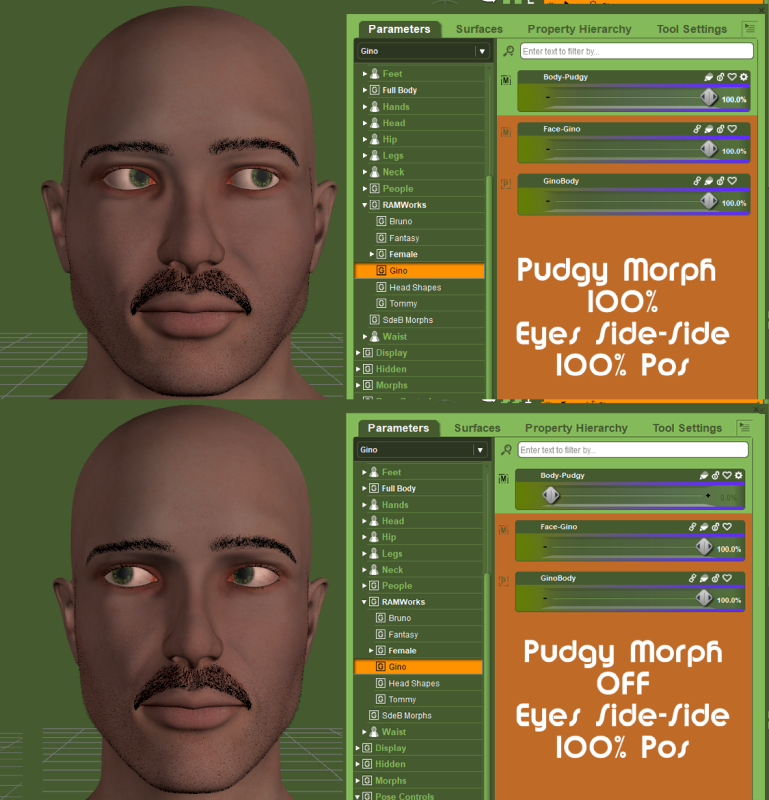 Issue with a morph I made or it's a bug in DS 4.10 not sure
Oh and the eye morphs I'm using to test this are the Eyes Up-Down and the Eyes Side-Side.
For the Eyes Up-Down -100 makes the eyes crossed and 100 the eyes each turn to the far outer sides
For the Eyes Side-Side Right eyeball goes UP and the Left goes DOWN. In the negative the opposite happens. It's like the rotations are messed up but only for these middle dial settings!
I've tried dialing out the Gino Head morph and the Gino Full body morph and then Both, the issue remains.
 Issue with a morph I made or it's a bug in DS 4.10 not sure
Hi,
STILL fiddling with Gino, at this point he MIGHT be released by XMas! LMAO
So I have a pudgy morph I made for him based off an old morph I made for my Bruno morphs I made years and years ago.
Here's the process. I load up a fresh copy of G8M, Apply my Gino set to him, Face morph (made in ZBrush) and Body morph (comprised of in house DAZ morphs for better compatibility with clothing). I then dial in the Gino-Pudgy morph and the eyes go all wonky about half dial. When it's fully dialed in the eyes go unwonky but what if end users want to use just a bit of the pudgy morph? I've done all the research I can. I've even completely recreated the morph from scratch (like it better actually) and Adjust Rigging to Shape and then ERC Freeze it and saved it out. STILL getting this issue and not sure what to do at this point so I'm reaching out
Don't laugh, screen gab below... OK, it's funny but it's not funny!

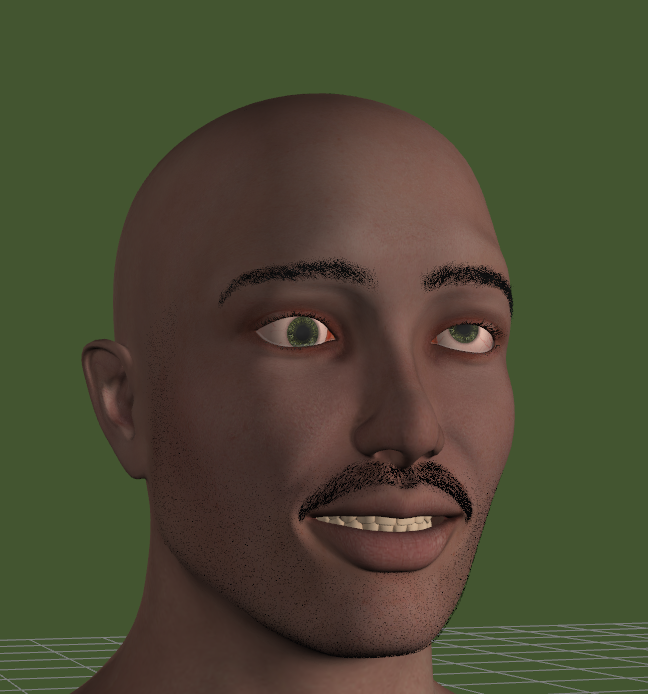 Hats off to Aeon Soul
That new one looks like it would be comfy. I also appreciate that they use consistent texturing that you can kitbash any of their products together.
I'm like the only one here who doesn't think the promo girl looks creepy. She looks weird in the promos because she's usually the only stylized human there. You could probably dial-spin something close. The only tricky parts is finding a good "round eyes" morph, making her face a bit round, and smoothing the upper part of the cheeks near the eyes.
Daz Studio Pro BETA - version 4.11.0.383! (*UPDATED*)I had the same problem with the not visible in the DIM List.
The only possible Solution was to download the zip File an transfer the File to the DIM Download Folder.PC1 - Visible in DIM List
PC2 - Not Visible, DIM Downloadlink SKU 1200 give only a 1kb File Beta Content but not the Pro Beta InstallerM4 & V4.2 Morphs PwrLdr says yes but DS says no?Rob says
the individual PowerLoder packages associated with a given morph product provide the "bullets" (configuration files) in your analogyRealistic Neko Ears (Male/Female)Using RAM's fantasy ear morph transferred to G3M and some of G3M's ear morphs, I made this;
https://i.imgur.com/kq76u8R.png
So yes, realistic cat ears are possible.3 or 4 fingers for Genesis 3 or 8 (male)I posted a screenshot tutorial for a 3 finger morph. Remember to adjust the skeleton rigging.
https://www.daz3d.com/forums/discussion/comment/4047206/#Comment_4047206
dForce Question: Shirt cuffs don't "ride" up when arm bends?This is a case of you can't have your cake and eat it too. dForce works on single layers of mesh, barring magic as soon as you make it thick like people are always complaining about dForce clothing not being then you get nice explosions. So in the case of this nice shirt either you have cuffs that don't ride up or you have single thickness mesh cuffs. Which is better? I don't know. There are ways to get around it with regular or HD morphs to apply after the drape which I've done with most of my dForce items, but I've noticed people rarely apply them even though there's an obvious preset for it right next to the clothes and a readme script saying to do it. I think next time I'll do it with dispacement maps so people can't forget to apply it, but that comes with its own challenges in Iray.
This particular shirt the best option would be to have a style morph that moves to cuff up on the arm that could be applied before or after the drape. >but< if the bones in the hand are in those cuffs, which is very likely with how far down they are and obviously not dForcing, if you slid the cuff up and had the thumb bent at all in the pose it would look quite weird.
Oh no! Please don't replace HD morphs with displacement in Iray. That would be a big step backwards, it seems to me.
Daz 3D is part of

Connect
DAZ Productions, Inc.
7533 S Center View Ct #4664
West Jordan, UT 84084Licensing Agreement | Terms of Service | Privacy Policy | EULA
© 2026 Daz Productions Inc. All Rights Reserved.