-
Mac: eGPU to work with Iray render
Before I bought my setup, I read a guy who wrote: "Please save your money and buy a PC", which was here on the DAZ forums. And if I had to do it again, I would spend a bit more and get a second handed gaming PC with a powerful NVIDIA Graphic card. That would be my advice to anyone considering this!
Well, if I were to do this last part, would I be able to set up the scene on my Macintosh, and then transfer the scene file to the PC, open the file with a Windows version of DAZ Studio, and render on the PC? Is there a way to transport the file and all the components needed to the PC? Or, would I have to set up my DAZ Libraries on the PC, and do the entire scene from start through to rendering, all on the PC?
How technically adept are you? If both machines are on the same network it would be doable, with some caveats. You'd need every asset used in the scene installed in the render box, and IIRC in the same file path as they are on the one you use for editing. IMO this would be a monumental PITA to setup and maintain, if it would even work.
As long as the content is of .duf, all you need it to have it installed in a mapped directory, absolute path is not an issue.
If you use .daz-files - you need all the autoadapted stuff from the data folder moved over
If you use Poser stuff, it often works, but sometimes loading fails, autoadapted problem her too.
I do this all the time, set scenes up on one machine and render on another (boths are macs though). I have a disk on one of the machines where DIM stores the downloads so I download once and install twice. I then mount the machine where the scene is setup and open the scenefile there and render.I wasn't sure how DS finds the stuff in a scene but then you could setup a NAS or a network share for your assets.
Where is Squish for G8 Female? (how do we butt the butt?)There's no impact or flat morph in glute controls.
Unfortunately, I can back this up. It seems like the kind of thing that really should be in Glute Control, but unless it's very well hidden, I've not found any morph that does the job for a character sitting on a flat surface.
Where is Squish for G8 Female? (how do we butt the butt?)There's no impact or flat morph in glute controls.
For flat surfaces... You can kind of get there by adding a smoothing modifier to the Genesis 8 figure, then using a Plane as the smoothing interaction so that you can vary the flat morphing without adjusting how close the figure is to the flat surface.
Smoothing modifiers are a decent stop gap, I think.
Mac: eGPU to work with Iray renderBefore I bought my setup, I read a guy who wrote: "Please save your money and buy a PC", which was here on the DAZ forums. And if I had to do it again, I would spend a bit more and get a second handed gaming PC with a powerful NVIDIA Graphic card. That would be my advice to anyone considering this!
Well, if I were to do this last part, would I be able to set up the scene on my Macintosh, and then transfer the scene file to the PC, open the file with a Windows version of DAZ Studio, and render on the PC? Is there a way to transport the file and all the components needed to the PC? Or, would I have to set up my DAZ Libraries on the PC, and do the entire scene from start through to rendering, all on the PC?
How technically adept are you? If both machines are on the same network it would be doable, with some caveats. You'd need every asset used in the scene installed in the render box, and IIRC in the same file path as they are on the one you use for editing. IMO this would be a monumental PITA to setup and maintain, if it would even work.
As long as the content is of .duf, all you need it to have it installed in a mapped directory, absolute path is not an issue.
If you use .daz-files - you need all the autoadapted stuff from the data folder moved over
If you use Poser stuff, it often works, but sometimes loading fails, autoadapted problem her too.
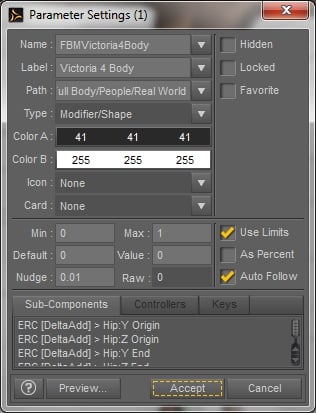
I do this all the time, set scenes up on one machine and render on another (boths are macs though). I have a disk on one of the machines where DIM stores the downloads so I download once and install twice. I then mount the machine where the scene is setup and open the scenefile there and render.Shoe distortion issueProblem solved and easy.........simply click on your Morph in the parameter setting tab under the morph loader to access the properties panel and un-check auto follow....Done Credit goes to Leana in the below post. I think this needs to be posted somewhere!
https://www.daz3d.com/forums/discussion/48750/shoes-fitting-them-conforming-feet
 Mac: eGPU to work with Iray render
Before I bought my setup, I read a guy who wrote: "Please save your money and buy a PC", which was here on the DAZ forums. And if I had to do it again, I would spend a bit more and get a second handed gaming PC with a powerful NVIDIA Graphic card. That would be my advice to anyone considering this!
Well, if I were to do this last part, would I be able to set up the scene on my Macintosh, and then transfer the scene file to the PC, open the file with a Windows version of DAZ Studio, and render on the PC? Is there a way to transport the file and all the components needed to the PC? Or, would I have to set up my DAZ Libraries on the PC, and do the entire scene from start through to rendering, all on the PC?
How technically adept are you? If both machines are on the same network it would be doable, with some caveats. You'd need every asset used in the scene installed in the render box, and IIRC in the same file path as they are on the one you use for editing. IMO this would be a monumental PITA to setup and maintain, if it would even work.
Mac: eGPU to work with Iray renderBefore I bought my setup, I read a guy who wrote: "Please save your money and buy a PC", which was here on the DAZ forums. And if I had to do it again, I would spend a bit more and get a second handed gaming PC with a powerful NVIDIA Graphic card. That would be my advice to anyone considering this!
Well, if I were to do this last part, would I be able to set up the scene on my Macintosh, and then transfer the scene file to the PC, open the file with a Windows version of DAZ Studio, and render on the PC? Is there a way to transport the file and all the components needed to the PC? Or, would I have to set up my DAZ Libraries on the PC, and do the entire scene from start through to rendering, all on the PC?
Plantigrade animal paws for G3/G8!I wouldn't mind seeing more plantigrade paw morphs myself. You'd think by this point some content creater would make a foot morph to make them look more paw like, but no. Every new creature that comes out has digitigrade paws and legs. Ever tried to put long pants on a model with digitigrade legs? It looks rediculus. You can get away with it if you have the model wearing a kilt or a skirt but not pants.
I've had some success with selecting the trousers left and right shins and adjusting the yScale parameter. Sometimes I need to tweak the bend as well, since odd things can happen as you shrink the scale. There is a limit (seems to be a bit different in each trousers model) beyond which the leg just crumples or distorts too much to be easily fixed.
Shoe distortion issueI'm not sure, my inclination would be to load the fixes as a new morph and then use ERC Freeze to link those corrections and the other properties to as ingle control slider.
I'm going to have to try that. I will re-review my method of incorporating morphs into the figure as when I lengthen toes using the Easy Feet Morphs the shoes are unaffected. Its only when I bring in the foot morph via Morph Loader Pro do I have an issue with the shoes. I just purchased the tutorial "How to Create a New Custom Daz Studio Character" by Digital Art Live and Sickleyield so I can properly bring in morphs and apply them correctly to the characters. The shoes are basically autofollowing the imported foot morph. I just need to see if there is a way to not have that happen.
Hylas' corner
This was supposed to be another quick scene, trying out the barn I picked up in the current sale. Not only did it take longer than expected to set it up (doesn't it always?) but it also took forever to render, and I'm not even sure why. But at least I'm very happy with the outcome!
Freebie credits:
Morph by Gregory H. Bontrager: https://www.sharecg.com/v/89882/gallery/21/DAZ-Studio/Elvis-Presley-for-Genesis-8-Male
HDRI Skydome by Agent Unawares: https://www.deviantart.com/agentunawares/art/Skyset-002-705701571
Ghostlights by AndyS: https://sharecg.com/v/87021/browse/7/Material-and-Shader/Simple-iRay-GhostLights-Shader
Boots by Wilmap: https://www.wilmapsdigitalcreations.co.uk/view_product.php?id=70
Pose by Thorvan: https://www.renderosity.com/mod/freestuff/30-mirrored-poses-for-genesis-8-male/77781
Haybale by squarepeg3d: https://www.renderosity.com/mod/freestuff/bale-of-hay---100-free/79103&ca
Wet skin tutorial by shibashake: https://thinkdrawart.com/how-to-get-wet-skin-in-irayGoing ape over the AM GorillaI do romance covers which never feature gorillas. Werewolves, though... I used the gorilla and took out the morph, added in the Lucan morph, a little dog head, and a bit of Collosus. I need to work on him some though. Longer fur on the head, shorter on the arms.
That looks amazing. I'll have to experiment with that later on.
Does this product speed up G3 to G2 skins into Carrara?That much I guessed, how about the Map transfer utility in DS mentioned further down? https://www.daz3d.com/forums/discussion/95701/tutorial-converting-custom-genesis-2-uvs-to-genesis-3you can only do the bits not geografted as the vertex count and surfaces don't match on the geografts
I did try it
basically your collars and thighs need to be covered
I do have some of the ones for Genesis 3 and 8
with those if fully clothed can leave off the geografts and save as a UV set for Misty's characters
cannot be bothered buying this one even at 299c
Does this product speed up G3 to G2 skins into Carrara?That much I guessed, how about the Map transfer utility in DS mentioned further down? https://www.daz3d.com/forums/discussion/95701/tutorial-converting-custom-genesis-2-uvs-to-genesis-3Shoe distortion issueI'm not sure, my inclination would be to load the fixes as a new morph and then use ERC Freeze to link those corrections and the other properties to as ingle control slider.
Shoe distortion issueExporting a shape and reloading as a new morph will break any connections to joint adjustments or corrective morphs. It's best not to use this method.
Hi Richard, so is there a better way? I have been making custom morphs since I started using DAZ back in the mid 2000's with little issues. The shoes seem to be the only issue I am having with possibly 4.11. Joints, corrective morphs etc seem to me no issue. I'm applying toe lengths via the Easy Feet Morphs and doing some fixing in Zbrush via Goz. When I am happy with the result I export out of DAZ at base resolution and import back into DAZ on new character as needed. The only time I have had any issues is with shoes. I would simply zero the morph in the shoe and that fixed the problem in previous versions of DAZ. This seems to not be an option with 4.11 so far as I can tell.
If you want to apply a morph is there a better way?
Plantigrade animal paws for G3/G8!I wouldn't mind seeing more plantigrade paw morphs myself. You'd think by this point some content creater would make a foot morph to make them look more paw like, but no. Every new creature that comes out has digitigrade paws and legs. Ever tried to put long pants on a model with digitigrade legs? It looks rediculus. You can get away with it if you have the model wearing a kilt or a skirt but not pants.
Shoe distortion issueExporting a shape and reloading as a new morph will break any connections to joint adjustments or corrective morphs. It's best not to use this method.
Shoe distortion issueMore testing and you can lengthen toes in DAZ but when you export out the finished morph and load it back in with Morph loader pro it destorts the shoe. Previously I would find the morph in the shoe and zero it out. Any poke through you could handle by applying a smoothing modifier and it would work like a charm in 4.10. In this case sometimes you can find the morph in the shoe but its locked and I am unable to unlock the morph and zero it out. In some cases the morph does not appear listed under the shoe. Seems to be an issue with 4.11. Any help would be greatly appreciated.
Hob Goblin for Genesis 8 Male [commercial]Hob Goblin
https://www.daz3d.com/hobgoblin-for-genesis-8-male
The Hob Goblin can be wonderful help around the house, cleaning and dusting while you sleep, asking only for scraps of food. But beware they can be playful tricksters who can turn your good times into a nightmare if you are not careful.
The set comes complete with custom crafted High Definition Morphs, and Highly detailed Textures for the utmost realism.
- Product Includes
- One HobGoblin Character Preset
- One HobGoblin Full Body HD Morph
- Two HobGoblin Shaping Presets (Small and Large)
- Three HobGoblin Full Body Material Presets including anatomical elements
- Three HobGoblin Full Body Material Presets with Tattoos
- Five Eye Material Presets
Includes both Iray and 3Delight Material Presets


 Going ape over the AM Gorilla
I do romance covers which never feature gorillas. Werewolves, though... I used the gorilla and took out the morph, added in the Lucan morph, a little dog head, and a bit of Collosus. I need to work on him some though. Longer fur on the head, shorter on the arms.
Awesome, @Damsel - really shows how powerful it is when base figures are used (as opposed to stand-alone).
- Greg
Daz 3D is part of

Connect
DAZ Productions, Inc.
7533 S Center View Ct #4664
West Jordan, UT 84084Licensing Agreement | Terms of Service | Privacy Policy | EULA
© 2026 Daz Productions Inc. All Rights Reserved.















