-
Plantigrade animal paws for G3/G8!
so .. kinda like this ?
Shown with my character's body morph and on plain g8f. I opted for separate foot morphs to make human shoes easier to deal with. I was surpised just now though, I only have one toenail morph (from Thistle set). I'm going to have to make some.
LM
Something like that would be just what the doctor ordered. All that would be needed would be a nail morph and it would be perfect.
Figure prop, rigging anomaly while posing bone rotationsSo the problem has resurfaced yet again when trying to make a MCM for the prop. There has to be something else going on here.
- I use GoZ to load up the prop in the posed (bone rotation) position, make my morph, and GoZ back to Daz.
- I then zero the bone rotation, and apply the morph.
When applying the morph the geometry distorts severely as though it were trying to return to a different location and scale possibly. I've taken both elements of the prop I am attempting to do this to back into blender, applied rotation and scale, set origin to geometry, and imported them back as a full geometry update. This didn't fix or make the problem worse at all, so It can't be that.
Any ideas?
Screenshot:
CAT girl G8@mab since I can't make it myself (tried several methods, but am I noob) I want to ask you here: Is it possible to get some kind of utility thing for the ear patches to use with regular textures, like it has for the tailcore and the catear surroundings?
I mean I want to use the catears with human skin and you provide the utility to do that, but then they still also have the human ears and using the patches only works with the patches textures, except if I missed something.
Do you want it to work with any skin textures? Or just "regular" human skin textures that come with an addon for the set?
Any skin texture. Just like the tail and the catears have a utility function to make it work with any skin, it would be helpful if the patches also have that. My amateurish guess would be that it would be like some skin transfer script
Now I understand something for the no ear patches. I am not sure how to do a script to anything with textures which include making that no ear patch match the rest of the skin. I misunderstood you.
How can we change thumbnails ?i manually transfer thumbnails by copy pasting with notepad. (the byte array
 )
)first i do a scene render to make the thumbnail i want. render with preview.
Novica & Forum Members Tips & Product Reviews Pt 12Love the Emma render!
@nonesuch00 your render reminds me of 1 Adam 12 lol (yes I'm dating myself)
That wasn't the intent but I think I will (once DAZ Studio has new & improved animation available such that even I can manage to make animations
 ) create an Adam-12 / Road Runner & Looney Tunes based fan cartoon where Adam-12 go about trying to stop some of those horrible things that goes on in Looney Tunes Land! I've been thinking about doing that for a while now.
I've never actually watched the show though until recently; when I was looking for cheap non-gory TV DVDs and found out Season One has Spanish (I want to learn Spanish better than the 2 semesters of College Spanish I had to take). It's pretty messed up when it's cheaper to buy a lot of old TV series DVD sets rather than subscribe to cable or satellite because of how expensive those subscriptions are!
+++++
Edit:
OK...so I updated my previous 'ad copy' to use the 2 opacity planes, the hinter one with a tiled pattern, and changed the head morph to a Adam-12 FaceGen morph I made last year for another render.
Officer's Friendly's Blown Kiss (revised) 
Note: A little mistake - I forgot to apply the Martin Milner morph to Cop 1 in the foreground so that cop is actually basic G2M (I knew he didn't look right but I wasn't sure
). I mainly wanted to show the effect of using 2 opacity planes for the background character so job done.Transfering DAZ filesHiy'all,
Just a quick question. I've been doing DAZ for months and I'm happy with it, but my computer is about to go belly up. I plan to buy a new one in the next month. Thing is, can I transfer all the content I've bought from the site(s) to my new machine or do I have to spend some major bank here at the studio to buy it all again? (Would copy/paste work after redownloading DAZ?)
I e-mailed them directly about a week ago and have not heard anything back, so I must ask here. Any info would help.
Thank you.
B.
Weird Merge behaviour in DS4.11.0.383I have had a similar thing with G3F. sometimes when merging a G3F into a scene with a G3, the face would get distorted. Never figured out why but I guess I have a morph (that may or may not used by any of the G3Fs) that is corrupted and distorts the G3F face morph.
Maximum GPU RAm for GPU rendering in IrayAlso, when discussing pooling VRAM, don't lose sight of the complexity of the problem...
For example, let's say you have a scene with 20 objects. In my overly-simplified example, with VRAM pooling you'd move 1/2 of the scene info (maybe 10 of the object descriptions including vertices and materials and locations, etc.) into one GPU, and the other half into the other GPU. So all each GPU knows about is it's 1/2 of the scene.
So you send a ray for pixel 1,536,224 into the scene, and it hits an object in GPU1. Cool. Then the ray bounces off and, uh oh, it's heading for an object that's residing on the other GPU. So you need to have some management info somewhere that keeps track of all the data across both GPU's. And to do all of this very fast you need to transfer rays from one GPU to the other as fast as possible and return the results as fast as possible. Which means you need super fast, bi-directional data transfer and a whole lot of software to manage all of it. And someone has to write all of that software. And it has nothing to do with NVLINK.
Of course all of this could work if you did that communication over a slow speed like (like PCI), but it's dreadfully slow. So hypothetically maybe you could achieve memory pooling at the expense of much slower renders, depending on how well you write the rendering software and what you're willing accept for render speeds in exchange for more memory.
So don't think that "oh, it has NVLINK therefore it can pool memory and also speed up my Iray renders". It may be able to pool memory, but it may also be dreadfully slow. And last I recall the RTX cards are utilizing a uni-directional SLI version of NVLINK, which means it's not helping you nearly as much as the ultimate NVLINK. This stuff requires a LOT of parts to come together to get a final result.
Plantigrade animal paws for G3/G8!so .. kinda like this ?
Shown with my character's body morph and on plain g8f. I opted for separate foot morphs to make human shoes easier to deal with. I was surpised just now though, I only have one toenail morph (from Thistle set). I'm going to have to make some.
LM
No Door in obj???By the way, you will not be able to open the door this way in DS, you will have to learn how to rig (shading domains, bones etc). It is easy to make a sliding door using a morph - If you want to go that route just say :)
Or just make the door a completely separate object that can be moved and rotated independently.
Teen Jane 8just thought i'd share a quick pic of jane + growing up youth morph... for some reason i think Jane looks even more cute as a little kid.... This is Shenequia/Jane plus Growing Up Youth morph
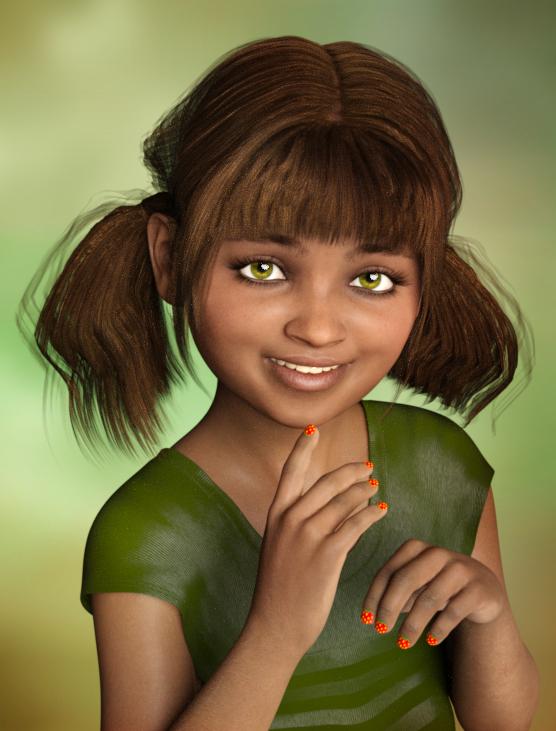
Great job!
No Door in obj???Can you do a screen grab of the wall showing the scene/properties tab.
A posible solution is, when you cut and paste (CTRL + X then CTRL + V on PC) you create a new form (form0 is the wall, form1 the door). Hexagon will only send a single form - Hexagon calls objects "Forms" until you re-name them.
By the way, you will not be able to open the door this way in DS, you will have to learn how to rig (shading domains, bones etc). It is easy to make a sliding door using a morph - If you want to go that route just say :)
Smaller (or bigger) characters than main Genesis 8 will distort clothingNot sure what you mean. The morph is for genenis 8, not the clothing. Basically this means creating a new character. The clothing is a standard genesis 8 female cloth, and the only difference between both characters is that one is scaled from 1.8 to 1.55, both Genesis 8 female with no any other change beyond scale. Skeleton has been also adapted to the new size. This means that a character that has not 1.8 will have more or less distorsions with pre existing clothing if doesnt match 1.8
The cloth is simply applied to the caracter, as its a pre existing standard genesis female 8 cloth and the character is a genesis 8 female not options are needed (in theory)
this smaller scale systematically adds a crack in any skirt.unless is dynamic clothing. I guess the crack will be smaller or bigger depending how much scaled is th character.
Autofollow is a setting on characters that cause clothing fit to the character to generate a morph to fit the character.
Open the parameters, of the character not the clothing, choose the morph(s) that you have created to shrink the character and click the gear icon on the right side of the slider, choose Parameter Settings and verify that autofoloow is checked. If it isn't check it and then apply the clothes again.
dForce Kay Hair questionsI have these questions regarding the dForce Kay Hair:
1. Is it possible to make the hair longer - down to the shoulder blades and the middle of the breasts?
Not out of the box, it's set up for collar bones length. If you set the length slider higher than 1, eg 1.5, it will be the length you want but the simulation will no longer drape nicely without Surface settings adjusted.
See attached render below - Surface settings changed were
Local Shape Constraint Stiffness = 0.78
Local Shape Constraint Stiffness Bias = 0.3
Local Shape Constraint Stiffness Gain = 0.10
Local Shape Constraint Tip Stiffness = 0.3
Hair Constraint Iterations = 1
PS Points Per Hair = 80
PR Points Per Hair = 80
Also this makes the hair floppier and can cover the face, so you may have to put an invisible sphere prop in front of her face so that the hair can collide against it.I'll look into doing a longer dForce hair sooner or later. :)
2. Is it possible to raise the forehead hairline?
I normally have Hairline Height adjustment morph in my polystrip hair models but left it out of this one because I had the smoothing modifier activated and it negates the hairline height morph. I will consider adding them back in future, thanks :)
3. How long does it take to simulate and render?
For me it takes 20 seconds to simulate (Frames To Simulate = Current Frame). My promo renders are 2600 x 3380 pixels and I set them to 20 minutes.

I always look forward to your hair now I am super excited to see the dforce stuff you come out with -- Big Fan
dForce Kay Hair questionsI have these questions regarding the dForce Kay Hair:
1. Is it possible to make the hair longer - down to the shoulder blades and the middle of the breasts?
Not out of the box, it's set up for collar bones length. If you set the length slider higher than 1, eg 1.5, it will be the length you want but the simulation will no longer drape nicely without Surface settings adjusted.
See attached render below - Surface settings changed were
Local Shape Constraint Stiffness = 0.78
Local Shape Constraint Stiffness Bias = 0.3
Local Shape Constraint Stiffness Gain = 0.10
Local Shape Constraint Tip Stiffness = 0.3
Hair Constraint Iterations = 1
PS Points Per Hair = 80
PR Points Per Hair = 80
Also this makes the hair floppier and can cover the face, so you may have to put an invisible sphere prop in front of her face so that the hair can collide against it.I'll look into doing a longer dForce hair sooner or later. :)
2. Is it possible to raise the forehead hairline?
I normally have Hairline Height adjustment morph in my polystrip hair models but left it out of this one because I had the smoothing modifier activated and it negates the hairline height morph. I will consider adding them back in future, thanks :)
3. How long does it take to simulate and render?
For me it takes 20 seconds to simulate (Frames To Simulate = Current Frame). My promo renders are 2600 x 3380 pixels and I set them to 20 minutes.
Nice
dForce Kay Hair questionsI have these questions regarding the dForce Kay Hair:
1. Is it possible to make the hair longer - down to the shoulder blades and the middle of the breasts?
Not out of the box, it's set up for collar bones length. If you set the length slider higher than 1, eg 1.5, it will be the length you want but the simulation will no longer drape nicely without Surface settings adjusted.
See attached render below - Surface settings changed were
Local Shape Constraint Stiffness = 0.78
Local Shape Constraint Stiffness Bias = 0.3
Local Shape Constraint Stiffness Gain = 0.10
Local Shape Constraint Tip Stiffness = 0.3
Hair Constraint Iterations = 1
PS Points Per Hair = 80
PR Points Per Hair = 80
Also this makes the hair floppier and can cover the face, so you may have to put an invisible sphere prop in front of her face so that the hair can collide against it.I'll look into doing a longer dForce hair sooner or later. :)
2. Is it possible to raise the forehead hairline?
I normally have Hairline Height adjustment morph in my polystrip hair models but left it out of this one because I had the smoothing modifier activated and it negates the hairline height morph. I will consider adding them back in future, thanks :)
3. How long does it take to simulate and render?
For me it takes 20 seconds to simulate (Frames To Simulate = Current Frame). My promo renders are 2600 x 3380 pixels and I set them to 20 minutes.
Teen Jane 8just thought i'd share a quick pic of jane + growing up youth morph... for some reason i think Jane looks even more cute as a little kid.... This is Shenequia/Jane plus Growing Up Youth morph
Smaller (or bigger) characters than main Genesis 8 will distort clothingIs your custom morph set to autofollow?
Seems to be proof that it *is* in fact following. It's a limitation inherent to projecting morphs from figures to clothing, and also why clothing comes with fits for different shapes.
- Greg
How well do G3, Horse 2 and Centaur 7 play together?H2 textures are the same UV as C7
they are the same mesh minus the neck and head but not quite the same rig or scale
Good, good...
sadly because parts of mesh missing morphs will not work
Blargh! Can anyone speak to how well morphs transfer between these two?
Will not work was pretty self explanatory I thought
How well do G3, Horse 2 and Centaur 7 play together?H2 textures are the same UV as C7
they are the same mesh minus the neck and head but not quite the same rig or scale
Good, good...
sadly because parts of mesh missing morphs will not work
Blargh! Can anyone speak to how well morphs transfer between these two?
Daz 3D is part of

Connect
DAZ Productions, Inc.
7533 S Center View Ct #4664
West Jordan, UT 84084Licensing Agreement | Terms of Service | Privacy Policy | EULA
© 2026 Daz Productions Inc. All Rights Reserved.