-
Feedback on my PA Application for Resubmission?
Hi Hi everyone! I wanna preface by saying that even though i've used daz for quite a while now, i've never used these forums, so I hope i'm in the right category and my post is in correct format and all.
I applied for PA ~2 weeks ago [July 5th], and haven't heard back. I'm planning to edit my application a bit and resubmit over the weekend, I'd just like some feedback
My initial submission included 3 G9 stylized character products, a G9 feet morphs pack, and a G8 feet morphs pack. The thing is, I'm not even sure resubmitting makes much sense, I'd be resubmitting with mostly the same products - adding 2 new products since my initial application [feet textures and details product + new character], for a total of 7, and, both the morph packs had the weakest full shape overhauled, and some new promos. But like, it's basically the same level of products and renders
I suppose my biggest question is, is my bias towards my own style making me overestimate the quality of the products and/or renders I submitted? Are they simply below PA-level quality?
I'm also concerned my application may have been too messy, especially cause I think the application shuffles the uploaded images. My initial application had 34 images for 5 products. I think I'll try to limit the resubmission to like 21ish images for 7 products? is that better? or is the image count not an issue as long as all the images actually contribute something?
Would it be okay if I opened a support ticket [from the PA landing page] to politely ask whether my application is still under review or if they've decided they're not interested? If Daz simply isn't interested, I'm not offended or anything, but I do just wanna be sure, because it would really suck if I posted 7 products elsewhere and then got PA acceptance a few days later. I also won't be splitting my products across different stores, it's intended to be one catalogue.
And, I'd welcome any other feedback, whether on the products or the renders, but I am limited to 6 image attachments I think, so ik that's a very limited sample, but I can say that the attached promos and technical shots aren't cherry picked.
[note, for the character promo images, only the characters are my products.]
[I did include wireframe and technical shots in the application]
CB Raven for Genesis 8.1 FemaleI remember I've seen the similar issue before... the vendor fixed FBM on a clothing, saved the morph asset but then they modified the character's shape again but didn't further fix the FBM ~~
Jus fill a ticket to report the issue ~
RTX 5090 and slow dazPadone said:
This is a known issue with 50xx cards, reported by many users, and also in the general release log, so DAZ is well aware. What you can try is to use the recommended drivers 576.80 studio, that's the same the DAZ developers are using, but it seems it doesn't help much. In my opinion DAZ rushed out DS6 too early, a similar major bug in the viewport should not have seen the general release. You can just hope they will fix it soon.
https://www.daz3d.com/forums/discussion/763291/daz-studio-6-25-0-x-general-release
Change Log:
Known Issues:
Viewport lag: Some reports indicate that the forthcoming Microsoft Patch Tuesday (June 09) may bring improvements.
edit. p.s. 64gb ram is a little low for 32gb vram, ideally you need ram = 3x vram. Also considering ram is used by the OS and other apps as well. Also ram can be used as out of core aka shared gpu memory by some rendering engines as cycles and octane. You better upgrade to 128gb ram if you can.
Right there, appreciate that's not an official response.
The issue for me is - when manipulating a single figure scene in any of the shader modes, when I apply a morph slider say from 0 to 50% it stops at 0.35% then a few seconds later jumps to whatever value, then I move it back down, lag, rinse repeat. Same scene in DS4 is buttery smooth so, for me, it's nothing to do with available RAM.
Proportions and SizesHavos said:
You can use the "Head Propagating Scale" morph or the "Youth Head Proportion" morph that comes with Growing-up to adjust head sizes so they are all roughly the same. Do that last, as dialing in various head morphs can make a head bigger or smaller. If the head needs a lot of scaling you might think the neck looks too thick or thin afterwards, so use the "Neck Width" morph to adjust this back to normal levels
Thanks. I do have growing-up.
Golden Palace G9 Bonus Morphnightwolf1982 said:
I have the latest package for Golden Palace G9 and the bonus morph is NOT included.
I've never had and installed the "bonus morphs" but I had no "Formula output property not found" messages in my DS log, I bought the product in 2024 and installed the latest package last year but only found 3 messages related to GP. I fixed them.
Besides, in Meipe's original thread of " G9 Golden Palace bonus morph - free download ", the morph he circled in the screenshot (as well as more relevant morphs) are all in the latest package, only the Labels of the morphs are modified a bit.
Edit: I think why he removed the link and gave no answers to the posts asking for re-uploading the bonus package is because everything are in the package ~~ You can PM Meipe anyway for a confirmation.
Or you can PM me your DS log, I can identify the modifiers "not found" and show you where they're ~
Golden Palace G9 Bonus MorphI have the latest package for Golden Palace G9 and the bonus morph is NOT included.
Golden Palace G9 Bonus MorphThe latest "bonus morph files" are all included in GP for G9's product package. Just download the latest package and install. Better remove the older files in both data / runtime and user-facing folders beforehand !
There may be still a couple of "....not found" warnings related to it but still easy to fix by correcting the modifier names ~~
Golden Palace G9 Bonus MorphWhile tracking down errors for G9, one that came up was for a bonus morph for Meipe's Golden Palace for G9. Does anyone have it?
Proportions and SizesYou can use the "Head Propagating Scale" morph or the "Youth Head Proportion" morph that comes with Growing-up to adjust head sizes so they are all roughly the same. Do that last, as dialing in various head morphs can make a head bigger or smaller. If the head needs a lot of scaling you might think the neck looks too thick or thin afterwards, so use the "Neck Width" morph to adjust this back to normal levels
Proportions and SizesThanks. Just got back from Door Dashing so I will try some things. Just knowing about the Height and Youth Morph alone helps a lot. I should have experimented more, but I didn't think about it.
DogZ & Zev0 200 Plus Morphs G9 ErrorEmma and Jordi's DAZ store is closed, but their some of their stuff is still available on Gumroad, including the face morph sets
Proportions and Sizeswhispers65 said:
I'm starting a new middle-school novel series and plan to use DAZ Studio for character renders. I'll eventually need a fairly large cast, so I'm trying to establish a consistent workflow before I get too far.
My biggest challenge isn't creating individual characters—it's keeping the head-to-body proportions consistent across the cast.
If I start with different Genesis 8 character morphs and then use things like Youth Morph and Height to make them into approximately 12-13 year olds (around 5' tall), I end up with characters whose heads don't seem to be in proportion with each other. Some appear to have noticeably larger or smaller heads relative to their bodies, even when they're intended to be the same age.
My questions are:
- Do Height and Youth Morph scale the head proportionally, or do they mainly affect the body?
Yes and No ~ Height morph just affects body + neck. Youth Morph affects body + neck + head.
- Is it better to create one "base" middle-school boy (and girl) with proportions I like, then build every character from that base by changing facial features, body shape, hair, etc.?
There won't be big difference in terms of final result if you customize each character directly.... but creating "base boy + girl" firstly can help with saving some time for customization~~
- Are there any recommended morphs or workflows for creating believable middle-school characters while keeping proportions consistent across a large cast?
I rarely make teenagers, boys and girls etc. ~~ see if other folks can give some suggestions ~~
My current thought is to make a base boy and girl, then create variations such as thin, average, athletic, and pudgy, but I'm wondering if there's a better approach.
sounds like a good idea to me ~~
DogZ & Zev0 200 Plus Morphs G9 ErrorWow, I was really surprised. After updating this product, my DS log that used to have 0 warning, 0 error when loading G9 now has this warning:
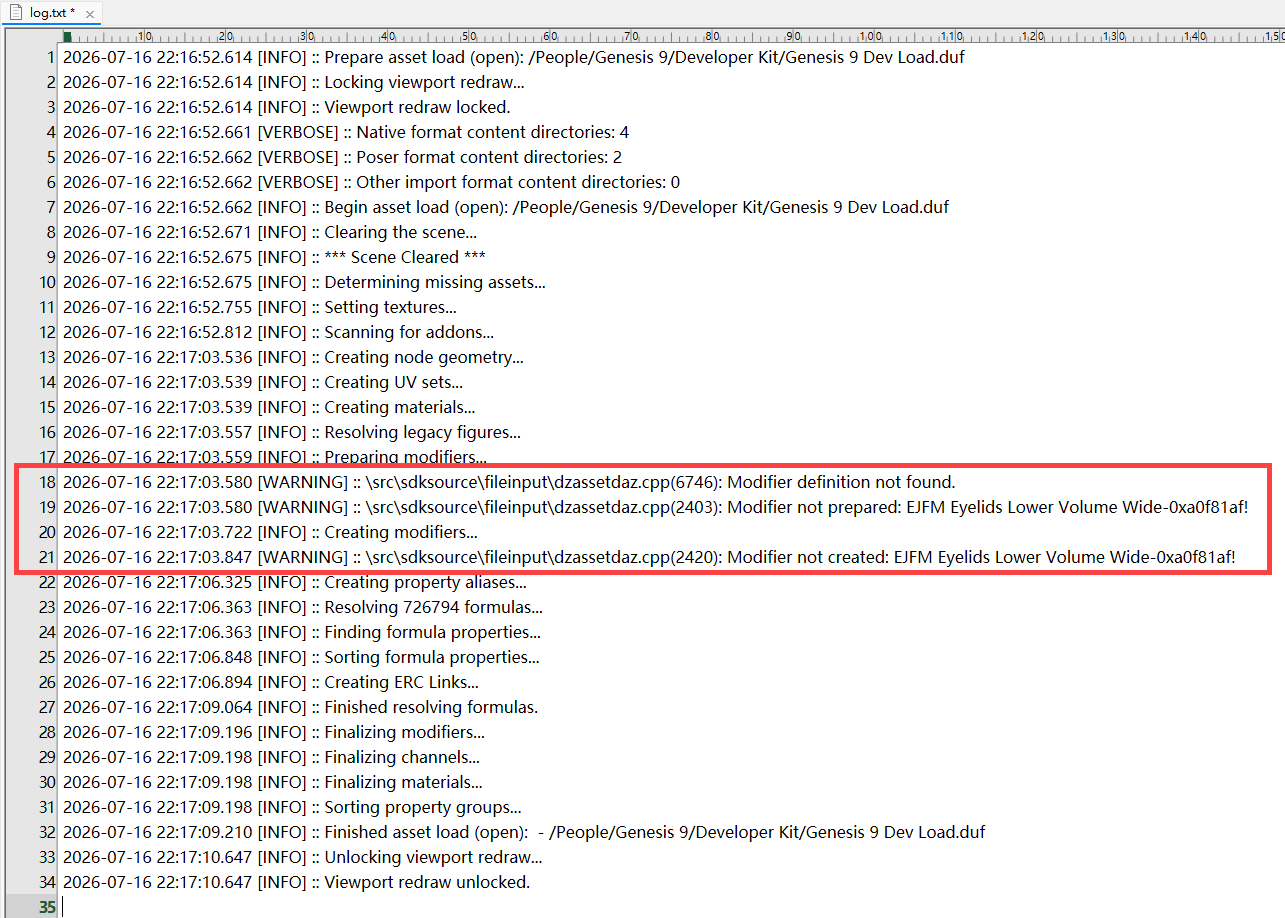
I can't believe it comes from a morph ever made by Emma and Jordi who left this store long time ago ~~
Hmm, I'm digging out the culprit ~~
DogZ & Zev0 200 Plus Morphs G9 ErrorAh, I found there's an updated package marked hidden in my DIM > Ready to download. Anyway I kept the older version and installed the latest one. Yes, I could reproduce the issue ~~
I think when Zev0 saved these morphs, Yonina Mouth property had a value 1.0 for some reason....(or maybe they made the morph by using this PHM but didn't bake it ~~ ? )
Now you just need to delete the forumula from DSF files... The issue can be fixed ~
Check the screenshot down below~ Do the same in Anya's DSF.
Proportions and SizesI'm starting a new middle-school novel series and plan to use DAZ Studio for character renders. I'll eventually need a fairly large cast, so I'm trying to establish a consistent workflow before I get too far.
My biggest challenge isn't creating individual characters—it's keeping the head-to-body proportions consistent across the cast.
If I start with different Genesis 8 character morphs and then use things like Youth Morph and Height to make them into approximately 12-13 year olds (around 5' tall), I end up with characters whose heads don't seem to be in proportion with each other. Some appear to have noticeably larger or smaller heads relative to their bodies, even when they're intended to be the same age.
My questions are:
- Do Height and Youth Morph scale the head proportionally, or do they mainly affect the body?
- Is it better to create one "base" middle-school boy (and girl) with proportions I like, then build every character from that base by changing facial features, body shape, hair, etc.?
- Are there any recommended morphs or workflows for creating believable middle-school characters while keeping proportions consistent across a large cast?
My current thought is to make a base boy and girl, then create variations such as thin, average, athletic, and pudgy, but I'm wondering if there's a better approach.
DogZ & Zev0 200 Plus Morphs G9 ErrorNo, never bought Yonina, and re-installing didn't fix it. Mine show the Anya morph modified 8/23/2023 and the brian morph modified 9/23/2023.
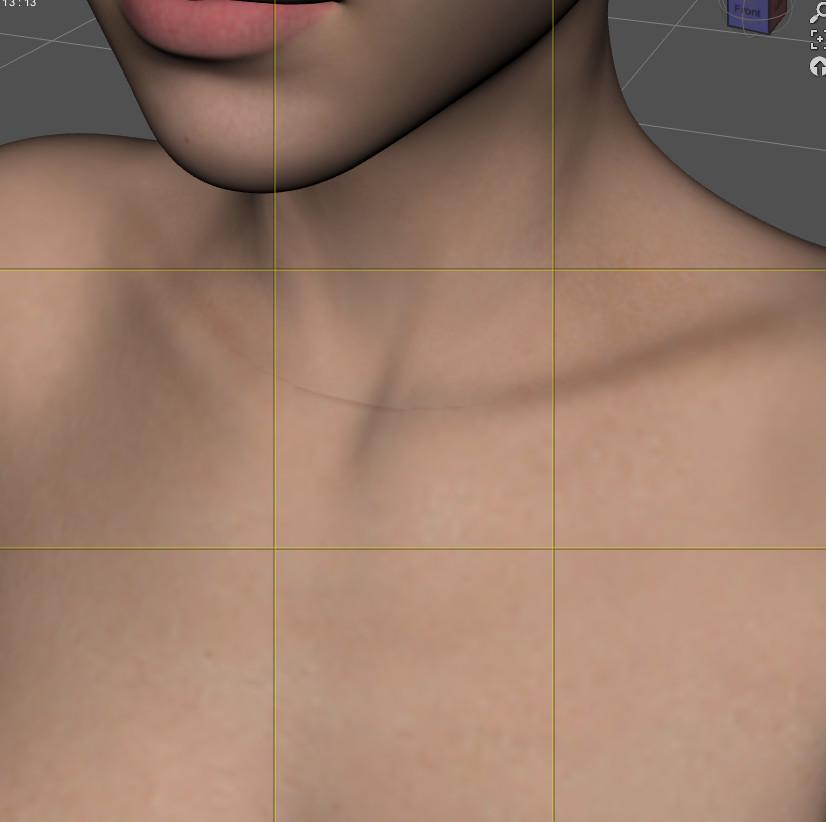
Varg 8 don't renderI've tryed to start from Daz Dog 8, Applied first the morph, after mat, and render has worked. When i've used dforce hair, DAZ has stopped to create render. Really trouble is that Varg, without fur, is like a crossbred among a pig and a ratIs there a way to fix a texture showing a strange line on a G8.1F character?I replaced the body diffuse map by the body diffuse map of another character, and the problem was not here anymore:
G8.1F with MSO Rory textures on all surfaces:
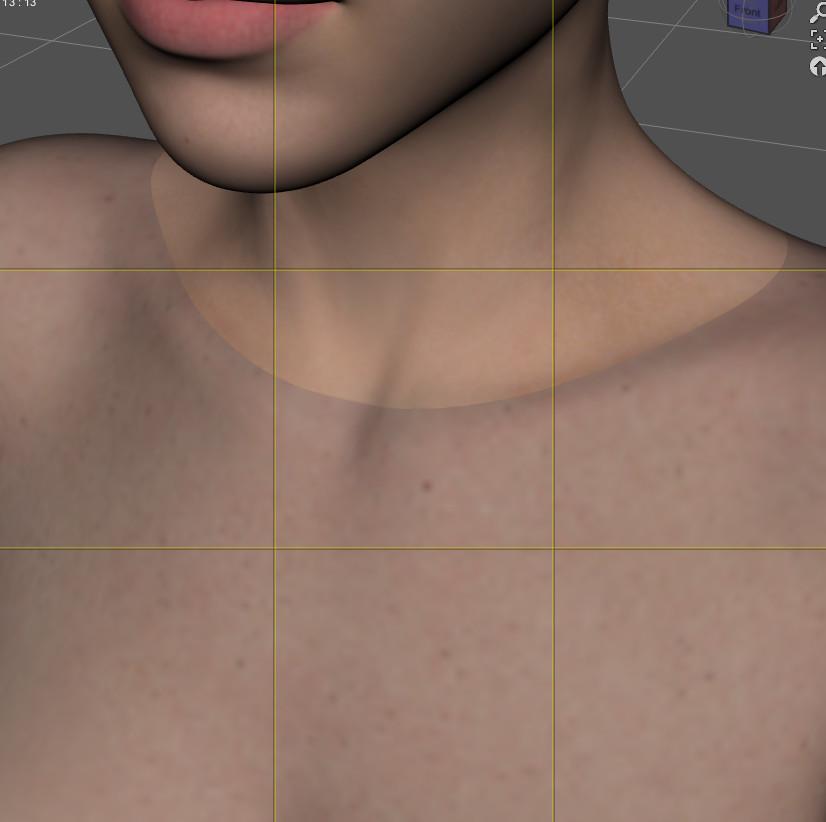
Same G8.1F, but I loaded MSO Lacey textures on the body surface:
crosswind said:
The seam issue can be seen with Texture Shaded drawstyle, so the issue must come from diffuse maps of Head and Body. It can be easily fixed in Blender by using Smear or Clone brushes, then bake the diffuse maps out.
As for the eye issue, I've seen the similar issue before. It's because the solely-used HD head morph makes the Sclera surface sink into the eyeball. You also can fix it in Blender or if you have Mesh Grabber, switch to Geometry Editor firstly, Select by > Surfaces > Sclera, active Mesh Grabber, zero radius, then drag out the sclera a little bit ~~
I opened a ticket, hopefully both will be fixed soon.
I'll keep your advices in mind, but I don't know enough about Blender to fix the diffuse map and I would not be surprised if the problem was also visible on other maps: I just don't know how to check for it.
Nic Cage - 8KWhat else to say than... Nicolas Cage...
THE CAGE IN 8K!
Nicolas Cage, from Call of Duty: Black Ops 7 made into a Genesis 9 Morph for my personal use.
PS!
What is going on with the Daz Gallery?
Been down since April?
And with the kinda disapointment with Daz6 (my opinion), hope the Gallery could be better...Diffeo Question About Anatomical ElementsPadone said:
That works as expected. You need to export at zero for no morphs applied, as in daz studio reset and zero are different things, aka the default values can be different to zero morphs. Then daz favorites will import the morphs and set them at default values, so they work the same as daz studio. If you try the controls everything works fine.
p.s. Probably the difference with other geografts is that they have default same as zero, but this is not always the case.
p.s. If you export a morph as non-zero this will be baked in the dbz and will affect the shape and imported morphs, of course, as the baked shape is the base added to the morphs.
Thank you for the explanation, Padone, now I understand.
Daz 3D is part of

Connect
DAZ Productions, Inc.
7533 S Center View Ct #4664
West Jordan, UT 84084Licensing Agreement | Terms of Service | Privacy Policy | EULA
© 2026 Daz Productions Inc. All Rights Reserved.