-
Saphirewild's Randomness Renders
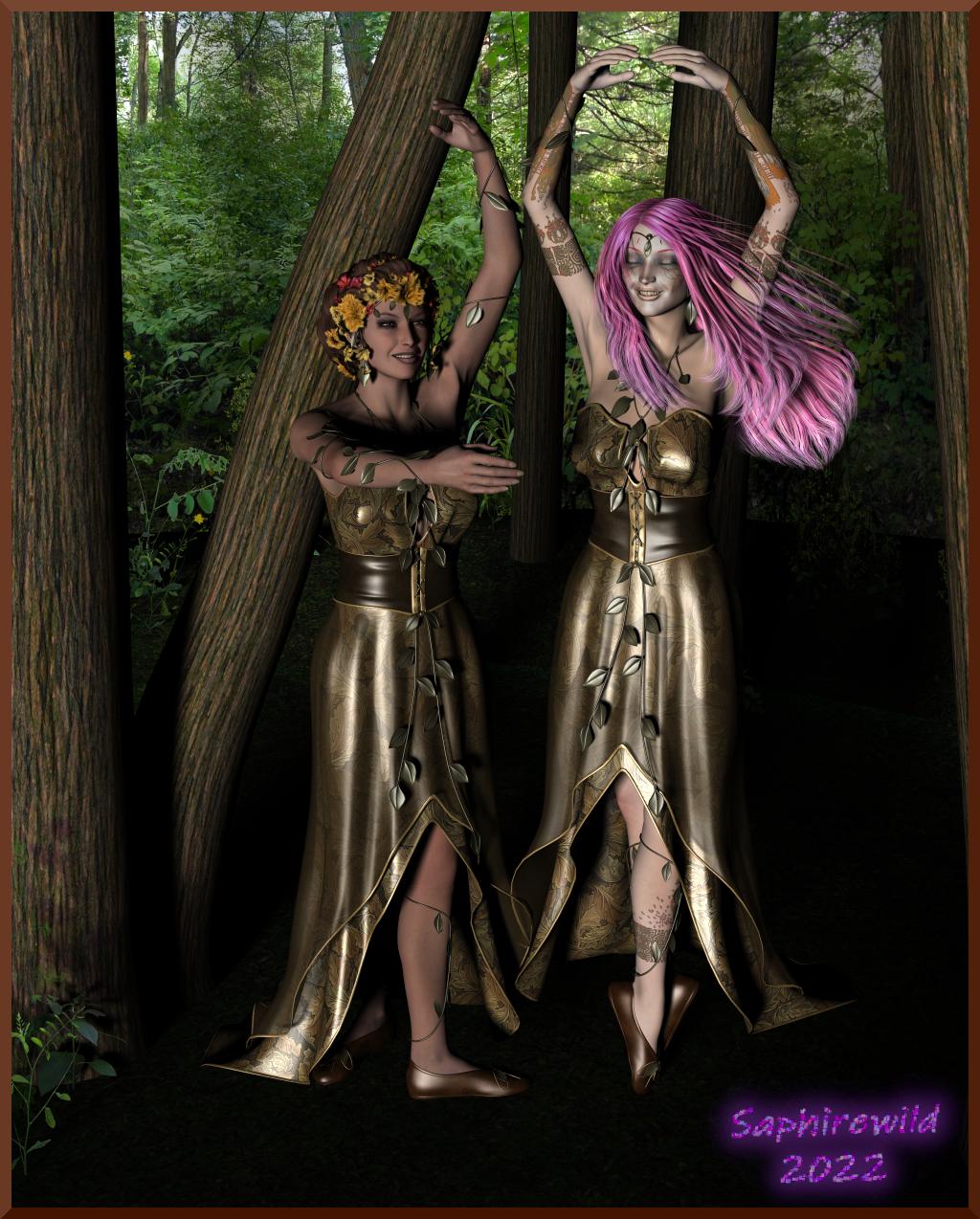
I also made this for the Daz+ Anniversary Contest!
Titled: Darleen and Darla Dancing with Nature
Used: Gaia for Victoria 4 Modern Muses: Bastienne
 Is this the KIDS 4?
Moved to Art Studio as it is not a Daz Studio question.
No, it's a shape fpr Genesis that more-or-less matches Kids 4. Kids 4 is of the same generation as Victoria 4 and Michael 4 - https://www.daz3d.com/the-kids-4-base
What is HD character ?ekajuan_9f765a669b said:
So
HD Add on: adds detail normal maps to mimic HD to a character
HD character: A character with detail virtual subD geometries?
No.
Daz Original characters, the ones that are named with a character name and a generation number, like Victoria 8.1, Michael 8.1, Necromancer 8.1, etc. do not come with HD morphs. They come with normal maps to mimic HD details. To get the real HD morphs for a Daz Original character, you have to buy the HD addon for the character. This can become quite expensive, because Daz prices both the character and the HD addon very high.
Characters that are created by other artists and are sold in the Daz store are usually sold as "character name FOR Genesis 8.1 Female" or "character name FOR Genesis 8.1 Male". Sometimes the artists use the HD morph tool to create their characters with an extra level of detail. When they do, they put HD into the character's name. In my experience, sometimes those HD details are as good as Daz original HD addon morphs, sometimes they are inferior, and sometimes they are better. They are almost always a more economical choice.
In any case, to see any benefit from HD morphs of any kind, it is necessary to select a fairly high subdivision level (minimum of 3, often 4, seldom 5) in the Parameters pane.Every level of subdivision quadruples the number of polygons, so you need to be careful to keep your computer specs in mind and not go too high. If you are not rendering a closeup portrait, you might not even be able to see a difference on many characters. I think HD morphs are over hyped in most cases, except for extreme character shapes or extreme closeups.
MetaMixer and HD Add-onGordig said:
You have to buy the MetaMixer add-on to use a character in MetaMixer. The HD addon gives you additional functionality in MetaMixer, but won't give you access to the character on its own. Victoria, Freja and Khemsit are included with MetaMixer.
I don't believe any of those three character shapes that you listed are included with the MetaMixer Toolkit. Where do you see that? I see that the included shapes are Holt, Nida, The Brute, and Twosret.
MetaMixer and HD Add-onYou have to buy the MetaMixer add-on to use a character in MetaMixer. The HD addon gives you additional functionality in MetaMixer, but won't give you access to the character on its own. Victoria, Freja and Khemsit are included with MetaMixer.
Tried out dForce and the Clothing went crazyI put a dress that is supposed to be compatible with dForce on a figure and posed the figure as sitting. The dress didn’t take account of the bent legs but I read that using dForce would help the clothing to fit to the figure.
Unfortunately, while the dress started to look OK, half way through the simulation the dress turned into a cocoon around the figure.
Where am I going wrong?
Before and after pictures attached
Figure: Victoria 8.1 with Alternative Shapes for Victoria 8.1 applied
Dress: dForce Evaline Outfit for Genesis 8 and 8.1 Females
Talk Show PosesCatherine3678ab said:
I don't know which one was used in the promo.
At the moment, this is the best buy to get a microphone: https://www.daz3d.com/vintage-film-props
This set also has microphones but at the moment the sale prices have not registered for all products so I would wait for a better price.
https://www.daz3d.com/jw-hd-microphone-and-singing-poses-for-genesis-8
And here's another one:
https://www.daz3d.com/guitar-and-microphone-with-poses-for-genesis-8-female-and-victoria-8
Thanks! I think I have one of those products, so I will look for it.
Talk Show PosesI don't know which one was used in the promo.
At the moment, this is the best buy to get a microphone: https://www.daz3d.com/vintage-film-props
This set also has microphones but at the moment the sale prices have not registered for all products so I would wait for a better price.
https://www.daz3d.com/jw-hd-microphone-and-singing-poses-for-genesis-8
And here's another one:
https://www.daz3d.com/guitar-and-microphone-with-poses-for-genesis-8-female-and-victoria-8
Torment 8.1 gender-swaplou_harper said:
MelissaGT said:
lou_harper said:
Instead swapping skins you could turn Torment into female using https://www.daz3d.com/genesis-8-cross-figure-resource-kit
How would you do that - doesn't the Cross-Figure Resource Kit only work to transfer clothing from male to female and vice versa?
Nope. You're thinking of a different product. This one, once installed, is a dial in the Parameters tab.
Nope, I have the product you linked, and all it does is convert clothing from male to female and vice versa. You can dial in the male to female clone and vice versa, but that's just the base male or female shape...it won't allow you to see the male morphs on a female character. Unless you're talking about loading Torment as a G8.1M and then dialing in the female clone...I wasn't aware that would work...but even then, it wouldn't allow you to see actual female morphs as options to use (i.e. dialing in Victoria 8.l on a loaded Torment 8.1).
Which "sexy" outfit is this?Scene loading time solutionTo all those who noticed that DAZ is taking an increasingly long time to load a scene.
I have the same scene, loading on two different computers, with similar CPU/GPU/memory.
The scene is has about 20 characters but they are all just two models ( Victoria 8 and Michael 8 ). The first computer needs a whooping ONE HOUR AND 3 MINUTES to load the scene.
I have been discussing this with DAZ for months, they claiming the scene is not taking long and not being able to explain it even after me sending tons of debug and log files. At an end, when I was finally able to reach someone who really knew about the project ( that is, after more than one month of having to go through layers and layers of customer service representative who knew nothing more than "re-install DAZ/Windows" ), there was a surprising conclusion.I have too many products.
My library is about 400+ products, most of them based on the Genesis 8 character. Apparently, DAZ has an issue with such big libraries. Therefor, the obvious solution was to trim down my library.
I have setup the second computer with the same scene and this time only the products i am using in the scene. The load time :
ONE MINUTE 42 SECONDS.The problem is that I need the full library while composing the scene.
Conclusion : DAZ does not support big libraries. The unofficial solution, therefor, is:
DO NOT BUY TOO MANY PRODUCTS. Buy just what you need, not everything that looks shiny/new/sexy. Buying all you like instead of just what you need will bring your DAZ to its knees and you will spend hours cursing the incredibly low speed.
A Little Help Re DAZ3Dhttps://www.daz3d.com/z-sign-language-alphabet-for-genesis-81-female-and-victoria-81
https://www.daz3d.com/the-good-student-poses-sign-language-and-expressions-for-genesis-8-female
https://www.daz3d.com/fingerspelling-poses
What is the most realistic and sexy skin? What is your favorite skin?Speaking culturally, as a North American, not personally - "sexy skin" is perfect looking. Thus, the thousands of products on the market, like syrums, creams, makeup, tanning products, shaving or hair removal stuff. Perfect skin is flawless. Flawless means young skin with no wrinkles, marks, blemishes, and that is evenly coloured, is not dry, etc. Fashion and beauty advertisments are heavily retouched to remove all imperfections.
Real looking skin is imperfect snd has hundreds of, what are considered, flaws.
Personally, not culturally, some people find real skin with all it's imperfections and flaws, sexy.
On that other 3D website with all the sexy content, many of the female figures in the promo images, use this skin, presumably because it's the sexiest skin https://www.daz3d.com/lyfw-adrienne-hd-for-victoria-6
An example of flawless male skin is https://www.daz3d.com/hercules-hd-for-genesis-3-male
In my opinion, a realistic male texture is https://www.daz3d.com/bjarke-hd-for-genesis-8-male
What is the most realistic and sexy skin? What is your favorite skin?IMO, the various generations of the Monique character qualify on both counts. Realistic imperfections in the skin make her more unique. The character expressions that are available in the bundles add to the usefulness of the character. She's a dark skinned character that doesn't look spray-painted. I have Monique6 and Monique7.
The Erynn character is also very nice. I can't resist freckles...
D-force Clothing Do not Adjust with figure
Thanks for the information, I will take a look.rcourtri_789f4b1c6b said:
Eparagraphics said:
Hello, I do images only. So do I also need to run simulations? Also, is there any good video or Guide where I can learn the same? Also, it is not related to dforce-bollywood-bride dress only, but happen with almost every skirt.Eparagraphics, the previous two posts point you toward helpful videos--where to find the appropriate tabs and buttons, the order of the steps taken, etc. Since your only creating still images, I would defer experimenting with animated-timeline simulations until you are getting good results with "Current Frame" simulations. Work on dForce with the character posed in empty space, and after you feel good about that, work on characters sitting or laying on furniture and the ground or floor. A long, loose-fitting skirt like on the Bollywood Bride Outfit can be quite tricky when the figure is sitting on a chair or stool.
"Almost every skirt," eh? Long skirts are the most difficult clothing item for the user (and probably the clothing's creator) to deal with. They need to bend at the hip and the knee, and that's usually even more challenging than shoulder/elbow/breasts issues with tops. Many older longer skirts are so much trouble that they can only be used in standing poses, either because the shape of the skirt can't be changed enough, or it can be changed only after excessive time and effort ("more trouble than it's worth").
Staying with Indian-themed clothes, I find the https://www.daz3d.com/saree-for-genesis-8-female-and-victoria-8 outfit easier and faster to use than the Bollywood Bride outfit, with equally good results in most poses and from most camera angles. It's a non-dForce outfit, and comparing how to fit the two outfits to a posed figure will give a user some useful experience for thinking about the advantages and disadvantages of conforming vs. dForce dynamic clothes. Anyway, a new user is well advised to practice with both conventional conforming and dForce dynamic clothing, and working with almost any outfit can provide some useful insights.
Let us choose which morphs to load before loading a character into the scene?Robert Freise said:
vozolgant said:
Let's say we want to load G8F into the scene. It would be nice if we could specify which morphs to load for it. I noticed that the more morphs G8F has, the slower it is to load. Letting us specify which morphs to load before hand could help fix that.
What do you guys think?
Years ago you could load a figure without any morphs add the ones you wanted and then save it as a custom figure.
No, the channels always had to be present - which was why combining mutliple sets was a pain, if each had its own custom CR2. The ExP System used by Victoria 4, Michael 4, etc. used separate pz2s listing each morph pack's entries and a utility to index them all for loading, but that required updating the inex files after any instalaltion. The only system that would inject morphs without any groundwork was the Poser .pmd system, but that had memory impact initially and the format of the calls changed with every service pack making ti impossible for Daz to implement, and a pain for Poser users.
However there were complaints from people who wanted all the morphs to load but didn't want load them and save a custom figure and then there was the problem created when you bought an outfit and it didn't have all the morphs in it.
So now everything loads every morph you have and you get long load times and a list of morphs that takes three days to look through with many duplicates of right eye closed, breasts big, cleavege mouth open and so on
Let us choose which morphs to load before loading a character into the scene?If you want to use a specific character preset, it's best to use that character preset. Whether that's Sakura, Tara or classic Victoria. You can also save a character as a preset to load instantly with all of the dials and morphs as you set them previously.
To do this, go to File -> Save as -> Character Preset
You can then simply load the character preset immediately by double-clicking on your character preset in the Content Library. I have many character presets saved, as there are a few I used regularly. There's also a handy-dandy guide in my sig if you want it to show up in the main Smart Content menu.
[Released] Bone Minion for Generation 4 Poses [Commercial]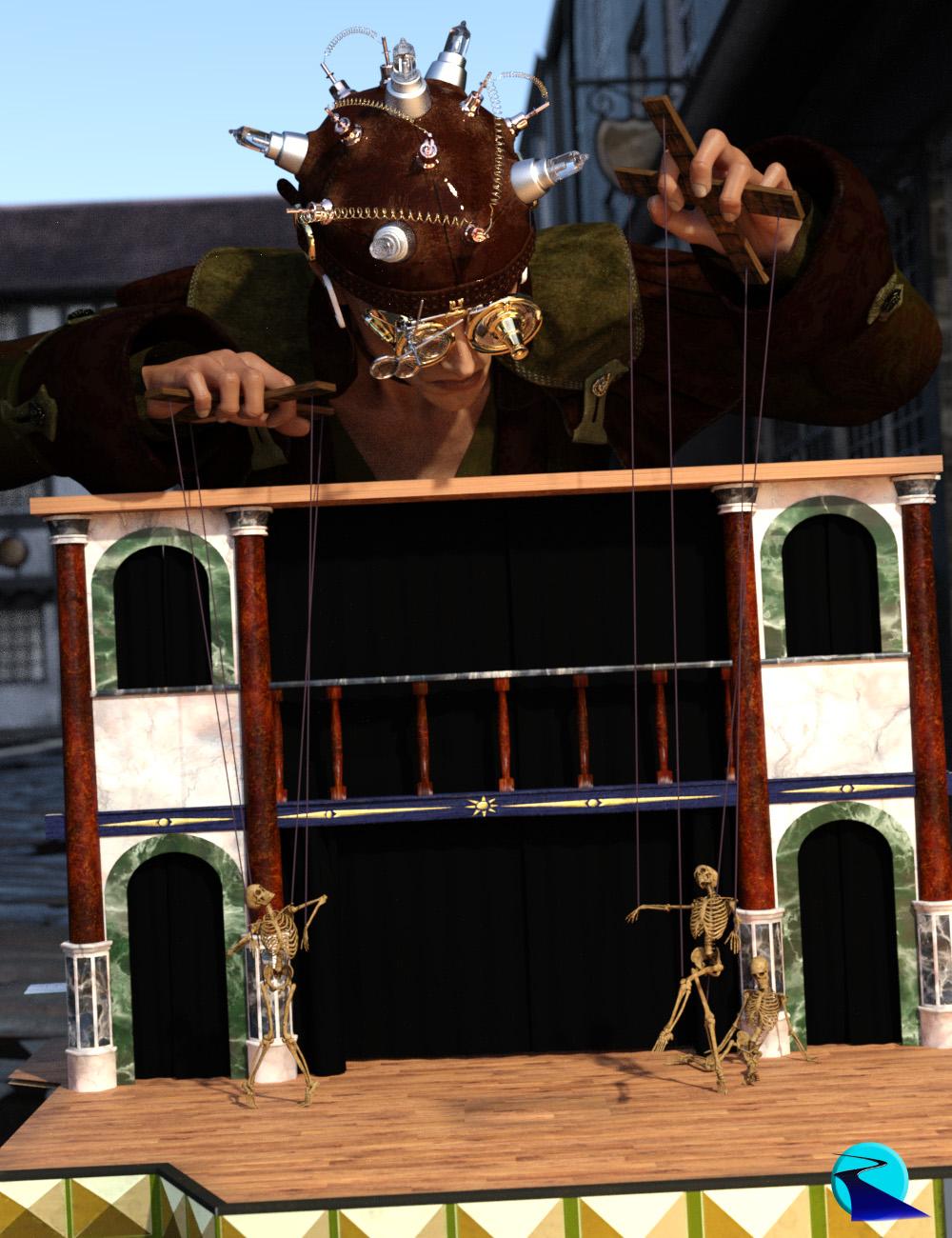 Introducing the revolutionary new way to use poses from different figure generations! Stop wasting time and hard drive space converting pose presets, just use them! With Bone Minion, you can directly use poses for Michael 4 and Victoria 4 on later generations without first converting and saving them to a preset. Your Bone Minion will do the hard work for you by acting as a bone "catcher" for a pose and then transferring (and converting if necessary) the pose to its parent target figure*. Simply load the desired Bone Minion (i.e., Victoria 4 Bone Minion for Victoria 4 poses) on your target figure (Genesis 8.1 Male), select the Bone Minion, and start applying poses!
- On the fly conversion of poses to your Target Figure
- Directly convert from the Source generation to the Target generation without converting to intermediate generations (i.e., direct conversion from V4 to G8F instead of V4 to G2 to G3 to G8)
- Works with full poses, partial poses**, and even hierarchical poses***
- Automatically applies full poses when they are loaded**
- Cross-gender pose conversion
- Use Pose Details on the Bone Minion to apply partial poses
Note that converted poses (and especially props if they are hierarchical poses) may not be perfect and may require tweaking. Facial Bones (i.e., expressions) except for the eyes are not transferred.
* Requires purchase of the correct Bone Minion product.
** Any pose that sets the hip of the Bone Minion will be automatically converted on the fly and applied to the target figure. Only 1 bone minion can be in automatic mode per figure (the first installed on a character). The Apply Changes script can be used to transfer any pose (including partial poses) on the Bone Minion to its target figure.
*** Hierarchical poses require the props loaded on both the Bone Minion and the target figure. The prop will be properly rotated for the pose but may need to be manually translated to the correct location.
Tutorial
 D-force Clothing Do not Adjust with figure
Eparagraphics said:
Hello, I do images only. So do I also need to run simulations? Also, is there any good video or Guide where I can learn the same? Also, it is not related to dforce-bollywood-bride dress only, but happen with almost every skirt.Eparagraphics, the previous two posts point you toward helpful videos--where to find the appropriate tabs and buttons, the order of the steps taken, etc. Since your only creating still images, I would defer experimenting with animated-timeline simulations until you are getting good results with "Current Frame" simulations. Work on dForce with the character posed in empty space, and after you feel good about that, work on characters sitting or laying on furniture and the ground or floor. A long, loose-fitting skirt like on the Bollywood Bride Outfit can be quite tricky when the figure is sitting on a chair or stool.
"Almost every skirt," eh? Long skirts are the most difficult clothing item for the user (and probably the clothing's creator) to deal with. They need to bend at the hip and the knee, and that's usually even more challenging than shoulder/elbow/breasts issues with tops. Many older longer skirts are so much trouble that they can only be used in standing poses, either because the shape of the skirt can't be changed enough, or it can be changed only after excessive time and effort ("more trouble than it's worth").
Staying with Indian-themed clothes, I find the https://www.daz3d.com/saree-for-genesis-8-female-and-victoria-8 outfit easier and faster to use than the Bollywood Bride outfit, with equally good results in most poses and from most camera angles. It's a non-dForce outfit, and comparing how to fit the two outfits to a posed figure will give a user some useful experience for thinking about the advantages and disadvantages of conforming vs. dForce dynamic clothes. Anyway, a new user is well advised to practice with both conventional conforming and dForce dynamic clothing, and working with almost any outfit can provide some useful insights.
help find characterI would assume it is https://www.daz3d.com/vyk-marty-for-victoria-81
As she is listed as being used in the promos.
Daz 3D is part of

Connect
DAZ Productions, Inc.
7533 S Center View Ct #4664
West Jordan, UT 84084Licensing Agreement | Terms of Service | Privacy Policy | EULA
© 2026 Daz Productions Inc. All Rights Reserved.