-
[Released] Character Converter from Genesis 8 Female to Genesis 3 Female - Conv JCMs too[Commercial]
RiverSoftArt said:
Nekura2000 said:
RiverSoftArt said:
Nekura2000 said:
RiverSoftArt said:
Nekura2000 said:
RiverSoftArt said:
Nekura2000 said:
RiverSoftArt said:
Nekura2000 said:
RiverSoftArt said:
Nekura2000 said:
I had to get a new hard drive so I reinstalled Daz Studio. When trying to convert my Generation 7 female characters to Generation 8, I'm getting a distorted face. I've uninstalled and reinstalled the program, even deleted the RSCloneGenesis3Female.obj file from the folder C:\Users\nekur\AppData\Roaming\DAZ 3D\Studio4\CharacterConverterMorphs, with no change. The Generation 7 character as well as Genesis 8 load without a flaw. Here's what I'm getting, attached or from https://www.deviantart.com/wow-creations/art/Converted-920761392. ; I just looked at the parameters for the character I converted, which was Agnes. It isn't showing an Agnes head or body for 8, just Agnes itself.
The clone is for a different Character Converter. Maybe it is pulling in the converted morphs twice? From your previous conversion on the old hard drive and a new conversion? What directories are specified in the content manager? You should check all the currently used morphs on the character and find the morphs. The Parameter Settings show the Asset File Path of the morph (and the [...] button shows the full path of the morph). Make sure the morphs are coming from where you think they should be coming.
I use two different drives when using software. I have the OS drive which I replaced and the data drive. I renamed the original Daz drive as “Daz 3D2 Old”, before installing the Daz Studio. When installing Daz Studio, I allowed it to keep the “Daz 3D” folder, but also use the new “My DAZ 3D Library” folder. I just remember to look at the Error Log when loading Agnes Genesis 8 and this is what I’m getting:
2022-06-29 07:16:21.449 [WARNING] :: ..\..\..\..\..\src\sdksource\fileinput\dzassetdaz.cpp(6903): Formula output property not found: Genesis8Female:/data/Daz%203D/Genesis%208/Female/Morphs/XTransfer/3D%20Universe/ToonGenerations2/Base/XT_CTRL3duToonGenerations2_AdjustAge.dsf#XTIDCTRL3duToonGenerations2_AdjustAge?value - in file: /data/Daz%203D/Genesis%208/Female/Morphs/Zev0/Shape%20Shift/Arm%20Length.dsf
2022-06-29 07:16:21.506 [WARNING] :: ..\..\..\..\..\src\sdksource\fileinput\dzassetdaz.cpp(6903): Formula output property not found: Genesis8Female:/data/DAZ%203D/Genesis%208/Female/Morphs/DAZ%203D/Head/Old/PHMEyesIrisSize.dsf#PHMEyesIrisSize?value - in file: /data/Daz%203D/Genesis%208/Female/Morphs/vyktohria/Meredith/VYK%20Meredith%20Head.dsf
2022-06-29 07:16:22.060 [WARNING] :: ..\..\..\..\..\src\sdksource\fileinput\dzassetdaz.cpp(6903): Formula output property not found: Genesis8Female:/data/DAZ%203D/Genesis%208/Female/Morphs/SickleYield2017/UniversalBreastHelper/PBMSYUBHGiantAll_proj.dsf#PBMSYUBHGiantAll_proj?value - in file: /data/Daz%203D/Genesis%208/Female/Morphs/SickleYield2017/UniversalBreastHelper/PBMSYUBHGiantAll.dsf
2022-06-29 07:16:22.125 [WARNING] :: ..\..\..\..\..\src\sdksource\fileinput\dzassetdaz.cpp(7134): Unsupported formula: /data/Daz%203D/Genesis%208/Female/Morphs/RiverSoft%20Art/Javeria%20for%20Victoria%207%20and%20Genesis%203/pJCMRSG3FVictoria7ThighBndFwdHDR.dsf
2022-06-29 07:16:22.155 [WARNING] :: ..\..\..\..\..\src\sdksource\fileinput\dzassetdaz.cpp(7134): Unsupported formula: /data/Daz%203D/Genesis%208/Female/Morphs/RiverSoft%20Art/Javeria%20for%20Victoria%207%20and%20Genesis%203/pJCMRSG3FVictoria7ThighBndFwdHDL.dsf
2022-06-29 07:16:22.628 [WARNING] :: ..\..\..\..\..\src\sdksource\fileinput\dzassetdaz.cpp(7134): Unsupported formula: /data/Daz%203D/Genesis%208/Female/Morphs/RiverSoft%20Art/FWSA%20Caterina%20for%20Victoria%207%20and%20Genesis%203/pJCMRSG3FVictoria7ShoulderBndFwd_110_R.dsf
2022-06-29 07:16:22.665 [WARNING] :: ..\..\..\..\..\src\sdksource\fileinput\dzassetdaz.cpp(7134): Unsupported formula: /data/Daz%203D/Genesis%208/Female/Morphs/RiverSoft%20Art/FWSA%20Caterina%20for%20Victoria%207%20and%20Genesis%203/pJCMRSG3FVictoria7ShoulderBndFwd_110_L.dsf
2022-06-29 07:16:22.769 [WARNING] :: ..\..\..\..\..\src\sdksource\fileinput\dzassetdaz.cpp(7134): Unsupported formula: /data/Daz%203D/Genesis%208/Female/Morphs/RiverSoft%20Art/FWSA%20Caterina%20for%20Victoria%207%20and%20Genesis%203/pJCMRSG3FVictoria7ShinBndBck_145_R.dsf
2022-06-29 07:16:22.806 [WARNING] :: ..\..\..\..\..\src\sdksource\fileinput\dzassetdaz.cpp(7134): Unsupported formula: /data/Daz%203D/Genesis%208/Female/Morphs/RiverSoft%20Art/FWSA%20Caterina%20for%20Victoria%207%20and%20Genesis%203/pJCMRSG3FVictoria7ShinBndBck_145_L.dsf
2022-06-29 07:16:22.895 [WARNING] :: ..\..\..\..\..\src\sdksource\fileinput\dzassetdaz.cpp(7134): Unsupported formula: /data/Daz%203D/Genesis%208/Female/Morphs/RiverSoft%20Art/FWSA%20Caterina%20for%20Victoria%207%20and%20Genesis%203/pJCMRSG3FVictoria7ForearmBnd_135_R.dsf
2022-06-29 07:16:22.935 [WARNING] :: ..\..\..\..\..\src\sdksource\fileinput\dzassetdaz.cpp(7134): Unsupported formula: /data/Daz%203D/Genesis%208/Female/Morphs/RiverSoft%20Art/FWSA%20Caterina%20for%20Victoria%207%20and%20Genesis%203/pJCMRSG3FVictoria7ForearmBnd_135_L.dsf
2022-06-29 07:16:31.020 [WARNING] :: ..\..\..\..\..\src\sdksource\fileinput\dzassetdaz.cpp(6903): Formula output property not found: Genesis8Female:/data/DAZ%203D/Genesis%208/Female/Morphs/DAZ%20Originals/data/DAZ%203D/Genesis%208/Female/Morphs/Fred%20Winkler%20Art%2CSabby%2CDAZ%20Originals/FW%20Frankie%20HD%20for%20Victoria%207/CTRL-RSC-Frankie.dsfCFred%20Winkler%20Art/data/DAZ%203D/Genesis%208/Female/Morphs/Fred%20Winkler%20Art%2CSabby%2CDAZ%20Originals/FW%20Frankie%20HD%20for%20Victoria%207/CTRL-RSC-Frankie.dsfCSabby/FWSA%20Agnes%20HD%20for%20Lilith%207/PHMMouthRealismHD.dsf#PHMMouthRealismHD?value - in file: /data/DAZ%203D/Genesis%208/Female/Morphs/Fred%20Winkler%20Art%2CSabby%2CDAZ%20Originals/FW%20Frankie%20HD%20for%20Victoria%207/CTRL-RSC-Frankie.dsf
2022-06-29 07:16:31.020 [WARNING] :: ..\..\..\..\..\src\sdksource\fileinput\dzassetdaz.cpp(6903): Formula output property not found: Genesis8Female:/data/DAZ%203D/Genesis%208/Female/Morphs/DAZ%20Originals/data/DAZ%203D/Genesis%208/Female/Morphs/Fred%20Winkler%20Art%2CSabby%2CDAZ%20Originals/FW%20Frankie%20HD%20for%20Victoria%207/CTRL-RSC-Frankie.dsfCFred%20Winkler%20Art/FW%20Brooke%20HD%20for%20Victoria%207/FHMVictoria7.dsf#FHMVictoria7?value - in file: /data/DAZ%203D/Genesis%208/Female/Morphs/Fred%20Winkler%20Art%2CSabby%2CDAZ%20Originals/FW%20Frankie%20HD%20for%20Victoria%207/CTRL-RSC-Frankie.dsf
2022-06-29 07:16:31.021 [WARNING] :: ..\..\..\..\..\src\sdksource\fileinput\dzassetdaz.cpp(6903): Formula output property not found: Genesis8Female:/data/DAZ%203D/Genesis%208/Female/Morphs/DAZ%20Originals/data/DAZ%203D/Genesis%208/Female/Morphs/Fred%20Winkler%20Art%2CSabby%2CDAZ%20Originals/FW%20Frankie%20HD%20for%20Victoria%207/CTRL-RSC-Frankie.dsfCFred%20Winkler%20Art/FW%20Brooke%20HD%20for%20Victoria%207/FBMVictoria7.dsf#FBMVictoria7?value - in file: /data/DAZ%203D/Genesis%208/Female/Morphs/Fred%20Winkler%20Art%2CSabby%2CDAZ%20Originals/FW%20Frankie%20HD%20for%20Victoria%207/CTRL-RSC-Frankie.dsf
2022-06-29 07:16:32.694 [WARNING] :: ..\..\..\..\..\src\sdksource\fileinput\dzassetdaz.cpp(6969): Formula target property not found: Genesis8Female:/data/DAZ%203D/Genesis%208/Female/Morphs/DAZ%203D/Olympia%208/FBMOlympia8.dsf#FBMOlympia8_Test?value - in file: /data/Daz%203D/Genesis%208/Female/Morphs/fabiana/KillerLegsG8/1FK-Olympia8BaseFix.dsf
2022-06-29 07:16:40.096 [WARNING] :: ..\..\..\..\..\src\sdksource\fileinput\dzassetdaz.cpp(7134): Unsupported formula: /data/Daz%203D/Genesis%208/Female/Morphs/DAZ%203D%2CHeysun%20Oh/Olympia%207%20HD%20Add-On/pJCMRSG3FOlympia7ForeArmBndHD_n100L.dsf
2022-06-29 07:16:40.261 [WARNING] :: ..\..\..\..\..\src\sdksource\fileinput\dzassetdaz.cpp(7134): Unsupported formula: /data/Daz%203D/Genesis%208/Female/Morphs/DAZ%203D%2CHeysun%20Oh/Olympia%207%20HD%20Add-On/pJCMRSG3FOlympia7ForeArmBndHD_100R.dsf
2022-06-29 07:16:40.986 [WARNING] :: ..\..\..\..\..\src\sdksource\fileinput\dzassetdaz.cpp(7134): Unsupported formula: /data/Daz%203D/Genesis%208/Female/Morphs/DAZ%203D%2CHeysun%20Oh/Mei%20Lin%207%20HD%20Add-On/pJCMRSG3FMeiLin7ShinBndBck_95R.dsf
2022-06-29 07:16:41.152 [WARNING] :: ..\..\..\..\..\src\sdksource\fileinput\dzassetdaz.cpp(7134): Unsupported formula: /data/Daz%203D/Genesis%208/Female/Morphs/DAZ%203D%2CHeysun%20Oh/Mei%20Lin%207%20HD%20Add-On/pJCMRSG3FMeiLin7ShinBndBck_95L.dsf
2022-06-29 07:16:41.322 [WARNING] :: ..\..\..\..\..\src\sdksource\fileinput\dzassetdaz.cpp(7134): Unsupported formula: /data/Daz%203D/Genesis%208/Female/Morphs/DAZ%203D%2CHeysun%20Oh/Mei%20Lin%207%20HD%20Add-On/pJCMRSG3FMeiLin7ShinBndBckR.dsf
2022-06-29 07:16:41.494 [WARNING] :: ..\..\..\..\..\src\sdksource\fileinput\dzassetdaz.cpp(7134): Unsupported formula: /data/Daz%203D/Genesis%208/Female/Morphs/DAZ%203D%2CHeysun%20Oh/Mei%20Lin%207%20HD%20Add-On/pJCMRSG3FMeiLin7ShinBndBckL.dsf
2022-06-29 07:16:43.828 [WARNING] :: ..\..\..\..\..\src\sdksource\fileinput\dzassetdaz.cpp(7134): Unsupported formula: /data/Daz%203D/Genesis%208/Female/Morphs/DAZ%203D%2CHeysun%20Oh/Karen%207%20HD%20Add-On/pJCMRSG3FKaren7ShldrFwd_n90L.dsf
2022-06-29 07:16:44.007 [WARNING] :: ..\..\..\..\..\src\sdksource\fileinput\dzassetdaz.cpp(7134): Unsupported formula: /data/Daz%203D/Genesis%208/Female/Morphs/DAZ%203D%2CHeysun%20Oh/Karen%207%20HD%20Add-On/pJCMRSG3FKaren7ShldrFwd_90R.dsf
2022-06-29 07:16:44.191 [WARNING] :: ..\..\..\..\..\src\sdksource\fileinput\dzassetdaz.cpp(7134): Unsupported formula: /data/Daz%203D/Genesis%208/Female/Morphs/DAZ%203D%2CHeysun%20Oh/Karen%207%20HD%20Add-On/pJCMRSG3FKaren7ShinBndBck_90R.dsf
2022-06-29 07:16:44.369 [WARNING] :: ..\..\..\..\..\src\sdksource\fileinput\dzassetdaz.cpp(7134): Unsupported formula: /data/Daz%203D/Genesis%208/Female/Morphs/DAZ%203D%2CHeysun%20Oh/Karen%207%20HD%20Add-On/pJCMRSG3FKaren7ShinBndBck_90L.dsf
2022-06-29 07:16:44.669 [WARNING] :: ..\..\..\..\..\src\sdksource\fileinput\dzassetdaz.cpp(7134): Unsupported formula: /data/Daz%203D/Genesis%208/Female/Morphs/DAZ%203D%2CHeysun%20Oh/Karen%207%20HD%20Add-On/pJCMRSG3FKaren7ForearmBnd_n85L.dsf
2022-06-29 07:16:44.910 [WARNING] :: ..\..\..\..\..\src\sdksource\fileinput\dzassetdaz.cpp(7134): Unsupported formula: /data/Daz%203D/Genesis%208/Female/Morphs/DAZ%203D%2CHeysun%20Oh/Karen%207%20HD%20Add-On/pJCMRSG3FKaren7ForearmBnd_85R.dsf
2022-06-29 07:16:56.769 [WARNING] :: ..\..\..\..\..\src\sdksource\fileinput\dzassetdaz.cpp(7134): Unsupported formula: /data/Daz%203D/Genesis%208/Female/Morphs/-Yannek-%2CDAZ%203D%2CHeysun%20Oh/Gia%207/pJCMRSG3FGia7ForeArmBnd_n135L.dsf
2022-06-29 07:16:57.067 [WARNING] :: ..\..\..\..\..\src\sdksource\fileinput\dzassetdaz.cpp(7134): Unsupported formula: /data/Daz%203D/Genesis%208/Female/Morphs/-Yannek-%2CDAZ%203D%2CHeysun%20Oh/Gia%207/pJCMRSG3FGia7ForeArmBnd_135R.dsf
2022-06-29 07:17:00.107 [WARNING] :: ..\..\..\..\..\src\sdksource\fileinput\dzassetdaz.cpp(7134): Unsupported formula: /data/Daz%203D/Genesis%208/Female/Morphs/-Yannek-%2CDAZ%203D%2CHeysun%20Oh/Arabella%207%20HD%20Add-On/pJCMRSG3FArabella7ForeArmBnd_n135L.dsf
2022-06-29 07:17:00.418 [WARNING] :: ..\..\..\..\..\src\sdksource\fileinput\dzassetdaz.cpp(7134): Unsupported formula: /data/Daz%203D/Genesis%208/Female/Morphs/-Yannek-%2CDAZ%203D%2CHeysun%20Oh/Arabella%207%20HD%20Add-On/pJCMRSG3FArabella7ForeArmBnd_135R.dsf
2022-06-29 07:17:02.981 [WARNING] :: ..\..\..\..\..\src\sdksource\fileinput\dzassetdaz.cpp(5962): Parent for modifier not found: TMLI Lashes 06.
2022-06-29 07:17:02.981 [WARNING] :: ..\..\..\..\..\src\sdksource\fileinput\dzassetdaz.cpp(1712): Modifier not prepared: TMLI Lashes 06!
2022-06-29 07:17:02.981 [WARNING] :: ..\..\..\..\..\src\sdksource\fileinput\dzassetdaz.cpp(1729): Modifier not created: TMLI Lashes 06!
Here’s an image of my Content Directory Manager.
What looks bad in your Content Directory is that you have no user library in the Daz Studio Formats. That means the character converter would be writing morphs (and possibly deleting morphs if the overwrite option is checked) in the Daz content folder. You will get bad/weird results from that. I am afraid you might have hosed your morphs folder at this point. You need something a user content folder as the first folder in the Daz Studio Formats section. Then, this folder would be used to write out morphs from the conversions and would not overwrite your Daz content library.
I'm sorry, but from what I can see I have a Content Directory in the Daz Studio Format. Could you give a step by step solution in solving this problem. I've used Daz Studio for several years, along with Character Converter, but I think I'm missing something based on what you're seeing and I'm trying to interpret.
Usually what you will see in Daz Studio Formats is something like this:
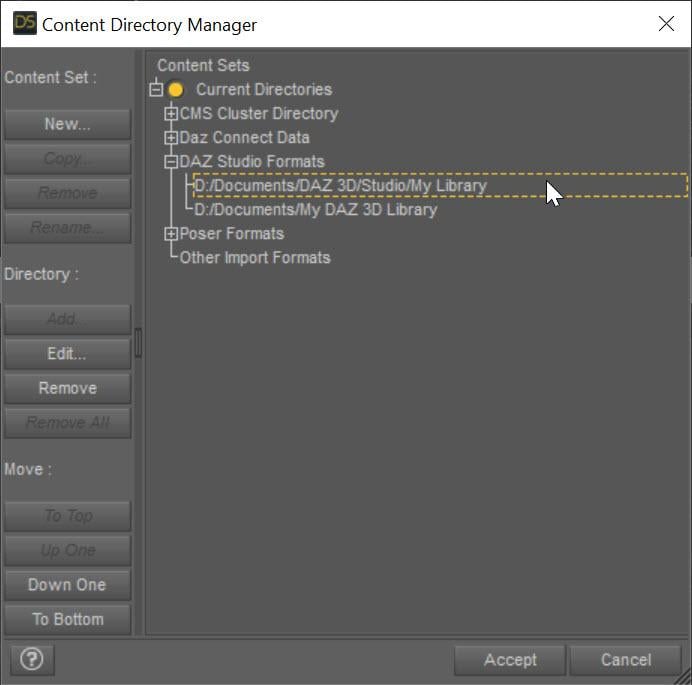
The SECOND entry points to My Daz 3D Library which has all of your installed content. The FIRST entry points to all of YOUR content, whether stuff you create or is created for you by converters. This ensures that everything you create never overwrites the installed content causing problems. Mostly, Daz Studio treats these two content directories as one big content directory, for example the morphs in D:\Documents\My Daz 3D Library\data\DAZ 3D\Genesis 8\Female\Morphs AND in D:\Documents\DAZ 3D\Studio\My Library\data\DAZ 3D\Genesis 8\Female\Morphs are both loaded and available as morphs for Genesis 8 Females. However, Daz Studio saves all the morphs and other data ONLY in the FIRST directory when a conversion occurs, ensuring that converted morphs do not overwrite installed content morphs. However, you are missing that first entry and your converters have been saving into the installed content folder, more than likely corrupting installed content.
I fixed my Daz Studio folders like the image. I even manually downloaded the converter program and copied the files into my "My Daz 3D Library" folder. However, I'm still getting the same result, however the male converter program is working fine. Any other ideas?
What do you mean that you copied the files into "My Daz 3D Library" folder? What files? None of the converted morphs should go in there. I would uninstall and reinstall Essentials so you get back the original morphs from Daz. Load a figure and make sure it is fixed. Then with the Daz Studio folders fixed, re-convert and make sure the morphs are showing up in your "My Library" folder and not "My Daz 3D library" folder.
This may or may not be important, I use the Daz Install Manager. I uninstalled the Genesis 3 and 8 Essentials, converter 3 to 8 female, along with Victoria 7. I then reinstalled them . Before I tried the conversion on Victoria 7, I removed the morph folder in the "M:\NZXT Storage\Documents\DAZ 3D\My Library\data\DAZ 3D\Genesis 8\Female\Morphs" folder for Victoria 7. I also made certain to remove the folder that was created by the converter for Victoria 7 from the "M:\NZXT Storage\Documents\My DAZ 3D Library\data\DAZ 3D\Genesis 8\Female\Morphs" folder, from my previous conversions. However, I'm still getting the same problem. The morphs are going into the "M:\NZXT Storage\Documents\DAZ 3D\My Library\data\DAZ 3D\Genesis 8\Female\Morphs" folder. I reset the settings on the converter and I've verified that they are the same for the female as the male (which is working), but I'm still getting the same problem. It's making me wonder if there are another set of files that need to be deleted, to make this thing work.
When the converter converts something, its morphs will go in M:\NZXT Storage\Documents\DAZ 3D\My Library\data\DAZ 3D\Genesis 8\Female\Morphs. However, BEFORE you converted anything, was the vanilla G8F correct? If not, there are some bad morphs in your installed morphs folder: M:\NZXT Storage\Documents\My DAZ 3D Library\data\DAZ 3D\Genesis 8\Female\Morphs
I uninstalled everything from "M:\NZXT Storage\Documents\DAZ 3D\My Library\" and "M:\NZXT Storage\Documents\My DAZ 3D Library\", even uninstalled the Daz Program. I deleted folders that weren't needed. However, after reinstalling everything, I'm getting the same problem. In fact, the converter program remembered the old settings. There's a setting in the system that didn't get deleted when I uninstalled everything that I could think of. I even deleted the files in username/appdata/ that belonged to Daz Studio. The only thing I didn't deleted were settings for the Daz Install Manager.
The script remembers its SETTINGs because those are in the registry (but the morphs, which are the problem should be gone if you uninstalled and deleted properly). If you are comfortable with RegEdit, you can remove the settings (just search for the script name in the registry).
There are morphs corrupted somewhere or being pulled in when they shouldn't be. Clear your scene. Load in your generic Genesis 8 Female figure (that contains the distortion). View the Daz Log (Help->Troubleshooting...->View Daz Log. Look for
2022-07-11 07:08:46.257 [INFO] :: Begin asset load (open): /People/Genesis 8 Female/Genesis 8 Basic Female.duf
[...LOTS OF MESSAGES HERE]
2022-07-11 07:08:50.243 [INFO] :: Finished asset load (open): 0m 3.986s - /People/Genesis 8 Female/Genesis 8 Basic Female.duf
Somewhere in there is probably a message about loading something it shouldn't (look for .dsf). If not, it is the /People/Genesis 8 Female/Genesis 8 Basic Female.duf that is corrupted I think. You *might* (because it is a relative path and could have been installed via DIM or Daz Connect) multiple versions of that file. One of them is the problem.
Just so we're on the same page, here's what I did to bring things back to normal. I used Daz Install Manager, so I used it to uninstall everything, including Daz Studio. I changed the "My DAZ 3D Library" to "My DAZ 3D Library - Broke" and created the new folder "My DAZ 3D Library". I even did the same to the "DAZ 3D" folder. I went into the "C:\Program Files\DAZ 3D" folder and removed everything accept the "DAZ3DIM1" folder. I went into the "C:\Users\nekur\AppData\Roaming" folder and copied the "DAZ 3D" folder to "DAZ 3D - Broke". I then deled the "cms", "dson", and "Studio4" folders in "DAZ 3D". Once that was all done, I reinstalled Daz Studio and then loaded all the rest. However, when I load Genesis 8, I'm getting the following errors:
2022-07-11 07:09:24.445 [WARNING] :: ..\..\..\..\..\src\sdksource\fileinput\dzassetdaz.cpp(6903): Formula output property not found: Genesis8Female:/data/Daz 3D/Genesis 8/Female/Morphs/XTransfer/3D Universe/ToonGenerations2/Base/XT_CTRL3duToonGenerations2_AdjustAge.dsf#XTIDCTRL3duToonGenerations2_AdjustAge?value - in file: /data/Daz 3D/Genesis 8/Female/Morphs/Zev0/Shape Shift/Arm Length.dsf
2022-07-11 07:09:24.502 [WARNING] :: ..\..\..\..\..\src\sdksource\fileinput\dzassetdaz.cpp(6903): Formula output property not found: Genesis8Female:/data/DAZ 3D/Genesis 8/Female/Morphs/DAZ 3D/Head/Old/PHMEyesIrisSize.dsf#PHMEyesIrisSize?value - in file: /data/Daz 3D/Genesis 8/Female/Morphs/vyktohria/Meredith/VYK Meredith Head.dsf
2022-07-11 07:09:24.792 [WARNING] :: ..\..\..\..\..\src\sdksource\fileinput\dzassetdaz.cpp(6903): Formula output property not found: Genesis8Female:/data/DAZ 3D/Genesis 8/Female/Morphs/SickleYield2017/UniversalBreastHelper/PBMSYUBHGiantAll_proj.dsf#PBMSYUBHGiantAll_proj?value - in file: /data/Daz 3D/Genesis 8/Female/Morphs/SickleYield2017/UniversalBreastHelper/PBMSYUBHGiantAll.dsf
2022-07-11 07:09:29.047 [WARNING] :: ..\..\..\..\..\src\sdksource\fileinput\dzassetdaz.cpp(7134): Unsupported formula: /data/Daz 3D/Genesis 8/Female/Morphs/DAZ 3D%2CHeysun Oh%2CYannek/Victoria 7/pJCMRSG3FVictoria7ShoulderBndFwd_110_R.dsf
2022-07-11 07:09:29.128 [WARNING] :: ..\..\..\..\..\src\sdksource\fileinput\dzassetdaz.cpp(7134): Unsupported formula: /data/Daz 3D/Genesis 8/Female/Morphs/DAZ 3D%2CHeysun Oh%2CYannek/Victoria 7/pJCMRSG3FVictoria7ShoulderBndFwd_110_L.dsf
2022-07-11 07:09:29.321 [WARNING] :: ..\..\..\..\..\src\sdksource\fileinput\dzassetdaz.cpp(7134): Unsupported formula: /data/Daz 3D/Genesis 8/Female/Morphs/DAZ 3D%2CHeysun Oh%2CYannek/Victoria 7/pJCMRSG3FVictoria7ShinBndBck_145_R.dsf
2022-07-11 07:09:29.403 [WARNING] :: ..\..\..\..\..\src\sdksource\fileinput\dzassetdaz.cpp(7134): Unsupported formula: /data/Daz 3D/Genesis 8/Female/Morphs/DAZ 3D%2CHeysun Oh%2CYannek/Victoria 7/pJCMRSG3FVictoria7ShinBndBck_145_L.dsf
2022-07-11 07:09:29.571 [WARNING] :: ..\..\..\..\..\src\sdksource\fileinput\dzassetdaz.cpp(7134): Unsupported formula: /data/Daz 3D/Genesis 8/Female/Morphs/DAZ 3D%2CHeysun Oh%2CYannek/Victoria 7/pJCMRSG3FVictoria7ForearmBnd_135_R.dsf
2022-07-11 07:09:29.657 [WARNING] :: ..\..\..\..\..\src\sdksource\fileinput\dzassetdaz.cpp(7134): Unsupported formula: /data/Daz 3D/Genesis 8/Female/Morphs/DAZ 3D%2CHeysun Oh%2CYannek/Victoria 7/pJCMRSG3FVictoria7ForearmBnd_135_L.dsf
2022-07-11 07:09:31.130 [WARNING] :: ..\..\..\..\..\src\sdksource\fileinput\dzassetdaz.cpp(5962): Parent for modifier not found: TMLI Lashes 06.
2022-07-11 07:09:31.130 [WARNING] :: ..\..\..\..\..\src\sdksource\fileinput\dzassetdaz.cpp(1712): Modifier not prepared: TMLI Lashes 06!
2022-07-11 07:09:31.130 [WARNING] :: ..\..\..\..\..\src\sdksource\fileinput\dzassetdaz.cpp(1729): Modifier not created: TMLI Lashes 06!
Have you ever seen anything like this that might help solve the problem? I got rid of one of the errors I'm not showing after buying Olympia 8. However, I can't find any of these files in my previous version of Daz Studio entitled "Daz 3D2 Old" or in the Genesis 8 female zip file I downloaded from the Product Library. I even tried to copy the Genesis 8 file from "Daz 3D2 Old", but with no luck.
[Released] Character Converter from Genesis 8 Female to Genesis 3 Female - Conv JCMs too[Commercial]Nekura2000 said:
RiverSoftArt said:
Nekura2000 said:
RiverSoftArt said:
Nekura2000 said:
RiverSoftArt said:
Nekura2000 said:
RiverSoftArt said:
Nekura2000 said:
RiverSoftArt said:
Nekura2000 said:
I had to get a new hard drive so I reinstalled Daz Studio. When trying to convert my Generation 7 female characters to Generation 8, I'm getting a distorted face. I've uninstalled and reinstalled the program, even deleted the RSCloneGenesis3Female.obj file from the folder C:\Users\nekur\AppData\Roaming\DAZ 3D\Studio4\CharacterConverterMorphs, with no change. The Generation 7 character as well as Genesis 8 load without a flaw. Here's what I'm getting, attached or from https://www.deviantart.com/wow-creations/art/Converted-920761392. ; I just looked at the parameters for the character I converted, which was Agnes. It isn't showing an Agnes head or body for 8, just Agnes itself.
The clone is for a different Character Converter. Maybe it is pulling in the converted morphs twice? From your previous conversion on the old hard drive and a new conversion? What directories are specified in the content manager? You should check all the currently used morphs on the character and find the morphs. The Parameter Settings show the Asset File Path of the morph (and the [...] button shows the full path of the morph). Make sure the morphs are coming from where you think they should be coming.
I use two different drives when using software. I have the OS drive which I replaced and the data drive. I renamed the original Daz drive as “Daz 3D2 Old”, before installing the Daz Studio. When installing Daz Studio, I allowed it to keep the “Daz 3D” folder, but also use the new “My DAZ 3D Library” folder. I just remember to look at the Error Log when loading Agnes Genesis 8 and this is what I’m getting:
2022-06-29 07:16:21.449 [WARNING] :: ..\..\..\..\..\src\sdksource\fileinput\dzassetdaz.cpp(6903): Formula output property not found: Genesis8Female:/data/Daz%203D/Genesis%208/Female/Morphs/XTransfer/3D%20Universe/ToonGenerations2/Base/XT_CTRL3duToonGenerations2_AdjustAge.dsf#XTIDCTRL3duToonGenerations2_AdjustAge?value - in file: /data/Daz%203D/Genesis%208/Female/Morphs/Zev0/Shape%20Shift/Arm%20Length.dsf
2022-06-29 07:16:21.506 [WARNING] :: ..\..\..\..\..\src\sdksource\fileinput\dzassetdaz.cpp(6903): Formula output property not found: Genesis8Female:/data/DAZ%203D/Genesis%208/Female/Morphs/DAZ%203D/Head/Old/PHMEyesIrisSize.dsf#PHMEyesIrisSize?value - in file: /data/Daz%203D/Genesis%208/Female/Morphs/vyktohria/Meredith/VYK%20Meredith%20Head.dsf
2022-06-29 07:16:22.060 [WARNING] :: ..\..\..\..\..\src\sdksource\fileinput\dzassetdaz.cpp(6903): Formula output property not found: Genesis8Female:/data/DAZ%203D/Genesis%208/Female/Morphs/SickleYield2017/UniversalBreastHelper/PBMSYUBHGiantAll_proj.dsf#PBMSYUBHGiantAll_proj?value - in file: /data/Daz%203D/Genesis%208/Female/Morphs/SickleYield2017/UniversalBreastHelper/PBMSYUBHGiantAll.dsf
2022-06-29 07:16:22.125 [WARNING] :: ..\..\..\..\..\src\sdksource\fileinput\dzassetdaz.cpp(7134): Unsupported formula: /data/Daz%203D/Genesis%208/Female/Morphs/RiverSoft%20Art/Javeria%20for%20Victoria%207%20and%20Genesis%203/pJCMRSG3FVictoria7ThighBndFwdHDR.dsf
2022-06-29 07:16:22.155 [WARNING] :: ..\..\..\..\..\src\sdksource\fileinput\dzassetdaz.cpp(7134): Unsupported formula: /data/Daz%203D/Genesis%208/Female/Morphs/RiverSoft%20Art/Javeria%20for%20Victoria%207%20and%20Genesis%203/pJCMRSG3FVictoria7ThighBndFwdHDL.dsf
2022-06-29 07:16:22.628 [WARNING] :: ..\..\..\..\..\src\sdksource\fileinput\dzassetdaz.cpp(7134): Unsupported formula: /data/Daz%203D/Genesis%208/Female/Morphs/RiverSoft%20Art/FWSA%20Caterina%20for%20Victoria%207%20and%20Genesis%203/pJCMRSG3FVictoria7ShoulderBndFwd_110_R.dsf
2022-06-29 07:16:22.665 [WARNING] :: ..\..\..\..\..\src\sdksource\fileinput\dzassetdaz.cpp(7134): Unsupported formula: /data/Daz%203D/Genesis%208/Female/Morphs/RiverSoft%20Art/FWSA%20Caterina%20for%20Victoria%207%20and%20Genesis%203/pJCMRSG3FVictoria7ShoulderBndFwd_110_L.dsf
2022-06-29 07:16:22.769 [WARNING] :: ..\..\..\..\..\src\sdksource\fileinput\dzassetdaz.cpp(7134): Unsupported formula: /data/Daz%203D/Genesis%208/Female/Morphs/RiverSoft%20Art/FWSA%20Caterina%20for%20Victoria%207%20and%20Genesis%203/pJCMRSG3FVictoria7ShinBndBck_145_R.dsf
2022-06-29 07:16:22.806 [WARNING] :: ..\..\..\..\..\src\sdksource\fileinput\dzassetdaz.cpp(7134): Unsupported formula: /data/Daz%203D/Genesis%208/Female/Morphs/RiverSoft%20Art/FWSA%20Caterina%20for%20Victoria%207%20and%20Genesis%203/pJCMRSG3FVictoria7ShinBndBck_145_L.dsf
2022-06-29 07:16:22.895 [WARNING] :: ..\..\..\..\..\src\sdksource\fileinput\dzassetdaz.cpp(7134): Unsupported formula: /data/Daz%203D/Genesis%208/Female/Morphs/RiverSoft%20Art/FWSA%20Caterina%20for%20Victoria%207%20and%20Genesis%203/pJCMRSG3FVictoria7ForearmBnd_135_R.dsf
2022-06-29 07:16:22.935 [WARNING] :: ..\..\..\..\..\src\sdksource\fileinput\dzassetdaz.cpp(7134): Unsupported formula: /data/Daz%203D/Genesis%208/Female/Morphs/RiverSoft%20Art/FWSA%20Caterina%20for%20Victoria%207%20and%20Genesis%203/pJCMRSG3FVictoria7ForearmBnd_135_L.dsf
2022-06-29 07:16:31.020 [WARNING] :: ..\..\..\..\..\src\sdksource\fileinput\dzassetdaz.cpp(6903): Formula output property not found: Genesis8Female:/data/DAZ%203D/Genesis%208/Female/Morphs/DAZ%20Originals/data/DAZ%203D/Genesis%208/Female/Morphs/Fred%20Winkler%20Art%2CSabby%2CDAZ%20Originals/FW%20Frankie%20HD%20for%20Victoria%207/CTRL-RSC-Frankie.dsfCFred%20Winkler%20Art/data/DAZ%203D/Genesis%208/Female/Morphs/Fred%20Winkler%20Art%2CSabby%2CDAZ%20Originals/FW%20Frankie%20HD%20for%20Victoria%207/CTRL-RSC-Frankie.dsfCSabby/FWSA%20Agnes%20HD%20for%20Lilith%207/PHMMouthRealismHD.dsf#PHMMouthRealismHD?value - in file: /data/DAZ%203D/Genesis%208/Female/Morphs/Fred%20Winkler%20Art%2CSabby%2CDAZ%20Originals/FW%20Frankie%20HD%20for%20Victoria%207/CTRL-RSC-Frankie.dsf
2022-06-29 07:16:31.020 [WARNING] :: ..\..\..\..\..\src\sdksource\fileinput\dzassetdaz.cpp(6903): Formula output property not found: Genesis8Female:/data/DAZ%203D/Genesis%208/Female/Morphs/DAZ%20Originals/data/DAZ%203D/Genesis%208/Female/Morphs/Fred%20Winkler%20Art%2CSabby%2CDAZ%20Originals/FW%20Frankie%20HD%20for%20Victoria%207/CTRL-RSC-Frankie.dsfCFred%20Winkler%20Art/FW%20Brooke%20HD%20for%20Victoria%207/FHMVictoria7.dsf#FHMVictoria7?value - in file: /data/DAZ%203D/Genesis%208/Female/Morphs/Fred%20Winkler%20Art%2CSabby%2CDAZ%20Originals/FW%20Frankie%20HD%20for%20Victoria%207/CTRL-RSC-Frankie.dsf
2022-06-29 07:16:31.021 [WARNING] :: ..\..\..\..\..\src\sdksource\fileinput\dzassetdaz.cpp(6903): Formula output property not found: Genesis8Female:/data/DAZ%203D/Genesis%208/Female/Morphs/DAZ%20Originals/data/DAZ%203D/Genesis%208/Female/Morphs/Fred%20Winkler%20Art%2CSabby%2CDAZ%20Originals/FW%20Frankie%20HD%20for%20Victoria%207/CTRL-RSC-Frankie.dsfCFred%20Winkler%20Art/FW%20Brooke%20HD%20for%20Victoria%207/FBMVictoria7.dsf#FBMVictoria7?value - in file: /data/DAZ%203D/Genesis%208/Female/Morphs/Fred%20Winkler%20Art%2CSabby%2CDAZ%20Originals/FW%20Frankie%20HD%20for%20Victoria%207/CTRL-RSC-Frankie.dsf
2022-06-29 07:16:32.694 [WARNING] :: ..\..\..\..\..\src\sdksource\fileinput\dzassetdaz.cpp(6969): Formula target property not found: Genesis8Female:/data/DAZ%203D/Genesis%208/Female/Morphs/DAZ%203D/Olympia%208/FBMOlympia8.dsf#FBMOlympia8_Test?value - in file: /data/Daz%203D/Genesis%208/Female/Morphs/fabiana/KillerLegsG8/1FK-Olympia8BaseFix.dsf
2022-06-29 07:16:40.096 [WARNING] :: ..\..\..\..\..\src\sdksource\fileinput\dzassetdaz.cpp(7134): Unsupported formula: /data/Daz%203D/Genesis%208/Female/Morphs/DAZ%203D%2CHeysun%20Oh/Olympia%207%20HD%20Add-On/pJCMRSG3FOlympia7ForeArmBndHD_n100L.dsf
2022-06-29 07:16:40.261 [WARNING] :: ..\..\..\..\..\src\sdksource\fileinput\dzassetdaz.cpp(7134): Unsupported formula: /data/Daz%203D/Genesis%208/Female/Morphs/DAZ%203D%2CHeysun%20Oh/Olympia%207%20HD%20Add-On/pJCMRSG3FOlympia7ForeArmBndHD_100R.dsf
2022-06-29 07:16:40.986 [WARNING] :: ..\..\..\..\..\src\sdksource\fileinput\dzassetdaz.cpp(7134): Unsupported formula: /data/Daz%203D/Genesis%208/Female/Morphs/DAZ%203D%2CHeysun%20Oh/Mei%20Lin%207%20HD%20Add-On/pJCMRSG3FMeiLin7ShinBndBck_95R.dsf
2022-06-29 07:16:41.152 [WARNING] :: ..\..\..\..\..\src\sdksource\fileinput\dzassetdaz.cpp(7134): Unsupported formula: /data/Daz%203D/Genesis%208/Female/Morphs/DAZ%203D%2CHeysun%20Oh/Mei%20Lin%207%20HD%20Add-On/pJCMRSG3FMeiLin7ShinBndBck_95L.dsf
2022-06-29 07:16:41.322 [WARNING] :: ..\..\..\..\..\src\sdksource\fileinput\dzassetdaz.cpp(7134): Unsupported formula: /data/Daz%203D/Genesis%208/Female/Morphs/DAZ%203D%2CHeysun%20Oh/Mei%20Lin%207%20HD%20Add-On/pJCMRSG3FMeiLin7ShinBndBckR.dsf
2022-06-29 07:16:41.494 [WARNING] :: ..\..\..\..\..\src\sdksource\fileinput\dzassetdaz.cpp(7134): Unsupported formula: /data/Daz%203D/Genesis%208/Female/Morphs/DAZ%203D%2CHeysun%20Oh/Mei%20Lin%207%20HD%20Add-On/pJCMRSG3FMeiLin7ShinBndBckL.dsf
2022-06-29 07:16:43.828 [WARNING] :: ..\..\..\..\..\src\sdksource\fileinput\dzassetdaz.cpp(7134): Unsupported formula: /data/Daz%203D/Genesis%208/Female/Morphs/DAZ%203D%2CHeysun%20Oh/Karen%207%20HD%20Add-On/pJCMRSG3FKaren7ShldrFwd_n90L.dsf
2022-06-29 07:16:44.007 [WARNING] :: ..\..\..\..\..\src\sdksource\fileinput\dzassetdaz.cpp(7134): Unsupported formula: /data/Daz%203D/Genesis%208/Female/Morphs/DAZ%203D%2CHeysun%20Oh/Karen%207%20HD%20Add-On/pJCMRSG3FKaren7ShldrFwd_90R.dsf
2022-06-29 07:16:44.191 [WARNING] :: ..\..\..\..\..\src\sdksource\fileinput\dzassetdaz.cpp(7134): Unsupported formula: /data/Daz%203D/Genesis%208/Female/Morphs/DAZ%203D%2CHeysun%20Oh/Karen%207%20HD%20Add-On/pJCMRSG3FKaren7ShinBndBck_90R.dsf
2022-06-29 07:16:44.369 [WARNING] :: ..\..\..\..\..\src\sdksource\fileinput\dzassetdaz.cpp(7134): Unsupported formula: /data/Daz%203D/Genesis%208/Female/Morphs/DAZ%203D%2CHeysun%20Oh/Karen%207%20HD%20Add-On/pJCMRSG3FKaren7ShinBndBck_90L.dsf
2022-06-29 07:16:44.669 [WARNING] :: ..\..\..\..\..\src\sdksource\fileinput\dzassetdaz.cpp(7134): Unsupported formula: /data/Daz%203D/Genesis%208/Female/Morphs/DAZ%203D%2CHeysun%20Oh/Karen%207%20HD%20Add-On/pJCMRSG3FKaren7ForearmBnd_n85L.dsf
2022-06-29 07:16:44.910 [WARNING] :: ..\..\..\..\..\src\sdksource\fileinput\dzassetdaz.cpp(7134): Unsupported formula: /data/Daz%203D/Genesis%208/Female/Morphs/DAZ%203D%2CHeysun%20Oh/Karen%207%20HD%20Add-On/pJCMRSG3FKaren7ForearmBnd_85R.dsf
2022-06-29 07:16:56.769 [WARNING] :: ..\..\..\..\..\src\sdksource\fileinput\dzassetdaz.cpp(7134): Unsupported formula: /data/Daz%203D/Genesis%208/Female/Morphs/-Yannek-%2CDAZ%203D%2CHeysun%20Oh/Gia%207/pJCMRSG3FGia7ForeArmBnd_n135L.dsf
2022-06-29 07:16:57.067 [WARNING] :: ..\..\..\..\..\src\sdksource\fileinput\dzassetdaz.cpp(7134): Unsupported formula: /data/Daz%203D/Genesis%208/Female/Morphs/-Yannek-%2CDAZ%203D%2CHeysun%20Oh/Gia%207/pJCMRSG3FGia7ForeArmBnd_135R.dsf
2022-06-29 07:17:00.107 [WARNING] :: ..\..\..\..\..\src\sdksource\fileinput\dzassetdaz.cpp(7134): Unsupported formula: /data/Daz%203D/Genesis%208/Female/Morphs/-Yannek-%2CDAZ%203D%2CHeysun%20Oh/Arabella%207%20HD%20Add-On/pJCMRSG3FArabella7ForeArmBnd_n135L.dsf
2022-06-29 07:17:00.418 [WARNING] :: ..\..\..\..\..\src\sdksource\fileinput\dzassetdaz.cpp(7134): Unsupported formula: /data/Daz%203D/Genesis%208/Female/Morphs/-Yannek-%2CDAZ%203D%2CHeysun%20Oh/Arabella%207%20HD%20Add-On/pJCMRSG3FArabella7ForeArmBnd_135R.dsf
2022-06-29 07:17:02.981 [WARNING] :: ..\..\..\..\..\src\sdksource\fileinput\dzassetdaz.cpp(5962): Parent for modifier not found: TMLI Lashes 06.
2022-06-29 07:17:02.981 [WARNING] :: ..\..\..\..\..\src\sdksource\fileinput\dzassetdaz.cpp(1712): Modifier not prepared: TMLI Lashes 06!
2022-06-29 07:17:02.981 [WARNING] :: ..\..\..\..\..\src\sdksource\fileinput\dzassetdaz.cpp(1729): Modifier not created: TMLI Lashes 06!
Here’s an image of my Content Directory Manager.
What looks bad in your Content Directory is that you have no user library in the Daz Studio Formats. That means the character converter would be writing morphs (and possibly deleting morphs if the overwrite option is checked) in the Daz content folder. You will get bad/weird results from that. I am afraid you might have hosed your morphs folder at this point. You need something a user content folder as the first folder in the Daz Studio Formats section. Then, this folder would be used to write out morphs from the conversions and would not overwrite your Daz content library.
I'm sorry, but from what I can see I have a Content Directory in the Daz Studio Format. Could you give a step by step solution in solving this problem. I've used Daz Studio for several years, along with Character Converter, but I think I'm missing something based on what you're seeing and I'm trying to interpret.
Usually what you will see in Daz Studio Formats is something like this:
The SECOND entry points to My Daz 3D Library which has all of your installed content. The FIRST entry points to all of YOUR content, whether stuff you create or is created for you by converters. This ensures that everything you create never overwrites the installed content causing problems. Mostly, Daz Studio treats these two content directories as one big content directory, for example the morphs in D:\Documents\My Daz 3D Library\data\DAZ 3D\Genesis 8\Female\Morphs AND in D:\Documents\DAZ 3D\Studio\My Library\data\DAZ 3D\Genesis 8\Female\Morphs are both loaded and available as morphs for Genesis 8 Females. However, Daz Studio saves all the morphs and other data ONLY in the FIRST directory when a conversion occurs, ensuring that converted morphs do not overwrite installed content morphs. However, you are missing that first entry and your converters have been saving into the installed content folder, more than likely corrupting installed content.
I fixed my Daz Studio folders like the image. I even manually downloaded the converter program and copied the files into my "My Daz 3D Library" folder. However, I'm still getting the same result, however the male converter program is working fine. Any other ideas?
What do you mean that you copied the files into "My Daz 3D Library" folder? What files? None of the converted morphs should go in there. I would uninstall and reinstall Essentials so you get back the original morphs from Daz. Load a figure and make sure it is fixed. Then with the Daz Studio folders fixed, re-convert and make sure the morphs are showing up in your "My Library" folder and not "My Daz 3D library" folder.
This may or may not be important, I use the Daz Install Manager. I uninstalled the Genesis 3 and 8 Essentials, converter 3 to 8 female, along with Victoria 7. I then reinstalled them . Before I tried the conversion on Victoria 7, I removed the morph folder in the "M:\NZXT Storage\Documents\DAZ 3D\My Library\data\DAZ 3D\Genesis 8\Female\Morphs" folder for Victoria 7. I also made certain to remove the folder that was created by the converter for Victoria 7 from the "M:\NZXT Storage\Documents\My DAZ 3D Library\data\DAZ 3D\Genesis 8\Female\Morphs" folder, from my previous conversions. However, I'm still getting the same problem. The morphs are going into the "M:\NZXT Storage\Documents\DAZ 3D\My Library\data\DAZ 3D\Genesis 8\Female\Morphs" folder. I reset the settings on the converter and I've verified that they are the same for the female as the male (which is working), but I'm still getting the same problem. It's making me wonder if there are another set of files that need to be deleted, to make this thing work.
When the converter converts something, its morphs will go in M:\NZXT Storage\Documents\DAZ 3D\My Library\data\DAZ 3D\Genesis 8\Female\Morphs. However, BEFORE you converted anything, was the vanilla G8F correct? If not, there are some bad morphs in your installed morphs folder: M:\NZXT Storage\Documents\My DAZ 3D Library\data\DAZ 3D\Genesis 8\Female\Morphs
I uninstalled everything from "M:\NZXT Storage\Documents\DAZ 3D\My Library\" and "M:\NZXT Storage\Documents\My DAZ 3D Library\", even uninstalled the Daz Program. I deleted folders that weren't needed. However, after reinstalling everything, I'm getting the same problem. In fact, the converter program remembered the old settings. There's a setting in the system that didn't get deleted when I uninstalled everything that I could think of. I even deleted the files in username/appdata/ that belonged to Daz Studio. The only thing I didn't deleted were settings for the Daz Install Manager.
The script remembers its SETTINGs because those are in the registry (but the morphs, which are the problem should be gone if you uninstalled and deleted properly). If you are comfortable with RegEdit, you can remove the settings (just search for the script name in the registry).
There are morphs corrupted somewhere or being pulled in when they shouldn't be. Clear your scene. Load in your generic Genesis 8 Female figure (that contains the distortion). View the Daz Log (Help->Troubleshooting...->View Daz Log. Look for
2022-07-11 07:08:46.257 [INFO] :: Begin asset load (open): /People/Genesis 8 Female/Genesis 8 Basic Female.duf
[...LOTS OF MESSAGES HERE]
2022-07-11 07:08:50.243 [INFO] :: Finished asset load (open): 0m 3.986s - /People/Genesis 8 Female/Genesis 8 Basic Female.duf
Somewhere in there is probably a message about loading something it shouldn't (look for .dsf). If not, it is the /People/Genesis 8 Female/Genesis 8 Basic Female.duf that is corrupted I think. You *might* (because it is a relative path and could have been installed via DIM or Daz Connect) multiple versions of that file. One of them is the problem.
[Released] Character Converter from Genesis 8 Female to Genesis 3 Female - Conv JCMs too[Commercial]RiverSoftArt said:
Nekura2000 said:
RiverSoftArt said:
Nekura2000 said:
RiverSoftArt said:
Nekura2000 said:
RiverSoftArt said:
Nekura2000 said:
RiverSoftArt said:
Nekura2000 said:
I had to get a new hard drive so I reinstalled Daz Studio. When trying to convert my Generation 7 female characters to Generation 8, I'm getting a distorted face. I've uninstalled and reinstalled the program, even deleted the RSCloneGenesis3Female.obj file from the folder C:\Users\nekur\AppData\Roaming\DAZ 3D\Studio4\CharacterConverterMorphs, with no change. The Generation 7 character as well as Genesis 8 load without a flaw. Here's what I'm getting, attached or from https://www.deviantart.com/wow-creations/art/Converted-920761392. ; I just looked at the parameters for the character I converted, which was Agnes. It isn't showing an Agnes head or body for 8, just Agnes itself.
The clone is for a different Character Converter. Maybe it is pulling in the converted morphs twice? From your previous conversion on the old hard drive and a new conversion? What directories are specified in the content manager? You should check all the currently used morphs on the character and find the morphs. The Parameter Settings show the Asset File Path of the morph (and the [...] button shows the full path of the morph). Make sure the morphs are coming from where you think they should be coming.
I use two different drives when using software. I have the OS drive which I replaced and the data drive. I renamed the original Daz drive as “Daz 3D2 Old”, before installing the Daz Studio. When installing Daz Studio, I allowed it to keep the “Daz 3D” folder, but also use the new “My DAZ 3D Library” folder. I just remember to look at the Error Log when loading Agnes Genesis 8 and this is what I’m getting:
2022-06-29 07:16:21.449 [WARNING] :: ..\..\..\..\..\src\sdksource\fileinput\dzassetdaz.cpp(6903): Formula output property not found: Genesis8Female:/data/Daz%203D/Genesis%208/Female/Morphs/XTransfer/3D%20Universe/ToonGenerations2/Base/XT_CTRL3duToonGenerations2_AdjustAge.dsf#XTIDCTRL3duToonGenerations2_AdjustAge?value - in file: /data/Daz%203D/Genesis%208/Female/Morphs/Zev0/Shape%20Shift/Arm%20Length.dsf
2022-06-29 07:16:21.506 [WARNING] :: ..\..\..\..\..\src\sdksource\fileinput\dzassetdaz.cpp(6903): Formula output property not found: Genesis8Female:/data/DAZ%203D/Genesis%208/Female/Morphs/DAZ%203D/Head/Old/PHMEyesIrisSize.dsf#PHMEyesIrisSize?value - in file: /data/Daz%203D/Genesis%208/Female/Morphs/vyktohria/Meredith/VYK%20Meredith%20Head.dsf
2022-06-29 07:16:22.060 [WARNING] :: ..\..\..\..\..\src\sdksource\fileinput\dzassetdaz.cpp(6903): Formula output property not found: Genesis8Female:/data/DAZ%203D/Genesis%208/Female/Morphs/SickleYield2017/UniversalBreastHelper/PBMSYUBHGiantAll_proj.dsf#PBMSYUBHGiantAll_proj?value - in file: /data/Daz%203D/Genesis%208/Female/Morphs/SickleYield2017/UniversalBreastHelper/PBMSYUBHGiantAll.dsf
2022-06-29 07:16:22.125 [WARNING] :: ..\..\..\..\..\src\sdksource\fileinput\dzassetdaz.cpp(7134): Unsupported formula: /data/Daz%203D/Genesis%208/Female/Morphs/RiverSoft%20Art/Javeria%20for%20Victoria%207%20and%20Genesis%203/pJCMRSG3FVictoria7ThighBndFwdHDR.dsf
2022-06-29 07:16:22.155 [WARNING] :: ..\..\..\..\..\src\sdksource\fileinput\dzassetdaz.cpp(7134): Unsupported formula: /data/Daz%203D/Genesis%208/Female/Morphs/RiverSoft%20Art/Javeria%20for%20Victoria%207%20and%20Genesis%203/pJCMRSG3FVictoria7ThighBndFwdHDL.dsf
2022-06-29 07:16:22.628 [WARNING] :: ..\..\..\..\..\src\sdksource\fileinput\dzassetdaz.cpp(7134): Unsupported formula: /data/Daz%203D/Genesis%208/Female/Morphs/RiverSoft%20Art/FWSA%20Caterina%20for%20Victoria%207%20and%20Genesis%203/pJCMRSG3FVictoria7ShoulderBndFwd_110_R.dsf
2022-06-29 07:16:22.665 [WARNING] :: ..\..\..\..\..\src\sdksource\fileinput\dzassetdaz.cpp(7134): Unsupported formula: /data/Daz%203D/Genesis%208/Female/Morphs/RiverSoft%20Art/FWSA%20Caterina%20for%20Victoria%207%20and%20Genesis%203/pJCMRSG3FVictoria7ShoulderBndFwd_110_L.dsf
2022-06-29 07:16:22.769 [WARNING] :: ..\..\..\..\..\src\sdksource\fileinput\dzassetdaz.cpp(7134): Unsupported formula: /data/Daz%203D/Genesis%208/Female/Morphs/RiverSoft%20Art/FWSA%20Caterina%20for%20Victoria%207%20and%20Genesis%203/pJCMRSG3FVictoria7ShinBndBck_145_R.dsf
2022-06-29 07:16:22.806 [WARNING] :: ..\..\..\..\..\src\sdksource\fileinput\dzassetdaz.cpp(7134): Unsupported formula: /data/Daz%203D/Genesis%208/Female/Morphs/RiverSoft%20Art/FWSA%20Caterina%20for%20Victoria%207%20and%20Genesis%203/pJCMRSG3FVictoria7ShinBndBck_145_L.dsf
2022-06-29 07:16:22.895 [WARNING] :: ..\..\..\..\..\src\sdksource\fileinput\dzassetdaz.cpp(7134): Unsupported formula: /data/Daz%203D/Genesis%208/Female/Morphs/RiverSoft%20Art/FWSA%20Caterina%20for%20Victoria%207%20and%20Genesis%203/pJCMRSG3FVictoria7ForearmBnd_135_R.dsf
2022-06-29 07:16:22.935 [WARNING] :: ..\..\..\..\..\src\sdksource\fileinput\dzassetdaz.cpp(7134): Unsupported formula: /data/Daz%203D/Genesis%208/Female/Morphs/RiverSoft%20Art/FWSA%20Caterina%20for%20Victoria%207%20and%20Genesis%203/pJCMRSG3FVictoria7ForearmBnd_135_L.dsf
2022-06-29 07:16:31.020 [WARNING] :: ..\..\..\..\..\src\sdksource\fileinput\dzassetdaz.cpp(6903): Formula output property not found: Genesis8Female:/data/DAZ%203D/Genesis%208/Female/Morphs/DAZ%20Originals/data/DAZ%203D/Genesis%208/Female/Morphs/Fred%20Winkler%20Art%2CSabby%2CDAZ%20Originals/FW%20Frankie%20HD%20for%20Victoria%207/CTRL-RSC-Frankie.dsfCFred%20Winkler%20Art/data/DAZ%203D/Genesis%208/Female/Morphs/Fred%20Winkler%20Art%2CSabby%2CDAZ%20Originals/FW%20Frankie%20HD%20for%20Victoria%207/CTRL-RSC-Frankie.dsfCSabby/FWSA%20Agnes%20HD%20for%20Lilith%207/PHMMouthRealismHD.dsf#PHMMouthRealismHD?value - in file: /data/DAZ%203D/Genesis%208/Female/Morphs/Fred%20Winkler%20Art%2CSabby%2CDAZ%20Originals/FW%20Frankie%20HD%20for%20Victoria%207/CTRL-RSC-Frankie.dsf
2022-06-29 07:16:31.020 [WARNING] :: ..\..\..\..\..\src\sdksource\fileinput\dzassetdaz.cpp(6903): Formula output property not found: Genesis8Female:/data/DAZ%203D/Genesis%208/Female/Morphs/DAZ%20Originals/data/DAZ%203D/Genesis%208/Female/Morphs/Fred%20Winkler%20Art%2CSabby%2CDAZ%20Originals/FW%20Frankie%20HD%20for%20Victoria%207/CTRL-RSC-Frankie.dsfCFred%20Winkler%20Art/FW%20Brooke%20HD%20for%20Victoria%207/FHMVictoria7.dsf#FHMVictoria7?value - in file: /data/DAZ%203D/Genesis%208/Female/Morphs/Fred%20Winkler%20Art%2CSabby%2CDAZ%20Originals/FW%20Frankie%20HD%20for%20Victoria%207/CTRL-RSC-Frankie.dsf
2022-06-29 07:16:31.021 [WARNING] :: ..\..\..\..\..\src\sdksource\fileinput\dzassetdaz.cpp(6903): Formula output property not found: Genesis8Female:/data/DAZ%203D/Genesis%208/Female/Morphs/DAZ%20Originals/data/DAZ%203D/Genesis%208/Female/Morphs/Fred%20Winkler%20Art%2CSabby%2CDAZ%20Originals/FW%20Frankie%20HD%20for%20Victoria%207/CTRL-RSC-Frankie.dsfCFred%20Winkler%20Art/FW%20Brooke%20HD%20for%20Victoria%207/FBMVictoria7.dsf#FBMVictoria7?value - in file: /data/DAZ%203D/Genesis%208/Female/Morphs/Fred%20Winkler%20Art%2CSabby%2CDAZ%20Originals/FW%20Frankie%20HD%20for%20Victoria%207/CTRL-RSC-Frankie.dsf
2022-06-29 07:16:32.694 [WARNING] :: ..\..\..\..\..\src\sdksource\fileinput\dzassetdaz.cpp(6969): Formula target property not found: Genesis8Female:/data/DAZ%203D/Genesis%208/Female/Morphs/DAZ%203D/Olympia%208/FBMOlympia8.dsf#FBMOlympia8_Test?value - in file: /data/Daz%203D/Genesis%208/Female/Morphs/fabiana/KillerLegsG8/1FK-Olympia8BaseFix.dsf
2022-06-29 07:16:40.096 [WARNING] :: ..\..\..\..\..\src\sdksource\fileinput\dzassetdaz.cpp(7134): Unsupported formula: /data/Daz%203D/Genesis%208/Female/Morphs/DAZ%203D%2CHeysun%20Oh/Olympia%207%20HD%20Add-On/pJCMRSG3FOlympia7ForeArmBndHD_n100L.dsf
2022-06-29 07:16:40.261 [WARNING] :: ..\..\..\..\..\src\sdksource\fileinput\dzassetdaz.cpp(7134): Unsupported formula: /data/Daz%203D/Genesis%208/Female/Morphs/DAZ%203D%2CHeysun%20Oh/Olympia%207%20HD%20Add-On/pJCMRSG3FOlympia7ForeArmBndHD_100R.dsf
2022-06-29 07:16:40.986 [WARNING] :: ..\..\..\..\..\src\sdksource\fileinput\dzassetdaz.cpp(7134): Unsupported formula: /data/Daz%203D/Genesis%208/Female/Morphs/DAZ%203D%2CHeysun%20Oh/Mei%20Lin%207%20HD%20Add-On/pJCMRSG3FMeiLin7ShinBndBck_95R.dsf
2022-06-29 07:16:41.152 [WARNING] :: ..\..\..\..\..\src\sdksource\fileinput\dzassetdaz.cpp(7134): Unsupported formula: /data/Daz%203D/Genesis%208/Female/Morphs/DAZ%203D%2CHeysun%20Oh/Mei%20Lin%207%20HD%20Add-On/pJCMRSG3FMeiLin7ShinBndBck_95L.dsf
2022-06-29 07:16:41.322 [WARNING] :: ..\..\..\..\..\src\sdksource\fileinput\dzassetdaz.cpp(7134): Unsupported formula: /data/Daz%203D/Genesis%208/Female/Morphs/DAZ%203D%2CHeysun%20Oh/Mei%20Lin%207%20HD%20Add-On/pJCMRSG3FMeiLin7ShinBndBckR.dsf
2022-06-29 07:16:41.494 [WARNING] :: ..\..\..\..\..\src\sdksource\fileinput\dzassetdaz.cpp(7134): Unsupported formula: /data/Daz%203D/Genesis%208/Female/Morphs/DAZ%203D%2CHeysun%20Oh/Mei%20Lin%207%20HD%20Add-On/pJCMRSG3FMeiLin7ShinBndBckL.dsf
2022-06-29 07:16:43.828 [WARNING] :: ..\..\..\..\..\src\sdksource\fileinput\dzassetdaz.cpp(7134): Unsupported formula: /data/Daz%203D/Genesis%208/Female/Morphs/DAZ%203D%2CHeysun%20Oh/Karen%207%20HD%20Add-On/pJCMRSG3FKaren7ShldrFwd_n90L.dsf
2022-06-29 07:16:44.007 [WARNING] :: ..\..\..\..\..\src\sdksource\fileinput\dzassetdaz.cpp(7134): Unsupported formula: /data/Daz%203D/Genesis%208/Female/Morphs/DAZ%203D%2CHeysun%20Oh/Karen%207%20HD%20Add-On/pJCMRSG3FKaren7ShldrFwd_90R.dsf
2022-06-29 07:16:44.191 [WARNING] :: ..\..\..\..\..\src\sdksource\fileinput\dzassetdaz.cpp(7134): Unsupported formula: /data/Daz%203D/Genesis%208/Female/Morphs/DAZ%203D%2CHeysun%20Oh/Karen%207%20HD%20Add-On/pJCMRSG3FKaren7ShinBndBck_90R.dsf
2022-06-29 07:16:44.369 [WARNING] :: ..\..\..\..\..\src\sdksource\fileinput\dzassetdaz.cpp(7134): Unsupported formula: /data/Daz%203D/Genesis%208/Female/Morphs/DAZ%203D%2CHeysun%20Oh/Karen%207%20HD%20Add-On/pJCMRSG3FKaren7ShinBndBck_90L.dsf
2022-06-29 07:16:44.669 [WARNING] :: ..\..\..\..\..\src\sdksource\fileinput\dzassetdaz.cpp(7134): Unsupported formula: /data/Daz%203D/Genesis%208/Female/Morphs/DAZ%203D%2CHeysun%20Oh/Karen%207%20HD%20Add-On/pJCMRSG3FKaren7ForearmBnd_n85L.dsf
2022-06-29 07:16:44.910 [WARNING] :: ..\..\..\..\..\src\sdksource\fileinput\dzassetdaz.cpp(7134): Unsupported formula: /data/Daz%203D/Genesis%208/Female/Morphs/DAZ%203D%2CHeysun%20Oh/Karen%207%20HD%20Add-On/pJCMRSG3FKaren7ForearmBnd_85R.dsf
2022-06-29 07:16:56.769 [WARNING] :: ..\..\..\..\..\src\sdksource\fileinput\dzassetdaz.cpp(7134): Unsupported formula: /data/Daz%203D/Genesis%208/Female/Morphs/-Yannek-%2CDAZ%203D%2CHeysun%20Oh/Gia%207/pJCMRSG3FGia7ForeArmBnd_n135L.dsf
2022-06-29 07:16:57.067 [WARNING] :: ..\..\..\..\..\src\sdksource\fileinput\dzassetdaz.cpp(7134): Unsupported formula: /data/Daz%203D/Genesis%208/Female/Morphs/-Yannek-%2CDAZ%203D%2CHeysun%20Oh/Gia%207/pJCMRSG3FGia7ForeArmBnd_135R.dsf
2022-06-29 07:17:00.107 [WARNING] :: ..\..\..\..\..\src\sdksource\fileinput\dzassetdaz.cpp(7134): Unsupported formula: /data/Daz%203D/Genesis%208/Female/Morphs/-Yannek-%2CDAZ%203D%2CHeysun%20Oh/Arabella%207%20HD%20Add-On/pJCMRSG3FArabella7ForeArmBnd_n135L.dsf
2022-06-29 07:17:00.418 [WARNING] :: ..\..\..\..\..\src\sdksource\fileinput\dzassetdaz.cpp(7134): Unsupported formula: /data/Daz%203D/Genesis%208/Female/Morphs/-Yannek-%2CDAZ%203D%2CHeysun%20Oh/Arabella%207%20HD%20Add-On/pJCMRSG3FArabella7ForeArmBnd_135R.dsf
2022-06-29 07:17:02.981 [WARNING] :: ..\..\..\..\..\src\sdksource\fileinput\dzassetdaz.cpp(5962): Parent for modifier not found: TMLI Lashes 06.
2022-06-29 07:17:02.981 [WARNING] :: ..\..\..\..\..\src\sdksource\fileinput\dzassetdaz.cpp(1712): Modifier not prepared: TMLI Lashes 06!
2022-06-29 07:17:02.981 [WARNING] :: ..\..\..\..\..\src\sdksource\fileinput\dzassetdaz.cpp(1729): Modifier not created: TMLI Lashes 06!
Here’s an image of my Content Directory Manager.
What looks bad in your Content Directory is that you have no user library in the Daz Studio Formats. That means the character converter would be writing morphs (and possibly deleting morphs if the overwrite option is checked) in the Daz content folder. You will get bad/weird results from that. I am afraid you might have hosed your morphs folder at this point. You need something a user content folder as the first folder in the Daz Studio Formats section. Then, this folder would be used to write out morphs from the conversions and would not overwrite your Daz content library.
I'm sorry, but from what I can see I have a Content Directory in the Daz Studio Format. Could you give a step by step solution in solving this problem. I've used Daz Studio for several years, along with Character Converter, but I think I'm missing something based on what you're seeing and I'm trying to interpret.
Usually what you will see in Daz Studio Formats is something like this:
The SECOND entry points to My Daz 3D Library which has all of your installed content. The FIRST entry points to all of YOUR content, whether stuff you create or is created for you by converters. This ensures that everything you create never overwrites the installed content causing problems. Mostly, Daz Studio treats these two content directories as one big content directory, for example the morphs in D:\Documents\My Daz 3D Library\data\DAZ 3D\Genesis 8\Female\Morphs AND in D:\Documents\DAZ 3D\Studio\My Library\data\DAZ 3D\Genesis 8\Female\Morphs are both loaded and available as morphs for Genesis 8 Females. However, Daz Studio saves all the morphs and other data ONLY in the FIRST directory when a conversion occurs, ensuring that converted morphs do not overwrite installed content morphs. However, you are missing that first entry and your converters have been saving into the installed content folder, more than likely corrupting installed content.
I fixed my Daz Studio folders like the image. I even manually downloaded the converter program and copied the files into my "My Daz 3D Library" folder. However, I'm still getting the same result, however the male converter program is working fine. Any other ideas?
What do you mean that you copied the files into "My Daz 3D Library" folder? What files? None of the converted morphs should go in there. I would uninstall and reinstall Essentials so you get back the original morphs from Daz. Load a figure and make sure it is fixed. Then with the Daz Studio folders fixed, re-convert and make sure the morphs are showing up in your "My Library" folder and not "My Daz 3D library" folder.
This may or may not be important, I use the Daz Install Manager. I uninstalled the Genesis 3 and 8 Essentials, converter 3 to 8 female, along with Victoria 7. I then reinstalled them . Before I tried the conversion on Victoria 7, I removed the morph folder in the "M:\NZXT Storage\Documents\DAZ 3D\My Library\data\DAZ 3D\Genesis 8\Female\Morphs" folder for Victoria 7. I also made certain to remove the folder that was created by the converter for Victoria 7 from the "M:\NZXT Storage\Documents\My DAZ 3D Library\data\DAZ 3D\Genesis 8\Female\Morphs" folder, from my previous conversions. However, I'm still getting the same problem. The morphs are going into the "M:\NZXT Storage\Documents\DAZ 3D\My Library\data\DAZ 3D\Genesis 8\Female\Morphs" folder. I reset the settings on the converter and I've verified that they are the same for the female as the male (which is working), but I'm still getting the same problem. It's making me wonder if there are another set of files that need to be deleted, to make this thing work.
When the converter converts something, its morphs will go in M:\NZXT Storage\Documents\DAZ 3D\My Library\data\DAZ 3D\Genesis 8\Female\Morphs. However, BEFORE you converted anything, was the vanilla G8F correct? If not, there are some bad morphs in your installed morphs folder: M:\NZXT Storage\Documents\My DAZ 3D Library\data\DAZ 3D\Genesis 8\Female\Morphs
I uninstalled everything from "M:\NZXT Storage\Documents\DAZ 3D\My Library\" and "M:\NZXT Storage\Documents\My DAZ 3D Library\", even uninstalled the Daz Program. I deleted folders that weren't needed. However, after reinstalling everything, I'm getting the same problem. In fact, the converter program remembered the old settings. There's a setting in the system that didn't get deleted when I uninstalled everything that I could think of. I even deleted the files in username/appdata/ that belonged to Daz Studio. The only thing I didn't deleted were settings for the Daz Install Manager.
Holy Hanna - I need some dental workRichard Haseltine said:
hjake said:
I own six Genesis 8.1 personas including M8.1 and V8.1, but I won't be buying anymore Genesis 8.1 characters. If they do bring out a Genesis 9 and Daz Studio 5 for Windows I am not sure I will be able to move along with them. Apparently, it seems all Daz Studio 4 scripts will have to be re-written to operate with the new API. I have a HUGE investment in Genesis 8 back to Victoria/Michael 3 and I actually use all the generations. If I have to re-purchase all the script based products I have bought from Daz over the past few years it would be just too much of a re-investment.
Plug-ins will need to be redone. How much rewriting will be required for scripts remains to be seen; it is not inevitable that they will break, but we have been told that some probably will. You would of course be able to test DS 5 alongside DS4, we have been told that they will be separate.
Thank you Richard for that explanation. I appreciate the dilema Daz is in. Progress requires leaving the old behind at some point, but for me this would be a major transition. According a Daz store sort of what I own in plug-ins and utilities, I have over 204 items. Even if I would have to replace only 100 items that is quite a large expense. Especially since many of them are not part of the Daz Original line and therefore always at a higher price point.
Since nothing is written in stone we just have to wait and see what Daz Studio 5 and Generation 9 have to bring to the game. I am very glad that there are bridges for Blender, UE, and Unity.
Just to clarify, I do not mean to knock Daz. The issues I have had with Genesis 8.1 personas, not just teeth, have given me pause about any more investment in that generation.
Holy Hanna - I need some dental workhjake said:
I own six Genesis 8.1 personas including M8.1 and V8.1, but I won't be buying anymore Genesis 8.1 characters. If they do bring out a Genesis 9 and Daz Studio 5 for Windows I am not sure I will be able to move along with them. Apparently, it seems all Daz Studio 4 scripts will have to be re-written to operate with the new API. I have a HUGE investment in Genesis 8 back to Victoria/Michael 3 and I actually use all the generations. If I have to re-purchase all the script based products I have bought from Daz over the past few years it would be just too much of a re-investment.
Plug-ins will need to be redone. How much rewriting will be required for scripts remains to be seen; it is not inevitable that they will break, but we have been told that some probably will. You would of course be able to test DS 5 alongside DS4, we have been told that they will be separate.
Diffeomorphic DAZ Importer version 1.6.0 releasedAfter I start using Diffeomorphic and the HD addon more seriously, I have some feature requests and questions:
Feature request:
It would be super handy if we could set in the settings of Diffeomorphic the n-panel name.
I use the addon Simple Tabs to reorganize my n-panel, but Simple Tabs can't do anything if an addon adds dynamicaly while using new n-panel categories like Diffeomorphic is doing, when you select n Armature with e.g. Simple IK.
Questions:
It's super easy to add the DAZ expressions and FACS expression with Diffeomorphic, but can we also add somehow the third party expressions, like expressions from products like
https://www.daz3d.com/new-faces--expressions-for-genesis-81-female-and-victoria-81
?
Feature request:
I started creating for all hd expressions vector displacements maps with the HD addon.
Works great bu it's a lot of work and once I would have created them, I have to add them everytime manually in the nodes to use them.
I think it would be super handy if:
- There would be an option to create for all expressions at once the vector displacement maps and store them automatically in a shared folder
- Expressions check if there is a vector displacement maps availibe and if yes, they add them automtically if the expression is used.Holy Hanna - I need some dental workI own six Genesis 8.1 personas including M8.1 and V8.1, but I won't be buying anymore Genesis 8.1 characters. If they do bring out a Genesis 9 and Daz Studio 5 for Windows I am not sure I will be able to move along with them. Apparently, it seems all Daz Studio 4 scripts will have to be re-written to operate with the new API. I have a HUGE investment in Genesis 8 back to Victoria/Michael 3 and I actually use all the generations. If I have to re-purchase all the script based products I have bought from Daz over the past few years it would be just too much of a re-investment.
53rd Bryce Render Challenge! ( Finished)Horo, Good improvement on the first one. The second one really takes you in with great speed. And the third one is just very funny!
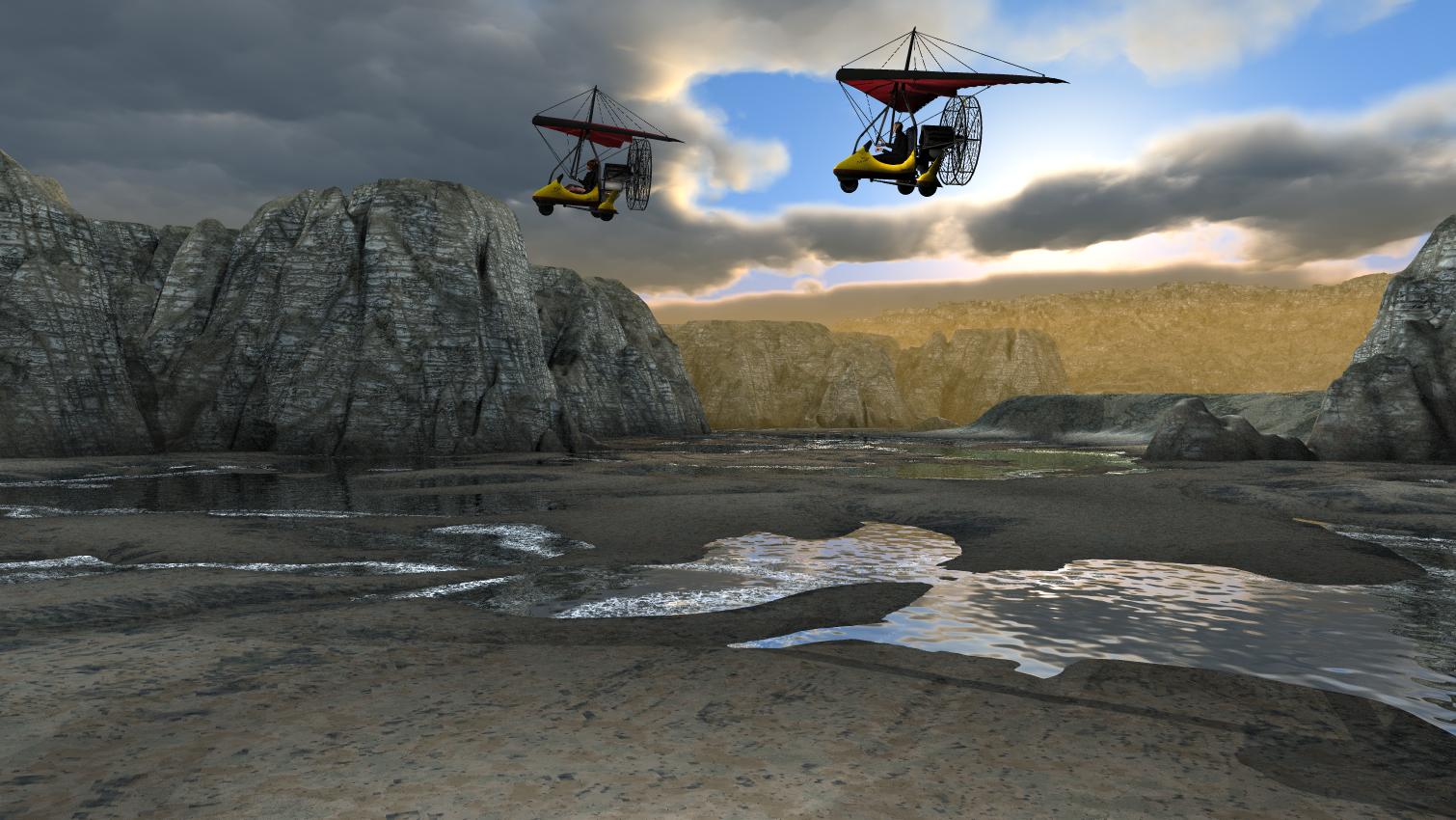
My first entry: Traveling light. I played with one of the cloudslab scenes by David and Horo, rearranging terrains and modifying the cloud slab, when I thought: "Why not put in some traveling machines?" So I posed Michael and Victoria 4 each on an Ultralight (hence the name) and placed them in the sky above the scene.
 Dailey Hair File Size? (solved)
@Sevrin and @MimicMolly, thanks, I didn't even see that enormous amount! I will probably delete most of the textures then, plus the references, because I usually use the Backlight Hair Shader by chevybabe25 anyway. It's quite freeing really, now that I found you can actually alter the zips BEFORE installing if you take care of the references as well. Tedious work, for sure, and takes ages, but very satisfying also. And helps my poor overcrowded SSD no end.
The morphs also do add up, with just a quick check I found that the figure morphs alone add up to about 100 MB. Since I don't own any of them except for Victoria, to the bin they'll go ...
Holy Hanna - I need some dental workI need a good 3D dental surgeon?
I like the TMA Andrea for Genesis 8.1 Female ( https://www.daz3d.com/tma-andrea-for-genesis-81-female ) but I am not a big fan of the teeth.
How can I apply a different set of teeth, maybe the default Victoria 8.1 ( https://www.daz3d.com/victoria-8-1 )?
or
How can I load the Andrea character morphs/textures on to Victoria 8.1 without loading the Andrea teeth?
Would this product solve my problem? Is it only for Gen 8 not Gen 8.1?
Teeth Master Control for Genesis 8 Female ( https://www.daz3d.com/teeth-master-control-for-genesis-8-female )
Linda hamilton Terminator 2 style hair?been looking for a hair similar to this one anyone cauld give me sugestions? If its for genesis 1or victoria 4 even better but anything is useful
 Victoria 8.1 Face Skin
alainmerigot said:
You can use on any char any other skin of the same family. Just pick a g8.1F skin that you like and apply it on Victoria.
Alternatively, you can photoshop the skin to change the parts that you don't like.
You can also use G8 on Victoria 8.1
... Hell, you can use G3, because they are the same texture-wise.
Just put the Torso in the Head and Body slots.
Victoria 8.1 Face Skinleonardo_3285321d said:
Hello, do you know where can I find other skins? I only have Victoria 8.1 with HD and morphs installed
When you are working with Victoria 8.1 you should at least have access to the four available skin materials from the Starter Essentials:
When working with Content Library you can navigate to People/Genesis 8 Female/Materials/Base Materials/Iray you should find:
- Genesis 8.1 Female Base MAT All Maps A
- Genesis 8.1 Female Base MAT All Maps B
- Genesis 8.1 Female Base MAT All Maps C
- Genesis 8.1 Female Base MAT All Maps D
When working with Smart Content you should find them in Materials/Iray/Feminine/Genesis 8.1 Female/Skin
When you are talking about acne do you mean the visible pores? You could also try to reduce the normal strength settings in the Surfaces pane for the face.
Victoria 8.1 Face SkinHello, do you know where can I find other skins? I only have Victoria 8.1 with HD and morphs installed
Victoria 8.1 Face SkinYou can use on any char any other skin of the same family. Just pick a g8.1F skin that you like and apply it on Victoria.
Alternatively, you can photoshop the skin to change the parts that you don't like.
Victoria 8.1 Face SkinHello again,
Is there a way to reduce the acne on Victoria 8.1? I would like to have a "cleaner" face skin
Thank you
Aging morphHello,
I would like to create old and young people using Genesis 8.1 female (Victoria 8.1 HD), is this possible?
Thank you
Best/Most Natural Expressions for Genesis 8.1?There's a lot of great ones. Some packs have more natural looking expressions, but may still include a few that feel very exaggerated (open mouth smiles often feel like this). I adjust the expressions using the sliders or use other settings (for example, I find some smile expressions don't squint the eyes or cheeks, so I will add that) to make them feel a little less exaggerated.
I pick from these fairly often. I have a lot of expression packs, so I tend to mix them when I can.
https://www.daz3d.com/around-me-poses-and-expressions-for-genesis-81
(I use this often when I'm just starting, so I don't have the default blank stare)
https://www.daz3d.com/the-expression-collection-for-victoria-81
[Released] Character Converter from Genesis 8 Female to Genesis 3 Female - Conv JCMs too[Commercial]Nekura2000 said:
RiverSoftArt said:
Nekura2000 said:
RiverSoftArt said:
Nekura2000 said:
RiverSoftArt said:
Nekura2000 said:
RiverSoftArt said:
Nekura2000 said:
I had to get a new hard drive so I reinstalled Daz Studio. When trying to convert my Generation 7 female characters to Generation 8, I'm getting a distorted face. I've uninstalled and reinstalled the program, even deleted the RSCloneGenesis3Female.obj file from the folder C:\Users\nekur\AppData\Roaming\DAZ 3D\Studio4\CharacterConverterMorphs, with no change. The Generation 7 character as well as Genesis 8 load without a flaw. Here's what I'm getting, attached or from https://www.deviantart.com/wow-creations/art/Converted-920761392. ; I just looked at the parameters for the character I converted, which was Agnes. It isn't showing an Agnes head or body for 8, just Agnes itself.
The clone is for a different Character Converter. Maybe it is pulling in the converted morphs twice? From your previous conversion on the old hard drive and a new conversion? What directories are specified in the content manager? You should check all the currently used morphs on the character and find the morphs. The Parameter Settings show the Asset File Path of the morph (and the [...] button shows the full path of the morph). Make sure the morphs are coming from where you think they should be coming.
I use two different drives when using software. I have the OS drive which I replaced and the data drive. I renamed the original Daz drive as “Daz 3D2 Old”, before installing the Daz Studio. When installing Daz Studio, I allowed it to keep the “Daz 3D” folder, but also use the new “My DAZ 3D Library” folder. I just remember to look at the Error Log when loading Agnes Genesis 8 and this is what I’m getting:
2022-06-29 07:16:21.449 [WARNING] :: ..\..\..\..\..\src\sdksource\fileinput\dzassetdaz.cpp(6903): Formula output property not found: Genesis8Female:/data/Daz%203D/Genesis%208/Female/Morphs/XTransfer/3D%20Universe/ToonGenerations2/Base/XT_CTRL3duToonGenerations2_AdjustAge.dsf#XTIDCTRL3duToonGenerations2_AdjustAge?value - in file: /data/Daz%203D/Genesis%208/Female/Morphs/Zev0/Shape%20Shift/Arm%20Length.dsf
2022-06-29 07:16:21.506 [WARNING] :: ..\..\..\..\..\src\sdksource\fileinput\dzassetdaz.cpp(6903): Formula output property not found: Genesis8Female:/data/DAZ%203D/Genesis%208/Female/Morphs/DAZ%203D/Head/Old/PHMEyesIrisSize.dsf#PHMEyesIrisSize?value - in file: /data/Daz%203D/Genesis%208/Female/Morphs/vyktohria/Meredith/VYK%20Meredith%20Head.dsf
2022-06-29 07:16:22.060 [WARNING] :: ..\..\..\..\..\src\sdksource\fileinput\dzassetdaz.cpp(6903): Formula output property not found: Genesis8Female:/data/DAZ%203D/Genesis%208/Female/Morphs/SickleYield2017/UniversalBreastHelper/PBMSYUBHGiantAll_proj.dsf#PBMSYUBHGiantAll_proj?value - in file: /data/Daz%203D/Genesis%208/Female/Morphs/SickleYield2017/UniversalBreastHelper/PBMSYUBHGiantAll.dsf
2022-06-29 07:16:22.125 [WARNING] :: ..\..\..\..\..\src\sdksource\fileinput\dzassetdaz.cpp(7134): Unsupported formula: /data/Daz%203D/Genesis%208/Female/Morphs/RiverSoft%20Art/Javeria%20for%20Victoria%207%20and%20Genesis%203/pJCMRSG3FVictoria7ThighBndFwdHDR.dsf
2022-06-29 07:16:22.155 [WARNING] :: ..\..\..\..\..\src\sdksource\fileinput\dzassetdaz.cpp(7134): Unsupported formula: /data/Daz%203D/Genesis%208/Female/Morphs/RiverSoft%20Art/Javeria%20for%20Victoria%207%20and%20Genesis%203/pJCMRSG3FVictoria7ThighBndFwdHDL.dsf
2022-06-29 07:16:22.628 [WARNING] :: ..\..\..\..\..\src\sdksource\fileinput\dzassetdaz.cpp(7134): Unsupported formula: /data/Daz%203D/Genesis%208/Female/Morphs/RiverSoft%20Art/FWSA%20Caterina%20for%20Victoria%207%20and%20Genesis%203/pJCMRSG3FVictoria7ShoulderBndFwd_110_R.dsf
2022-06-29 07:16:22.665 [WARNING] :: ..\..\..\..\..\src\sdksource\fileinput\dzassetdaz.cpp(7134): Unsupported formula: /data/Daz%203D/Genesis%208/Female/Morphs/RiverSoft%20Art/FWSA%20Caterina%20for%20Victoria%207%20and%20Genesis%203/pJCMRSG3FVictoria7ShoulderBndFwd_110_L.dsf
2022-06-29 07:16:22.769 [WARNING] :: ..\..\..\..\..\src\sdksource\fileinput\dzassetdaz.cpp(7134): Unsupported formula: /data/Daz%203D/Genesis%208/Female/Morphs/RiverSoft%20Art/FWSA%20Caterina%20for%20Victoria%207%20and%20Genesis%203/pJCMRSG3FVictoria7ShinBndBck_145_R.dsf
2022-06-29 07:16:22.806 [WARNING] :: ..\..\..\..\..\src\sdksource\fileinput\dzassetdaz.cpp(7134): Unsupported formula: /data/Daz%203D/Genesis%208/Female/Morphs/RiverSoft%20Art/FWSA%20Caterina%20for%20Victoria%207%20and%20Genesis%203/pJCMRSG3FVictoria7ShinBndBck_145_L.dsf
2022-06-29 07:16:22.895 [WARNING] :: ..\..\..\..\..\src\sdksource\fileinput\dzassetdaz.cpp(7134): Unsupported formula: /data/Daz%203D/Genesis%208/Female/Morphs/RiverSoft%20Art/FWSA%20Caterina%20for%20Victoria%207%20and%20Genesis%203/pJCMRSG3FVictoria7ForearmBnd_135_R.dsf
2022-06-29 07:16:22.935 [WARNING] :: ..\..\..\..\..\src\sdksource\fileinput\dzassetdaz.cpp(7134): Unsupported formula: /data/Daz%203D/Genesis%208/Female/Morphs/RiverSoft%20Art/FWSA%20Caterina%20for%20Victoria%207%20and%20Genesis%203/pJCMRSG3FVictoria7ForearmBnd_135_L.dsf
2022-06-29 07:16:31.020 [WARNING] :: ..\..\..\..\..\src\sdksource\fileinput\dzassetdaz.cpp(6903): Formula output property not found: Genesis8Female:/data/DAZ%203D/Genesis%208/Female/Morphs/DAZ%20Originals/data/DAZ%203D/Genesis%208/Female/Morphs/Fred%20Winkler%20Art%2CSabby%2CDAZ%20Originals/FW%20Frankie%20HD%20for%20Victoria%207/CTRL-RSC-Frankie.dsfCFred%20Winkler%20Art/data/DAZ%203D/Genesis%208/Female/Morphs/Fred%20Winkler%20Art%2CSabby%2CDAZ%20Originals/FW%20Frankie%20HD%20for%20Victoria%207/CTRL-RSC-Frankie.dsfCSabby/FWSA%20Agnes%20HD%20for%20Lilith%207/PHMMouthRealismHD.dsf#PHMMouthRealismHD?value - in file: /data/DAZ%203D/Genesis%208/Female/Morphs/Fred%20Winkler%20Art%2CSabby%2CDAZ%20Originals/FW%20Frankie%20HD%20for%20Victoria%207/CTRL-RSC-Frankie.dsf
2022-06-29 07:16:31.020 [WARNING] :: ..\..\..\..\..\src\sdksource\fileinput\dzassetdaz.cpp(6903): Formula output property not found: Genesis8Female:/data/DAZ%203D/Genesis%208/Female/Morphs/DAZ%20Originals/data/DAZ%203D/Genesis%208/Female/Morphs/Fred%20Winkler%20Art%2CSabby%2CDAZ%20Originals/FW%20Frankie%20HD%20for%20Victoria%207/CTRL-RSC-Frankie.dsfCFred%20Winkler%20Art/FW%20Brooke%20HD%20for%20Victoria%207/FHMVictoria7.dsf#FHMVictoria7?value - in file: /data/DAZ%203D/Genesis%208/Female/Morphs/Fred%20Winkler%20Art%2CSabby%2CDAZ%20Originals/FW%20Frankie%20HD%20for%20Victoria%207/CTRL-RSC-Frankie.dsf
2022-06-29 07:16:31.021 [WARNING] :: ..\..\..\..\..\src\sdksource\fileinput\dzassetdaz.cpp(6903): Formula output property not found: Genesis8Female:/data/DAZ%203D/Genesis%208/Female/Morphs/DAZ%20Originals/data/DAZ%203D/Genesis%208/Female/Morphs/Fred%20Winkler%20Art%2CSabby%2CDAZ%20Originals/FW%20Frankie%20HD%20for%20Victoria%207/CTRL-RSC-Frankie.dsfCFred%20Winkler%20Art/FW%20Brooke%20HD%20for%20Victoria%207/FBMVictoria7.dsf#FBMVictoria7?value - in file: /data/DAZ%203D/Genesis%208/Female/Morphs/Fred%20Winkler%20Art%2CSabby%2CDAZ%20Originals/FW%20Frankie%20HD%20for%20Victoria%207/CTRL-RSC-Frankie.dsf
2022-06-29 07:16:32.694 [WARNING] :: ..\..\..\..\..\src\sdksource\fileinput\dzassetdaz.cpp(6969): Formula target property not found: Genesis8Female:/data/DAZ%203D/Genesis%208/Female/Morphs/DAZ%203D/Olympia%208/FBMOlympia8.dsf#FBMOlympia8_Test?value - in file: /data/Daz%203D/Genesis%208/Female/Morphs/fabiana/KillerLegsG8/1FK-Olympia8BaseFix.dsf
2022-06-29 07:16:40.096 [WARNING] :: ..\..\..\..\..\src\sdksource\fileinput\dzassetdaz.cpp(7134): Unsupported formula: /data/Daz%203D/Genesis%208/Female/Morphs/DAZ%203D%2CHeysun%20Oh/Olympia%207%20HD%20Add-On/pJCMRSG3FOlympia7ForeArmBndHD_n100L.dsf
2022-06-29 07:16:40.261 [WARNING] :: ..\..\..\..\..\src\sdksource\fileinput\dzassetdaz.cpp(7134): Unsupported formula: /data/Daz%203D/Genesis%208/Female/Morphs/DAZ%203D%2CHeysun%20Oh/Olympia%207%20HD%20Add-On/pJCMRSG3FOlympia7ForeArmBndHD_100R.dsf
2022-06-29 07:16:40.986 [WARNING] :: ..\..\..\..\..\src\sdksource\fileinput\dzassetdaz.cpp(7134): Unsupported formula: /data/Daz%203D/Genesis%208/Female/Morphs/DAZ%203D%2CHeysun%20Oh/Mei%20Lin%207%20HD%20Add-On/pJCMRSG3FMeiLin7ShinBndBck_95R.dsf
2022-06-29 07:16:41.152 [WARNING] :: ..\..\..\..\..\src\sdksource\fileinput\dzassetdaz.cpp(7134): Unsupported formula: /data/Daz%203D/Genesis%208/Female/Morphs/DAZ%203D%2CHeysun%20Oh/Mei%20Lin%207%20HD%20Add-On/pJCMRSG3FMeiLin7ShinBndBck_95L.dsf
2022-06-29 07:16:41.322 [WARNING] :: ..\..\..\..\..\src\sdksource\fileinput\dzassetdaz.cpp(7134): Unsupported formula: /data/Daz%203D/Genesis%208/Female/Morphs/DAZ%203D%2CHeysun%20Oh/Mei%20Lin%207%20HD%20Add-On/pJCMRSG3FMeiLin7ShinBndBckR.dsf
2022-06-29 07:16:41.494 [WARNING] :: ..\..\..\..\..\src\sdksource\fileinput\dzassetdaz.cpp(7134): Unsupported formula: /data/Daz%203D/Genesis%208/Female/Morphs/DAZ%203D%2CHeysun%20Oh/Mei%20Lin%207%20HD%20Add-On/pJCMRSG3FMeiLin7ShinBndBckL.dsf
2022-06-29 07:16:43.828 [WARNING] :: ..\..\..\..\..\src\sdksource\fileinput\dzassetdaz.cpp(7134): Unsupported formula: /data/Daz%203D/Genesis%208/Female/Morphs/DAZ%203D%2CHeysun%20Oh/Karen%207%20HD%20Add-On/pJCMRSG3FKaren7ShldrFwd_n90L.dsf
2022-06-29 07:16:44.007 [WARNING] :: ..\..\..\..\..\src\sdksource\fileinput\dzassetdaz.cpp(7134): Unsupported formula: /data/Daz%203D/Genesis%208/Female/Morphs/DAZ%203D%2CHeysun%20Oh/Karen%207%20HD%20Add-On/pJCMRSG3FKaren7ShldrFwd_90R.dsf
2022-06-29 07:16:44.191 [WARNING] :: ..\..\..\..\..\src\sdksource\fileinput\dzassetdaz.cpp(7134): Unsupported formula: /data/Daz%203D/Genesis%208/Female/Morphs/DAZ%203D%2CHeysun%20Oh/Karen%207%20HD%20Add-On/pJCMRSG3FKaren7ShinBndBck_90R.dsf
2022-06-29 07:16:44.369 [WARNING] :: ..\..\..\..\..\src\sdksource\fileinput\dzassetdaz.cpp(7134): Unsupported formula: /data/Daz%203D/Genesis%208/Female/Morphs/DAZ%203D%2CHeysun%20Oh/Karen%207%20HD%20Add-On/pJCMRSG3FKaren7ShinBndBck_90L.dsf
2022-06-29 07:16:44.669 [WARNING] :: ..\..\..\..\..\src\sdksource\fileinput\dzassetdaz.cpp(7134): Unsupported formula: /data/Daz%203D/Genesis%208/Female/Morphs/DAZ%203D%2CHeysun%20Oh/Karen%207%20HD%20Add-On/pJCMRSG3FKaren7ForearmBnd_n85L.dsf
2022-06-29 07:16:44.910 [WARNING] :: ..\..\..\..\..\src\sdksource\fileinput\dzassetdaz.cpp(7134): Unsupported formula: /data/Daz%203D/Genesis%208/Female/Morphs/DAZ%203D%2CHeysun%20Oh/Karen%207%20HD%20Add-On/pJCMRSG3FKaren7ForearmBnd_85R.dsf
2022-06-29 07:16:56.769 [WARNING] :: ..\..\..\..\..\src\sdksource\fileinput\dzassetdaz.cpp(7134): Unsupported formula: /data/Daz%203D/Genesis%208/Female/Morphs/-Yannek-%2CDAZ%203D%2CHeysun%20Oh/Gia%207/pJCMRSG3FGia7ForeArmBnd_n135L.dsf
2022-06-29 07:16:57.067 [WARNING] :: ..\..\..\..\..\src\sdksource\fileinput\dzassetdaz.cpp(7134): Unsupported formula: /data/Daz%203D/Genesis%208/Female/Morphs/-Yannek-%2CDAZ%203D%2CHeysun%20Oh/Gia%207/pJCMRSG3FGia7ForeArmBnd_135R.dsf
2022-06-29 07:17:00.107 [WARNING] :: ..\..\..\..\..\src\sdksource\fileinput\dzassetdaz.cpp(7134): Unsupported formula: /data/Daz%203D/Genesis%208/Female/Morphs/-Yannek-%2CDAZ%203D%2CHeysun%20Oh/Arabella%207%20HD%20Add-On/pJCMRSG3FArabella7ForeArmBnd_n135L.dsf
2022-06-29 07:17:00.418 [WARNING] :: ..\..\..\..\..\src\sdksource\fileinput\dzassetdaz.cpp(7134): Unsupported formula: /data/Daz%203D/Genesis%208/Female/Morphs/-Yannek-%2CDAZ%203D%2CHeysun%20Oh/Arabella%207%20HD%20Add-On/pJCMRSG3FArabella7ForeArmBnd_135R.dsf
2022-06-29 07:17:02.981 [WARNING] :: ..\..\..\..\..\src\sdksource\fileinput\dzassetdaz.cpp(5962): Parent for modifier not found: TMLI Lashes 06.
2022-06-29 07:17:02.981 [WARNING] :: ..\..\..\..\..\src\sdksource\fileinput\dzassetdaz.cpp(1712): Modifier not prepared: TMLI Lashes 06!
2022-06-29 07:17:02.981 [WARNING] :: ..\..\..\..\..\src\sdksource\fileinput\dzassetdaz.cpp(1729): Modifier not created: TMLI Lashes 06!
Here’s an image of my Content Directory Manager.
What looks bad in your Content Directory is that you have no user library in the Daz Studio Formats. That means the character converter would be writing morphs (and possibly deleting morphs if the overwrite option is checked) in the Daz content folder. You will get bad/weird results from that. I am afraid you might have hosed your morphs folder at this point. You need something a user content folder as the first folder in the Daz Studio Formats section. Then, this folder would be used to write out morphs from the conversions and would not overwrite your Daz content library.
I'm sorry, but from what I can see I have a Content Directory in the Daz Studio Format. Could you give a step by step solution in solving this problem. I've used Daz Studio for several years, along with Character Converter, but I think I'm missing something based on what you're seeing and I'm trying to interpret.
Usually what you will see in Daz Studio Formats is something like this:
The SECOND entry points to My Daz 3D Library which has all of your installed content. The FIRST entry points to all of YOUR content, whether stuff you create or is created for you by converters. This ensures that everything you create never overwrites the installed content causing problems. Mostly, Daz Studio treats these two content directories as one big content directory, for example the morphs in D:\Documents\My Daz 3D Library\data\DAZ 3D\Genesis 8\Female\Morphs AND in D:\Documents\DAZ 3D\Studio\My Library\data\DAZ 3D\Genesis 8\Female\Morphs are both loaded and available as morphs for Genesis 8 Females. However, Daz Studio saves all the morphs and other data ONLY in the FIRST directory when a conversion occurs, ensuring that converted morphs do not overwrite installed content morphs. However, you are missing that first entry and your converters have been saving into the installed content folder, more than likely corrupting installed content.
I fixed my Daz Studio folders like the image. I even manually downloaded the converter program and copied the files into my "My Daz 3D Library" folder. However, I'm still getting the same result, however the male converter program is working fine. Any other ideas?
What do you mean that you copied the files into "My Daz 3D Library" folder? What files? None of the converted morphs should go in there. I would uninstall and reinstall Essentials so you get back the original morphs from Daz. Load a figure and make sure it is fixed. Then with the Daz Studio folders fixed, re-convert and make sure the morphs are showing up in your "My Library" folder and not "My Daz 3D library" folder.
This may or may not be important, I use the Daz Install Manager. I uninstalled the Genesis 3 and 8 Essentials, converter 3 to 8 female, along with Victoria 7. I then reinstalled them . Before I tried the conversion on Victoria 7, I removed the morph folder in the "M:\NZXT Storage\Documents\DAZ 3D\My Library\data\DAZ 3D\Genesis 8\Female\Morphs" folder for Victoria 7. I also made certain to remove the folder that was created by the converter for Victoria 7 from the "M:\NZXT Storage\Documents\My DAZ 3D Library\data\DAZ 3D\Genesis 8\Female\Morphs" folder, from my previous conversions. However, I'm still getting the same problem. The morphs are going into the "M:\NZXT Storage\Documents\DAZ 3D\My Library\data\DAZ 3D\Genesis 8\Female\Morphs" folder. I reset the settings on the converter and I've verified that they are the same for the female as the male (which is working), but I'm still getting the same problem. It's making me wonder if there are another set of files that need to be deleted, to make this thing work.
When the converter converts something, its morphs will go in M:\NZXT Storage\Documents\DAZ 3D\My Library\data\DAZ 3D\Genesis 8\Female\Morphs. However, BEFORE you converted anything, was the vanilla G8F correct? If not, there are some bad morphs in your installed morphs folder: M:\NZXT Storage\Documents\My DAZ 3D Library\data\DAZ 3D\Genesis 8\Female\Morphs
[Released] Character Converter from Genesis 8 Female to Genesis 3 Female - Conv JCMs too[Commercial]RiverSoftArt said:
Nekura2000 said:
RiverSoftArt said:
Nekura2000 said:
RiverSoftArt said:
Nekura2000 said:
RiverSoftArt said:
Nekura2000 said:
I had to get a new hard drive so I reinstalled Daz Studio. When trying to convert my Generation 7 female characters to Generation 8, I'm getting a distorted face. I've uninstalled and reinstalled the program, even deleted the RSCloneGenesis3Female.obj file from the folder C:\Users\nekur\AppData\Roaming\DAZ 3D\Studio4\CharacterConverterMorphs, with no change. The Generation 7 character as well as Genesis 8 load without a flaw. Here's what I'm getting, attached or from https://www.deviantart.com/wow-creations/art/Converted-920761392. ; I just looked at the parameters for the character I converted, which was Agnes. It isn't showing an Agnes head or body for 8, just Agnes itself.
The clone is for a different Character Converter. Maybe it is pulling in the converted morphs twice? From your previous conversion on the old hard drive and a new conversion? What directories are specified in the content manager? You should check all the currently used morphs on the character and find the morphs. The Parameter Settings show the Asset File Path of the morph (and the [...] button shows the full path of the morph). Make sure the morphs are coming from where you think they should be coming.
I use two different drives when using software. I have the OS drive which I replaced and the data drive. I renamed the original Daz drive as “Daz 3D2 Old”, before installing the Daz Studio. When installing Daz Studio, I allowed it to keep the “Daz 3D” folder, but also use the new “My DAZ 3D Library” folder. I just remember to look at the Error Log when loading Agnes Genesis 8 and this is what I’m getting:
2022-06-29 07:16:21.449 [WARNING] :: ..\..\..\..\..\src\sdksource\fileinput\dzassetdaz.cpp(6903): Formula output property not found: Genesis8Female:/data/Daz%203D/Genesis%208/Female/Morphs/XTransfer/3D%20Universe/ToonGenerations2/Base/XT_CTRL3duToonGenerations2_AdjustAge.dsf#XTIDCTRL3duToonGenerations2_AdjustAge?value - in file: /data/Daz%203D/Genesis%208/Female/Morphs/Zev0/Shape%20Shift/Arm%20Length.dsf
2022-06-29 07:16:21.506 [WARNING] :: ..\..\..\..\..\src\sdksource\fileinput\dzassetdaz.cpp(6903): Formula output property not found: Genesis8Female:/data/DAZ%203D/Genesis%208/Female/Morphs/DAZ%203D/Head/Old/PHMEyesIrisSize.dsf#PHMEyesIrisSize?value - in file: /data/Daz%203D/Genesis%208/Female/Morphs/vyktohria/Meredith/VYK%20Meredith%20Head.dsf
2022-06-29 07:16:22.060 [WARNING] :: ..\..\..\..\..\src\sdksource\fileinput\dzassetdaz.cpp(6903): Formula output property not found: Genesis8Female:/data/DAZ%203D/Genesis%208/Female/Morphs/SickleYield2017/UniversalBreastHelper/PBMSYUBHGiantAll_proj.dsf#PBMSYUBHGiantAll_proj?value - in file: /data/Daz%203D/Genesis%208/Female/Morphs/SickleYield2017/UniversalBreastHelper/PBMSYUBHGiantAll.dsf
2022-06-29 07:16:22.125 [WARNING] :: ..\..\..\..\..\src\sdksource\fileinput\dzassetdaz.cpp(7134): Unsupported formula: /data/Daz%203D/Genesis%208/Female/Morphs/RiverSoft%20Art/Javeria%20for%20Victoria%207%20and%20Genesis%203/pJCMRSG3FVictoria7ThighBndFwdHDR.dsf
2022-06-29 07:16:22.155 [WARNING] :: ..\..\..\..\..\src\sdksource\fileinput\dzassetdaz.cpp(7134): Unsupported formula: /data/Daz%203D/Genesis%208/Female/Morphs/RiverSoft%20Art/Javeria%20for%20Victoria%207%20and%20Genesis%203/pJCMRSG3FVictoria7ThighBndFwdHDL.dsf
2022-06-29 07:16:22.628 [WARNING] :: ..\..\..\..\..\src\sdksource\fileinput\dzassetdaz.cpp(7134): Unsupported formula: /data/Daz%203D/Genesis%208/Female/Morphs/RiverSoft%20Art/FWSA%20Caterina%20for%20Victoria%207%20and%20Genesis%203/pJCMRSG3FVictoria7ShoulderBndFwd_110_R.dsf
2022-06-29 07:16:22.665 [WARNING] :: ..\..\..\..\..\src\sdksource\fileinput\dzassetdaz.cpp(7134): Unsupported formula: /data/Daz%203D/Genesis%208/Female/Morphs/RiverSoft%20Art/FWSA%20Caterina%20for%20Victoria%207%20and%20Genesis%203/pJCMRSG3FVictoria7ShoulderBndFwd_110_L.dsf
2022-06-29 07:16:22.769 [WARNING] :: ..\..\..\..\..\src\sdksource\fileinput\dzassetdaz.cpp(7134): Unsupported formula: /data/Daz%203D/Genesis%208/Female/Morphs/RiverSoft%20Art/FWSA%20Caterina%20for%20Victoria%207%20and%20Genesis%203/pJCMRSG3FVictoria7ShinBndBck_145_R.dsf
2022-06-29 07:16:22.806 [WARNING] :: ..\..\..\..\..\src\sdksource\fileinput\dzassetdaz.cpp(7134): Unsupported formula: /data/Daz%203D/Genesis%208/Female/Morphs/RiverSoft%20Art/FWSA%20Caterina%20for%20Victoria%207%20and%20Genesis%203/pJCMRSG3FVictoria7ShinBndBck_145_L.dsf
2022-06-29 07:16:22.895 [WARNING] :: ..\..\..\..\..\src\sdksource\fileinput\dzassetdaz.cpp(7134): Unsupported formula: /data/Daz%203D/Genesis%208/Female/Morphs/RiverSoft%20Art/FWSA%20Caterina%20for%20Victoria%207%20and%20Genesis%203/pJCMRSG3FVictoria7ForearmBnd_135_R.dsf
2022-06-29 07:16:22.935 [WARNING] :: ..\..\..\..\..\src\sdksource\fileinput\dzassetdaz.cpp(7134): Unsupported formula: /data/Daz%203D/Genesis%208/Female/Morphs/RiverSoft%20Art/FWSA%20Caterina%20for%20Victoria%207%20and%20Genesis%203/pJCMRSG3FVictoria7ForearmBnd_135_L.dsf
2022-06-29 07:16:31.020 [WARNING] :: ..\..\..\..\..\src\sdksource\fileinput\dzassetdaz.cpp(6903): Formula output property not found: Genesis8Female:/data/DAZ%203D/Genesis%208/Female/Morphs/DAZ%20Originals/data/DAZ%203D/Genesis%208/Female/Morphs/Fred%20Winkler%20Art%2CSabby%2CDAZ%20Originals/FW%20Frankie%20HD%20for%20Victoria%207/CTRL-RSC-Frankie.dsfCFred%20Winkler%20Art/data/DAZ%203D/Genesis%208/Female/Morphs/Fred%20Winkler%20Art%2CSabby%2CDAZ%20Originals/FW%20Frankie%20HD%20for%20Victoria%207/CTRL-RSC-Frankie.dsfCSabby/FWSA%20Agnes%20HD%20for%20Lilith%207/PHMMouthRealismHD.dsf#PHMMouthRealismHD?value - in file: /data/DAZ%203D/Genesis%208/Female/Morphs/Fred%20Winkler%20Art%2CSabby%2CDAZ%20Originals/FW%20Frankie%20HD%20for%20Victoria%207/CTRL-RSC-Frankie.dsf
2022-06-29 07:16:31.020 [WARNING] :: ..\..\..\..\..\src\sdksource\fileinput\dzassetdaz.cpp(6903): Formula output property not found: Genesis8Female:/data/DAZ%203D/Genesis%208/Female/Morphs/DAZ%20Originals/data/DAZ%203D/Genesis%208/Female/Morphs/Fred%20Winkler%20Art%2CSabby%2CDAZ%20Originals/FW%20Frankie%20HD%20for%20Victoria%207/CTRL-RSC-Frankie.dsfCFred%20Winkler%20Art/FW%20Brooke%20HD%20for%20Victoria%207/FHMVictoria7.dsf#FHMVictoria7?value - in file: /data/DAZ%203D/Genesis%208/Female/Morphs/Fred%20Winkler%20Art%2CSabby%2CDAZ%20Originals/FW%20Frankie%20HD%20for%20Victoria%207/CTRL-RSC-Frankie.dsf
2022-06-29 07:16:31.021 [WARNING] :: ..\..\..\..\..\src\sdksource\fileinput\dzassetdaz.cpp(6903): Formula output property not found: Genesis8Female:/data/DAZ%203D/Genesis%208/Female/Morphs/DAZ%20Originals/data/DAZ%203D/Genesis%208/Female/Morphs/Fred%20Winkler%20Art%2CSabby%2CDAZ%20Originals/FW%20Frankie%20HD%20for%20Victoria%207/CTRL-RSC-Frankie.dsfCFred%20Winkler%20Art/FW%20Brooke%20HD%20for%20Victoria%207/FBMVictoria7.dsf#FBMVictoria7?value - in file: /data/DAZ%203D/Genesis%208/Female/Morphs/Fred%20Winkler%20Art%2CSabby%2CDAZ%20Originals/FW%20Frankie%20HD%20for%20Victoria%207/CTRL-RSC-Frankie.dsf
2022-06-29 07:16:32.694 [WARNING] :: ..\..\..\..\..\src\sdksource\fileinput\dzassetdaz.cpp(6969): Formula target property not found: Genesis8Female:/data/DAZ%203D/Genesis%208/Female/Morphs/DAZ%203D/Olympia%208/FBMOlympia8.dsf#FBMOlympia8_Test?value - in file: /data/Daz%203D/Genesis%208/Female/Morphs/fabiana/KillerLegsG8/1FK-Olympia8BaseFix.dsf
2022-06-29 07:16:40.096 [WARNING] :: ..\..\..\..\..\src\sdksource\fileinput\dzassetdaz.cpp(7134): Unsupported formula: /data/Daz%203D/Genesis%208/Female/Morphs/DAZ%203D%2CHeysun%20Oh/Olympia%207%20HD%20Add-On/pJCMRSG3FOlympia7ForeArmBndHD_n100L.dsf
2022-06-29 07:16:40.261 [WARNING] :: ..\..\..\..\..\src\sdksource\fileinput\dzassetdaz.cpp(7134): Unsupported formula: /data/Daz%203D/Genesis%208/Female/Morphs/DAZ%203D%2CHeysun%20Oh/Olympia%207%20HD%20Add-On/pJCMRSG3FOlympia7ForeArmBndHD_100R.dsf
2022-06-29 07:16:40.986 [WARNING] :: ..\..\..\..\..\src\sdksource\fileinput\dzassetdaz.cpp(7134): Unsupported formula: /data/Daz%203D/Genesis%208/Female/Morphs/DAZ%203D%2CHeysun%20Oh/Mei%20Lin%207%20HD%20Add-On/pJCMRSG3FMeiLin7ShinBndBck_95R.dsf
2022-06-29 07:16:41.152 [WARNING] :: ..\..\..\..\..\src\sdksource\fileinput\dzassetdaz.cpp(7134): Unsupported formula: /data/Daz%203D/Genesis%208/Female/Morphs/DAZ%203D%2CHeysun%20Oh/Mei%20Lin%207%20HD%20Add-On/pJCMRSG3FMeiLin7ShinBndBck_95L.dsf
2022-06-29 07:16:41.322 [WARNING] :: ..\..\..\..\..\src\sdksource\fileinput\dzassetdaz.cpp(7134): Unsupported formula: /data/Daz%203D/Genesis%208/Female/Morphs/DAZ%203D%2CHeysun%20Oh/Mei%20Lin%207%20HD%20Add-On/pJCMRSG3FMeiLin7ShinBndBckR.dsf
2022-06-29 07:16:41.494 [WARNING] :: ..\..\..\..\..\src\sdksource\fileinput\dzassetdaz.cpp(7134): Unsupported formula: /data/Daz%203D/Genesis%208/Female/Morphs/DAZ%203D%2CHeysun%20Oh/Mei%20Lin%207%20HD%20Add-On/pJCMRSG3FMeiLin7ShinBndBckL.dsf
2022-06-29 07:16:43.828 [WARNING] :: ..\..\..\..\..\src\sdksource\fileinput\dzassetdaz.cpp(7134): Unsupported formula: /data/Daz%203D/Genesis%208/Female/Morphs/DAZ%203D%2CHeysun%20Oh/Karen%207%20HD%20Add-On/pJCMRSG3FKaren7ShldrFwd_n90L.dsf
2022-06-29 07:16:44.007 [WARNING] :: ..\..\..\..\..\src\sdksource\fileinput\dzassetdaz.cpp(7134): Unsupported formula: /data/Daz%203D/Genesis%208/Female/Morphs/DAZ%203D%2CHeysun%20Oh/Karen%207%20HD%20Add-On/pJCMRSG3FKaren7ShldrFwd_90R.dsf
2022-06-29 07:16:44.191 [WARNING] :: ..\..\..\..\..\src\sdksource\fileinput\dzassetdaz.cpp(7134): Unsupported formula: /data/Daz%203D/Genesis%208/Female/Morphs/DAZ%203D%2CHeysun%20Oh/Karen%207%20HD%20Add-On/pJCMRSG3FKaren7ShinBndBck_90R.dsf
2022-06-29 07:16:44.369 [WARNING] :: ..\..\..\..\..\src\sdksource\fileinput\dzassetdaz.cpp(7134): Unsupported formula: /data/Daz%203D/Genesis%208/Female/Morphs/DAZ%203D%2CHeysun%20Oh/Karen%207%20HD%20Add-On/pJCMRSG3FKaren7ShinBndBck_90L.dsf
2022-06-29 07:16:44.669 [WARNING] :: ..\..\..\..\..\src\sdksource\fileinput\dzassetdaz.cpp(7134): Unsupported formula: /data/Daz%203D/Genesis%208/Female/Morphs/DAZ%203D%2CHeysun%20Oh/Karen%207%20HD%20Add-On/pJCMRSG3FKaren7ForearmBnd_n85L.dsf
2022-06-29 07:16:44.910 [WARNING] :: ..\..\..\..\..\src\sdksource\fileinput\dzassetdaz.cpp(7134): Unsupported formula: /data/Daz%203D/Genesis%208/Female/Morphs/DAZ%203D%2CHeysun%20Oh/Karen%207%20HD%20Add-On/pJCMRSG3FKaren7ForearmBnd_85R.dsf
2022-06-29 07:16:56.769 [WARNING] :: ..\..\..\..\..\src\sdksource\fileinput\dzassetdaz.cpp(7134): Unsupported formula: /data/Daz%203D/Genesis%208/Female/Morphs/-Yannek-%2CDAZ%203D%2CHeysun%20Oh/Gia%207/pJCMRSG3FGia7ForeArmBnd_n135L.dsf
2022-06-29 07:16:57.067 [WARNING] :: ..\..\..\..\..\src\sdksource\fileinput\dzassetdaz.cpp(7134): Unsupported formula: /data/Daz%203D/Genesis%208/Female/Morphs/-Yannek-%2CDAZ%203D%2CHeysun%20Oh/Gia%207/pJCMRSG3FGia7ForeArmBnd_135R.dsf
2022-06-29 07:17:00.107 [WARNING] :: ..\..\..\..\..\src\sdksource\fileinput\dzassetdaz.cpp(7134): Unsupported formula: /data/Daz%203D/Genesis%208/Female/Morphs/-Yannek-%2CDAZ%203D%2CHeysun%20Oh/Arabella%207%20HD%20Add-On/pJCMRSG3FArabella7ForeArmBnd_n135L.dsf
2022-06-29 07:17:00.418 [WARNING] :: ..\..\..\..\..\src\sdksource\fileinput\dzassetdaz.cpp(7134): Unsupported formula: /data/Daz%203D/Genesis%208/Female/Morphs/-Yannek-%2CDAZ%203D%2CHeysun%20Oh/Arabella%207%20HD%20Add-On/pJCMRSG3FArabella7ForeArmBnd_135R.dsf
2022-06-29 07:17:02.981 [WARNING] :: ..\..\..\..\..\src\sdksource\fileinput\dzassetdaz.cpp(5962): Parent for modifier not found: TMLI Lashes 06.
2022-06-29 07:17:02.981 [WARNING] :: ..\..\..\..\..\src\sdksource\fileinput\dzassetdaz.cpp(1712): Modifier not prepared: TMLI Lashes 06!
2022-06-29 07:17:02.981 [WARNING] :: ..\..\..\..\..\src\sdksource\fileinput\dzassetdaz.cpp(1729): Modifier not created: TMLI Lashes 06!
Here’s an image of my Content Directory Manager.
What looks bad in your Content Directory is that you have no user library in the Daz Studio Formats. That means the character converter would be writing morphs (and possibly deleting morphs if the overwrite option is checked) in the Daz content folder. You will get bad/weird results from that. I am afraid you might have hosed your morphs folder at this point. You need something a user content folder as the first folder in the Daz Studio Formats section. Then, this folder would be used to write out morphs from the conversions and would not overwrite your Daz content library.
I'm sorry, but from what I can see I have a Content Directory in the Daz Studio Format. Could you give a step by step solution in solving this problem. I've used Daz Studio for several years, along with Character Converter, but I think I'm missing something based on what you're seeing and I'm trying to interpret.
Usually what you will see in Daz Studio Formats is something like this:
The SECOND entry points to My Daz 3D Library which has all of your installed content. The FIRST entry points to all of YOUR content, whether stuff you create or is created for you by converters. This ensures that everything you create never overwrites the installed content causing problems. Mostly, Daz Studio treats these two content directories as one big content directory, for example the morphs in D:\Documents\My Daz 3D Library\data\DAZ 3D\Genesis 8\Female\Morphs AND in D:\Documents\DAZ 3D\Studio\My Library\data\DAZ 3D\Genesis 8\Female\Morphs are both loaded and available as morphs for Genesis 8 Females. However, Daz Studio saves all the morphs and other data ONLY in the FIRST directory when a conversion occurs, ensuring that converted morphs do not overwrite installed content morphs. However, you are missing that first entry and your converters have been saving into the installed content folder, more than likely corrupting installed content.
I fixed my Daz Studio folders like the image. I even manually downloaded the converter program and copied the files into my "My Daz 3D Library" folder. However, I'm still getting the same result, however the male converter program is working fine. Any other ideas?
What do you mean that you copied the files into "My Daz 3D Library" folder? What files? None of the converted morphs should go in there. I would uninstall and reinstall Essentials so you get back the original morphs from Daz. Load a figure and make sure it is fixed. Then with the Daz Studio folders fixed, re-convert and make sure the morphs are showing up in your "My Library" folder and not "My Daz 3D library" folder.
This may or may not be important, I use the Daz Install Manager. I uninstalled the Genesis 3 and 8 Essentials, converter 3 to 8 female, along with Victoria 7. I then reinstalled them . Before I tried the conversion on Victoria 7, I removed the morph folder in the "M:\NZXT Storage\Documents\DAZ 3D\My Library\data\DAZ 3D\Genesis 8\Female\Morphs" folder for Victoria 7. I also made certain to remove the folder that was created by the converter for Victoria 7 from the "M:\NZXT Storage\Documents\My DAZ 3D Library\data\DAZ 3D\Genesis 8\Female\Morphs" folder, from my previous conversions. However, I'm still getting the same problem. The morphs are going into the "M:\NZXT Storage\Documents\DAZ 3D\My Library\data\DAZ 3D\Genesis 8\Female\Morphs" folder. I reset the settings on the converter and I've verified that they are the same for the female as the male (which is working), but I'm still getting the same problem. It's making me wonder if there are another set of files that need to be deleted, to make this thing work.
Daz 3D is part of

Connect
DAZ Productions, Inc.
7533 S Center View Ct #4664
West Jordan, UT 84084Licensing Agreement | Terms of Service | Privacy Policy | EULA
© 2026 Daz Productions Inc. All Rights Reserved.