-
Genesis 9 delayed until at least 2020. Will you be buying it?
I wouldn't call the skipping of G9 in 2019 'good news' per se, rather, info that everyone will have to wait longer.
Totally agree!
Like L'Adair said, why just cycle through the same content repeatedly and not really do anything exciting or create character bases that the buyers might be looking for.I agree to a point. I would love to see a Gen 9 this year (not going to happen) if we see significant improvements such as much better facial expressions. See below:

To me this is mandatory in the next figure. Keep in mind that Snappers Systems in not a huge company like Disney, and the rigging was done in Maya. I love their blue dot manipulaton system directly over the mesh (not off to the side on a seperate representation of the figure) It was rendered in Unreal Engine 4.
Other things such as advanced and completely accurate HD morphs to the body based upon something like being done at https://texturing.xyz is crucial for those of us desiring realism. The HD morphs I have purchased look pretty good to me so this might already be being done in all fairness, and can be done for Gen 8 without the need for a new figure. I would love to see a bit more rigging for the toes, and a re-work of the balls of the feet. Because of increased tessellation for the toes there is a transition from bigger quads to smaller ones which means splitting tri's to make quads. In SubD this causes unrealistic ripples in the balls of the feet because the quads are so close together. All I can do is go into Zbrush and try to spread the geometry a bit to relax those ripples.
I have almost 80 figures now for Gen 8 female and probably 10 for Gen 8 male plus all the content I need for these figures, I'm kind of done buying for a bit unless something really grabs me.
Things such as more realistic hair, better soft body dynamics, better more efficient collision detection with multiple objects, much faster DForce (Marvelous Designer comes to mind) that is greatly expanded in capabilities, and applying a brush to control the amount of HD morph in certain body areas vs HD morph for only the whole body are some improvements that come to mind. This is more applicable to the application (DAZ Studio) versus a new figure so I think DAZ is on the right course for delaying a new figure release and concentrating on Studio updates this year.
I am super excited and can't wait to see a new Gen 9 male and female figure line, but as long as it is a big leap forward.
Wow. Great video! I would love to see this ability come to daz.
Figure with a SUPERMODEL body?Back in the V4 days, there was the Reby Sky set.
https://www.daz3d.com/v4-elite-reby-sky
Details
Who is Reby Sky? Based on actual 3D scan data, high resolution photos, and time spent with Reby Sky herself, a popular model, radio and TV personality, DAZ 3D has carefully crafted this unique, official Reby Sky texture and morph set. This elite character set for V4 adds a whole new level of realism to your runtime.
It is a good figure and texture, but Reby is quite short. She also caught a crapton of flack from the haters for having her body scanned.
Posed Daz to Marvelous DesignerHey thanks, peenwolf! Especially the tips about the purchased garment fit - that was a bit troublesome as well. Alembic Exporter is close to $90 so I think I'll work on the .obj and morph targets for now.
Thanks again!
Daf
Looking for Miku Miku Dance enthusiasts that like using DAZ as an MMD platformLOL, I was surprised that you actually were able to show your samples with a nude model and get away with it, but I mean after all, it's clinical nudity.
She's wearing strapless underwire bra cups and pantiesI do often see the issue with the twist bones in the conversions, so is there anything that can be done? I know the TDA modele has twist bones and G3/G8 do as well so I wonder if they could be mapped in 3DXchange. I notice sometimes when the character is suppose to clap the hands don't actually come together fully. Obviously there are the pass through issues as well ( hands passing through the body) because of the figure size deviations.
I use motionbuilder, and the solution there is to lock the joints. (ie. lock the shoulder bends, forearm bends for x-rotation; lock the twist bones for Y,Z rotation for the upper limbs. For the thighs, the bends have the Y locked, twists have the X,Z locked). Essentially that forces the solved data to go where it's supposed to go - the twist goes into the twist bones. That's the "proper" way to solve the motion to make it compatible with G3/G8 weight mapping. That also makes the motion more accurate, it's not a bit "off" - it becomes essentially perfect match to what you have in motionbuilder. I don't use 3DX, but one of my friends has it, and I played with it before. If I have time , I'll see if there is a solution there. But if you know offhand if you can lock specific joints, that's how it should be doneAs you could see though the conversion does yeild at least a 90% solution bringing in the amazing MMD motions into DAZ. Generally doing animations is forgiving of minor flaws since the character is moving and such flaws go unnoticed by most veiwers. At least I was able to get rid of that stupid feet sliding. I have also had pretty good success using a high heel offset in a subtract in aniMate2 (high heels alway make things squirrely).
I agree, and pmx2fbx is the method I've been using too . The "major" issues like massive foot sliding, or floating, etc.. mostly taken care of
(except I use it with motionbuilder, and fbx with animated pose preset instead of bvh, because bvh has other limitations e.g you can't do blendshape (morph) animations. Some G8 HD expressions are driven by bones and morphs )
pmx2fbx is the "best" vmd transfer method overall, by a long shot. I've tried the others. But there are always problems, more than typical mocap
The quality of the FBX conversion is affected by using a matching base with bones with that specific VMD. If the VMD readme doesn't list which model type and what bones , you might chose a wrong one.
For example, I tried that TDA Teto Base with another motion , and there were some issues, intersections, because it doesn't have the arm twist bones required for that motion
That flying spirits base seems to have some IK issues - whenever a motion specifies a bend or reach down, the toes lift up
Is there a "super duper base" that works for everything ? Probably not . It can be quite finicky IMO , trial and error, unless the specific model and bones are provided or listed in the VMD readme
I do need help with converting some clothing items only available in MMD do you know how to adjust the texturing once an item is converted to quads? I'm sure it can be done in Blender which is where I am converting to quads also.I literally have gigs and gigs of MMD vmd files stages clothing and charcters some of which I have already gotten into DAZ . Three of the pics I included above have stages the I imported from MMD by just exporting from PMX editor in OBJ format. Low poly but some look great for the purpose required. If I could get as many tips as people are willing to share about converting and using MMD assets in DAZ I'll be a happy camper. I have other motions I can share if it would help assess better motion solutions.
Not sure; I haven't really tried transferring MMD clothing . If I have time I'll check it
Looking for Miku Miku Dance enthusiasts that like using DAZ as an MMD platformpdr0
I attached a sample conversion BVH for G8. The motion is from On The Rocks. I got it from Flying Spirits on DA on of the files linked actually has the model you have to use for his Project Diva Motions.
All I do is turn off limits and unlock nodes when I import the BVH. I actually have the facial DUF too but I figured I'd just give you a sample of how the motion came out.
Thanks kwannie,
It's smooth, none of the major issues like joint popping or feet sliding, floating or going through floor .
Some digits look slightly off but lets ignore that for now
The main issue here is the twist values (x-rotation) are not applied correctly - this leads to slightly off motion, weight mapping issues and ugly joint deformations.
eg.frame 0000

frame 0234
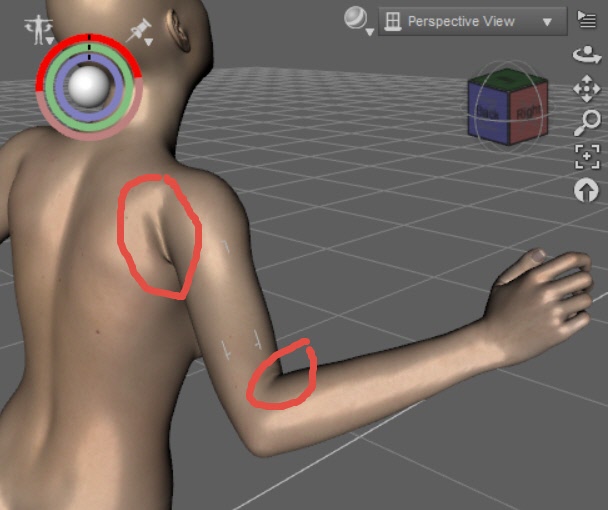
Click on , say Right Shoulder Bend, or Right Shoulder Twist open up the parameters. Look at the twist parameter as you scrub through the timeline, it's zeroed out . Same with the thigh twists . They are actually applied (if they weren't applied, the motion would be way off)On the initial G8 version (intial G8 essentials release) , the values were displayed in the parameters, but you still get the deformation issue, unless the twist (x-rot) is applied to the actual twist bone
I made sure the G8 base wasn't "contaminated" - "currently used" is empty in the parameters tab
There might be some differences in the DS version, or G8 essentials version . Can you compare those same frames 0000, 0234 for the deformation issues ? There are other frames, but I just chose a couple at random (where I could angle the camera so Richard won't slap me
 ). For your sample BVH - I selected children, unlocked nodes and rotation limits off
This dance example doesn't have large rotations (the bends are minimal) - the more complex the motion, the larger the rotation values, the more problems you will see if the twist isn't properly appliedThe slightly off motion has implications - say you were reaching to grab a microphone from a stand - it would no longer grab correctly, it would be off slightly. If you were shaking another characters hand - it would be off slightly
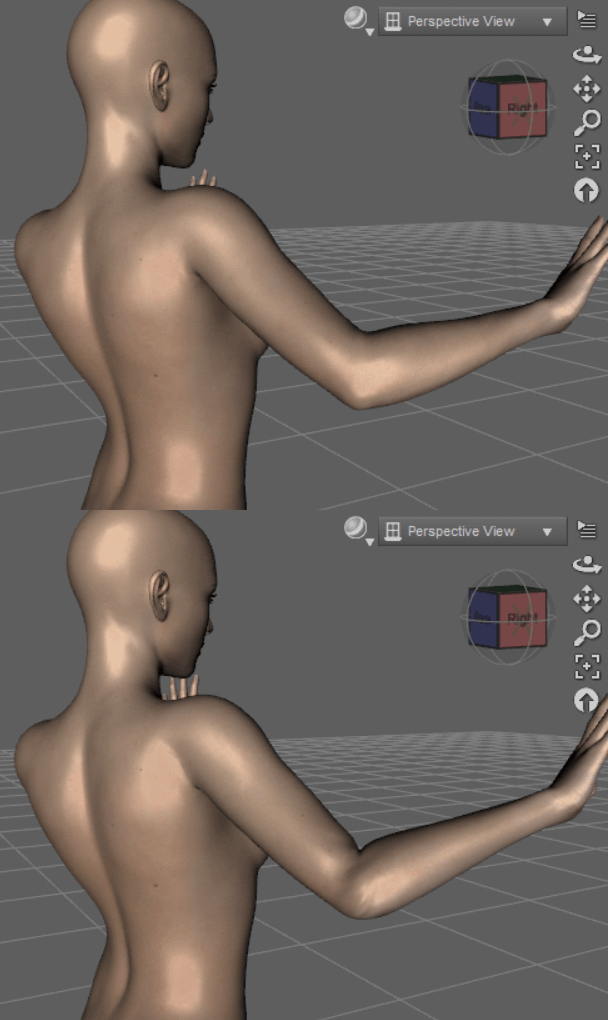
This does not only apply to MMD VMD transfers - it's applicable to DS in general, all animation, all motions ,all sources , mixamo, carnigie hall, unity, unreal etc... To illustrate the issue better, here is an animated gif (motion not from a MMD transfer, but you can see this with a VMD transfer too and in your BVH). Notice the hands/arms are roughly correct position, but slightly off. Also notice the ugly skin deformations. In DS, that's what the twist bones are for - weight mapping
 Morph problem.
I’m not sure which tutorials you’ve been watching, but you can’t create a morph directly from a totally unrelated mesh, a morph is created from a version of the same mesh where vertices have been moved.
You might be able to project the shape on the target figure using a variation of the methods used to transfer morphs between the various generations of Genesis figures, but there’s no guarantee the results would be good.
Thanks. I'd like to try but how can I do this?
Figure with a SUPERMODEL body?Back in the V4 days, there was the Reby Sky set.
https://www.daz3d.com/v4-elite-reby-sky
Details
Who is Reby Sky? Based on actual 3D scan data, high resolution photos, and time spent with Reby Sky herself, a popular model, radio and TV personality, DAZ 3D has carefully crafted this unique, official Reby Sky texture and morph set. This elite character set for V4 adds a whole new level of realism to your runtime.
Posed Daz to Marvelous DesignerSo you have two options i guess:
1. Export your figure as OBJ in A-pose and then export any additional poses as morph targets. Set up the initial MD clothing item on your a-posed figure and then simulate to your desired pose via morph targets.
or
2. Export your figure from daz as an animation in alembic format with A pose as first frame and then set the desired pose as your final frame (you need alembic exporter for this i think). And then you can click on the animation simulation in Marvelous designer for the cloth simulation from initial pose to final pose. Alembic is vertex exact unlike Collada files so you will never have difference between your Daz studio pose and MD pose. Note: When exporting as OBJ, you shouldnt have any problems in MD either but you cant do animation.
When trying to get purchased garments to fit on Avatars in MD, sometimes it pays to adjust the garment shrink weft/shrink warp. You can expand or shrink by going over 100% or under 100% respectively. Changing shrink values is probably a bit more forgiving than scaling the relevant parts of the pattern.
Also, when i purchase MD garments, usually i find it's best to arrange the pattern pieces around your figure and sew. You can use arrangment points to help you with this. If arrangment points dont come up automatically, google how to add custom arrangment points. The default custom ones should be fine for most purposes.
Figure with a SUPERMODEL body?I would add that Sakura 8 has some awesome rib cage morphs if you want to show individual rib bones on the skinny girls.
https://www.daz3d.com/sakura-8
Sakura 8 isn't what you want in terms of a single "supermodel" dial, but the "Ribs Details" morph is a must-have IMO.
I would go with https://www.daz3d.com/auto-shape-enhancer-for-genesis-8-female for the ribcage morph unless you really want Sakura. It has a bunch of other useful morphs, as well.
Morph problem.I’m not sure which tutorials you’ve been watching, but you can’t create a morph directly from a totally unrelated mesh, a morph is created from a version of the same mesh where vertices have been moved.
You might be able to project the shape on the target figure using a variation of the methods used to transfer morphs between the various generations of Genesis figures, but there’s no guarantee the results would be good.
Morph problem.Which figure? Was the mesh exported at base resolution? If it is Genesis 8, or using add-ons/grafts, had you removed things like the lashes and brows?
I want to transfer some unique morphs from a custom character that isn't a daz model into daz on a genesis 8 male. I tested on Eva 7 to try to change her apparance and that works fine but I'm interested on a custom character to bring it's morphs into daz but when I do this I get this error'' Geometry did not match, failed to create morph.
I already removed accesories, eyebrows, eyelashes and set the genesis 8 male to base resolution but it doesn't work.
Daz Model - Export HelpI've making a custom morph in Daz 4.11. I've used the Joan preset for Vic 8 as a starting point and completely customized the avatar. For some reason this avatar doesn't want to import to any software. I've gone and tested both default and morphed versions of Vic 8 and the Joan preset with Marvelous Designer, and they import with no issue. The only differences with my custom avatar is that there's the Teena hair and a RenderCam in the sceen.
I'm using all the same import/export settings from the same location on my PC. Any ideas?
Posed Daz to Marvelous DesignerInteresting. I didn't really understand, or try, anything to do with importing as .obj or as morph target. I will give that some time. I have to say ... this should be a LOT easier. I get the impression that MD projects are in T or A poses?
How to change a parameter to a shape morph?I have some morphs that show up in the Parameters tab, how do I change those to show up in the Shaping tab instead? Thanks in advance for any help!
Figure with a SUPERMODEL body?I would add that Sakura 8 has some awesome rib cage morphs if you want to show individual rib bones on the skinny girls.
https://www.daz3d.com/sakura-8
Sakura 8 isn't what you want in terms of a single "supermodel" dial, but the "Ribs Details" morph is a must-have IMO.
Diego 8Just the base Diego 8 morph. Cormac beard, the Lightweight Hair Set for the body hairs. Caballero outfit stuff.
He's a good lookin' fellah!
There was more to this render, but I cropped it to avoid showing the pant's ability to smuggle bananas when you add Smoothing Iterations.
 Looking for Miku Miku Dance enthusiasts that like using DAZ as an MMD platform
however I have been able to get very clean results on on my conversions to each DAZ generation. I had to learn the hard way but one thing I discovered was that using the Teto TDA model as the base PMX yeilded the most accurate results in 3DXchange. I use a free script called "Pmx2Fbx with Batch Files" to attain an FBX with motion from the combination of the PMX and VMD files placed in the batch folder with the script.
One thing I discovered was that importing the created FBX int Ikinema Web Animate and simply exporting it back out some how frees the root bone so when I import it into 3DXchange I don't get the legs flayling about and the motion is very stable. After I create a BVH and import it into DAZ I make sure to turn off limits and unlock nodes both the base nodes and pose nodes (Edit, Figure,Lock menus). This generally eleminates all feet sliding and makes motion as smooth as in MMD.
I'm not talking massive issues like about legs/hands flying around, massive skating across the screenI'm talking about typical problems in the motion, such as foot sliding a bit, foot going through floor a bit - looks like spongy floor - that aren't in the PMX when VMD is applied in MMD. Other occasional twist issues, gimbal lock . You can get these with mocap too... but VMD sourced motions - even high quality ones - always need even more work and always have more problems than typical decent quality mocap.
I don't mean to be negative , but you can see those problems in your youtube video - but maybe the original motion had those problems too ?
Or maybe the bases I used were not ideal, or maybe my pmx2fbx version is different. Or maybe 3DX does a better job for this task than motionbuilder. Do you have a link to the "Teto TDA" base ? or the "Pmx2Fbx with Batch Files" ? Thanks in advance
I use motionbuilder, so the root is usually empty when bringing back into DS . However, note that an empty root will cause problems in DS for characters that have the scale parameter not at 100% (smaller or larger characters than don't have ERC freeze) . The translation will be off, and you will not have perfection motion matching what was in the retargetting software (ie. foot sliding again). The workaround is actually to place the transforms into the root, or ERC freeze everything (bake the character) before retargetting, so the scale value is 100% in DS
I do have an interest inimporting a few of the MMD cloting items in and I attempted by converting triangular to quads in blender and import as an OBJ into DAZ used the transfer utility ( very slopilly I might add) and the made it SubD. there are some faces that have rounded corners in within the mesh now and the texture has gaps in it after converting. Anywhere to get tips on converting MMD clothes and hair?
Not sure, I havent tried with MMD cloth/hair - but I would assume it's the same as any clothing from other sources
Show Us Your Iray Renders. Part VIIGabriela with a bucket of tweaks from various morph sets and Nik filters.
mcjTeleBlender:Daz Studio scenes/animations w/Blender's Cycles EngineYAY! i now know how to transfer an animated Daz Studio scene to Blender, using FBX, and i made script(s) that allow healthy animations to replace the baaaad ones from fbx - then i'll adapt the code that fixes the material transfer issues of fbx (mcjBlendBot)
blender eevee render, 2 secs per frame
but with proper materials and lighting it will look good enough for movies
WOW amazing work
Looking for Miku Miku Dance enthusiasts that like using DAZ as an MMD platformWow, nice input on this thread guys! I love getting a different perspective. I have to say though pdr0 everything you said is spot on, however I have been able to get very clean results on on my conversions to each DAZ generation. I had to learn the hard way but one thing I discovered was that using the Teto TDA model as the base PMX yeilded the most accurate results in 3DXchange. I use a free script called "Pmx2Fbx with Batch Files" to attain an FBX with motion from the combination of the PMX and VMD files placed in the batch folder with the script. One thing I discovered was that importing the created FBX int Ikinema Web Animate and simply exporting it back out some how frees the root bone so when I import it into 3DXchange I don't get the legs flayling about and the motion is very stable. After I create a BVH and import it into DAZ I make sure to turn off limits and unlock nodes both the base nodes and pose nodes (Edit, Figure,Lock menus). This generally eleminates all feet sliding and makes motion as smooth as in MMD.
Artini i found the the step by step instructions here:
He also made a MMD script that can export the facial data into DUF files for G1 and mcasual made a script that can transfer the facial morphs from G1 to G2 G3 and G8.
As far as the breast physics go as pdr0 suggested you can use 3DXchange to map the G3 or G8 because the bone movement is imorted in with the FBX. I usully just use the Breast Jig script I baught from another site. VWD can also do breast and glute physics but there is a learning curve and yes it does work in DS 4.11 and 4.12 there is actually a version 2 out now.
BTW way pdr0 I do have an interest inimporting a few of the MMD cloting items in and I attempted by converting triangular to quads in blender and import as an OBJ into DAZ used the transfer utility ( very slopilly I might add) and the made it SubD. there are some faces that have rounded corners in within the mesh now and the texture has gaps in it after converting. Anywhere to get tips on converting MMD clothes and hair?
Daz 3D is part of

Connect
DAZ Productions, Inc.
7533 S Center View Ct #4664
West Jordan, UT 84084Licensing Agreement | Terms of Service | Privacy Policy | EULA
© 2026 Daz Productions Inc. All Rights Reserved.