-
Centuar 8 (Male) Keeps crashing?
Not much help, but it works fine over here. No crashes or issues. Here is Mervin with horse body. Its a bit of an extreme morph so it looks a bit odd but no technical issues.
Maybe try a re-install? How did you install? I always install manually.
Ciao
TD
Who is this character?It seems the style of Cherubit, and with that red nose... probable using the youth morph on one of his characters.
Celebrity Look-a-Likes for 3D figures Part 2Is DTG Studios Morgan for G8 Female over at Rendo supposed to be Meghan Markle? I only think yes because of the pregnant morph
I was thinking of posting this when she first appeared but didn't as I was unsure. Glad other people see it too :)
Celebrity Look-a-Likes for 3D figures Part 2Is DTG Studios Morgan for G8 Female over at Rendo supposed to be Meghan Markle? I only think yes because of the pregnant morph
Yes, I guess it’s supposed to be her.
Mod Edit :- to sort out the quote
Centaur Maxx and Solar Wardens - Where have you been all my life?Curiousity for anyone who picked up Maxx...
Can the tail and feathering of the hooves on Maxx easily be used on Daz Horse 2?
How does the Maxx settings look if you only have the base centaur, and not the Brute?
As a side note, the transition from horse to human looks excellent on him. :-DI have had Maxxtaur in my paddock all afternoon and I am still so very astounded by the extremely high detail and quality of this product. I've been tweaking and changing so many things. It really is top tier and should have been the standard Centaur 8 that was sold. Here is just a really quick render with the Brute taken out and a bit of a bodybuilder morph added to it and with the Markos character features.
The horsey part looks smaller as well. Is that what happens when you remove the Brute or did you make the horse parts smaller yourself?
Yes, I just made the horse part smaller to look 'somewhat more proportional', but it was a complete rush job. With the Brute part taken out the G8 male portion looks odd in proportion...but everything is tweakable/re-sizable.
People who make Daz characters (that look too much like their other characters)What type of imperfections sets a skin apart in the group's opinion? Anything besides your basic freckles, moles, etc? Aversions to too much LIE Editor stuff? Curious...LOL. It's funny how everyone is different in what they find attractive. I remember reading in another thread that someone disliked a certain character because of the heavy eye makeup when that is what drew me to that particular character. Not the heaviness itself, which I didn't think was bad, but the way it was applied and the subtle blending of it is what attracted me. I don't worry too much about much more than the head since I can dial whatever I like and clothes hides most of the skin anyway a good portion of the time. But I do usually buy for the skin and the head morph now.
Remember, "There's Always Another Sale™" (Report sales errors here.)Edit, it's looking like if you're at $34 for the pro bundle, it may have been the max discount of 72% plus 10%.
This is where the confusion stems from. Out of curiosity, where on the sales page is the max discount of 72% mentioned?
- Greg
It's not. My understanding is the way the discounts stack, ends up with a particular discount. It's easier for me to see it on a cart for someone not in the PC. 40% and 50%. I'm not math-versed and so go by how it's explained to me. Further wrenches get in when there are like the 10% discount on-site. Plus, as a PA, I believe I have additional, thus my asking what are the prices a PC-member-only sees on the two items I asked about.
ps: This post contains all the scenes you would need for the today's sell error
So I was gone till now and came back to see that Daz had let us know that they had fixed things. I put together two carts. Each has the same item. A debut from today plus 4 items from the Special Featured items which includes the two Centaur 7 pro bundles. What I found was this:
Me not logged in so I am your customer without PC or anything and the discounts jumped from 40 to 50% on the morph products I selected and went from 52 to 60% on the Centaur 7 pro bundles. The debut item went to 50%. Note: the new item got a discount boost, it has no effect on the special featured.
Me as PC/PA logged in morph items went from 67 to 72%, the pro bundles from 74 to 78%. Debut, here, also did the same as in the non-logged in above.
One debut and one Special Featured (attached), the debut went to 50% and the Special Featured went to 60% on the selected morph item when not logged in.
When logged in, debut went to 50% and Special Featured went to 72% as expected (attached).
Not shown, the centaur 7 pro bundle plus debut gave the expected 60%, not logged, and 78% when logged in.
This all seems to be working. Is it working for everyone else? My understanding is max discount for non-PC in is 50-60%, 72-78% for PC/PA accounts. I remain unclear, but believe I get a bit more discount being a PA account which is why I list it that way in case PC alone is slightly different.
Hope I haven't messed up my explanation.
In my cart, the Centaur 7 Male Pro is still showing at $34.00, which would be incorrect (should be $45.34 - 50% - extra 10% coupon), and the Muelsfell Atlantis Armor is not getting the extra 50% off, either, and is showing at $10.78 (should be 14.78 - 50% - 10% coupon). I have three of today's new items in my cart, so those should have triggered the discount. Sigh.
Please show your cart. Are you a PC member? What are the start discounts on the two special featured items?
Edit, it's looking like if you're at $34 for the pro bundle, it may have been the max discount of 72% plus 10%.
The sale says this: you got 40% off get two to 50% off. (The centaur 7 pro bundle starts at 52% off because it's in another sale too. the PC puts it 30% lower, the buy 2 or more is bugged so it works with two item in your chart. (posted two chart because of it one with the two centaur G= bundle one with only one G7)
But there is no "Buy any Debut New Release OR Still New Release to get an EXTRA 50% OFF* These Special Featured Items"
So it's (1-0,52)*(1-0,3)*(1-0,1) instead of (1-0,52)*(1-0,3)*(1-0,1)*(1-0,5) it's at 70% off instead of being 85% off.
Today Only!
Buy any Debut New Release OR Still New Release to get an EXTRA 50% OFF* Today's Special Featured Items
Is not working, lost one more day of saleday offer.ps: I hope I have posted all the print screens you needed and made the calculations too, so it could be corrected and make it last a bit longer so we get the the actual offer.


ps one more chart with only the G7 ones, so there is no missunderstanding. (Probably this would have been my chart if the sale would have worked.
 Remember, "There's Always Another Sale™" (Report sales errors here.)
So I was gone till now and came back to see that Daz had let us know that they had fixed things. I put together two carts. Each has the same item. A debut from today plus 4 items from the Special Featured items which includes the two Centaur 7 pro bundles. What I found was this:
Me not logged in so I am your customer without PC or anything and the discounts jumped from 40 to 50% on the morph products I selected and went from 52 to 60% on the Centaur 7 pro bundles. The debut item went to 50%. Note: the new item got a discount boost, it has no effect on the special featured.
Me as PC/PA logged in morph items went from 67 to 72%, the pro bundles from 74 to 78%. Debut, here, also did the same as in the non-logged in above.
One debut and one Special Featured (attached), the debut went to 50% and the Special Featured went to 60% on the selected morph item when not logged in.
When logged in, debut went to 50% and Special Featured went to 72% as expected (attached).
Not shown, the centaur 7 pro bundle plus debut gave the expected 60%, not logged, and 78% when logged in.
This all seems to be working. Is it working for everyone else? My understanding is max discount for non-PC in is 50-60%, 72-78% for PC/PA accounts. I remain unclear, but believe I get a bit more discount being a PA account which is why I list it that way in case PC alone is slightly different.
Hope I haven't messed up my explanation.
In my cart, the Centaur 7 Male Pro is still showing at $34.00, which would be incorrect (should be $45.34 - 50% - extra 10% coupon), and the Muelsfell Atlantis Armor is not getting the extra 50% off, either, and is showing at $10.78 (should be 14.78 - 50% - 10% coupon). I have three of today's new items in my cart, so those should have triggered the discount. Sigh.
Please show your cart. Are you a PC member? What are the start discounts on the two special featured items?
Edit, it's looking like if you're at $34 for the pro bundle, it may have been the max discount of 72% plus 10%.
The sale says this: you got 40% off get two to 50% off. (The centaur 7 pro bundle starts at 52% off because it's in another sale too. the PC puts it 30% lower, the buy 2 or more is bugged so it works with two item in your chart. (posted two chart because of it one with the two centaur G= bundle one with only one G7)
But there is no "Buy any Debut New Release OR Still New Release to get an EXTRA 50% OFF* These Special Featured Items"
So it's (1-0,52)*(1-0,3)*(1-0,1) instead of (1-0,52)*(1-0,3)*(1-0,1)*(1-0,5) it's at 70% off instead of being 85% off.
Today Only!
Buy any Debut New Release OR Still New Release to get an EXTRA 50% OFF* Today's Special Featured Items
Is not working, lost one more day of saleday offer.ps: I hope I have posted all the print screens you needed and made the calculations too, so it could be corrected and make it last a bit longer so we get the the actual offer.
ps one more chart with only the G7 ones, so there is no missunderstanding. (Probably this would have been my chart if the sale would have worked.
Remember, "There's Always Another Sale™" (Report sales errors here.)So I was gone till now and came back to see that Daz had let us know that they had fixed things. I put together two carts. Each has the same item. A debut from today plus 4 items from the Special Featured items which includes the two Centaur 7 pro bundles. What I found was this:
Me not logged in so I am your customer without PC or anything and the discounts jumped from 40 to 50% on the morph products I selected and went from 52 to 60% on the Centaur 7 pro bundles. The debut item went to 50%. Note: the new item got a discount boost, it has no effect on the special featured.
Me as PC/PA logged in morph items went from 67 to 72%, the pro bundles from 74 to 78%. Debut, here, also did the same as in the non-logged in above.
One debut and one Special Featured (attached), the debut went to 50% and the Special Featured went to 60% on the selected morph item when not logged in.
When logged in, debut went to 50% and Special Featured went to 72% as expected (attached).
Not shown, the centaur 7 pro bundle plus debut gave the expected 60%, not logged, and 78% when logged in.
This all seems to be working. Is it working for everyone else? My understanding is max discount for non-PC in is 50-60%, 72-78% for PC/PA accounts. I remain unclear, but believe I get a bit more discount being a PA account which is why I list it that way in case PC alone is slightly different.
Hope I haven't messed up my explanation.
In my cart, the Centaur 7 Male Pro is still showing at $34.00, which would be incorrect (should be $45.34 - 50% - extra 10% coupon), and the Muelsfell Atlantis Armor is not getting the extra 50% off, either, and is showing at $10.78 (should be 14.78 - 50% - 10% coupon). I have three of today's new items in my cart, so those should have triggered the discount. Sigh.
Please show your cart. Are you a PC member? What are the start discounts on the two special featured items?
Edit, it's looking like if you're at $34 for the pro bundle, it may have been the max discount of 72% plus 10%.
I dumped it and just bought one item I was interested in. All I can tell you is that yesterday when I was mulling the Centaur 7 Male Pro Bundle, with my purchase of the new combined 8 pro bundle, it was in my cart at $17- something. Same sale, same price should have applied; same 10% extra from the purple banner. I have no idea what max discount you are talking about, because I have found lots of items for more than 80% off in the past. And yes, I am a PC+ member. It's fine, just a bit frustrating to not have the sales working correctly. As the thread says, there is alway another sale. Thanks anyway, Cris.
Remember, "There's Always Another Sale™" (Report sales errors here.)So I was gone till now and came back to see that Daz had let us know that they had fixed things. I put together two carts. Each has the same item. A debut from today plus 4 items from the Special Featured items which includes the two Centaur 7 pro bundles. What I found was this:
Me not logged in so I am your customer without PC or anything and the discounts jumped from 40 to 50% on the morph products I selected and went from 52 to 60% on the Centaur 7 pro bundles. The debut item went to 50%. Note: the new item got a discount boost, it has no effect on the special featured.
Me as PC/PA logged in morph items went from 67 to 72%, the pro bundles from 74 to 78%. Debut, here, also did the same as in the non-logged in above.
One debut and one Special Featured (attached), the debut went to 50% and the Special Featured went to 60% on the selected morph item when not logged in.
When logged in, debut went to 50% and Special Featured went to 72% as expected (attached).
Not shown, the centaur 7 pro bundle plus debut gave the expected 60%, not logged, and 78% when logged in.
This all seems to be working. Is it working for everyone else? My understanding is max discount for non-PC in is 50-60%, 72-78% for PC/PA accounts. I remain unclear, but believe I get a bit more discount being a PA account which is why I list it that way in case PC alone is slightly different.
Hope I haven't messed up my explanation.
In my cart, the Centaur 7 Male Pro is still showing at $34.00, which would be incorrect (should be $45.34 - 50% - extra 10% coupon), and the Muelsfell Atlantis Armor is not getting the extra 50% off, either, and is showing at $10.78 (should be 14.78 - 50% - 10% coupon). I have three of today's new items in my cart, so those should have triggered the discount. Sigh.
Please show your cart. Are you a PC member? What are the start discounts on the two special featured items?
Edit, it's looking like if you're at $34 for the pro bundle, it may have been the max discount of 72% plus 10%.
Remember, "There's Always Another Sale™" (Report sales errors here.)So I was gone till now and came back to see that Daz had let us know that they had fixed things. I put together two carts. Each has the same item. A debut from today plus 4 items from the Special Featured items which includes the two Centaur 7 pro bundles. What I found was this:
Me not logged in so I am your customer without PC or anything and the discounts jumped from 40 to 50% on the morph products I selected and went from 52 to 60% on the Centaur 7 pro bundles. The debut item went to 50%. Note: the new item got a discount boost, it has no effect on the special featured.
Me as PC/PA logged in morph items went from 67 to 72%, the pro bundles from 74 to 78%. Debut, here, also did the same as in the non-logged in above.
One debut and one Special Featured (attached), the debut went to 50% and the Special Featured went to 60% on the selected morph item when not logged in.
When logged in, debut went to 50% and Special Featured went to 72% as expected (attached).
Not shown, the centaur 7 pro bundle plus debut gave the expected 60%, not logged, and 78% when logged in.
This all seems to be working. Is it working for everyone else? My understanding is max discount for non-PC in is 50-60%, 72-78% for PC/PA accounts. I remain unclear, but believe I get a bit more discount being a PA account which is why I list it that way in case PC alone is slightly different.
Hope I haven't messed up my explanation.
In my cart, the Centaur 7 Male Pro is still showing at $34.00, which would be incorrect (should be $45.34 - 50% - extra 10% coupon), and the Muelsfell Atlantis Armor is not getting the extra 50% off, either, and is showing at $10.78 (should be 14.78 - 50% - 10% coupon). I have three of today's new items in my cart, so those should have triggered the discount. Sigh.
Remember, "There's Always Another Sale™" (Report sales errors here.)So I was gone till now and came back to see that Daz had let us know that they had fixed things. I put together two carts. Each has the same item. A debut from today plus 4 items from the Special Featured items which includes the two Centaur 7 pro bundles. What I found was this:
Me not logged in so I am your customer without PC or anything and the discounts jumped from 40 to 50% on the morph products I selected and went from 52 to 60% on the Centaur 7 pro bundles. The debut item went to 50%. Note: the new item got a discount boost, it has no effect on the special featured.
Me as PC/PA logged in morph items went from 67 to 72%, the pro bundles from 74 to 78%. Debut, here, also did the same as in the non-logged in above.
One debut and one Special Featured (attached), the debut went to 50% and the Special Featured went to 60% on the selected morph item when not logged in.
When logged in, debut went to 50% and Special Featured went to 72% as expected (attached).
Not shown, the centaur 7 pro bundle plus debut gave the expected 60%, not logged, and 78% when logged in.
This all seems to be working. Is it working for everyone else? My understanding is max discount for non-PC in is 50-60%, 72-78% for PC/PA accounts. I remain unclear, but believe I get a bit more discount being a PA account which is why I list it that way in case PC alone is slightly different.
Hope I haven't messed up my explanation.
People who make Daz characters (that look too much like their other characters)
Not saying they are bad but IMHO just not worth it. If I have one character of some artist you might as well say I have 80% of anything that artist puts out. Im amazed at figures like the goblin, orc, mini godzilla thing (name?) but yawn at girl 12 with a minor change to skin color and a nose morph.All charcters are based on Genesis (1, 2, 3, 8), so are morphs. (I'm ignoring previous to Genesis.)
A huge number of characters are based off merchant resources; that doesn't make them bad. If I like a character, I buy, if I discover that they have the same texture with tweaks, I've been known to return them, but if I like those tweaks I don't usually bother.
My biggest issue is with re-using assets. Adding a mole to a texture isnt a new texture. To qualify as a different character there should be a good deal if change. If not it should be sold as a morph and not a complete character. A few custom characters Ive come across are just dial setting.Harbinger Machine Pistol [Commercial]Stand alone (like my Carnomloch) because I don't think this level of detail (and look) could be achieved in the face and feet with a morph.
My phone will not charge complaint threadComplaint: Why are modern keyboards so flimsy?
 This is the second identical HP keyboard that has worn the "N" decal off of the "N" keycap, and developed a depression on the "Space bar". I miss the old keyboards that had mechanical movements and went "click" when you depressed them and had molded two color plastic keycaps that would never wear through the letter, and could substitute for cricket bats. I regret that I've actually discarded plenty of those old keyboards in my foolish youth.
It's not that I don't know where the "N" key is. After all, it hasn't moved but I'm a neatnic and things out of place or unbalanced tug at my reality.

Non-complaint: It's 8:30 in the morning and I'm listening to the Buffalo classical radio station over the internet (WNED https://tunein.com/radio/WNED-FM-945-s21414/) playing Beethoven Symphony #7. Enough said!
 (head 'splode; the guy was completely deaf at this point
 )
)Beethoven: Symphony #7 https://www.youtube.com/watch?v=-
I think old keys were heat transfer printed... which melted the paint into the plastic surface slightly.
Some of my really old keys (70s or 80s) seem to be co-molded... the lettering is actually different color plastic filling a recess in the surface... here’s a pix...
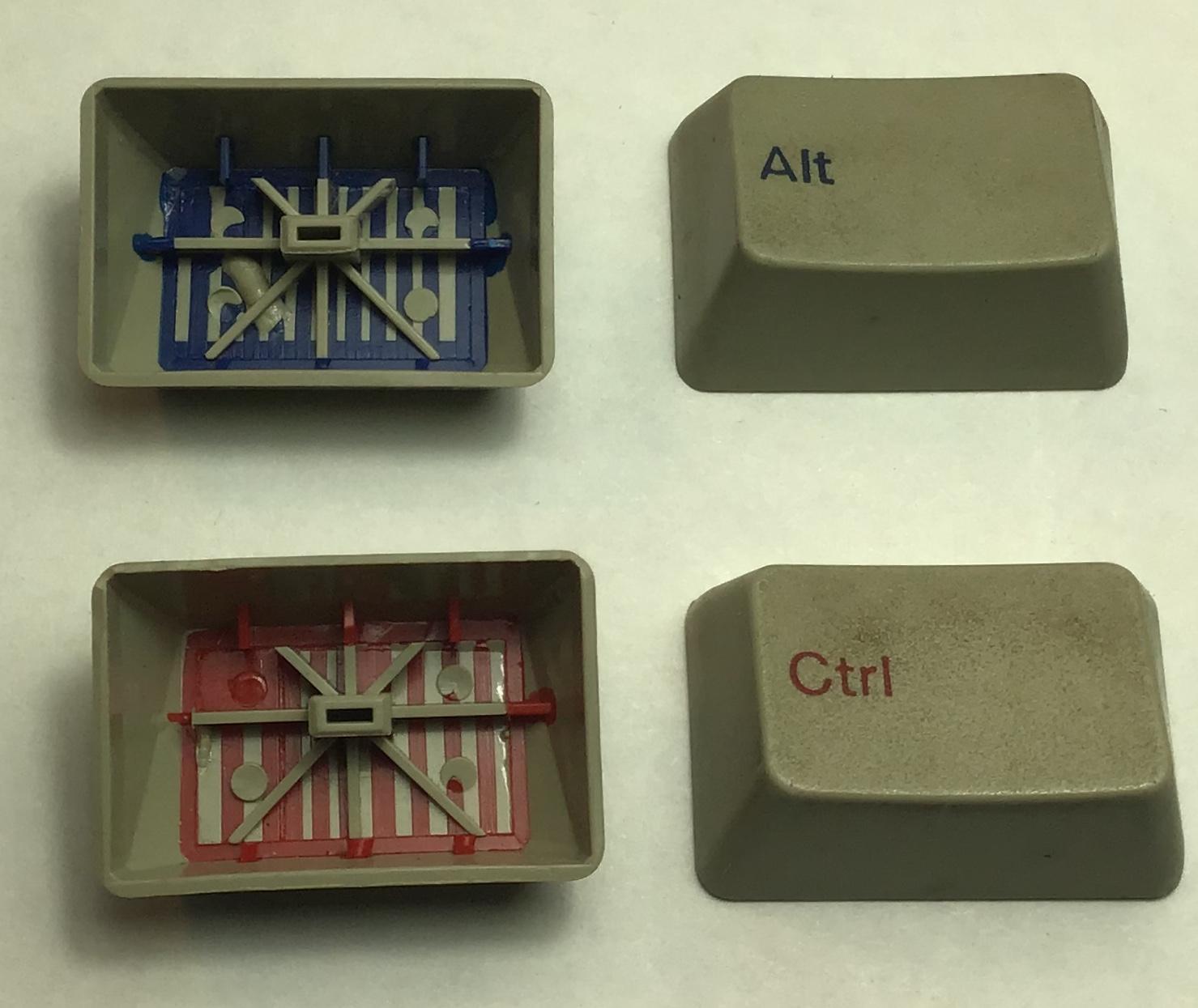
You would be hard pressed to wear out that lettering...
...those were the kind of keys that old "cat proof" keyboard of mine had.
Who said Blender was hard?I'm having an odd problem with importing an OBJ that was exported from Studio. It probably has a simple solution, but I must be missing it.
I exported a Genesis 8 figure with some simple clothing items as an OBJ from Studio and opened it in Blender. I don't need the textures to be pre-applied (since I want to do it myself with nodes) and I don't need it to posable (because Studio is far better for posing) or carry over any morph dials. Basically, I just need a statue to come over to Blender with the proper UV mapping so that it's regular textures will work as they do in Studio. It does load, but there are some weird issues.
- The figure is mirrored for some reason. It was facing right in Studio and is now facing left in Blender.
- When rendered in Cycles, the figure is entirely black. I've tried adjusting and adding nodes, lighting, and other options and the figure always renders black while the ground plane and such render as expected.
Anyone have any suggestions? Thanks in advance.
edit: never mind, I solved both of these 2 minutes after posting this. ;P Needed to invert X positive direction and 'write material library' got unchecked.
Dragon 3: "Dragon 3 Morph" + "The Feathered Dragon HD" ?Dear,
2 questions:
- is https://www.daz3d.com/raptor-the-feathered-dragon-hd a realistic skin for dragon 3 ?
- is compatible with https://www.daz3d.com/daz-dragon-3-morphs ?
Thanks, Xavi
Centaur Maxx and Solar Wardens - Where have you been all my life?Curiousity for anyone who picked up Maxx...
Can the tail and feathering of the hooves on Maxx easily be used on Daz Horse 2?
How does the Maxx settings look if you only have the base centaur, and not the Brute?
As a side note, the transition from horse to human looks excellent on him. :-DI have had Maxxtaur in my paddock all afternoon and I am still so very astounded by the extremely high detail and quality of this product. I've been tweaking and changing so many things. It really is top tier and should have been the standard Centaur 8 that was sold. Here is just a really quick render with the Brute taken out and a bit of a bodybuilder morph added to it and with the Markos character features.
The horsey part looks smaller as well. Is that what happens when you remove the Brute or did you make the horse parts smaller yourself?
Celebrity Look-a-Likes for 3D figures Part 2Is DTG Studios Morgan for G8 Female over at Rendo supposed to be Meghan Markle? I only think yes because of the pregnant morph
 Who said Blender was hard?
Whilst 'DazToBlender8' is interesting, and I'm happy if it helps some people use Blender more with Daz content, but I'll be keeping my $15, for a number of reasons.
First, based on reading its manual and donalddade's experience with it, it looks like the author has forked Thomas Larsson's Import Daz plugin, hobbled it (only G8, far fewer options), changed materials (for the worse?), added some workflow sugar to what's left, and put a $15 price tag on this. They are perfectly entitled to do that with an open source project, of course. However, good etiquette and respecting the licence would mean acknowledging the project you forked, rather than implying by silence that it is all your own work, and I see no evidence of that acknowledgment.
Second, as a Blender plugin, the author is obliged to release it under the GPL, or a GPL compatible licence. I can't find any licensing statement to that effect, which is not great.
Third, the author parachuted into a thread on a Blender forum that was started by Thomas Larsson and was dedicated to his Import Daz plugin, just to promote their own product, again without acknowledging any debt to Thomas. Bit of a low blow IMO.
Of course it is possible DazToBlender8 has been written entirely from scratch, in which case great, I withdraw my first objection. I'm open to being convinced of that.
It's a pity Thomas Larsson doesn't even have a Donate button on his Diffeomorphic blog. I'd happily give him $15, heck make it $30. Maybe I'll write to him and suggest it.
By the way, people are wondering above about importing JCMs and geografts. I have been able to import some JCMs using the Import Daz plugin - Setup->Morphs->Load Correctives option. I have also imported a geograft along with a figure; it comes in as a separate mesh but you can merge it with the figure using the 'Merge Anatomy' button under the 'Finishing' section of the interface. I then had to tinker with the materials a bit to get it to blend into the main figure. The rigging of the geograft is not working, I'll have to look into why that happened, might be my fault.
Geografts are the deal breaker for me, If they don't work then there's no point in me even attempting an export to Blender. I think, if that is the case, then my only option would be to export in OBJ/MDD format. How the materials will look is something I will need to see for myself but I would have to do all of the posing and animating in DAZ Studio and just export for rendering - which, using Eevee, should be a great time-saver over IRay. Perhaps Casual's mcjteleblender is a better option but I believe he uses FBX to export which seems to have its own limitations.
It is frustrating - there's always a gotcha.
There is another option: I think if you want geografts to use in Blender you need to convert the Geograts to be part of the original DAZ model's obj geometry and then go through and systemically add all the morphs contained in the original geograph to the newly create model geometry in DAZ that has integrated the geograph. Then export to Blender. You'll need to save separate 'base character' as you integrate the geograph directly to the base geometry to avoid messing up your DAZ Originals though.
On further consideration: would this create a loadable, rigged character with integrated grafts? And would it be possible to change textures, morphs, etc? If so, where is the procedure described? However, I'm guessing this would involve exporting as an OBJ and then using the character creation tools to transfer the rigging, etc. As I understand it, all the JCMs and weight mapping would be lost in the process, right?
Yes it would but it involves multiple exports of the DAZ figure + geograph as a new object base. & then repeat exports for each of the character's geograph morphs plus the character's morphs too you'll need & reimport the integrated export, integrate into the new base as a morph, & repeat, potentially many times. You're essentially learning how to build a brand new DAZ character from scratch, sans any modeling. You'd need to reconstruct UVs and textures but because the figure is still the same shape you shouldn't need to do excessive adjusting.
It's definitely lots of work but I think it's the only way to do what you are talking about if Blender never gets a plugin that can handle geographs.
I'd study SickleYield's tutorials as they explain much of what you need to know and then search on YouTube (the DAZ 3D YouTube channel has short tutorials on how to do most of those things).
Finally in the DAZ Store there is a big PDF tutorial on how to do much of what you want to do and more with regards to rigging but I can't remember the PA's name that wrote the tutorial.
Daz 3D is part of

Connect
DAZ Productions, Inc.
7533 S Center View Ct #4664
West Jordan, UT 84084Licensing Agreement | Terms of Service | Privacy Policy | EULA
© 2026 Daz Productions Inc. All Rights Reserved.