-
Shoe fits for other characters
The shoes with this outfit are an example.
https://www.daz3d.com/hc-dforce-office-outfit-for-genesis-8-females
Aoto fit as normal mangles up the shoes. Romoving the auto fit morph is worse.I can make morphs in hexagon but things go terribly wrong when I bring them back into Studio.
Well I just tried it with that outfit and Alexandria. the outfit fits as expected, but it does warp the heels a bit, but because of the morph, not autofit.
If you can't live without the Alexandria morph, you could try this product to zero out the morphs in the feet https://www.daz3d.com/shape-splitter
How to add another daz character asset to use as a morphI may be misinterprettng the question here, but if the morph isn't showing up as a slider under the Shaping tab, it probably has the wrong path or hasn't been properly saved. Morph Loader Pro, by default gives the item a path that won't show up under the shaping tab. To fix this:
After loading the morph with Morph Loader Pro, select the item/figure and go to Parameters -> Morphs, or to whatever location it is saved to. Find your morph and click the gear icon to modify settings. The current path may be something like "Morphs/Morph Loader". Click the arrow next to it and navigate to "Actor/YourPreferredPathHere". The morph's path must start with "Actor/" to appear in the Shaping tab.
Now that it is in the Shaping tab, you need to save it as a morph with File -> Save As -> Support Asset -> Morph Asset(s). Navigate the tree to your morph and click the checkbox. It should now be available in the Shaping tab anytime you open Daz Studio.
Possible to save part of a G8F Face as a morph?Assuming the nose in question is a part of a face morph, that's not a built in ability for Daz, but the product Shape Splitter appears to be designed to do that.
Thanks ArkadySkies! (=
Yes, its a part of a full-body morph, that I've splitted so the head atleast is separate.
I will try the 'Shape Splitter' utility product! (=
Shoe fits for other charactersThe shoes with this outfit are an example.
https://www.daz3d.com/hc-dforce-office-outfit-for-genesis-8-females
Aoto fit as normal mangles up the shoes. Romoving the auto fit morph is worse.I can make morphs in hexagon but things go terribly wrong when I bring them back into Studio.
Possible to save part of a G8F Face as a morph?Assuming the nose in question is a part of a face morph, that's not a built in ability for Daz, but the product Shape Splitter appears to be designed to do that.
MimicMolly's Renders & WIPsHi, it's been a while. Mostly been focusing on other art hobbies. Anyway, this is a quick test render of Fantasy Assassins for V4 converted to G8F with RiverSoftArt's script. Latonya 8 with Mousso's Albany's HD and normals, as the model. I've not seen renders of this outfit on G8F, only on G1. (This outfit also has one of the best product descriptions I ever read because it's so self-aware.) However, due to the fact that this is a very revealing outfit and I want to post this test render while complying with forum guidelines, I did this textureless render.
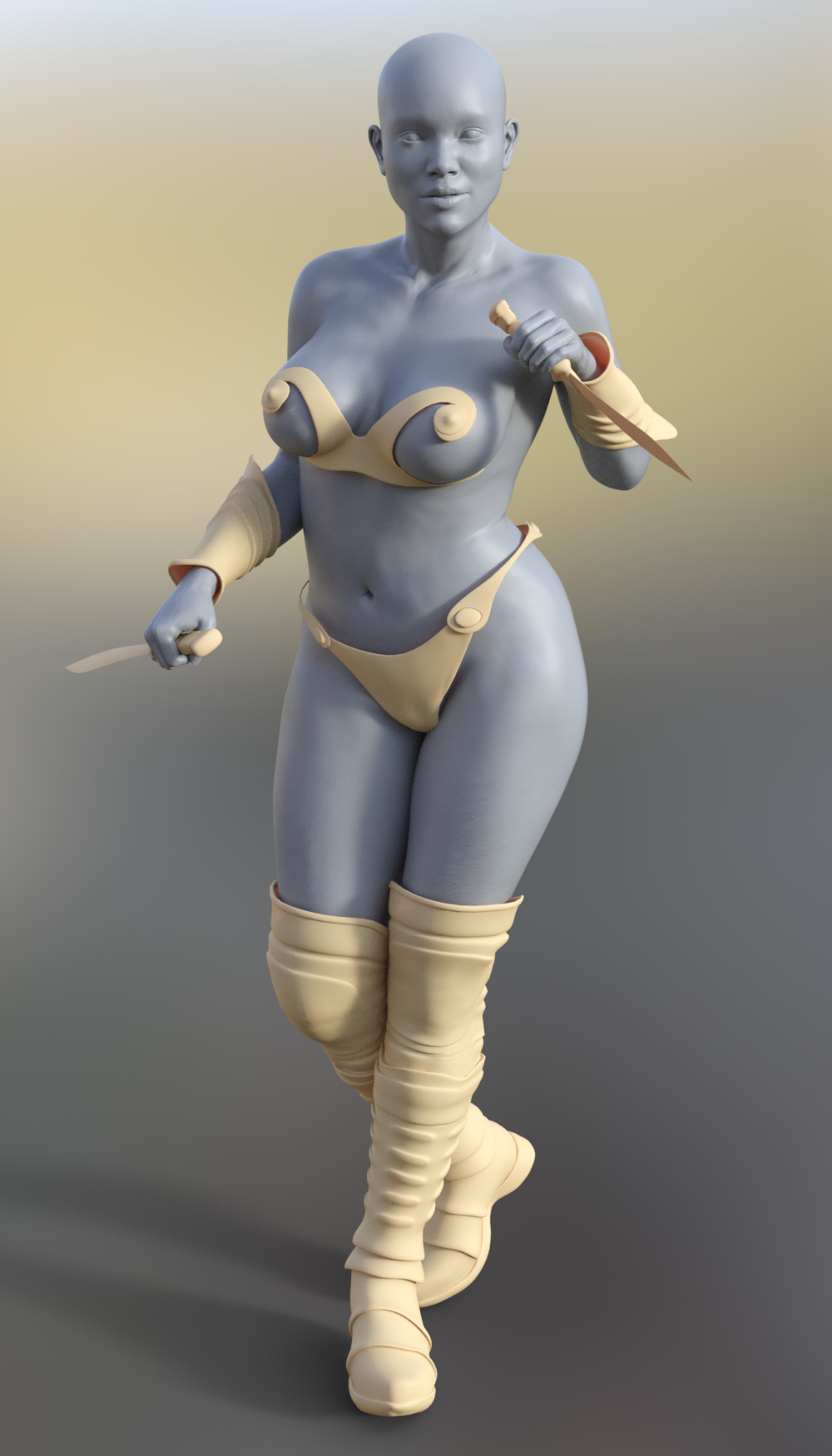
My only gripe is that with this script, the armor fits lose and even lifts off the skin. I tried the tightening morph that the script generates, but it doesn't help. Still it's a good-enough fit for me. For the knives, I unparented them from the hands after loading. Moved the arms up around 30 degress, then reparented them, moved them around and used the basic hand grip poses and fingers fist pose.
can not export morph with a Gen8 modelsI tried every way i can but I can not get any morphs from Gen 8 character out of Daz studio 4.11 ?
the morphs that are export do nothing and are not hte ones i set in Daz to export ???
any ideas would be most appecated
G8 Eyes not Closed even with parameter at fullestLooks like your eye shape is not compatible with the existing morph.
A probably satisfactory fix without making making own morphs would be to own Emma&Jordis Face Morphs which has 3 morphs Eyelids lower height for inner, middle and outer. (Maybe Rarestones face moprhs would work too). The you adjust the the inner and outer and leave the middle (or adjust it way less than the other two).
Adjust as needed then save that moprh preset as a one click duf.
link of that product?
When does DAZ treat an object as a cloth that moves along?What were your settings in the Transfer Utility? Does the jacket line up with the figure when both are zeroed?
G8 Eyes not Closed even with parameter at fullestLooks like there's a morph applied to the head which lacks an MCM for the eyes closed. Have you used OBJ Export/moprh import to bake several shapes into one?
she is Tika8 at X% only, no other morphs on the face is applied.
Doncha just love when that happens?Following along with SickleYield's tutorial for setting up Multi Bend JCM morph for thigh side to side for some shorts I made (basically a full split). Got is set up via the Property Hierarchy tab, Saved as instructed using the ERC and CRASH... no joy. No save... just DS doing it's crashy washy thing!
Grrrrrrrrrrrrrr
Hiccup!
 Request
How can I get DazStudio 4.10 64-bit setup? I looked around, but I can't find a download link. Since I updated to 4.11, my project template is empty. When I transfer utility it just copies the legs, above it, nothing works.
G8 Eyes not Closed even with parameter at fullestLooks like your eye shape is not compatible with the existing morph.
A probably satisfactory fix without making making own morphs would be to own Emma&Jordis Face Morphs which has 3 morphs Eyelids lower height for inner, middle and outer. (Maybe Rarestones face moprhs would work too). The you adjust the the inner and outer and leave the middle (or adjust it way less than the other two).
Adjust as needed then save that moprh preset as a one click duf.
When does DAZ treat an object as a cloth that moves along?Hello!
I have imported a jacket OBJ.
I think I did everything to "tell" DAZ that it's a cloth that should conform and move along with the model.
I have used the Transfer Utility, and I have parented the jacket to the model, and I have clicked "Fit to...".
However, when I move an arm of my Genesis 2 Female model, the jacket doesn't move.
Instead, the jacket stays just perfectly where it is and also doesn't conform along with the arm.
What else could I check?
Who said Blender was hard?I use a similar workflow for some projects. Some people have reasons to use FBX instead of BVH when going back to DS. A big one is blendshapes / morphs. eg. In G8, some HD expressions are both bone/joint and blendshape (morph targets) driven. Facial animation, speech visemes, various pose controls , accessory movements like breathing, etc...are also a combination . The morphs that you export in the FBX from DS show up as blendshapes in maya/max/mobu for animation. BVH is only going to transfer bone/joint based movements.
Both DS's BVH and FBX importer have issues - well known - but the imported FBX is just used as a container for keys. (You ignore what it "looks" like in the DS viewport, the key data is ok). That FBX is saved out as an animated properties preset for shape/morph keys and bone/joint keys. If you only have bone/joint rotataions, then an animated pose preset is sufficient (if you are not using blendshapes, then actually a BVH is ok if you can get it to work - there have been issues, but apparently newer versions addressed some of those BVH issues). To apply an animated pose or properties preset, you merge it back to target character. Sometimes there are other "gotchas" , such as the naming convention is slightly different - maya or mobu might add a prefix to a blendshape channel - you might have to batch edit or remove prefixes in a text editor, it's very easy to do (and better than the alternative - animating in DS). I'm using older versions, and I typically do this from mobu , there might be a more streamlined way in newer versions. But run some tests end to end before you commit
Thank you for all of that.
Tracking Character with CameraYesss!! That is always my concern also pdr0 I am always paranoid about the back door crap that goes on with giving permissions. I always wonder "who" is collecting "what", so that is primarily why I keep DAZ on a stand alone system (thinking that they secretly capturing samples of my renders..........lol) and transfer files via thumbdrive wherever possible, I do not trust Windows 10 one iota, and intentionally broke windows update so it cannot do it's automatic updates.
Yes you are right, I guess I don't need to be so lazy with cameras and actually do some animating. DS 12 has improved many things but the inability to delete key frames thus far is a huge hinderence to animating. The new motion I was playing with is the Sweet Devil Live Concert version where the character prances back and forth quite a bit. Its odd though this motion does not have any issues with the arms at all and yet it was package with its' own model.
So you think setting up the Pose Estimation on a virtual machine would quell the the invaisive possibilities and I wonder if a program live Ikinema WebAnimate could fix the jitters enough in the output file. I also have Iclone 7 with the editor that can clean motion nicely, I hear.
I definitely want to hear more about getting Pose estimation working, even if the motion is crappy its a start. Thanks!!!
Exporting anatomical elements morphsI have the exact same issue, morph just don't work after the merge, also not all of the morphs even visible, like 40% are present but have no effects.
PS: Actually I found 2 morphs out of 30 that works, but still I need my 60 workable morphs.Could you please tell me which 2 still worked?
@Troyminator was there any response to that open trouble ticket? I'd hate to open another for the same issue but I'm anxiously awaiting any update/progress made on their end. Also, does anybody know the last version of Daz this worked in? Maybe I can redownload that to continue my project...
Novica & Forum Members Tips & Product Reviews Pt 12A couple of items from the "85% off with debut item" I'd like to draw attention to:
Genesis Supersuit: this converts forward moderately well (I've had some trouble using smoothing to make pokethrough go away on the shoulders on G3) and has a ton of surfaces; it can be useful as an undergarment for more risque outfits, for instance. The actual textures do not translate that well to Iray because they rely so heavily on displacement.
Karen 7: She has a better than average base skin by Genesis 3 standards, but the real selling point is her morph, which really gives the idea of an attractive, unironically nice woman-next-door type. I use her a lot for female Catholic saints; check her out if you have a similar need for female characters who can seem strong in a low-key way and good-looking without being either a googly-eyed child-woman or the next Betty Page. With the RSSY G3-to-G8 morph converter, or with the couple of other scripts and tutorials that do the same thing, she's even useful if you're on G8.
Exporting anatomical elements morphsI have the exact same issue, morph just don't work after the merge, also not all of the morphs even visible, like 40% are present but have no effects.
PS: Actually I found 2 morphs out of 30 that works, but still I need my 60 workable morphs.Script to import Blender animations to StudioHi
Here's an update regarding my tests with tree animations from blender. First I didn't realise before that the Sapling Tree add-on has an option to produce a looping animation where you can specify the number of frames for the loop. I specified 125 frames. Then instead of loading all 125 .obj files, I only loaded every 4th object and modified the script to create a key frame at every 4th frame. This reduces the size of the .duf file a lot because there are less morphs. And the animation is smooth because of the interpolation between key frames.But loading every 4th object with Morph Loader Pro is a bit tedious. So I had a look at the "Silent OBJ Morph Loader Import" sample script from Daz (http://docs.daz3d.com/doku.php/public/software/dazstudio/4/referenceguide/scripting/api_reference/samples/file_io/import_obj_morph_loader_silent/start) and modified it to drop 3 files out of 4. But I got the following error message:
The load mode set is not compatible with mynodename
Looking at the code I don't understand what is being checked so I tought Hey I simply have to remove that check. I ran the script, every 4th morph loaded OK. So I ran my script to generate the keyframes and then oops! The tree does not get morphed but rather it's scale and position are modified. But when I used Morp Loader Pro it works fine. Any help on this would be great, then I could combine the 2 scripts to import the morphs and generate the keyframes in one shot with the possibility to choose the space between keyframes.
Here's a 500 frames video with looping animation using Morph Loader Pro.

Daz 3D is part of

Connect
DAZ Productions, Inc.
7533 S Center View Ct #4664
West Jordan, UT 84084Licensing Agreement | Terms of Service | Privacy Policy | EULA
© 2026 Daz Productions Inc. All Rights Reserved.