-
Pixeluna cyborg skins help
The product description says it uses the Base Male UV maps.
If Fauvist is like me, the question I had was how much of the channels and panels on the body were from the morph and how much were the texture files.
Do you think it would be possible to somehow use only the Channels, but with a different characters skin? I’d like to make a whole race of cyborgs, but it won’t work if they all look too much alike.
Pixeluna cyborg skins helpThe product description says it uses the Base Male UV maps.
If Fauvist is like me, the question I had was how much of the channels and panels on the body were from the morph and how much were the texture files.
Thanks for the image! So it looks like the channnels and panels are in the texture?
Pixeluna cyborg skins helpThe product description says it uses the Base Male UV maps.
If Fauvist is like me, the question I had was how much of the channels and panels on the body were from the morph and how much were the texture files.
Pixeluna cyborg skins helpyou can use it with any character morph.
Only download Genesis 8 files in products that support 3 and 8Well, Richard made me go look so I need to amend my original statement slightly. It appears from looking through my items that are listed as both Genesis 3 and Genesis 8 there is a pattern.
Props are like what I described. A single set of geometry and texture files with different presets to load them into Gen 3 or Gen 8 hands.
Likewise the few textures (mostly tatoos) I have that are for both generations are using common texture files with only the presets to load them being separated into Gen 3 and 8 folder structures.
Obviously pose sets don't require geometry; so it's only the pose files in the respective "People/Genesis 3 [Female/Male]/Poses" that would be duplicated.
However, hair items appear to be separate. For example, OOT's Liv Hair has two root folders:
- /data/outoftouch/Liv Hair/Liv Hair Genesis 3 Female/
- /data/outoftouch/Liv Hair/Liv Hair Genesis 8 Female/
And there are subfolders underneath each for the morphs. This seems to be consistent across the sampling I did of hair products from multiple vendors.
The only clothing I have that is packaged for both Genesis 3 and 8 is Aeon Soul's The Legend armor. That likewise has two root folders under the data folder for each figure.
- /data/Aeon Soul/The Legend/
- /data/Aeon Soul/The Legend 8/
Each of which has several files with geometry in them as well as morph support files.
So, it would seem there could be some space to be gained from not installing the Gen 3 versions of hair and clothing. However, those are also the products that are the hardest to segregate since you'd have to find the product folders under /data for each one. Much harder than just removing the Genesis 3 preset files with that delete batch file I mentioned. Especially since the naming of the folders is entirely up to the content artist that created them.
TBH, since you can only filter DIM based off the software required not the figure, I think you'll be fighting a losing battle if you try to manage it manually. And, let's be honest, if you stay around here long enough there will be a Genesis 3 character sale which is so attractive you won't be able to stop yourself, and then you'll have a use for all those things that you thought were just taking up space!
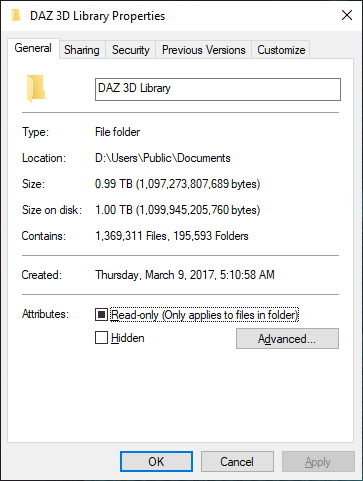
At least that's what I keep telling myself when I look at my Daz Library folder size...
 Pixeluna cyborg skins help
https://www.daz3d.com/pix-cypher-for-genesis-3-male
Does this cyborg skin texture work on other character morphs, or just with the character morph that comes with the product?
Opinions on Marvelous Designer Video Tutorial?The next tutorial is finished with the following chapters...
- Design Considerations
- Retopology in MD and ZBrush, ZBrush Projections
- MD Exporting, Morphs, ZBrush Normal Map Creation
- MD Morphs, Rigging Daz JCM's, MD Morph Targets
- Daz Rigid Follow Nodes, MD Draping, Creating Character Fittings
Maybe a week or two for video editing and "stuff"

Sorry, but the emphasis on ZBrush takes it out of reach for me. MD was a big hit for my budget, ZBrush is impossible.
Marble, I show you how to do it all inside of MD without going to ZBrush...working inside of ZBrush is an option/choice not a necessity.
 HFS Ultimate Shapes Bundle Question
You might want to double check the Cayman Studios texture utilities. HFS did a package of fantasy races for G1 which included Catfolk, Dwarves, Elves, Fauns, Orcs and some others that I think are from SF. That package included textures, as well. They were 3DL and for G1, but the transfer might work.
Babina 8Anybody know what the straight long hair is for Babina 8 promo with the light blue 2 piece swim suit. Appears to be redish brown hair.
@Siciliano1969 dForce Longdrape Hair for Genesis 3 and 8 Female(s). May I suggest an off-center parted scalp/hair cap to avoid the balding look on those promos IF you can find one that lines up.
@xyer0 how can this be done, with the hair caps? This Dforce long hair is pretty sparse at the scalp

@ALLIEKATBLUE I don't have that hair, but if I did, I would look for a hair with a believable hairline (which unfortunately narrows the choices severely). Comb through (pun intended) any AprilYSH, Mairy, or SAV hairs that you have in order to find a hair that has a part in the same place as the PhilW hair (and also has a hairline height morph). Some Mairy hairs have movable parts or mirrored versions. Once you find a few candidates, pick the most likely, load it, and apply a hair colour close to the one you intend to use on the PhilW hair. Uber convert to Iray if necessary. Go to Surfaces and turn off the Cutoff Opacity on all the surfaces EXCEPT the scalp/hair cap (or whatever it's called on your chosen hair). Now morph it until you get the hairline and part lined up with the PhilW hair. It IS theoretically possible, but you have to find a hair with a part in the right place or morphable.
[Released] Character Converter from Genesis 3 Male to Genesis 8 Male (Now Conv JCMs) [Commercial]*thumbs up* Sounds great. I've had no major issues so far. I was actually able to get a Michael 4 GenX morph (Jepe's Jonah for M4) to carry over although it was trial and error till I finally got it right. ;-). It's not 100% perfect but looks fine to me. I'm not seeing any distortion except around the lower eyelid and it's a very trivial thing. I have to really zoom in to see it. The Genesis 3 men though have all looked perfect to me. Changeling Chick's Cillian on G8 looks flawless.Did you carry it over from M4 to Genesis 1, then to this Character Converter product, or, as I'm guessing, from a higher version of Genesis, such as Genesis 3?
Question on a new Windows laptopSo far I've only been using daz with Macbook and this will be my first Windows machine.Welcome to the Dark Side.
 1. Should Daz content be fine on a Hard drive (SSD is only 250gb compared to 1TB of 7200 rpm on hard drive) or should I get an external SSD?
Should be fine on the SSD, but 250Gb is awfully small, so eventually you'll want to migrate to a larger drive. Might as well do it up front and skip the pain later. Personally, I've got my library on an 5400 rpm external HD, and I don't find the transfer speed to be an issue. YMMV.
3. Do I have to update the NVIDIA drivers (I read somewhere people encountered issues after updating and had to downgrade, a process I am not familiar with at all)?Try it with the installed driver first. If it works, consider leaving it. If you DO decide to update the driver, create a restore point first in case the update borks something. (I upgraded the driver and ran into an issue that DAZ tech support is still trying to help sort out.) NVIDIA builds a clean install capability into their driver installers, so it's easy to downgrade if you do run into a problem with an update, though.
4. Is it okay if I continue using Daz and the content on my old Macbook (the TOS are not specific about that but I thought it's worth checking)? Thanks a lot, I appreciate any advice or any of the questions above.Without taking the time to check the EULA, you'll probably be OK, provided that you're only running one device (Macbook or Windoze) at a time.
Opinions on Marvelous Designer Video Tutorial?The next tutorial is finished with the following chapters...
- Design Considerations
- Retopology in MD and ZBrush, ZBrush Projections
- MD Exporting, Morphs, ZBrush Normal Map Creation
- MD Morphs, Rigging Daz JCM's, MD Morph Targets
- Daz Rigid Follow Nodes, MD Draping, Creating Character Fittings
Maybe a week or two for video editing and "stuff"
Sorry, but the emphasis on ZBrush takes it out of reach for me. MD was a big hit for my budget, ZBrush is impossible.
Please List Items Used In PromosI try to list as much as I can but it really is difficult sometimes. I set something up, change it, discard it, load something else, change that too - really hard to keep track of that, especially with poses.
You also seem to assume that we use things out of the box so we could link to a specific product, but most of us don't. I sometimes make a background prop specially for a promo, or I put a custom texture on something. Or I use one character's skin and a combination of several morphs at low values for the face. Do you really expect me to write down a list of what morph I used at which percentage? For each promo? (I usually use different characters in my clothing promos so the list would be rather long.)
Sometimes I layer hairstyles, hide some parts or add custom morphs to adjust the hair to my needs. With lighting, I usually use a combination of an HDRI or the Iray sun plus manually placed spots or emissive planes. How should I even begin to list that? *scratches head*Setting up a complete How-to-replicate-this-render guide is impossible, giving a list with the main items is time-consuming enough. If you really want to know something and can't find it you can always ask here in the forum.
What is particularly frustrating is when I get inquiries about the stuff I used when it's an item I didn't change and which is clearly listed in the Products Used section. It seems the more products are listed the less willing people are to check out those links. That really makes me ask myself why I even bother...
I'll still do my best to list what I used, though, within the limitations described above.I know that when I save a scene and then afterwards a render of it, I save them both as (here is made up example) G8 TJane Mix V8 skin SB Leni Hair SBC pants H&C Hoodie. SB is Skin Builder. The file names can get long though and for a PA they could have a computer text file or even write down with a pen on a pad what was used for the promo while they are creating it. I don’t think anyone is asking for what was the exact mix was for a custom character but maybe just the main character with “mix” after it or if Daz allows it, just put “custom character, V8 skin with Skin Builder or Custom Skin. Maybe the OP wants to recreate the promo but most of us just want to know if they can buy a product in the Daz store or even if they already own it and forgot lol.
Please List Items Used In PromosI try to list as much as I can but it really is difficult sometimes. I set something up, change it, discard it, load something else, change that too - really hard to keep track of that, especially with poses.
You also seem to assume that we use things out of the box so we could link to a specific product, but most of us don't. I sometimes make a background prop specially for a promo, or I put a custom texture on something. Or I use one character's skin and a combination of several morphs at low values for the face. Do you really expect me to write down a list of what morph I used at which percentage? For each promo? (I usually use different characters in my clothing promos so the list would be rather long.)
Sometimes I layer hairstyles, hide some parts or add custom morphs to adjust the hair to my needs. With lighting, I usually use a combination of an HDRI or the Iray sun plus manually placed spots or emissive planes. How should I even begin to list that? *scratches head*Setting up a complete How-to-replicate-this-render guide is impossible, giving a list with the main items is time-consuming enough. If you really want to know something and can't find it you can always ask here in the forum.
What is particularly frustrating is when I get inquiries about the stuff I used when it's an item I didn't change and which is clearly listed in the Products Used section. It seems the more products are listed the less willing people are to check out those links. That really makes me ask myself why I even bother...
I'll still do my best to list what I used, though, within the limitations described above.Rigging & Weight Map Tutorials?@DarkEdgeDesign is working on a new tutorial : https://www.daz3d.com/forums/discussion/comment/4882106/#Comment_4882106
The next tutorial is finished with the following chapters...
- Design Considerations
- Retopology in MD and ZBrush, ZBrush Projections
- MD Exporting, Morphs, ZBrush Normal Map Creation
- MD Morphs, Rigging Daz JCM's, MD Morph Targets
- Daz Rigid Follow Nodes, MD Draping, Creating Character Fittings
Making your own face morphs for daz figures in external modellerIf you have the ability to freeze, yes. I normally export with surfaces and select the face and lips and then invert and freeze. If working with G8, export at base level and don't export the lashes. Remember when you import through Morph Loader Pro (MLP) you figure must match the same resolution and what's visible as when you exported. Leave in A-Pose. If you are using the base with no other morphs, you can MLP without reverse deformation.
Doncha just love when that happens?I've never tried to model in DAZ Studio but I thought you model your shorts in this case, position them where the G8M is going to where them and then transfer all that rigging, morph, JCM, MCM, and whatever to the shorts & presto you're magically done?
Transferring a donor rig to another item...How do you transfer rigging when you can't select the donor AND the donee? It won't allow me to.
If I were paranoid I'd think Daz was designed to drive me crazy every time I try to learn how to use it.
Maisie for Teen Jane 8 name conflict fixedpretty sure i've seen one for morphs, in the 200 and daz ones; i'm going to check whilst i think about it. :)
It is the Natalie head morph.
Cause this is only a single head morph it could be fixed easily by changing the calls "Natilie" in "Natalie_200" in the Natalie.dsf and rename it to Natalie_200.dsf
Making your own face morphs for daz figures in external modellerHi,
found some tutorials about this topic but I'm missing two major things.
How to handle "inner" parts of the mesh like eyeballs, teeth etc. while morphing/ sculpting the outer mesh ?
Do I simply lock/ freeze these parts in the modelling program and resize/ translate them later if needed ?
What if I have sized/ translated these parts and import my morph into Daz, is "adjust rigging to shape" enough to make everything work properly ?
Any help or links to tutorials or threads are appreciated.
Daz 3D is part of

Connect
DAZ Productions, Inc.
7533 S Center View Ct #4664
West Jordan, UT 84084Licensing Agreement | Terms of Service | Privacy Policy | EULA
© 2026 Daz Productions Inc. All Rights Reserved.