-
Male character ID in promo
He reminds me of TMA Kade, but with different eyebrows. More the texture than the morph.
Character SplitterUnfortunately, version 4 of the character splitter seems not compatible with Daz Studio 4.xx. It simply throws out an "Error while loading file" blahblah. The log file tells me this:
2026-07-23 19:46:23.444 [INFO] :: Loading script: K:/DAZ3D/Studio/DAZeigene/! Development Tools Characters/Character Splitter/Character Splitter.dsa
2026-07-23 19:46:23.445 [WARNING] :: Script Error: Line 267
2026-07-23 19:46:23.445 [WARNING] :: SyntaxError: Parse error
2026-07-23 19:46:23.445 [WARNING] :: Stack Trace:
<anonymous>()@K:/DAZ3D/Studio/DAZeigene/! Development Tools Characters/Character Splitter/Character Splitter.dsa:267
2026-07-23 19:46:23.446 [WARNING] :: Error in script execution: K:/DAZ3D/Studio/DAZeigene/! Development Tools Characters/Character Splitter/Character Splitter.dsaDaz Studio 4.24.0.3 is used by me. No interest to install or use this unfinished DS6.
And in the previous version 3 I found an issue that can mess up the spitted shape if a character needs "special rigging" for the lower neck:
The script ignores the first neck bone for rigging in any case and doesn't save it in the head morph.@Mike3D is it possible to fix this in v3?
Dealing with CBS morphs, is there an easy way?Right ~ though it's tedious but adding character's morph as a Controller to the 2nd stage of corrective blended shapes (cbs) is the only correct way to fix the issues, if one doensn't want to uninstall the char products ~~
Anyway, each step is still simple: with Edit mode, locate the problematic cbs, right-click to Show in Property Hierarchy..., drag character's body morph to the 2nd Stage Controller of the cbs, then Save Modified Assets... It always works as long as you do it correctly.
If the issue persists, try Clear DSON Cache Files in Preferences... then load G9 to check.
If there's other better solution, I'd love to know as well.
Dealing with CBS morphs, is there an easy way?I have asked this before, but the solutions were just not viable for me. I'm stuck. So, in a desperate state, I am asking again, hoping for a different solution.
The problem in a nutshell: I have a monstrous library of characters. Many I have used and still am using in projects. Many from very popular vendors I like very much. But these characters fire off correction morphs, I think they are called (Cbs), whenever I pose any character, in any pose. As you can imagine, zeroing out 40 or 50 morphs after every pose can be quite frustrating.
The solutions I have been given are to remove the character from my library. But I am stuck because I have used these characters in projects, and I can't just delete them from my library, and I like them, so I really don't want to. Or
Fix the controller for the correction morph myself. The problem with that is, I guess I am just not smart enough. I have tried, and they keep coming back, or new ones pop up every time I buy a new character. I am not very savvy with Daz Studio when it comes to the nuts and bolts of the program.
So in desperation, I was crossing my fingers and hoping for a magic trick someone had discovered to turn off these corrective morphs off with a one- or two-click process. Sometimes I have 5 or 6 characters from different vendors, injecting these corrective morphs on my character at once. They add up and distort the character. I can't believe this hasn't become an issue with more people. These characters injecting the corrective morphs are from some of the most popular vendors and I hope I can keep them in my inventory because they are very well made...except for the correction morph problem. Believe me, I understand what I am doing here. I am asking the same question, hoping for a different answer. Usually I get mad at people for doing that, but like I said before, I am desperate. I am at a make-or-break state with my entire Genesis 9 inventory. Right now, I pose my character, then enter the "currently used" tab to find all the cbs morphs applied, and start zeroing out all of them, so it's not impossible to deal with, but not very practical either.
Asset Optimizer (Beta) Sneak Peek [DEVELOPMENT IN PROGRESS]Asset Optimizer for DAZ Studio — Current Development Features
Asset Optimizer is being developed to make game-ready and real-time assets directly inside DAZ Studio while keeping the original asset safe and editable.
- Optimize both static objects and fully rigged characters.
- Create a single optimized model or a complete custom LOD chain.
- Set different reduction levels for every LOD.
- Control optimization globally, by model component, material, or surface.
- Paint directly on the model to protect important areas such as faces, ears, hands, joints, logos, or small details.
- Painted protection supports a natural falloff: red areas receive the most protection, while blue areas transition gradually into normal optimization.
- Optional X-axis symmetry mirrors painted protection across compatible models.
- Preserves important features such as silhouettes, hard edges, material borders, UV seams, curved surfaces, and open boundaries.
- Includes additional protection and repair for thin, stretched, or sliver-like triangles.
- Handles large and unusually dense meshes, including multi-million-triangle assets.
- Preserves character skeletons, skin weights, posing, fitted followers, eyes, tears, eyelashes, mouth meshes, and similar figure components.
- Export selected character morphs as ordinary FBX blendshapes for editing in applications such as Cinema 4D, Maya, Blender, and Unreal Engine.
- Choose between editable morph exports or baking the character’s current shape directly into the exported model.
- Convert a posed or shaped rigged figure into an ordinary static mesh when rigging is not needed.
- Preserve material assignments, UV layouts, base-color and opacity texture connections.
- Embed available textures in FBX files and create portable, UDIM-safe companion texture files.
- Export single or multi-LOD FBX files with clean, consistent
_LOD0,_LOD1,_LOD2, etc. naming. - Keeps shared skeleton and standard skinning data for broad DCC and engine compatibility.
- Preview and update optimization settings without repeatedly damaging the source.
- Every LOD is generated from the unchanged original geometry rather than from the previous reduced level.
- Source-safe Undo/Redo removes or recreates the complete generated result in one operation.
- Generated LODs can be exported repeatedly without rebuilding them.
- Built-in validation checks geometry, UVs, materials, skinning, morphs, textures, deformation, and exported FBX contents.
- Detailed support logs make failed or unusual assets easier to diagnose.
Still planned: texture baking/atlasing, a polished manual and branding, and a future production-quality remeshing solution.
Currently only being considered for DAZ Studio 2026 Windows OnlyDaz Studio 6 Beta - version 6.25.2026.19821! (Updated July 23, 2026)Well, it seems like the crashes are coming from G9. With G8, I don't get any crashes when sliding a morph or editing a percentage.
LFC Ryujin from ITZYas well as some chars from Goanna Mix the heads, then shape the face by using partial head morphs
Edit: If you have Face Transfer, you may also give it a try ~
High Fantasy PropsWendyLuvsCatz said:
Taoz said:
and the Cloak Clasp (which probably fits to one of the clothing pieces in the V3 High Fantasy Character & Clothing Bundle (not available anymore it seems)).
which is mostly textures for the V3 MFD by looks
WHAT'S INCLUDED
Features
- Tariena Ar'Edana Characters
- 2 Characters with custom morph INJections
- 2 Deformer props for body and clothing
- 2 Custom ear INJections
- 2 Photo-painted head textures with bump maps (4000x2719)
- 2 Photo-painted body textures with bump maps (3000x3999)
- 4 Realistic eye textures (800x800)
- 1 Eye reflection map (800x800)
- 2 Brow and Eyelash transmaps (2000x2000)
- 2 Brow and Eyelash colormaps (2000x2000)
- 1 Teeth and Gum texture (2000x2000)
- MAT files for P4,PP, and P5
- Tariena Ar'Edana Clothing
- Tariena Clothing Pieces
- V3 Elven sash/belt
- V3 Elven shoes
- V3 Elven boots
- Edana Clothing Pieces
- Breast plate to fit over the DAZ Morphing Fantasy Dress
- Helmet
- Boots
- Shin guards
- Bracers
- Tariena Clothing Pieces
- Tariena Clothing Textures
- Battle wear: Textures for the MFD, Tariena boots and a subdividing texture for V3.
- Berry gown: Textures for the MFD and Tariena shoes
- Crystal gown: Textures for the MFD and Tariena shoes
- Ecru gown: Textures for the MFD and Tariena shoes
- Indigo gown: Textures for the MFD and Tariena shoes.
- Onyx gown: Textures for the MFD, Tariena sash and Tariena shoes
- Riding outfit: Textures for the MFD, Tariena boots and a subdividing texture for V3
- Edana Clothing Textures
- Battle dress: Texture for the MFD and Edana battle pieces
- Chocolate dress: Texture for the MFD
- Chocolate overcoat: Texture for the MFD
- Corset gown: Texture for the MFD
- Amethyst gown: Texture for the MFD
- Emerald gown: Texture for the MFD
- Merlot gown: Texture for the MFD
- 1 complete texture set for the Edana battle gear:
- Embossed tri-tone leathers with equine motifs for the Edana breastplate, bracers, boots, shin guards and a duo-tone metallic texture for her helmet
- BONUSES!
- Six character poses
- A Battle texture for the V3 Hooded Cloak.
- An indigo texture for the V3 Hooded Cloak.
- Amethyst textures for the V3 Hooded Cloak and Morphing Face Mask
- Emerald texture for the V3 Morphing Face Mask
- 60 Texture Maps
- 17 Transparency Maps
- 4 Reflection Maps
- 56 MAT poses
- 1 sub-dividing MAT pose for V3
- 16 MOR poses for the DAZ Morphing Fantasy Dress
Looking for skin used on PU Namio morph characterI bought this morph on another site and tried messaging the seller to find out what skin he used in the promos but he hasn't responded.
Does anyone here know what skin that was used in the promos? I would really appreciate it.
https://www.renderhub.com/puetro01/pu-namio-morph-for-genesis-8-female
mcjBend : Bend Objects and props and peeps in Daz Studio ! Upgraded and SaferEightiesIsEnough said:
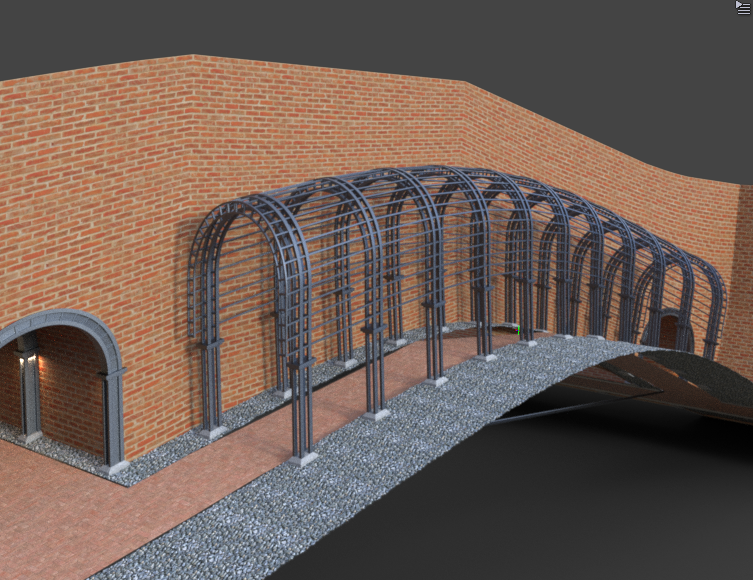
Can this script possibly create curves and hills in roads?
While not ideal you can bend terrain and structures attached to them. It is a Morph so you would have to export obj for the bend to be permanent.
 The Girl 9
I think your response may be a good window into some of the reasoning behind not creating a GIRL 9 (yet??). She's nothing "special" now, so why not use an existing G9 character or the closest Genesis figure available, Girl 6. I would like to have a G9 version 1) so I can easily use G9 clothing, hair, etc. on the Girl, and 2) because I often dialed in a bit of the GIRL into my characters. IMHO, she always gave something special to my characters that I find difficult to replicate without her. Because of her unique shape, using many clothing items on her can be difficult, and those issues only get worse when you try to fit cloths from a different generation on her.
Yes, I can create my own Girl for G9 by using Shape Transfer, but her unique shape also creates some issues (I've started that project, but need to fix the eyes). The down side to this is the loss of the CBS/JCM morphs for better bends. So, I'm really not sure it's worth all the work for me at this point. But that doesn't mean I wouldn't buy a G9 version of her in a heart beat!!
For those of us that have been around 3D for a long time, the G.I.R.L also has quite a bit of sentimental and nostalgic value. Originally she was created by 3D graphics and games artist Kim Goossens (not in or for DAZ). IIRC images of her were first published on/in 3D World magazine. She was on the cover, and generated a LOT of interest. As I recall, DAZ contracted with Kim Goossens to make her available in Poser and DS. It was a huge deal at the time (just guessing here ... it could also be that DAZ doesn’t have the rights to create a new version of her, but probably it's just the great interest in her has vanished). So I guess in many ways she is also a nostalgic reminder from a time when computer based 3D was new and exciting, and if someone wasn't a part of it then (early 200's), she has no meaning or extra value. She still reminds me of those exciting times when things were improving at a rapid pace.
High Fantasy PropsThe bridge and pavilion do transfer to Iray. I've used both with UltraScenery.
The tree with the bridge doesn't look great, but is OK, bits of the bridge could really do with re-texture mapping to get it to modern standards. The shape of the bridge is good still.. See Bridge Image for one image I did with it, and here's another.
See the Pavilion image for one thing I did with the Pavilion. I thought with Iray shaders, it looked very nice, converted by the 'DAZ Uber' shader preset.
Even though I have them, I have not used the weapons. I do use V3 (Well, Jim Burton's Glamorous Vickie 3) and have converted the character to TriAx and added autofit clothing so there is less necessity to use Generation 3 props with the characters.
Regards,
Richard.
more....Wacky Modelling ~ In Carrara ~Stezza said:
Cannon Theory: theory links Humpty Dumpty to a large cannon used during the siege of Colchester in 1648, which fell from a wall and could not be repaired.

the book of dread
from the cube with a morph to turn a page plus a couple more

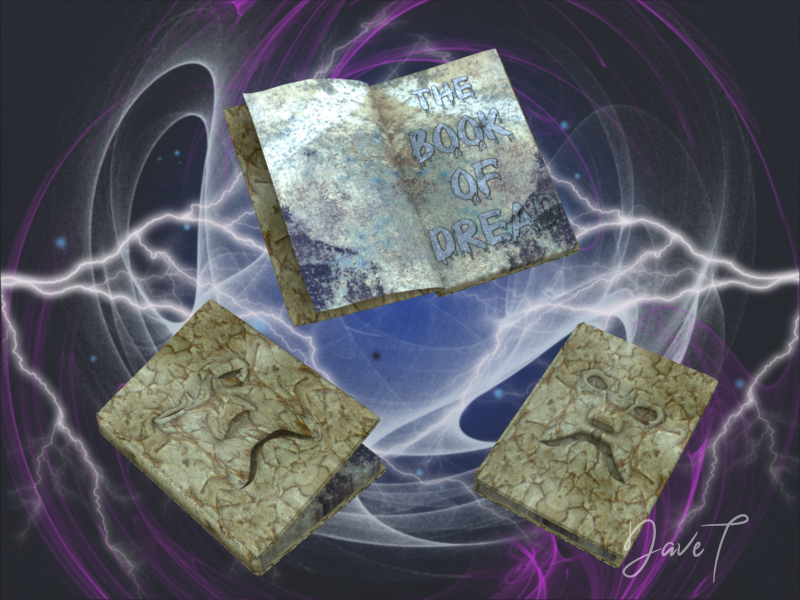
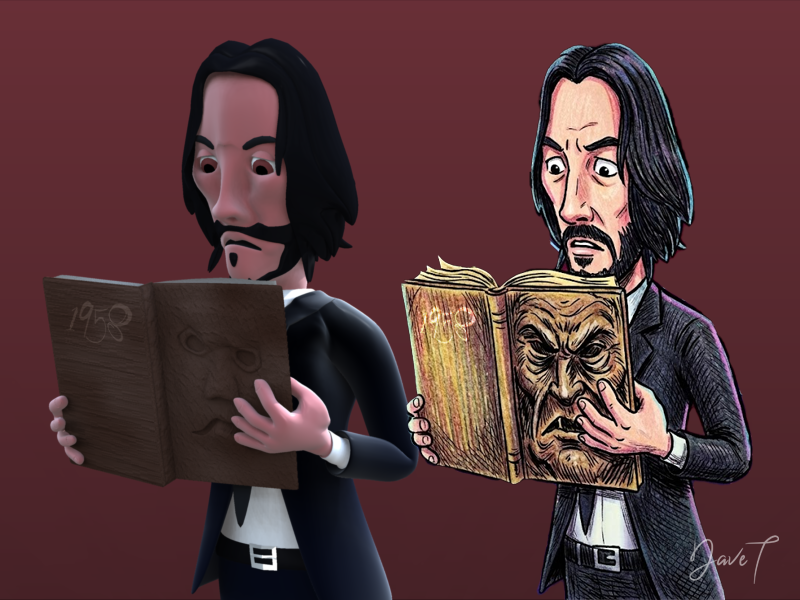
this ... the book of dread!
 The older generation: Victoria 2/3, Michael 2/3 and their children renders
I wanted to add mine even if this render is still waiting background and maybe bit editing. Michael 3... still has that something. There he is with gorgeous Apollonius character and morph set by Luciferino and Morrighan. ( which was sold elserwhere and no longer available. Am glad that they did bring their stuff back shortly though and i was able to be at the right place at the right time. * I adores * Hair is Nana hair.
As cool as some of the newer, shinier things are.... sorry, I like using these old ones. I use Generation 3 characters, 4ht generation and Genesis.
My biggest nemesies usually are postworking and backgrounds.
Large number of [WARNING] itemsThat's an interesting point. I located a random other figure that does not have a warning like this for proportions: ES3D Cassidy, just a figure with a proportions dial picked at random. When I load a generic G9 figure and apply the "ES3D Cassidy" dial, it applies the Body, Proportions and Head items along with it. The same test performed with the "KOO Elea" dial applies the Body and Head items, but not the Proportions item. I can manually dial Proportions and it does work - it's just that it's not connected to the main dial.
Is that what the warning is actually about - that there's a disconnect? And if so, how might one fix it?
Just to note, the original example was picked at random. The warnings involve various morph aspects for assorted figures - not just proportions.
Large number of [WARNING] itemsAt some point, my Daz installation started throwing large numbers of items like:
"2026-07-19 10:00:25.500 [WARNING] :: \src\sdksource\fileinput\dzassetdaz.cpp(595): Formula output property not found:
File: /data/Daz 3D/Genesis 9/Base/Morphs/kooki99/KOO Elea/Elea_proportions.dsf"
On loading a G9 figure*. It happens when loading the default G9 figure, or a saved file with a G9 in it, etc. (*I've confirmed that I get some when loading a G8 base figure. I've uninstalled most of my G8s but there are still are a few and I get warnings just like this.)
I found these by chance, when looking for something unrelated. I don't know when this started happening as I don't have a collection of logs over time.
It only occurs to some items. For instance, this is the only one related to KOO Elea. (In fact, it's the only one related to KOO figures, of which I have dozens.) And the file is actually there:

I have my doubts that they're actually meaningful errors, as the Elea Proportions morph is available and appears to do what one would it expect it to do to a stock G9 figure. I've found similar when testing other examples. It occurs across a wide variety of PAs and also with some of my own saved morphs. But if possible, I'd like to get to the bottom of this and fix it, so these aren't clogging up the log.
Is there a way to fix a texture showing a strange line on a G8.1F character?Turn out I saved the maps with the black 'line', using a unique name so I didn't replace them:
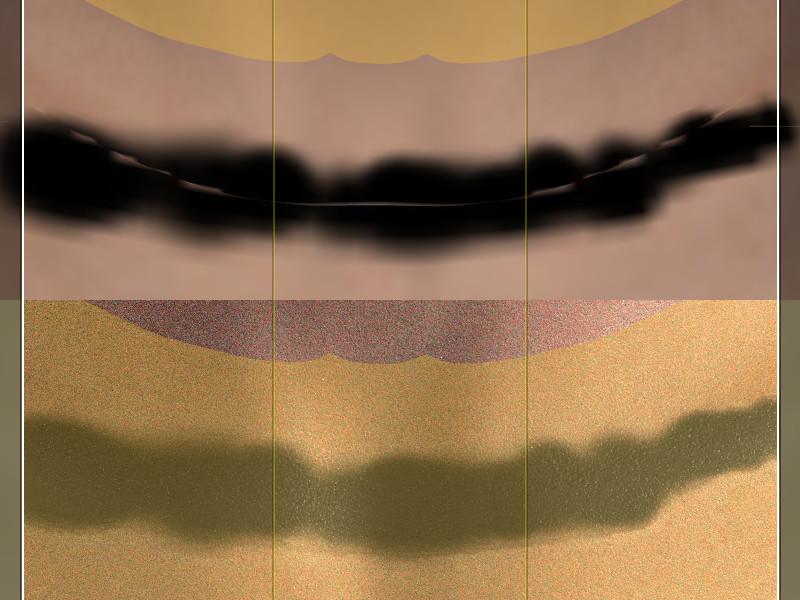
It's with the same character morph as the previous picture (using MSO Rory textures). The line around the seam is visible in Textured Mode, but not in Iray preview.
I also did the test in Daz Studio 6: first picture is texture shaded, then Iray Preview, then Filament:
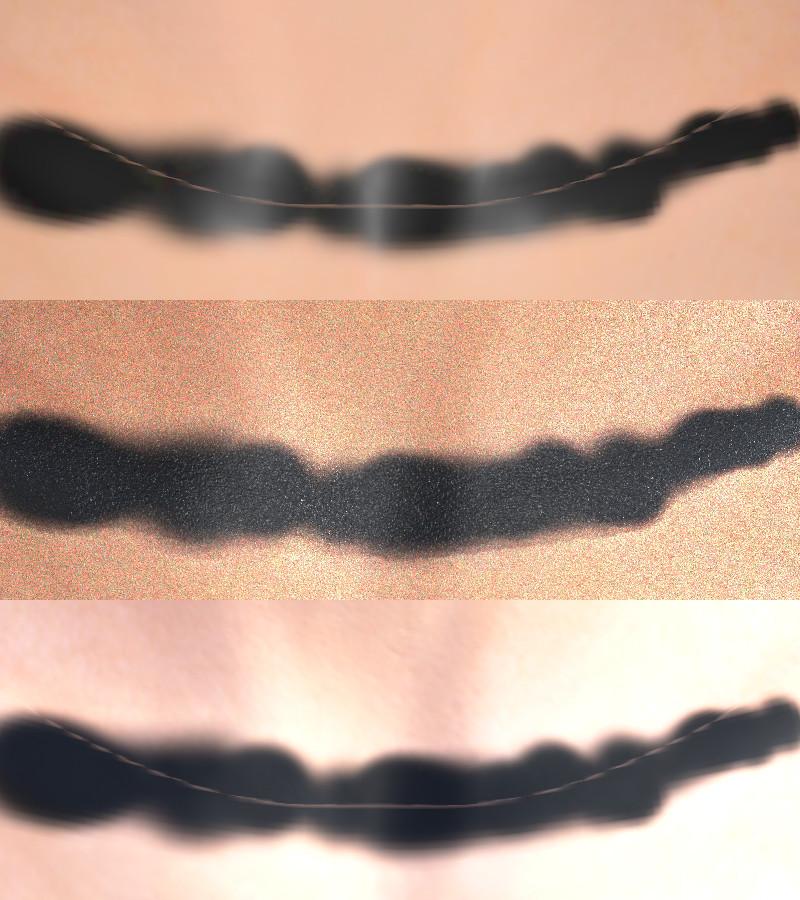
Like with Daz Studio 4, the line around the seam is visible in Texture Shaded not in Iray but is back in Filament.
I also did a render in Iray with Daz Studio 6 (not all the way to the end though):
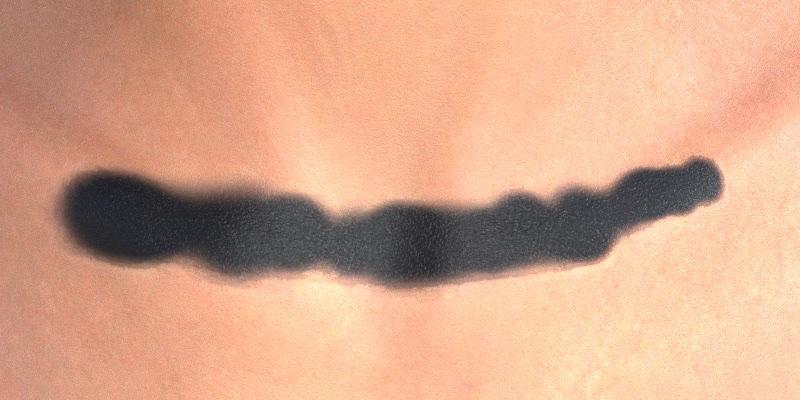
I have no idea what could cause that problem, but the test with the black line shows that it's apparently a visual bug on any mode except when using Iray.
Hairy dForce problems...Ocean said:
crosswind said:
it's a strand-based hair (SBH)... custom bones + weight mapping don't work on SBHs.
My understanding is you can still ultimately run transfer utility on curves/polylines with the option of selecting either rigid or non-rigid for the weight transfer. Rigid will apply weights for the whole strand based on the root weight. Non-Rigid will apply individual weight to each vertex of the curve. In either of those cases the curves can be transferred onto a rigged proxy mesh rather than onto the G9 scalp (and the proxy mesh can have custom bones), but only in the latter case of non-rigid weighting would this be useful in most applications, such as ponytails etc. Of course, a non-PA creator would not be able to generate quote-unquote dForce SBH but I suspect the transfer and rigging with custom bones and custom-weight would still work on standard non-SBH curves.
Actually, as far as I experiment, I could create custom bones as well as face groups on SBH, fill general weight on selected vertices, and assign to face group binded with custom bones, however, I have no way to accurately edit the weight by using paint brush because the weight on polylines are toally invisible... let alone smoothing ~~
Though custom bones do move SBHs... its performance is very much lower than using morphs. So it's almost useless to me ~ While on the other hand, I can easily deform SBHs by using dFormer, Geometry Sculptor or Blender and create morphs. Besides, personally I've never seen custom bones on SBHs made by PAs, so I totally gave up using custom bones on SBHs ~~
I don't know if there's any good tricks for this subject matter... or any more advice from you PAs ?
Hairy dForce problems...crosswind said:
it's a strand-based hair (SBH)... custom bones + weight mapping don't work on SBHs.
My understanding is you can still ultimately run transfer utility on curves/polylines with the option of selecting either rigid or non-rigid for the weight transfer. Rigid will apply weights for the whole strand based on the root weight. Non-Rigid will apply individual weight to each vertex of the curve. In either of those cases the curves can be transferred onto a rigged proxy mesh rather than onto the G9 scalp (and the proxy mesh can have custom bones), but only in the latter case of non-rigid weighting would this be useful in most applications, such as ponytails etc. Of course, a non-PA creator would not be able to generate quote-unquote dForce SBH but I suspect the transfer and rigging with custom bones and custom-weight would still work on standard non-SBH curves.
Is there a way to fix a texture showing a strange line on a G8.1F character?It's Rory materials on another character morph, one that was loaded while I read your previous message, so I simply changed the Head map on that character instead of loading Rory.
But all my tries to fix the problem where done loading Rory herself, exporting her shape as OBJ and loading that OBJ in Blender, but maybe I should try with this character: it seems to make the problem more visible, so maybe I'll see something different in Blender (I doubt it, after all, I'm applying the clone brush following the visible line on the seam between the two surfaces and it should be large enough to catch everything).
Daz 3D is part of

Connect
DAZ Productions, Inc.
7533 S Center View Ct #4664
West Jordan, UT 84084Licensing Agreement | Terms of Service | Privacy Policy | EULA
© 2026 Daz Productions Inc. All Rights Reserved.