-
MimicMolly's Renders & WIPs
I'm finally not as busy anymore. Since then, I've had to buy a new laptop but due to my own budget restraints I couldn't get one with a NVDIA graphics card. This new laptop feels like an inferior version (that somehow runs faster) than my previous device.
Anyway, I've attempted to do a fresh install of DAZ Studio on it with DIM. And as of May 2025, DIM insists on installing the latest version of DS + all the recently "manually added" G9 freebies snd the G9 Starter Essentials. I wanted G9 and the rest to be in my SSD, but I guess I'll have to do things manually.
And yes, the first thing I did after finishing the fresh install was to close the Smart Content panel and the AUX Viewport.
I was also surprised that Filament was the default view. But I don't mind, since I'm planning on just keeping G9 + Filatoon on this new laptop. But I'm going to reinstall G8 and everyone else to that SSD.
I actually had some difficulty in trying to get DIM on the new laptop to recognize the files I have saved to the SSD. I really did want everything on the SSD, since this was pretty much meant to be a clean start.
A couple months later, this is the real review of my experience.
Easy FilaToon [Commercial]wsterdan said:
itinerant said:
EDIT: By the way, the scripts do not work in the Mac 2025 Alpha build, but they do work in the Windows 2025 Alpha build. The shader presets work in both, but the full conversion scripts do not.
I think the only thing that doesn't work is generating the geoshell Toon Outline shell for Filatoon. You get the message. below when that happens
For loading the presets, the Mac OS operating system uses "/" instead of a PC's "\"; for example, if you check the log report, it can't find "\Shader Presets\ Filatoon\Presets" because on a Mac it should be "/Shader Presets/FilaToon".
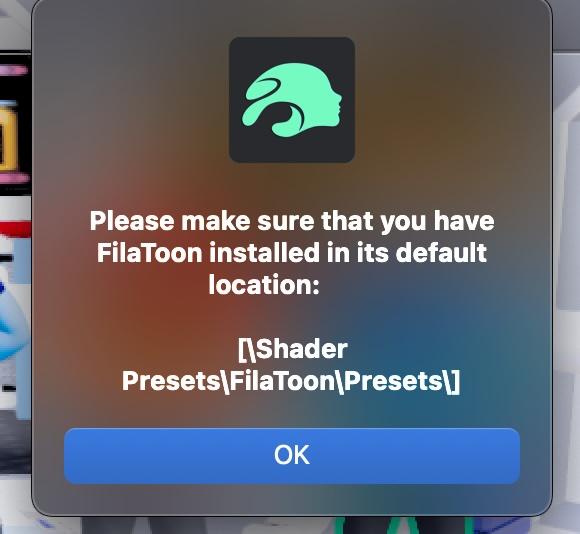
You can do this manually by going to the Shader Presets folder in the Filatoon Presets; everything else that I've tried in Easy Filatoon works fine, as far as I can tell.
You can file a ticket with support to help out; I already did one and was told that since DAZ doesn't yet fully support Filament on the Mac, I had to file a "feature request".
LIke you, I love the product, it's made it so much easier and so much fun to finally get into Filatoon on the Mac
Thanks for the information. It is always good to know why something is happening. Hopefully, as the Mac version of Filament is better supported, this product will automagically work.
Easy FilaToon [Commercial]itinerant said:
EDIT: By the way, the scripts do not work in the Mac 2025 Alpha build, but they do work in the Windows 2025 Alpha build. The shader presets work in both, but the full conversion scripts do not.
I think the only thing that doesn't work is generating the geoshell Toon Outline shell for Filatoon. You get the message. below when that happens
For loading the presets, the Mac OS operating system uses "/" instead of a PC's "\"; for example, if you check the log report, it can't find "\Shader Presets\ Filatoon\Presets" because on a Mac it should be "/Shader Presets/FilaToon".
You can do this manually by going to the Shader Presets folder in the Filatoon Presets; everything else that I've tried in Easy Filatoon works fine, as far as I can tell.
You can file a ticket with support to help out; I already did one and was told that since DAZ doesn't yet fully support Filament on the Mac, I had to file a "feature request".
LIke you, I love the product, it's made it so much easier and so much fun to finally get into Filatoon on the Mac
Nvidia IrayRichard Haseltine said:
It loks as if the Headlamp is on (Render Settings>Editor tab, under General - it adds a light shining from the camera when there are no other light nodes in the scene). You probably also wish to adjust tone-mapping (select the Tonemapper Options node and use the Parameters pane, or use the Editor tab of Render Settings) - Iray and Filament Drawstyles are not always in agreement over exposure and so on.
Hi Richard!
That was it. I did change the said settings as you advised and it worked just perfectly. Now my image looks as it should. Will keep in mind these settings.
Thanks for the help!
Nvidia IrayIt loks as if the Headlamp is on (Render Settings>Editor tab, under General - it adds a light shining from the camera when there are no other light nodes in the scene). You probably also wish to adjust tone-mapping (select the Tonemapper Options node and use the Parameters pane, or use the Editor tab of Render Settings) - Iray and Filament Drawstyles are not always in agreement over exposure and so on.
Nvidia IrayDear DAZ experts!
Is there anyone who could explain why is my top image from the attached looking as it looks? I was trying to see the difference between Iray and Filament and boy there is a difference indeed. Just not the one I was expecting. I believe the top one (Iray) should reflect how the image would look like before rendering, but it is waaay too exposed.
If anyone interested, the GPU I have is a Nvidia GeForec RTX 3060.
Thanks for any help!
Daz Studio 4.24[.0.x], General Release!warrenao said:
First impression is that the interface is much more responsive on my 2018 Mini (Intel, 64GB), and that makes a pretty big difference in the overall feel of the UX. New black/green, as a default, is easier to read and the contrast is markedly higher, too, and I can see myself adjusting a few things in it — but just the uptick in speed is a nice change.
I agree. I think it's a much better interface and I'm very much enjoying using Filament in 4.24, which is so fast!
Daz Studio 2026 Beta - version 6.25.2026.6423! (Updated March 09, 2026)Pretty new to all the daz stuff and wanted to try filament on mac in the new alpha build. The problem i have is that the skin part is blocked out in black and bugging quite a bit. It only happens when i use filament. Do you know whether it's my computer that is just terrible or it's a settings thing?
NVidia 5090Richard Haseltine said:
windli3356 said:
Richard Haseltine said:
windli3356 said:
Darknote said:
So I finally got the 5090 (+Ryzen 7800X3D + 64GB RAM) rig, and installed Daz Studio Public Build 2025 (6.25), and renders take from 11 minutes to 4 minutes now, to complete! Yay!
But, I have a big issue, iRay/Texture/Filament preview is unbelievably slow. I've disabled CPU fallback in render settings (first thing I did :D ), but it still doesn't help? I've also switched in Texture Resources to Performance mode, in Preferences -> Interface. Does anyone have any idea why this is? Moving around in iRay preview mode (Or Texture/Filament mode even) is incredibly slow, but once I stop moving, it instantly renders the scene, so something is working at least...
(I'm also on the Nvidia Studio Driver 576.02).
Thanks for any advice!
how did you get your RTX5090 to work? me and my friend both have RTX5090, and the render stopped for both of us as soon as we hit the render button. Are you sure your rendering task didn't fall on CPUs?
You are trying the Daz Studio 2025 Alpha, and you do have sufficiently new drivers? https://www.daz3d.com/forums/discussion/727631/daz-studio-2025-6-25-2025-x-evergreen
I tried searching sku # 109051 in both store and install manager, nothing pops up, is this version for Daz + users only?
It's two colons (::) not a hash (#).
All worked out! everything feel so much faster, thank you!
I especially like the fact that it's a stand lone app outside of the one I'm using, So this 6.25 is what Daz 5 will look like?
NVidia 5090windli3356 said:
Richard Haseltine said:
windli3356 said:
Darknote said:
So I finally got the 5090 (+Ryzen 7800X3D + 64GB RAM) rig, and installed Daz Studio Public Build 2025 (6.25), and renders take from 11 minutes to 4 minutes now, to complete! Yay!
But, I have a big issue, iRay/Texture/Filament preview is unbelievably slow. I've disabled CPU fallback in render settings (first thing I did :D ), but it still doesn't help? I've also switched in Texture Resources to Performance mode, in Preferences -> Interface. Does anyone have any idea why this is? Moving around in iRay preview mode (Or Texture/Filament mode even) is incredibly slow, but once I stop moving, it instantly renders the scene, so something is working at least...
(I'm also on the Nvidia Studio Driver 576.02).
Thanks for any advice!
how did you get your RTX5090 to work? me and my friend both have RTX5090, and the render stopped for both of us as soon as we hit the render button. Are you sure your rendering task didn't fall on CPUs?
You are trying the Daz Studio 2025 Alpha, and you do have sufficiently new drivers? https://www.daz3d.com/forums/discussion/727631/daz-studio-2025-6-25-2025-x-evergreen
I tried searching sku # 109051 in both store and install manager, nothing pops up, is this version for Daz + users only?
It's two colons (::) not a hash (#).
NVidia 5090windli3356 said:
Richard Haseltine said:
windli3356 said:
Darknote said:
So I finally got the 5090 (+Ryzen 7800X3D + 64GB RAM) rig, and installed Daz Studio Public Build 2025 (6.25), and renders take from 11 minutes to 4 minutes now, to complete! Yay!
But, I have a big issue, iRay/Texture/Filament preview is unbelievably slow. I've disabled CPU fallback in render settings (first thing I did :D ), but it still doesn't help? I've also switched in Texture Resources to Performance mode, in Preferences -> Interface. Does anyone have any idea why this is? Moving around in iRay preview mode (Or Texture/Filament mode even) is incredibly slow, but once I stop moving, it instantly renders the scene, so something is working at least...
(I'm also on the Nvidia Studio Driver 576.02).
Thanks for any advice!
how did you get your RTX5090 to work? me and my friend both have RTX5090, and the render stopped for both of us as soon as we hit the render button. Are you sure your rendering task didn't fall on CPUs?
You are trying the Daz Studio 2025 Alpha, and you do have sufficiently new drivers? https://www.daz3d.com/forums/discussion/727631/daz-studio-2025-6-25-2025-x-evergreen
I tried searching sku # 109051 in both store and install manager, nothing pops up, is this version for Daz + users only?
You can only install betas through DIM.
NVidia 5090Richard Haseltine said:
windli3356 said:
Darknote said:
So I finally got the 5090 (+Ryzen 7800X3D + 64GB RAM) rig, and installed Daz Studio Public Build 2025 (6.25), and renders take from 11 minutes to 4 minutes now, to complete! Yay!
But, I have a big issue, iRay/Texture/Filament preview is unbelievably slow. I've disabled CPU fallback in render settings (first thing I did :D ), but it still doesn't help? I've also switched in Texture Resources to Performance mode, in Preferences -> Interface. Does anyone have any idea why this is? Moving around in iRay preview mode (Or Texture/Filament mode even) is incredibly slow, but once I stop moving, it instantly renders the scene, so something is working at least...
(I'm also on the Nvidia Studio Driver 576.02).
Thanks for any advice!
how did you get your RTX5090 to work? me and my friend both have RTX5090, and the render stopped for both of us as soon as we hit the render button. Are you sure your rendering task didn't fall on CPUs?
You are trying the Daz Studio 2025 Alpha, and you do have sufficiently new drivers? https://www.daz3d.com/forums/discussion/727631/daz-studio-2025-6-25-2025-x-evergreen
I tried searching sku # 109051 in both store and install manager, nothing pops up, is this version for Daz + users only?
Gray rectangle in middle of scene in iray viewThank you, I usually work in Filament so I guess I just forgot. I appreciate you quick response!
Daz Studio 4.24[.0.x], General Release!Leana said:
Filament is not supported on MacOS in DS 4.x, only in DS2025.
Got it, thank you. I did DL and install the 4.24 applicaiton manually, and it does appear to function as expected on macOS (2018 Mini, Intel), so that part worked out OK, at least.
Daz Studio 4.24[.0.x], General Release!Filament is not supported on MacOS in DS 4.x, only in DS2025.
Daz Studio 4.24[.0.x], General Release!"Installation via Install Manager is recommended"
That may be so, but it doesn't seem possible. It's not showing up in DIM, and this install-option list (from https://www.daz3d.com/downloader/customer/files#prod_13176) seems to suggest manual DL and install is the only option, for both Mac and Win. Am I interpreting this information correctly?
Also, I'm not seeing this in any of the notes I've pored through: Is Filament supported on macOS yet, or not?
NVidia 5090windli3356 said:
Darknote said:
So I finally got the 5090 (+Ryzen 7800X3D + 64GB RAM) rig, and installed Daz Studio Public Build 2025 (6.25), and renders take from 11 minutes to 4 minutes now, to complete! Yay!
But, I have a big issue, iRay/Texture/Filament preview is unbelievably slow. I've disabled CPU fallback in render settings (first thing I did :D ), but it still doesn't help? I've also switched in Texture Resources to Performance mode, in Preferences -> Interface. Does anyone have any idea why this is? Moving around in iRay preview mode (Or Texture/Filament mode even) is incredibly slow, but once I stop moving, it instantly renders the scene, so something is working at least...
(I'm also on the Nvidia Studio Driver 576.02).
Thanks for any advice!
how did you get your RTX5090 to work? me and my friend both have RTX5090, and the render stopped for both of us as soon as we hit the render button. Are you sure your rendering task didn't fall on CPUs?
You are trying the Daz Studio 2025 Alpha, and you do have sufficiently new drivers? https://www.daz3d.com/forums/discussion/727631/daz-studio-2025-6-25-2025-x-evergreen
NVidia 5090Darknote said:
So I finally got the 5090 (+Ryzen 7800X3D + 64GB RAM) rig, and installed Daz Studio Public Build 2025 (6.25), and renders take from 11 minutes to 4 minutes now, to complete! Yay!
But, I have a big issue, iRay/Texture/Filament preview is unbelievably slow. I've disabled CPU fallback in render settings (first thing I did :D ), but it still doesn't help? I've also switched in Texture Resources to Performance mode, in Preferences -> Interface. Does anyone have any idea why this is? Moving around in iRay preview mode (Or Texture/Filament mode even) is incredibly slow, but once I stop moving, it instantly renders the scene, so something is working at least...
(I'm also on the Nvidia Studio Driver 576.02).
Thanks for any advice!
how did you get your RTX5090 to work? me and my friend both have RTX5090, and the render stopped for both of us as soon as we hit the render button. Are you sure your rendering task didn't fall on CPUs?
Thoughts on older and abandoned productsjust pointing out, they may add Poser formats to the final release (if there is an issue), this is just an alpha to address hardware incompatibilities after all
there may even be 3Delight and other missing features, or other third party developers could add them
I see this as I had actually myself suggested before they released it, as a render engine to load saved duf scenes from D|S4 for those using 5xxx cards and Mac Filament users
AIUTO...CHI CONOSCE L’ITALIANO? PARTE QUATTORDICICrios, ho visto il tuo post sul thread dell'Alpha riguardo 3Delight... Rassegnati come mi sono rassegnato io, ragazzo.
Hanno deciso che dobbiamo usare Filament (incompleto), IRay (scassato) oppure Octane (poco pratico).

Però io mi tengo il mio bel 4.12 e come i calabroni che non sanno che non possono volare, io renderizzo su 3Delight anche loro non vogliono.

La mia speranza è che con le nuove librerie vengano fuori anche nuovi motori di render, anche in tempo reale (non sarebbe male mettere le mani su un bel Eevee)
Daz 3D is part of

Connect
DAZ Productions, Inc.
7533 S Center View Ct #4664
West Jordan, UT 84084Licensing Agreement | Terms of Service | Privacy Policy | EULA
© 2026 Daz Productions Inc. All Rights Reserved.