Nvidia Iray

Dear DAZ experts!
Is there anyone who could explain why is my top image from the attached looking as it looks? I was trying to see the difference between Iray and Filament and boy there is a difference indeed. Just not the one I was expecting. I believe the top one (Iray) should reflect how the image would look like before rendering, but it is waaay too exposed.
If anyone interested, the GPU I have is a Nvidia GeForec RTX 3060.
Thanks for any help!
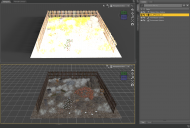
image_2025-05-05_213544964.png
1391 x 939 - 670K

Daz 3D is part of 
Connect
DAZ Productions, Inc.
7533 S Center View Ct #4664
West Jordan, UT 84084
Licensing Agreement | Terms of Service | Privacy Policy | EULA
© 2026 Daz Productions Inc. All Rights Reserved.
Comments
It loks as if the Headlamp is on (Render Settings>Editor tab, under General - it adds a light shining from the camera when there are no other light nodes in the scene). You probably also wish to adjust tone-mapping (select the Tonemapper Options node and use the Parameters pane, or use the Editor tab of Render Settings) - Iray and Filament Drawstyles are not always in agreement over exposure and so on.
Hi Richard!
That was it. I did change the said settings as you advised and it worked just perfectly. Now my image looks as it should. Will keep in mind these settings.
Thanks for the help!