-
AIUTO...CHI CONOSCE L’ITALIANO? PARTE QUATTORDICI
Grazie a tutti dei consigli, purtroppo non sono venuto a capo di niente.
Non ho trovato neanche col search le "Disco effect light". Ho comunque cambiato lo shader sulle altre superfici che mi avete indicato, ma non è cambiato nulla.
AIUTO...CHI CONOSCE L’ITALIANO? PARTE QUATTORDICIeman said:
Esatto. Se devi riggare un modello da zero ti renderai conto di quanto sono importanti.
Qualcuno sa come cacchio si fa ad inserire l'immagine sotto al testo?
DALLA AI DI GOOGLE
Per allegare e mostrare le immagini all'interno dei post del Forum ufficiale di Daz 3D ci sono due metodi principali: puoi caricarle come semplice allegato (che apparirà come miniatura) oppure inserirle direttamente nel testo (inline) per farle vedere subito a dimensione intera. [1, 2]
Ecco i passaggi dettagliati per entrambe le soluzioni.
Metodo 1: Allegare l'immagine come miniatura (Metodo base)
Questo è il sistema più rapido se vuoi semplicemente allegare un file in fondo al tuo messaggio: [3]
- Scrivi il testo del tuo commento nel box di digitazione.
- Subito sotto al box di testo, clicca sulla voce "Attach a file" (Allega un file).
- Clicca su "Sfoglia" (o Browse), seleziona l'immagine dal tuo computer e premi Apri.
- Attendi che il caricamento sia completato e poi clicca su "Save Comment" (Salva commento) o Post Comment. [1, 4, 5]
Metodo 2: Inserire l'immagine direttamente nel testo (Inline)
Il forum di Daz non permette di inserire direttamente un file dal PC all'interno del testo con un semplice copia-incolla, ma richiede una piccola deviazione molto usata dalla community: [6]
- Esegui prima il Metodo 1 caricando il file e pubblicando il post. [1]
- Una volta pubblicato il post, fai click con il tasto destro sulla miniatura della tua immagine appena caricata e seleziona "Apri link in una nuova scheda" (oppure fai click destro e scegli "Copia link immagine"). [1, 4]
- Torna sul tuo post, fai click sull'icona dell'ingranaggio in alto a destra del tuo messaggio e seleziona "Edit" (Modifica). [1]
- Posiziona il cursore nel punto esatto del testo in cui vuoi che appaia l'immagine. [4]
- Clicca sull'icona dell'immagine nella barra degli strumenti del forum. [1]
- Incolla l'URL copiato precedentemente nel campo richiesto. [1]
- Regola la larghezza (Width): Per evitare che la foto si deformi o sia troppo grande, imposta la larghezza a un valore massimo di 800 pixel (la dimensione standard del forum). [1]
- Salva le modifiche apportate al post. [5]
⚠️ Requisiti e Limiti importanti delle immagini
- Peso del file: Il file non deve superare i 2 MB (2000 KB) altrimenti il sistema fallirà il caricamento senza avvisarti.
- Larghezza massima: La larghezza ideale per la visualizzazione sul forum è di 800 pixel.
- Contenuto (ToS): Ricorda che il forum di Daz ha regole molto severe sulla nudità e sui contenuti espliciti relativi ai render artistici. [1, 7, 8, 9]
Nota alternativa: Se riscontri problemi di caricamento (bug temporanei del forum), puoi caricare l'immagine nella tua Daz Gallery personale e poi copiare il link diretto della foto per inserirlo nel forum. [10, 11]
Hai bisogno di aiuto per capire come ridimensionare il peso del file o vuoi sapere come fare a collegare direttamente un render dalla tua gallery personale di Daz?
How do I Save a Render in 10-Bit or Higher?3DIO said:
@Garrett and @Fishtales
Not sure if you're aware of it, but there's a member on here called Horo who takes a very professional approach to HDRI and has a website that covers it : Horo.ch
He has a whole section and very detailed PDF documentation about the creation of HDRI and Panoramas: HDRI & PanoramasYes, when I was using Bryce a lot I talked to him on the Bryce forum :) I have used Bryce to make HDRI's too.
Digital Art Live & Drew Spence + Daz Store [Commercial]Cybersox said:
johnbuckeridge said:
Hi there. I bought Art Official Intelligence: DAZ Studio-Centered Workflows with AI Tools by Digital Art Live and Griffin Avid yesterday - went to download it via DIM but nothing comes up when you search for it - DIM doesn't know what it is. Daz Connnect recognises it, but downloading it that way didn't work at all. Can you shed any light?
I don't have that item, but I believe you usually have to have DIM set up with a folder dedicated to that kind of content, which can be problematic with some tutorial files as the zips may enclude DS products, objs, photoshop elements, etc. Doesn't really matter, though, as you can just go to your Content Library in your account and download the folders manually.
It's videos, as far as I can see, no content, so it shouldn't have anything but a general installer (which DIM should be able to handle). However, from the filelist on the readme page it looks as if the packaging is seriously messed up, so we will report it to Daz.
Digital Art Live & Drew Spence + Daz Store [Commercial]johnbuckeridge said:
Hi there. I bought Art Official Intelligence: DAZ Studio-Centered Workflows with AI Tools by Digital Art Live and Griffin Avid yesterday - went to download it via DIM but nothing comes up when you search for it - DIM doesn't know what it is. Daz Connnect recognises it, but downloading it that way didn't work at all. Can you shed any light?
I don't have that item, but I believe you usually have to have DIM set up with a folder dedicated to that kind of content, which can be problematic with some tutorial files as the zips may enclude DS products, objs, photoshop elements, etc. Doesn't really matter, though, as you can just go to your Content Library in your account and download the folders manually.
The "The Weather Changes More Often than the Thread Title" Complaint Thread3DIO said:
@Torquinox
Apologies, seems I missed a whole post of yours and that you had already replied. It happens a lot and I've no idea why. I thought it must be an issue with the forum software, perhaps a side-effect of all that 'Bad Gateway' crap. but I've yet to see anyone complain about posts being missed due to not showing.Weird.
No worries! It's easy to miss a post or two in forum discussions.
Content Catalog - Windows/macOS (Commercial) - Out nowI agree with donniekeidic. There needs to be a “NOT” included in the search. I did a search for “People” and besides people, it bought up hats, clothes, etc. I guess the tag “People” was included with these since the clothes were for people - as opposed to clothes or armor for animals. But this really cluttered up the search results with unwanted content. - Just a suggestion.
Digital Art Live & Drew Spence + Daz Store [Commercial]Um, that's a good one. I would open up a ticket. Since it's video content, maybe it's not something you install and instead you search for it in your library of purchased items and access the files that way.
That's what I did just now. It shows a long list of Downloadable files.
P.S. Thank you for your support in picking this up.
Has Anyone here experimented with Gaussian Splatting?""Daz render as a precursor to GS seems a bit unnecessary anyway since you can get AI to generate a GS from scratch.""
This is a really odd sentiment to express in a forum for a particular 3d animation software.
Are you saying I should make gaussian splats from just a prompt? That doesn't appeal to me, if that's what I wanted to do, why would I be in the Daz Studio Discussion forum to ask about that?
I'm not trying to use Daz Studio as an arbitrary 'precursor', I have specific scenes that I have made in Daz Studio that I am exploring redistributing as Gaussian Splats.The "The Weather Changes More Often than the Thread Title" Complaint Thread@Torquinox
Apologies, seems I missed a whole post of yours and that you had already replied. It happens a lot and I've no idea why. I thought it must be an issue with the forum software, perhaps a side-effect of all that 'Bad Gateway' crap. but I've yet to see anyone complain about posts being missed due to not showing.Weird.
Mr Potato Head?There are a few pretty good models on Sketchfab which should import easily enough. Obviously it's up to you to do the rigging if you want a fully poseable character but it shouldn't be too tricky or time-consuming.
https://sketchfab.com/search?features=downloadable&q=potato+head&type=models
Digital Art Live & Drew Spence + Daz Store [Commercial]Hi there. I bought Art Official Intelligence: DAZ Studio-Centered Workflows with AI Tools by Digital Art Live and Griffin Avid yesterday - went to download it via DIM but nothing comes up when you search for it - DIM doesn't know what it is. Daz Connnect recognises it, but downloading it that way didn't work at all. Can you shed any light?
Accessing Art Official Intelligence: DAZ Studio-Centered Workflows with AI ToolsBought Art Official Intelligence: DAZ Studio-Centered Workflows with AI Tools by Digital Art Live and Griffin Avid yesterday - went to download it via DIM but nothing comes up when you search for it - DIM doesn't know what it is. Daz Connnect recognises it, but downloading it that way didn't work at all. Can anybody shed any light?
Content Catalog - Windows/macOS (Commercial) - Out nowdonniekeidic said:
This reminds me, I wanted to ask @DoctorJellyBean if he could possibly add either a search modifier such as NOT or a way to include spaces in search. Right now when searching for something like "hair" the search function also pulls up all the "chairs" as well obviously. And I have a lot of chairs so being able to do a seach for "hair NOT chair" would be useful, or an alternative would be a way to search including spaces such as: " hair " OR " hairs "
Implemented, it will need testing. No need for spaces, NOT is sufficient.
Content Catalog - Windows/macOS (Commercial) - Out nowYou are right! If I search hair, I do get some products with chair in the name, like wheelchair. I think you have a good suggestion.
Content Catalog - Windows/macOS (Commercial) - Out nowbarbult said:
Corridor seems to be the new Daz euphemism for Hallway. Content Catalog quickly showed me that i have way more than I need. I filtered to Name (i.e. product name) searched for corridor OR hallway. That search finds both (product name that has either word) because of the upper case OR in the search string. I acquired a lot of these as Daz+ freebies, I think. Yup, too many for sure.
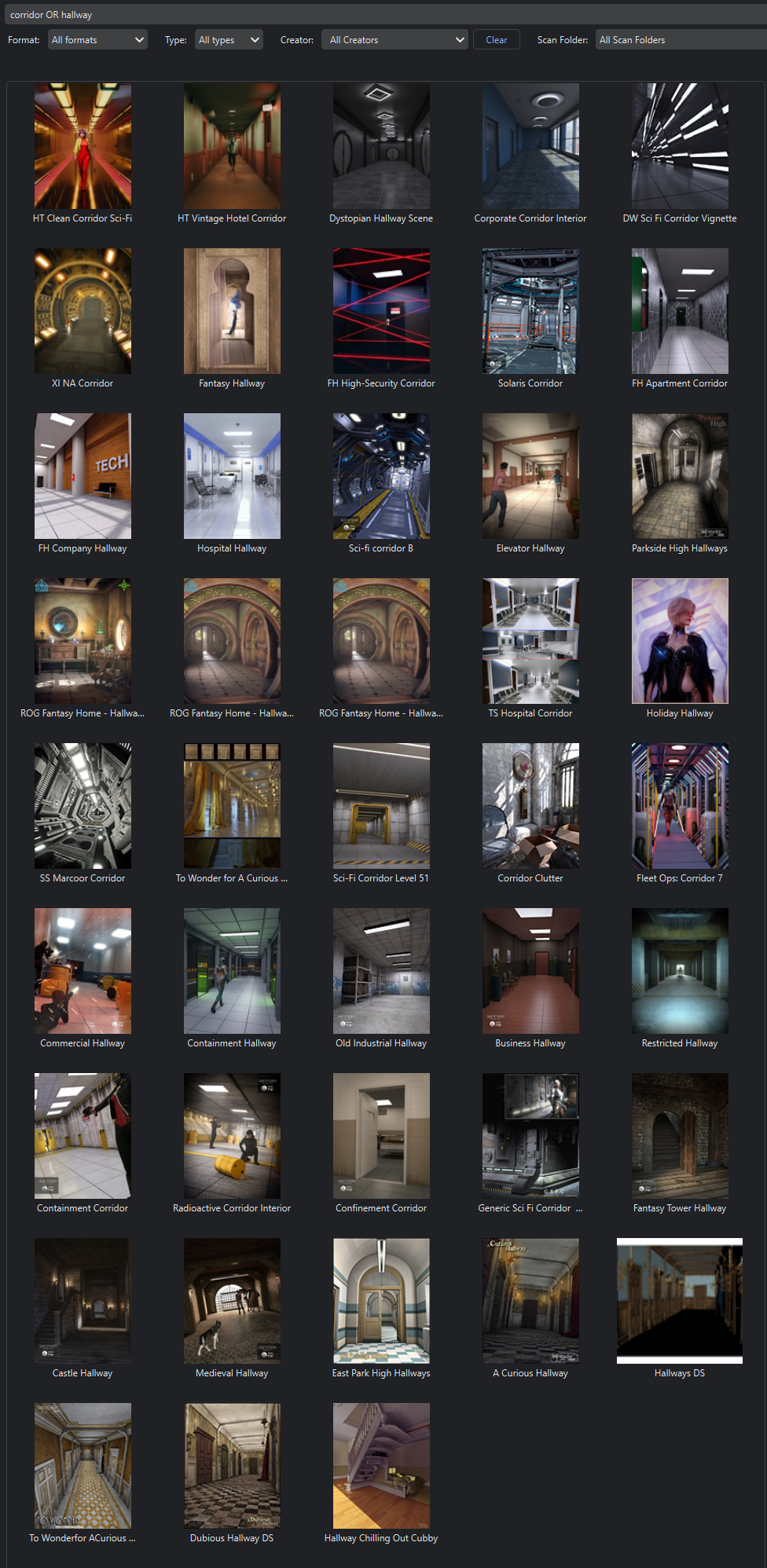
This reminds me, I wanted to ask @DoctorJellyBean if he could possibly add either a search modifier such as NOT or a way to include spaces in search. Right now when searching for something like "hair" the search function also pulls up all the "chairs" as well obviously. And I have a lot of chairs so being able to do a seach for "hair NOT chair" would be useful, or an alternative would be a way to search including spaces such as: " hair " OR " hairs "
Women's Basketball Uniform? Baggy Knee Length Shorts? Matching Jersey?Tynkere said:
Thanks for replies. "Basketball kit" seems a winner. Odd it didn't show up when I'd typed 'basketball', 'basketball uniform', etc. Anyway, good idea about supersuit to make bandage brace. Hadn't thought of that.
Nice to find another PA who makes contemporary stuff. Outfit looks great. Also looks like Darius & Monique will be getting hairdo & probably snag a couple of his characters while I'm at it.
---
That's why I like DAZ forums. Can always count on members to help out if draw a blank on search results.
Best wishes & enjoy week. ; )
I know your post is really old, but you can try matteoio from RenderHub, they made some actual identical women sports wear that look just like the one in your link.
Content Catalog - Windows/macOS (Commercial) - Out nowCorridor seems to be the new Daz euphemism for Hallway. Content Catalog quickly showed me that i have way more than I need. I filtered to Name (i.e. product name) searched for corridor OR hallway. That search finds both (product name that has either word) because of the upper case OR in the search string. I acquired a lot of these as Daz+ freebies, I think. Yup, too many for sure.
Daz Studio 6.25[.0.x], General Release!Richard Haseltine said:
barbult said:
Richard Haseltine said:
https://docs.daz3d.com/public/software/dazstudio/6/change_log 6.25.2025.14815
Removed non-optional/obsolete preferences from the “Interface” page of the “Preferences” dialog
-
“Per Pixel Shading”
-
“Hardware Anti-Aliasing”
-
“Display Optimization”
-
“Backface Lighting”
-
“Pixel Buffer”
Richard, the link doesn't work. It is processed as: https://docs.daz3d.com/public/software/dazstudio/6/change_log 6.25.2025.14815.
I was using Firefox browser. It has %C2%A0 in it. I can't get the forum to display this link text as shown in the address bar of the browser, no matter how many times I edit this message.Weird, it was trreating the space and the version number after it as part of the URL. I think that is fixed now.
Yes, you fixed it. Thanks.
Daz Studio 6.25[.0.x], General Release!barbult said:
Richard Haseltine said:
https://docs.daz3d.com/public/software/dazstudio/6/change_log 6.25.2025.14815
Removed non-optional/obsolete preferences from the “Interface” page of the “Preferences” dialog
-
“Per Pixel Shading”
-
“Hardware Anti-Aliasing”
-
“Display Optimization”
-
“Backface Lighting”
-
“Pixel Buffer”
Richard, the link doesn't work. It is processed as: https://docs.daz3d.com/public/software/dazstudio/6/change_log 6.25.2025.14815.
I was using Firefox browser. It has %C2%A0 in it. I can't get the forum to display this link text as shown in the address bar of the browser, no matter how many times I edit this message.Weird, it was trreating the space and the version number after it as part of the URL. I think that is fixed now.
Daz 3D is part of

Connect
DAZ Productions, Inc.
7533 S Center View Ct #4664
West Jordan, UT 84084Licensing Agreement | Terms of Service | Privacy Policy | EULA
© 2026 Daz Productions Inc. All Rights Reserved.