-
Mr Potato Head?
There are a few pretty good models on Sketchfab which should import easily enough. Obviously it's up to you to do the rigging if you want a fully poseable character but it shouldn't be too tricky or time-consuming.
https://sketchfab.com/search?features=downloadable&q=potato+head&type=models
What is strand based hair?Gordig said:
Richard Haseltine said:
With strand-based hair you set up a scattering guide hairs, which can be curved and given different lengths, and then DS fills in with extra generated hairs between the guides so that you get an effect much closer to real hair than transmapped planes or the reltively coarse results of exporting another application's hair as explicit geometry.
That is how it generally works, but some PAs do all that scattering around guides before importing into DS and packaging up as a product, so what you get in DS is every single hair.
For dForce PAs can import guide hairs from other applications and still interpolate between them.
V3D Magic Extract And Append Bundle (Commercial)xavierkilla057 said:
V3Digitimes said:
This is the support page for “V3D Magic Extract And Append Bundle””, a complete workflow bundle to recover and reuse only the scene content you want from saved DAZ Studio Scene and Scene Subset DUF files.
As usually, any issue, remark, feedback, questions, etc., feel free to post here or to contact me directly via PM.
You can find it here :
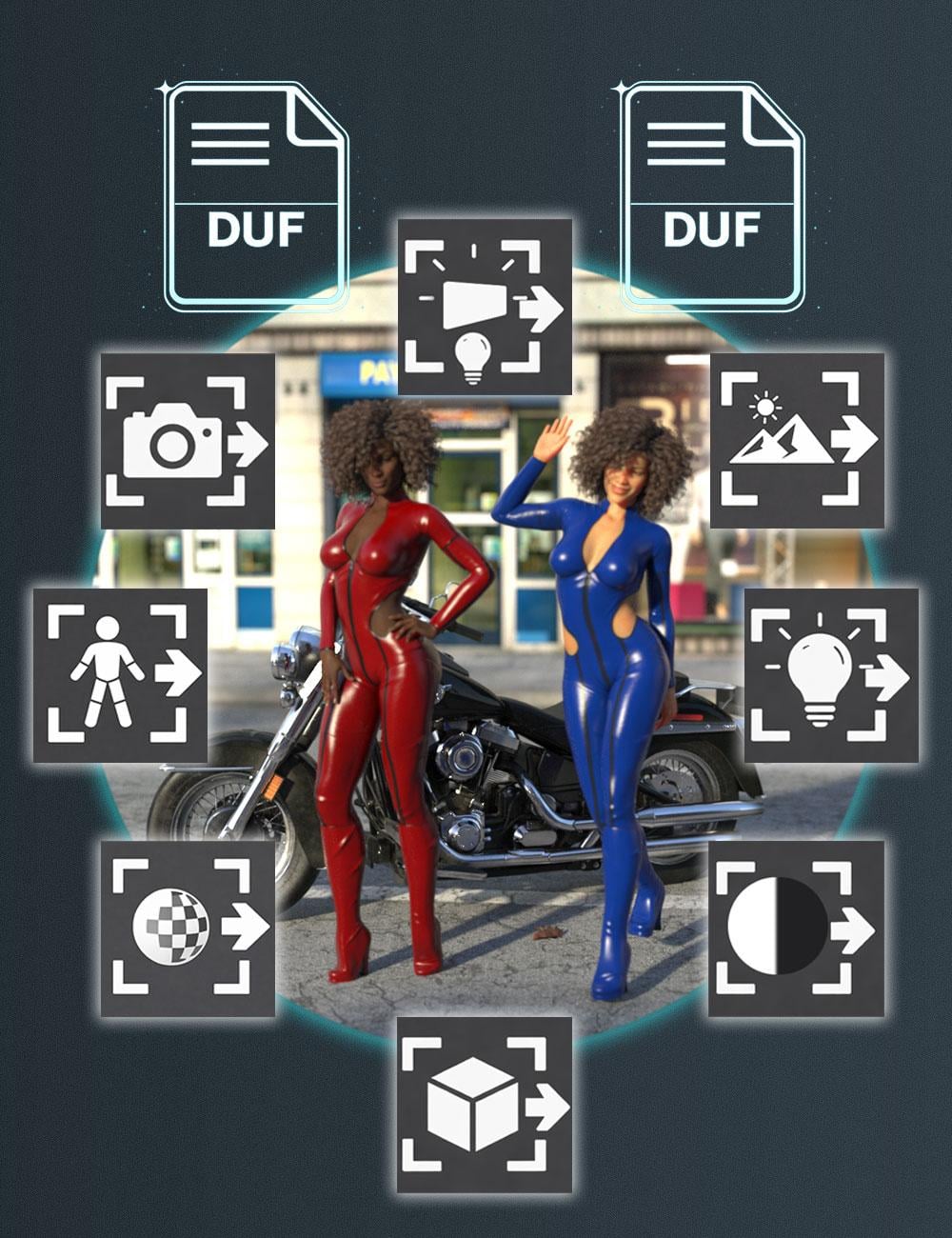
https://www.daz3d.com/v3d-magic-extract-and-append-bundleV3D Magic Extract And Append Bundle brings together the three products of the V3D Extract and Append series in one complete workflow collection for DAZ Studio.
With this bundle, your saved DAZ Studio Scene and Scene Subset DUF files become practical reusable sources for a wide range of scene content. Depending on the script you launch, you can recover and reuse only the figures, props, outfits, hair, poses, material properties, cameras, scene lights, Iray Uber emissive surfaces, environment settings, or tone mapping settings you want to bring into your current scene.
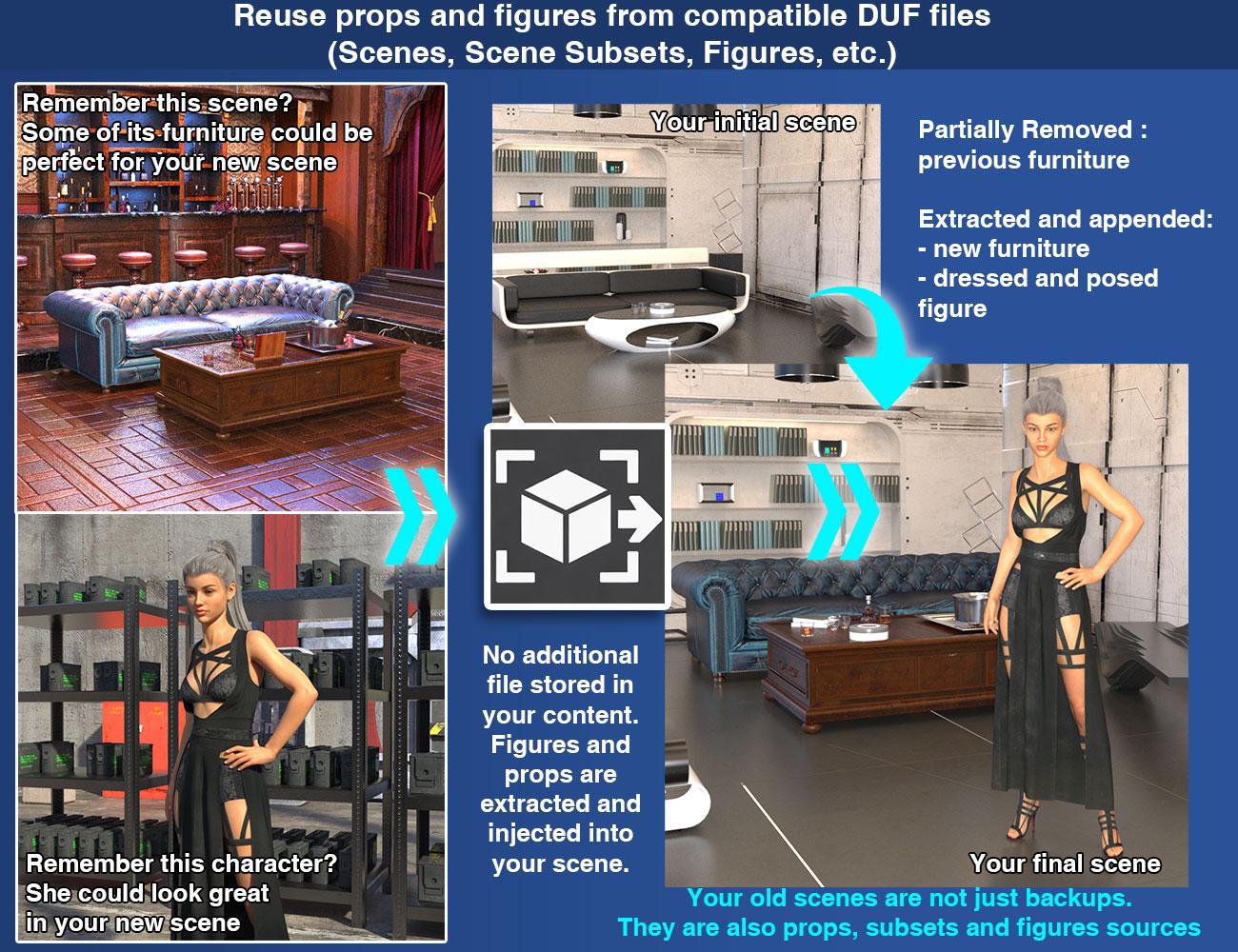
These tools are designed to make scene reuse faster, cleaner, and more convenient. Instead of reopening older scenes and rebuilding content manually, you can extract and reload only the compatible data you actually want to bring back into your current work.
This bundle is also extremely practical during normal scene iteration. You may change a light setup, adjust a pose, load a new outfit, and then realize that the earlier pose or the previous lighting was actually better. Instead of undoing everything, rebuilding it manually, or going through any other tedious process to bring your preferred setup back, you can simply launch the extractor you need, load the relevant data from an earlier saved version of your scene, and bring back the part you preferred while keeping the rest of your current work intact.
The bundle includes:
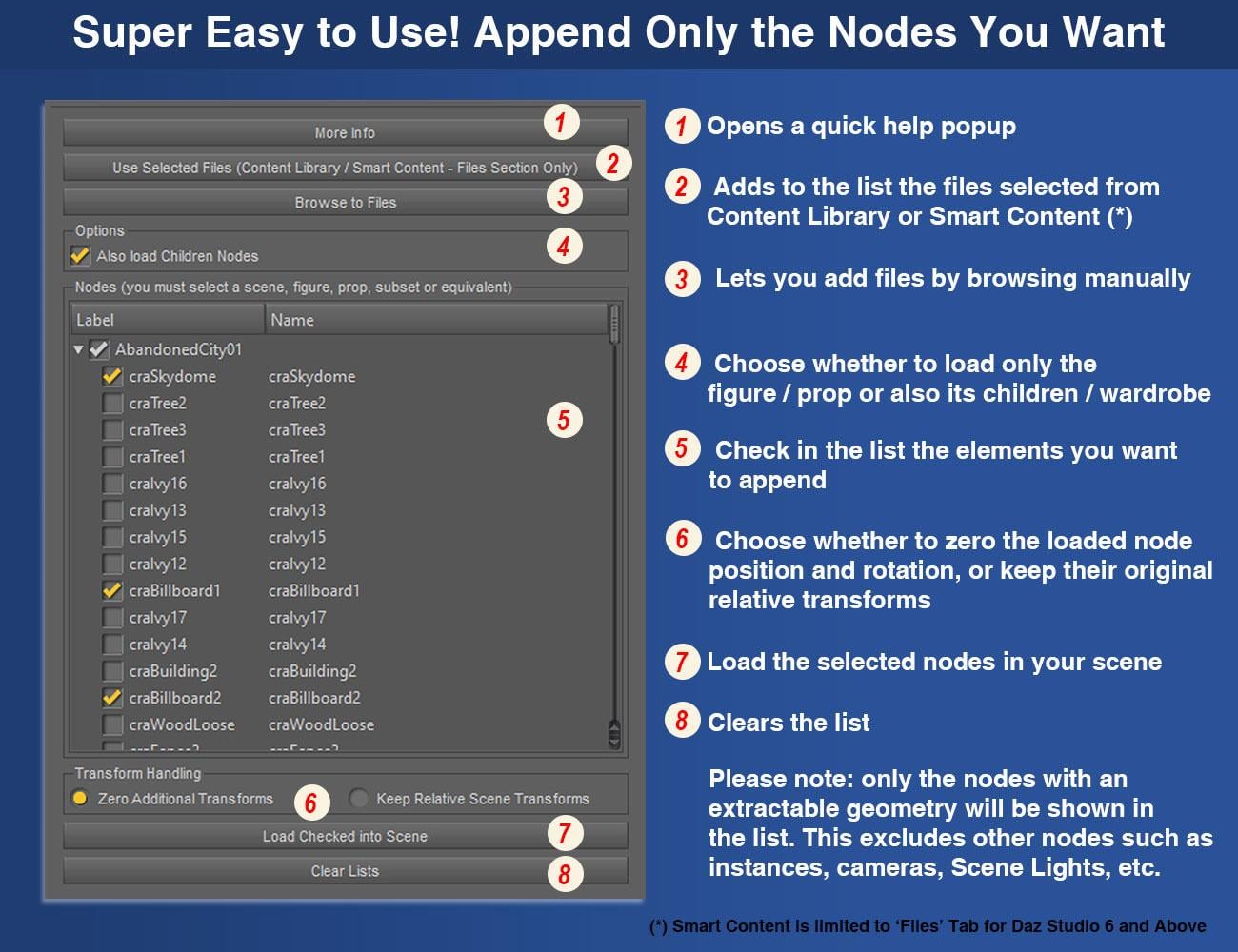
V3D Extract and Append : Figures and Props
V3D Extract and Append : Cameras, Lights, Environment Settings and More
V3D Extract and Append : Poses and Material Properties
For detailed behavior, product-specific compatibility, advanced options, and technical notes for each workflow, please refer to the individual product descriptions included in this bundle.
V3D Magic Extract And Append Bundle is intuitive, easy to use, and workflow-efficient. It gives you a complete reusable scene-content toolkit for DAZ Studio, helping you recover the content you want while staying focused on building, posing, shading, and lighting your scene.
A couple of images - not showing everything... and a link to the video presentation of the bundle...Know issues :
DS6 User WarningVery large or complex source scenes seem to be problematic in DS6 with version 1.0 of the product.
They may cause DS6 to hang or crash during the initial source analysis step, before the item list is displayed. These same scenes should usually still work in DS4 / 4.24.
A DS6-specific solution is currently being investigated.
If you encounter this issue and have a way to share the problematic DUF file with me, it would be very helpful and could speed up the patch development.Please Note : This product was optimized around my own, fairly classic workflow, but it can be improved to support other workflows when it makes sense.
Feature requests that may be implemented in a future update, if technically possible:- Priority number 1 : If a GroupNode (what you call "Group") is the parent of supported geometry nodes, it should also be displayed in the list.
- A checkbox to load/appended items and strip (remove) their animation.
- If possible: a clearer display of the scene hierarchy (nesting hierarchy) in the item list. This one is more complex, as scripted list views are not the easiest thing to handle cleanly.
- Understand what happens in DS6 on one user large or specific - not clear yet - file (script blocked? DS6 freeze? What is specific in this scene?) - this is debugging, not refinment.
If something does not work for you, or if you see possible improvements, feel free to share.For Published Artists and environment creators, this can also be useful as a production tool. When working on large environments, test scenes, promo scenes, or older WIP files, you often need to recover one specific element without reloading the whole scene: a prop, a material setup, a camera, a light rig, a figure setup, or an imported object that was saved inside the scene and even not as a clean standalone dsf asset.This is one of the reasons I made these tools in the first place. They help me compare older versions of my scenes, recover elements from previous tests, reuse lighting/camera setups, and bring back specific parts of a scene without manually rebuilding everything.
So the product is not only intended for end users who want to reuse content from saved scenes. It can also be useful for creators who build complex scenes and need a faster way to extract, compare, and reuse parts of their own production files.
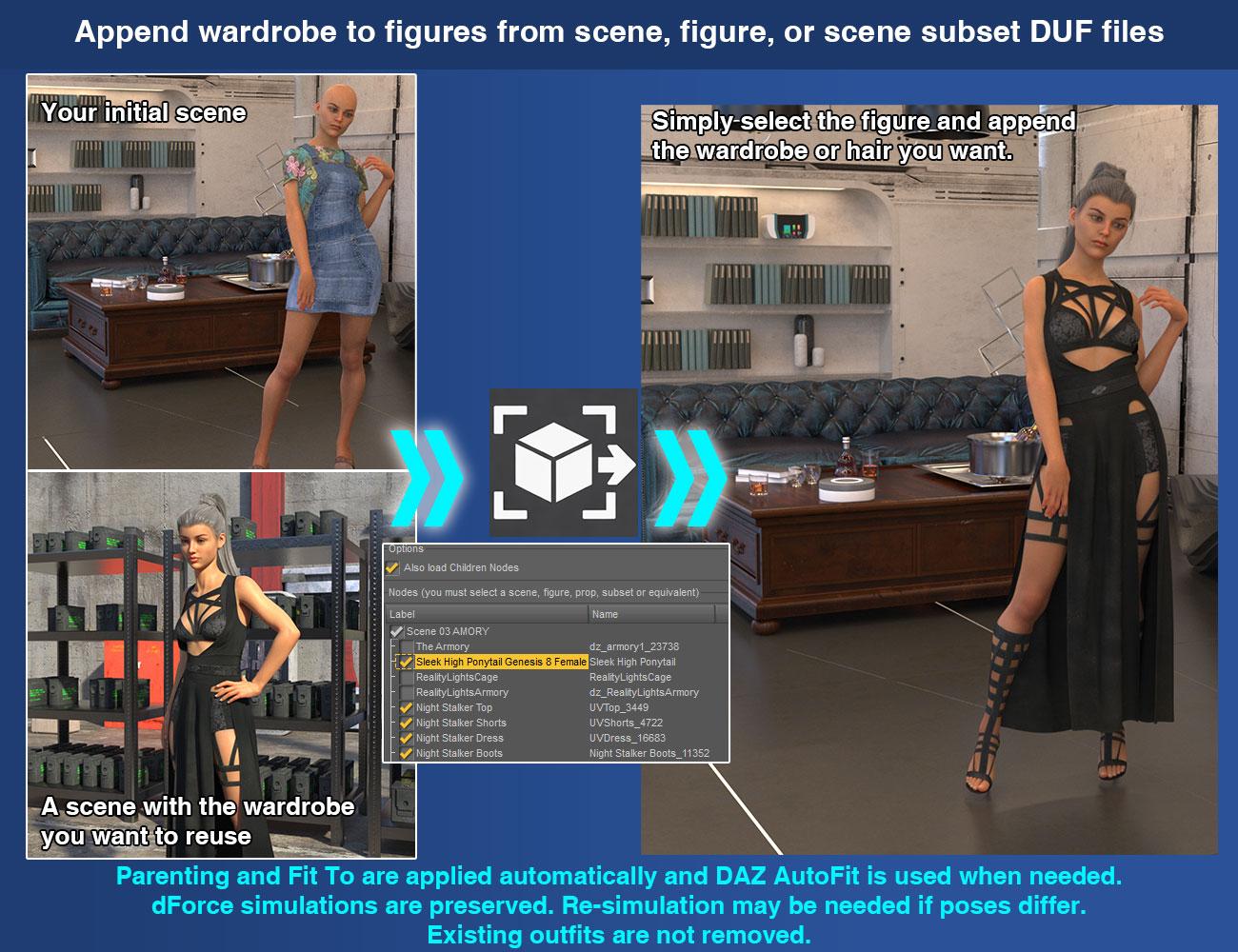
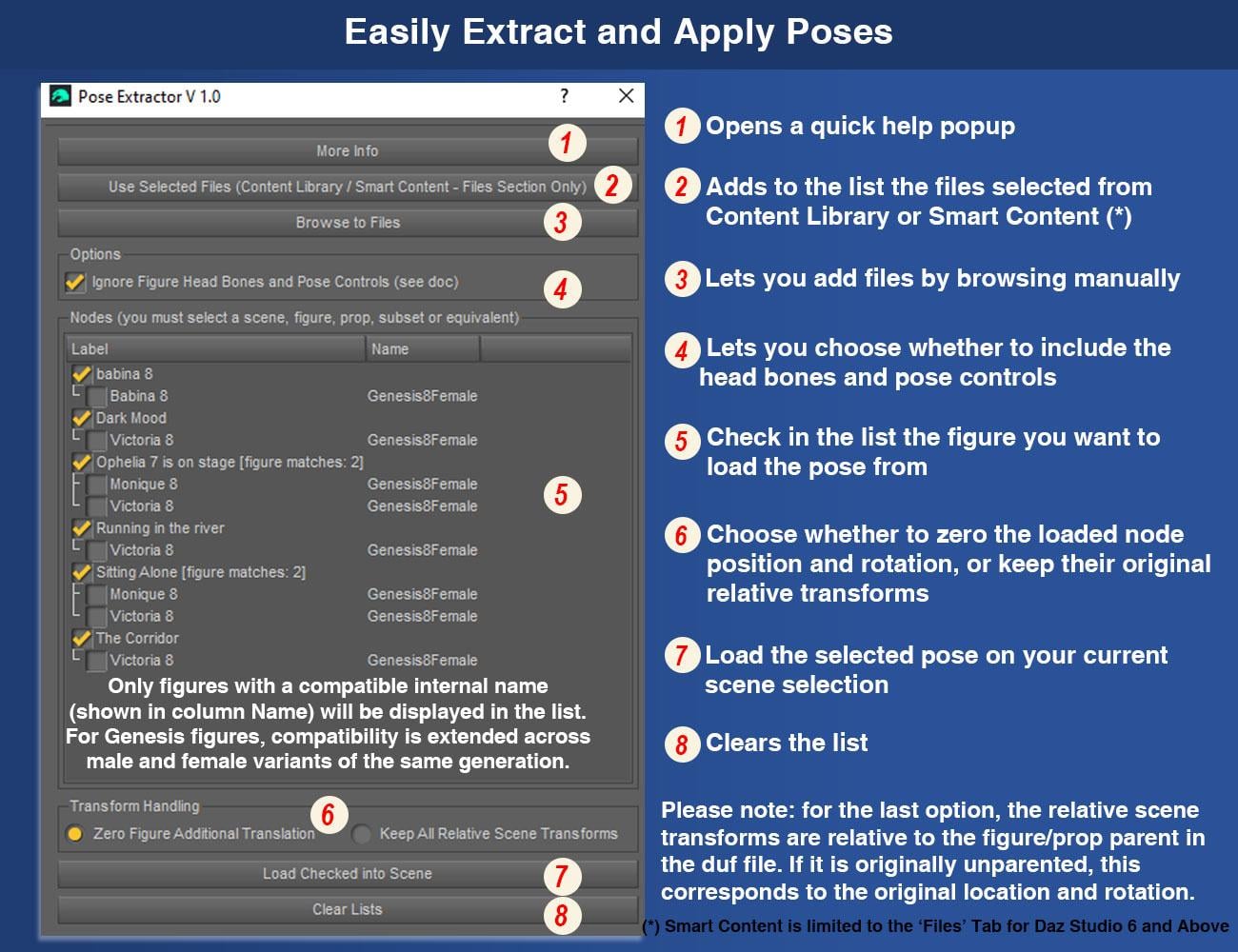
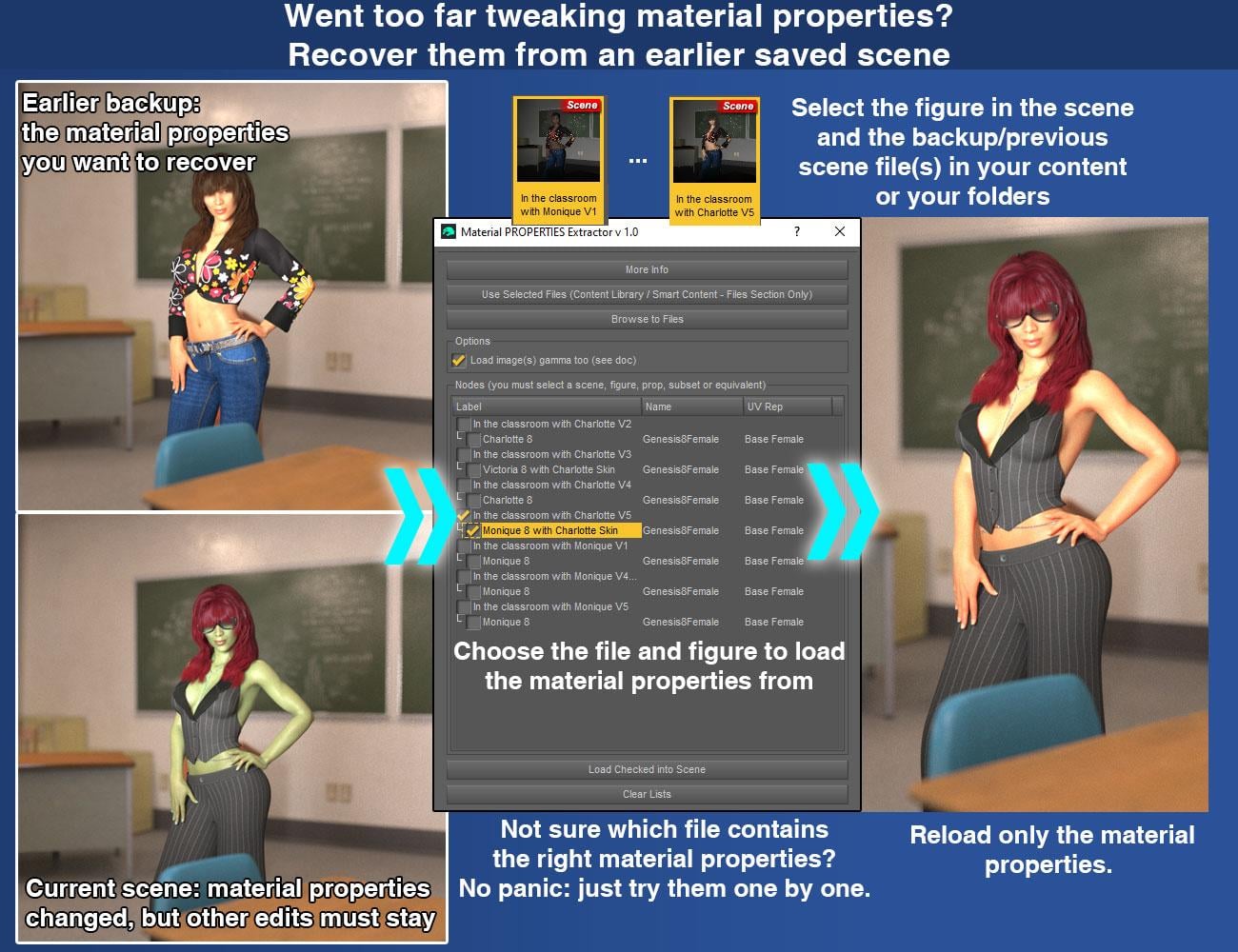
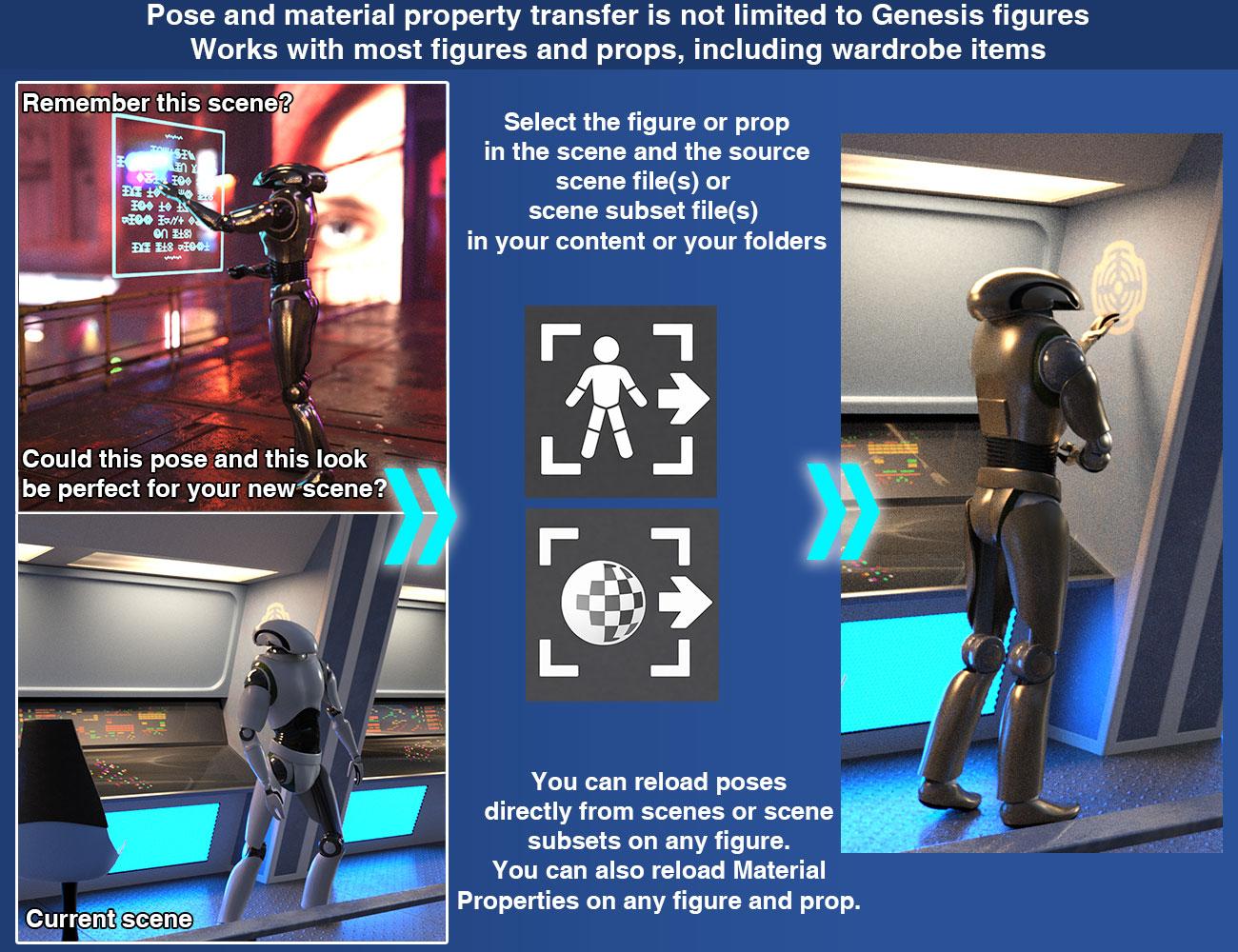
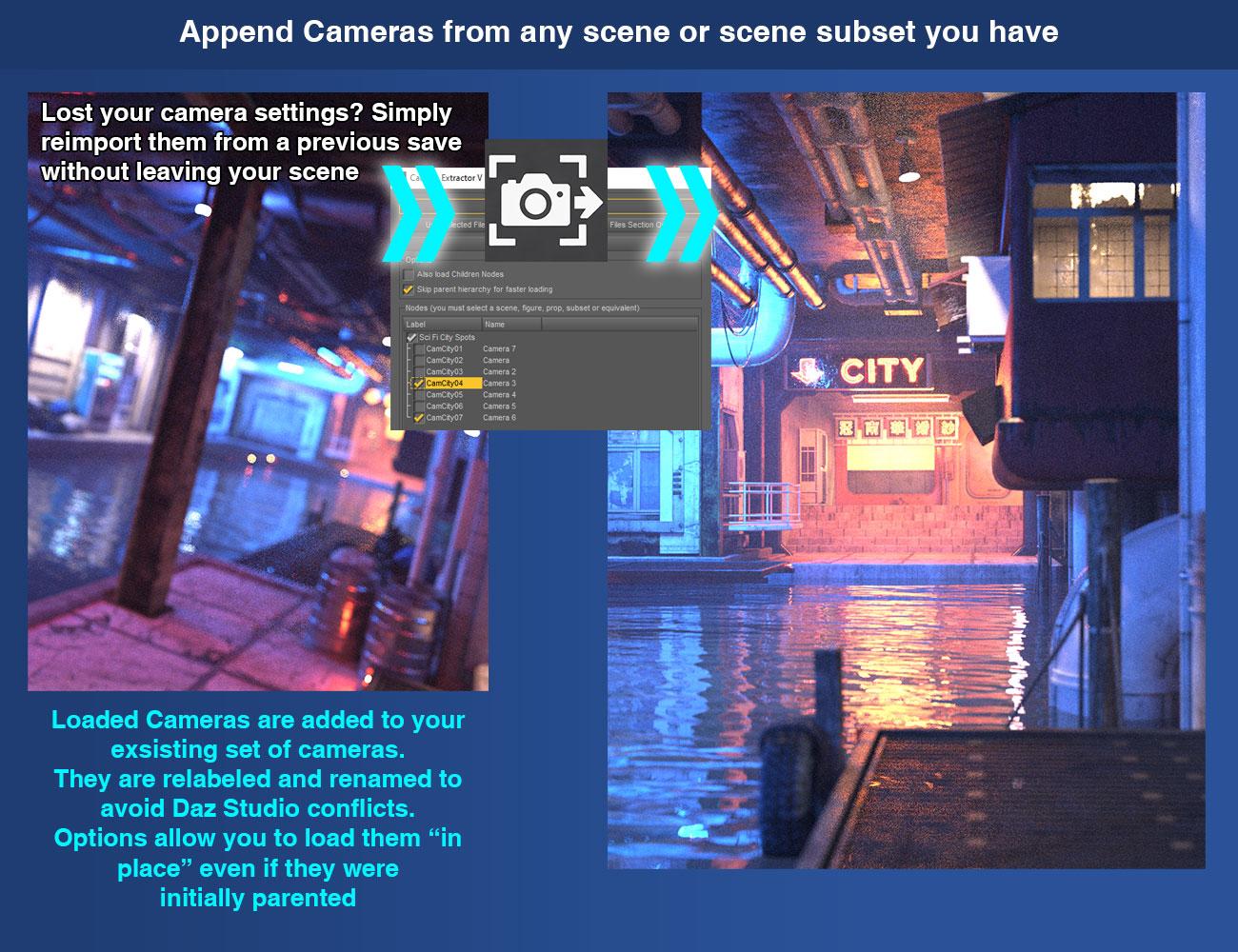
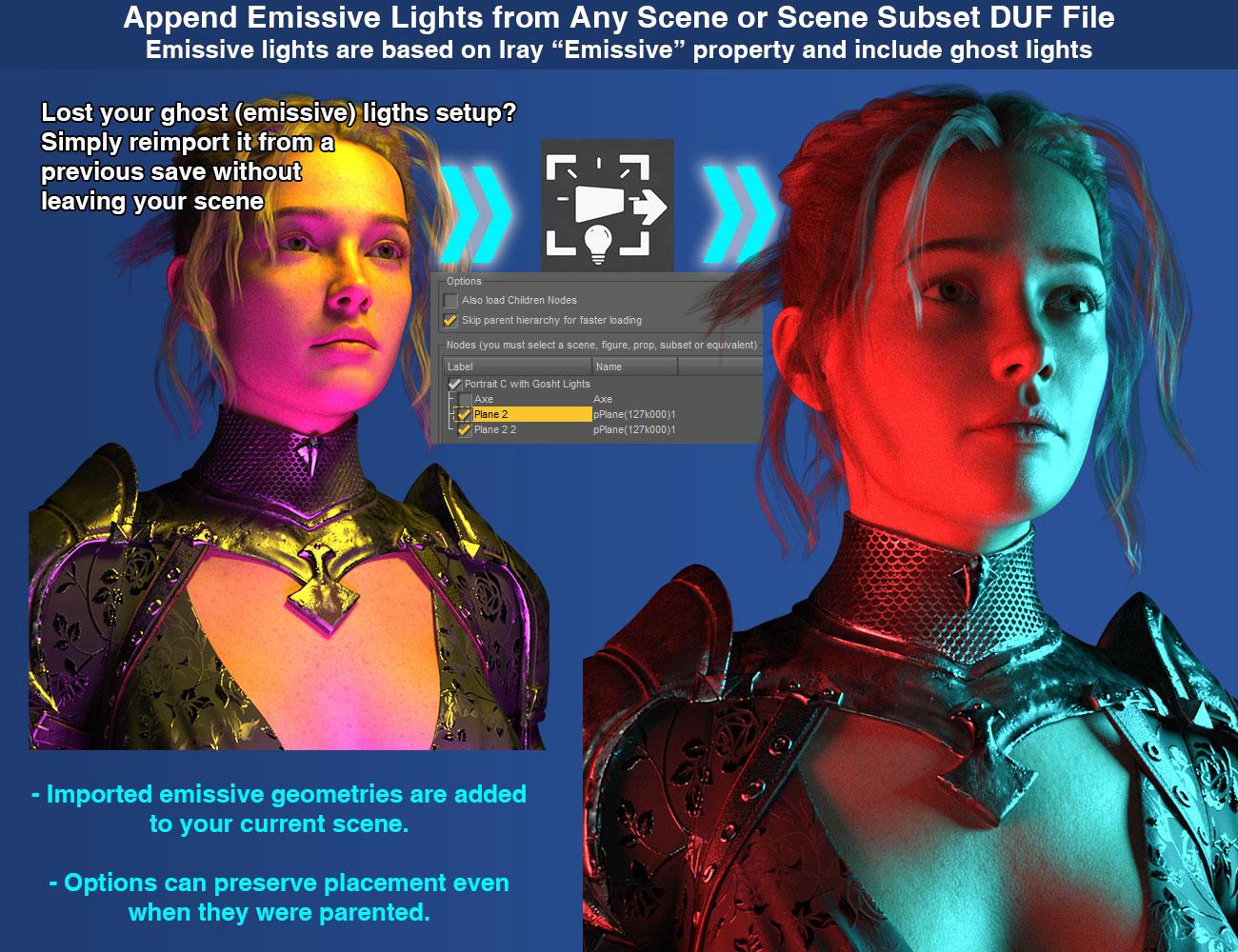
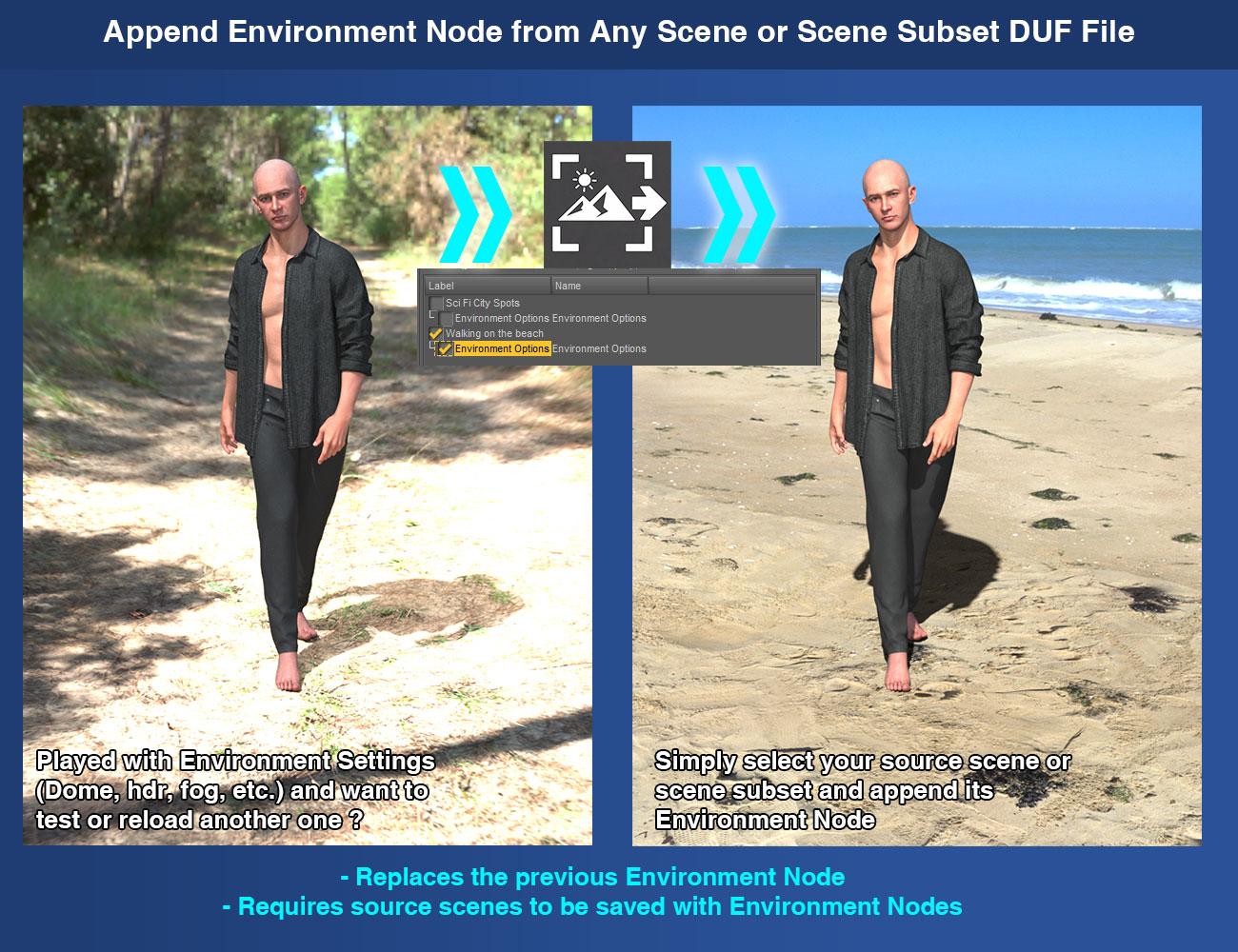
I FOUND A ISSUE with the Append Sricpt I finally figured out the issue with your script. After doing a bunch of testing by removing things one by one, I found that the script crashes on any scene that contains dForce hair that has already been simulated. When I removed the hair completely, the script worked perfectly. I then tested it further: when I added the same dForce hair but left it unsimulated, the script imported the scene without any problems. However, as soon as I simulated the hair, saved the scene, and tried to import it again, the script crashed immediately. So basically, the script cannot handle dForce hair that has already been simulated and saved in the scene file. The hair needs to be in its default, unsimulated state for the script to work. Just wanted to let you know the exact cause. Let me know if you need any more info.
Thanks for the detailed testing. That is indeed a known issue, but normally it should be specific to DAZ Studio 6.
So first, could you please let me know which exact DAZ Studio version you are using, especially if this happened in DS4? So far, I have not seen this problem occur in DS4.
The issue comes from the DS6 JSON parser. Simulated dForce hair can store very large simulation-data blocks in the DUF file, including extremely long lines that can reach several megabytes. DS6 currently has problems parsing files containing these very large blocks, and it will then hang or crash during the JSON parsing itself.
I reported the issue to DAZ several weeks ago, with a reproducible test case, but so far I have not received any further information about a fix.
In the meantime, while I have been busy updating the rest of my catalog for DS6 compatibility, I also developed an update for the Append scripts specifically to work around this problem. I have not submitted it yet because I was waiting to hear back from DAZ.
This version - not submitted yet - adds a DS6 "Safe Mode". Before the normal processing starts, it checks the source DUF and removes the stored simulation data from a temporary copy of the file. This prevents the DS6 parser crash and allows the scene to be processed normally. The original DUF is never modified.
The obvious drawback is that the stored simulation data cannot be preserved when Safe Mode is used.
There is another drawback that I am not very happy with: the Safe Mode can considerably slow down the process on large files because, in DS6, the file has to be pre-processed before it can safely be passed to the JSON parser.
I also tested a completely different approach using an external Python parser integrated into the product. That actually works very well: it avoids the initial DS6 parsing crash and can preserve the simulation data. Unfortunately, it would also require a very substantial rewrite of everything that happens after the file is parsed, so it is not a practical short-term fix.
So for now, the DS6 Safe Mode is the workaround I have as "soon submittable", unless DAZ fixes the underlying parser issue.
I am going to follow up with DAZ again about the parser issue. If I still do not get any feedback, I will submit the temporary Safe Mode update rather than keep waiting.
After that, there are basically two possible outcomes: either DAZ fixes the DS6 parser issue on their side, or, if it becomes clear that this is going to take a long time, I will probably complete the integration of the external Python parser for Windows.
That second solution would solve the problem properly for Windows users, including preserving the simulation data (and globally speeding the workflow too).
Outlet and Quick Grab DiscussionThe PW sets are always huge, but when I look up close at them I never see the kind of detail or quality I am looking for. So I always pass on them no matter how cheap. I could see it being fun to import these into Unreal or Unity or something and doing animations with them though.
Postgre breaks on every PC restartEvery time I restart my PC, Postgre breaks and needs to be fixed. If I delete the Content Cluster (CC) folder, Postgre can then start, but I won't be able to actually login unless I restart Daz. It gives me an error otherwise. From there I can use everything normally, until I sign off for the night. The next day, it'll be broken again and I'll have to repeat the process and re-import everything again. What could be causing this? Nothing's changed on my PC prior to this happening and I've reinstalled and relocated CMS to different folders to see if that would help and it hasn't.
Thank you for any and all help!Migrated to new PC, re-downloaded assets via DIM, but very few show up in Smart?Richard Haseltine said:
If you open the Content Library option menu (the lined button in the top corner, or right-click the pane's tab) and select Content DB Maintenenace, then check reimport Metadata and click Accept, does the list of products that appears have some of the things that are missing from Samrt Content? if so, check them in the list and then click Accept
Sorry, life stuff. I went to Content DB Maintenance, checked reimport metadata and accepted. The list of products there is very robust, I do expect it's got the stuff missing from Smart content. I am reimporting everything, fingers crossed.
Phew, it took a while, but I think that did it! Thank you!(Released) Wall Wizard Cutout Tool for Daz Studio [Commercial]mrpenguin76 said:
EZ3DTV said:
Thank you for taking the time to lay this out so thoroughly — and you're completely right. The WallFront and WallBack UVs were being written to the DUF in a format that Daz Studio misreads, which scrambles the coordinates exactly the way your screenshot shows.
In all honesty, it slipped past my own testing: I'd been checking the walls with plain shaders, and a solid shader color doesn't use the UVs at all — so it looked fine on my end. It's only when you apply an actual image texture, which reads the UVs, that the scramble shows up — which is exactly what you hit. That's a real bug on my end, not operator error, and as you correctly noted it happens even on a plain wall with no cutouts. I'm genuinely sorry you lost time re-exporting into MAX to work around it.
The good news: your report pinpointed the cause, and it's fixed. The UVs now export as a clean, standard planar unwrap, so image textures apply correctly. A corrected, signed update is built and on its way to the store.
Your refund is completely fair and there are no hard feelings whatsoever. If you'd ever like to try the fixed version once the update is live, I'd be happy to help you get it sorted — no pressure at all. Thanks again for the honest, detailed feedback; it's exactly what made the fix possible.
One more thing, since you mentioned plain walls: there's now a "None" option in the shapes dropdown, so you can export a wall with no cutouts at all — and with the UV fix, those texture cleanly now too.
That is all looking really good and glad that you were able to fix it so quickly! Nice Bug squashin' for sure. With the abilitity to cut into OTHER walls I will definitley pick it back up in the future.
I also have a suggestion for an Add-On.... "The Roof Wizard Add-On"... (because it sounds better then the Ceiling or Floor Wizard I think) Any way, How about taking all the cutting tools for the horizontal and make them vertical too!
It would be great to be able to cut that cylider into the ceiling to add a spiral stair case, or Stove Pipe (or any pipe for that matter) into that cabins roof, the cabin could also use a chimey cut into its 2nd floor and then through it's roof too. Not to mention that it also needs it's 1st floor ceiling Cut for the regular stair case (standard cube or rectangle cut) to access the 2nd floor of the cabin. But most importantly of course, would be cutting into the floor to add access to to the super secret elevator hidden under that big rug, that leads to my underground test lab.(What? Only me?....Weird). Well I hope that gives a brief idea of the benefits of making the Roof Wizard, (think sky lights too...). and I would definitely buy that as and Add-On. (or StandAlone, whatever)
Hello MrPenguin,
I wanted to follow up on my earlier note, because your feedback stayed with me and the program has grown a great deal since then.
Wall Wizard's next update is a large one, and it changes what the product fundamentally is. It no longer only generates its own walls — it now cuts openings directly into walls that are already in your Daz Studio scene, from any product, with no export or import step. You select the wall, Ctrl-click the doors or windows you want as openings right where you've placed them, and the cut is baked onto that same wall in place, with its original textures fully preserved.
And it isn't limited to walls anymore. The same tools now cut through floors, ceilings, and roofs — including curved and assembled roofs — so skylights, stairway openings, chimney passes, and round windows through a curved roof are all a couple of clicks. It can even cut the silhouette of a posed figure through a wall, gaps and all.
Every cut is repeatable: the program keeps the original geometry, so you can reopen a cut wall later, move an opening, and re-cut with no scars. The manual has been rewritten and illustrated to cover all of it.
The update is nearly finished on my bench and is going through final testing and store submission now, so it will reach the Daz store (DIM) as soon as their process allows. When it lands, I'd be honored if you gave Wall Wizard another look — your report is part of why it became what it is, and I think you'll find it a very different tool from the one that disappointed you.
Either way, thank you again for the honest feedback. It mattered.
Eric (EZ3DTV)
Diffeomorphic Easy Import Default Settings?Sorry, I should have mention my current workflow for importing characters
- Create character in DAZ
- Open Blender
- Easy Import into Blender
- Select Preset
- Load Figure
- Convert Rig
- Save as Blend file.
- Close Blender
- Repeat Steps 1-8
Correct me if I'm wrong, but I believe what you are saying is that easy import remembers if Blender didn't close. Yes, I do recognize that easy import does remember it in that situation.
What I would like to do is have the "Easy Import" presets be remembered even when Blender is closed. There doesn't seem to be any settings in global to turn this on. It would be nice to have this option so it's one less thing to click/remember for my process.But it's not really a big deal since I'll learn overtime through muscle memory.
Diffeomorphic Easy Import Default Settings?You can delete then redo any preset including the default. However, easy import remebers the last settings used, so it reopens with that.
Diffeomorphic Easy Import Default Settings?When using "Easy Import DAZ" is there a way to keep the operator presets default or persistent? I'm steamlining my workflow and it would be great if the current preset I saved was the default so it would be one less thing to click or remember.
Thanks.
Migrated to new PC, re-downloaded assets via DIM, but very few show up in Smart?If you open the Content Library option menu (the lined button in the top corner, or right-click the pane's tab) and select Content DB Maintenenace, then check reimport Metadata and click Accept, does the list of products that appears have some of the things that are missing from Samrt Content? if so, check them in the list and then click Accept
EZFinder - Advanced Content Manager for Daz Studio [Commercial]mindsong said:
EZ3DTV said:
I thought I would clarify things for you all, Daz Studio only needs to be open when you are doing a full compartment scan, append compartment scan or the new fast compartment scan, other than that, Daz Studio can be closed and the program works just fine in every way. At some point in the future, I will make an update where Daz Studio does not need to be open but for now it uses Daz Studio to extract metadata online for products. If Daz Studio is not open during these scans, some metadata points in the info shelf will be missing.
This is useful information, thanks. FWIW, I appreciate and value the standalone nature of your tool. That independence is one of the greatest features of EZFinder, and that it can leverage resources if available, but operate fine without them shows an excellent sense of design. Thanks for the effort you put into it all.
-ms
Thanks, MindSong for the compliment! To further iterate, this scan time when Daz Studio is open, EzFinder builds its directories so it can then work autonomously without Daz open. EzFinder will still work without these directories it builds from Daz's online state, but the metadata will be lacking in that instance. It is highly recommended that Daz be open and online when the scan occurs to make use of the rich metadata it acquires from that union.
EZFinder - Advanced Content Manager for Daz Studio [Commercial]EZ3DTV said:
I thought I would clarify things for you all, Daz Studio only needs to be open when you are doing a full compartment scan, append compartment scan or the new fast compartment scan, other than that, Daz Studio can be closed and the program works just fine in every way. At some point in the future, I will make an update where Daz Studio does not need to be open but for now it uses Daz Studio to extract metadata online for products. If Daz Studio is not open during these scans, some metadata points in the info shelf will be missing.
This is useful information, thanks. FWIW, I appreciate and value the standalone nature of your tool. That independence is one of the greatest features of EZFinder, and that it can leverage resources if available, but operate fine without them shows an excellent sense of design. Thanks for the effort you put into it all.
-ms
Migrated to new PC, re-downloaded assets via DIM, but very few show up in Smart?Richard Haseltine said:
Daz Connect (through Daz Studio) installations do go to the /data/cloud/1_#####/ folder, where ##### is the SKU, in the Daz Connect Data Directory so that is right (if you do both installs then you end up with two copies of all the files). Are all the products installed through DIM going to the same folder? If so it may be that the content lacks metadata, or it may be that PostgreSQL was not running when DIM did the installing (that can happen if you close DS and immediately open DIM).
Thanks for replying. I would love not to have two copies of products. With the fresh installs, all I did was redirect DIM's default directories to a different drive, and then did the same with Daz. I know the content doesn't completely lack metadata natively, these are G9 recent-year assets still available for sale, some of which show up and some don't. So if metadata is missing it's getting blown out somewhere during DIM's installation. I kind of wonder if downloading too many assets via DIM at once might be some sort of known problem. If that's the case, I'm going to let out the world's biggest disappointed sigh.
Migrated to new PC, re-downloaded assets via DIM, but very few show up in Smart?Daz Connect (through Daz Studio) installations do go to the /data/cloud/1_#####/ folder, where ##### is the SKU, in the Daz Connect Data Directory so that is right (if you do both installs then you end up with two copies of all the files). Are all the products installed through DIM going to the same folder? If so it may be that the content lacks metadata, or it may be that PostgreSQL was not running when DIM did the installing (that can happen if you close DS and immediately open DIM).
How to re-populate LOCAL USER folder with old saved content?I think if you categorize them in some way, they will return to LOCAL USER. The database seems to need to know which product an asset belongs to categorize it. Use something like "Lost and Found" to start, or a new Custom category. When saving, assets get categorized as "Saved Files", but I do not see that in the list of Default categories using the Content DB Editor, so it might be hidden. It is visible using the "Categorize" option (right-click on assets), unfortunately it isn't recursive through folder structures. I recall something like that when I had to re-import metadata (several years ago, and never repeated, so the memory is dim).
How to re-populate LOCAL USER folder with old saved content?I recently had to re-build my CMS metadata, as it would no longer load properly (I'm assuming it got corrupted somewhere.) One effect of this is that my LOCAL USER product in Smart Content with all my old saved scenes, characters, wearables, etc. are all now missing from this folder.
My content directories haven't changed. All of my old files are there, Daz is still pointed to them properly, and I can save new files which show up in the proper folder and in the LOCAL USER category. It's just a matter of re-populating all my old saved data. Thank you all in advance for the help!Recently Purchased Items in Lost & FoundElor said:
I could be mistaken, but the Touchable products were initially sold at Renderosity before being transferred here and products who moved from another store usually don't have metadata and will end in Lost and found once installed.
Edit : just one warning, but as far as I know, Touchable products are not hair products but alternatives textures for existing hair products.
Yeah, I eventually figured that out. lol Lesson learned, I guess. Turns out I already owned one the actual hairstyles, so money not wasted, at least. I'm able to use the ponytail now. Thanks! :)issues reimporting wearables modified in blender, eyebrowsI wanted to change the shape of and location of the eyebrows for my character, i imported the character into blender, modified the brows but after i export the brows from blender and import into daz the transform are lost and the size is super [...] tiny, I tried the different unit measurement conversion options on the import obj screen in daz and tried both blender and daz for the metric units but its still dislocated and tiny when i import the brows.
Smart Content "Greyed Out" after fresh installRichard Haseltine said:
Open the Content Library option menu (the lined/hamburger button in the top corner, orr ight-click the tab)>Content DB Maintenance, check Reimport Metadata, click Accept, a dialgue will open, check to import all products (and user data, if any) then click Accept.
Thank you Richard, this worked for me. Now I don't have to go reinstalling everything but rather continue where I left off.
Daz 3D is part of

Connect
DAZ Productions, Inc.
7533 S Center View Ct #4664
West Jordan, UT 84084Licensing Agreement | Terms of Service | Privacy Policy | EULA
© 2026 Daz Productions Inc. All Rights Reserved.